We spent three months measuring one 51.25 GB file on the same machines. The answer that came out was simpler than we expected.
The uvf command that ships with the free edition holds its own against the fastest grep and against the standard log viewer.
The paid uvp starts to matter when you ask the same file a second question.
We split it into three arenas.
First — what uvf and uvp are
UwView has two faces: a window (GUI) and a command line. The window is for opening and reading a huge file; the command is for finding things in it.
uvf— the command in the free edition. No index; it reads the file sequentially, once, and searchesuvp— the command in UwView Pro. On the first run it builds a.uwvz(about one ninth of the original, with a line index) and never touches the original again-open— an option on either one.uvf <file> '<pattern>' -openhands the byte offsets of the matching lines straight to the window, and UwView opens. The window does not search again
Both run standalone on Windows, macOS and Linux. Every number below is the same Mac, the same file, and every run cold.
Arena 1: find one term from the CLI — uvf against ripgrep
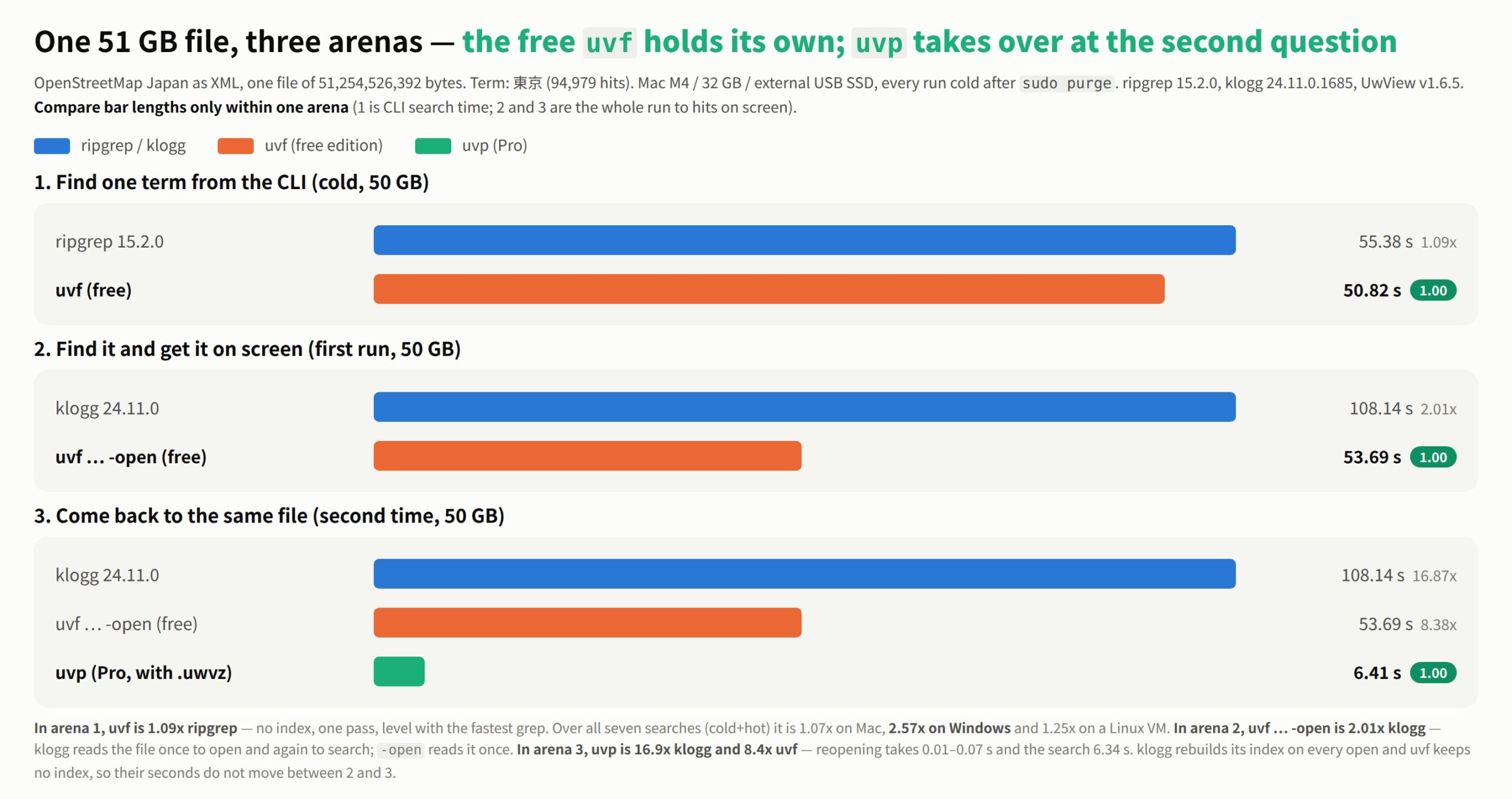
The plainest contest there is. Find 東京 in a 50 GB file.
| 50 GB, cold | Time |
|---|---|
| ripgrep 15.2.0 | 55.38 s |
uvf (free) |
50.82 s |
1.09×. Level. A tool with no index running as fast as another tool with no index is, in a sense, exactly what should happen — both are limited by how fast the disk reads, and this drive does about 950 MB/s raw.
Judging on one search would be thin, so here is the sum of seven searches (plain, -i, -E, -E anchored, -E -i, -v, -E -v), counting a cold run plus the warm run right after it.
| Seven searches, cold+hot | ripgrep | uvf (free) |
Ratio |
|---|---|---|---|
| Mac M4 / 32 GB / 3 GB | 31.35 s | 33.29 s | 1/1.06 (ripgrep wins) |
| Mac M4 / 32 GB / 10 GB | 157.93 s | 145.76 s | 1.08× |
| Mac M4 / 32 GB / 50 GB | 797.66 s | 745.68 s | 1.07× |
| Windows laptop / 16 GB / 50 GB | 1,780.77 s | 693.84 s | 2.57× |
| Linux VM / 2 vCPU / 50 GB | 1,334.80 s | 1,069.35 s | 1.25× |
We lose at 3 GB. That size fits in memory, so ripgrep’s second run comes entirely from cache. Past 10 GB it does not fit, and uvf edges ahead by 7–8%.
Only the Windows 2.57× is a different order of magnitude — and that is not uvf being fast, it is ripgrep being slow on Windows. Its default memory-mapped read backfires at 50 GB; adding --no-mmap makes it 2.89× faster (we wrote that up separately). uvf does not memory-map, so it never falls into that hole.
One conclusion so far: if all you do is search, the free uvf is enough. No reason to buy anything yet.
Arena 2: find it and read it — uvf … -open against klogg
What you actually want is not “search” but “find it and read the place it hit.” So we timed that, against the standard log viewer.
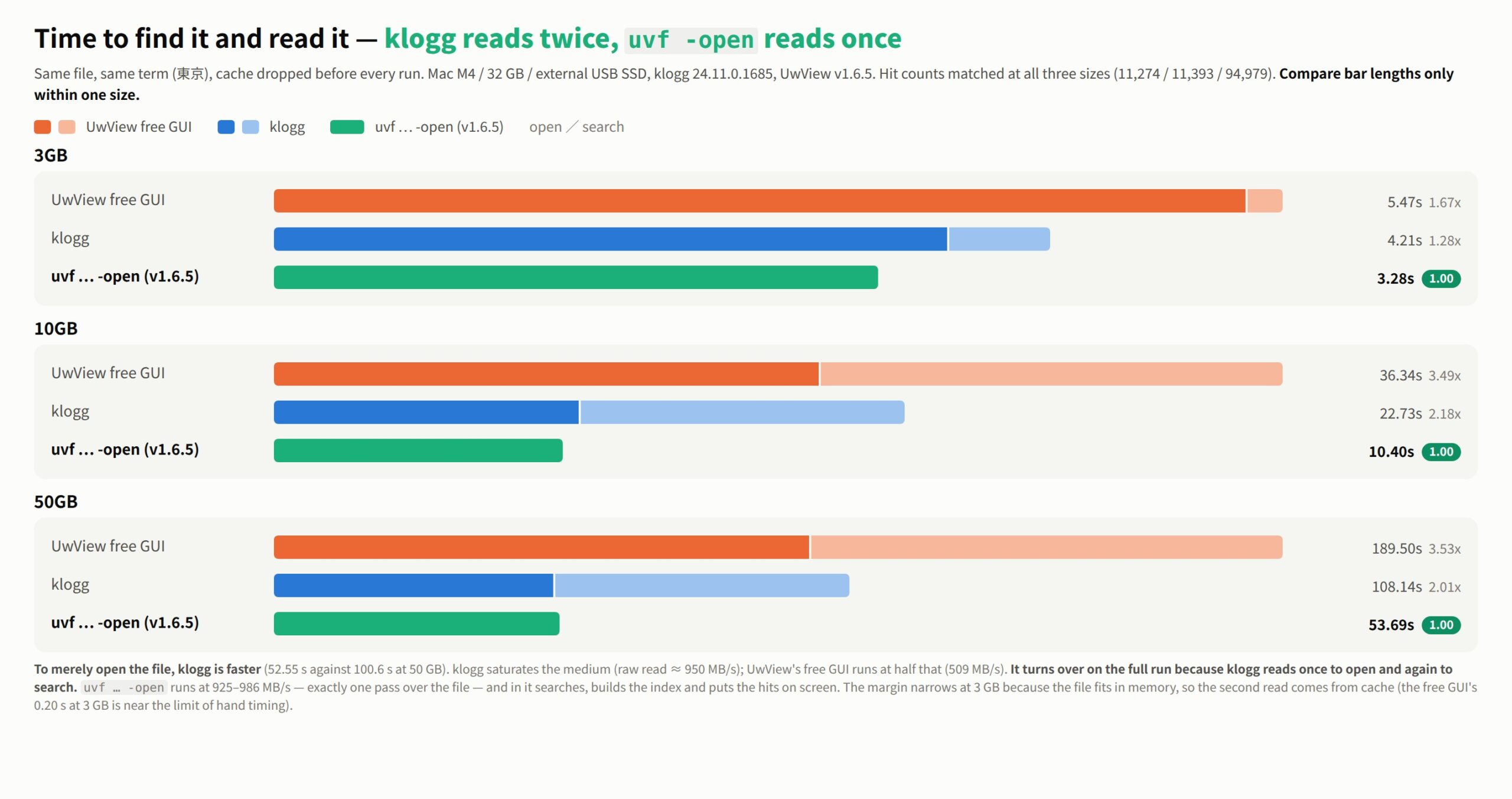
The loss first — as it stood on v1.6.5. If all you did was open a 50 GB file, klogg was faster.
| 50 GB | klogg | UwView free GUI v1.6.5 | v1.6.6 |
|---|---|---|---|
| Open | 52.55 s | 100.6 s | 50.44 s |
| Search (東京, 94,979 hits) | 55.59 s | 88.9 s | not measured※ |
[Added 2026-09-19] v1.6.6 turned opening over. 2.99 s at 3 GB, 10.13 s at 10 GB, 50.44 s at 50 GB — faster than
klogg (3.65 / 10.98 / 52.55 s) at all three sizes, at 967 / 966 / 969 MB/s.
※ Search on its own was not re-measured on v1.6.6. Opening and searching now run together, so adding the two does not
give the end-to-end time — the measured end-to-end run is 53.7 s.
The text below stands as the record of what v1.6.5 measured.
As throughput, klogg opens at 930 MB/s and searches at 879 MB/s — it saturates the medium. Our free GUI ran at 486 / 550 MB/s on v1.6.5, half of that. Not a bug; it matched what we had published all along, and it was a debt we owed — in v1.6.6 the open side reaches 969 MB/s, and that debt is paid.
[Added for v1.6.6 — final figures] This table is v1.6.5.
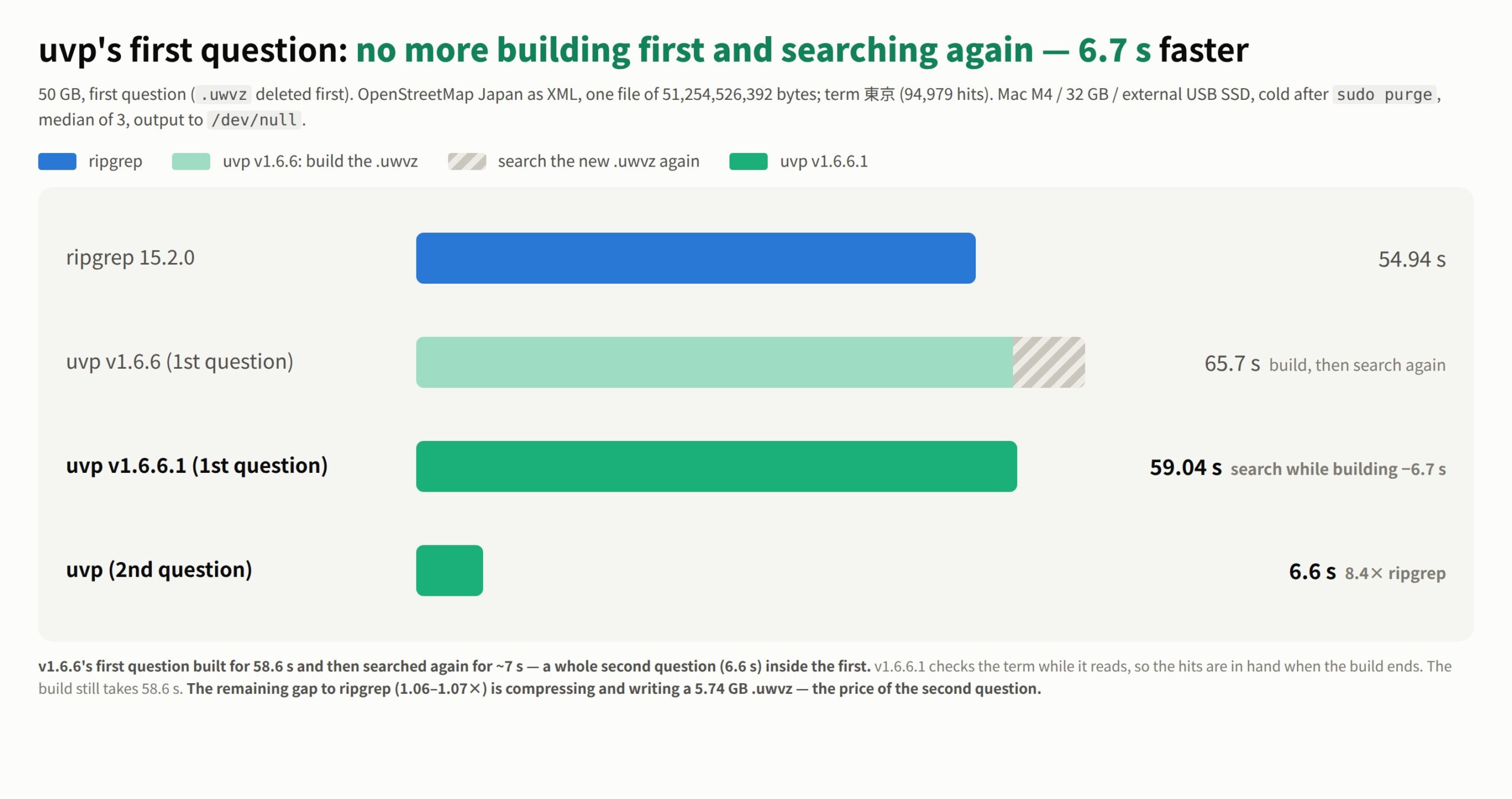
v1.6.6 rebuilt the free GUI’s open path so that the search can start without waiting for the index to finish.
At 50 GB, going from opening the file to a line-numbered list of hits on screen takes 53.7 s
(cold aftersudo purge, timed with a stopwatch). 910 MB/s. The command,uvf … -openon v1.6.6, takes 50.76 s = 963 MB/s, about 3 s less than the window — both now open and search at the same time, so what remains is drawing the window and the steps a person takes.
50 GB, find it and read it Time vs v1.6.6 GUI Free GUI, v1.6.5 (the table below) 189.50 s 3.53× klogg 24.11.0 108.14 s 2.01× uvf … -open(v1.6.6)50.76 s about 3 s faster than the window Free GUI, v1.6.6 53.7 s — The gap we call a debt just above is the gap that closed. The window caught up with the previous version (v1.6.5) of the command.
We are not publishing seconds for 3 GB and 10 GB — it is past what a stopwatch can resolve, and
at 3 GB the file finishes opening while you are still typing the search term.
The tables below are v1.6.5 measurements, except that theuvf … -openfigures were replaced with the v1.6.6 values on 2026-09-21 (v1.6.5 was 3.28 / 10.41 / 53.69 s).
And yet the whole run turns over.
| Time to find it and read it | 3 GB | 10 GB | 50 GB |
|---|---|---|---|
| UwView free GUI (open + search) | 5.47 s | 36.34 s | 189.50 s |
| klogg (open + search) | 4.21 s | 22.73 s | 108.14 s |
uvf … -open (v1.6.6) |
3.40 s | 10.42 s | 50.76 s |
| Ratio against klogg | 1.24× | 2.18× | 2.13× |
The reason is not speed. It is how many times the file gets read. klogg reads it once to open and again to search. uvf … -open reads it once.
$ time uvf osm/japan-latest.osm 東京 -open
11.34s user  6.30s system  34% cpu  50.743 total
51.25 GB ÷ 50.74 s = 963 MB/s (v1.6.6; the table’s 50.76 s was measured on another day, 0.02 s apart). CPU sits at 34%; the rest is waiting on the disk. Inside those 50.74 seconds it searches, builds the index, hands it to the window and puts a line-numbered list of hits on screen.
258.68 GB and 4.5 billion lines behaved the same way. uvf … -open (v1.6.6) took 261.37 s. klogg needs 272.10 s merely to finish opening that file (fully automated run, 21 Sept 2026) — so before klogg has finished opening it, we have already searched it and put the hits on screen. klogg starts searching from there. At this size CPU sits at 37% and the disk’s read speed is simply the ceiling — this is about how many passes, not a boast.
This is all still the free edition.
Arena 3: come back to the same file — where uvp starts
The boundary is not file size. It is the second question.
For the first question, klogg, uvf and uvp all have to read the whole file once. That is physics; there is no way around it. What differs is what is left behind afterwards.
- klogg — nothing is kept. It rebuilds its index every time you open the file
uvf(free) — builds no index. The second question costs the same as the firstuvp(Pro) — builds a.uwvzon the first run and never touches the original again
| 50 GB, second time | Open | Search | Total |
|---|---|---|---|
| klogg | 52.55 s (every time) | 55.59 s | 108.14 s |
uvf … -open (free, v1.6.6) |
— | — | 50.76 s |
uvp (with .uwvz) |
0.01–0.07 s | 6.34 s | 6.41 s |
16.9× klogg, and 7.9× our own free uvf. This is where the order of magnitude finally changes.
The seven-search totals say the same thing. Against ripgrep, uvp is 3.76× at 10 GB and 2.88× at 50 GB (3.77× counting only the warm run). That is a different number entirely from uvf‘s 1.07×.
A .uwvz is about one ninth of the original — roughly 5.7 GB for a 50 GB file. You can delete the original and still search it, and -extract puts it back.
To be honest about it, uvp loses at 3 GB too. For a single search on a file already in memory, ripgrep takes 0.33 s and uvp 1.01 s. uvp always pays 0.6–1.0 s of startup and index loading, so no number of repeats turns that around. At that size an index simply does not earn its keep.
So which one
- Searching once, no window needed →
uvf(free). Level with ripgrep, and it leaves nothing behind - Find it, then read it →
uvf … -open(free). If you already know what you are looking for, this is the shortest path. One pass over the file gets you to the window (about 2× klogg) - You don’t know the term yet, you just want to open it and look → the UwView free GUI. In v1.6.6 it opens faster than klogg too — 2.99 s at 3 GB, 10.13 s at 10 GB, 50.44 s at 50 GB, against klogg’s 3.65 / 10.98 / 52.55 s — and the whole run matches
uvf … -openat 53.7 s (see the note above). You are not kept waiting even when you don’t know the term yet. klogg remains excellent, free and open source - Coming back to the same file, or archiving it → UwView Pro. Reopening takes 0.01–0.07 s, searching 50 GB takes 6.34 s, and storage is one ninth
We wanted to state plainly how far the free edition gets you. uvf is free and runs as a single binary from GitHub Releases. Try it before you buy anything.
How it was measured (you can repeat it)
- File: OpenStreetMap Japan XML, one file of 51,254,526,392 bytes (the 10 GB and 3 GB files are splits of the same data)
- Term:
東京, fixed string. Hit counts confirmed at 11,274 / 11,393 / 94,979 and matched across tools - Every item:
sync→sudo purge→ 10 s settle → cold, then the warm run right after - Mac M4 / 32 GB / external USB SSD (about 950 MB/s raw), ripgrep 15.2.0, klogg 24.11.0.1685, UwView v1.6.5 (CLI comparison on v1.6.3)
- GUI runs were timed by hand (open = until the index finishes and you can move anywhere in the file; search = until the hit count settles)
- CLI output was diffed against
rgandsedon every item: 78 matches, 0 mismatches - Do not compare seconds across machines. Only the ratios inside one machine mean anything
All conditions and data are in the benchmark summary. Related: the ripgrep no-mmap finding and the honest klogg re-measurement.