
The UwView series — search with UwView, compare with UwDiff
Open and search huge files with UwView; compare two files or two folders with UwDiff. Both run on Windows, macOS and Linux. → UwDiff overview
Open huge files instantly — every time.
Open any gigantic log or text file and read, scroll and search from the very first moment — even at 51 GB / 890M lines.
Try free for 14 days (full View + Edit) | Buy View License ($129 / $9 mo) | Edit Upgrade (+$120 / +$8 mo) | About UwView (free) | Download free
Came here looking for the free UwView? Start with what UwView is, or download it here — the free edition opens huge files instantly too. Pro adds the saved index (instant re-open), bundling many files into one
.uwvz, zip and OSM pbf input, faster search, and 1/9 archiving.
▶ A 1-minute walkthrough (instant open, search, color highlight, block save)
Unlike other viewers, viewing is instant on the first open and every open after. UwView lets you view and search the whole file the moment it opens (other viewers show only the head until indexing finishes). Indexing runs in the background and line numbers appear once it finishes. Because UwView Pro saves the index and compression, the 2nd open onward is instant, with line numbers.
- UwView Pro — a CLI / GUI tool for investigating huge files
- Take the “waiting” out of huge files
- Three benefits (all measured)
- CLI (uvp) — compared with ripgrep
- GUI — compared with klogg
- It edits, too — the Edit Upgrade (compared with EmEditor)
- Free vs Pro
- Main features
- Pricing
- Requirements
- FAQ (excerpt)
- About the numbers
- Changelog
UwView Pro — a CLI / GUI tool for investigating huge files
UwView Pro is a CLI / GUI tool for investigating huge text files. Search with the CLI (uvp), add -open, and the results appear straight in the GUI — the GUI does not search again. What sets it apart from the free edition is that it saves the index and the content as a .uwvz (compression format plus index). From the second time on, the original file is not read at all.
On this page, the CLI is compared with ripgrep and the GUI with klogg.
The current release is v1.9.0 “Full Spectrum”. Full Spectrum means every combination of (plain, Word, Excel, PDF, compressed, pbf, zip) × (CLI, GUI) × (huge, many) × (four encodings) × (complex searches). It handles not just one file but many files bundled into one .uwvz (since v1.7 “Wide Field”).
| What you want to do | What to use |
|---|---|
| Search the same file or log set from the CLI again and again | CLI (uvp) — searches the .uwvz from the second time |
| Find something and read the hit in the GUI | uvp … -open |
| Open a large file in the GUI again and again | GUI — reopens in 0.01–0.07 s from the second time |
| Search compressed logs, zip, OSM pbf, Word, Excel or PDF | CLI (uvp) — indexes the seven compressed formats, zip, pbf, Word, Excel and PDF |
| Edit | GUI + Edit Upgrade (and -replace in the CLI) |
Take the “waiting” out of huge files
Server logs, security logs, OSM data, AI corpora — tens of GB and hundreds of millions of lines take minutes just to open, and minutes again to search. That wait piles up many times a day. With UwView Pro you can browse the entire file the moment it opens — indexing and the compressed cache are built in the background, so you can scroll and search from start to end without waiting for them to finish (viewers that block on indexing keep the middle and end of the file out of reach until it’s done). And because UwView Pro saves the index and compression, the 2nd open onward is instant, with line numbers.
Three benefits (all measured)
1. Instant to open and use, every time — read, scroll and search any huge file from the moment it opens (indexing runs in the background; line numbers appear once it finishes). UwView Pro saves the index and compression to a .uwvz, so the 2nd open onward is instant, with line numbers (reopening the 51.25 GB file takes 0.01–0.07 s; klogg keeps no index, so every open takes 52.55 s, and you cannot scroll to the end until its index is built).
2. Faster search — from the second run on it searches the .uwvz, so the 51.25 GB file takes 6.45 s (ripgrep still takes 55–70 s on its second run — 70.33 s on 4 October — and klogg 55.59 s; both read the whole file every time). Over the total of seven kinds of search, including regex and case-insensitive (first + second run), it is 3.74× ripgrep at 50 GB. The first run builds the index, though, so there it is on par with ripgrep.
3. Store at 1/9 — archive a log at about 1/9 of its size (48 GB → 5.3 GB, checksum-protected) and open it directly, without extracting. You can still search it after deleting the original, and -extract restores it.
Note on file size: “48 GB” is 47.73 GiB (bytes / 1024^3), rounded. macOS reports it as 51.25 GB (SI, / 1000^3). It is the same file (51,254,526,392 bytes).
CLI (uvp) — compared with ripgrep
v1.9.0 “Full Spectrum” results (14 October 2026, Mac; Windows and Linux checked)
The latest results, measured with v1.9.0 on a Mac (14 October 2026; Apple M4, 32 GB, external USB SSD). Ratios are ripgrep’s (or the other tool’s) time ÷ uvf / uvp‘s time (total of cold + hot); under 1.5× counts as on par.
The same test suite was also run on Windows and Linux to confirm that everything works correctly (correctness tests: 66 input-type checks, 34–36 multi-file checks and 43 exclusion checks all passed, and the speed runs had zero mismatches against ripgrep). Windows and Linux speeds are shown in the two right-hand columns for reference only, since the machines and conditions differ from the Mac.
| ripgrep ÷ uvf / uvp (total of cold + hot) | Mac | Windows (reference) | Linux (reference) |
|---|---|---|---|
| One 3 GB file, overall (30–32 items) | 2.56 | 2.24 | 1.50 |
| One 10 GB file, overall (30 items) | 2.51 | 3.17 | 1.96 |
Free uvf, seven searches (3 GB / 10 GB) |
1.08 / 1.08 (on par) | 1.46 / 1.92 | 1.32 / 1.06 |
uvp, seven searches (3 GB / 10 GB, incl. building the index) |
3.44 / 3.55 | 2.48 / 2.48 | 1.42 / 2.06 |
uvp, tally and sort (3 GB and 10 GB) |
4.2–4.9 | 2.0–3.6 | 1.4–3.3 |
uvp, Shift-JIS / EUC-JP / UTF-16 (3–6 GB, from the 2nd run) |
5.4–38.8 | 2.2–14.1 | 2.0–15.3 |
uvp, three log examples (Linux kernel, 60,000 files) |
2.35–4.56 | 1.26–2.48 | 1/2.85–1/3.21 |
| Output check | 0 mismatches | 0 mismatches | 0 mismatches |
The first run (including building the index) is about 1/1.4–1/1.7 of ripgrep for Shift-JIS and EUC-JP (the range over three runs on a Mac). Fast-to-decompress lz4 including the first run is 1/1.4. In the reference Windows and Linux runs, uvp‘s first run, zst, lz4 and first-time bundling of many files showed losses beyond 1.5×.
Details: the v1.9.0 “Full Spectrum” article.
Unless noted, the numbers below in this section are from v1.7.3.6.9 (4 October 2026, Mac).
uvp is the CLI you search with in a terminal. Its yardstick is ripgrep. The first run builds a .uwvz; from the second run on, it searches that. Its exit codes follow the same idea as grep, so it works in scripts too.
What it does
- Search and narrow:
uvp file term. Multi-stage narrowing (drill-down), tallies (-uniq), sorting, sequences of events in order,-head/-tail.-replace, which outputs the full replaced text, works with an Edit license (the original and the.uwvzare untouched). - Hand off to the GUI with
-open: every stage and tally from the CLI goes straight to the GUI, which does not search again. - Bundle many files into one
.uwvz:uvp '*.log' ERROR(always quote the pattern). It is not rebuilt on later searches..ignore/.gitignorefollow ripgrep’s main rules. - Add only what’s new: when files are added or lines are appended, only that part is added to the index.
- No rebuild when a source file disappears: the content of a deleted file stays in the index and can still be searched (log rotation doesn’t lose anything). Add
--rebuildonly when you want a fresh index. - Bundle a zip entry by entry:
uvp logs.zip ERROR(hits readlogs.zip!app.log:line). - OSM
.pbfto.uwvz: converted to XML form and indexed for search. - Seven compressed formats to
.uwvz: gz, bz2, xz, lzma, zst, lz4 and br, with no external commands. Truncated files are detected. - Write out and restore:
-outwrites any of the seven formats or zip, chosen by extension.-extractrestores in the format you name.--infoshows what a bundle contains (-extractand--infowork without a license). - No crash when memory runs out: with too many hits,
uvpexplains how to narrow the search and exits with code 2. - The GUI’s “Command line setup…” menu adds
uvpto your PATH.
One large file (51.25 GB)
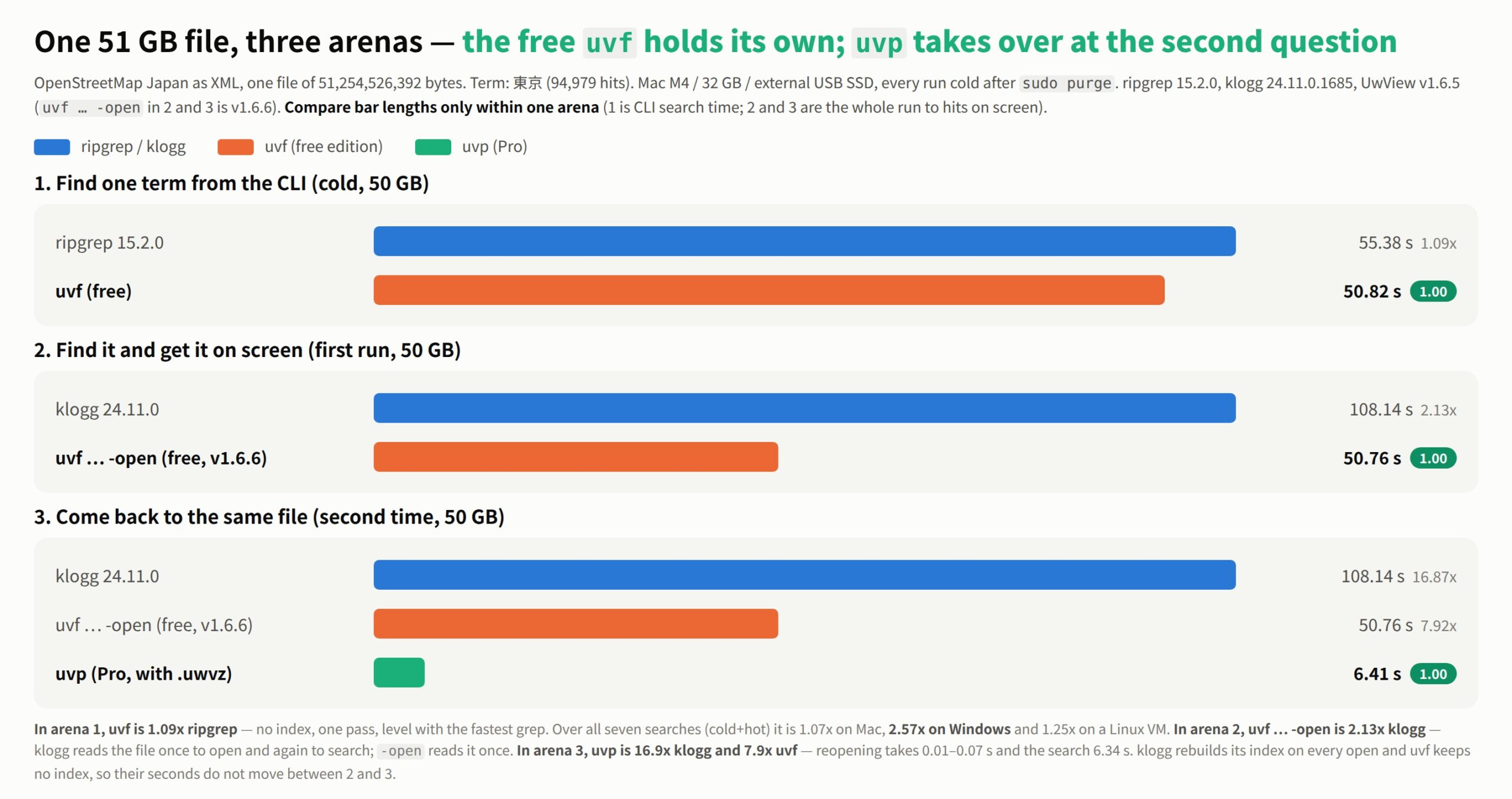
Fig 1: the same 51.25 GB file in three arenas. (1) To find one term from the CLI, the free uvf keeps pace with ripgrep; (2) to find it and read it in the GUI, uvf … -open is about 2× klogg; (3) from the second visit to the same file, UwView Pro (uvp with .uwvz) takes over. Compare bar lengths only within one arena. The timings in the figure are from an earlier measurement (the latest values are in the table below).
The loss first. With no .uwvz yet, the first run is on par with ripgrep, and slightly slower at 3 GB and 10 GB (3.43 s vs 3.26 s, 1/1.05; 11.82 s vs 10.94 s, 1/1.08) — the cost of writing the compression and index (on 51.25 GB it is 58.81 s vs 64.68 s, uvp 1.10×, on par). At 3 GB and 10 GB the second run is on par too (the file stays in memory, so ripgrep’s second run is fast as well; at 10 GB ripgrep is 1.03× faster). In return, on 51.25 GB the original file is not read from the second run on.
| Plain search for 東京 | ripgrep first / second | uvp first (builds the index) / second (with .uwvz) |
Second run |
|---|---|---|---|
| 3 GB | 3.26 s / 0.31 s | 3.43 s / 0.29 s | On par (1.07×) |
| 10 GB | 10.94 s / 0.97 s | 11.82 s / 1.00 s | On par (1/1.03) |
| 51.25 GB | 64.68 s / 70.33 s (reads the whole file every time) | 58.81 s / 6.45 s | 10.9× ripgrep (ripgrep’s second run varies between 55 and 70 s; even at 55.50 s it is 8.6×) |
Over the seven search variants (plain, -i, -E, -E anchored, -E -i, -v, -E -v), first + second run, uvp is 2.39× (3 GB), 3.28× (10 GB) and 3.74× (50 GB) ripgrep. On 16 items only uvp has — narrowing, tallies, sorting, -head / -tail, -out and so on — against combinations of rg, sed, sort, uniq and gzip, it is 5.19×, 5.15× and 7.49× (uvp timed after the index is built). The free uvf is on par with ripgrep on the same seven searches (1.00–1.16×).
Bundled and compressed files
Losses first. uvp’s first run includes building the index (.uwvz); the second run uses that index. Anything under 1.5× is called “on par”.
- The first run of a bundle is slow: bundling 12 files (7 gz + 5 plain, about 60 GB decompressed) takes 41.23 s the first time — 2.34× the free
uvf(17.60 s) and 1.67× ripgrep (24.62 s). Even with 5 gz files it takes 2.27× ripgrep. - Bundling only plain text, ripgrep is faster: 5 plain files, first + second run, ripgrep 5.60 s vs
uvp6.59 s (ripgrep 1.18× faster; within “on par”). - The first run on one compressed file is on par: in all seven formats
uvpis on par with ripgrep anduvf(1/1.13–1.29× ripgrep).
| What we measured (seconds) | ripgrep | free uvf |
uvp first |
uvp second |
Second run vs ripgrep |
|---|---|---|---|---|---|
| 5 gz files, bundled (about 7.4 GB decompressed) | 1.34 | 1.04 | 3.04 | 0.73 | 1.84× (on par with uvf, 1.42×) |
| 12 files, 7 gz + 5 plain, bundled (about 60 GB decompressed) | 24.62 | 17.60 | 41.23 | 9.52 | 2.59× (1.85× uvf) |
| 1 gz file (979 MB of XML, compressed) | 0.43 | 0.33 | 0.42 | 0.12 | 3.6× |
| 1 lz4 file (same) | 0.31 | 0.28 | 0.35 | 0.12 | 2.6× |
| 1 zst file (same) | 0.54 | 0.50 | 0.57 | 0.12 | 4.5× |
| 1 br file (same) | 0.87 | 0.74 | 0.85 | 0.12 | 7.3× |
| 1 lzma file (same) | 3.40 | 2.57 | 2.64 | 0.12 | 28× |
| 1 xz file (same) | 4.21 | 3.37 | 3.44 | 0.11 | 38× |
| 1 bz2 file (same) | 7.89 | 7.43 | 7.64 | 0.12 | 66× |
uvp‘s second run takes 0.11–0.12 s whatever the compression format (it searches the index, so the cost of decompression disappears). With the 12 files, the first run’s delay (about 24 s behind uvf) is level at four searches in total and turns into a lead from the fifth. japan-latest.osm.pbf (2.46 GB, 51.3 GB of content as XML) becomes a searchable .uwvz in 21.6 s; finding 東京 takes 27.34 s in total from a dropped cache, and 5.01 s from the second search on.
If you search a file only once, the free uvf or ripgrep is enough — no index needed (on one compressed file, uvf is on par with ripgrep or slightly faster in all seven formats, 1.06–1.32×). Pro pulls ahead when you come back to the same files, search compressed files as they are, or query a large file many times.
GUI — compared with klogg
The GUI never loads the whole file into memory; it draws only the lines on screen. Its yardstick is klogg.
What it does
- Move through the whole file from the moment it opens: the index is built in the background and line numbers appear when it is ready. From the second time, it opens instantly with line numbers from the
.uwvz. - Drill-down search (up to 8 stages) and sequence search: search near the previous results, or pull out only the flows that happened in order.
- Tally, sorting and block selection: count values and list them most frequent first, then click to drill down to that value’s lines. Pull just the vertical columns out of fixed-width logs.
- Up to ±64 context lines around each hit (the free edition: up to ±1).
- Open compressed files as
.uwvz: the seven formats are converted to.uwvzwithout writing the plain text; no decompression from then on. - Open a bundle: the line column reads
file-number:line, and the file list opens the original files in extra tabs (up to 8; the main tab is gray). Bundling is done with the CLI (uvp) (zip and pbf are not opened directly in the GUI either — turn them into a.uwvzwithuvpfirst). - Buttons are icons (hover for the name). The window title reads
UwView Pro(uvp)-Full Spectrum(v1.9.0).
Compared with klogg (51.25 GB)
The loss first: if you open a file only once, klogg is slightly faster (within “on par”). UwView Pro builds a .uwvz on the first open, which takes longer.
| 51.25 GB | klogg | UwView Pro |
|---|---|---|
| Open, first time | 52.55 s | 58.42 s (builds the .uwvz; the first search is done inside this too; 1/1.11 = on par) |
| Open, second time onward | 52.55 s (same every time) | 0.01–0.07 s |
| Search (after opening) | 55.59 s | 6.47 s (with .uwvz; 8.6×) |
The UwView Pro figures were measured with the CLI (uvp), building the same .uwvz the GUI uses. klogg keeps no index, so every open takes the same time and you cannot scroll to the end until its index is built. UwView Pro lets you move to the end from the moment the file opens.
A full feature comparison of klogg, free UwView and UwView Pro is here: the complete comparison — klogg’s advantages are listed honestly too. How to use it is in the UwView Pro guide.
Looking for a klogg alternative specifically? We benchmarked reopening a 47.73 GB, 892M-line file — including the cases where you should stay with klogg.
It edits, too — the Edit Upgrade (compared with EmEditor)
Fixing a text file that doesn’t fit in memory tends to start with “find an editor that can even open it”. The Edit Upgrade for UwView Pro changes the approach.
- It never rewrites your original file. Every fix and replacement accumulates in a sidecar diff file (
.ewvz); the source stays untouched. - The cost of an edit does not depend on file size. A one-line fix in a 100 GB file is instant. In our measurement, replacing 21,994 occurrences across a 10 GB, 100-million-line file took 16.8 s (the measurement; varies by hardware).
- Stop mid-way, resume tomorrow — without saving the whole giant file back out.
- The Edit Upgrade is an add-on to the View License (it does not work on its own).
- In the CLI,
uvp … -replaceoutputs the full replaced text.
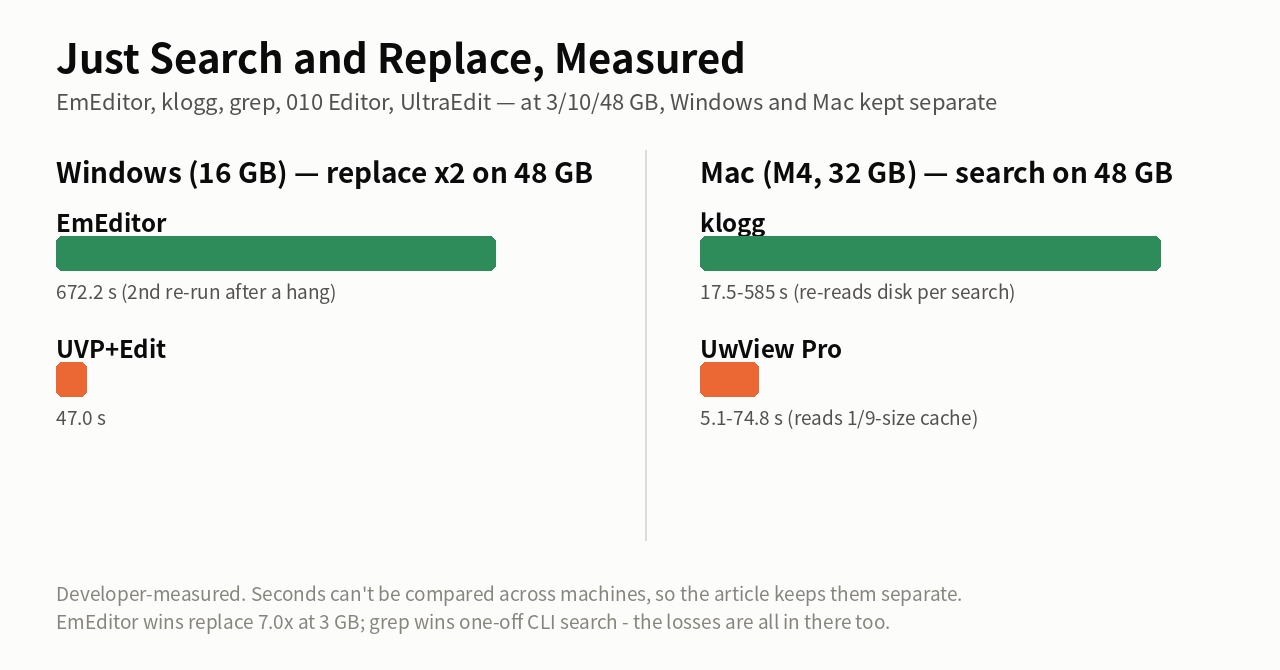
Fig 2: two replacements on a 48 GB file on Windows (16 GB RAM) — EmEditor 672.2 s, the Edit Upgrade 47.0 s. But EmEditor replaces 7.0× faster at 3 GB, and every losing case is in the measurement article. Seconds can’t be compared across machines. The search timings in the lower half (Mac) are from an earlier measurement; the latest search values are in “One large file” and “Compared with klogg” above.
Built for the migration dump, the fixed-width data fix, the mass-correction job — the once-a-quarter task where a failure costs you days.
Free vs Pro
UwView (free, CLI uvf) |
UwView Pro (CLI uvp) |
|
|---|---|---|
Search many files at once (wildcards, .gitignore-style exclusion, --files) |
Yes | Yes |
| Seven compressed formats (gz, bz2, xz, lzma, zst, lz4, br) | Searched as they decompress | Decompressed into an index (no decompression from the second time) |
Bundle many files into one .uwvz |
— | Yes |
| Inside zip / OSM pbf | — | Yes |
| Word, Excel, PDF (from v1.9.0) | Searched as the text is extracted | Text extracted into an index (tallies, ranges and templates too) |
| Shift-JIS, EUC-JP, UTF-16 (from v1.9.0) | Converted on every read | Kept as a UTF-8 index; from the second search as fast as UTF-8 |
| Multi-stage narrowing, tallies, sorting, sequences | — | Yes |
| Jump from the results window to the line | Reopens the original file first | Jumps at once inside the bundled index |
| File list and tabs (up to 8) | Yes | Yes |
| Context lines ±N | Up to ±1 (none for multi-file results) | Up to ±64 |
Compressed output (-out) and restore (-extract) |
— | Yes |
GUI: instant reopen from the second time (.uwvz) |
— | Yes |
| GUI: block selection, editing (Edit Upgrade) | — | Yes |
| Real-time Tail | Yes | No |
Main features
GUI
- Instant open — browse the whole file the moment you open it, without waiting for indexing. From the second open, the
.uwvzopens it instantly with line numbers. - Search while opening — searching starts before the index is complete, so the file is read once.
- Color highlighter — colorize multiple keywords at once; bundled presets, save and export sets.
- Right-click to colorize — select a word, right-click, pick a color; every occurrence lights up at once.
- Fast search with history and saved filters — result list, context view (up to ±64 lines), save frequent searches.
- Drill-down and sequence search — narrow 100,000 hits to 3 in two clicks; extract only the flows where “w1 → w2 → w3” appear in order.
- Frequency ranking (Tally) — count the values pulled out of hit lines, most frequent first; click a value to drill down to its lines; CSV export.
- Block (rectangular) selection and copy — pull just the vertical columns out of fixed-width logs (Pro only).
- File list and tabs — open a bundle in the GUI and the original files in extra tabs (up to 8).
- Session restore, recent files and favorites — pick up right where you left off.
- Non-destructive editing (Edit Upgrade) — fix and mass-replace via a diff sidecar (.ewvz) without touching the original; pause and resume.
- Japanese encoding auto-detect (Shift-JIS / EUC-JP) and an English / Japanese UI.
CLI (uvp)
- Search, narrow, tally and sequence-search from the terminal —
-openhands the result straight to the GUI. - Bundle many files into one
.uwvz— never rebuilt on later searches; only new files and lines are added; a deleted file’s content is kept (--rebuildfor a fresh index). Exclusion via.gitignoreand friends follows ripgrep’s main rules. - zip and OSM pbf into the index — a zip is bundled entry by entry; a pbf is searched in XML form.
- Word, Excel and PDF into the index (from v1.9.0) — search, tally, ranges and templates on the extracted text (never written back in their own format).
- Shift-JIS, EUC-JP and UTF-16 as a UTF-8 index (from v1.9.0) — from the second search as fast as UTF-8 files;
-extractwrites them back in the original encoding. - Compressed output and restore —
-outto the seven formats or zip,-extractin the format you name,--infoto see what’s inside.
Both CLI and GUI
- Compressed files straight to
.uwvz— convert and open without ever writing the plain text: gz, bz2, xz, lzma, zst, lz4 and br. Truncated files are detected. - .uwvz archive — store at 1/9 and open directly, checksum-protected.
Pricing
| License | One-time | Monthly | What you get |
|---|---|---|---|
| View License | $129 | $9 / mo | Everything for viewing, searching and 1/9 archiving |
| Edit Upgrade | +$120 | +$8 / mo | Adds non-destructive editing to View (requires a View License) |
With editing, the total is $249 one-time / $17 monthly. One-time owns this major version forever; monthly always includes the latest updates.
Every license starts with a free 14-day trial. The trial is a $0 order that issues a full-featured View + Edit key, which expires 14 days after issue (follow Polar’s checkout screen for how payment details are handled).
Try free for 14 days | Buy View License | Buy Edit Upgrade
- Payment is handled by a Merchant of Record (Polar); prices are in US dollars.
- After purchase, a license key (
UVP-…for View,UVPE-…for the Edit Upgrade,UVPT-…for trials) and a download arrive from Polar. Paste the key into the app under Settings → License to activate the Pro features (see Help).
Requirements
Available for Windows, macOS and Linux.
- macOS 11 or later (Apple Silicon / Intel). Developer ID signed and Apple-notarized, so it launches without warnings.
- Windows 10 / 11 (x64 / ARM64). Unzip and run. (Currently unsigned, so Windows SmartScreen may warn on first launch — choose “More info → Run anyway”. SHA256 provided.)
- Linux (x86_64 / ARM64). Extract the tar.gz and run (SHA256 provided).
The free version (UwView) already lets you experience instant open of huge files, multi-file search and Japanese auto-detection → Download
Verify your download (SHA256)
Checksums for the latest build are in SHA256SUMS, and the version currently posted is in VERSION (see the download page). To verify: macOS / Linux shasum -a 256 <file>, Windows certutil -hashfile <file> SHA256.
FAQ (excerpt)
- How is it different from the free version? Both let you read and search a huge file from the moment it opens. The free edition’s CLI (
uvf) can also search many files and the seven compressed formats in one go. UwView Pro saves the index and compression, so the 2nd open onward is instant with line numbers, plus bundling many files into one.uwvz, zip and OSM pbf input, much faster search and 1/9 archiving (see the “Free vs Pro” table above). Basic viewing, search and color-coding are in the free version too. Going the other way: real-time Tail is in the free edition and not in Pro (see below). - Can it follow a log that is still being written? (Tail) Pro has no real-time Tail. Following appended lines lives in the free UwView. Pro keeps edits in a sidecar diff (
.ewvz), which does not sit well with an original that keeps changing underneath it. Use the free edition to follow a live log; reopening a file to read up to the latest content works fine in Pro. Please check this before buying. - Which OS? Windows 10/11 (x64 / ARM64), macOS 11+ (Apple Silicon / Intel), and Linux (x86_64 / ARM64). One license covers every OS.
- One-time vs monthly? One-time owns this major version forever; monthly includes the latest updates and is good for trying it out.
- Can I buy the Edit Upgrade alone? No — it is an add-on to the View License and does nothing by itself. For editing you register both keys (View + Edit Upgrade), or use a trial key.
- Is the trial limited? No feature limits (full View + Edit). The key simply expires 14 days after issue.
- Refunds? Payment is via a Merchant of Record (Polar). See Support and the terms shown at checkout.
More: Help | UwView Pro guide | uvp command manual | Support | Source (GitHub)
About the numbers
- Single-file CLI timings (“Three benefits”, the “One large file” table with the seven searches and 16 items, and the UwView Pro rows of “Compared with klogg”) were measured with
uvp/uvf1.7.3.6.9 and ripgrep 15.2.0 on 4 October 2026 (only the UwView Pro rows of “Compared with klogg” are from 28 September, 1.7.3.1). First run = right after dropping the cache (cold, aftersudo purge;uvpincludes building the.uwvz); second run = immediately after (hot, with the.uwvz). The seven searches and 16 items are first + second run totals. Across all 96 items, the overall total is 2.49× the command-line combinations, with zero mismatched results. - The bundled and compressed files table was measured with
uvp1.7.3.5 (same search code as 1.7.3.6),uvf1.7.3.4 (same search code as 1.7.3.6) and ripgrep 15.2.0 (rg -z) on 28 September 2026, hot (warm cache, the faster of two runs each). The single compressed files are the same 979 MB of XML compressed in each format. Only the 5-plain-file bundle (6.59 s vs 5.60 s) is a first + second run (cold + hot) total fromuvp1.7.2.7. The pbf figures areuvp1.7.3.5 (conversion and search code as in 1.7.3.6; 28 September 2026; first run aftersudo purge, then repeated). - The klogg column and the GUI reopen (0.01–0.07 s) were measured with v1.6.6 “First Light” (klogg 24.11.0, 20 September 2026, cold).
- The timings in Figs 1 and 2 are from an earlier measurement (the replacement in Fig 2 follows “The editing comparisons” below).
- Data: OpenStreetMap Japan XML, searching mostly for 東京. Results (hit counts and content) were checked to match.
- Mac (Apple M4, 10 cores, 32 GB RAM), external USB SSD.
- The editing comparisons (Fig 2’s replacement and the 16.8 s mass replacement) come from the setups and versions in their own measurement articles, such as a Windows laptop with 16 GB RAM.
- Timings vary by setup. Do not compare seconds across machines. Every number and condition, including Windows and Linux, is on the Benchmarks page.
Changelog
The current version is v1.9.0 (Full Spectrum).
v1.9.0 “Full Spectrum” (2026-10) — four encodings, Word, Excel, PDF and complex searches, fast across the full spectrum
- Shift-JIS, EUC-JP and UTF-16 as a UTF-8 index: kept as UTF-8 inside the index, so from the second search they are as fast as UTF-8 files.
-extractwrites them back in the original encoding. The index format is new, so a.uwvzmade by an earlier version is rebuilt on the first search. - Search Word, Excel and PDF: the text is extracted into an index, with search, tallies, ranges and templates (never written back in their own format).
- Faster repeat searches: line skeleton, block marks and joining on the second word (output unchanged).
- GUI: dark theme, fonts, key bindings (vi/less preset), bookmarks in the results window, AND/NOT/OR templates, file actions (copy path, folder, terminal, open in app). A file truncated from outside no longer crashes the app.
- Brace patterns in file patterns, such as
'**/*.{txt,log}'. - Details: release notes.
v1.8.1.9 “Finder Scope” (2026-10) — Command Line in the window, multi-line blocks, masking, templates
- Search from the window with the same arguments as
uvp, and bundle several files there. Adds-seq … -range,-maskand-format(release notes).
v1.7.3.6.9 (2026-10) — faster second (hot) searches, checked on three operating systems
- Faster newline counting: counting newlines for line numbers now works 16 bytes at a time (0.15 s → 0.028 s on 3 GB). Bundling uses the same line counting.
- Measured: over the seven searches (first + second run, including building the index), 2.39× (3 GB), 3.28× (10 GB) and 3.74× (50 GB) ripgrep on the Mac; 2.22 / 2.81 / 3.44× on Windows and 1.62 / 2.45 / 1.99× on Linux (2 cores). Across all 96 items: Mac 2.49×, Windows 3.42×, Linux 1.88×, with zero mismatched results.
- Very many small files: bundling the Linux kernel source (86,000 files) into one
.uwvztakes 9.18 s on the first query, then 0.27–0.31 s per query — 2.48× faster than ripgrep over five searches (Mac). - Loss: on Linux (2 cores), for zst, lz4 and plain text — which decompress fast — the first run that builds the index is heavy, and the two-run total is 1/1.2 to 1/1.4 of ripgrep. From the third run on,
uvpis faster. - The window title reads
UwView Pro(uvp)-Wide Field(v1.7.3.6.9). Mac timings are from 4 October 2026; Windows and Linux from 3 October (1.7.3.6.8). Do not compare seconds across operating systems.
v1.7.3.6.7 (2026-10) — bundling and searching many small files, faster
- Bundling: the Linux kernel source (86,000 files) can now be bundled into one
.uwvz(in v1.7.3.6 the list of source files written into the index went over its limit and the run stopped). Building the bundled index, including the first search, takes 8.58 s (cold; 56.31 s before). Later searches take 0.74–0.78 s with the same file pattern, or 0.28–0.32 s on the.uwvzdirectly. Over five searches (cold + hot), it was 2.7× faster than ripgrep. - Ignore-case (
-i): two anchors instead of one;spinlock -iwent from 1.27 s to 0.30 s. Regex plus ignore-case (-E -i) is faster too. - Fixes:
convert -outno longer also writes a.uwvznext to the original file. Searching a single-file.uwvzdirectly with-Hnow shows the original file name. - The window title reads
UwView Pro(uvp)-Wide Field(v1.7.3.6.7). Timings are from a Mac (Apple M4, 10 cores) with an external USB SSD, measured on 3 October 2026.
v1.7.3.6 “Wide Field” (2026-09) — bundle many files into one .uwvz (v1.7.0–v1.7.3.6 in one entry)
- Bundling:
uvp '*.log' ERRORbundles several files into one.uwvzand searches it (wildcards,**, comma-separated lists; always quote the pattern). It is not rebuilt on later searches; only new files and appended lines are added. A deleted file’s content stays in the index and nothing is rebuilt; use--rebuildfor a fresh index. - Exclusion: when a wildcard is expanded, files matched by
.ignore/.gitignoreare left out (ripgrep’s main rules). Hidden files are skipped on every OS. New--no-ignoreand--files. - Input: seven compressed formats (gz, bz2, xz, lzma, zst, lz4, br) are decompressed into the index. A zip is bundled entry by entry, and OSM pbf is indexed in XML form. Non-text files are named and skipped.
- Output:
-outwrites the seven formats or zip, chosen by extension.-extractrestores in the format you name, and--infoshows where an index came from and what it holds. bz2 output now works on Windows too. - Window: a bundle opens with
file-number:linein the line column. The file list opens the original files in extra tabs (up to 8; the main tab is gray). Context lines go up to ±64. Buttons are now icons (hover for the name), and the window title shows the version asUwView Pro(uvp)-Wide Field(v1.7.3.6). Keyboard shortcuts (Ctrl+F, F3, Ctrl+L, Ctrl+B with[], F5) were added, and bookmarks are now remembered per file (v1.7.3.6; the earlier v1.7.3.5 was withdrawn). - No crash: when too many hits exhaust memory,
uvpexplains how to narrow the search and exits with code 2. - Measured (Mac (Apple M4, 10 cores), external USB SSD): bundling only plain text, ripgrep is on par and slightly ahead (5 plain files: 6.59 s vs 5.60 s; 1.7.2.7). With 12 files (7 gz + 5 plain, hot), the bundling first run takes 41.23 s (2.34×
uvf‘s 17.60 s) and the second 9.52 s (1.85× faster thanuvf, 2.59× faster than ripgrep’s 24.62 s).japan-latest.osm.pbf, 2.46 GB, becomes a.uwvzin 21.6 s (27.34 s to finish the search; 5.01 s the second time).
v1.6.6.1 (2026-09) — uvp now searches while it builds the index
- When there is no
.uwvzyet, the first query now builds the.uwvzand searches in the same pass. 50 GB: 65.7 s → 59.04 s; the gap to ripgrep is down to 6–7% (what remains is writing the.uwvz). From the second query on it is still 6.6 s. - Clearer messages when a compressed file can’t be read, split by cause (tar bundles, double gzip, truncated files, etc.).
- The version now displays correctly as “1.6.6.1”.
v1.6.6 “First Light” (2026-09) — the GUI searches while it opens
- The GUI can start searching before the index is complete, so opening and searching share a single read. In the free edition’s GUI, 50 GB “open, search, show results” went from 189.5 s → 53.7 s, and open-only from 100.6 s → 50.44 s (klogg 52.55 s).
- Reduced the fixed start-up cost that stood out on small (3 GB) files.
v1.6.3–v1.6.5 (2026-09) — mainly the free uvf command
- The free
uvfcommand was rebuilt to read the file once (50 GB: 203 s → 50.82 s), and-opennow hands both the results and the index landmarks to the GUI. Pro’suvp -openalready handed its results to the GUI, so nothing changes in how you use it.
v1.6.2 (2026-09) — faster second-and-later queries in uvp
- Narrowing, tallies and regex now run at fixed-string speed (50 GB,
.uwvzreused: two-word narrowing 21.48 s → 7.36 s,-uniqtally 145 s → 7.7 s, regex 13.68 s → 7.75 s). The GUI’s drill-down no longer re-reads from the second stage on. -head Nstops as soon as N hits are found (7.01 s → 0.32 s). The default for-limitis now unlimited.- New
-replacein the CLI (Edit license; the original and the.uwvzare untouched). -openhands every stage and tally from the CLI straight to the GUI, which does not search again.- The “Command line setup…” menu adds
uvpto your PATH.
v1.6.0 (2026-09) — the uvp command line and compressed files
- New
uvpcommand for the terminal (search, narrowing, tallies, sequence search,-open). - Opening a
.gzconverts it straight to.uwvzwithout writing the plain text. Truncated gz files are caught by their checksum.
v1.5.1 (2026-09) — small usability fixes
- Processing times stay in the status bar (last 10). Open files from Finder’s “Open With”, by dropping them on the app icon, or with
open -a. The tally box comes preloaded with common expressions.
v1.5.0 (2026-09) — frequency ranking and stronger narrowing
- Frequency ranking (something like
sort | uniq -c | sort -rn, inside the results list); click a row to drill down to that value’s lines. - New narrowing options “Whole word” and “Does not contain”; export can now put line 1 as a header and include ±N context lines.
v1.4.1 / v1.4.2 (2026-09) — bug fixes
- Fixed editing/replace stopping after closing a tab and reopening the same file, and the save (.uwvz) progress staying at “Preparing…”.
v1.4.0 (2026-09) — editing, integrated
- New Edit Upgrade license: non-destructive diff editing (.ewvz), mass replacement in huge files, pause-and-resume.
- A common 14-day free trial for every license ($0 order issues a full View + Edit key that expires in 14 days).
- From the v1.3 line: drill-down and sequence search.
v1.2.1 (2026-07) — a stability update (includes everything from v1.2.0)
- Faster scrolling in the search-results list (only visible rows are drawn) — the more hits, the bigger the win.
- Fixed a blank screen when dragging the scrollbar all the way to the bottom.
- “Include line numbers” now applies to every output (rectangular selection and copy/save of selected rows). The results popup keeps its scroll position and ±N setting when reopened.
- From v1.2.0: fully icon-based toolbar, session-restore fix (resume from where you closed), and a fix to the search “Next” starting point.
Full notes (including the free edition): see the GitHub release notes.
From the developer: a list of my apps, Kindle books and public projects is on GitHub: amru195704.