
The UwView series — search with UwView, compare with UwDiff
Open and search huge files with UwView; compare two files or two folders with UwDiff. Both run on Windows, macOS and Linux. → UwDiff user manual
User guideUwView Pro
User guide
UwView Pro (current release v1.9.0 “Full Spectrum”) is a CLI / GUI tool for investigating huge text files. You open, read, narrow down and edit in the GUI (the window), and the CLI (uvp) uses the same index from scripts. This guide covers viewing & search (View License), editing (Edit Upgrade) and the CLI (uvp), comparing the GUI with klogg and the CLI with ripgrep along the way. For basics shared with the free edition see Help and the UwView (free) User Guide; for pricing and purchase see the product page. Details of each feature are also in the v1.9.0 release notes (previous release: v1.8.1.9).
New in v1.9.0 “Full Spectrum”: Shift-JIS, EUC-JP and UTF-16 files are kept as a UTF-8 index (the index format is new, so .uwvz files from earlier releases are rebuilt; §3-2); Word, Excel and PDF files can be opened and searched (§3-3); file actions and a notice bar when the file changes outside the app (§3-4); a bookmark switch in the results window and templates in Predefined ★ (§4-1, §4-2); brace patterns {a,b} in file patterns (§14-1); and the Keys and Display tabs in Settings (§15).
▶ The basics in one minute (instant open, search, color highlighting, rectangular save)
▶ More videos: YouTube playlist “UwView|English” (how to use the free UwView v1.7.3.6 “Wide Field” in 8 topics, plus an overview. Searching in the CLI and reading in the GUI works the same way in Pro. Japanese · Channel @uwviewapp)
- 1. How Pro differs from the free edition
- 2. License and trial
- 3. Opening, viewing and the index (.uwvz)
- 4. Search and the results window
- 5. Drill-down Search
- 6. Sequence Search
- 7. Tally
- 8. Sort and Order
- 9. Extract and save
- 10. Color highlighter, rectangular selection and more
- 11. Editing — Edit Upgrade (UVPE)
- 12. Compressed files
- 13. Bundled indexes (several files), the file list and tabs
- 14. Combining the CLI (uvp -open) with the GUI
- 15. Settings
- 16. CLI (uvp) — compared with ripgrep
- 17. Known limitations
- About the numbers
- 18. Need help?
1. How Pro differs from the free edition
UwView Pro is the free UwView CLI / GUI plus index-based speed (.uwvz), multi-stage narrowing, tallies and editing. Opening, moving around, search, the highlighter, bookmarks and copying work exactly as in the free edition.
| Feature | UwView (free) | UwView Pro |
|---|---|---|
| CLI | uvf (search one file, several files, seven compressed formats; -open) |
uvp (index, stages, tally, sort, replace, bundling; §16) |
| GUI: open, navigate, search, highlighter, bookmarks | ✓ | ✓ (same) |
| Index (.uwvz): instant reopen, parallel search | — | ✓ |
| ±N context lines around results | up to ±1 | up to ±64 |
| Drill-down and Sequence search | — | ✓ (up to 8 stages) |
| Tally, Sort and Order | — | ✓ |
| Ranges (multi-line blocks), masking, collecting by template (from v1.8.1.9; §8, §9) | — | ✓ |
| Extract-save options (first line as header, save context too) | — | ✓ |
| Rectangular selection | — | ✓ |
| Editing & replace (the original is never changed) | — | ✓ (Edit Upgrade) |
Open compressed files as .uwvz |
— | ✓ |
| Open a bundled index (several files), bundle in the GUI (from v1.8.1.9) | — | ✓ |
| The GUI’s Command Line (from v1.8.1.9) | ✓ (uvf syntax) |
✓ (all of uvp‘s syntax; §14-1) |
| Settings window | ✓ (Keys, Display; from v1.9.0) | ✓ (General, Keys, Display; §15) |
| Open and search Word, Excel and PDF (from v1.9.0; §3-3) | ✓ (extracts while searching; no index) | ✓ (builds an index report.docx.uwvz next to the file) |
| Keep Shift-JIS, EUC-JP and UTF-16 as a UTF-8 index (from v1.9.0; §3-2) | — | ✓ |
| Bookmarks in the result list, Predefined ★ templates, key bindings, fonts, dark theme (from v1.9.0) | ✓ | ✓ (same; the result list switch is per stage tab too) |
File actions (copy path, folder, terminal, open in app), brace patterns {a,b} in file patterns (from v1.9.0) |
✓ | ✓ (same) |
| Notice bar when the file changes outside the app (from v1.9.0; §3-4) | ✓ (with follow tail on, it reloads by itself) | ✓ (the bar tells you; Reload reloads) |
| Follow the end of a file (Tail) | ✓ | Not available (§17) |
- The window title reads
UwView Pro(uvp)-Full Spectrum(v1.9.0), showing the release name (Full Spectrum) and version. “About UwView Pro” anduvp --versionshow only the product name and version. - Buttons are icons. Hover to see a button’s name. Yes / No, Open / Close, Save, Cancel, Save CSV and the like keep their text labels. Where this guide mentions an icon, its shape is given in parentheses.
2. License and trial
After purchase or trial signup, Polar sends you a license key. There are three kinds:
| Key | Type | What it unlocks |
|---|---|---|
UVP-… |
View License | All Pro viewing, search and index features |
UVPE-… |
Edit Upgrade | Adds non-destructive editing (used together with a View key) |
UVPT-… |
14-day trial | Everything (View + Edit; expires 14 days after issue) |
- Paste the key into Settings → License and press Activate (key icon). Registering several keys adds up what you can do. For editing, register both
UVP-…andUVPE-…(or a single trial key). - Even with no key, the Pro viewing features work for 14 days from the first launch (editing does not).
- The license is checked online every 7 days, and keeps working for 14 days without a network connection.
- The status bar shows a prompt button only when there is something to act on.
What stops working without a license: building new indexes (including converting compressed files), parallel search (drops to one thread), rectangular selection, Drill-down / Sequence / Sort / Order, Tally and editing.
Opening and reading a .uwvz you already have always works.
The status reads, for example, “License active (View + Edit)”, “License active (View)”, “14-day trial (n days left, View + Edit)”, “Trial (14 days, viewing features)” or “Trial ended (restricted mode)”.
2-1. PATH setup for the CLI (uvp)
To type uvp by name in a terminal, choose Help → “Command line setup…” in the app. The same screen removes it again.
| OS | Where it goes |
|---|---|
| macOS | /usr/local/bin/uvp (if that is not writable, the standard password prompt appears) |
| Windows | The app folder is added to the user’s PATH environment variable (no administrator rights needed) |
| Linux | /usr/local/bin (or ~/.local/bin without permission; takes effect after you log in again) |
uvp --version     # uvp 1.9.0
uvp --help        # all commands (Japanese / English)
uvp uses the license you registered in the GUI (-replace needs Edit Upgrade; -extract, --info and --files need no license). Usage is in §16 and the uvp command manual.
3. Opening, viewing and the index (.uwvz)
- The whole file is browsable the moment it opens. The index is built in the background; line numbers appear when it completes (while building, jump by percentage such as
50%). Progress shows in the window, as a % on the tab and in the status bar. Cancel it and you can keep reading. - Files of 64 MB or more get an index built in the background. It is saved next to the original as
original-name.uwvz(about 1/9 of the original, checksum-protected per block). - Multiple files open as tabs. Drag & drop, multi-select, and session restore (reopen last session’s files) are supported.
- Character encoding is auto-detected (UTF-8 / Shift-JIS / EUC-JP / UTF-16), with manual override on the toolbar (no re-indexing). Indexes of Shift-JIS, EUC-JP and UTF-16 files hold the text as UTF-8 (from v1.9.0; §3-2).
- Long lines can be read with horizontal scrolling (scrollbar, swipe, Shift+wheel,
←/→; line numbers stay pinned on the left).
| Situation | What happens |
|---|---|
| First open | Readable at once (page mode) while the index is built in the background |
| From the second time | If the index exists, opens immediately with line numbers |
| The original has changed | Asks whether to rebuild or use the index as is |
Only the .uwvz exists |
Opens the .uwvz directly (readable even without the original) |
- No index is built for files under 64 MB, when free disk space is short (about 1/6 of the original + 1 GB), in a folder you cannot write to, or without a license. The app then behaves like the free edition.
- Searches use the index in parallel (thread count in §15; default 8). If the index is at least 25% done, or the file is 5 GB or less, the search waits for the index to finish first.
- The index format is new in v1.9.0.
.uwvzfiles made by earlier releases are not read; they are rebuilt the first time you open or search the file (§3-2).
Keeping files as an archive: even after deleting the original, the .uwvz opens on its own (pick it in the file dialog or drag & drop it). Keep huge logs on the shelf at 1/9 size and open them instantly only when needed. To restore the original form, use uvp … -extract (no license needed, §12).
3-1. GUI — compared with klogg
Both klogg and UwView Pro read the whole file once on the first open to build an index. The difference is whether that index is kept (same machine, same files, search term “東京”; conditions under About the numbers).
| klogg and UwView Pro | 3 GB | 10 GB | 50 GB |
|---|---|---|---|
| First open, klogg | 3.65 s | 10.98 s | 52.55 s |
First open, UwView Pro (builds the .uwvz; the first search is done within this time) |
3.43 s | 11.79 s | 58.42 s |
| on par | on par | on par | |
| Later opens, klogg | same as the first | same as the first | 52.55 s (every time) |
| Later opens, UwView Pro | — | — | 0.01–0.07 s |
| Search (after opening, second run onward), klogg | 0.56 s | 11.75 s | 55.59 s |
Search, UwView Pro (with .uwvz) |
0.29 s | 0.95 s | 6.47 s |
| 1.9× | 12.4× | 8.6× |
- The loss first: on the first open, UwView Pro is a little slower because it builds the
.uwvz(58.42 s vs 52.55 s at 50 GB; 1/1.11, within “on par”; 10 GB is 1/1.07, also on par). - klogg cannot scroll to the end until its index is built. UwView can move to the end the moment the file opens (page mode until the index is ready).
- klogg rebuilds its index every time it opens a file; UwView Pro opens with the saved index in 0.01–0.07 s. Search also reads the index in parallel, so it is 1.9× faster at 3 GB and 8.6–12.4× faster at 10 GB and above.
- The free GUI against klogg (open and search both on par) is on the About page; full data is on the benchmarks page.
3-2. Encodings and the index format — from v1.9.0
- Shift-JIS, EUC-JP and UTF-16 files are converted to UTF-8 inside the index (
.uwvz) (each file inside a bundled index, a gz or a zip is converted too). The encoding no longer has to be converted on every search, so from the second search on they are as fast as UTF-8 files. - Display, saving, copying and CLI output show the characters in the original encoding.
uvp <file.uwvz> --infoshows, for example, “Encoding inside: UTF-8 (original encoding: shift_jis)”.uvp <file.uwvz> -extractwrites the file back in the original encoding. NEC and IBM extension characters and the like may come back with different code points (the characters are the same).- Writing out an edit (§11) also goes back to the original encoding. If some characters cannot be represented in it, you are shown how many and asked to confirm.
- EUC-JP supplementary kanji (JIS X 0212) cannot be read; they become “・” and cannot be restored.
- The index format is new (version 4).
.uwvzfiles made by earlier releases are not read; they are rebuilt the first time you search or open the file. For large files and many files, that first time takes a while. - An “extra index” that speeds up repeat searches (a line skeleton, plus marks for skipping blocks that cannot match; kept at the end of the
.uwvz) is built together with the.uwvz. Newly built.uwvzfiles use 1 MB blocks. In the CLI,--no-extra(don’t build it),uvp <file> --build-extra(build it now) anduvp <file> --extra-status(show its status) are available.
3-3. Word, Excel and PDF — from v1.9.0
Opening a .docx (.docm), .xlsx (.xlsm) or .pdf shows “Extracting text” with progress, then extracts the text, builds an index next to the file (report.docx.uwvz) and opens it. From the second time it opens at once, and it is rebuilt when the original changes. Search, Drill-down, Tally, ranges and templates all work as usual.
| Format | What each line holds |
|---|---|
| Word | One paragraph per line. A table row becomes one line with its cells joined by tabs. After the body, [Footnote] … and [Comment] … |
| Excel | Sheet!row<TAB>A<TAB>B… (the displayed values; with --raw in the CLI, the stored values) |
## page N, followed by the page’s text in reading order (left column first in a two-column layout) |
- Extracting a new file needs a license. Without one, the text is extracted to a temporary folder and opened, as in the free edition (indexes already extracted always open).
- They cannot be written in their original format (
-outdoes not accept.docxand the like).uvp report.docx.uwvz -extractwrites the extracted text toreport.docx.txt. - Not readable: old formats (.doc, .xls), password-protected files, PDFs without text (images only; no OCR) and broken files. They are refused with the reason (exit code 2 in the CLI; a bundling pattern skips them by name).
- The CLI works the same:
uvp report.docx Tokyo,uvp 'expenses/**/*.xlsx' taxi --raw,uvp 'docs/**/*.pdf' contract -C 3 cancel.
3-4. File actions and files changed outside — from v1.9.0
File actions: click the file name in the status bar (left or right click), or right-click a row in the file list, for a small window. The status bar shows the file name only.
| Part | What it does |
|---|---|
| Full path | Where the file is. You can select and copy it |
| Copy | Copies the full path to the clipboard |
| Folder | Opens the folder in Finder, Explorer or the like, with the file selected |
| Terminal | Opens a terminal in the file’s folder (Terminal on a Mac; Windows Terminal on Windows, or Command Prompt if it is not installed) |
| App | Opens the file in the app for its extension (a PDF app for .pdf, Word for .docx and so on). For an extracted index (report.pdf.uwvz) it opens the original next to it (report.pdf) |
- App is disabled for an index without its original next to it (such as a bundled index), a file that cannot be found, and a file inside a zip (hover to see why).
When the file changes outside the app: the app no longer crashes when another program truncates, recreates, rotates or deletes the open file. Each tab checks once a second and shows a yellow notice bar above the text.
| What happened | Example | Notice bar |
|---|---|---|
| Truncated | : > app.log, truncate |
“app.log was truncated” |
| Recreated (the beginning or the content changed) | Overwritten with other content | “app.log was recreated” |
| Rotated | A new app.log appeared after mv app.log app.log.1 |
“app.log was replaced by another file with the same name (rotation)” |
| Deleted | rm app.log |
“app.log was deleted” |
- Reload on the bar (the same as F5) reopens the current content; × closes the bar. Pro has no follow tail, so it never reloads by itself (§17).
- Until you reload, the old content stays visible. After a deletion there is no Reload; when a file with the same name appears, the bar changes to “replaced”.
- Tabs being edited and bundled-index tabs cannot be reloaded, as with F5 (only the bar appears).
- Searching after an outside change does not reopen the file by name. Reload first, then search.
4. Search and the results window
- Literal and regex. Hits are highlighted in the text and plotted on the minimap (click to jump).
- When a search completes (once you close the completion dialog), the Drill-down / Sequence search window opens. The results-list button on the search bar opens it too. There is one per tab. Double-click / Enter jumps to the line in the file.
- ±N context lines go up to ±64 (the free edition allows ±1).
- Tally (Σ), Sort, Order (numbered list), Back (left arrow) and File list (bulleted list) at the top of the window are icon buttons.
- From v1.8.1.9, Tally, Sort, Order and the rest sit under More, switched with the Tally, Sort / Sequence and Mask / Template tabs.
- The bottom of the window shows the
uvpcommand for what the window shows. Copy it into a terminal for the same result (for a bundled index it shows the file pattern you typed). - Search history autocomplete, plus “★” to save frequent searches as named filters. The × at the right of a predefined row deletes it (from v1.9.0).
Refine options: Regex / Ignore case / Whole word (distinguishes ERROR from ERROR_RETRY) / Exclude (keep hits whose ±N range does not contain the term; stages 2+).
4-1. Bookmarks in the results window — from v1.9.0
- Above the list on each stage tab there is a switch: Hits + bookmarks (default), Bookmarks only, Hits only. Your choice is remembered.
- Hits and bookmarks are merged in file-line order. Bookmarked lines get a blue bar left of the line number. A line that is both appears once, with both marks. Bundled indexes work the same (lines are merged with their
3:128394numbers). - With ± N context, bookmarked lines get the same context.
- Select a bookmarked line in the list and press Delete (or Backspace) to remove that bookmark. The marks in the text and on the minimap go too.
- Select a range of lines in the text and press Ctrl (Cmd)+B to toggle them all (§10).
- With the vi/less-style keys (§15-2),
vcycles through the three choices.
4-2. AND / NOT / OR templates in Predefined ★ — from v1.9.0
The Predefined ★ list starts with three templates that write AND, NOT and OR as a single regular expression (added on the first launch; a template you delete does not come back).
| Template | Expression | Matching lines |
|---|---|---|
| AND (contains both) | ^(?=.*word1)(?=.*word2) |
Lines containing both word1 and word2 (in any order) |
| NOT (does not contain) | ^(?!.*excluded).*word |
Lines containing word but not excluded |
| OR (either) | word1|word2 |
Lines containing either |
- Picking a template puts the expression in the search box and turns Regex on. Unlike other predefined searches, picking it does not search yet.
- The first word (
word1/excluded) is selected, so typing replaces it. -
Replace the remaining words too, then press Enter to search.
-
The words go inside a regular expression, so put
\before symbols such as.([(for example\.). - In the Japanese UI the templates use Japanese placeholder words.
5. Drill-down Search
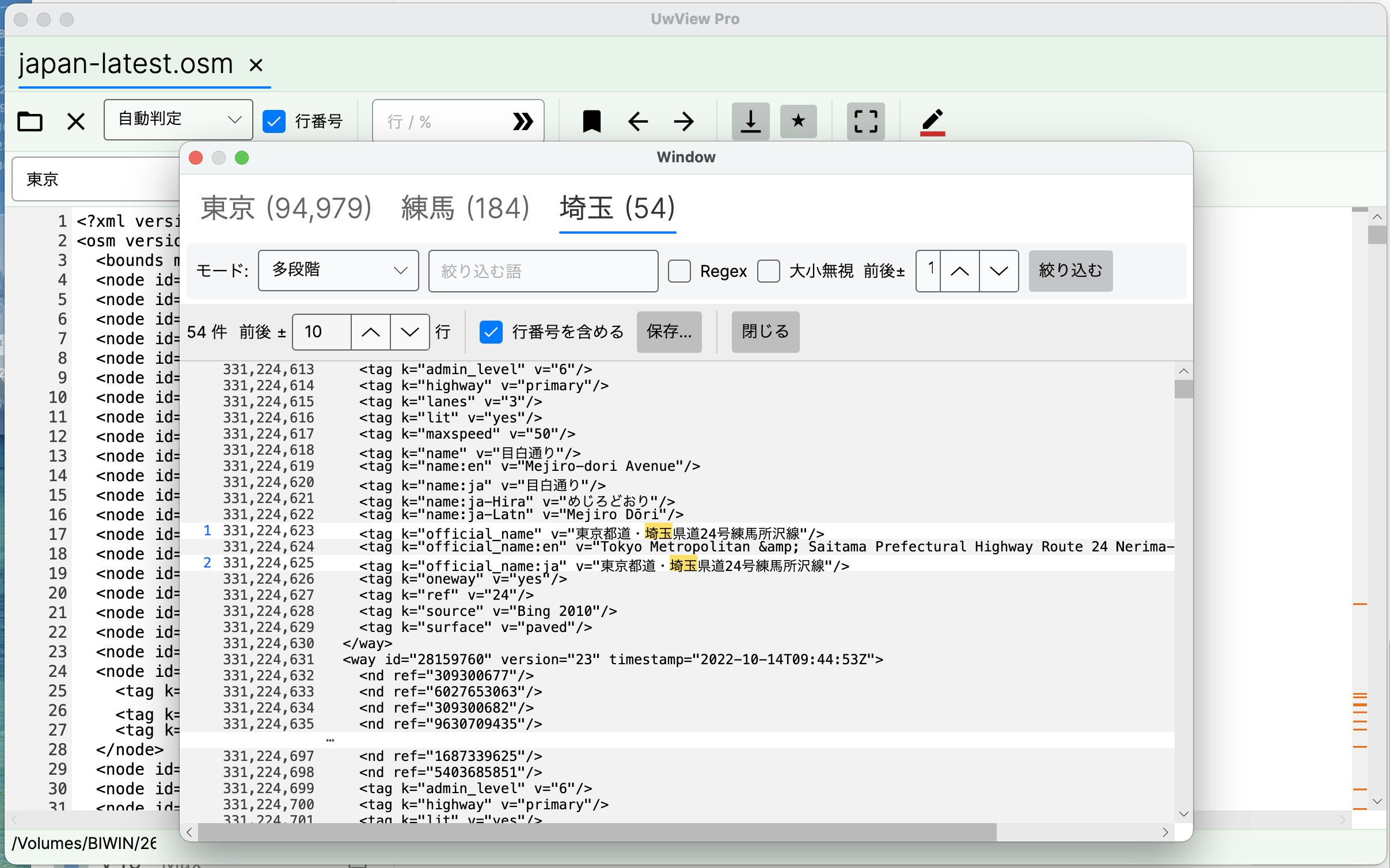
Refine your results with another term, then another — the GUI version of grep -C N w1 | grep w2 | grep w3.
- Run a normal search; results appear in Tab 1.
- Type the next term in the refine bar and hit Refine → a new tab appears, searching only within ±N lines of the previous stage’s hits (up to 8 stages).
- Each tab shows
term (count), and ±N is independent per stage (keep middle stages at ±1, open the last one to ±10 to read). Selecting a tab shows that stage’s hits in yellow in the text, on the minimap and with ◀▶. - Refining again from a middle stage discards the stages after it.
- Stages after the first are instant — they only scan the previous stage’s range (a three-stage drill-down on 50 GB takes 8.1 s, 0.24 s per later stage. The CLI’s multi-stage search works the same way).
Right-click a row → History (refinement path) to trace which line of which stage it came from. Real example: Tokyo 94,979 → Nerima 184 → Saitama 54 on a 51 GB / 892-million-line file. See the announcement.
6. Sequence Search
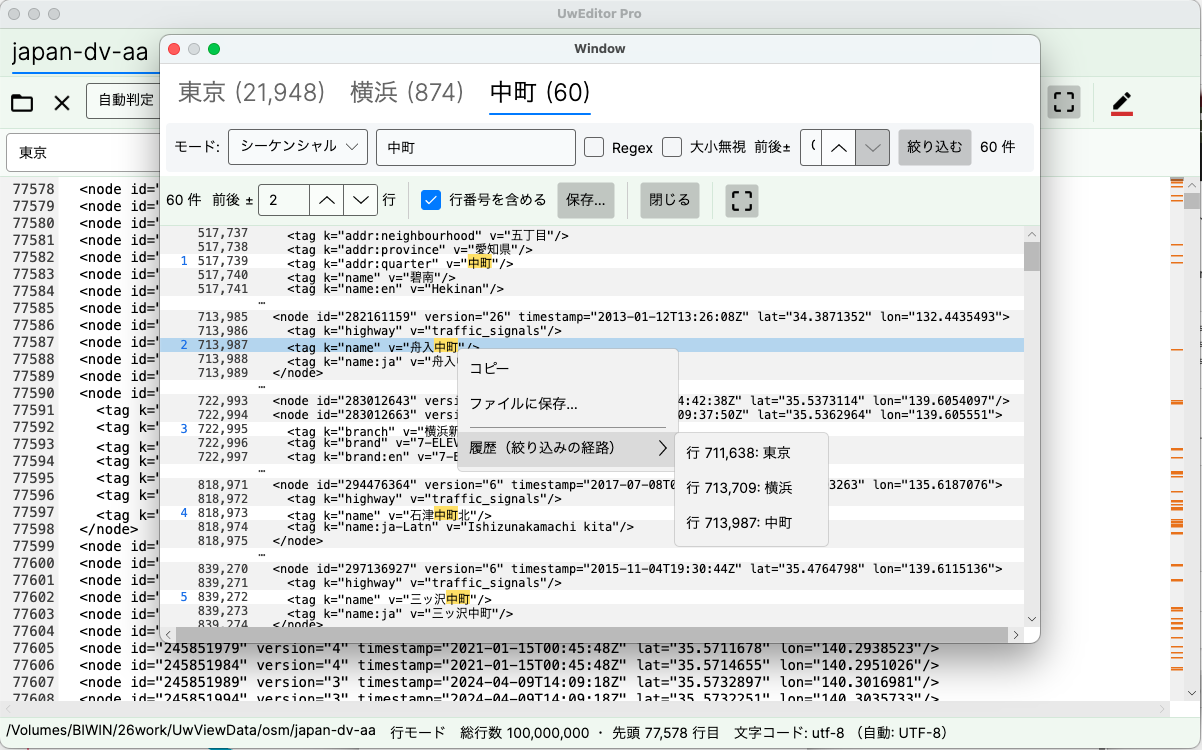
Switch the same tabbed UI to “Sequence” mode to find only the places where w1 → w2 → w3 appear in that order (think “login → timeout → restart” in a log).
- If an earlier word reappears mid-match, matching restarts from it — only clean, uninterrupted flows survive.
- Right-click a result and open History (refinement path) to list every line that formed the flow and jump to any of them.
- Each term is searched across the whole file and the order is checked afterwards, so each stage takes about as long as a full-text search (unlike Drill-down, stages are not instant).
- Switching to Drill-down while there are two or more stages asks you to confirm that Tab 2 onward will be discarded.
See the announcement.
7. Tally
Count the values inside the hit lines and rank them (the sort | uniq -c | sort -rn of the GUI).
- Enter a regex in the tally field. The first capture group
( )is the value (without parentheses, the whole match is the value). - Choose the “Top” count (default 20, 1–1000). The rest is grouped as “Other”.
- Run with ▶.
| Ready-made patterns (offered as suggestions) | What they count |
|---|---|
(ERROR\|WARN\|INFO\|DEBUG) |
Log levels |
status=(\d+) |
key=value values (HTTP status and so on) |
^(\S+) |
First word of the line (the IP in an access log, etc.) |
^(\d{4}-\d{2}-\d{2}) |
Date (count per day) |
T(\d{2}): |
Hour of the timestamp (distribution by hour) |
^[^,]*,([^,]*) |
Second CSV column |
k="([^"]+)" / v="([^"]+)" |
XML / OSM attribute names / values |
- A value is counted once per line. Up to 200,000 distinct values.
- Click a ranking row to drill down into a stage containing only that value.
- “Save CSV” writes
tally.csv(No, value, count, %). “Back” (left arrow) closes the ranking.
Details in the announcement.
8. Sort and Order
| Feature | How to use it |
|---|---|
| Sort | Sorts the hit lines by the first capture group of a pattern. Numbers compare as numbers; lines without the key go last. Example: ts=(\S+) for time order |
| Order | Two or more terms separated by commas (login,timeout,restart). Lists the flows that happened in that order. Case-sensitive |
Click a result row to jump to that line. “Save” writes sorted.txt / sequences.txt (line-number<TAB>text, flows separated by --).
8-1. Ranges (multi-line blocks) — from v1.8.1.9
Put a start and an end term in Sequence ([ERROR] SessionStart,[INFO] SessionEnd) and turn on As ranges: everything from the start line to the end line becomes one block (the CLI’s -seq … -range).
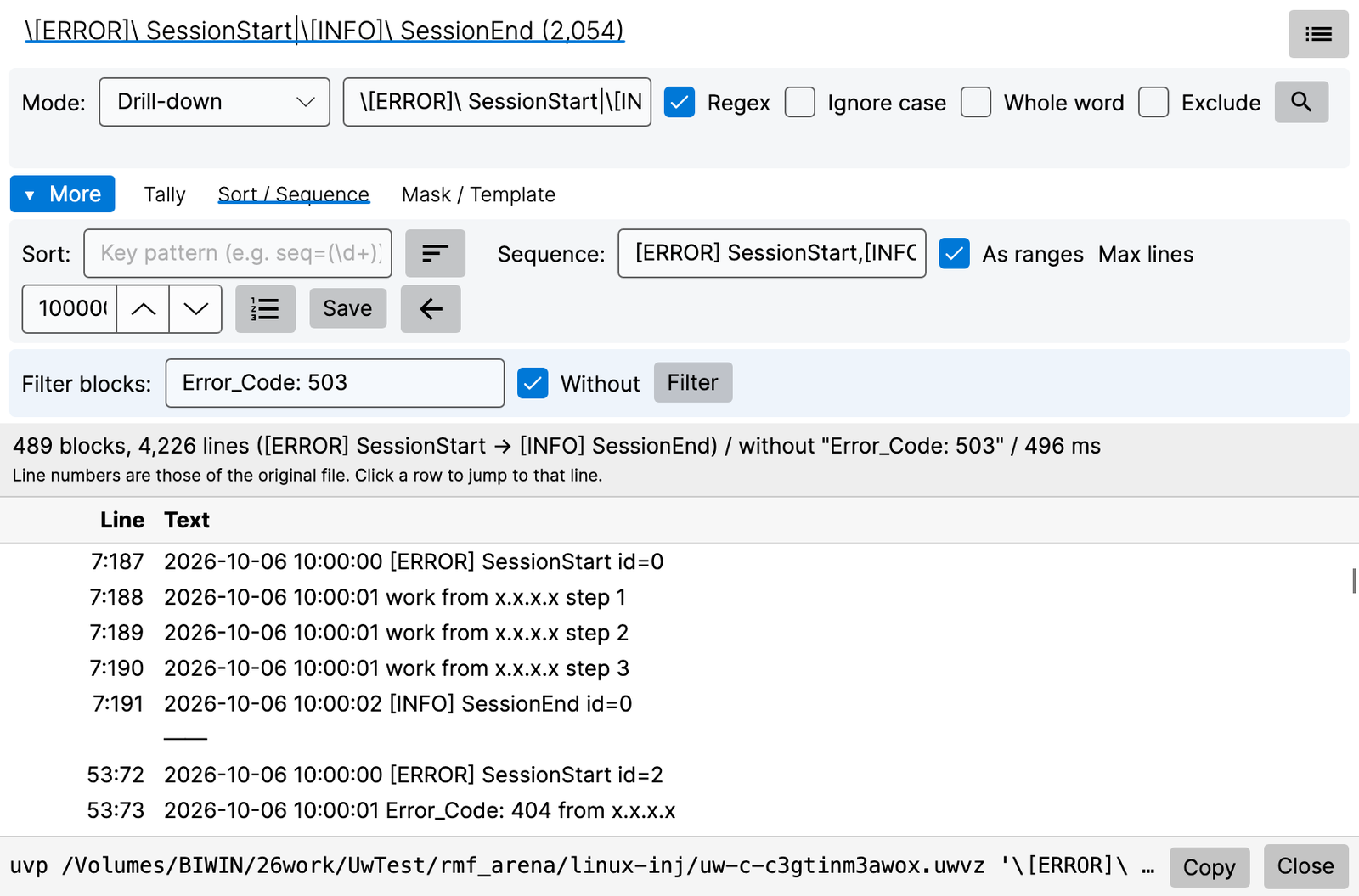
| Part | Meaning |
|---|---|
| As ranges | On: lists blocks, separated by a line |
| Max lines | A start that is still open after this many lines is dropped (--range-max) |
| Filter blocks | Keeps only blocks containing this term. With Without, keeps only blocks without it (-grep … -v). Pressing Filter again ANDs another term |
Line numbers are those of the original file. Click a row to jump to that line.
9. Extract and save
The lower row of the results window writes the hit lines to a file. Your choices are remembered for next time.
| Control | Meaning |
|---|---|
| ±N lines | Include lines around each hit (up to 64) |
| Include line numbers | Line number at the start of each line (on by default) |
| First line as header | Put the file’s first line (a CSV header, say) at the top |
| Save ±N context too | Write the surrounding lines as well (when ±N is 1 or more) |
| Save… | Write the file |
If a search stopped at the hit cap, “Change cap…” (adjust icon) opens the settings. Rectangular selection works inside the results too.
- What is saved is the lines visible under the list switch (§4-1). Bookmarked lines stay even with “Save ±N context too” off (from v1.9.0).
9-1. Masking and collecting by template — from v1.8.1.9
Use them under More → Mask / Template.
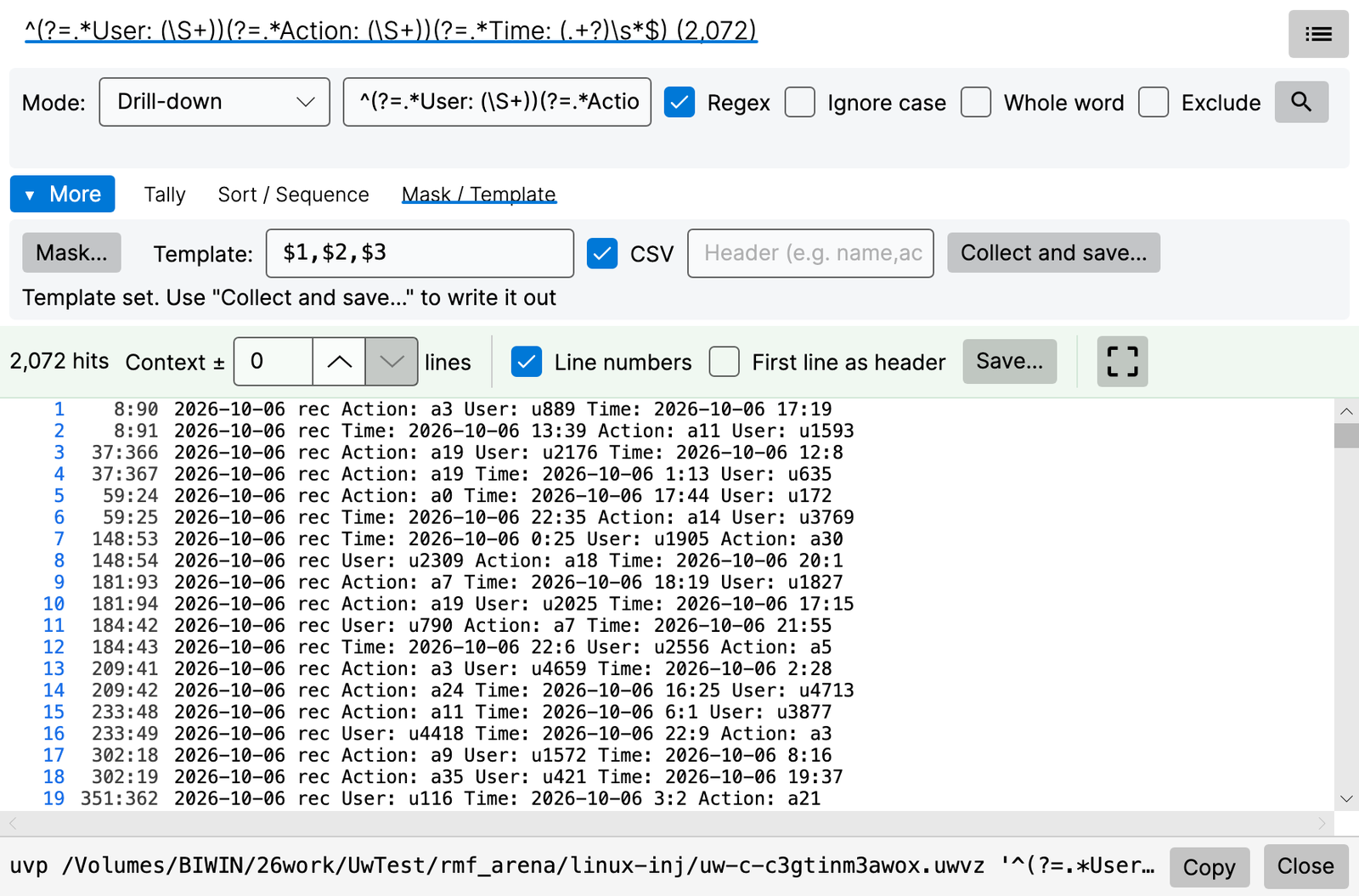
| Part | Meaning |
|---|---|
| Mask… | Replaces what a regex matches (-mask; e.g. IP addresses → x.x.x.x). Add as many as you like; they apply in order. Only what is shown, saved and copied is masked; the text and the search and filter decisions are unchanged |
| Template | Builds output from the ( ) groups of this stage’s regex (-format: $1, ${name}, $0, ${line}, ${file}, \t). The stage’s search must be a regex with ( ) |
| CSV | Splits the template at , and quotes values by the CSV rules (--csv) |
| Header | A header line to put first (--csv-header; e.g. name,action) |
| Collect and save… | Writes only the matching lines, built by the template (adds a BOM for .csv) |
10. Color highlighter, rectangular selection and more
- Color highlighter: keep multiple patterns permanently colored. 32-color palette, named sets,
.uwvhlexport, bundled industry presets. Select a word and right-click → color swatch for instant coloring. - In the dark theme (from v1.9.0): pale preset colors are drawn in colors that read well on a dark background (the colors stored in the rules do not change). Rules that are hard to read on a dark background get a ⚠ in the rule list.
- Rectangular selection (Pro): turn on Rect select in the toolbar, then drag to select a rectangle (a column block). A single click keeps its normal behavior; in edit mode use Alt+drag. Extract the “vertical column” of a fixed-width log and copy or save it; auto-scroll at the view edge lets you build very tall rectangles.
- Ctrl (Cmd)+C copies (beyond about 5 million characters it switches to saving to a file). Right-click for “Copy” and “Save to file…”.
- Esc or a click elsewhere clears it. Full-width characters count as 2 columns, tabs as 8.
- Works in line mode (once the index is built).
- Bookmarks: toggle any line, jump back and forth, shown in blue on the minimap.
- Toggle several at once (from v1.9.0): select a range of lines in the text and press Ctrl (Cmd)+B to bookmark all of them (if all are bookmarked, all are removed; up to 100,000 lines at a time; viewing only).
- Show in the results window (from v1.9.0): bookmarks are merged with the hits in the results list, and Delete in the list removes them (§4-1).
- Japanese/English UI switch, identical rendering on Windows / macOS / Linux.
11. Editing — Edit Upgrade (UVPE)
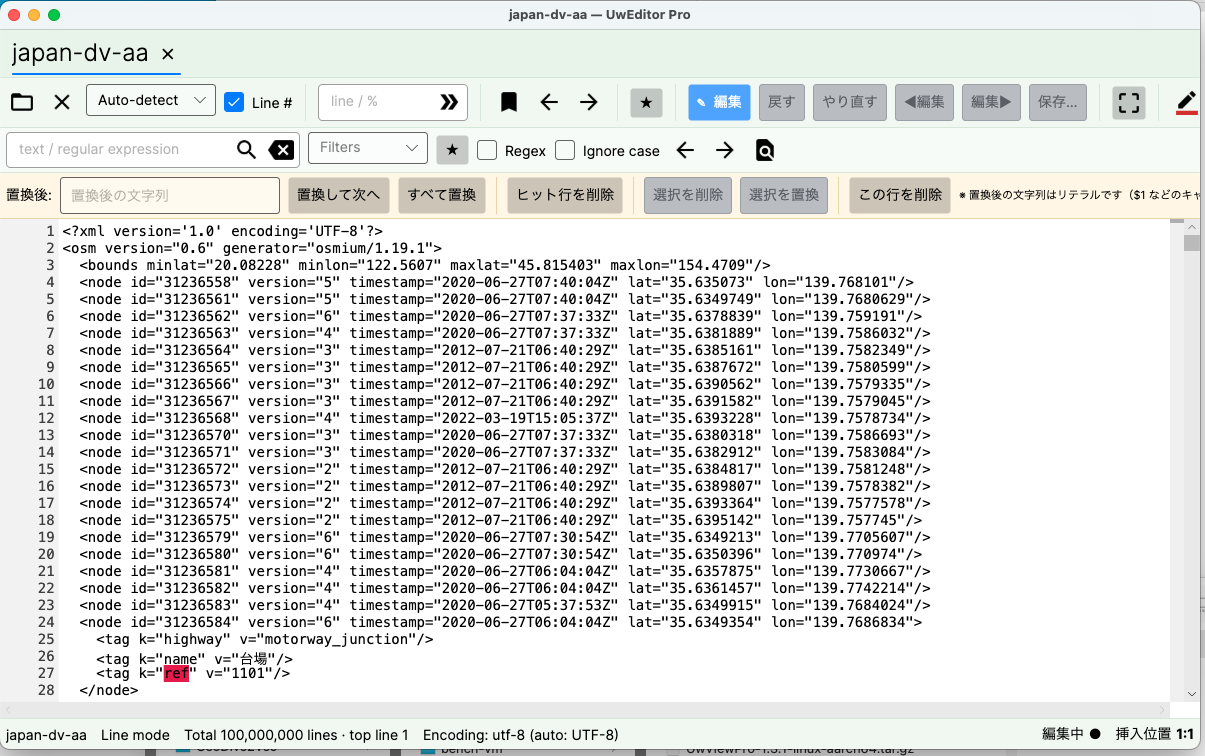
(Earlier screen.)
Press Edit on the toolbar (pencil icon; a padlock when editing is not available) to enter edit mode (the file needs an index). The original file is never touched. After a crash, the app says it restored your previous edits.
| Action | What it does |
|---|---|
| Click / drag / Shift+click | Cursor / range |
| Double-click / triple-click | Select word / line |
| Alt+drag | Rectangular selection |
| Typing (IME too), Enter, Backspace, Delete | Edit |
| Ctrl (Cmd)+C / X / V | Copy / cut / paste |
| Ctrl (Cmd)+Z / Ctrl (Cmd)+Shift+Z (also Ctrl+Y on Windows) | Undo / redo |
| Previous / next edit | Jump to the places you changed |
The replace bar (shown in edit mode; every button is an icon — hover to see its name)
- Type the replacement and use Replace next / Replace all. Replace all confirms “Replace N hit lines” first, and a single Undo reverts the whole operation. Measured: 21,994 replacements across a 10 GB / 100-million-line file in 16.8 s (write-up).
- Delete hit lines / delete selection / replace selection / delete this line (the top line on screen).
- The replacement is literal text (
$1and the like do not work here; the CLI’suvp -replacesupports them with-E). - After a replace that changes the line count, “Recounting line numbers” appears (you can keep working meanwhile).
The diff file (.ewvz) and saving
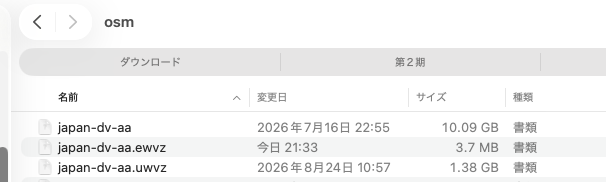
- Every edit accumulates in
file.ewvz(a few MB even for a 100-million-line replace). The original and the.uwvzstay untouched. - Stop and resume: close mid-edit and pick up tomorrow. Undo/Redo works across sessions, including edits from previous days.
- Saving: menu File → Save (.uwvz)… (you choose where). “Export as text…” writes plain text. Leaving edit mode asks whether to save.
12. Compressed files
The point is to remove the “decompress first” step and the disk space a plain-text copy takes.
Opening in the GUI
- Opening any of seven formats — gz, bz2, xz, lzma, zstd, lz4, brotli — asks how you want it opened.
| Choice | What happens |
|---|---|
| Convert to .uwvz and open | Builds name.gz.uwvz (and so on) and opens it without writing a plain-text copy. Later opens are fast, with no decompression |
| Decompress to text and open | Same as the free edition |
- If a converted file already exists, or the original compressed file has changed, the app asks what to do.
- Measured (a 9.49 GB / 100-million-line gz): manual gunzip → normal open took 44.6 s and 10.63 GB of disk; the direct conversion took 23.5 s and 1.15 GB (1.89× faster, 1/9.3 the disk). Expanded size, total line count and block count were confirmed identical.
- A truncated compressed file is refused, so a partial file is never read as if it were complete.
.tar.gzis not supported (extract it and bundle the files withuvp). - zip and OSM pbf cannot be opened in the GUI. Index them with the CLI (
uvp), then open that.uwvz(uvp logs.zip TERM,uvp japan.osm.pbf TERM; §16).
Writing and restoring (CLI)
uvp‘s-outpicks the format from the extension: the seven formats.gz.bz2.xz.lzma.zst.lz4.brplus.zip; anything else is plain text (uvp f '東京' -out hits.xz).-extractrestores a.uwvzto its original form (uvp f.uwvz -extract [txt|gz|bz2|xz|lzma|zst|lz4|br|zip] -out f). Leave out the format to get the original form back. No license needed; the decompressed content is byte-identical to the original (the compressed file itself is not). An index built from a pbf comes back as XML text.- Committing an edit (Edit Upgrade) writes a new
.uwvzor plain text (§11). -extracton an index built from Shift-JIS, EUC-JP or UTF-16 writes the original encoding back.-extracton an index built from Word, Excel or PDF writes the extracted text toreport.docx.txt(the original format cannot be restored; from v1.9.0; §3-2, §3-3).
Can .uwvz replace gzip? — .uwvz is a compression format plus index. The same files compressed with gzip -6, zip -6 and .uwvz (Mac (Apple M4, 10 cores), external USB SSD; conditions under About the numbers).
| Original | gzip -6 | zip -6 | .uwvz |
Search: gunzip + rg | unzip + rg | .uwvz directly |
|---|---|---|---|---|---|---|
| 3.03 GB | 0.30 GB (16.8 s) | 0.30 GB (19.4 s) | 0.25 GB (1.2 s) | 6.47 s | 8.71 s | 0.68 s |
| 10.26 GB | 1.12 GB (66.5 s) | 1.12 GB (76.8 s) | 1.16 GB (14.9 s) | 24.70 s | 40.48 s | 1.74 s |
| 51.25 GB | 5.75 GB (347.2 s) | 5.76 GB (394.7 s) | 5.74 GB (65.0 s) | 120.67 s | 203.06 s | 7.21 s |
About the same size as gzip (1/8.9 at 50 GB), 5× faster to build, and searchable without restoring — that is the difference. It is a UwView-specific format, so when you hand a file to someone else, -extract it or gzip it. Details in Keep it as .uwvz instead of gzip.
13. Bundled indexes (several files), the file list and tabs
When the CLI bundles several files into one index (uvp '*.log' TERM), you can open that uw-….uwvz in the GUI. From v1.8.1.9, you can also bundle in the GUI with the Command Line dialog (Ctrl+Shift+K, Cmd+Shift+K on a Mac): write a pattern such as '*.log' in the file field and run it, and it bundles and opens the files the same way uvp does (§14-1). Dropping a folder, or choosing two or more files with Open, also leads there.
Display
- The line column reads
file-number:line(e.g.3:128394). A file inside a zip isn-m(e.g.2-3:128394= the third file of the second zip). - The text, the results window and the Sort list all use the same notation. The status bar shows, for example, “3: line 128394 of app-0903.log”.
- The whole bundle is searched at once (Drill-down and Tally work as usual).
File list (the file-list button on the search bar — a bulleted-list icon; the results window has the same button)
| Column | Content |
|---|---|
| Number, file, hits, size | Hits only while searching. Hover a file name for its full path |
| Mark | Main / tab |
| Bottom | Tabs n / 8 |
- Double-click / Enter on a row to open it. Right-click a row for the file actions window (§3-4; from v1.9.0).
- Open in (top right: Main, Tab, App; Main by default, remembered; App was added in v1.9.0) switches how it opens:
- Main: jumps to the start of that file inside the bundled text (the main tab).
- Tab: opens the original file on its own in an extra tab. For Word, Excel and PDF, the text of that one file is extracted and opened.
- App: opens the original file in the app for its extension (a PDF app for .pdf, Word for .docx, Excel for .xlsx and so on; the OS settings decide which app), so you can check a Word, Excel or PDF file as it really looks. Files inside a zip and files whose original cannot be found are not opened; you are told at the bottom of the list.
- Up to 8 tabs (the main tab + 7 extra). Beyond that the file is not opened and you are told why (old tabs are never closed for you). A file that is already open is simply switched to.
- While extra tabs are open, the main tab cannot be closed.
- The main tab of the bundle is gray, so it stands out from the extra tabs.
- A tab is named
number:file-name(e.g.3:app-0903.log), cut with...beyond 27 characters. Hover to see the full name (the location on the second line). The tabs stay on one row and scroll sideways. - What cannot open in a tab: files inside a zip, and files whose original has been deleted (their content remains in the index). You are told why, and the main tab jumps to that position instead.
14. Combining the CLI (uvp -open) with the GUI
| Form | What happens |
|---|---|
uvp app.log ERROR -C 5 timeout -open (at the end) |
Shows the CLI’s result in the GUI without searching again (“Showing CLI result (no re-search)”) |
uvp -open app.log ERROR -C 5 timeout (at the start) |
Runs the same investigation in the GUI (stages become tabs) |
uvp -open '*.log' |
Bundles the files (reusing the index from the second time) and opens that .uwvz in the GUI |
uvp -open uw-%a.log.uwvz |
Opens a bundled index made earlier, by name |
| The GUI’s Command Line | Works like the command with -open (§14-1). No need to write -open (it is ignored) |
- Ranges (
-range), masking (-mask) and templates (-format) are rebuilt in the window too (from v1.8.1.9). - Stages the GUI does not have (such as
-sort count) are skipped, and you are told so. - The GUI and the CLI share the same index. Click a row in the list to drill into the next stage; Tally, Sort and Save CSV are right there.
14-1. The GUI’s Command Line — search and bundle with uvp’s syntax (from v1.8.1.9)
Open the dialog with the Command Line button on the toolbar (the terminal icon), File → Command Line…, or Ctrl+Shift+K (Cmd+Shift+K on a Mac). How to open it, its parts, the base folder and the history are the same as in the free edition (UwView User Guide §8). In Pro, all of uvp‘s syntax works.
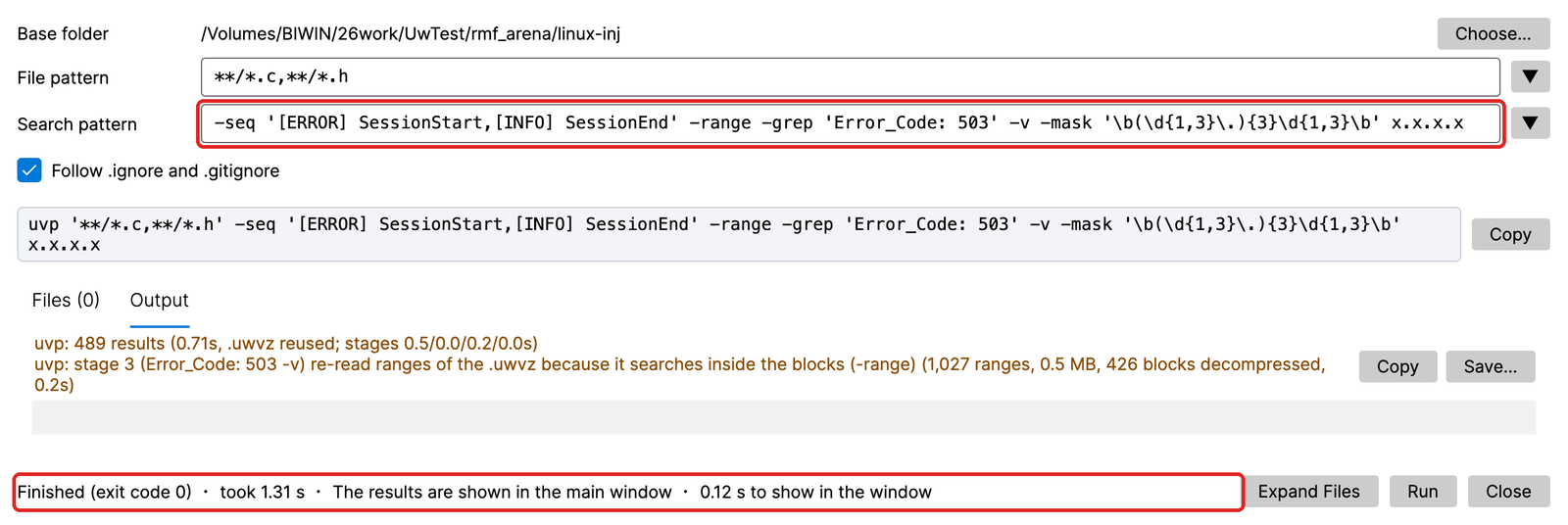
| Command | File pattern | Search pattern |
|---|---|---|
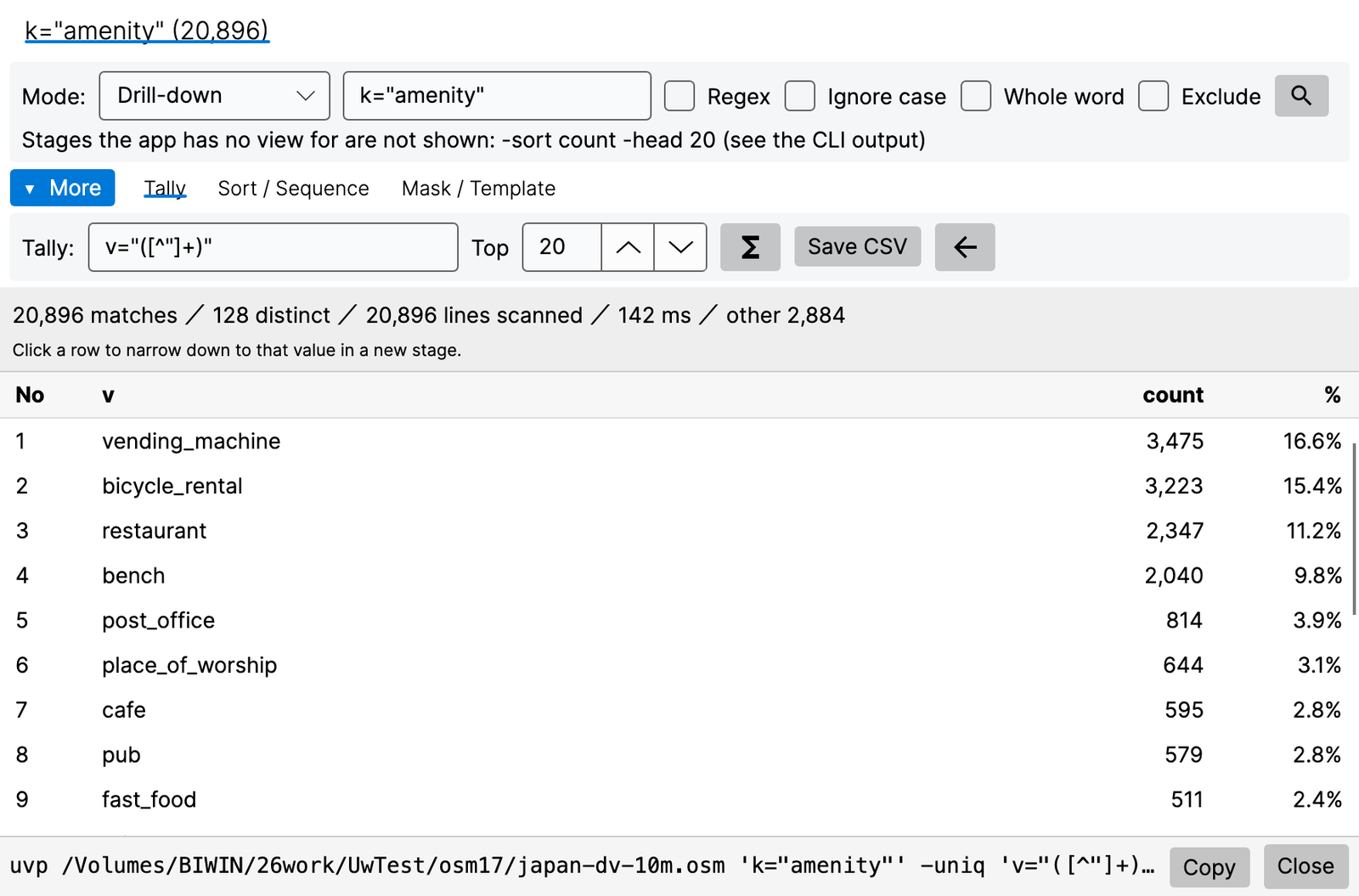
uvp japan.osm 'k="amenity"' -uniq 'v="([^"]+)"' -sort count -head 20 |
japan.osm |
'k="amenity"' -uniq 'v="([^"]+)"' -sort count -head 20 |
uvp '**/*.c,**/*.h' -seq '[ERROR] SessionStart,[INFO] SessionEnd' -range … |
**/*.c,**/*.h |
-seq '[ERROR] SessionStart,[INFO] SessionEnd' -range … |
uvp japan.osm.uwvz 東京 |
japan.osm.uwvz |
東京 |
uvp convert '*.log' |
*.log |
convert |
uvp '**/*.{txt,log}' ERROR |
**/*.{txt,log} |
ERROR |
Brace patterns {a,b} in file patterns (from v1.9.0)
Write {a,b} in a file pattern and it expands to both a and b. The uvp CLI and the GUI’s Command Line work the same.
| Pattern | Expands to |
|---|---|
**/*.{txt,log} |
Every .txt and .log in all folders below |
app.log{,.*.gz} |
app.log and app.log.*.gz (the same as app.log,app.log.*.gz) |
logs/2026-{09,10}/*.log |
logs/2026-09/*.log and logs/2026-10/*.log |
- Nesting (
{a,{b,c}}) and empty choices ({,.gz}) are allowed. - One pattern expands to at most 1,000 variants; beyond that it stops (exit code 2).
- Commas and spaces inside braces do not split the pattern.
- An unclosed
{, or{}/{a}without a comma, is taken literally. - If a file whose name contains the braces actually exists, that file is used without expanding.
Where the results go
- One file: opened and loaded into the Multi-stage / sequential search window. Stages become tabs, and tally (
-uniq), sort, order, ranges (-range), masking (-mask) and templates (-format) are rebuilt in the window. The CLI result is handed over as is, so the GUI does not search again. - Several files: the bundled index (
.uwvz) is opened and loaded the same way. - Stages the GUI does not have (
-sort count,-head 20and so on) are noted at the top of the window. To get everything as text, use Save….
Bundling
- Write several files in the file field —
*.log,logs/**,f1.log,f3.log— and they are bundled into one index and opened, just asuvpdoes. The tab reads like*.log — app (12 files). The CLI uses an index made in the GUI without rebuilding it, and the other way round. - At the end of the line under Expand Files, a preview says what will happen: create a new index (with size and estimated time), reuse the previous one, append new files, rebuild because a file changed, or keep the previous index because files are missing (then Rebuild… also appears; the old index is kept as
.bak-<date>). - Running without a search term only bundles and opens (the same as
uvp -open '*.log'). Progress and Stop are shown while bundling. - If the base folder is not writable, it asks where to keep the index (an index kept elsewhere is not shared with the CLI).
- Dropping a folder on the main window opens the dialog with that folder as the base folder. Choosing two or more files with Open asks whether to open them in separate tabs or bundle them into one.
- Opening a bundled index directly checks it against the original files; if files were added or changed it asks whether to append/rebuild and open, open as is, or cancel.
Writing out
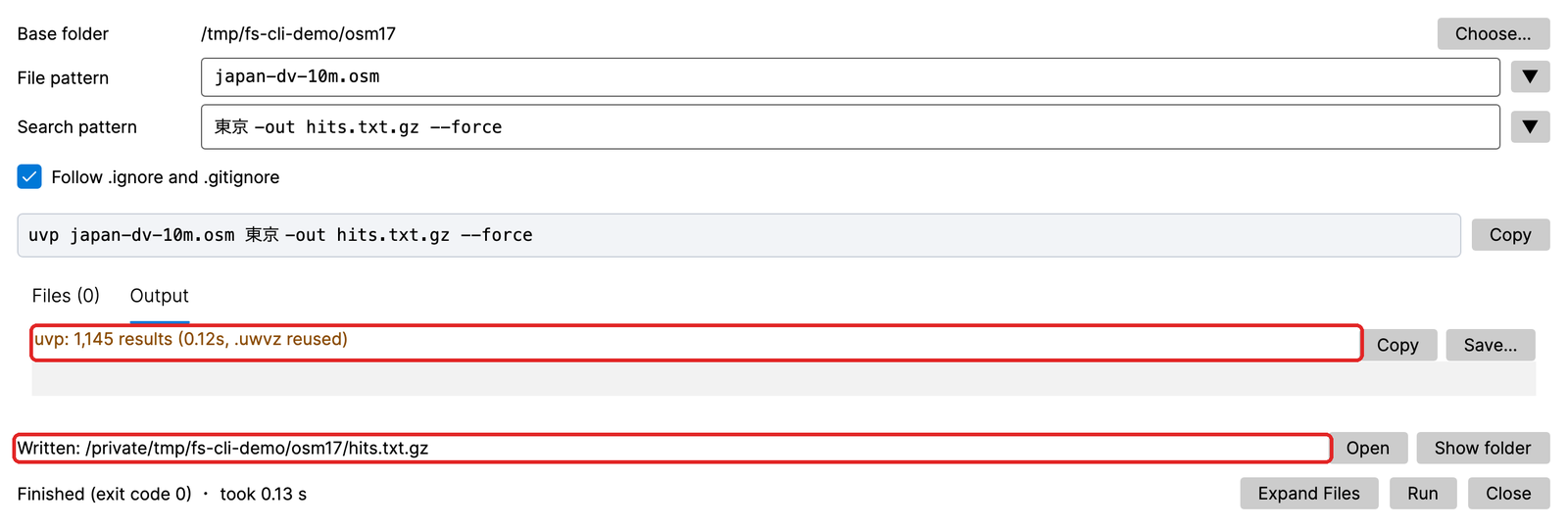
| Form | What happens |
|---|---|
-out hits.txt.gz |
Writes the file and shows “Written: path” with Open and Show folder. If the file exists, asks before overwriting (“Yes” is the same as --force) |
cat, -replace (without -out) |
Opens the output in a new tab as name.cat.txt / name.replaced.txt. The original file is unchanged |
convert, --rebuild, --tune |
Shows the new index with Open / asks before rebuilding / shows the output (--apply also updates the settings) |
| Save… | Writes the same way as the CLI’s -out. The format follows the extension (.csv → --csv, .json / .jsonl → --json) |
15. Settings
On Windows and Linux, menu “File → Settings…” (Ctrl+,); on a Mac, “Settings…” in the app menu (Cmd+,). The Settings window has three tabs: General, Keys and Display (Keys and Display from v1.9.0). Changes take effect at once and are remembered automatically.
15-1. General
| Item | Default | Content |
|---|---|---|
| Language | Follow the OS | 日本語 / English |
| Maximum hits kept per search | 0 (unlimited) | A cap to protect memory. Shared with the CLI (uvp) (-limit) |
| Search threads | 0 (= 8) | 0–1024. uvp --tune --apply stores the measured value here. The environment variable UVP_MAX_THREADS takes precedence if set |
| License | — | Status, registered keys (type, days left, remove = trash can), key entry, Activate (key) / Re-verify (sync) / Deactivate (broken link), Buy (cart) |
15-2. Keys (key bindings) — from v1.9.0
| Part | Meaning |
|---|---|
| Presets: Standard / vi/less style | Replace all bindings at once (table below) |
| List | Action, current keys, default keys (the Standard bindings), Reset (that action to its default), Clear (remove its keys) |
| Box below | Select an action in the list and this box waits for a new key. The key you press is bound to that action |
| Reset all to defaults | Resets every action (the same as choosing Standard) |
| Export… / Import… | Write / read the bindings as a .uwvkeys file, to take them to another machine (also between Mac and Windows / Linux; Ctrl and Cmd are swapped) |
- Up to two keys per action. If the key is already bound to another action, you are asked on the spot whether to move it.
- Digits cannot be bound, because they are count prefixes (
5j= five lines down,120g= line 120). - In text boxes such as the search box or jump box, and in the text while editing, single-character keys (
j,k,[and so on) are typed as text. Keys with Ctrl, F keys and Esc still work. - Standard keeps the bindings as before. vi/less style is Standard plus these keys.
| Key | Action |
|---|---|
j / k |
One line down / up (type a number first for N lines; 5j = five lines down) |
h / l |
Scroll left / right |
^ / $ |
Left end / right end of the line |
g / G |
Go to the start (type a number first to go to that line; 120g = line 120) / go to the end |
n / N |
Next hit / previous hit (on a Mac, bound instead of Cmd+G / Cmd+Shift+G) |
* / # |
Search for the next / previous occurrence of the selected word (double-click to select it) |
m |
Toggle a bookmark (all selected lines if a range is selected) |
f |
Follow tail on/off (Pro has no follow tail, so it does nothing) |
v |
Cycle the result list switch (Hits + bookmarks → Bookmarks only → Hits only; §4-1) |
+ / - |
Make the results window larger / smaller |
| Ctrl+Shift+O | A small window to pick an open file (type part of a name to narrow, Enter to go, Esc to close) |
15-3. Display (fonts and theme) — from v1.9.0
| Part | Meaning |
|---|---|
| Theme: Follow OS / Light / Dark | The default is Follow OS, which follows the OS’s light / dark switch on the spot |
| Body font | Monospaced fonts are listed first. “Default” means Cascadia Mono, Menlo, Consolas and the like |
| Size | 6–48. The result list is shown 2 points smaller than the text. Line height follows the font |
| Reset font | Resets the font and size to the defaults |
- Over the text or the result list, Ctrl (Cmd)+wheel and Ctrl++ / Ctrl+- also change the size, and Ctrl+0 returns to the default.
- In the dark theme, the window, text, result list, minimap, toolbar icons, dialogs and the notice bar turn dark. The edit selection, cursor and change marks, rectangular selection and button colors are also adjusted for the dark background.
16. CLI (uvp) — compared with ripgrep
uvp is a CLI that uses the same engine and the same .uwvz as the GUI. You get the same results you saw in the GUI from a script, and -open hands the CLI result to the GUI as is, where you continue narrowing with the mouse. PATH setup is in §2-1. Every option and example is in the uvp command manual.
uvp <file> <term> [stages…] [options]        investigate (main form)
uvp '<pattern>' <term> [stages…]             bundle several files into one .uwvz and investigate
uvp convert <file> [-out x.uwvz]             just build a .uwvz
uvp cat <file> [-out …]                      print the text
uvp <file.uwvz> -extract [format] [-out …]   restore the original form (no license needed)
uvp <index or pattern> --info                show where an index came from and what it holds (no license needed)
uvp <pattern> --files                        list only the files that would be searched (no license needed)
uvp -open [<file>] …                         launch the GUI (put it first to run the command in the GUI)
Stages run in the order written (think of a pipe). Modifiers (-i, -E, -w, -v, -C N) go after the term.
Several files, zip / pbf, compression and more
- Bundle several files into one
.uwvz:uvp '*.log' ERROR,uvp '**/*.log' ERROR,uvp 'app.log,app.log.*.gz' ERROR. Always quote the pattern (uvp expands it, not the shell). Brace patterns such asuvp '**/*.{txt,log}' ERRORanduvp 'app.log{,.*.gz}' ERRORwork too (from v1.9.0; §14-1). The index is created in the current folder with a name likeuw-%a.log.uwvz. Output isfile:line<TAB>text. - No rebuild from the second run: files added or lines appended are added to the end of the index. It is rebuilt only when a file has been rewritten (with a notice first).
- Deleted files are kept (Keep): when log rotation deletes old files, their content stays in the index and is still searched. To drop them from the index too, use
--rebuild(the previous index is moved to.bak-<timestamp>). - Ignore rules: files matched by
.ignore/.gitignoreare left out of wildcard expansion (the main rules are the same as ripgrep’s). Hidden files are skipped on every OS.--no-ignoreturns this off. - zip:
uvp logs.zip ERROR(each text file inside; output readslogs.zip!app.log:line), oruvp 'logs.zip!server/*.log' ERRORfor part of it. - OSM pbf:
uvp japan-latest.osm.pbf 東京(handled as OSM-XML).japan-latest.osm.pbf(2.46 GB, 51.3 GB of content as XML) becomes a searchable.uwvzin 21.6 s. Finding 東京 (94,979 hits) takes 27.34 s in total from a dropped cache; from the second search on it uses the.uwvzand takes 5.01 s (6.43 s right after dropping the cache) (measured 28 September 2026 withuvp1.7.3.5; conversion and search code as in 1.7.3.6). - Seven compressed input formats (gz, bz2, xz, lzma, zst, lz4, br) are decompressed into the index, with no external commands. Plain and compressed files can be bundled together.
-outwrites seven formats plus zip: the extension picks.gz.bz2.xz.lzma.zst.lz4.bror.zip(e.g.uvp cat app.log.bz2 -out app.log.zst).-extracttakes a format:txt gz bz2 xz lzma zst lz4 br zip. The format is decided by “what you specify → the-outextension → the original form”, in that order. A bundled index is restored file by file under the original names (-outis a folder).--info: prints a bundled index’s original pattern, creation time and contents (useful when an index has a hashed name).--files: prints only what the pattern expands to, without searching (also reports how many files were ignored; no index is built).- Out of memory: when too many lines match and memory runs short, uvp does not crash; it prints how to narrow the search and exits with 2 (
-limit N,-head N,-out, or add a search term). --tune: measures the best thread count for this machine (--applysaves it to the settings shared with the GUI).
Side by side with ripgrep (rg) and sed — what you would write with rg / sed, and how it is written with uvp.
| # | Function | rg, sed, … | uvp |
|---|---|---|---|
| 1 | Search (literal) | rg -n -F '東京' f |
uvp f '東京' |
| 2 | Case-insensitive | rg -n -i -F tokyo f |
uvp f tokyo -i |
| 3 | Regex | rg -n 'v="(a\|b)"' f |
uvp f 'v="(a\|b)"' -E |
| 4 | Whole word | rg -n -w id f |
uvp f id -w |
| 5 | Drill-down (multi-stage) | rg -n -F A f \| rg -F B |
uvp f A B (list the terms; each re-searches inside the previous stage) |
| 6 | Exclude | rg -n -F A f \| rg -v -F B |
uvp f A B -v |
| 7 | Co-occurrence within ±N lines | (no single command; rg -C only prints context) |
uvp f A -C 3 B (only A with B within 3 lines) |
| 8 | Tally, top 20 | rg -N -o 'k="amenity" v="([^"]+)"' -r '$1' f \| sort \| uniq -c \| sort -rn \| head -20 |
uvp f 'k="amenity"' -uniq 'v="([^"]+)"' -head 20 |
| 9 | Tally → by count / by value | … \| sort -k1,1nr / … \| sort -k2 |
… -uniq '<key>' -sort count / -sort value |
| 10 | Sequence (A→B→C in that order) | (no equivalent; a state machine in awk) |
uvp f -seq 'login,timeout,restart' |
| 11 | First N | rg -n -F '東京' f \| head -10 |
uvp f '東京' -head 10 (stops once N are found) |
| 12 | Last N | rg -n -F '東京' f \| tail -10 |
uvp f '東京' -tail 10 |
| 13 | Sort → first N | rg -n -F '東京' f \| sort \| head -10 |
uvp f '東京' -sort -head 10 |
| 14 | Write to a file | rg -n -F '東京' f > out.txt |
uvp f '東京' -out out.txt (never overwrites without --force) |
| 15 | Compressed output | rg -n -F '東京' f \| gzip > out.gz |
uvp f '東京' -out out.txt.gz (seven formats such as .bz2 .xz .zst, plus .zip) |
| 16 | Extract (no line numbers) | sed -n '/東京/p' f > out.txt |
uvp f '東京' --no-line-number -out out.txt |
| 17 | Replace | sed 's/A/B/g' f > out.txt |
uvp f A -replace B -out out.txt (Edit licence; the original is not modified) |
| 18 | Replace (regex + group reference) | sed -E 's/v="(a\|b)"/v="X_\1"/g' f > out.txt |
uvp f 'v="(a\|b)"' -E -replace 'v="X_$1"' -out out.txt |
| 19 | Several files | rg -n -F ERROR logs/ |
uvp 'logs/**' ERROR (bundled into one .uwvz) |
| 20 | List the target files | rg --files logs/ |
uvp 'logs/**' --files |
| 21 | Search while compressed | rg -z -n -F '東京' f.xz (decompresses every time) |
uvp f.xz '東京' (builds the .uwvz on first use) / uvp f.uwvz '東京' (works without the original) |
| 22 | Inside a zip | (not possible; extract first) | uvp logs.zip ERROR |
| 23 | Restore the original form | gzip -dc f.gz > f |
uvp f.uwvz -extract [format] -out f (no licence needed; content byte-identical) |
| 24 | Print the text | cat f |
uvp cat f |
| 25 | Cap on hits kept | — | -limit N (memory safeguard; default unlimited, exit 2 when the cap is hit) |
| 26 | Hand the result to the GUI | — | … -open (at the end = run, then open in the GUI; at the start = run in the GUI) |
| 27 | Exit code | grep: 0 = found / 1 = none / 2 = error |
same 0 / 1 / 2 (2 also when stopped at the cap or out of memory) |
-limit Ncaps the number of hits kept (memory grows with the hit count). The default is unlimited (shared with the GUI setting). Hitting the cap returns exit code2, and which hits remain is not defined. If you want the first N hits, use-head N.- Progress and diagnostics go to stderr, data to stdout (safe to pipe).
Performance at a glance — compared with ripgrep (the first run is timed right after dropping the cache (cold), the second immediately after (hot). uvp’s first run includes building the index. The ratio is rg ÷ uvp; above 1 🟢 = uvp faster, 1/x 🍊 = rg faster; under 1.5× is “on par”. Every result matched rg (or a combination of sed, sort, uniq and so on). Versions and machine are under About the numbers.)
First, where uvp does not win:
- Searching one file once: on par. Building the index makes rg slightly faster on the first run at 3 GB and 10 GB (3 GB: rg 3.26 s / uvp 3.43 s = 1/1.05 🍊; 10 GB: 10.94 s / 11.82 s = 1/1.08 🍊; at 50 GB it is 64.68 s / 58.81 s, uvp 1.10×, on par). At 3 GB and 10 GB the second run is on par too (0.31 s / 0.29 s, 0.97 s / 1.00 s; the file stays in memory, so rg’s second run is fast as well).
- The first run of a bundle is slow. 12 files (7 gz + 5 plain): rg 24.62 s / uvp 41.23 s (1/1.67 🍊), and 2.34× the free uvf (17.60 s). Even 5 gz files: rg 1.34 s / uvp 3.04 s (1/2.27 🍊).
- Bundling only plain text, rg is faster (five plain files, first + second run: rg 5.56 s / uvp 6.64 s = 1/1.19 🍊, within “on par”).
- The first run on one compressed file is on par (1/1.13–1.29 across the seven formats).
| One large file | 3 GB | 10 GB | 50 GB |
|---|---|---|---|
| Plain search for 東京, second run (hot), rg → uvp | 0.31 → 0.29 s (on par) | 0.97 → 1.00 s (on par) | 70.33 → 6.45 s (10.9 🟢; rg’s second run varies between 55 and 70 s, and even at 55.50 s it is 8.6) |
Seven search variants, total (cold + hot; plain, -i, -E, -v, …), rg → uvp |
33.63 → 14.05 s (2.39 🟢) | 95.41 → 29.07 s (3.28 🟢) | 870.64 → 232.98 s (3.74 🟢) |
| 16 uvp stages and outputs, total (cold + hot), command combination → uvp (uvp timed after the index is built) | 70.54 → 13.59 s (5.19 🟢) | 200.01 → 38.81 s (5.15 🟢) | 1,590.26 → 212.36 s (7.49 🟢) |
- The free uvf is on par with rg on the same seven searches (1.00–1.16). Across all 96 items, the command-line combinations took 4,168.64 s and uvf / uvp 1,672.55 s (2.49×), with zero mismatched results.
Compressed and multiple files (warm cache (hot), the faster of two runs each; rg is rg -z; each single compressed file is the same 979 MB of XML compressed in that format)
| Seconds | rg | uvf | uvp first | uvp second | Second run, rg → uvp |
|---|---|---|---|---|---|
| 1 gz file | 0.43 | 0.33 | 0.42 | 0.12 | 3.6 🟢 |
| 1 bz2 file | 7.89 | 7.43 | 7.64 | 0.12 | 66 🟢 |
| 1 xz file | 4.21 | 3.37 | 3.44 | 0.11 | 38 🟢 |
| 1 lzma file | 3.40 | 2.57 | 2.64 | 0.12 | 28 🟢 |
| 1 zst file | 0.54 | 0.50 | 0.57 | 0.12 | 4.5 🟢 |
| 1 lz4 file | 0.31 | 0.28 | 0.35 | 0.12 | 2.6 🟢 |
| 1 br file | 0.87 | 0.74 | 0.85 | 0.12 | 7.3 🟢 |
| 5 gz files, bundled (about 7.4 GB decompressed) | 1.34 | 1.04 | 3.04 (1/2.27 🍊) | 0.73 | 1.84 🟢 |
| 12 files, 7 gz + 5 plain, bundled (about 60 GB decompressed) | 24.62 | 17.60 | 41.23 (1/1.67 🍊) | 9.52 | 2.59 🟢 |
- The second run searches the index, so it takes 0.11–0.12 s whatever the format; the heavier the decompression, the wider the gap.
- With the 12 files, the second run onward is 1.85× faster than uvf, and the first run’s delay (about 24 s) is won back within three searches after the first.
- rg re-reads the whole file for every question; uvp reads it once and keeps an index. For a single search, the index-free uvf or rg is enough; the more questions you ask of the same file, the more uvp pays off. Full data is in the uvp command manual and on the benchmarks page.
17. Known limitations
- Lines display up to the first 8,192 characters (the rest is elided — a deliberate speed-first design; horizontal scrolling covers those 8,192).
- Line endings: LF / CRLF (bare CR unsupported). Primary encodings: UTF-8 / Shift-JIS / EUC-JP. Line breaks in UTF-16 are not exact.
- EUC-JP supplementary kanji (JIS X 0212) cannot be read and become “・” (they cannot be restored; §3-2).
- The index format is new in v1.9.0.
.uwvzfiles made by earlier releases are rebuilt the first time you open or search the file (§3-2). - Word, Excel and PDF cannot be written in their original format. .doc, .xls, password-protected files and PDFs without text cannot be read (§3-3).
- ±N context is at most 64. Tally handles up to 200,000 distinct values. Copying a rectangle beyond about 5 million characters switches to saving a file.
- Editing (Edit Upgrade) operates on
.uwvzfiles. Replacements are literal text (no$1). - Narrowing down from millions of hits can show “Calculating positions…” for a while.
- zip and pbf cannot be opened directly in the GUI (§12). A zip can be opened by bundling it with the GUI’s Command Line (§14-1).
- The Windows build is not code-signed (a warning may appear on first launch).
- Real-time tail (the
tail -fstyle follow mode) is not in Pro. Following a growing file is available in the free UwView. Pro keeps edits in a separate journal (.ewvz), which does not sit well with an original that keeps changing underneath it. Use the free edition to follow a log as it is written; reopening a file to read up to the latest content works in Pro. From v1.9.0, when the open file is truncated or deleted outside the app, a notice bar tells you and Reload reopens it (§3-4). - Reloading a file that changed outside the app does not update the search results by itself (search again).
About the numbers
- The GUI comparison with klogg (§3-1): the klogg rows and the 0.01–0.07 s reopen were measured with v1.6.6 “First Light” (klogg 24.11.0, 20 September 2026, cold). The UwView Pro first-open and search rows come from the same engine through the CLI (
uvp1.7.3.1, 28 September 2026): first open = right after dropping the cache (cold, including building the.uwvz); search = second run with the.uwvz(hot). - The CLI comparison with ripgrep (§16): the single large files were measured with uvp / uvf 1.7.3.6.9 and ripgrep 15.2.0 on 4 October 2026; first run = cold (after
sudo purge), second run = hot. The compressed and multiple files were measured with uvp 1.7.3.5 (same search code as 1.7.3.6), uvf 1.7.3.4 (same search code as 1.7.3.6) and ripgrep 15.2.0 on 28 September 2026, hot (the faster of two runs each). Only the five-plain-file bundle (rg 5.56 s / uvp 6.64 s) is a cold + hot total from uvp 1.7.3.6.9 (4 October 2026). - The Drill-down timings (§5: 8.1 s for three stages on 50 GB, 0.24 s per later stage) were measured with v1.6.2.
- The direct conversion of a compressed file (§12: 9.49 GB gz) was measured with v1.6, and the comparison with gzip / zip with uvp 1.6.2 (14 September 2026, cold). In that comparison, the immediate second run (hot) of the direct
.uwvzsearch took 1.00 / 1.78 / 5.81 s (uvp 1.6.3). - Conditions for the bulk replace (§11: 16.8 s on 10 GB / 100 million lines) are in the write-up.
- The comparisons with klogg, ripgrep and gzip were measured on a Mac (Apple M4, 10 cores, 32 GB memory) with an external USB SSD. Data: OpenStreetMap Japan XML, searching mostly for 東京. Timings depend on the environment; do not compare seconds across operating systems or machines. Full data is on the benchmarks page.
18. Need help?
See Support. Feature requests are tracked on GitHub Issues.
Feature deep-dives
- Drill-down Search — from 94,979 hits to 54 in two clicks
- Sequence Search — find only “Tokyo → Yokohama → Nakamachi” in that order
- Tally —
sort | uniq -cin the GUI - 21,994 replacements across 100 million lines in 16.8 s — Edit Upgrade, measured
- An honest, complete feature comparison with klogg
- The uvp command manual — every command, side by side with rg/sed
- Keep it as .uwvz instead of gzip — 1/9 the size, searchable in seconds, restorable for free
- Picking the one place to beat ripgrep — read 1/9 of the bytes
Free-edition manuals
- UwView (free) User Guide (GUI)
- uvf command manual
- v1.9.0 “Full Spectrum” release notes (Japanese and English)
- Previous release: v1.8.1.9 “Finder Scope” release notes (Japanese and English)
From the developer: My apps, Kindle books, and public projects are listed at GitHub: amru195704.