
The UwView series — search with UwView, compare with UwDiff
Open and search huge files with UwView; compare two files or two folders with UwDiff. Both run on Windows, macOS and Linux. → UwDiff overview
258.68 GB and 4.5 billion lines — find it with the CLI, read it in the GUI.
UwView is a CLI / GUI tool for investigating huge text files. Search with the CLI (uvf), add -open, and the hits appear straight in the GUI. The GUI does not search again and does not wait for an index — the same engine is looking at the same single file.
On this page the CLI is compared with ripgrep and the GUI with klogg. The current release is v1.9.0 “Full Spectrum”.
| Largest file tested so far | |
|---|---|
| File size | 258,679,440,228 bytes (258.68 GB) |
| Lines | 4,509,830,821 (4.5 billion) |
| Content | OpenStreetMap for the whole USA expanded to XML — one unsplit file |
| UwView free (GUI) | opens in 4 min 15.5 s (255.5 s = 966 MB/s) / searches in 4 min 16.5 s (256.5 s = 962 MB/s) |
| UwView free (CLI) | uvf … -open 261.37 s (search and hand to the GUI) |
| UwView Pro | first open 5 min 18 s (including the index) / from then on it opens instantly and a search takes about 35 s |
Details of the 258 GB run are in the write-up (the saved .uwvz is 28.61 GB — about 1/9 of the original).
We have not found a line limit yet. The theoretical ceiling is about 9.2 quintillion lines; in practice the disk’s file-size limit comes first.
📊 Measured comparisons with other tools → Benchmarks (EmEditor, klogg, 010 Editor, UltraEdit, Log Viewer, grep, ripgrep and amber, from 3 GB to 250 GB. The numbers where UwView loses are published as they are.)
▶ Watch the videos → YouTube playlist “UwView|English” (how to use v1.7.3.6 “Wide Field” in 8 topics, plus an overview · Japanese · Channel @uwviewapp)
Which one should you use
Before size, it comes down to “search with the CLI or read in the GUI” and “how many times you open and search”.
| What you want | Use |
|---|---|
| Just search with the CLI (no window) | uvf (free) — level with ripgrep |
| Search with the CLI, then read the hit in the GUI | uvf … -open (free) — the shortest path |
| Open it in the GUI and look | the UwView GUI (free) — scroll to the end the moment it opens |
| Search many files or compressed logs at once | uvf '*.log' <term> (free, including 7 compressed formats) / uvp (Pro — bundles them into one .uwvz so the second search is fast; zip and pbf too) |
| Come back to the same file again and again | UwView Pro (CLI uvp; the GUI opens instantly with its index) |
| Edit it | UwView Pro + Edit Upgrade |
| Up to 3 GB, nothing installed | Web version (browser) — no install, no sign-up, free |
It is clear when the free edition is enough.
- For a one-off investigation the free edition is enough. It opens 250 GB too (open 4 min 15.5 s, one search 4 min 16.5 s).
- The free edition keeps no index, so every open and every search reads the whole file again (about 965 MB/s to open and 960 MB/s to search — the raw read speed of the drive).
Pro pays off when you keep coming back to the same file. Pro saves the index and the text in a .uwvz (compression format plus index), so the second open onward takes 0.01–0.07 s, and a repeat search of 50 GB takes 6.45 s (10.9× ripgrep at 70.33 s, 8.7× the free uvf at 55.94 s; ripgrep’s second run varies between 55 and 70 s, and even at 55.50 s it is 8.6×). You can delete the original, keep it at about 1/9 the size, and still read it.
One-time or monthly (the Edit Upgrade too). A 14-day free trial includes editing. Prices → Product page
What UwView is
UwView is a free CLI / GUI tool that handles text files of hundreds of millions of lines quickly and with little memory. It is a rebuild, on Avalonia UI and .NET 10, of a large-file text viewer once published on Vector. The source is readable on GitHub (PolyForm Internal Use License 1.0.0: free for personal use and internal business use; redistribution needs a separate license).
- CLI (
uvf): searches from the terminal and returns the same exit codes asgrep, so scripts can use it as is. It is compared with ripgrep. - GUI: never loads the whole file into memory and draws only the lines currently on screen, so it reads files ordinary editors cannot open, from the moment they open. It is compared with klogg. The free edition is read-only (editing is Pro’s Edit Upgrade).
Highlights
CLI (uvf)
- Searches one huge file as fast as ripgrep —
uvf FILE TERM.-i/-E/-v,--json(JSON Lines), exit codes 0 = found / 1 = not found / 2 = error. -openhands the results to the GUI — the GUI opens the moment the search ends, with a line-numbered hit list. It does not search again.- Searches many files at once —
uvf '*.log' <term>with wildcards or comma lists..ignore/.gitignoreare handled the same way as ripgrep. - Searches seven compressed formats directly — gz, bz2, xz, lzma, zst, lz4 and br, decompressed on the fly with no external commands, and mixable with plain text in one run.
- Searches inside Word, Excel and PDF (from v1.9.0) —
uvf report.docx term,uvf 'docs/**/*.pdf' term. The text is extracted as it searches (never written back in their own format). - Brace patterns in file patterns (from v1.9.0) — write
uvf '**/*.{txt,log}' term. --tune— measures the right thread count for this machine.
GUI
- Move anywhere the moment it opens — the index is built in the background and line numbers appear when it is ready. Even at 258 GB you can scroll to the end right away.
- Automatic encoding detection — UTF-8 / Shift-JIS / EUC-JP / UTF-16. Switching by hand takes effect instantly, without rebuilding the index.
- Search and hit list — literal and regex, match highlighting, a minimap, and a list of only the matching lines (±1 line of context, save).
- Reads multi-file results — results from
uvf … -openare listed asfile-number:line, and files can be opened in extra tabs (up to 8) from the file list. - Color highlighter — colorize multiple registered patterns at once, with a color-blind-friendly 32-color palette and 7 bundled presets (generic log / syslog / Web access / JSON / GNSS NMEA / GeoJSON / KML). Right-click a selected word to colorize it instantly.
- Tabs, bookmarks, follow mode, session restore — switch files as tabs, bookmark any line, follow appended logs (like
tail -f; appends only), and restore the previous set of files. - Dark theme, fonts and key bindings (from v1.9.0) — chosen in Settings. Keys come with a vi/less preset and can be carried to another machine as
.uwvkeys. - Identical rendering on every OS — the same look on Windows / macOS / Linux. Buttons are icons; hover to see their names. There is also a bonus browser (WASM) build.
Requirements
Desktop Windows / macOS / Linux (primary), plus a browser (WASM) build. Built on .NET 10 and Avalonia UI 12.x.
For downloads and how-to, see Help; to try it right away in a browser, open the WASM demo.
CLI — compared with ripgrep
v1.9.0 “Full Spectrum” results (14 October 2026, Mac; Windows and Linux checked)
The latest results, measured with v1.9.0 on a Mac (14 October 2026; Apple M4, 32 GB, external USB SSD). Ratios are ripgrep’s (or the other tool’s) time ÷ uvf / uvp‘s time (total of cold + hot); under 1.5× counts as on par.
The same test suite was also run on Windows and Linux to confirm that everything works correctly (correctness tests: 66 input-type checks, 34–36 multi-file checks and 43 exclusion checks all passed, and the speed runs had zero mismatches against ripgrep). Windows and Linux speeds are shown in the two right-hand columns for reference only, since the machines and conditions differ from the Mac.
| ripgrep ÷ uvf / uvp (total of cold + hot) | Mac | Windows (reference) | Linux (reference) |
|---|---|---|---|
| One 3 GB file, overall (30–32 items) | 2.56 | 2.24 | 1.50 |
| One 10 GB file, overall (30 items) | 2.51 | 3.17 | 1.96 |
Free uvf, seven searches (3 GB / 10 GB) |
1.08 / 1.08 (on par) | 1.46 / 1.92 | 1.32 / 1.06 |
uvp, seven searches (3 GB / 10 GB, incl. building the index) |
3.44 / 3.55 | 2.48 / 2.48 | 1.42 / 2.06 |
uvp, tally and sort (3 GB and 10 GB) |
4.2–4.9 | 2.0–3.6 | 1.4–3.3 |
uvp, Shift-JIS / EUC-JP / UTF-16 (3–6 GB, from the 2nd run) |
5.4–38.8 | 2.2–14.1 | 2.0–15.3 |
uvp, three log examples (Linux kernel, 60,000 files) |
2.35–4.56 | 1.26–2.48 | 1/2.85–1/3.21 |
| Output check | 0 mismatches | 0 mismatches | 0 mismatches |
The first run (including building the index) is about 1/1.4–1/1.7 of ripgrep for Shift-JIS and EUC-JP (the range over three runs on a Mac). Fast-to-decompress lz4 including the first run is 1/1.4. In the reference Windows and Linux runs, uvp‘s first run, zst, lz4 and first-time bundling of many files showed losses beyond 1.5×.
Details: the v1.9.0 “Full Spectrum” article.
Unless noted, the numbers below in this section are from v1.7.3.6.9 (4 October 2026, Mac).
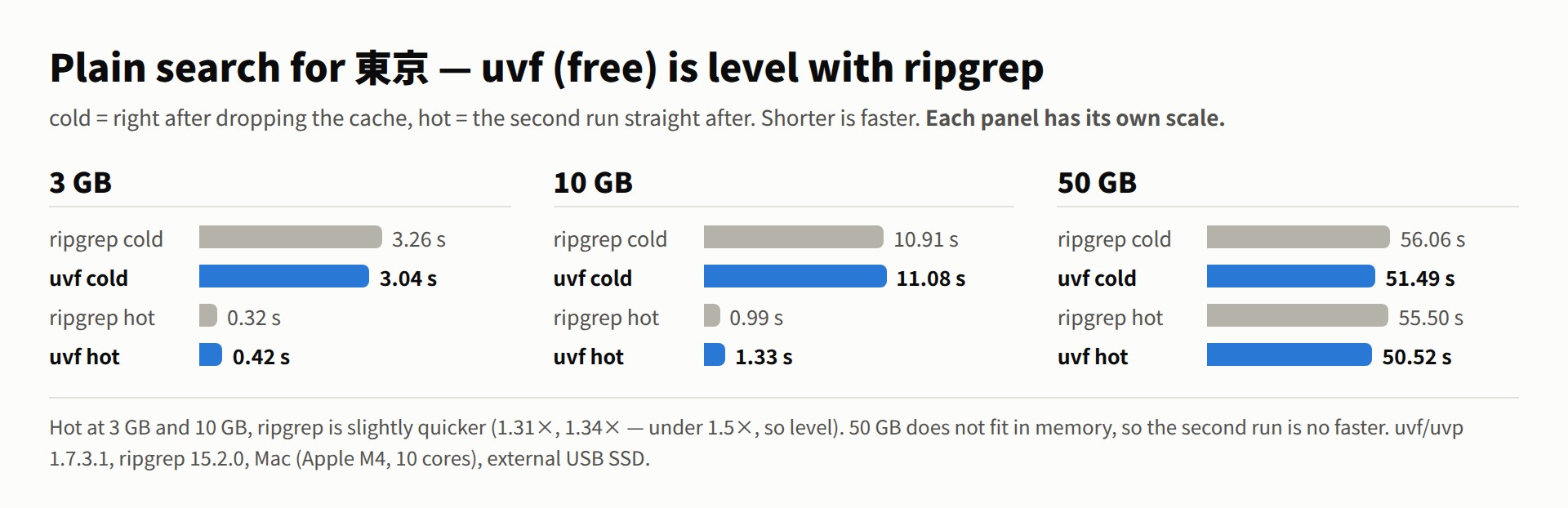
One large file (term 東京; cold = right after dropping the cache, hot = the second run straight after. Conditions are at the end of the page.)
In the plain search, uvf was slightly faster at 3 GB, 10 GB and 50 GB, cold and hot (all under 1.5×, so level). Earlier (1.7.3.1) ripgrep was slightly quicker in the hot run at 3 GB and 10 GB (0.32 s vs 0.42 s and 0.99 s vs 1.33 s); 1.7.3.6.8 reworked how the second (hot) run reads, and the order flipped. 50 GB does not fit in memory, so neither tool gets faster on the second run (ripgrep’s hot time on 50 GB varies between 55 and 70 s).
| Plain search (cold / hot) | ripgrep | uvf (free) |
|
|---|---|---|---|
| 3 GB | 3.26 s / 0.31 s | 3.04 s / 0.29 s | level |
| 10 GB | 10.94 s / 0.97 s | 10.15 s / 0.88 s | level |
| 50 GB | 64.68 s / 70.33 s | 50.66 s / 55.94 s | level |
| Seven searches, cold + hot total | ripgrep | uvf (free) |
|
|---|---|---|---|
| 3 GB | 33.63 s | 33.55 s | level (1.00×) |
| 10 GB | 95.41 s | 81.99 s | level (1.16×) |
| 50 GB | 870.64 s | 768.93 s | level (1.13×) |
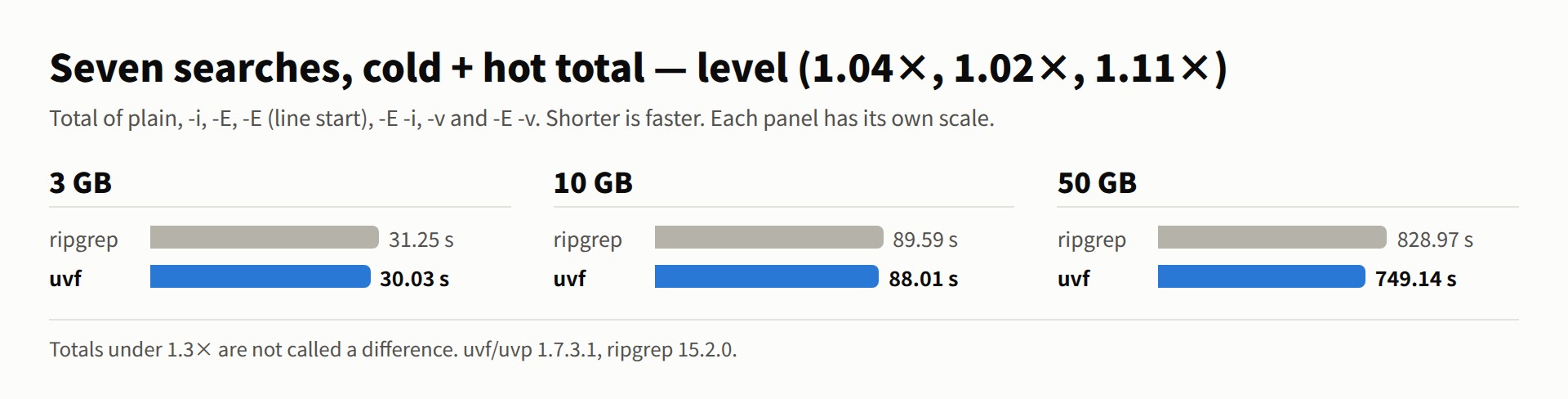
The seven searches are plain, -i, -E, -E (line start), -E -i, -v and -E -v. On a single file, the free uvf is level with ripgrep (under 1.5× for each item, under 1.3× for the seven-search totals). It builds no index and reads the file once each time.
Many files and compressed files (against the grep family — standard grep, ugrep and ripgrep; hot = the faster of two runs)
Losses first. Where there are very many small files (the Linux kernel source, 86,000 files, five queries in total), uvf is at 1/1.20 of ripgrep (under 1.5×, so level; uvp, which keeps an index, is 2.48× faster). On Windows, uvf is slower than ripgrep on some xz, zst and lz4 cases (1/1.51 to 1/2.09; the cause is still being investigated, and the table below is the Mac). For several plain-text files only, the two are level (five plain files, cold + hot: ripgrep 5.56 s, uvf 5.44 s = 1.02×; up to 1.7.3.1 it was 1/1.17, with ripgrep slightly faster).
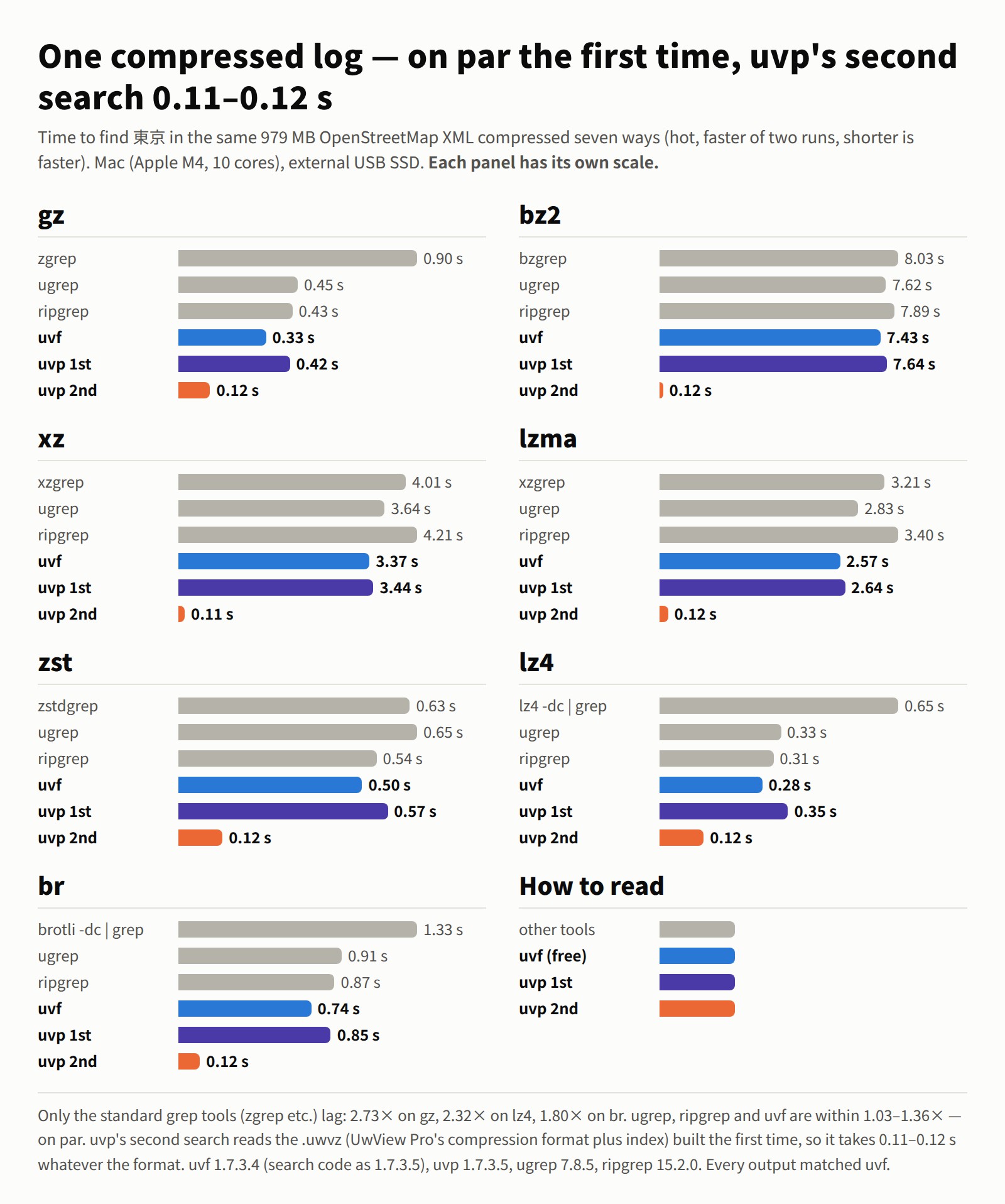
| One compressed file (979 MB in each format, hot) | Standard grep | ugrep | ripgrep | uvf (free) |
uvp 1st |
uvp 2nd |
|---|---|---|---|---|---|---|
| gz | 0.90 s (zgrep) | 0.45 s | 0.43 s | 0.33 s | 0.42 s | 0.12 s |
| bz2 | 8.03 s (bzgrep) | 7.62 s | 7.89 s | 7.43 s | 7.64 s | 0.12 s |
| xz | 4.01 s (xzgrep) | 3.64 s | 4.21 s | 3.37 s | 3.44 s | 0.11 s |
| lzma | 3.21 s (xzgrep) | 2.83 s | 3.40 s | 2.57 s | 2.64 s | 0.12 s |
| zst | 0.63 s (zstdgrep) | 0.65 s | 0.54 s | 0.50 s | 0.57 s | 0.12 s |
| lz4 | 0.65 s (lz4 -dc | grep) | 0.33 s | 0.31 s | 0.28 s | 0.35 s | 0.12 s |
| br | 1.33 s (brotli -dc | grep) | 0.91 s | 0.87 s | 0.74 s | 0.85 s | 0.12 s |
- For a single search,
uvfis shortest in all seven formats, but the gap to ugrep and ripgrep is 1.03–1.36× — level. Only the standard grep tools (zgrep and so on) fall behind: 2.73× for gz, 2.32× for lz4 and 1.80× for br. - ripgrep (
-z) calls an external command for each format and silently skips the file when it is missing;uvfuses no external commands. - Pro’s
uvptakes 0.11–0.12 s from the second search on, whatever the format (it searches the.uwvzbuilt the first time; 62× faster thanuvfon bz2).
| Many files in one search (hot) | zgrep | ugrep | ripgrep | uvf (free) |
uvp 1st (bundling) |
uvp 2nd |
|---|---|---|---|---|---|---|
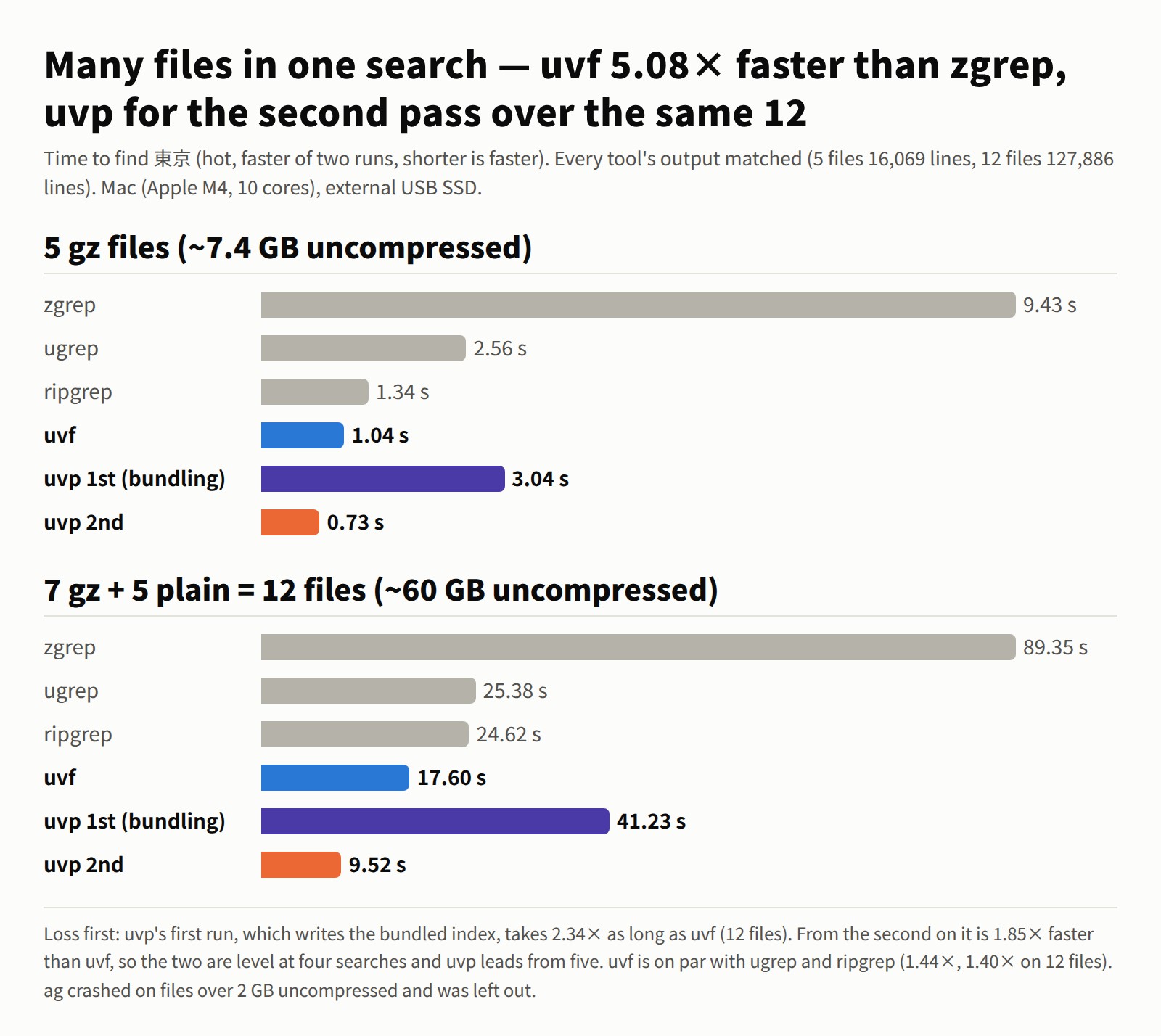
| 5 gz files (about 7.4 GB expanded) | 9.43 s | 2.56 s | 1.34 s | 1.04 s | 3.04 s | 0.73 s |
| 7 gz + 5 plain = 12 files (about 60 GB expanded) | 89.35 s | 25.38 s | 24.62 s | 17.60 s | 41.23 s | 9.52 s |
- On 12 files,
uvfis level with ripgrep and ugrep (1.40×, 1.44×) and 5.08× faster than zgrep. Every tool’s output matched in line count and content.
Pro’s uvp changes the order of magnitude from the second run on. It builds a .uwvz on the first run, so the first run takes about as long as ripgrep (50 GB: 58.81 s vs 64.68 s = 1.10×, level; the 28 September run had 58.42 s vs 56.06 s, with uvp slightly slower), but from the second run on it never reads the original.
| Second run straight after, on 50 GB (hot) | Seconds | |
|---|---|---|
| ripgrep | 70.33 s (reads the whole file every time) | |
uvf (free) |
55.94 s (reads the whole file every time) | level |
uvp (with .uwvz) |
6.45 s | 10.9× ripgrep |
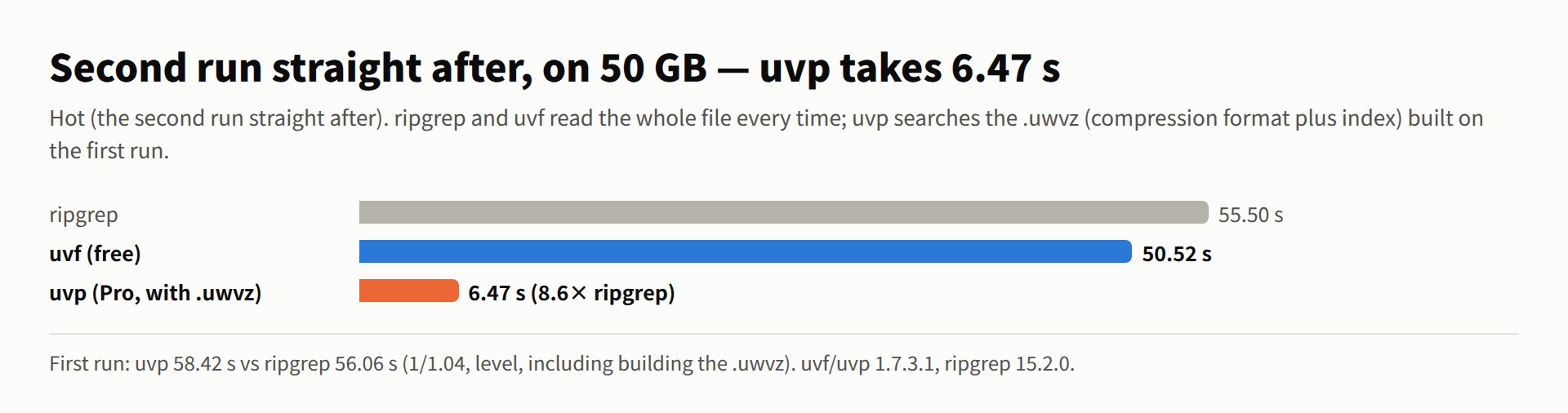
- ripgrep’s hot time on 50 GB varies between 55 and 70 s from run to run. In the 28 September run (55.50 s),
uvpat 6.47 s was 8.6×.uvpitself barely moves (6.45–6.47 s). - On the seven-search cold + hot totals,
uvpis 2.39× ripgrep at 3 GB (14.05 s), 3.28× at 10 GB (29.07 s) and 3.74× at 50 GB (232.98 s). - The 16 items only
uvpdoes — two-term narrowing, tallies (likesort | uniq -c), sorting, first / last N, writing out, gz input and so on — are 5.19× (3 GB), 5.15× (10 GB) and 7.49× (50 GB) the rg / sed / sort / uniq / gzip combinations (cold + hot totals). - With many files, the first run builds the bundled
.uwvz, so it takes 2.34× as long asuvf(12 files: 41.23 s vs 17.60 s). The second run is 9.52 s, 1.85× faster thanuvf; the two are level at four searches in total, anduvppulls ahead from the fifth. - Across all 96 items, the CLI side (ripgrep and others) took 4,168.64 s against 1,672.55 s for
uvf/uvp— 2.49× (0 result mismatches).
→ The uvp command manual · Picking the one place to beat ripgrep
GUI — compared with klogg
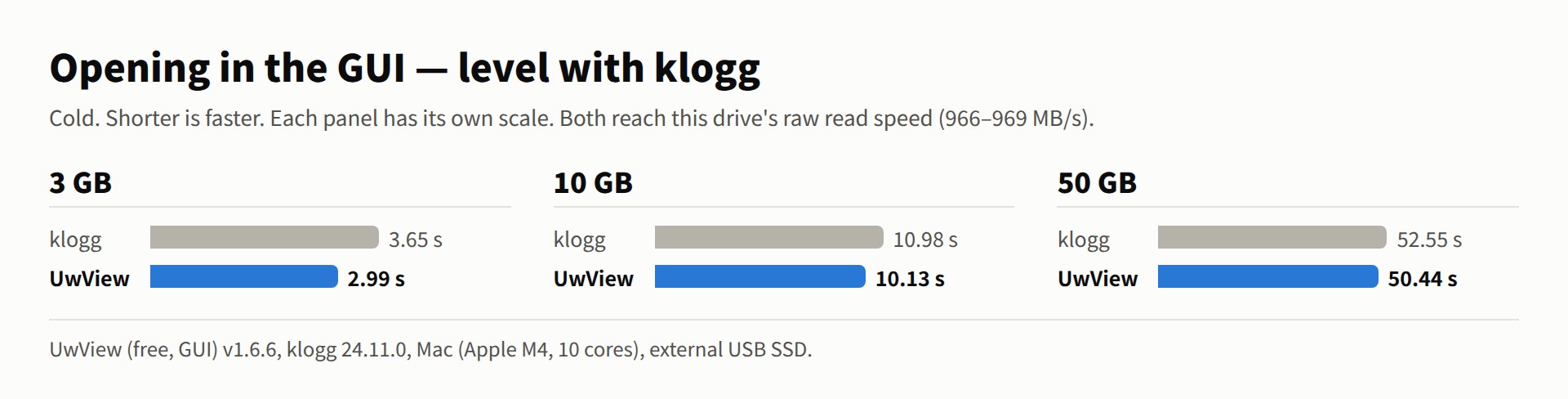
Same machine, same files (Mac (Apple M4, 10 cores), external USB SSD, all cold, klogg 24.11.0, term 東京, hit counts match).
| Open | 3 GB | 10 GB | 50 GB |
|---|---|---|---|
| klogg | 3.65 s | 10.98 s | 52.55 s |
| UwView (free, GUI) | 2.99 s | 10.13 s | 50.44 s |
| level | level | level |
| Search (after opening) | 3 GB | 10 GB | 50 GB |
|---|---|---|---|
| klogg | 0.56 s | 11.75 s | 55.59 s |
| UwView (free, GUI) | 0.32 s | 10.15 s | 53.50 s |
| 1.75× | level | level | |
UwView Pro (with .uwvz) |
— | 1.80 s | 6.47 s |
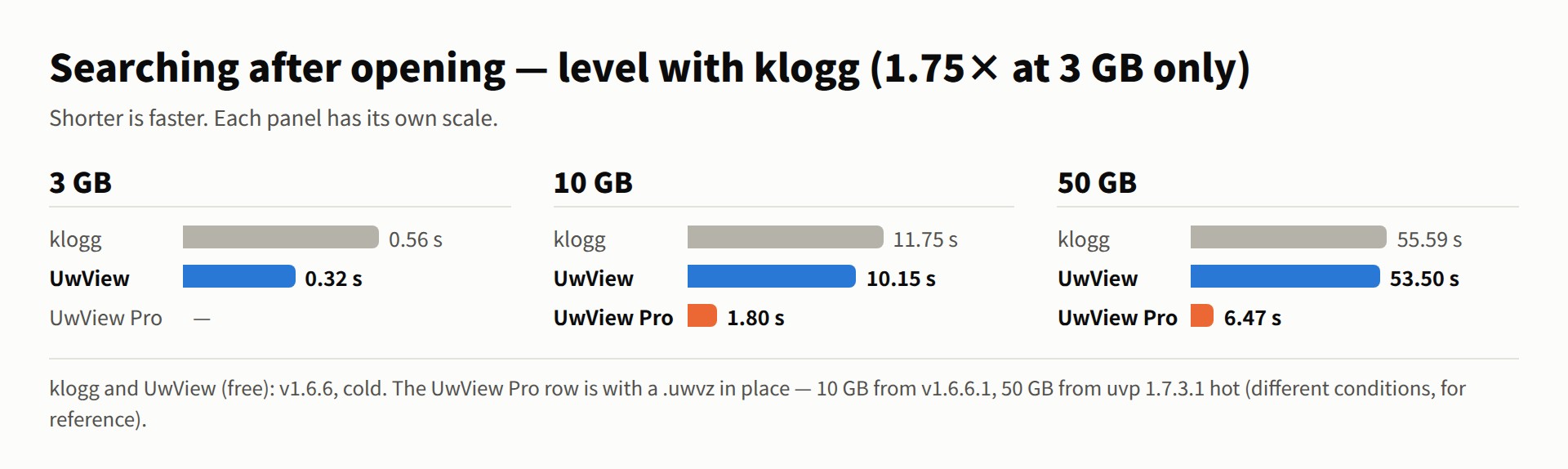
Opening and searching are both level with klogg (only the 3 GB search is 1.75× in UwView’s favour). Both reach this drive’s raw read speed (966–969 MB/s to open).
The gap appears when you go all the way from searching to reading. klogg reads once to open and once more to search; uvf … -open reads once.
| “Search, then read it in the GUI” | 3 GB | 10 GB | 50 GB |
|---|---|---|---|
| klogg (open + search) | 4.21 s | 22.73 s | 108.1 s |
uvf … -open (free) |
3.40 s | 10.42 s | 50.76 s |
| level | 2.18× | 2.13× |
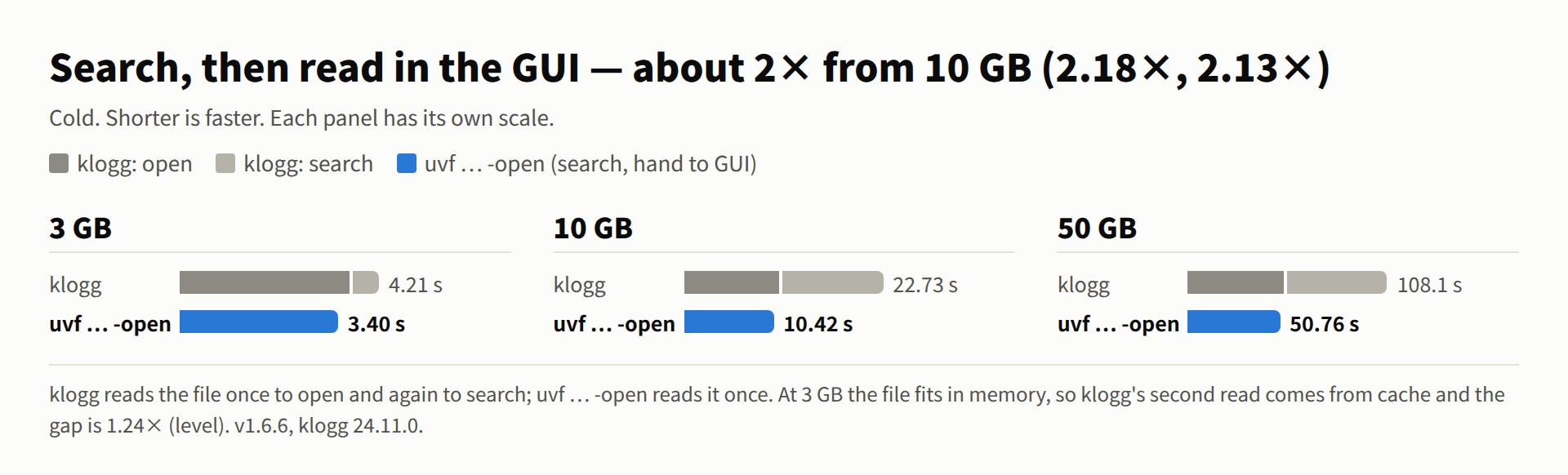
The gap narrows at 3 GB because the file fits in memory, so klogg’s second read comes from cache.
The same holds at 258.68 GB and 4.5 billion lines. uvf … -open searches and reaches the GUI in 261.37 s — about the same as the 258 s klogg needs merely to finish opening the file, after which klogg starts searching. And klogg cannot scroll to the end until its index is built (4 min 18 s at 258 GB); UwView can move to the end the moment the file opens.
On the second open, klogg rebuilds its index every time, while UwView Pro opens from its saved index in 0.01–0.07 s. → An honest re-measurement against klogg
As an editor — against EmEditor and 010 Editor (Edit Upgrade)
UwView Pro edits without rewriting the original file, keeping only the differences. That is why “save” does not depend on file size.
| 48 GB, 890 million lines (Windows laptop, 16 GB RAM) | EmEditor | UwView Pro + Edit | Difference |
|---|---|---|---|
| Open the file | 103.6 s | 107.1 s | level |
| Full-text search for 東京 (94,979 lines) | 194.7 s | 23.9 s | about 8× |
| Replace all 東京 → Tokyo | 210.5 s | 35.9 s | about 6× |
| Save so you can stop for the day | 31 min | 0 s | — |
| Write out a single file | 31 min | 1 min 33 s | about 20× |
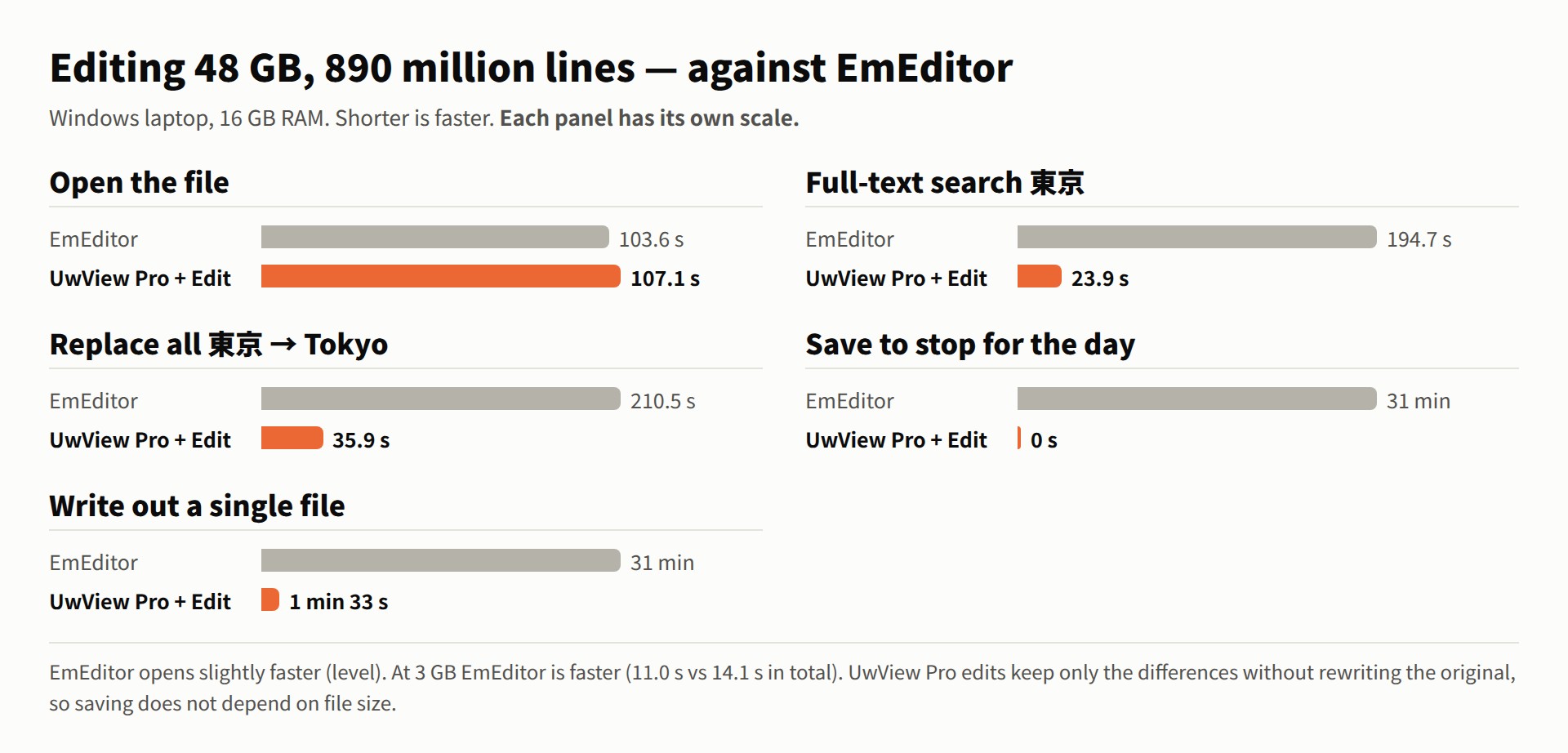
At 3 GB EmEditor is faster (open → two replaces → save: 11.0 s vs 14.1 s in total; a single replace 0.9 s vs 6.3 s, EmEditor ahead). The gap opens from 10 GB (229.9 s vs 51.9 s in total) and at 50 GB it is 47 min 13 s vs 2 min 53 s.
Against 010 Editor (10.19 GB, Mac ARM): opening is level (11.1 s vs 10.9 s), full-text search 11.5 s vs 2.2 s, saving mid-work 2 min 41.5 s vs 0 s, and the final text export 2 min 41.5 s vs 12.3 s. Against UltraEdit (3.07 GB): full-text search 5.3 s vs 0.94 s, replace all 14.1 s vs 1.31 s (both write-ups note that my settings may not have been optimal). → EmEditor at 48 GB · 010 Editor and UltraEdit on Mac ARM
UwView Pro (current release v1.9.0 “Full Spectrum”)
The commercial edition UwView Pro is on sale for Windows, macOS and Linux (one license, every OS). What sets it apart from the free build is that it saves the index and the text in a .uwvz (compression format plus index).
- CLI (
uvp): from the second run on it never reads the original — a 50 GB search takes 6.45 s (10.9× ripgrep). Multi-stage narrowing, tallies, sorting and replace. Several files can be bundled into one.uwvzand searched without rebuilding from the second time on. Text inside zip files and OpenStreetMap pbf can be used as input, and seven compressed formats can be read and written. - From v1.9.0: Shift-JIS, EUC-JP and UTF-16 files are kept as a UTF-8 index, so from the second search they are as fast as UTF-8. Word, Excel and PDF are indexed too, with tallies, ranges and templates.
- GUI: opens instantly with line numbers from the second time on. Drill-down and sequence search, tallies, block selection, and up to ±64 lines around each hit. Open a bundled index and open the original files in tabs from the file list.
- Editing (Edit Upgrade): difference-based editing that never rewrites the original, replace all, stop and resume.
One-time purchase or monthly, with a 14-day free trial. → UwView Pro
Conditions behind the numbers
- CLI, one file (plain search, seven searches, the 16
uvp-only items, all 96 items, the second run on 50 GB): measured withuvf/uvp1.7.3.6.9 and ripgrep 15.2.0 (4 October 2026). Cold is right after dropping the cache, hot is the second run straight after.uvp‘s cold run includes building the.uwvz. - Seven compressed formats and many files: hot (the faster of two runs), measured with
uvf1.7.3.4 (search code the same as 1.7.3.6) /uvp1.7.3.5 (same search code as 1.7.3.6), ugrep 7.8.5 and ripgrep 15.2.0 (28 September 2026). Only the five-plain-file figure isuvf1.7.3.6.9, cold + hot total (4 October 2026). - Very many small files (Linux kernel source, 86,602 files) are
uvf/uvp1.7.3.6.9 (4 October 2026); the Windows compressed figures come from the three-OS comparison of v1.7.3.6.8 (3–4 October 2026). - GUI vs klogg and 258 GB: measured on v1.6.6 “First Light” (20–21 September 2026, klogg 24.11.0, cold). In the GUI table, the UwView Pro row is v1.6.6.1 at 10 GB and
uvp1.7.3.1 hot at 50 GB. The Pro search of 258 GB (about 35 s) is from uvp 1.6.2 (16 September 2026). - Editing comparisons: each write-up’s own machine and versions (Windows laptop with 16 GB RAM, Mac ARM and so on).
- CLI and GUI: Mac (Apple M4, 10 cores, 32 GB RAM), external USB SSD, OpenStreetMap Japan XML, term
東京. Timings vary by machine; do not compare seconds across machines. Conditions and full data are on the Benchmarks page.
License
UwView is provided under the PolyForm Internal Use License 1.0.0.
- Personal use and internal business use are free.
- Redistribution, bundling into a product or service, resale and supply to third parties are not permitted; they require a separate commercial (redistribution) license.
- The exception: the unmodified official binaries may be redistributed free of charge as packages (Flathub, Snap, the AUR, Linux distribution repositories, Homebrew, Scoop, winget and so on). The conditions are in the “Additional Permission” section of LICENSE. Builds from source, modified binaries and UwView Pro are not covered.
- UwView is not open source software.
- For a commercial license, ask via GitHub Issues.
Links
- GitHub repository: amru195704/UwView
- Try in a browser (WASM demo): https://amru195704.github.io/UwView/
- Download: UwView (free) and UwView Pro
- How-to: Help (including PATH setup for
uvf/uvp) · User guides (UwView / UwView Pro) · Command manuals (uvf / uvp) - Originals of the free-edition manuals (Japanese, on GitHub): uvf command manual · GUI manual (PDF too) · v1.8.1.9 release notes
- Videos (YouTube): Playlist “UwView|English” · Japanese · Channel @uwviewapp
- Bug reports & requests: Support
From the developer: a list of my apps, Kindle books and public projects is on GitHub: amru195704.