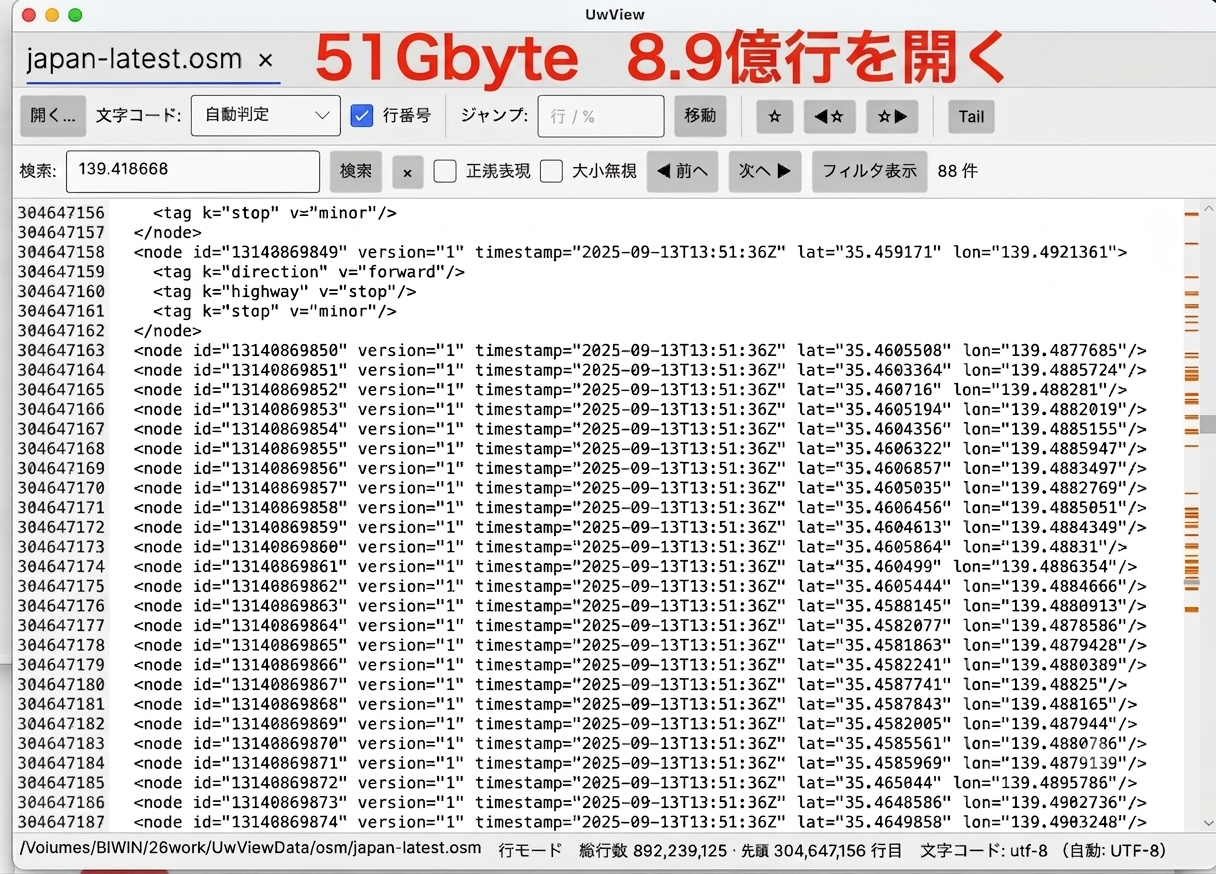
A while back I wrote an article about releasing the large-file text viewer “UwView” on GitHub. It claims to handle “up to roughly 200 million lines at high speed,” but until now my actual measurements were only on synthetic data — files containing nothing but sequential line numbers. “What about real data, and data that’s an order of magnitude bigger?” — that’s what I’m putting to the test this time.
For the test data I chose an XML dump of the entire OpenStreetMap (OSM) Japan dataset. The result: a file of 51GB and roughly 890 million lines — more than four times the “200 million lines” the product advertises.
Repository: amru195704/UwView (PolyForm Internal Use License 1.0.0)
- How I Built the Test Data — Turning OSM Japan into a 51GB XML File
- Measured Results (51GB, 892,239,125 lines, Apple Silicon Mac, external SSD)
- Clearing the “200 Million Line Wall” Without Issues
- The Difference from Synthetic Data — an Honest Look
- Visible the Instant You Open It — the Strength of Page Mode
- Summary
How I Built the Test Data — Turning OSM Japan into a 51GB XML File
OSM’s Japan data is distributed by Geofabrik. It’s distributed in binary .osm.pbf format (about 2.3GB), so I used osmium-tool to expand it into XML text (.osm).
# Download the pbf (2.3GB, binary)
curl -L -o japan-latest.osm.pbf \
  https://download.geofabrik.de/asia/japan-latest.osm.pbf

# Convert to XML (text) with osmium → 51GB, 890 million lines
osmium cat japan-latest.osm.pbf -o japan-latest.osm
The resulting file is UTF-8 text that looks like this — an endless stream of <node> elements carrying latitude/longitude.
<?xml version='1.0' encoding='UTF-8'?>
<osm version="0.6" generator="osmium/1.19.1">
  <bounds minlat="20.08228" minlon="122.5607" maxlat="45.815403" maxlon="154.4709"/>
  <node id="31236558" version="5" timestamp="2020-06-27T07:40:04Z" lat="35.635073" lon="139.768101"/>
  ...
Counting with wc -l gives 892,239,125 lines — squarely in “no editor will ever open this” territory.
Measured Results (51GB, 892,239,125 lines, Apple Silicon Mac, external SSD)
Measured using the benchmark harness bundled with UwView (UwView.Bench).
| Item | Measured value |
|---|---|
| File size | 51,254,526,392 bytes (about 48 GiB) |
| Open + encoding detection | 12 ms |
| Page-mode display (first 50 lines + 50 lines at the 50% position) | 3 ms |
| Index build (one sequential read) | 172.8 seconds (283 MB/s) |
| Total line count | 892,239,125 (exact match with wc -l) |
| Checkpoint count (index) | 3,485,310 entries ≒ 26.6 MB |
| Managed heap growth | 33.3 MB |
| GetLine random × 1000 | average 1.28 ms / p99 3.0 ms / max 5.7 ms |
| First-line fetch | <?xml version='1.0' encoding='UTF-8'?> (2.9 ms) |
| Jump to the last line (line 892,239,125) | </osm> in 0.006 ms |
| Encoding switch | 3.4 ms (no index rebuild) |
| WorkingSet | 12,083 MB (includes mmap’d pages; reclaimable by the OS) |
Clearing the “200 Million Line Wall” Without Issues
What I most wanted to verify this time was whether things would hold up beyond the advertised 200 million lines. The short answer: no problems at all.
- Accurate total line count: the
892,239,125that UwView counted matchedwc -l‘s result exactly, without a single line off. - Instant jump to the end: jumping to the last line (line 892,239,125,
</osm>) took 0.006 ms. Once the index exists, jumping anywhere in the file is instantaneous. - Memory footprint stays flat: for a 51GB file, what’s actually resident is roughly 26.6MB of index plus about 33MB of managed heap. The file itself is never loaded into memory.
UwView carries line numbers as a long (64-bit integer), but 890 million comfortably fits even within the int limit (about 2.14 billion). By design, line count is never going to be a bottleneck here.
Note that the “WorkingSet 12GB” figure in the table above looks large, but it’s the cache of file pages touched via mmap — non-resident memory that the OS reclaims on demand under memory pressure. It is not memory the app itself has allocated.
The Difference from Synthetic Data — an Honest Look
Let’s line up the earlier synthetic 200-million-line data against this run’s real 890-million-line data.
| Item | Synthetic 200M lines (5.1GB) | Real data 890M lines (51GB) |
|---|---|---|
| Index build speed | 538 MB/s | 283 MB/s |
| GetLine random (average) | 0.005 ms | 1.28 ms |
| Jump to last line | 0.003 ms | 0.006 ms |
| Index size | 6.0 MB | 26.6 MB |
I’ll be upfront that GetLine is slower than on synthetic data (0.005 ms → 1.28 ms). There are three reasons.
- Random reads on the external SSD are the limiting factor (an internal SSD would be faster).
- Real XML has widely varying line lengths, so cache efficiency is worse than with synthetic data.
- 51GB doesn’t fit entirely in memory (WorkingSet 12GB), so many reads end up hitting actual disk I/O.
Even so, it’s still solidly in the “single-digit milliseconds” range, and scrolling and line-jumping feel plenty practical in real use. The 283 MB/s index-build figure also reflects a single sequential read of the full 51GB, and that number is entirely determined by storage speed.
Visible the Instant You Open It — the Strength of Page Mode
Another point I want to emphasize is that you can start browsing without waiting for the index build (about 3 minutes). Here too, opening plus encoding detection took 12 ms, and the first full screen rendered in 3 ms. Even for a 51GB file, the moment you open it — much like the instant less opens a huge file — the content is immediately visible in “byte-offset-based page mode,” and once the index finishes building in the background, it quietly gets promoted to “line-number-based line mode.”
There’s no need to brace yourself for “opening a huge file” — the content is visible the instant you double-click. That’s the experience UwView most wants to convey.
Summary
- Tested UwView by opening a real 51GB / 890-million-line dataset — the entire OSM Japan dataset converted to XML.
- It held up well beyond four times the advertised “200 million lines,” with the total line count matching
wc -lexactly and a jump to the last line (line 892,239,125) taking just 0.006 ms. - Resident memory is roughly 26.6MB of index plus 33MB of heap; the file itself is never resident.
- Browsing is possible in page mode from the instant it opens (12 ms / 3 ms), while the index builds in the background (about 3 minutes, 283 MB/s — limited by storage speed).
- GetLine averages 1.3 ms on real data (slower than synthetic’s 0.005 ms, due to the external SSD, uneven line lengths, and actual out-of-cache I/O). Still, it stays at the millisecond level and remains practical.
The “up to 200 million lines” figure is only a rough guideline — real-world testing confirmed that storage capacity becomes the limiting factor before line count does.
As a practical matter, with as many as 890 million lines, building the line index takes around three minutes, and searches don’t return results quickly. For practical use, something around 200 million lines is probably the sweet spot.
Theoretically, since it’s 64-bit… …I’m too scared to actually test that.
Related Articles
Sources
- amru195704/UwView (GitHub) https://github.com/amru195704/UwView
- OpenStreetMap Japan extract (Geofabrik) https://download.geofabrik.de/asia/japan.html
- osmium-tool https://osmcode.org/osmium-tool/
Premium Edition: UwView Pro (on sale now, Windows/macOS/Linux)
A commercial edition that lets you “instantly view and search huge files anytime, save the index so that from the second time on it opens instantly with line numbers, search up to about 9× faster, and store logs at about 1/9 the size while still opening them directly.” one-time purchase or monthly subscription.
→ https://uvp.y42u.net/en/pro-en/
(With UwView / UwView Pro, you can view and search the entire file the moment you open it — even on the very first open. The index is built in the background, and line numbers appear once it’s complete. UwView Pro saves the index and compressed cache, so from the second open onward it opens instantly with line numbers already in place. Other viewers show only the head until indexing finishes, whereas UwView lets you view and search the whole file instantly from the first open.)
From the developer: a list of my apps, Kindle books and public projects is on GitHub: amru195704.
A note
The information in this article is provided for reference purposes only, and its accuracy or completeness is not guaranteed. If you notice any errors or inaccuracies, please let us know in the comments and we will review and correct them.


コメント