
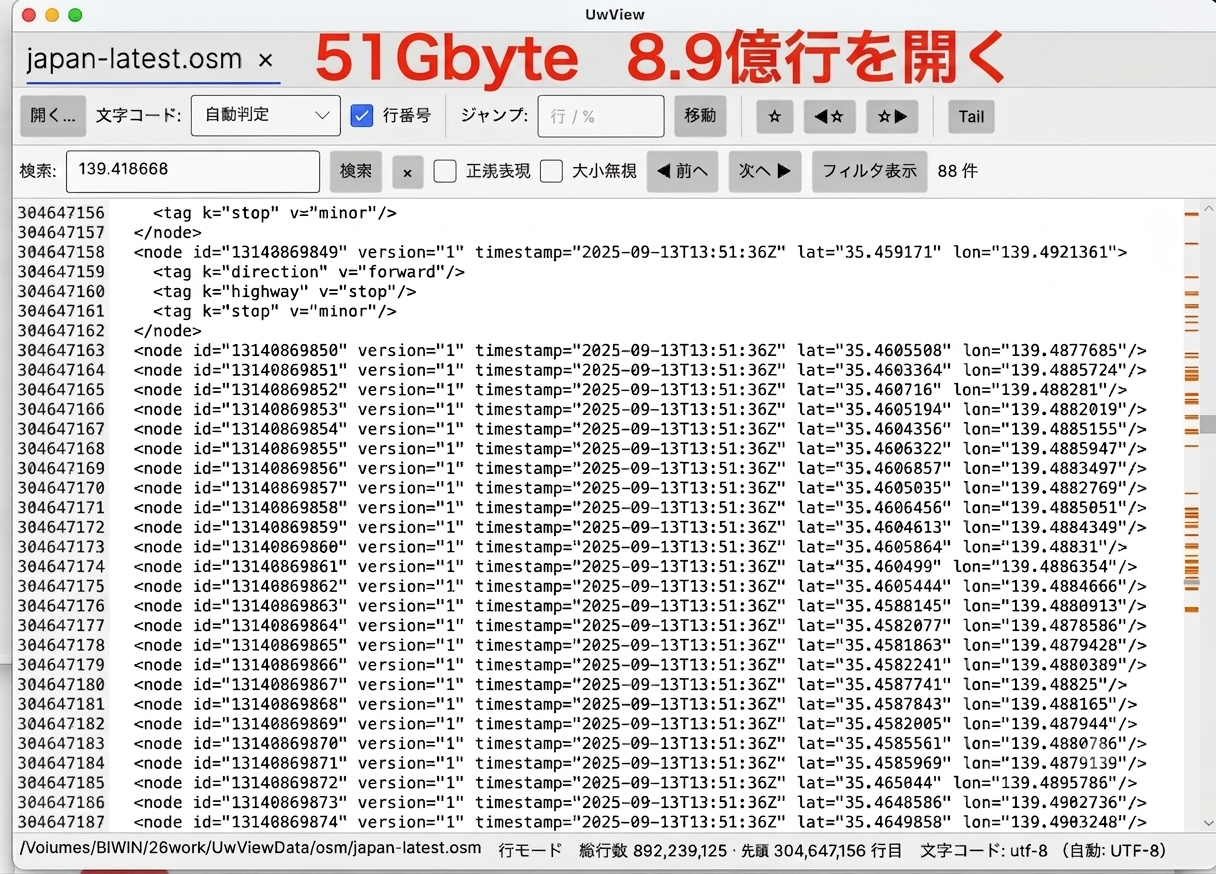
Back in the Windows 95 era, I built a large-capacity text viewer called “UwView” and published it on Vector. I’ve now rebuilt it from scratch using Avalonia UI and released it on GitHub. It’s a personal development tool with no direct connection to GDE (GeoDiveExa), but I’m introducing it here as another result of working in the same .NET field.
Repository: amru195704/UwView (PolyForm Internal Use License 1.0.0)
What UwView Is — A “Viewer,” Not an Editor
UwView is a text viewer that lets you browse huge text files of up to about 200 million lines, with low memory use and high speed. Ordinary text editors typically stop being able to open files somewhere around a million lines, but UwView never loads the whole file into memory — it renders only the lines currently visible on screen, which makes it practical to browse even enormous files. It’s a viewing-only tool, with no editing features, purpose-built to “just look at it fast” for the huge-line-count files that come out of RDB or XML dumps and the like.
This renewal takes an idea I’d been holding onto since the Windows 95 era and rebuilds it with a modern stack: .NET 10 and Avalonia UI.
Key Features
| Feature | Details |
|---|---|
| Ultra-fast display of huge files | Browse files of up to about 200 million lines with low memory use. The file body itself is never resident in memory; the index is about 6 MB (at 200 million lines) |
| Progressive open | Instant display in page mode the moment you open the file → index construction runs in the background → promotes to line mode once complete |
| Automatic encoding detection | Automatically detects BOM + UTF-8 / Shift-JIS / EUC-JP / UTF-16, with manual switching also available (no re-indexing required) |
| Multi-file tabs | Switch between multiple files via tabs. Add files in bulk via drag-and-drop or multi-select |
| String search / regex | Literal search uses SIMD byte-sequence scanning (3.4 seconds for 200 million lines); regex matches after line decoding (12.7 seconds for the same file). Matches are highlighted, with a minimap display |
| Line filter view | Extracts and displays only the lines matching a search (the original file is untouched — this is a virtual view) |
| Bookmarks | Toggle a bookmark on any line and jump forward/backward. Remain valid even after switching encoding |
| Real-time tail | Detects appended data, remaps the mmap, updates the index incrementally, and auto-scrolls to the end. Can open logs that are still being written to |
| Identical rendering on every OS | Avalonia’s own Skia-based rendering makes the appearance identical on Windows / macOS / Linux. The browser version also bundles Japanese fonts |
Supported Environments — Windows / macOS / Linux, Plus a Browser Version as a Bonus
The primary supported platforms are the three desktop OSes — Windows, macOS, and Linux — and a browser (WASM) version is also provided as a bonus. The browser version runs the same UI and the same core as the desktop version, with I/O implemented via random reads through blob.slice (the whole file is never loaded into memory).
The technology stack is .NET 10 (pinned to 10.0.100 via global.json, with rollForward: latestFeature) and Avalonia UI 12.x.
The Design Behind “Low Memory Use” — a Sparse Line Index
The golden rule for huge files is: never load the whole file into memory, and never load every line into the UI. UwView achieves this with a four-layer architecture.
UI layer (TextView: self-drawn virtual text surface)   ... Renders only the visible lines
      ↓ GetPageAt(byteOffset) / GetLine(lineIndex)
Document layer (LineDocument)                          ... On-demand fetch + LRU cache
      ↓
Index layer (SparseLineIndex)                          ... Sparse index every N lines (default 256) for low memory use
      ↓ Read(offset, length)
I/O abstraction layer (IByteSource)                     ... Desktop: mmap / Browser: Blob.slice
The key part is the index layer. Naively storing the starting offset of every single line would use about 1.6 GB of memory for 200 million lines, but UwView records just one checkpoint every 256 lines, and for any given line it recounts newlines forward from the nearest checkpoint. With this technique, the index size stays around 6 MB.
The I/O layer is also consolidated into a thin abstraction, IByteSource, exposing only Length and Read(offset, buffer), so the layers above it work without needing to care whether they’re running on Desktop (mmap) or in the Browser (blob.slice).
Measured Results (200 Million Lines, a 5.1 GB File)
These figures were measured on an Apple Silicon Mac with an external SSD, using a 200-million-line, 5.1 GB UTF-8 file.
| Item | Measured value |
|---|---|
| open + encoding detection | 10 ms |
| Page-mode display (first 50 lines + 50 lines at the 50% position) | 0 ms |
| Index construction (one sequential read) | 9.7 seconds (538 MB/s) |
| Index size | about 6.0 MB (781,251 checkpoints) |
| Managed heap increase | 9.3 MB |
| GetLine, 1,000 random calls | average 0.005 ms / p99 0.007 ms |
| Jump to the end (the 200-millionth line) | 0.003 ms |
| String search (literal) | 3.4 seconds (1,521 MB/s) |
| String search (regex) | 12.7 seconds (414 MB/s) |
The display appears instantly at 0 ms the moment the file is opened, and page-by-page browsing is never blocked even while the index is still being built. Once the index is complete, both random access and jumping to the end take less than a millisecond.
Distribution and License
The dist/ folder contains prebuilt archives for each OS and architecture.
| File | Target |
|---|---|
UwView-macos-arm64.zip |
macOS (Apple Silicon) |
UwView-macos-x64.zip |
macOS (Intel) |
UwView-win-arm64.zip |
Windows (ARM64) |
UwView-win-x64.zip |
Windows (x64) |
UwView-linux-arm64.tar.gz |
Linux (ARM64) |
UwView-linux-x64.tar.gz |
Linux (x64) |
On macOS, just extract the archive and launch UwView.app directly; on Windows and Linux, just run the bundled executable. It’s licensed under the PolyForm Internal Use License 1.0.0.
Known Limitations
- Supported line-ending styles are LF and CRLF. Bare CR (classic Mac) is not fully supported at this time.
- UTF-16 is recognized via BOM detection, but since line splitting is based on the
\nbyte, the primary supported encodings are UTF-8 / Shift-JIS / EUC-JP. - Since mmap provides a read-only view, if the file is truncated externally while it’s being viewed, an access could fail (this is considered acceptable for a viewer).
- The browser version requires selecting a file each time (no opening a path directly, no drag-and-drop, no tail support), and index construction is also slower than in the native version.
Summary
- UwView, a large-capacity text viewer originally published on Vector in the Windows 95 era, has been rebuilt with Avalonia UI and released on GitHub.
- It can browse huge text files of up to about 200 million lines with low memory use and high speed (it’s a viewer, not an editor).
- Supported environments are the three desktop OSes — Windows / macOS / Linux — plus a bonus browser (WASM) version.
- Thanks to a sparse line index (a checkpoint every 256 lines), the index size stays around 6 MB even at 200 million lines.
- In measurements, random access and jumping to the end were both under a millisecond once the index was built, and searches completed in a few seconds.
- Released on GitHub under the PolyForm Internal Use License 1.0.0, with prebuilt archives also distributed for each OS.
Related Articles
Source
- amru195704/UwView (GitHub) https://github.com/amru195704/UwView
Higher tier: UwView Pro (on sale, macOS version first)
This is the commercial edition: “instantly display and search huge files anytime; save the index so that from the second open onward the file opens instantly with line numbers already shown; searches up to about 9x faster; store logs at about 1/9 the size and open them as-is.” one-time purchase or monthly subscription.
→ https://uvp.y42u.net/en/pro-en/
(With UwView / UwView Pro, you can view and search the entire file from the moment you open it — even on the very first open. The index is built in the background, and line numbers are displayed once it’s complete. UwView Pro saves the index and a compressed cache, so from the second open onward the file opens instantly with line numbers already shown. Other viewers show only the head until indexing finishes, whereas UwView lets you view and search the whole file instantly from the first open.)
From the developer: a list of my apps, Kindle books and public projects is on GitHub: amru195704.
A note
The information in this article is provided for reference purposes only, and its accuracy or completeness is not guaranteed. If you notice any errors or inaccuracies, please let us know in the comments and we will review and correct them.
コメント