UwView Pro (hereafter UVP, on sale now) — the pro edition of the large-file text viewer UwView — was compared against klogg on a 48GB, 890-million-line file in the previous article. This is the complete version of that benchmark.
“What’s the point of being fast only on huge files? What about everyday sizes?” — a fair question. So we measured all 9 combinations of 3 file sizes x 3 storage types.
- Sizes: 2.95GB / 100 million lines, 9.4GB / 100 million lines, 47.73GB / 890 million lines (all derived from real OSM data)
Note on file-size notation: In this article, “48GB” is a rounded value of 47.73 GiB (bytes ÷ 1024³). macOS’s capacity display (SI units, ÷1000³) shows this as 51.25GB. Both refer to the same file (51,254,526,392 bytes); the “51GB” notation used in the explainer video matches this SI figure.
- Storage: USB HDD (measured 0.10GB/s), USB SSD (0.41GB/s), Internal SSD (3.29GB/s) — a 33x gap in raw bandwidth
- Environment: MacBook Air / Apple M4 (10-core) / 32GB RAM / macOS Tahoe 26.3.1, klogg 24.11.0
- Search times are the average of 10 consecutive word searches (Hokkaido, Sendai, Tokyo, Nagoya, Osaka, Kobe, Hiroshima, Yamaguchi, Fukuoka, Oita) simulating real-world use, including the first cold read (for 48GB only, a single measurement was taken)
- Search hit counts were confirmed to exactly match klogg’s in every measurement (e.g., “Tokyo” on the 10GB file = 1,211 hits)
- klogg’s times are approximate, measured visually from the GUI
1. What Storage Speed Changes — The Overall Trend
Looking at all 9 cells together, the dividing lines were two: whether the file fits in RAM (32GB), and how slow the disk is.
At sizes that fit in RAM (3GB, 10GB), search takes only a few seconds with both tools. klogg is fast at search too, because the file it read while building its index stays in the OS cache. In this zone, the difference isn’t search speed — it shows up in whether the tool has to rebuild its index from scratch every time it opens (klogg) or can save its index and reopen instantly with line numbers already resolved (UwView Pro). (Both tools let you view the file the instant it opens.)
Once you go past RAM to 48GB, search itself becomes a different world. klogg has to scan the entire disk on every search (about 10 minutes on HDD, still over 15 seconds even on internal SSD). UwView Pro only reads its compressed cache (.uwvz), which is about 1/9 the size, so the same search returns in a few seconds to 75 seconds.
And the slower the disk, the more every difference expands in absolute time. A situation that’s “both are fast enough” on internal SSD becomes a “10-minute wait vs. 75 seconds” experience gap on USB HDD. In other words, this matters most for people who keep huge logs on external HDDs or NAS.
There was a development-side discovery too. We found that on HDDs, parallel reads thrash the head seeks and become counterproductive, so we added a mechanism to UwView Pro that test-reads storage speed on open and automatically switches to sequential reads if it’s slow (automatic shard-count adjustment). The numbers in this article are actual measurements with that auto-adjustment in effect.
2. UVP vs klogg — Full Comparison Table (Open → Search Flow)
We’ll lay this out in the order you’d actually use these tools — first open the file, then search it.
Open times are compared as the combined total of opening the same file twice. klogg simply doubles, since it rebuilds its index from scratch every time it opens. For UVP, the second open takes only tens of milliseconds (≈0), so the total is nearly the same as the first open alone — this is a way of expressing UVP’s “next time is zero” characteristic as a single number.
Each size’s subtotal row includes a ratio (klogg ÷ UVP, a simple sum across the 3 storage types).
| Size / Storage | klogg Open (2x total) | UVP Open (2x total) | klogg Search | UVP Search |
|---|---|---|---|---|
| 3GB, Internal SSD | ~4s | 1.4s | ~2s | 0.40s |
| 3GB, USB SSD | ~16s | 8.3s | ~2s | 0.43s |
| 3GB, USB HDD | ~94s | 51.3s | ~2s | 0.72s |
| 3GB Subtotal → Ratio | ~114s | 61.0s → ~1.9x | ~6s | 1.55s → ~3.9x |
| 10GB, Internal SSD | ~7s | 4.9s | ~2s | 1.20s |
| 10GB, USB SSD | ~48s | 27.8s | ~3s | 1.14s |
| 10GB, USB HDD | ~220s | 155.8s | ~3s | 2.41s |
| 10GB Subtotal → Ratio | ~275s | 188.5s → ~1.5x | ~8s | 4.75s → ~1.7x |
| 48GB, Internal SSD | ~30s | 23.3s | ~17.5s | 5.1s |
| 48GB, USB SSD | ~220s | 138.5s | ~128s | 14.3s |
| 48GB, USB HDD | ~1090s | 637s | ~585s | 74.8s |
| 48GB Subtotal → Ratio | ~1340s | 798.8s → ~1.7x | ~730s | 94.2s → ~7.7x |
Even when open time is measured as “the total of 2 opens,” UVP is still 1.5-1.9x faster, and since only klogg’s time keeps accumulating on the 3rd, 4th open and so on, this ratio grows larger the more times you open the file (open it N times and klogg’s time scales roughly Nx, while UVP stays close to its first-open time).
The search ratio is roughly 1.7-3.9x at sizes that fit in RAM, and about 7.7x at 48GB, which exceeds RAM. Since searches also accumulate with repeated use, the felt difference compounds as this ratio times the number of searches.
Regex search shows the same trend (e.g., UVP averages 1.8-1.9 seconds for the 10-word average on the 10GB file). With archive-style operation — deleting the original file and keeping only the .uwvz — disk usage drops to 1/7 to 1/13 of the original (3GB → 0.23GB, 10GB → 1.29GB, 48GB → 5.32GB).
3. Search Speed Graph — All 9 Cells in One Chart
To fit all 9 cells — differing in both size and storage — into a single chart, the horizontal axis is logarithmic. Shorter bars mean faster.
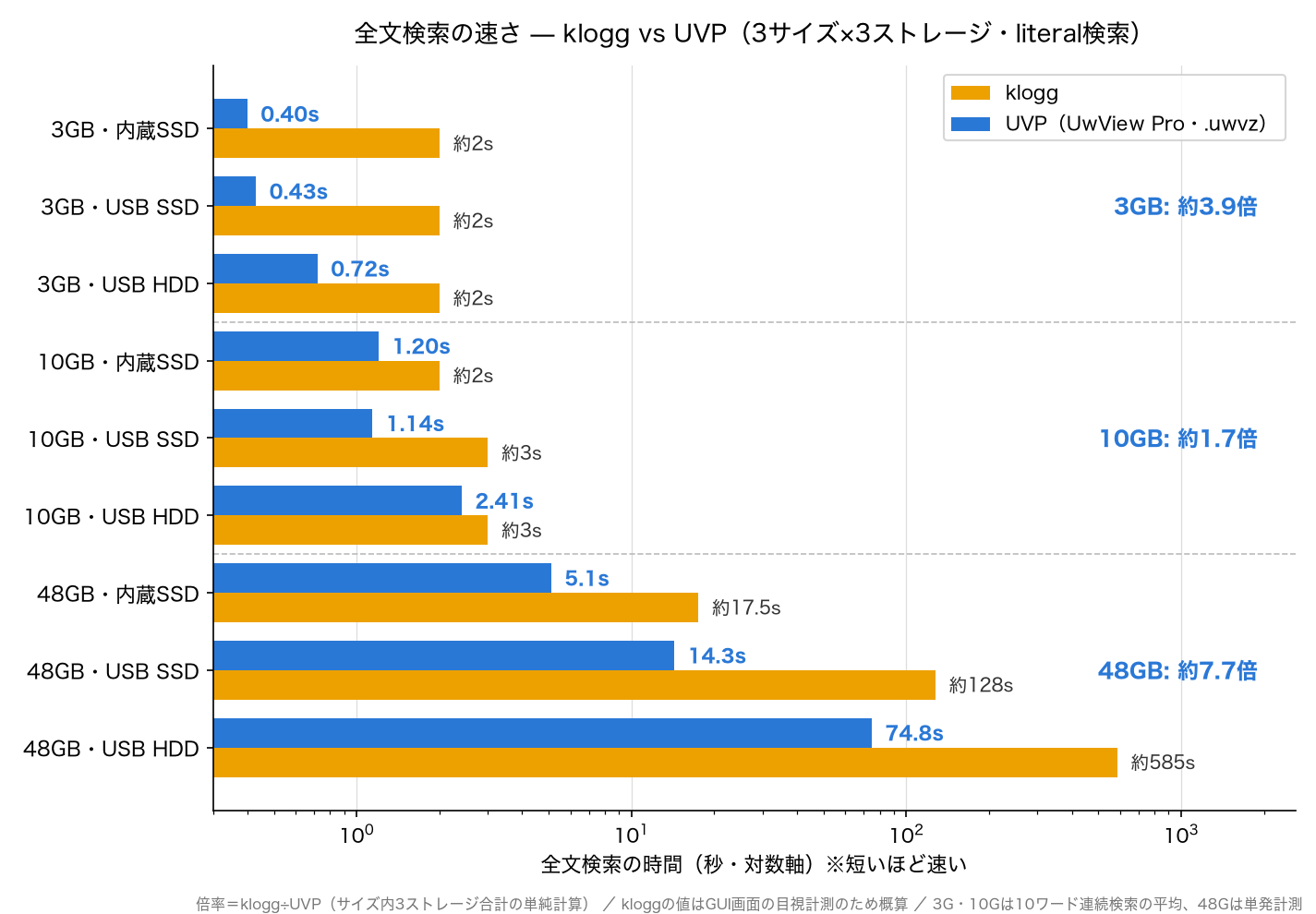
You can see that going from top (smaller files) to bottom (larger files), and also within each size as the disk gets slower, the gap between blue (UVP) and orange (klogg) widens. The bottom-most bar, “48GB, USB HDD,” is the “10 minutes vs. 75 seconds” mentioned at the start.
4. Open-Time Graph — Comparing the Combined Total of 2 Opens
Here’s another fundamental difference. As in the table, we compare the combined total of opening the same file twice. klogg’s index-building is required every single time it opens, so the time simply doubles (and until it finishes, you can only see the head of the file). UwView Pro builds its index and compressed cache (.uwvz) on the first open, but the second open takes only tens of milliseconds — essentially zero — so the total barely differs from the first open alone.
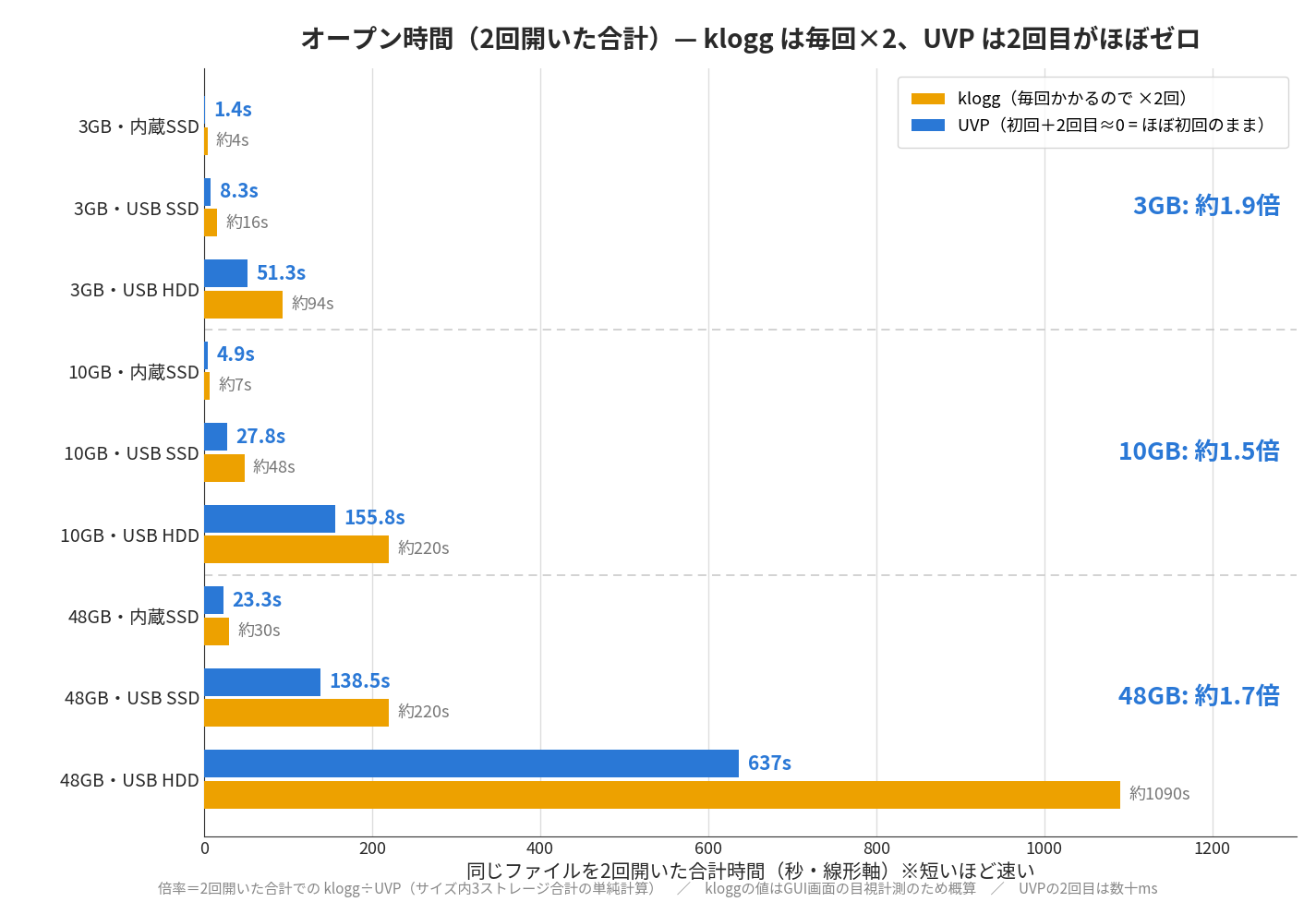
If you look only at the first open, UVP actually takes 10-30% longer (due to building the compressed cache). Yet by the second open, the ranking has already flipped in every single cell. And this gap keeps opening up one-sidedly every time you open the file a 3rd, 4th time (klogg scales roughly Nx over N opens, while UVP stays close to its first-open time). For anyone who routinely wants to “look at yesterday’s log one more time,” a 10GB file on USB HDD showing “110 seconds every time” vs. “instant” is decisive.
5. Summary
The picture that emerged from testing all 9 combinations was simple.
- Even at everyday sizes (3-10GB), UVP’s search is faster (about 1.7-3.9x). That said, klogg also returns in under a few seconds, so there’s no practical problem in this zone.
- For huge files beyond RAM, UVP is dramatically faster (about 7.7x on search). klogg routinely makes you wait several minutes per search, which doesn’t seem practical to use.
- The slower the storage, the more pronounced this trend becomes. Handling a huge file on slow storage (external HDD, NAS) with klogg means a world of 10-minute searches and 9-minute reopens — frankly, that sounds painful.
- That’s exactly why compressing huge files into archives with UVP is the best approach. The archive is 1/7 to 1/13 the original size. You can delete the original file and view/search using only the .uwvz (with checksum protection), and even on slow storage, search returns in a few seconds to 75 seconds.
To let you in on the trick, what UwView Pro does comes down to one idea: “since you have to read the whole file on the first open anyway, build the compressed cache and index while you’re at it, and never read the raw file in full again.” It doesn’t fight the physical law of disk I/O — it reduces the number of bytes you actually read. These 9 cells are the result of reworking a 30-year-old design with today’s hardware (fast CPUs, large RAM, zstd).
And if a huge log is eating your disk and you want it compressed for storage while staying searchable at speed, give UwView Pro a look — persistent index, compressed-cache search, and ~1/9 storage make both reopening and searching a step faster (all OS, one-time or monthly). The publicly released UwView is available on GitHub.
Measurement details: Before each cold measurement, we fully read a 48GB file on a separate volume to evict the page cache. klogg’s times were measured visually from its GUI progress display (approximate). UwView Pro was measured with a bench harness. Search hit counts were confirmed to exactly match klogg’s across all patterns and environments.
From the developer: a list of my apps, Kindle books and public projects is on GitHub: amru195704.


コメント