One of them was gone.
A source file behind the index I had built to search the whole pile. app.log.9.gz had aged out of retention — so what should the index do?
The old answer here was: rebuild. This is the story of realising that was wrong.
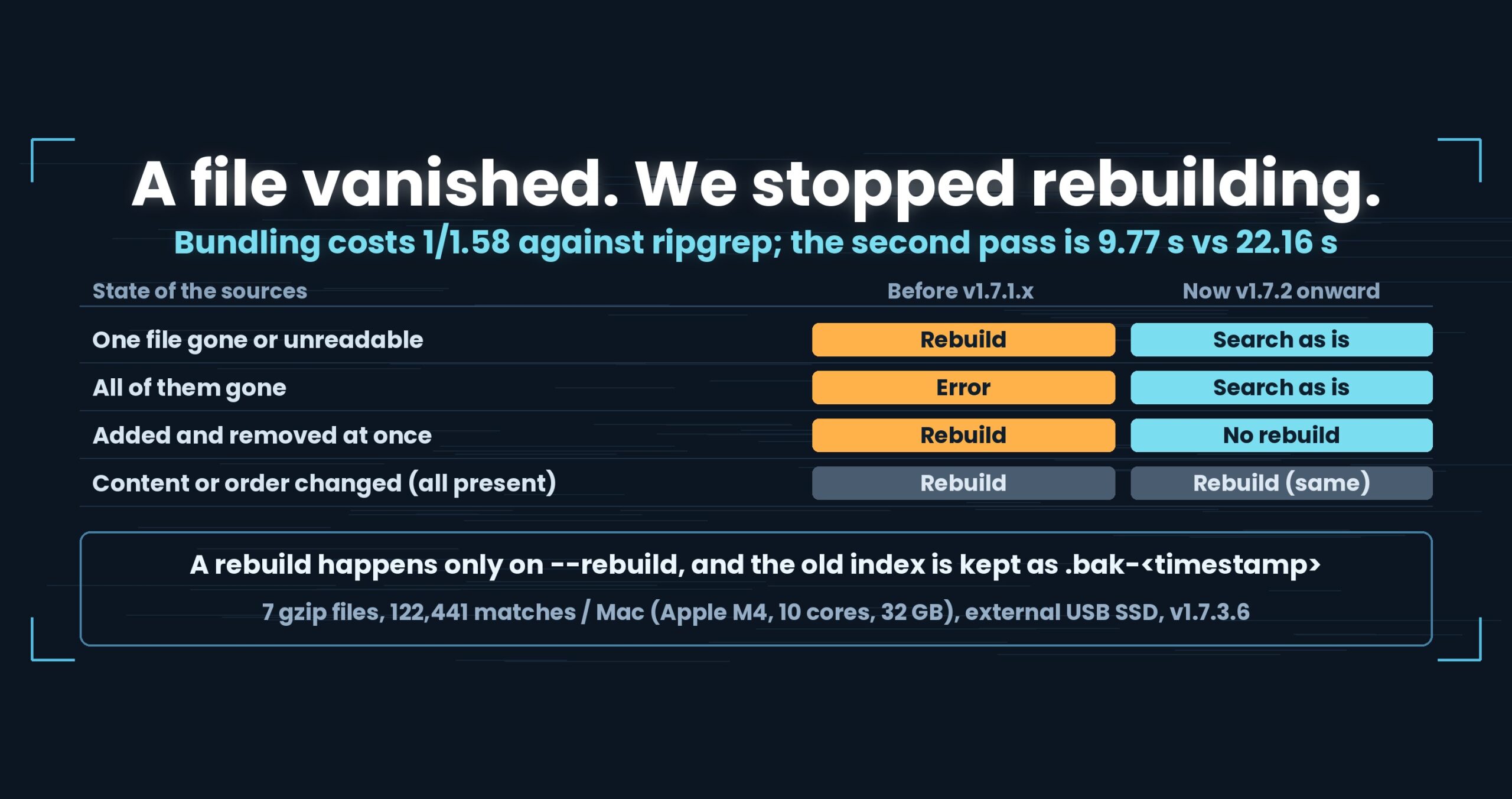
- The short version: bundling costs 1/1.58 against ripgrep on the first pass, then runs at 9.77 s (2.27x ripgrep’s 22.16 s). And if a source file disappears — or all of them do — the index is not rebuilt; it is still searchable
- Where we lose, first
- ripgrep reads from scratch, every time
- The bundle is matched by name
- We stopped rebuilding when something disappears
- What this looks like under logrotate
- The numbers
- How it was measured
- What generalises
- Being straight about it
- The tools used here
- Links
The short version: bundling costs 1/1.58 against ripgrep on the first pass, then runs at 9.77 s (2.27x ripgrep’s 22.16 s). And if a source file disappears — or all of them do — the index is not rebuilt; it is still searchable
ripgrep keeps no state. Search the same pile ten times and it reads the files from scratch ten times. We build a bundled .uwvz (UwView Pro’s compression format plus index) on the first pass and read that afterwards. On seven gzip files the first pass is 35.70 s against ripgrep’s 22.54 s — a 1/1.58 loss — and the second is 9.77 s against 22.16 s, 2.27x. Since v1.7.2, when a source file is missing, removed or unreadable we do not rebuild; we search the existing index and warn. Even with every source gone it still searches, because what was bundled stays inside the index after the originals are deleted. Mac (Apple M4, 10 cores), 32 GB RAM, external USB SSD, OpenStreetMap XML.
uvfanduvpare the search commands of UwView v1.7.3.6 “Wide Field” (released 28 September 2026), which I make.uvfships in the free edition;uvpis part of the paid UwView Pro. The timings are v1.7.3.6 measured on 29 September 2026; the rebuild rules landed in v1.7.2.
Where we lose, first
- The bundling pass is a clear loss. 1/1.58 on seven gzip files, which is the cost of writing the index. If you will search once, the free
uvfor ripgrep is faster. - It uses disk. Five plain files plus seven gzip — twelve in all — bundled to about 8.2 GB in one measurement (
uvp1.7.3.5). Keep the originals and that is on top. - The “append only what was added” path has not been timed. It is implemented, but there is no measurement of how long an append takes, so this article makes no speed claim about it.
ripgrep reads from scratch, every time
Start with the other side’s design. ripgrep opens and reads the files on every search. Nothing is carried over — not the previous result, not the previous read.
That is not a weakness; it is the choice. With no state, stored state can never drift from reality. Whether files have vanished or appeared, whatever is on disk right now is the answer. It is also why it works the moment you install it.
The cost is that ten searches over the same pile mean ten reads. The more often you look, the more often it redoes the same work.
We chose the opposite. Build a bundled index on the first pass and read it afterwards — and, in exchange, take on the question of what to do when the index and reality disagree.
The bundle is matched by name
Given uvp 'osm17/*.gz,osm17/*.osm' 東京, the first pass expands the targets, bundles them into one .uwvz, and searches as it goes. Run the same command again and it first checks whether the index is still usable.
That check originally worked by position — first file, second file, third file, matched in order.
Which is where the accident lived. If one file in the middle disappears, everything after it looks like “the order changed.” The result was a full rebuild. Under logrotate, old files disappearing is the normal course of a week.
In v1.7.2 the check was changed to match by name. Lose one file and the rest are still found as the same parts under the same names.
We stopped rebuilding when something disappears
With name matching in place, the behaviour itself was re-decided.
| Situation | Before (v1.7.1.x) | Now (v1.7.2 onward) |
|---|---|---|
| A source file is missing, removed or unreadable | Rebuild (losing what was in it) | No rebuild; search the existing index. Warn, and point at --rebuild |
| Zero targets left (everything gone) | Error: “no match” | Still searchable from the existing index |
| Something added and something removed at once | Rebuild | No rebuild (and nothing appended) |
| Content or order changed, with everything present | Rebuild (announced) | Unchanged |
--rebuild |
— | Moves the old index to .bak-<timestamp> first, then rebuilds |
Entries disappearing from inside a zip are treated the same way.
Is searching a stale index correct?
This is where a reader should be suspicious, so it gets its own heading.
Sometimes it is not. That is why there is a warning.
The index holds what the files contained when it was built. Search it after a source file has been deleted and lines from the deleted file come back — lines that no longer exist on disk.
Whether that is “wrong” or “archived” depends on what you are doing. Chasing something in a log that aged out of retention is a real need. Rebuild, and that content is gone for good.
So the default is not to rebuild. And, alongside that, not to be quiet about the mismatch: the missing filenames are named in a warning, with --rebuild offered for anyone who wants the index to match reality. --rebuild moves the old index to .bak-<timestamp> before rebuilding, so following the advice still does not destroy the old content.
Do not make a destructive operation the default. That is the whole of the decision.
Additions go in at their place in the name order
In the other direction, new targets are added to the index. A file that sorts into the middle by name is appended to the index and placed correctly at search time. Parts excluded by .ignore and friends stay in the index but are not searched.
Again: how long that append takes has not been measured, so it gets no speed claim here. What can be said is that a path exists which is not a full rebuild.
What this looks like under logrotate
In practice: app.log rotates daily, older files become .gz, and anything past retention disappears. The usual shape.
- Today’s file appeared … appended to the index
- The oldest
.gzdisappeared … no rebuild; the old lines are still searchable - Something appeared and something disappeared in the same interval … no rebuild, and no append either
- You want the index to match reality … run
--rebuildexplicitly; the old index survives as.bak-<timestamp>
So the index behaves as an archive you search, not a mirror of the directory. ripgrep’s “reality is the answer” is a different character. Neither is more correct; they answer different questions.
The numbers
Seven gzip files (osm17, OpenStreetMap XML, 122,441 matching lines) searched in one command.
| ripgrep | uvp |
|
|---|---|---|
| First pass (cold, writing the index) | 22.54 s | 35.70 s = 1/1.58 |
| Second pass (hot, reading the index) | 22.16 s | 9.77 s = 2.27x |
- About 13 s extra on the first pass, about 12 s saved on each pass after, so it is roughly even by the second.
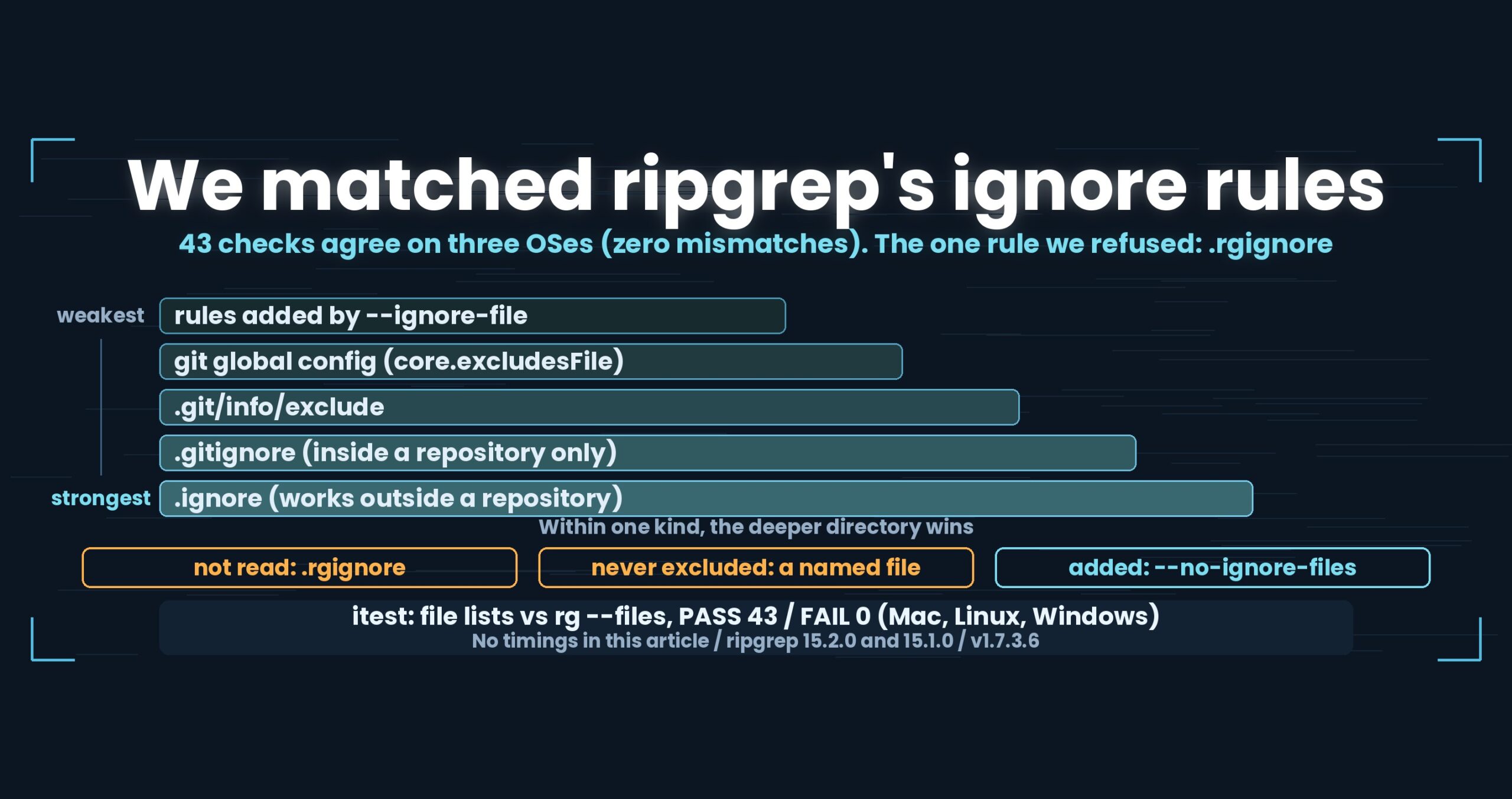
- Match counts agree with ripgrep. In the same day’s integration test, all 36 multi-file checks passed with zero mismatches.
- The rebuild rules themselves passed all 27 checks in the multi-file suite, including “remove one file” and “remove them all” (verified for v1.7.2).
How it was measured
- Files: OpenStreetMap (Japan) XML from
osm17, seven gzip files - Term:
東京(fixed string, with line numbers) - State: first pass after
sudo purge(cold) and the second pass immediately after (hot), recorded separately - Against: ripgrep 15.2.0 (
rg -z -n -F) - Ours:
uvf/uvpv1.7.3.6 “Wide Field” (integration test of 29 September 2026). The index-size figure is a separate 12-file run onuvp1.7.3.5 - Mac (Apple M4, 10 cores, 32 GB RAM), external USB SSD. Seconds vary with the environment.
What generalises
(1) Once you decide to keep state, the drift rules are part of the design. The benefit of an index (2.27x on the second pass) and the problem of diverging from reality are two sides of one choice. Take the speed and leave the drift for later, and you end up where we were: with “rebuild when something disappears” — the most expensive possible default.
(2) Do not key a reconciliation on position. Match in order and a single missing element shifts everything after it. Key on something intrinsic to the element, such as its name, and a gap stays a local gap. This is not specific to indexes.
(3) Never make an irreversible operation the default. Rebuilding destroyed whatever the missing file had contained. A default that falls on the destructive side is the wrong default, even in the name of consistency. Do it when the user asks (--rebuild), and still keep a copy.
(4) Do not publish speed for something you did not time. The append path is implemented, but there are no seconds for it, so there is no speed claim. A specification and a measurement are different things, and mixing them makes every other number in the article suspect.
Being straight about it
- All numbers are examples measured on Mac (Apple M4, 10 cores), 32 GB RAM, external USB SSD, OpenStreetMap XML. Other environments will differ
- The index size (about 8.2 GB) comes from a separate run over twelve files (five plain plus seven gzip). The timings here are the seven-gzip set, and the index size for that set was not recorded
- The append path has not been timed. It appears here as a specification only
- Searching an old index after the sources are deleted returns lines that no longer exist on disk. There is a warning, but matching reality requires
--rebuild - Anything under 1.5x is not called a difference. The only figures called differences here are 1/1.58 and 2.27x
- Windows and Linux results are not brought in. The same integration test passed on all three with zero mismatches, but the machines and media differ, so seconds are never compared across operating systems
- I develop one side of this comparison. Discount it accordingly
The tools used here
UwView is a CLI and GUI for working with very large text files and logs. In v1.7.3.6 “Wide Field” it searches several files and seven compression formats in one pass, with no external commands.
The same thing on the command line
# first pass: search while writing the bundled .uwvz (UwView Pro)
uvp 'app.log,app.log.*.gz' ERROR

# second pass onward: the same command reuses the index (UwView Pro)
uvp 'app.log,app.log.*.gz' ERROR

# rebuild to match reality (the old index is kept as .bak-<timestamp>)
uvp 'app.log,app.log.*.gz' ERROR --rebuild

# see which files the pattern picks up, before searching (free)
uvf 'app.log,app.log.*.gz' --files

# search in place, with no index (free)
uvf 'app.log,app.log.*.gz' ERROR

# take the parts back out (plain, gz and zip come back as-is; others come back as text)
uvp app.uwvz -extract -out ./restored/
Exit codes follow grep: 0 = found, 1 = not found, 2 = error or incomplete result.
The free edition is on GitHub Releases. On Mac, brew install --cask amru195704/uwview/uwview; on Windows, Scoop (scoop bucket add uwview https://github.com/amru195704/scoop-uwview then scoop install uwview).
Links
- Searching compressed logs against ugrep, ripgrep and zgrep (seven formats, six tools): https://uvp.y42u.net/en/blog/uwview-ugrep-ripgrep-zgrep-compressed-logs-en/
- Building a
.uwvz, searching inside it, and taking it back out: https://uvp.y42u.net/en/blog/uwvz-compressed-archive-search-extract-en/ - Compressed logs are faster to search (choosing a format): https://uvp.y42u.net/en/blog/log-compression-format-choice-en/
- Searching gzip without extracting it (a single file): https://uvp.y42u.net/en/blog/uwview-fl08-gz-without-extract-en/
- Thirteen parts about removing passes, in one place: https://uvp.y42u.net/en/blog/uwview-fl13-first-light-recap-en/
- All measurements (benchmarks): https://uvp.y42u.net/en/benchmarks-en/
- Source code (GitHub): https://github.com/amru195704/UwView
And if your huge logs are eating storage and you want them kept compressed and still searchable fast, take a look at UwView Pro — a persistent index, search inside the compressed cache, roughly 1/9 storage, and both reopening and searching a step faster (all OSes; one-time purchase or a monthly plan).
From the developer: my apps, Kindle books and public projects are listed on GitHub: amru195704.