This is a follow-up on where to keep logs you have finished reading.
gzip makes them small, but searching means zgrep decompressing the whole thing as it reads. For a 50 GB log, that is 50 GB decompressed on every search. I wrote about that as “reconciling compressed storage with search”, and at the time I had no answer.
While building the CLI, I noticed that the .uwvz file UwView Pro produces is that answer. Something built as an index turned out to work as a compressed archive.
What a .uwvz is
When UwView Pro opens a gigantic file, a .uwvz appears next to it. Inside are the line index and a compressed copy of the file itself. The second time you open the file, this is what gets read, so even 50 GB opens in under 0.1 s.
I have always described it as “a cache for opening quickly”. But the whole file is inside it, so nothing is lost if the original is gone.
How small it gets — the same size as gzip, built five times faster
I compressed the same files with gzip -6, zip -6 and as .uwvz, and compared size and time.
| Original | gzip -6 | zip -6 | .uwvz |
|---|---|---|---|
| 3.03 GB | 0.30 GB (16.8 s) | 0.30 GB (19.4 s) | 0.25 GB (1.2 s) |
| 10.26 GB | 1.12 GB (66.5 s) | 1.12 GB (76.8 s) | 1.16 GB (14.9 s) |
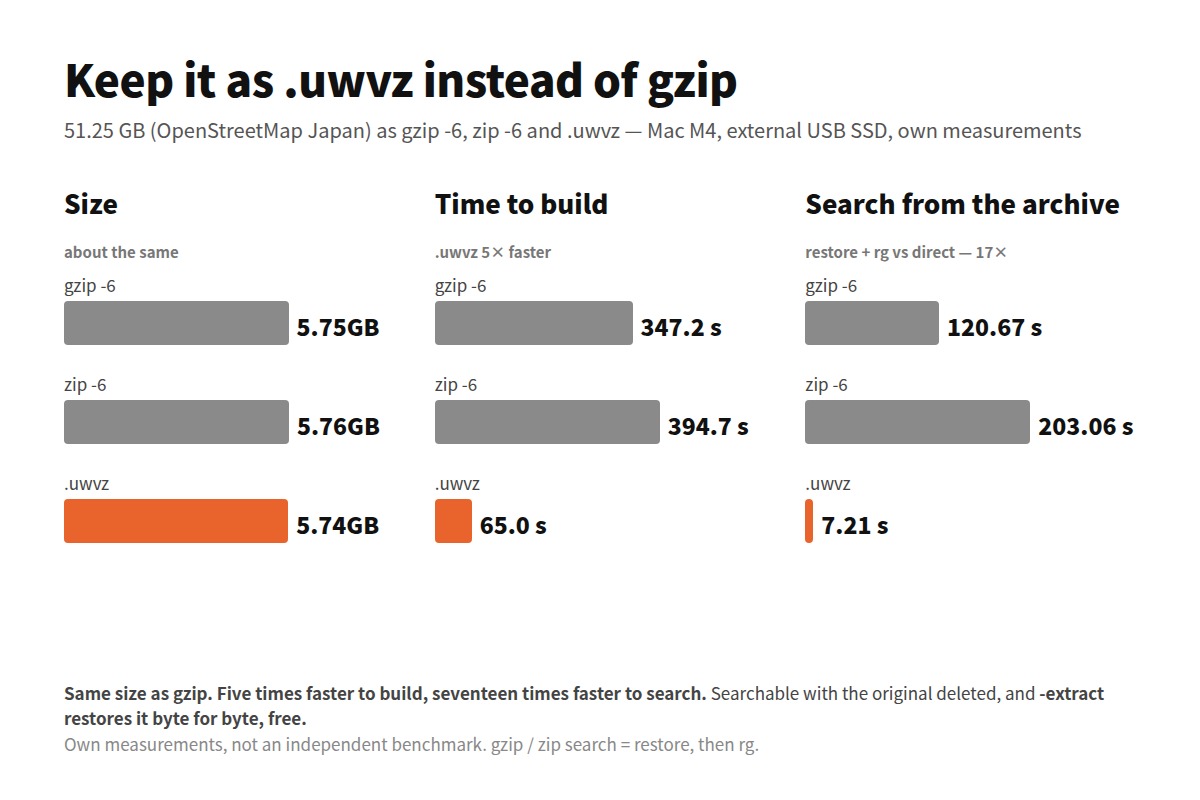
| 51.25 GB | 5.75 GB (347.2 s) | 5.76 GB (394.7 s) | 5.74 GB (65.0 s) |
As ratios: 3 GB is gzip 1/10.1, zip 1/10.1, .uwvz 1/12.0; 10 GB is 1/9.2, 1/9.2, 1/8.8; 50 GB is 1/8.9, 1/8.9, 1/8.9 (computed from the actual sizes on disk). The size is essentially the same as gzip. At 50 GB, gzip gives 1/8.91 and .uwvz 1/8.93. There is no difference to speak of.
What differs is the time to build it. For 50 GB, gzip takes 5 min 47 s and .uwvz 1 min 5 s — five times faster, even though it is building an index while it compresses.
The 258 GB United States extract came out at 28.61 GB (1/9.0). These are OpenStreetMap XML figures, so logs will give different numbers, but that is the order of magnitude.
Search it with the original gone
This is the point.
uvp japan.osm.uwvz '東京' # the 51 GB original is gone; search the .uwvz on its own
With the original gone, you can point uvp at the .uwvz directly and search. The lines that come back are the same as searching the original.
To search a file kept as gzip or zip, you first have to restore it. Restore, then search with rg — that total, next to searching the .uwvz directly:
| Size | gzip (restore + rg) | zip (restore + rg) | Search the .uwvz directly |
|---|---|---|---|
| 3 GB | 6.47 s (3.49 + 2.98) | 8.71 s (8.08 + 0.63) | 0.68 s |
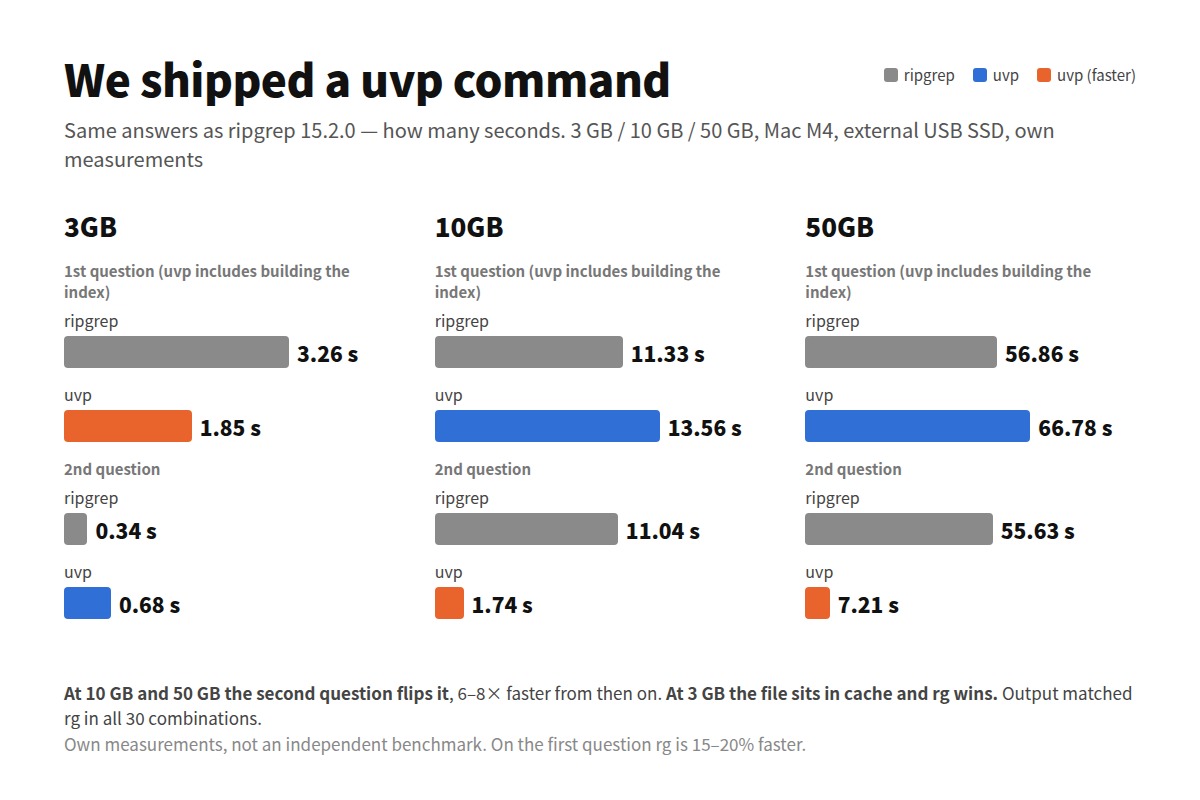
| 10 GB | 24.70 s (13.12 + 11.58) | 40.48 s (29.28 + 11.20) | 1.74 s |
| 50 GB | 120.67 s (65.05 + 55.62) | 203.06 s (146.97 + 56.09) | 7.21 s |
At 50 GB: two minutes for gzip, three and a half for zip, seven seconds for .uwvz. Seventeen times gzip.
The reason is simple. gzip has to be fully restored on every search, while the .uwvz has an index and searches without restoring. And the second and third questions stay at seven seconds. With gzip you could keep the restored file around and get rg’s 55 s from the second question on — but then there was no point compressing it.
zgrep avoids writing the restored file to disk, but it cannot skip the decompression itself, so the order of magnitude does not change (I did not measure zgrep for this article).
Storage and search are the same file.
Everything uvp can do — narrowing, regex, frequency counts — works on the .uwvz as well (the command list is here).
And you can restore it. For free
Compression you cannot undo is no use for storage.
uvp japan.osm.uwvz -extract -out ./restored/
-extract gives you the original file back. On the 3 GB file it took 3.38 s, and the result matched the original byte for byte. Restoring the same 3 GB with gzip -dc takes 3.49 s, so restoring is as fast as gzip.
Extraction is a free feature. If the Pro licence lapses, the contents of the .uwvz can still be taken out. You are not storing data in a format you cannot leave.
How long it takes to build
| Size | Time to build the .uwvz (two runs) |
|---|---|
| 3 GB | 1.1–1.2 s |
| 10 GB | 11.8–14.9 s |
| 50 GB | 59.6–65.0 s |
About 1 to 1.3 seconds per gigabyte (Mac M4, external USB SSD). It is the same as the time UwView Pro takes to “open” the file — because it is building the same thing. Faster than gzip -6’s 5 min 47 s at 50 GB, as shown above.
What it is not for
To be straight about it:
- Not for a log that is still growing. A
.uwvzfreezes the contents at the moment it was built. Build it after the file has stopped changing - It is a UwView-only format. Unlike gzip, other tools will not open it. To pass a file to someone else,
-extractit or gzip it - A purpose-built format wins. The same 50 GB of OpenStreetMap in its own binary PBF format is 2.46 GB (1/20.8), less than half of gzip or
.uwvz..uwvzis general-purpose compression for any text; it does not compete with a format designed for one kind of data -extractwas only timed at 3 GB. Extraction times at 10 GB and 50 GB are not measured- The gzip comparison is “restore, then rg”. I did not measure the streaming
zgreproute (the decompression cost is the same, so I do not expect the conclusion to change)
Which to use
- Finished with it, but you may need to search it now and then → keep it as
.uwvz. The same size as gzip, and searches take seconds - You will never look at it again → gzip is enough. If you will not search it, an index is pointless
- Still growing, or shared with other tools → not this
Think of it as one more option under “compress” in the earlier piece on deleting, keeping or compressing logs.
The tools
The .uwvz is produced by UwView Pro (Windows, macOS and Linux, one licence for all three; one-time or monthly; 14-day free trial). Extraction with -extract is a free feature and needs no Pro licence.
All figures are my own measurements on my own machines, not an independent benchmark.
Links
- We shipped a uvp command — the same answers as ripgrep, 7× faster at 10 GB — every CLI command, measured against rg
- Compressed logs and the zgrep slowness you cannot live with — storage and search together — the question this article tries to answer
- Where finished logs go — delete, keep or compress
- Opening 258 GB and 4.5 billion lines as one file — where the 28.61 GB
.uwvzcame from