A grep on 3 GB belongs to ripgrep if the file is in the cache. If it is not, it belongs to uvp.
In the previous article I wrote that 3 GB is ripgrep’s ground and I concede it. When the file fits in memory, an index has little to offer — believing that, I had been measuring warm every single time. Drop the cache and measure again, and it is the other way round. So here is the 3 GB picture again, that included.
- Up front
- First, drop the cache and measure again
- ① A day you fix and save — when the job writes output, bytes read matter directly
- ② A day you use something rg does not have
- ③ A day the logs are kept as gz / zip — stop expanding them every time
- ④ A day you do not yet know what you are looking for — this is the real point
- Summary — four situations where you win at 3 GB
- The tools
- Links
Up front
I compared ripgrep / sed / gzip against uvp on a 3 GB file (3,032,812,644 bytes cut from OpenStreetMap Japan XML) under the same rules (Apple M4 / 32 GB / external USB SSD, /usr/bin/time -p real. Each search was measured cold — straight after sudo purge — and warm, the run immediately after, with the .uwvz already built).
- Pure search swaps with the state of the cache. Warm, ripgrep (0.33 s vs 1.01 s); cold, uvp (3.26 s vs 1.25 s = 2.6×). It comes down to whether uvp’s fixed cost — startup plus index load, just under a second — is larger or smaller than rg’s whole scan, and the absolute gap is under 0.7 s either way
- Even so, there are four situations where you win at 3 GB: ① fixing and saving (replace 3.5× and extract 12.6× over sed), ② operations rg does not have (sequence detection, ±N-line drill-down, click-to-drill), ③ logs kept as gz/zip (expand + rg 6.47 s vs
.uwvzdirect 0.68 s = 9.5×), and ④ not yet knowing what you are looking for (narrow in the CLI, look in the GUI, narrow again — 0.24 s per stage) - In short: on a day that ends with grep, use rg. The moment the investigation involves reading, narrowing, counting, fixing or saving, 3 GB becomes uvp’s ground too
First, drop the cache and measure again
First, pure search, measured in two states. Cold is straight after sudo purge (the file is not in the page cache); warm is the run immediately after (it is in memory). uvp 1.6.3, ripgrep 15.2.0, with the .uwvz already built.
Cold (opening a file after a while)
| Search | rg |
uvp |
rg ÷ uvp | Hits |
|---|---|---|---|---|
| Fixed string | 3.26 s | 1.25 s | 2.6× | 11,274 |
Ignore case -i |
3.30 s | 1.58 s | 2.1× | 940,482 |
Regex -E |
3.32 s | 1.70 s | 2.0× | 928,301 |
| Regex, anchored | 3.24 s | 1.47 s | 2.2× | 222,072 |
| Regex + ignore case | 3.29 s | 1.69 s | 1.9× | 491,643 |
Exclude -E -v |
3.57 s | 1.85 s | 1.9× | 1 |
Exclude -v, plain term |
3.51 s | 3.96 s | 1/1.1 | 7,698,790 |
Six of seven go to uvp, by roughly 2×. The reason is exactly the reason at 10 and 50 GB: it reads 1/12 of the bytes (3,032,812,644 against 251,829,224).
Warm (asking again, right after reading it)
| Search | rg |
uvp |
rg ÷ uvp |
|---|---|---|---|
| Fixed string | 0.33 s | 1.01 s | 1/3.1 |
Ignore case -i |
0.65 s | 1.22 s | 1/1.9 |
Regex -E |
0.52 s | 1.28 s | 1/2.5 |
| Regex, anchored | 0.48 s | 1.16 s | 1/2.4 |
| Regex + ignore case | 0.61 s | 1.40 s | 1/2.3 |
Exclude -v, plain term |
2.10 s | 3.74 s | 1/1.8 |
Exclude -E -v |
3.13 s | 1.74 s | 1.8× |
Warm, six rows go to rg. 3 GB fits in 32 GB of RAM, so one read puts the whole file in the cache and rg runs straight over it in 0.33 s, while uvp pays its startup and index load first. I concede this. The gap is 0.7 s, and conceding it costs nothing in practice.
One exception: -E -v is faster on uvp even warm (1.74 s against 3.13 s). Excluding works over every line, so ripgrep’s cache advantage stops helping and the difference in bytes read shows through.
At 10 GB there is no warm state at all
| 10 GB | Cold | Warm |
|---|---|---|
rg (fixed string) |
10.96 s | 10.89 s |
uvp (.uwvz 1.16 GB) |
2.37 s | 1.55 s |
The second run is the same 10.96 s. The file does not fit in 32 GB of RAM, so every run reads it off the drive again. “At 3 GB, use rg” holds only when the file fits in memory and someone read it a moment ago. Right after a reboot, on a log you last opened days ago, on a USB HDD or a network share, the difference in bytes read shows up even at 3 GB.
The problem is that an investigation almost never ends after one grep.
① A day you fix and save — when the job writes output, bytes read matter directly
Search is “read and count”. Extract and replace are “read and write out“. That changes things.
| Test | CLI | uvp |
Ratio |
|---|---|---|---|
Extract hit lines (sed -n '/term/p') |
9.96 s | 0.79 s | 12.6× |
Replace all (sed 's/A/B/g') |
15.04 s | 4.28 s | 3.5× |
Same (rg --passthru -r) |
— | 4.28 s | 1.7× |
sed processes one line at a time, so even 3 GB takes 10–15 s. uvp pulls only the lines it needs out of a 0.25 GB index and writes them, so it wins even at 3 GB. The replace output is byte-identical to sed and to rg --passthru -r in every combination tested.
Add up a day’s flow — “investigate, fix, save” — and it looks like this.
| Open → 2 queries → replace and save (3 GB) | Total |
|---|---|
| rg + sed | 17.7 s |
| uvp (including index build) | 7.6 s (2.3×) |
uvp’s 7.6 s includes 1.2 s to build the index on the first run. It still wins. One replace turns sed’s 15 s into uvp’s 4.3 s, and next to that 10-second gap the 1.2 s for the index is noise.
② A day you use something rg does not have
Some rows could only go into the comparison as “reference”, because rg has no equivalent command.
| Operation | uvp (3 GB) |
In rg you would… |
|---|---|---|
Sequence detection -seq login,timeout,restart (only flows in this order) |
0.99 s | write a state machine in awk |
Second term within ±N lines -C 3 <term2> (co-occurrence nearby) |
1.23 s | rg -C 3 \| rg mixes context lines in and changes the meaning |
| Click a tally value to drill into it | instant in the GUI | read rg -o \| sort \| uniq -c, then run rg again |
| Jump from a hit to the original text with line numbers | instant in the GUI | note the line number from rg -n, then sed -n 'Np' |
Before “faster or slower”, these are rows where the comparison itself does not exist. “Only the flows where a timeout follows a failed login within three lines”, “only the hits with another term within five lines” — use any one of these in an investigation and whether the file is 3 GB stops mattering.
③ A day the logs are kept as gz / zip — stop expanding them every time
Logs are normally kept gzipped. To search them you expand and then rg — and zgrep does not save you the expansion itself.
I compressed the same 3 GB with gzip -6, zip -6 and .uwvz, and compared expand-then-search with search directly.
| 3 GB | Time to compress | Size | Search (expand + rg / direct) |
|---|---|---|---|
| gzip -6 | 16.8 s | 0.30 GB (1/10.1) | 6.47 s (expand 3.49 + rg 2.98) |
| zip -6 | 19.4 s | 0.30 GB (1/10.1) | 8.71 s (expand 8.08 + rg 0.63) |
.uwvz |
1.2 s | 0.25 GB (1/12.0) | 0.68 s (direct search) |
Same size as gzip, 14× faster to create, 9.5× faster to search. gzip expands everything every time you search; .uwvz carries an index and is searched without expanding. The second and third questions stay at 0.68 s. You could keep the expanded file around and get rg’s 0.33 s from the second question on, but then there was no point compressing.
And .uwvz restores the original byte-for-byte with -extract (free). Change the storage format from gz to .uwvz and the per-search expansion disappears, even at 3 GB. At 50 GB it is 7 s against gzip’s 2 minutes — 17×.
④ A day you do not yet know what you are looking for — this is the real point
In the table of losses, 東京 at 3 GB returns 11,274 hits. rg’s 0.33 s does not include the time for a person to read those 11,274 lines.
There are two kinds of investigation. Checking whether a string is there — and the kind where you do not yet know what to search for. The second is trial and error itself: scan the 11,274, look around the interesting ones, narrow by another term, count, go back. In a terminal you rebuild the command each time for 0.33 s — except that what you actually pay is the time to rebuild it and the time to follow output scrolling past.
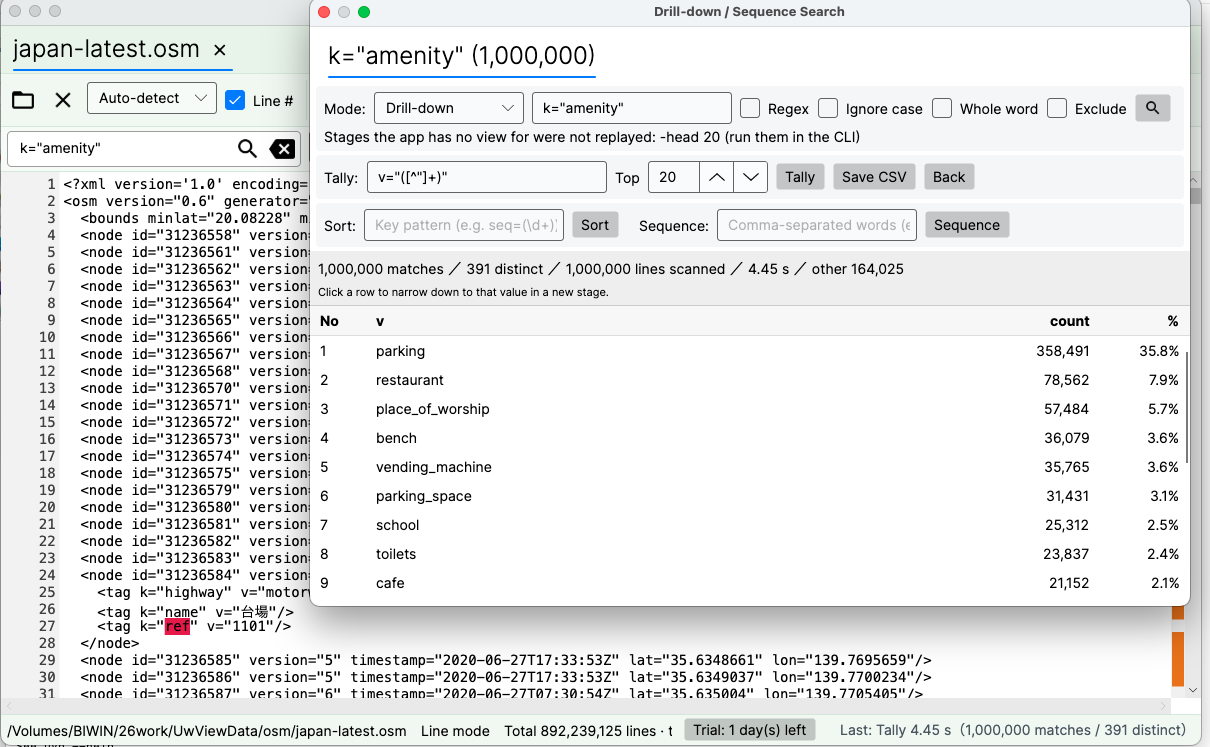
Put -open at the end of a uvp command and the CLI result is handed straight to the GUI.
uvp japan-dv-ai.uwvz '東京' -uniq 'k="([^"]+)"' -sort count -head 20 -open
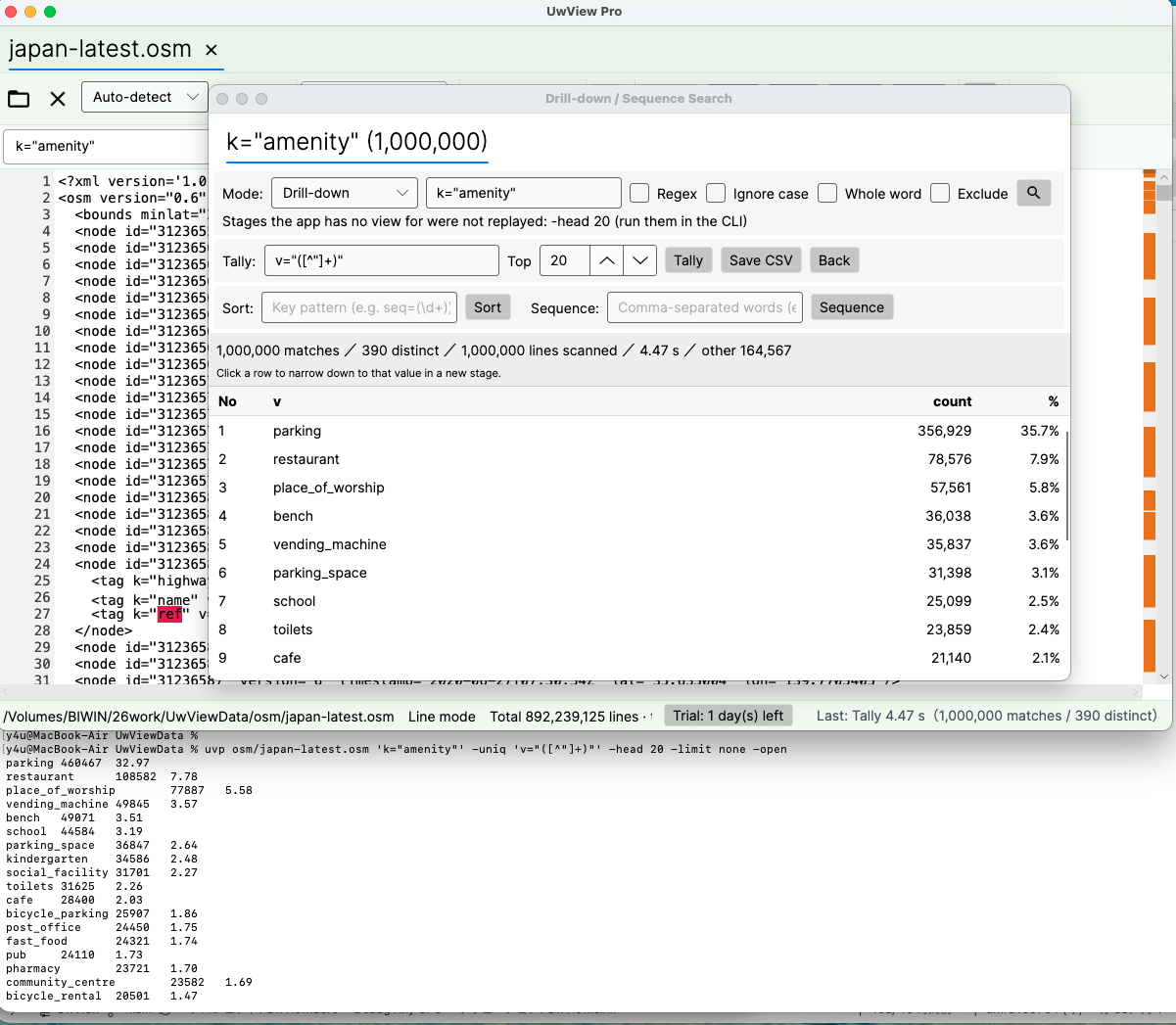
- The CLI finishes the search and the tally, and hands the result to the GUI through a temporary file (the GUI does not search again; v1.6.2)
- The GUI reads the same
.uwvz, so reopening does not read 3 GB (reopening a 47.73 GB file takes 0.02–0.07 s from the second time on; 3 GB is less) - Click a row in the list to jump to it in the text. ±N lines of context. Click a value in the tally to drill into it as the next stage
- Narrow again with another term — 0.24 s per stage (measured at 50 GB; 3 GB is less)
- Once you know what you are after, drop back to the command line and process in bulk. The GUI and the CLI use the same
.uwvz, so moving between them costs no waiting
So the thing to compare is not “one grep, 0.33 s vs 1.01 s” but “total time and number of actions to reach the answer”. rg alone means rebuilding the command, reading the output, rebuilding again for every re-narrowing. GUI alone means a slow open. Put an index between them so the CLI and the GUI use the same thing, and narrow broadly with a command, look closely on screen, drop back to a command connects with no waiting.
The CLI and the GUI call the same functions (drill-down, tally, sequence), so the count the CLI prints and the count the GUI shows always agree. That was verified byte-for-byte against rg / sed across 81 combinations plus 12 gz/zip inputs plus every 258 GB case, with zero defects on the product side.
Summary — four situations where you win at 3 GB
| Situation | Measured at 3 GB |
|---|---|
| A day that ends with grep | Warm, rg wins (0.33 s vs 1.01 s). Cold, uvp wins (3.26 s vs 1.25 s = 2.6×). -E -v goes to uvp even warm (1.74 s vs 3.13 s) |
| ① A day you fix and save | Replace 3.5×, extract 12.6× over sed. 2.3× on “open → 2 queries → replace and save” |
| ② A day you need something rg lacks | Sequence detection, nearby co-occurrence, click-to-drill, line-number jump. No comparison exists |
| ③ A day the logs are gz/zip | Expand + rg 6.47 s vs direct 0.68 s (9.5×). Compressing takes 1/14 of gzip’s time |
| ④ A day you do not yet know what you are looking for | Narrow in the CLI, look in the GUI, narrow again. 0.24 s per stage. The unit of comparison changes from “one grep” to “time to the answer” |
“A single grep on 3 GB” is ripgrep’s ground, and it can be conceded. The moment an investigation involves any one of reading, narrowing, counting, fixing or saving, it becomes uvp’s ground — and past 10 GB, pure search wins by 5–10× as well.
The tools
uvp ships with UwView Pro v1.6.3 (Windows, macOS and Linux, one licence for all three; one-time or monthly; 14-day free trial, during which uvp and editing both work). Replace (-replace) is part of the Edit Upgrade. Restoring from .uwvz (-extract) is free. The free UwView ships uvf, which does search and -open only and has no index (v1.6.3 rebuilt it as a single pass: 3.32 s cold at 3 GB, level with rg).
All figures are my own measurements on my own machines, not an independent benchmark. ripgrep is among the fastest there is for searching across many files, and this article does not contest that. If you spot a configuration issue, tell me; I will check and correct.
Conditions
- Apple M4 / 32 GB / macOS 26.3.1 / external SSD
- ripgrep 15.2.0 / BSD sed / gzip and zip at level 6 / the cold and warm search figures are uvp 1.6.3, measured 2026-09-17; replace, compression and GUI figures are uvp 1.6.2 /
sudo purgebefore every run, cooldown between runs - 3 GB: 3,032,812,644 bytes cut from OpenStreetMap Japan XML. The
.uwvzis 251,829,224 bytes (1/12.0); gzip is 300,890,910 bytes (1/10.1) - The search tables assume the
.uwvzis already built. Including the build, the first run is 4.64 s cold (rg 3.26 s) - Everything here was measured on a Mac (Apple M4 / 32 GB / external USB SSD). Windows and Linux — a low-powered laptop, under VMware — may behave differently; those are being measured separately and will get their own article
Links
- Picking the one place to beat ripgrep — the main article, at 258 GB. This is its 3 GB companion
- Keep .uwvz instead of gzip — 1/9 the size, searchable in 7 seconds, restored for free — all the numbers behind ③ (3 GB / 10 GB / 50 GB)
- We shipped a uvp command — the same answers as ripgrep, 7× faster at 10 GB. And at 3 GB too, if the cache is cold — 3 GB / 10 GB / 50 GB tables
- uvp command manual — current
-open,-seq,-C N,-replace,-extractbehaviour - Measured results — large-file tools compared