The incident investigation is over. The postmortem is written. What’s left on disk is the tens of gigabytes of logs you used to get there.
So what happens to them?
In most shops, that call gets made on the spur of the moment. There’s room this week, so keep them. When the disk fills up next month, delete oldest-first. Nobody has written the rule down, so the question gets re-litigated every time — and the answer changes when the person on duty changes.
This article lines up four situations around where finished logs live: they pile up, compression makes them unreadable, slow storage makes them unbearable to open, and a server migration leaves them homeless. Each one has a workable command-line answer. And each one has a point where that answer stops.
1. “Keep it just in case” piles up — logs with no retention rule
Situation
You run df -h and nearly half the data volume is logs. Look closer and the properly rotated logs are the minority. Most of the bulk is copies somebody made by hand during an investigation: app.log.20250912.bak, investigation/, old_server_logs/. Nobody remembers which incident any of it belonged to.
Why it happens
Because deleting and keeping have asymmetric costs when you get them wrong.
Delete it and later need it, and there is no recovery. An auditor asks. The same failure recurs. A customer inquiry arrives six months later. Every one of those ends with “if only we still had that log.” Keep it and never use it, and all you lose is some disk.
That asymmetry is real, so people rationally fall toward keeping. The problem is how they fall: falling without a rule means things that should have been deleted stay forever. A few years on, you have hundreds of gigabytes nobody understands, in a state where deleting feels dangerous.
Command-line triage, and where it stops
You can enforce the trim mechanically.
find /var/log/archive -name '*.log' -mtime +90 -print   # look at the targets first
find /var/log/archive -name '*.log' -mtime +90 -delete  # then delete
du -sh /var/log/* | sort -h | tail -20                  # what's actually fat
Set rotate and maxage in logrotate and the properly managed logs take care of themselves.
The limit is that nobody supplied the reasoning behind the number. If you can’t defend “90 days,” you slide back to “keep it, it’s scary.” Defending it means separating at least three axes:
- Legal and contractual. How far back you can be asked to reach varies by industry. There’s no negotiating here; it’s the outermost constraint.
- Reproducibility. How long the events in that log can still be reproduced. If the affected version is gone from every host, the investigative value of that log is effectively zero.
- Cost. Less the raw capacity than the fact that it rides along on backup and replication and multiplies. One log existing in three places is entirely normal.
And the moment you work through those three axes and decide to keep, the next three problems begin.
2. Half the disk is logs — and compressing them makes them unreadable
Situation
Space got tight, so you gzipped the older logs. Text compresses well, and the free space came back. Six months later somebody wants to look at one of them. You go to decompress it and realize: there’s no longer room for the extracted file.
Why it happens
gzip, bzip2, and zstd are, in their default usage, stream compressors. There’s no way to address byte n directly; getting there means decompressing everything before it.
zgrep looks convenient because it hides that full decompression from you. It’s genuinely convenient — but what’s underneath is a full decompression every time. Search the same archive five times in a day and you decompressed all of it five times. And each result was thrown away.
The bigger issue is losing random access at all. What log investigation actually wants is “jump to around 12:34” and “show me twenty lines either side of this ID” — not reading every line in order. The instant you compress, jumping by line number or by position is gone.
Command-line triage, and where it stops
Split before compressing and you can at least pull out pieces.
split -l 5000000 app.log part_ && gzip part_*   # 5M lines per chunk, then compress
zstd --long=27 -19 app.log                      # long-range matching for better ratio
zstd -d --stdout app.log.zst | less             # read while decompressing
zstd also has a seekable format extension: with a tool that understands it, you can decompress from a block boundary in the middle.
Three limits. First, splitting destroys “one log” as a unit. Which line of the original is line 1,203 of part_ac? You’re doing that arithmetic by hand now. Second, the decompress-and-read approach can’t search. Hit / in less and you’re searching whatever has been decompressed so far. Third, clever formats like seekable zstd require the reading tool to know about them. A viewer that claims it can “open .gz” is very often just extracting the whole thing to a temp file behind your back.
The practical choice available today, in other words, is between small and unreadable or readable and large.
3. Where “just in case” logs actually live — NAS and slow disks
Situation
You moved the undeletable logs to a NAS and an external drive. Capacity solved. A few times a year, the day comes when you have to open one. You double-click, and go make coffee.
Why it happens
I/O is the bottleneck, and that has almost nothing to do with the quality of your tools.
Reading a 48GB file end to end from network storage that delivers an effective 100MB/s takes a bit over eight minutes. Gigabit Ethernet tops out around 125MB/s in theory, so that order of magnitude doesn’t move. However fast the CPU is, a thin wire means waiting.
What makes it hurt is that most tools are built to show you nothing until they’ve read everything. If all you need is the last screenful, or one specific line, you still wait for the whole read. Even if the few kilobytes you actually needed were 0.0001% of the file, that’s eight minutes.
And combine it with work that involves reopening the file — like the encoding checks in part 3 — and it becomes untenable. At eight minutes per interpretation switch, you simply stop checking.
Command-line triage, and where it stops
Fetch only the part you need and the wait shrinks.
tail -c 10M /mnt/nas/app.log > tail.log        # last 10MB only
dd if=/mnt/nas/app.log bs=1M skip=20000 count=50 of=part.log  # pull by offset
rsync -P /mnt/nas/app.log ./                    # drag it back (resumable)
The limit is that this only works when you already know the position. The number you put in dd‘s skip is usually a result of the investigation, not something available at its start. So you guess “probably around 20000MB,” pull, miss, and guess again.
And implementations that lean on mmap don’t behave the way you’d hope over a network. mmap on NFS/SMB triggers a network round trip on every page fault, so code written as if the disk were local simply runs slow. “Copy it locally, then open it” ends up being the reliable path — which means the files you moved off to solve a capacity problem come back to your local disk every time you want to read them.
4. The old server’s logs, homeless after a migration
Situation
The migration is scheduled. The application and the database are both in the plan. Two weeks before the decommission date, somebody notices: “What are we doing with the old server’s logs?”
Why it happens
Because logs were never inventoried as an asset. What gets into a migration plan is the stuff that breaks when it stops — the app, the DB, certificates, DNS, cron. Logs break nothing when they stop. So they never reach the agenda.
From an audit standpoint, though, a migration is not a valid reason for logs to disappear. And they come with baggage specific to the old environment: rotation naming (does the ordering of app.log.1 through app.log.52 still mean anything on the new host?), symlinks (where did the real files live?), encoding and locale (is there output in there that depended on the old server’s LANG?). And finally, the tools for reading them only exist on the old server — the lnav config, the awk script someone wrote, the collection of grep aliases. Power the box down and those go too.
Command-line triage, and where it stops
The mechanics are simple enough.
tar -cf - /var/log/app | zstd -19 -T0 > applog.tar.zst   # bundle and compress
sha256sum applog.tar.zst > applog.tar.zst.sha256          # attach proof of integrity
rsync -avP applog.tar.zst backup:/archive/                # transfer (resumable)
Keeping the checksum alongside is what lets you later say “this log has not been altered since the migration.” If there’s any chance the logs become evidence, don’t skip that line.
The limit is that none of this guarantees you can read them later. applog.tar.zst is stored, yes. But when an auditor asks for one specific day two years from now, the job is: find room for the extraction, extract several hundred gigabytes, locate the file, open it. The problem from section 2, forwarded intact to your future self.
There’s one more. The question that always surfaces during a migration — how much do we take with us? — is unanswerable without the three axes from section 1. Without a rule, it collapses into taking everything, or hacking it down under deadline pressure.
What the four had in common
| Situation | How it shows up | Where it stops |
|---|---|---|
| No retention rule | Logs of unknown origin pile up | No basis for “how many days is safe” |
| Compressed to free space | No room to extract, six months later | Small and unreadable, or readable and large |
| Moved to NAS or external disk | Every open is a wait | Read-everything-first design plus I/O limits |
| Carried out of a migration | Stored, but not provably readable | The problem was forwarded, not solved |
All four jam at the same point: “stored small” and “readable now” don’t currently coexist in the tooling.
That’s why the decision reduces to delete-or-keep. The binary only holds if compressing means giving up readability. Even the section-1 work of setting retention by legal, reproducibility, and cost gets substantially easier once readable while compressed is on the table — the cost axis drops by an order of magnitude, which makes “keep it when in doubt” much cheaper to be wrong about.
And this shape has recurred throughout the series: the part 1 tools that demand a full read before they show you anything, the part 2 round trip between the hit list and the scene, the part 3 re-read on every interpretation switch. It reads like a storage problem, but it’s the assumptions of the reading tool reaching forward to constrain how you’re allowed to store.
The tool I use
UwView (free), which I develop, is a viewer built to drop the read-everything-first assumption. Even with huge files it displays, scrolls, and searches from the moment it opens; the index is built in the background, and line numbers appear when it completes. On a NAS or a slow external drive it reads only the positions it needs, so looking at the last screenful doesn’t mean waiting for the whole file. (I/O is still the bottleneck, so a full-text search costs what physics costs.) It never writes to the original, so logs you may need to treat as evidence can be opened as they are.
The same things, from the command line
v1.6.0 added a uvp command (and uvf for the free build). It uses the same .uwvz as the GUI, so an index built from the shell is already there when you open the file in the app. Mapped onto this article’s four parts:
# Part 1: before setting a retention rule, count what's actually in the log
uvp app-2025.log -uniq '^\S+ \S+ (\w+)' -head 20

# Part 2: search it compressed — a .uwvz answers without being unpacked
uvp app-2025.log.uwvz 'OutOfMemory'

# Part 3: even against a slow NAS disk, keep the result compressed locally
uvp /Volumes/nas/archive/2024.log 'AUDIT' -out 2024-audit.txt.gz

# Part 4: before the migration throws the original away, prove you can get it back
uvp app-2025.log.uwvz -extract -out restored/   # restoring the original is free
Exit codes are grep’s — 0 found, 1 not found — plus 2 when a limit is hit and the output is cut off (no limit by default; only when you set one with -limit N). That makes part 1’s mechanical pre-check — the part before a human decides keep or delete — scriptable.
Stated honestly: on the first question uvp is a little slower than ripgrep — it builds its .uwvz (a compressed cache plus index) first, 59.0 s against 54.9–55.8 s at 50 GB, 6–7%. In v1.6.6.1 it searches while building the index instead of re-reading it afterwards, which cut 6.7 s. It starts paying from the second question: the same 50 GB search takes 6.6 s against ripgrep’s 55–57 s — 8.4×. On a small file such as 3 GB the two are level, because an index has little to earn there. The free uvf is level with ripgrep at every size (the measurements; Mac M4, external USB SSD, OpenStreetMap XML — one setup, results vary).
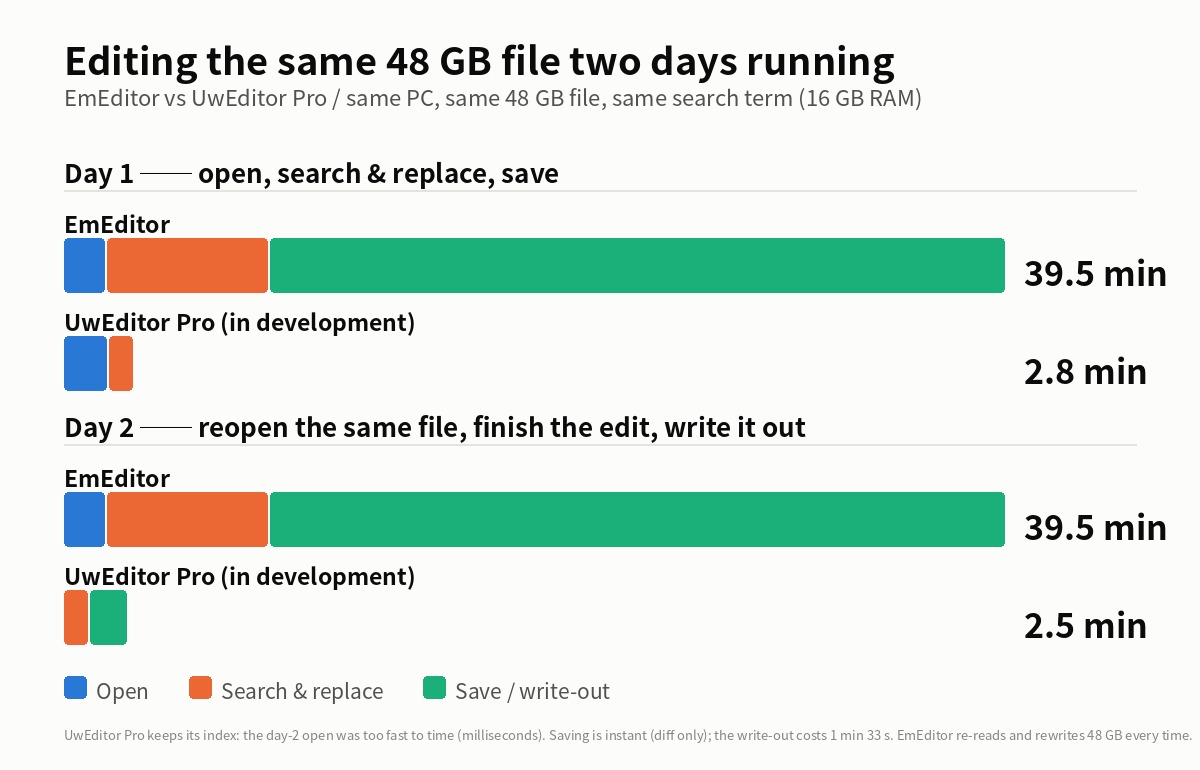
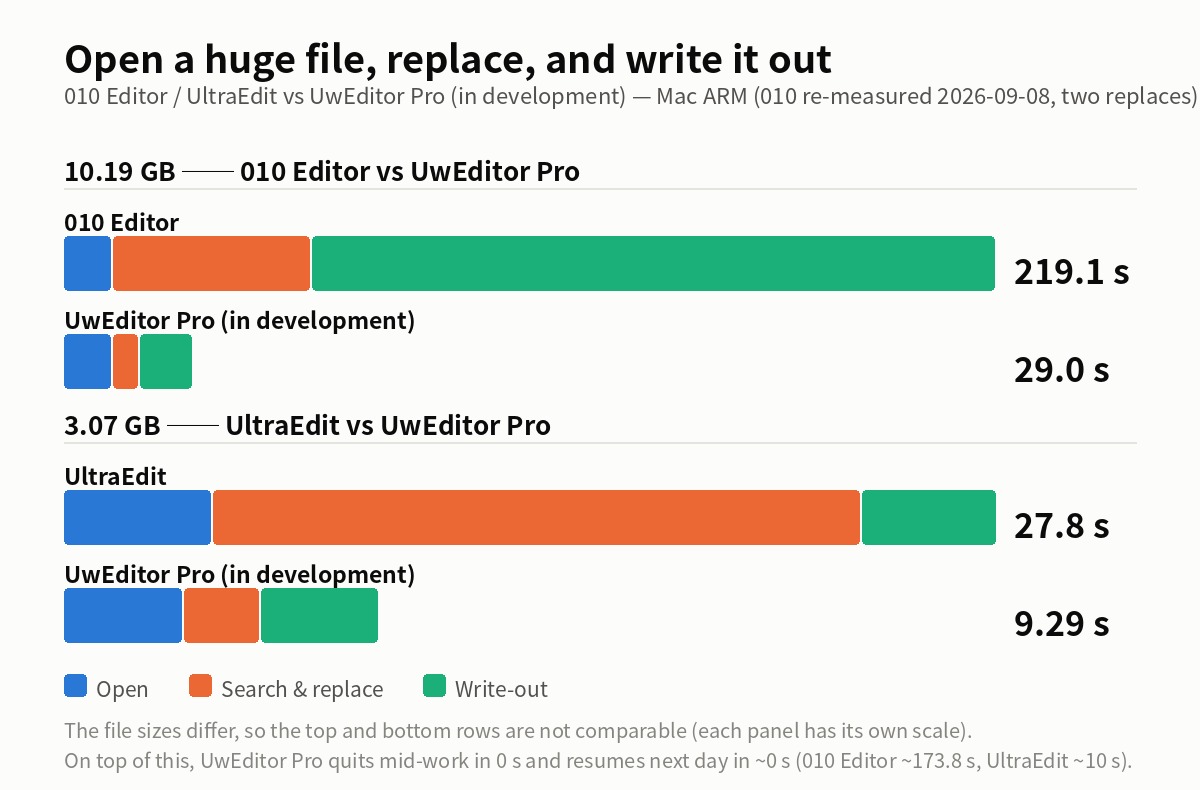
And if a huge log is eating your disk and you want it compressed for storage while staying searchable at speed, give UwView Pro a look — persistent index, compressed-cache search, and ~1/9 storage make both reopening and searching a step faster (from the second time on, files open instantly with line numbers; archives carry a checksum so corruption in storage is detectable; all OS, one-time or monthly).
Links
- Part 1: four go-to tools that sink under huge files: https://uvp.y42u.net/en/blog/uwview-ps01-huge-file-tool-limits-en/
- Part 2: four ways to trace causality in logs: https://uvp.y42u.net/en/blog/uwview-ps02-log-causality-tracing-en/
- Part 3: four character-encoding traps: https://uvp.y42u.net/en/blog/uwview-ps03-japanese-encoding-traps-en/
- A third option beyond delete-or-keep: https://uvp.y42u.net/en/blog/uwview-pro-archive-teaser-en/
- Measured compression and speed (with conditions): https://uvp.y42u.net/en/blog/uwview-pro-benchmark-3sizes-en/
- We shipped a
uvpcommand (measured against ripgrep): https://uvp.y42u.net/en/blog/uvp-cli-release-vs-ripgrep-en/ - Source code (GitHub): https://github.com/amru195704/UwView
From the developer: My apps, Kindle books, and public projects are listed at GitHub: amru195704.
A note
The information in this article is provided for reference and is not guaranteed to be accurate or complete. Transfer speeds, compression ratios, and retention periods vary widely by environment and by industry requirements. Command examples may need adjusting for your environment (GNU vs. BSD,zstdversion, filesystem, etc.). For statutory retention obligations, always confirm against your own organization’s policies and the applicable regulations. If you find an error or inaccuracy, please point it out in the comments and it will be corrected after verification.