
The UwView series — search with UwView, compare with UwDiff
Open and search huge files with UwView; compare two files or two folders with UwDiff. Both run on Windows, macOS and Linux. → UwDiff user manual (CLI uvd)
Command manualuvp (UwView Pro CLI)
Command manual
The uvp command — manual
Covers: the CLI of UwView Pro v1.9.0 “Full Spectrum” (uvp).
uvp is UwView Pro’s CLI. It runs the same engine and reads the same index (.uwvz) as the GUI (the window), so whatever you were looking at in the GUI, you can pull from a script. As a search tool it stands where ripgrep stands, so this page explains it side by side with ripgrep (the mapping is in chapter 18, performance in chapter 21).
uvp can also:
- Bundle several files into one index and search them (wildcards, subfolders, plain text and compressed files mixed)
- Take seven compressed formats (gz, bz2, xz, lzma, zst, lz4, br) plus zip, OSM pbf, and Word, Excel and PDF (since v1.9.0) as input
- Hold Shift-JIS, EUC-JP and UTF-16 files as UTF-8 inside the index, so from the second search on they are as fast as UTF-8 files (chapter 4)
- Leave out files matched by
.ignore/.gitignore(the main rules are the same as ripgrep’s);--fileslists what would be searched - Write out in the seven formats and zip (
-out), and show what a bundled index contains with--info
Against ripgrep: where uvp helps and where it does not — the “does not” first.
- A single question is not faster. The first run builds the index, so on one file
uvpis on par with ripgrep (50 GB: rg 56.06 s, uvp 58.42 s — 1/1.04) - The first run over several bundled files is slower than ripgrep, because it writes the bundled index (12 files — 7 gz + 5 plain: rg 24.62 s, uvp 41.23 s; rg 1.67× faster). The second run takes 9.52 s (chapter 21)
- A second question on the same file is faster. Searching one 50 GB file for Tokyo a second time: rg 70.33 s, uvp 6.45 s (10.9×; rg’s second run varies between 55 and 70 s, and even at 55.50 s it is 8.6×). Over seven kinds of search, the cold + hot total was rg 870.64 s, uvp 232.98 s (3.74×)
- A compressed file is not decompressed again after the first run. For a 979 MB file compressed in any of the seven formats, uvp’s second run took 0.11–0.12 s (xz: ripgrep 4.21 s)
- Narrowing, tallying, sorting and sequences are one command each. Against the rg / sed / sort / uniq combinations that give the same result, uvp was 5.12–7.44× faster on a 16-item total
-openhands the investigation to the GUI. On screen, click a row and it becomes the next stage (chapter 15)
About the numbers (please read)
Every timing on this page comes from one Mac (Apple M4, 10 cores), external USB SSD. Disk, CPU and data all change the result. Do not compare seconds across machines or operating systems.
The versions, data and method are collected in “21.7 Conditions behind the numbers” at the end of chapter 21. Every result was checked against ripgrep, sed and the like (zero mismatches).
- 1. What uvp does (and how it differs from the free CLI, uvf)
- 2. Install and put it on your PATH
- 3. The basic shape
- 4. How the index (.uwvz) works
- 5. Stages (drill-down, tally, sort, sequence)
- 6. Quoted pipe syntax
- 7. Options
- 8. Choosing files (one, several, wildcards, zip, exclusions)
- 9. Bundled indexes (several files)
- 10. Input types (seven compressed formats, zip, pbf, Word, Excel, PDF)
- 11. Output (-out and compressed output)
- 12. Restoring (-extract) and looking inside (–info)
- 13. Replacing text (-replace)
- 14. Regular expressions (-E)
- 15. From the CLI into the GUI — -open
- 16. Thread count (–tune)
- 17. Exit codes and scripts
- 18. ripgrep cheat sheet
- 19. Common stumbling blocks
- 20. Added in v1.9.0 (Full Spectrum)
- 21. Performance (for reference)
- v1.9.0 (Full Spectrum) results (14 October 2026, Mac; Windows and Linux checked)
- 21.1 Reading the numbers (losses first)
- 21.2 One large file (seconds)
- 21.3 uvp stages, output and more (total of 16 items, seconds)
- 21.4 Seven compressed formats (one file, seconds) — against the grep family
- 21.5 Several files (seconds)
- 21.6 Per-item figures (cold / hot, seconds)
- 21.7 Conditions behind the numbers
- 21.8 If your numbers differ
- Related
1. What uvp does (and how it differs from the free CLI, uvf)
The free UwView comes with its own CLI, uvf. uvf builds no index; it reads the file every time.
| uvf (free) | uvp (Pro) | |
|---|---|---|
Search (-i -E -v) |
✓ | ✓ |
Whole-word -w, surrounding lines -C N |
— | ✓ |
| Several files, wildcards | ✓ | ✓ |
Honours .ignore / .gitignore (main rules same as ripgrep) |
✓ | ✓ |
List the targets (--files) |
✓ | ✓ |
| Compressed files (gz bz2 xz lzma zst lz4 br) | searched as they decompress | decompressed into an index |
Index (.uwvz) that makes later runs fast |
— | ✓ |
| zip, OSM pbf | — | ✓ |
| Word, Excel, PDF (since v1.9.0) | extracted while searching (no index) | extracted into an index (report.docx.uwvz next to the file) |
| Shift-JIS, EUC-JP, UTF-16 held as UTF-8 in the index | — | ✓ |
| Multi-stage narrowing, tally, sort, sequence | — | ✓ |
| Write out the full text with replacements | — | ✓ (Edit license) |
Write out compressed, restore (-extract) |
— | ✓ |
| From a result to its source line (GUI) | reopens the file first, then jumps | jumps within the bundled text right away |
| GUI search box (several files) | only the one file in the main tab | the whole bundle |
| Surrounding lines in the on-screen hit list (±N) | up to ±1 (none in the multi-file results window) | up to ±64 |
- For a one-off search,
uvfis enough. It runs on par with ripgrep (seven kinds of search over one 50 GB file, cold + hot total: rg 870.64 s, uvf 768.93 s — 1.13×). uvfusage is in the uvf command manual, the window in the UwView (free) User Guide, and the changes in the v1.9.0 release notes.- File selection, regular expressions and reading compressed files work the same in
uvf. This page repeats the shared parts rather than skipping them.
License: uvp is part of UwView Pro (one-time or monthly, the Edit Upgrade too; 14-day free trial; prices on the product page).
-extract (restore), --info (look inside an index) and --files (list the targets) work without a license — building is paid, restoring is free. -replace needs the Edit license.
2. Install and put it on your PATH
After installing UwView Pro, open the app menu Help → “Command line setup…”. The same screen also removes it.
| OS | Where it goes |
|---|---|
| macOS | /usr/local/bin/uvp (you may be asked for your password) |
| Windows | The download zip contains UwView.Pro.App.exe (the app) and uvp.exe. That folder is added to your user PATH (no admin rights needed) |
| Linux | /usr/local/bin, falling back to ~/.local/bin (log in again to pick it up) |
uvp --version       # version (1.9.0)
uvp --help          # short usage
uvp --help files    # file selection in detail
uvp --help regex    # regular expressions in detail
3. The basic shape
3.1 Four commands to start with
# 1. Find (same lines as rg -n -F; the first run builds the index, later runs are fast)
uvp huge.log 'ERROR'

# 2. Count (instead of sort | uniq -c | sort -rn | head)
uvp huge.log 'ERROR' -uniq 'code=([0-9]+)' -head 20

# 3. Replace (instead of sed 's/A/B/g'; the file itself is never modified)
uvp huge.log 'old-host' -replace 'new-host' -out fixed.log

# 4. Bundle several files into one index and search them (quote the pattern)
uvp '*.log' 'ERROR'
3.2 Command forms
uvp <file> <term> [stages…] [options]            investigate (flag syntax)
uvp <file> '<term> | sort … | uniq …'            investigate (quoted pipe syntax, same meaning; ch. 6)
uvp convert <file> [-out x.uwvz]                 just build the index (.uwvz)
uvp cat <file> [-out …]                          print the text
uvp <file.uwvz> -extract [format] [-out dest]    restore the original (free; ch. 12)
uvp <index or pattern> --info                    show where an index came from and what it holds (free; ch. 12)
uvp <pattern> --files                            only list what would be searched (free; 8.4)
uvp <file> <term> -replace <new>                 write out the full text with replacements (ch. 13)
uvp -open [<file>]                               launch the app (ch. 15)
Examples:
uvp app.log ERROR                         # first run builds the index as it searches; later runs are fast
uvp app.log ERROR -i                      # ignore case
uvp app.log ERROR -uniq 'code=(\d+)'      # count the ERROR lines by code
uvp '*.log' ERROR                         # bundle several files into one index and search
uvp app.log.xz ERROR                      # compressed files work as they are
By default the search term is taken literally. To search with a regular expression, put -E right after the term (chapter 14).
4. How the index (.uwvz) works
uvp builds an index (.uwvz) of each file it searches. A .uwvz is a compression format plus index: the original text, compressed, with line positions added. Its size depends on the content; for OSM XML it came to about 1/9–1/12 of the original (3 GB → 0.25 GB, 50 GB → 5.74 GB).
| Situation | What happens |
|---|---|
| First run | builds the index while searching |
| From the second run | uses the index, so it is fast (changes to the file are detected automatically) |
| Lines were appended to the original | only the new lines are added to the index |
| The original was rewritten | the index is rebuilt |
| Built from a compressed file | later runs search the .uwvz instead of decompressing the original again (faster by the decompression time) |
- A single file’s index is created next to the original as
app.log.uwvz. - A bundled index for several files is created in the folder you ran the command from (chapter 9).
- You can name an index directly, as in
uvp app.log.uwvz ERROR. It still works after the original is deleted. - To build one ahead of time:
uvp convert app.log.
4.1 Character encodings (since v1.9.0)
- Shift-JIS, EUC-JP and UTF-16 files are held as UTF-8 inside the index (file by file, inside bundles, gz and zip too). From the second search on, they are as fast as UTF-8 files.
- Output and display keep the original characters.
-extractwrites the original encoding back (12.1). --infoshows that the index holds UTF-8 and names the original encoding (such as shift_jis).- When you edit in the window and write the file out, it is written in the original encoding (if some characters cannot be represented in it, you are shown how many and asked to confirm).
4.2 Index format (since v1.9.0)
- The index format is new (version 4). A
.uwvzmade by an earlier version is not read; it is rebuilt the first time you search or open it (so that one run takes longer). - A newly built
.uwvzstores the text in 1 MB blocks.
4.3 Extra index (line skeletons and block marks)
To make later searches faster, uvp also builds an extra index (line skeletons and block marks) when it builds a .uwvz, and stores it at the end of the .uwvz. Opening a .uwvz that has none builds it too.
| Command | What it does |
|---|---|
uvp app.log ERROR --no-extra |
do not build the extra index (an existing one is still used) |
uvp app.log --build-extra |
build (rebuild) the extra index now |
uvp app.log --extra-status |
show the state of the extra index |
term1 -C N term2(searching around matches) and-seqsearch for the second term once across the whole text and match it up by line number (the output is the same as before).
5. Stages (drill-down, tally, sort, sequence)
After a search you can chain stages. They run in the order you write them, just like a pipeline: -uniq then -sort count is not the same as -sort then -uniq.
| Stage | Meaning | Example |
|---|---|---|
<term> or -grep <term> |
Search. From the second one on, only the lines hit by the previous stage (or the ±N lines around them with -C N) are searched — drill-down |
uvp app.log ERROR -grep timeout |
-uniq <key> |
Frequency tally. The key is a regex; values are counted by the first capture group (inside ( )) |
uvp app.log ERROR -uniq 'code=(\d+)' |
-sort <key> |
Sort. Lines are sorted by the key (a regex). After -uniq, use count (most frequent first) or value (by value) |
uvp app.log ERROR -sort 'ts=(\S+)' |
-seq a,b,c |
Find “sequences” where a → b → c appear in this order | uvp app.log -seq login,timeout,restart |
-head N / -tail N |
First / last N | uvp app.log ERROR -head 10 |
Modifiers for a search stage (written right after that term):
| Modifier | Meaning | Example |
|---|---|---|
-i |
ignore case | uvp app.log error -i |
-E |
treat the term as a regex | uvp app.log 'ERROR\|WARN' -E |
-w |
whole-word match (no word character on either side) | uvp app.log ERROR -w |
-v |
lines that do not match. In the first stage, “lines without the term”; in later stages, “drop the previous stage’s hits that contain the term” | uvp app.log DEBUG -v / uvp app.log ERROR -grep dev2 -v |
-C N |
N lines of context. Adds the surrounding lines to the output, and the next stage searches within that range | uvp app.log ERROR -C 5 timeout |
Examples:
# Look for timeout within 5 lines of an ERROR (drill-down)
uvp app.log ERROR -C 5 timeout

# ERROR lines without dev2, first 10
uvp app.log ERROR -i -grep dev2 -v -head 10

# Count ERROR lines by error code, most frequent first (CSV and JSON also available)
uvp app.log ERROR -uniq 'code=(\d+)' -sort count
uvp app.log ERROR -uniq 'code=(\d+)' --csv

# Sort by timestamp
uvp app.log ERROR -sort 'ts=(\S+)'

# The last 5 sequences of login → timeout → restart
uvp app.log -seq login,timeout,restart -tail 5

# A term that starts with - goes after -grep
uvp app.log -grep '-9999'
The same thing with ripgrep and friends (same result as the uvp column):
| What you want | rg, sort, uniq … | uvp |
|---|---|---|
| Narrow by a second term | rg -n -F 'k="amenity"' F \| rg -F 'v="parking"' |
uvp F 'k="amenity"' 'v="parking"' |
| Exclude while narrowing | rg -n -F 'k="amenity"' F \| rg -v -F 'v="parking"' |
uvp F 'k="amenity"' 'v="parking"' -v |
| Second term within 3 lines | no single command (rg -C only displays the context) |
uvp F 'k="amenity"' -C 3 'k="name"' |
| Count by value | rg … \| sort \| uniq -c \| sort -rn \| head -20 |
uvp F 'k="amenity"' -uniq 'v="([^"]+)"' -head 20 |
| Terms appearing in order | none (grep only sees a set of terms; you would write a state machine in awk) |
uvp F -seq 'login,timeout,restart' |
| Last N | rg -n -F 'Tokyo' F \| tail -10 |
uvp F 'Tokyo' -tail 10 |
Which stage may follow which (combinations with no meaning are rejected before running):
| Current result \ next stage | search | head / tail | sort | uniq | seq |
|---|---|---|---|---|---|
| Lines (search result) | ✓ | ✓ | ✓ | ✓ | ✓ |
| Sorted lines | ✗ | ✓ | ✓ | ✓ | ✗ |
| Tally (ranking) | ✗ | ✓ | ✓ (count / value) | ✗ | ✗ |
| Sequences | ✗ | ✓ | ✗ | ✗ | ✗ |
-sortand-uniqcannot be the first stage (they would cover the whole file and break down on a huge one).- Up to 8 search stages (same as the GUI).
5.1 Stage rules in detail
Search stages after the first (drill-down)
| Rule | Detail | Example |
|---|---|---|
| Where it searches | Set by -C N on the previous search stage. Without -C, only the hit lines themselves are searched (the same as keeping lines that contain both) |
uvp app.log ERROR -grep timeout |
With -C N |
Searches N lines either side of each hit. Overlapping or adjacent ranges are merged, so no line is counted twice | uvp app.log ERROR -C 5 timeout |
| Lines output | the new hits inside the range (not the previous stage’s lines) | |
With -v |
keeps the previous stage’s lines whose range has no hit | uvp app.log ERROR -C 5 -grep retry -v |
| Context shown | set by -C on the last search stage |
uvp app.log ERROR -grep timeout -C 2 |
-limit |
applies to each search stage | |
| Bundled index | ranges count through the whole bundle, so they can cross a file boundary (the N lines after the last line of one file are the first lines of the next) |
-seq a,b,c (sequences)
| Rule | Detail |
|---|---|
| Lines in between | no limit (however far apart, appearing in this order makes one sequence) |
| An earlier term appears again | counting restarts there (for a b a c, counting restarts at the second a, so no sequence; a later b c would complete one) |
| Same line | a line may hold several terms (counted in order from the earlier term) |
| Between sequences | they do not overlap (after one is found, counting starts fresh) |
| How terms are matched | in the first stage, a case-sensitive literal search; after a search stage, whether the line contains the text |
| Bundled index | counted across files. Output uses line numbers through the whole bundle, without file names |
| Output | one sequence per line, the line number of each term separated by tabs |
-uniq <key> (frequency tally)
| Rule | Detail |
|---|---|
| What is counted | lines. A value appearing twice in one line counts once |
| Different values in one line | each counts once |
| Value | the key regex’s first capture group ( ); without ( ), the whole match |
| Lines the key does not match | not counted |
| Order | most frequent first; ties in character-code order of the value |
| Output | value<TAB>count<TAB>share (%). The share’s denominator is the number of (line, value) pairs (more than the line count when a line holds several values) |
--csv |
with a header No,<key name>,count,%. The key name is the named group’s name, or the word before ( ) (code for code=(\d+)) |
| Distinct values | up to 200,000. Beyond that it stops with exit code 2 |
Where you put -head N changes its meaning.
-head Nright after a search reads from the start of the file and stops at the Nth hit. For one file it prints the same lines asrg -n -F -m N term file(andrg … | head -N).-head Nafter-uniq,-sortor-seqmeans “the first N rows after sorting” (a top-20 ranking, say).-tail Nhas to see every hit to know which are last.
6. Quoted pipe syntax
You can write the stages as a pipeline inside one pair of quotes. It means exactly the same as the flag syntax.
uvp app.log ERROR -sort 'ts=(\S+)' -uniq 'code=(\d+)'          # flag syntax
uvp app.log 'ERROR | sort ts=(\S+) | uniq -c code=(\d+)'        # quoted pipe syntax (same meaning)
How uvp decides which syntax you meant:
| Rule | Example | Read as |
|---|---|---|
Exactly one quoted string after the file, containing \|, is read as quoted pipe syntax |
uvp app.log 'ERROR \| head 10' |
two stages (search, first 10) |
Stages are separated by \| with spaces around it. A \| without spaces is part of the term |
uvp app.log 'ERROR\|WARN' |
one stage, searching the literal text “ERROR|WARN” (no -E, so not a regex) |
Two or more arguments after the file means flag syntax; \| is a character in the term |
uvp app.log 'ERROR\|WARN' -E |
regex alternation (ERROR or WARN) |
| A regex inside quoted pipe syntax | uvp app.log 'ERROR\|WARN -E \| head 5' / uvp app.log '/ERROR\|WARN/ \| head 5' |
both are regex alternation (/…/ is read as a regex) |
Searching for a term that contains \| with spaces |
uvp app.log '"a \| b" \| head 5' |
inside "…" it is not a separator; searches the literal “a | b” |
The same, as a regex matching a literal \| |
uvp app.log '"a \\| b" -E \| head 5' |
in a regex a literal \| is \\| |
A spaced \| in a flag-syntax term |
uvp app.log 'a \| b' -E |
error (“put the whole pipe syntax in one quoted string”); use the "…" form above |
A quoted string without \| |
uvp app.log 'ERROR -i' |
one search term (the text “ERROR -i”) |
| Quoted pipe syntax | Flag syntax (same meaning) |
|---|---|
uvp app.log 'ERROR -i \| head 10' (a leading grep can be left out) |
uvp app.log ERROR -i -head 10 |
uvp app.log 'ERROR \| grep -v dev2' (rg works too; -i -E -w -v -C N allowed) |
uvp app.log ERROR -grep dev2 -v |
uvp app.log 'ERROR \| sort ts=(\S+)' |
uvp app.log ERROR -sort 'ts=(\S+)' |
uvp app.log 'ERROR \| uniq -c code=(\d+)' |
uvp app.log ERROR -uniq 'code=(\d+)' |
uvp app.log 'seq login timeout restart \| tail 5' |
uvp app.log -seq login,timeout,restart -tail 5 |
uvp app.log 'ERROR \| head 10' (head -10 also works) / uvp app.log 'ERROR \| tail 5' |
uvp app.log ERROR -head 10 / uvp app.log ERROR -tail 5 |
uvp app.log 'ERROR -i | grep -v dev2 | head 10'
uvp app.log 'ERROR -C 3 | grep timeout | uniq -c code=(\d+) | sort value'
uvp app.log 'seq login timeout restart | tail -5'
7. Options
Options can go anywhere (except -open, which goes first or last).
| Option | Meaning | Example |
|---|---|---|
-out <file> |
Output file; the extension decides the format (ch. 11) | uvp app.log ERROR -out errors.txt |
--force |
overwrite an existing output file (refused by default) | uvp app.log ERROR -out errors.txt --force |
-limit N |
maximum hits kept by one search (explained below) | uvp app.log ERROR -limit 1000000 |
-H / -h |
always / never print the file name (by default only for a bundle of several files). -h on its own shows usage |
uvp app.log ERROR -H / uvp '*.log' ERROR -h |
--no-line-number |
omit line numbers (matches sed -n '/term/p' output) |
uvp app.log ERROR --no-line-number |
--csv |
tally output as CSV | uvp app.log ERROR -uniq 'code=(\d+)' --csv |
--json |
one JSON object per line (9.4) | uvp app.log ERROR --json |
--rebuild |
rebuild a bundled index (the old one is kept as .bak-<timestamp>; 9.2) |
uvp '*.log' ERROR --rebuild |
--raw |
take Excel cells as stored values instead of the displayed ones (formula results as numbers; 10.2) | uvp sales.xlsx 0.5 --raw |
--no-extra |
do not build the extra index (line skeletons and block marks; an existing one is still used; 4.3) | uvp app.log ERROR --no-extra |
<file> --build-extra |
build (rebuild) the extra index now (4.3) | uvp app.log --build-extra |
<file> --extra-status |
show the state of the extra index (4.3) | uvp app.log --extra-status |
--files |
do not search; only show what the pattern expands to (with the number left out; no index is built; 8.4) | uvp '**/*.log' --files |
--no-ignore |
do not apply .ignore / .gitignore (rules added with --ignore-file still apply; 8.4) |
uvp '**' ERROR --no-ignore |
--no-ignore-files |
also drop the rules added with --ignore-file (8.4) |
uvp '**' ERROR --no-ignore --no-ignore-files |
--ignore-file <file> |
add exclusion rules; may be given more than once (8.4) | uvp '**' ERROR --ignore-file extra.ignore |
-open |
first: run in the GUI / last: run, then also open the GUI (ch. 15) | uvp -open app.log ERROR / uvp app.log ERROR -open |
--help / --help files / --help regex |
usage, file selection, regular expressions | uvp --help files |
--version |
version (uvp 1.9.0 (build 26.10.13.22)) |
uvp --version |
--tune [file] [--apply] |
measure the thread count (ch. 16) | uvp --tune big.log |
-limit N versus -head N
uvp F 'ERROR' -limit 1000      # stop searching once 1,000 hits have piled up
uvp F 'ERROR' -limit none      # unlimited (0 means the same; the default)
uvp F 'ERROR' -head 10         # stop once the first 10 from the start are found
-limitis a safety net so a huge result does not eat all your memory. The default is unlimited, shared with the app’s setting (-limiton the command line wins).- Hitting the cap returns exit code 2 with a warning. The count is the overall total. Because the search runs in parallel, which hits are kept is not defined.
-outdoes not lift the cap.- When you want the first N hits, use
-head N, not-limit(same result asrg | head -N).
8. Choosing files (one, several, wildcards, zip, exclusions)
8.1 The rule that matters most: always quote the pattern
uvp '*.log' ERROR           # ✓
uvp *.log ERROR             # ✗ the shell expands it → error
uvp 'a.log b.log' ERROR     # ✓
uvp expands the pattern rather than the shell, so the same form works on Windows.
8.2 Separators, wildcards and examples
Separate several entries with spaces or commas. If there is a comma, only commas separate (use commas for paths that contain spaces). Commas and spaces inside braces { } do not separate.
| Symbol | Meaning | Example |
|---|---|---|
* |
any run of characters (does not cross the folder separator /) |
uvp '*.log' ERROR |
? |
any single character | uvp 'app-0?.log' ERROR |
** |
any number of folders (including none) | uvp '**/*.log' ERROR |
{a,b} |
a or b (braces; since v1.9.0; rules in 8.3) | uvp '**/*.{txt,log}' ERROR |
[ ] |
not supported (taken literally) | uvp 'app[1].log' ERROR (a file named app[1].log) |
| Command | Targets |
|---|---|
uvp '*.log' ERROR |
.log files in this folder |
uvp '*/*.log' ERROR |
.log files one folder down |
uvp '**/*.log' ERROR |
every .log below this folder |
uvp 'logs/**' ERROR |
every file under logs |
uvp 'app.log,app.log.*.gz' ERROR |
plain text and gz together |
uvp '**/*.{txt,log}' ERROR |
every .txt and .log below this folder |
uvp 'app.log{,.*.gz}' ERROR |
app.log and app.log.*.gz (same as 'app.log,app.log.*.gz') |
uvp 'logs/2026-{09,10}/*.log' ERROR |
.log files in logs/2026-09 and logs/2026-10 |
uvp logs.zip ERROR |
every text file in the zip |
uvp 'logs.zip!server/*.log' ERROR |
only server/*.log in the zip |
8.3 Rules
- Order follows what you wrote; within one entry, by name; each file only once. Files added to a bundled index later go to the end of the index, so their results come last (9.2).
- Hidden files and folders (names starting with
.) are skipped on every OS (same as ripgrep). Symlinked folders are not followed. - Case: Linux distinguishes case; Mac and Windows do not.
- Wildcards never pick up
.uwvzfiles (name one explicitly to use it). - An entry that matches nothing is reported by name. More than 1,000 files is reported too (the environment variable
UVF_MANY_FILESchanges the threshold). - A bare folder name (
'logs') does not work; write'logs/**'. - Braces
{a,b}(since v1.9.0): nesting ({a,{b,c}}) and empty choices ({,.gz}) are allowed. One entry expands to at most 1,000 combinations; beyond that, uvp stops (exit code 2). An unclosed brace ({a,b) or one without a comma ({},{a}) is taken literally. If a file with exactly the written name exists, it is used as is (no expansion). An entry that matches nothing is reported as written, braces included (nothing is reported when only some of the choices match nothing). The same rules apply in the window’s Command Line dialog. - Files matched by
.ignore/.gitignoreare left out when a wildcard is expanded (8.4). This is separate from skipping hidden files.
8.4 Exclusions (.ignore, .gitignore) and --files
When a wildcard is expanded, files matched by .ignore / .gitignore are not bundled or searched (same as uvf).
The main rules are the same as ripgrep’s, and the target list and search results have been checked to match ripgrep. The one difference is that .rgignore is not read.
If .gitignore says bin/ and obj/, those stay out even with '**'. (Being tracked by git does not exclude anything; what the rules name is excluded.)
| Rule | Detail |
|---|---|
| Scope | only files expanded from a wildcard. A file you name is never excluded, nor is a folder you write at the front, as in 'build/**' (the files inside are still checked against the rules) |
| Files read | .ignore, .gitignore, .git/info/exclude, git’s global setting ([core] excludesFile in ~/.gitconfig, or else ~/.config/git/ignore). .rgignore is not read |
Where .gitignore applies |
only inside a git repository. .ignore applies anywhere |
| Parent folders | exclusion files above the starting folder apply too (.gitignore up to the repository root) |
| Precedence | strongest first: .ignore → .gitignore → .git/info/exclude → global setting → --ignore-file. Within one kind, a deeper folder wins |
| Excluded folders | not looked inside; a file inside cannot be brought back with ! (same as git) |
| Case | case-sensitive (same as git and ripgrep) |
| Inside a zip | exclusions apply to the zip file itself, not to entries inside it (narrow with 'logs.zip!server/*.log') |
Syntax is the same as .gitignore: # starts a comment (\# for a literal #); *.log matches at any depth; /build only at the top; doc/*.md is anchored to that folder when a / appears in the middle; build/ matches folders only; [a-z] and [!a-z] work (unlike file selection); ** matches any depth; !keep.log negates (later lines win); trailing spaces are ignored (\ for a space). CRLF and BOM files are read too.
| Option | Meaning | Example |
|---|---|---|
--no-ignore |
skip exclusions from .ignore, .gitignore, .git/info/exclude and the global setting. Rules added with --ignore-file still apply (same as ripgrep 15) |
uvp '**' ERROR --no-ignore |
--no-ignore-files |
also drop rules added with --ignore-file (same name as ripgrep) |
uvp '**' ERROR --no-ignore --no-ignore-files |
--ignore-file <file> |
add exclusion rules; may repeat. Weakest of all (loses to a ! in .ignore and the like). A name-only rule (*.md) matches anywhere, wherever the file sits |
uvp '**' ERROR --ignore-file extra.ignore |
--files |
do not search; only show what the pattern expands to (“number |
uvp '**' --files |
How you are told: nothing is added to search results. --files ends with “excluded N files, M folders (not looked inside)”. When exclusions leave a pattern with no files at all, it adds “(excluded by .gitignore etc.; –no-ignore includes them)”. When --ignore-file added rules, it also says “rules added with –ignore-file are turned off with –no-ignore-files” (because --no-ignore alone does not turn them off).
$ uvp '**' --files
uvp: excluded 1 file, 2 folders (not looked inside) (.gitignore etc.; --no-ignore includes them)
1   app.log
2   keep.tmp
3   logs/b.log

uvp '**' ERROR                   # bundle and search, honouring exclusions
uvp '**' ERROR --no-ignore       # without exclusions (excluded files are also added to the index; 9.2)
(The actual messages are printed in the language of your setup; the English above is a translation.)
8.5 Awkward names
| Name | How to write it | Example |
|---|---|---|
| One file with spaces | write it as is (if the whole string is an existing file, it is taken as one file) | uvp 'sp dir/my log.txt' ERROR |
| One wildcard with spaces | add a trailing comma (with a comma present, spaces do not separate) | uvp 'C:/Program Files/app/*.log,' ERROR |
| Several entries with spaces | separate with commas | uvp 'C:/Program Files/app/*.log,D:/logs/*.log' ERROR |
| A name containing a comma | a comma is a separator, so replace it with ?. ? matches any character, so a-b.log or aXb.log would also match. Check with --files first |
uvp 'a?b.log' --files, then uvp 'a?b.log' ERROR |
A name starting with - |
prefix ./ |
uvp ./-debug.log ERROR |
A name with [ ] |
write it as is (not a wildcard) | uvp 'app[1].log' ERROR |
A name with { } |
{} and {a} (no comma) can be written as is. {a,b} with a comma expands as braces, but if a file with exactly that name exists, that file is used (8.3). Check with --files first |
uvp 'report{1}.log' ERROR |
9. Bundled indexes (several files)
When you give several files, uvp bundles them all into one index. A bundled index is not rebuilt on later runs.
uvp '*.log' ERROR          # first run: build the bundled index
uvp '*.log' timeout        # from the second run: uses the index, so it is fast
9.1 Index name and location
- It is created in the folder you ran the command from.
- The name starts with
uw-followed by the pattern with symbols replaced (*→%a,/→%s,,→%c).
| Command | Index created |
|---|---|
uvp '*.log' ERROR |
uw-%a.log.uwvz |
uvp 'osm17/*.osm' Tokyo |
uw-osm17%s%a.osm.uwvz |
uvp 'logs/*.log,err/*.log' ERROR (long) |
uw-logs-ayh2yrrosfs3.uwvz (uw-<label>-<12-char hash>) |
- When the name (without
.uwvz) exceeds 24 characters, it becomesuw-<label>-<hash>.uwvz.--infoshows the original pattern (chapter 12). - An absolute path inside the starting folder is turned into a relative one, so it maps to the same index.
- You can search by the index name as well:
uvp 'uw-%a.log.uwvz' ERROR
9.2 When files change
| Change | What happens |
|---|---|
| New files | only the new files are added, at the end of the index (even one whose name sorts in the middle; its results come last) |
| Lines appended | only the new lines are added |
| A file rewritten | rebuilt (with a notice first) |
| A file deleted | not rebuilt. The deleted file’s content stays in the index and can still be searched |
Newly excluded (added to .gitignore, or --ignore-file given; the file is still on disk) |
kept in the index but not searched; not rebuilt |
No longer excluded (removed from .gitignore, or --no-ignore given) |
added at the end (if not in the index yet). Something added once with --no-ignore becomes “kept but not searched” when you run without it |
| You want a rebuild | --rebuild (the old index is kept as .bak-<timestamp>) |
- This is so log rotation (deleting old files) does not lose content. Use
--rebuildonly when you also want deleted files gone from the index. - In short, what gets searched is “this run’s expanded list” plus “files deleted from disk”. Files still on disk but missing from this run’s list (excluded ones) are not searched.
- Even when adding, the index is rebuilt if the current index is under 4 MB or if what is added is a compressed file.
9.3 Output
file:line<TAB>text. Inside a zip,logs.zip!app.log:line<TAB>text.- Line numbers start at 1 in each file (only
-seqoutput uses line numbers through the whole bundle; 5.1).
9.4 JSON shapes (–json)
One JSON object per line (the whole output is not wrapped in an array).
| Case | Command | Shape |
|---|---|---|
| One file | uvp app.log ERROR --json |
{"n":line,"line":"text"} |
| Bundled index (including zip entries) | uvp '*.log' ERROR --json |
{"file":"a.log","n":line within that file,"line":"text"} (-h drops file) |
| No line numbers | uvp app.log ERROR --json --no-line-number |
{"line":"text"} |
Context lines (-C) |
uvp app.log ERROR -C 2 --json |
context lines in the same shape (no field tells a hit from a context line; -- separators are not printed) |
Tally (-uniq) |
uvp app.log ERROR -uniq 'code=(\d+)' --json |
{"value":"value","count":count} (no share or rank) |
Sequence (-seq) |
uvp app.log -seq login,timeout --json |
{"lines":[line,…]} (bundle-wide line numbers, no file name, even for a bundle) |
10. Input types (seven compressed formats, zip, pbf, Word, Excel, PDF)
The format is recognised by the extension.
| Format | Command | uvp |
|---|---|---|
.gz |
uvp app.log.gz ERROR |
decompressed into the index |
.bz2 .xz .lzma .zst .lz4 .br |
uvp app.log.xz ERROR |
decompressed into the index (no external commands) |
.zip |
uvp logs.zip ERROR |
each entry is handled separately (logs.zip!app.log). Text entries only (images and the like are named and skipped) |
.pbf (OSM) |
uvp japan-latest.osm.pbf Tokyo |
converted to XML (the same shape as OSM-XML) |
.docx .docm .xlsx .xlsm .pdf |
uvp report.docx Tokyo |
the text is extracted into an index (report.docx.uwvz next to it; since v1.9.0; 10.2) |
.doc .xls |
uvp old.doc Tokyo |
not supported (old formats; save them as .docx / .xlsx in Word / Excel) |
.uwvz |
uvp app.log.uwvz ERROR |
an index you built; searched as is |
.tar.gz |
uvp logs.tar.gz ERROR |
not supported (unpack it and bundle the files with uvp) |
| anything else | uvp app.log ERROR |
treated as text. Non-text files such as images and executables are not bundled; they are named and skipped (not text, skipped: name; ripgrep does not search them either) |
- Plain and compressed files can be bundled together:
uvp 'app.log,app.log.*.gz' ERROR - Files of different formats can be mixed in one bundle.
- A truncated compressed file is refused and no index is left behind.
- UTF-32 files cannot be bundled with others and are refused (a single one on its own works). From v1.9.0, UTF-16 files are held as UTF-8 in the index, so they can be bundled with others (4.1).
japan-latest.osm.pbf(2.46 GB) expands to 51.3 GB of XML.uvpturns it into a searchable.uwvzin 21.6 s. Finding 東京 (94,979 hits) takes 27.34 s in total from a dropped cache; from the second search on it uses the.uwvzand takes 5.01 s (6.43 s right after dropping the cache) (measured 28 September 2026 withuvp1.7.3.5; conversion and search code as in 1.7.3.6).
10.1 Character encoding
The encoding is detected from the start of the file (up to 256 KB). There is no option to set it.
| Order | Test | Encoding |
|---|---|---|
| 1 | a BOM at the start | UTF-8, UTF-16LE, UTF-16BE, UTF-32LE |
| 2 | no BOM, valid UTF-8 (including pure ASCII) | UTF-8 |
| 3 | otherwise, compare Shift_JIS and EUC-JP; the one with fewer odd bytes wins | Shift_JIS or EUC-JP |
| 4 | undecided | Shift_JIS |
- UTF-16 / UTF-32 without a BOM, UTF-32BE and other encodings (Latin-1, GBK, ISO-2022-JP …) are not detected.
- Matching is done on characters, regardless of encoding.
- Shift-JIS, EUC-JP and UTF-16 are held as UTF-8 inside the index (4.1).
10.2 Word, Excel and PDF (since v1.9.0)
uvp extracts the text of Word, Excel and PDF files and builds an index next to the file (report.docx.uwvz). From the second search on, it searches the index; if the original changes, the index is rebuilt. Stages such as tally, range and format work just as they do on text.
uvp report.docx Tokyo              # Word (builds report.docx.uwvz next to it)
uvp 'expenses/**/*.xlsx' taxi      # Excel (bundled)
uvp 'docs/**/*.pdf' contract -i    # PDF
uvp sales.xlsx 0.5 --raw           # Excel, by the stored value instead of the displayed one
| Format | Extensions | What one line looks like |
|---|---|---|
| Word | .docx .docm |
one line per paragraph. A table row is one line, with the cells separated by tabs. Footnotes and comments follow at the end, with a prefix |
| Excel | .xlsx .xlsm |
sheet!row<TAB>column A<TAB>column B…. Cells hold the displayed value (such as 50%); with --raw, the stored value (0.5; a formula gives its result as a number) |
.pdf |
a ## page N line for each page, followed by that page’s lines in reading order (on two-column pages, the left column first) |
- Refused: old formats (
.doc,.xls), password-protected files, PDFs with no text (images only; there is no OCR) and damaged files. uvp says why and exits with code 2. Inside a pattern for several files, such a file is named and skipped (not bundled). - Cannot be written in the original format (
-outcannot be.docxand the like).-extractwrites the extracted text toreport.docx.txt(12.1). - Opened in the window, the file shows a progress bar while its text is extracted, and the index is built. Extracting a new file needs a license (without one, the text is extracted to a temporary folder, as in the free edition).
- The component that reads Word, Excel and PDF (PdfPig, Apache 2.0) makes the uvp command larger (about 10 MB → 21 MB).
11. Output (-out and compressed output)
The extension of -out decides the format — for search results, cat and -extract alike.
| Extension | Written as | Example |
|---|---|---|
.gz .bz2 .xz .lzma .zst .lz4 .br |
compressed in that format | uvp app.log ERROR -out errors.xz |
.zip |
zip | uvp app.log ERROR -out errors.zip |
| anything else | text | uvp app.log ERROR -out errors.txt |
uvp app.log ERROR -out errors.txt          # as text (instead of rg -n > file)
uvp app.log ERROR -out errors.txt.gz       # gzip-compressed (instead of rg | gzip > out.gz)
uvp app.log ERROR -out errors.xz           # xz-compressed
uvp cat app.log.bz2 -out app.log.zst       # rewrite bz2 as zst
- An existing file is never overwritten unless you add
--force. - Word, Excel and PDF formats (
.docx,.xlsx,.pdfand so on) cannot be written (10.2). - With
-extract, a format you name takes precedence over the-outextension (chapter 12). When extracting a bundled index,-outis a folder. - The file is named only after writing finishes, so stopping midway never leaves a broken file.
- Compression levels: gz 6, bz2 9, xz 6 (multi-block, so it can be decompressed in parallel later), lzma 6, zst 3, lz4 fast setting, br 6.
- Where the library for a format is missing,
uvpstops with an error rather than falling back to text. bz2 is the exception: on Windows, where the OS has no library for it, a built-in method writes it (more slowly). - For large output, writing to a file with
-outis quicker than sending it to the terminal.
12. Restoring (-extract) and looking inside (–info)
12.1 -extract (free)
uvp app.log.uwvz -extract                    # restore in the original format, under the original name
uvp app.log.uwvz -extract txt -out app.log   # as text
uvp app.log.uwvz -extract gz -out app.log.gz # as gz
- Formats:
txt gz bz2 xz lzma zst lz4 br zip. Leave it out to get the original format (an index built fromapp.log.bz2comes back asapp.log.bz2). - The format is decided in this order: what you name → the
-outextension → the original format. - The decompressed content is byte-identical to the original. The compressed file itself will not be byte-identical (compression details and timestamps differ).
- pbf cannot be restored (you get the XML text;
-extract pbfis an error). - An index built from Word, Excel or PDF cannot be restored to the original format. The extracted text is written to
report.docx.txt. - Shift-JIS, EUC-JP and UTF-16 files are held as UTF-8 in the index, but
-extractwrites them back in the original encoding (4.1). NEC / IBM extended characters (vendor-specific characters) and the like may come back as the same character under a different code. - EUC-JP supplementary kanji (JIS X 0212) cannot be read. They are read as a middle dot (・), so they are not restored.
- A bundled index is restored part by part, under original names and formats (
-outis a folder). Naming a format converts every part to it and changes the extensions. If that would give two parts the same name, it stops with an error before writing anything. - Works without a license.
12.2 –info (free)
uvp uw-logs-ayh2yrrosfs3.uwvz --info
uvp 'logs/*.log,err/*.log' --info
Shows the original pattern, when the index was built, and the list of bundled files. For an index built from Shift-JIS and the like, it also shows that the index holds UTF-8 and names the original encoding (such as shift_jis). Use it to find out what a hash-named index holds.
12.3 Keeping .uwvz instead of gzip
A .uwvz is a compression format plus index that you can search without unpacking, so it can stand in for an archival gzip.
- On a 2.9 GB OSM file,
.uwvzproduced 240.2 MB in 4.03 s or less;gzip -6produced 287.0 MB in 16.70 s. - Searching a 50 GB
.uwvzdirectly took 6.48 s cold and 5.19 s hot, against 54.99 s and 55.04 s for rg scanning the original. -extracttook 3.55 s for 3 GB, byte-identical to the original.- The conditions for these three figures are in 21.7.
- The format is UwView’s own. When handing a file to someone else, restore it with
-extractor write it out as gz and the like with-out.
More in Keep it as .uwvz instead of gzip.
13. Replacing text (-replace)
# sed / ripgrep
sed 's/Tokyo/TOKYO/g' F > out.txt
sed -E 's/v="(bus_stop|traffic_signals)"/v="X_\1"/g' F > out.txt
rg -N -F --passthru 'Tokyo' -r TOKYO F > out.txt

# uvp (the source file is never modified; the whole text is written out)
uvp F 'Tokyo' -replace TOKYO -out out.txt
uvp F 'v="(bus_stop|traffic_signals)"' -E -replace 'v="X_$1"' -out out.txt
uvp app.log 'password=[^ ]+' -E -replace 'password=***' -out masked.log
uvp app.log '(\d{4})-(\d{2})-(\d{2})' -E -replace '$1/$2/$3'
- Writes out the whole text with every match replaced (like
sed 's/A/B/g'). The source file is not changed. - The search term takes
-i,-Eand-w. - The replacement is literal. Only with
-Ecan you insert captures as$1,$2($$is a literal$). - The output has been checked to be byte-for-byte identical to
sed/rg --passthru. - A replacement counts occurrences, not lines: for the Japanese word for Tokyo (東京) in the 3 GB file, 11,274 lines matched but 11,361 occurrences were replaced — 87 lines held more than one.
- Cannot be combined with
convert,cator-extract. - Needs the Edit license (included in the 14-day free trial).
Measured (time to write the whole file out; conditions in 21.7)
| 3 GB | 10 GB | 50 GB | |
|---|---|---|---|
uvp -replace |
4.57 s | 13.47 s | 69.75 s |
sed 's/A/B/g' |
14.94 s (3.27×) | 26.51 s (1.97×) | 187.74 s (2.69×) |
rg --passthru -r |
7.06 s (1.54×) | 26.89 s (2.00×) | 146.65 s (2.10×) |
uvp -E -replace '$1' |
4.17 s | 14.08 s | 69.95 s |
sed -E (backreferences) |
24.81 s (5.95×) | 78.36 s (5.57×) | 405.52 s (5.80×) |
Figures in brackets are the time relative to uvp. A replacement with backreferences runs about 6× faster than sed — at 50 GB, sed took 6 min 45 s and uvp 1 min 10 s.
14. Regular expressions (-E)
UwView uses .NET regular expressions. The common syntax is the same as ripgrep (Rust), but some differences change what matches (table below).
| Syntax | Meaning | Example |
|---|---|---|
. * + ? {2,5} |
any character, 0 or more, 1 or more, 0 or 1, 2 to 5 times | uvp app.log 'code=\d{3}' -E |
[abc] [^abc] ( ) a\|b |
character class, group, alternation | uvp app.log '(ERROR\|WARN) disk' -E |
^ $ \d \w \s \b |
line start, line end, digit, word character (Japanese too), whitespace, word boundary | uvp app.log '^2026-09-27' -E |
(?i) |
ignore case | uvp app.log '(?i)error' -E |
| Syntax | uvp (.NET) | ripgrep |
|---|---|---|
| Default | uvp app.log 'a.b' (literal “a.b”; regex needs -E) |
rg 'a.b' app.log (regex; literal needs -F) |
| Lookahead / lookbehind | uvp app.log 'ERROR(?=.*disk)' -E (supported) |
rg -P 'ERROR(?=.*disk)' app.log (with PCRE2) |
| Backreferences | uvp app.log '(\w+) \1' -E (supported) |
rg -P '(\w+) \1' app.log (with PCRE2) |
| Named groups | uvp app.log '(?P<code>\d{3})' -E (uvp rewrites it as (?<code>…)) |
rg '(?P<code>\d{3})' app.log |
| POSIX classes | uvp app.log '[A-Za-z]+' -E ([[:alpha:]] is not supported; the error suggests the equivalent range) |
rg '[[:alpha:]]+' app.log (matches ASCII letters only) |
| Digits, whitespace | uvp app.log '[0-9]+' -E (\d also matches full-width digits) |
rg '\d+' app.log (Unicode digits) |
| Scripts (Han, Hiragana) | uvp app.log '\p{IsCJKUnifiedIdeographs}+' -E (\p{Han} is not supported; the range differs slightly) |
rg '\p{Han}+' app.log |
- Matching is line by line (no multi-line matches).
- A single match attempt that runs over 5 seconds is stopped.
- The keys for
-uniqand-sortare the same kind of regex; the first capture group( )is the value. - Regex speed depends on the number of hits more than on the shape of the expression (21.6).
Rewrite examples (1): POSIX classes → the same range as ripgrep (the lines matched do not change):
| ripgrep | uvp | Note |
|---|---|---|
rg '[[:alpha:]]+' app.log |
uvp app.log '[A-Za-z]+' -E |
\p{L} would also match Japanese and more (wider) |
rg 'id=[[:digit:]]+' app.log |
uvp app.log 'id=[0-9]+' -E |
\d would also match full-width digits (12) |
rg 'a[[:space:]]b' app.log |
uvp app.log 'a[ \t\r\n\f\v]b' -E |
\s would also match full-width spaces and more |
Rewrite examples (2): Unicode scripts → a close range (.NET has no script property, so a nearby range is written with Unicode blocks; the matched characters are not identical):
| ripgrep | uvp (close equivalent) | Difference |
|---|---|---|
rg '\p{Han}+' app.log |
uvp app.log '[\p{IsCJKUnifiedIdeographs}\p{IsCJKUnifiedIdeographsExtensionA}\p{IsCJKCompatibilityIdeographs}々〇]+' -E |
\p{IsCJKUnifiedIdeographs} alone misses 々, 〇 and Extension A (㐀 etc.). Kanji in Extension B and later cannot be included this way |
rg '\p{Hiragana}+' app.log |
uvp app.log '\p{IsHiragana}+' -E |
block versus script gives a slightly different range (combining voiced marks and the like) |
rg '\p{Katakana}+' app.log |
uvp app.log '[\p{IsKatakana}ヲ-゚]+' -E |
\p{IsKatakana} alone misses half-width kana. The long-vowel mark ー is in the block but counted as Common in the script |
To include Japanese and full-width characters, use \p{L} (letters), \d (digits) and \s (whitespace). They cover a wider range than ripgrep’s [[:alpha:]] and the like.
15. From the CLI into the GUI — -open
uvp lets you carry an investigation from the terminal straight into the window. The CLI and the GUI share the same index (.uwvz), so there is nothing to wait for on arrival.
| Form | What happens |
|---|---|
uvp -open |
just launches the GUI |
uvp -open app.log |
opens app.log in the GUI |
uvp -open app.log ERROR -C 5 timeout |
runs the same query in the GUI (-open first) |
uvp app.log ERROR -uniq 'code=(\d+)' -open |
runs it, prints the result, and also opens the GUI (-open last) |
uvp -open '*.log' |
bundles (reusing the index from the second run on) and opens that .uwvz in the GUI |
uvp '*.log' ERROR -uniq 'code=(\d+)' -open |
bundles, runs, prints, then also opens the bundled .uwvz in the GUI |
uvp -open uw-%a.log.uwvz |
opens a bundled index you built earlier, by name |
# -open at the end … run in the CLI, print the result, and hand it to the GUI as well
uvp osm/japan-latest.osm 'k="amenity"' -uniq 'v="([^"]+)"' -head 20 -limit none -open

# -open at the front … don't run in the CLI; run it in the GUI and watch it there
uvp -open osm/japan-latest.osm 'k="amenity"' -uniq 'v="([^"]+)"' -head 20 -limit none
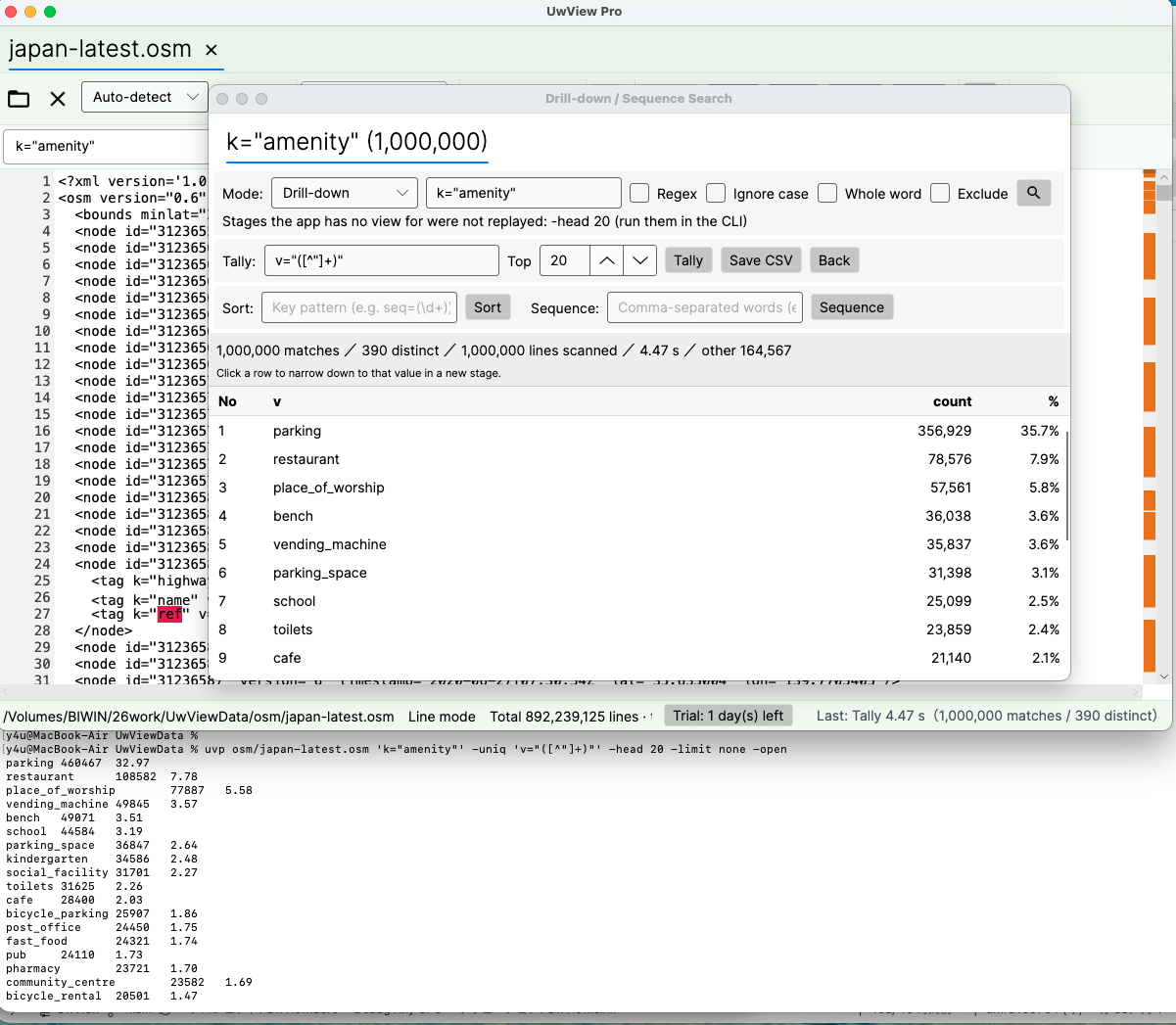
With -open at the end — the terminal prints the result, and the same tally appears in the app (the screenshots show text buttons; today the buttons are icons, with the name shown on hover).
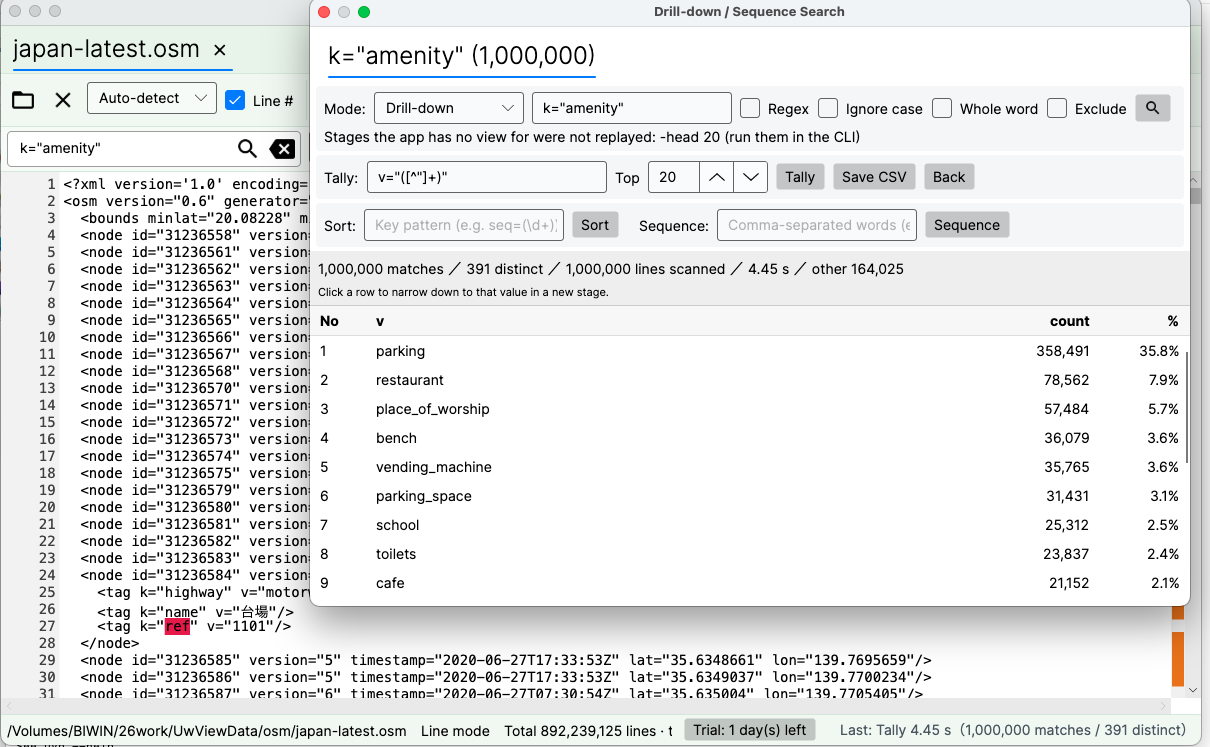
With -open at the front — the GUI does the work, and you carry on with the mouse.
15.1 It stays fast after you arrive
In the window you can keep adding questions to the same file.
- Click a row and it becomes the next stage. Click
parkingand a new tab opens fork="amenity"andparking - Stages after the first only look inside the previous stage, so there is no wait. Changed your mind? Go back to that tab. You never rebuild a pipeline and re-read 51 GB
- Switch between Drill-down / Sequence, and tally, sort or save as CSV right there
- On a 51 GB, 892-million-line file, the tally on screen took 4.45 s (“Last: Tally 4.45 s” in the screenshot’s status bar; conditions in 21.7)
CLI in scripts and cron. Once you have a lead,
-openhands it to the GUI, where you can re-narrow as many times as you like.
That round trip is what a grep / rg pipeline cannot give you.
15.2 File list and tabs (when a bundled index is open)
With a bundled index open, the line-number column reads file number:line (n-m:line inside a zip).
The “File list” button in the main window (a bulleted-list icon; the results window has the same button) opens a table mapping numbers to source files.
Buttons are icons; the name appears when you hover (Yes/No, Open/Close, Save and Cancel stay as text).
| Column | Content |
|---|---|
| Number | n or n-m (the same numbers as --files) |
| File | the source file’s name (hover for the full path) |
| Hits | hits in that file for the current search |
| Size | size when bundled |
| Far right | “Tab” if it is open in an extra tab |
- Double-click (or Enter) a row to open it.
- “Open in tab” at the top right switches how it opens (remembered next time; off by default).
- Off: jumps to the start of that file within the bundled text (the main tab).
- On: opens the source file on its own in an extra tab. Tabs are numbered, like
3:app-0903.log. - Up to 8 tabs (1 main + 7 extra). With 8 open, it does not open another and says “Up to 8 tabs” (it never closes an old tab for you).
- A file that is already open just switches to its tab.
- While extra tabs are open, the bundled (main) tab cannot be closed.
- The bundled (main) tab is grey. The window title reads
UwView Pro(uvp)-Full Spectrum(v1.9.0). - Tabs stay on one row and scroll sideways. Names longer than 27 characters end in
...; hover to see the full name. - A source file that has been deleted and a file inside a zip cannot open in a tab.
uvpsays why and jumps to the start of that file in the main tab.
From v1.8.1.9 (Finder Scope), you can also bundle inside the GUI (20.1).
- Open the dialog with the Command Line button on the toolbar (Ctrl+Shift+K, Cmd+Shift+K on a Mac), put a pattern such as
'*.log'in the file field and press Run. It bundles and opens the files the same wayuvpdoes. With no search term, it only bundles and opens them (the same asuvp -open '*.log'). - Before bundling, the dialog says whether it will reuse, add to, rebuild or newly create the index, and roughly how long it will take.
- Dropping a folder on the window opens the dialog with that folder as the base folder. Choosing two or more files with Open asks whether to open them in separate tabs or bundle them into one.
- If the base folder is not writable, it asks where to save the index.
16. Thread count (–tune)
uvp --tune                 # measure and show the recommended value
uvp --tune big.log         # measure with a file of your own
uvp --tune --apply         # save it to the settings (shared with the GUI)
17. Exit codes and scripts
| Code | Meaning |
|---|---|
| 0 | found |
| 1 | not found (same as grep) |
| 2 | error (a bad pattern or option, -limit reached, the index could not be saved, out of memory, etc.) |
Commands other than search:
| Command | 0 | 1 | 2 |
|---|---|---|---|
uvp convert app.log |
built | — | could not build (e.g. -out is not .uwvz) |
uvp cat app.log |
printed | — | could not read |
uvp app.log.uwvz -extract |
restored | — | not a .uwvz, or could not write |
uvp '…' --info |
printed | — | no index, or no record of its origin |
uvp '…' --files |
at least one file | — | no files at all |
uvp app.log term -replace new |
replaced at least one | nothing to replace | no Edit license, or an error |
- Stopping partway with
-head Nis not a cap being hit, so it returns 0 (2 if an earlier stage hit-limit). -uniqstopping at 200,000 distinct values also returns 2.- A Word, Excel or PDF file that is refused (
.doc,.xls, password-protected, a PDF with no text, damaged) returns 2, with the reason (10.2). So does a brace pattern with more than 1,000 combinations (8.3). - When too many lines match and memory runs out,
uvpdoes not crash: it prints advice on how to narrow the search and exits with 2.
#!/usr/bin/env bash
if uvp /var/log/app.log 'FATAL' -limit 100 -out /tmp/fatal.txt; then
  mail -s "FATAL found" ops@example.com < /tmp/fatal.txt
fi
- Progress and diagnostics go to stderr, data to stdout — safe to pipe.
- For large output, write to a file with
-out. To protect memory use-limit; to see only the first N, use-head N.
18. ripgrep cheat sheet
The examples use the file app.log, the folder logs and the term ERROR.
| What you want | ripgrep etc. | uvp |
|---|---|---|
| Literal search | rg -F ERROR app.log |
uvp app.log ERROR |
| Regex search | rg 'ERROR\|WARN' app.log |
uvp app.log 'ERROR\|WARN' -E |
| Ignore case | rg -F -i error app.log |
uvp app.log error -i |
| Non-matching lines | rg -F -v DEBUG app.log |
uvp app.log DEBUG -v |
| Context lines | rg -F -C 3 ERROR app.log |
uvp app.log ERROR -C 3 |
| Whole word | rg -F -w ERROR app.log |
uvp app.log ERROR -w |
| First N | rg -F ERROR app.log \| head -10 |
uvp app.log ERROR -head 10 |
| Narrow (ERROR lines that contain timeout) | rg -F ERROR app.log \| rg -F timeout |
uvp app.log ERROR -grep timeout |
| Print without line numbers | sed -n '/ERROR/p' app.log |
uvp app.log ERROR --no-line-number |
| Subfolders too | rg -F ERROR logs/ |
uvp 'logs/**' ERROR |
Honour .ignore / .gitignore |
rg -F ERROR . (the default) |
uvp '**' ERROR (the default; 8.4) |
| Do not exclude | rg -F --no-ignore ERROR . |
uvp '**' ERROR --no-ignore |
| Add exclusion rules | rg -F --ignore-file extra.ignore ERROR . |
uvp '**' ERROR --ignore-file extra.ignore |
| Drop the added rules too | rg -F --no-ignore --no-ignore-files ERROR . |
uvp '**' ERROR --no-ignore --no-ignore-files |
| List the target files | rg --files logs/ |
uvp 'logs/**' --files (same exclusion rules; .rgignore is not read) |
| Compressed files too | rg -z -F ERROR app.log.xz |
uvp app.log.xz ERROR (no -z needed) |
| Count (ERROR lines by code) | rg -F ERROR app.log \| rg -n -o -r '$1' 'code=(\d+)' \| sort -u \| cut -d: -f2 \| sort \| uniq -c \| sort -rn (-n and sort -u count a value once per line, because -uniq counts lines) |
uvp app.log ERROR -uniq 'code=(\d+)' -sort count |
| Full text with replacements | sed -E 's/password=[^ ]+/password=***/g' app.log |
uvp app.log 'password=[^ ]+' -E -replace 'password=***' |
| Inside a zip | not possible (unpack first) | uvp logs.zip ERROR |
| A faster second run | no index to reuse (the OS cache speeds up the second run) | uvp app.log ERROR (builds an index and searches it from the second run) |
18.1 What ripgrep has and uvp does not
The tables in chapters 5 and 7 are every option and stage uvp has. The ripgrep features below are not in uvp; where there is a workaround, it is in the right-hand column.
| ripgrep | What it does | In uvp |
|---|---|---|
rg -F -A 3 ERROR app.log, -B 3 |
lines after only / before only | none (for both sides, uvp app.log ERROR -C 3) |
rg -F -x ERROR app.log |
whole-line match | uvp app.log '^ERROR$' -E |
rg -F -c ERROR app.log |
count of matching lines | uvp app.log ERROR \| wc -l (the count is also printed at the end as “N hits”) |
rg -F -l ERROR logs/ |
names of matching files only | uvp 'logs/**' ERROR --json \| jq -r .file \| uniq (needs jq). If no path contains a colon, uvp 'logs/**' ERROR \| cut -d: -f1 \| uniq also works (a shortcut that fails with Windows paths like C:) |
rg -F -q ERROR app.log |
just whether it exists (stop at the first) | uvp app.log ERROR -head 1 > /dev/null (check the exit code; stops at the first hit) |
rg -F -m 5 ERROR logs/ |
per-file hit limit | none (for the first N overall, uvp 'logs/**' ERROR -head 5) |
rg -o 'code=\d+' app.log |
print only the matched part | none (to count by value, uvp app.log ERROR -uniq 'code=(\d+)') |
rg -e ERROR -e WARN app.log (and -f) |
several terms | uvp app.log 'ERROR\|WARN' -E (no pattern file -f) |
cat app.log \| rg ERROR |
search standard input | none (write it to a file first) |
rg -U 'a\nb' app.log |
multi-line matches | none (matching is line by line; for order, use -seq) |
rg --hidden ERROR |
include hidden files | none (a hidden file can still be searched by naming it) |
rg -L ERROR |
follow symlinked folders | none |
rg -t log ERROR, --max-depth, --max-filesize |
filter by type, depth, size | type and depth through the pattern (uvp '**/*.log' ERROR, uvp '*/*.log' ERROR); no size filter |
rg -E sjis ERROR app.log |
set the encoding | none (detected automatically) |
rg -0, --column, -b |
NUL separators, column number, byte offset | none |
Also, files are given as a single string (chapter 8). Names containing spaces, commas, [ ] or { } may not work as is, and for scripts that pass file names one by one, ripgrep is the better fit.
19. Common stumbling blocks
(Messages are shown here in translation.)
| Symptom | Cause and fix |
|---|---|
| “Several files were passed directly” | You forgot the quotes: uvp '*.log' term |
| “Write -i right after the search term” | Search modifiers (-i -E -w -v -C) go immediately after their term |
| “Unknown option” | For a term that starts with -, write -grep -9999 |
-sort or -uniq errors as the first stage |
Put a search stage first |
exit 2 from -limit |
The cap was reached. For the first N use -head N; for everything, lift the cap (-limit none, also if the app’s setting has a cap). With many hits, writing to a file with -out is faster than the terminal (-out alone does not lift the cap) |
| “Not enough memory” advice and exit 2 | Too many lines match. Use one of the suggestions (-limit N to fix the count, -head N for the first N, -out to write to a file, or add a term to narrow) |
| Lines from a deleted file still appear | By design (9.2). Use --rebuild to drop them |
| “output already exists” | The output file exists. Use --force or another name |
| Can’t tell what an index holds from its name | uvp <index> --info |
| tar.gz is not supported | Unpack it, then bundle with uvp 'dir/**' term |
| A file you expect is missing | It may be excluded by .gitignore / .ignore. Check the “excluded N files” line at the end of uvp '…' --files, and use --no-ignore to include it (8.4) |
Lines from a file you just added to .gitignore stopped appearing |
By design (9.2). It is still in the index; --no-ignore brings it back |
| “not text, skipped: …” | A non-text file such as an image was skipped (chapter 10). It is only left out of the search; not an error |
| A Word, Excel or PDF file is refused with exit 2 | Old formats (.doc, .xls), password-protected files, PDFs with no text (images only; there is no OCR) and damaged files are refused. Save a .doc / .xls as .docx / .xlsx in Word / Excel (10.2) |
The first run on a .uwvz made by an earlier version is slow |
The index format is new, so the index is being rebuilt (4.2). Later runs are fast again |
20. Added in v1.9.0 (Full Spectrum)
| Feature | Detail | Added in |
|---|---|---|
| Word, Excel, PDF | Extract the text of .docx .docm .xlsx .xlsm .pdf into an index (report.docx.uwvz next to the file), then search and tally it (10.2) |
v1.9.0 |
| Character encodings | Shift-JIS, EUC-JP and UTF-16 are held as UTF-8 in the index; from the second search on, as fast as UTF-8 files. -extract writes the original encoding back (4.1, 12.1) |
v1.9.0 |
| Index format (version 4) | A .uwvz made by an earlier version is not read; it is rebuilt the first time you search or open it (4.2) |
v1.9.0 |
| Extra index | Line skeletons and block marks, stored at the end of the .uwvz, make later searches faster. --no-extra, --build-extra, --extra-status (4.3) |
v1.9.0 |
| Second-term matching | term1 -C N term2 and -seq search for the second term once across the whole text and match it up by line number (same output) |
v1.9.0 |
Braces {a,b} |
File patterns such as '**/*.{txt,log}' and 'app.log{,.*.gz}'; the window’s Command Line dialog too (8.2, 8.3) |
v1.9.0 |
| The window (GUI) | A Settings window (theme, body font, key bindings); a switch in the results window for hits + bookmarks / bookmarks only / hits only; copy the path or open the folder, a terminal or the app from the file name in the status bar; no crash when the open file is truncated or rotated by something else (a bar tells you) | v1.9.0 |
20.1 Added in v1.8.1.9 (Finder Scope)
| Feature | Detail | Added in |
|---|---|---|
| Command Line in the window | Type the same arguments as uvp (file pattern and search pattern) into a dialog in the window, run them, and see the results in the main window. Toolbar button, Ctrl+Shift+K (Cmd+Shift+K on a Mac) |
v1.8.1.9 |
| Choose and bundle several files in the GUI | In the Command Line dialog, write several files in the file field to bundle and open them. Dropping a folder or choosing several files with Open also leads there (chapter 15) | v1.8.1.9 |
21. Performance (for reference)
v1.9.0 (Full Spectrum) results (14 October 2026, Mac; Windows and Linux checked)
The latest results, measured with v1.9.0 on a Mac (14 October 2026; Apple M4, 32 GB, external USB SSD). Ratios are ripgrep’s (or the other tool’s) time ÷ uvf / uvp‘s time (total of cold + hot); under 1.5× counts as on par.
The same test suite was also run on Windows and Linux to confirm that everything works correctly (correctness tests: 66 input-type checks, 34–36 multi-file checks and 43 exclusion checks all passed, and the speed runs had zero mismatches against ripgrep). Windows and Linux speeds are shown in the two right-hand columns for reference only, since the machines and conditions differ from the Mac.
| ripgrep ÷ uvf / uvp (total of cold + hot) | Mac | Windows (reference) | Linux (reference) |
|---|---|---|---|
| One 3 GB file, overall (30–32 items) | 2.56 | 2.24 | 1.50 |
| One 10 GB file, overall (30 items) | 2.51 | 3.17 | 1.96 |
Free uvf, seven searches (3 GB / 10 GB) |
1.08 / 1.08 (on par) | 1.46 / 1.92 | 1.32 / 1.06 |
uvp, seven searches (3 GB / 10 GB, incl. building the index) |
3.44 / 3.55 | 2.48 / 2.48 | 1.42 / 2.06 |
uvp, tally and sort (3 GB and 10 GB) |
4.2–4.9 | 2.0–3.6 | 1.4–3.3 |
uvp, Shift-JIS / EUC-JP / UTF-16 (3–6 GB, from the 2nd run) |
5.4–38.8 | 2.2–14.1 | 2.0–15.3 |
uvp, three log examples (Linux kernel, 60,000 files) |
2.35–4.56 | 1.26–2.48 | 1/2.85–1/3.21 |
| Output check | 0 mismatches | 0 mismatches | 0 mismatches |
The first run (including building the index) is about 1/1.4–1/1.7 of ripgrep for Shift-JIS and EUC-JP (the range over three runs on a Mac). Fast-to-decompress lz4 including the first run is 1/1.4. In the reference Windows and Linux runs, uvp‘s first run, zst, lz4 and first-time bundling of many files showed losses beyond 1.5×.
Details: the v1.9.0 “Full Spectrum” article.
Unless noted, the numbers below in this chapter were measured with earlier versions.
These are examples measured on one Mac. Disk, CPU and data all change the result.
The ratio is “the other tool’s time (mostly ripgrep) ÷ uvp’s time”. Above 1 means uvp is faster; below 1 (written 1/x) means the other tool is faster. A gap under 1.5× on a single item, or under 1.3× on a total of seven or more items, is called “on par”.
Cold means right after the cache is dropped; hot means the second run straight after. uvp’s first run includes building the index (.uwvz) (the index was deleted before measuring). The second run uses that index.
The versions, machine, data and method are collected in “21.7 Conditions behind the numbers” in this chapter.
21.1 Reading the numbers (losses first)
- The first run over several bundled files is slower than ripgrep and uvf (it writes the bundled index). 12 files (7 gz + 5 plain): rg 24.62 s, uvp 41.23 s (rg 1.67× faster); 5 gz files: rg 1.34 s, uvp 3.04 s (rg 2.27× faster). In return, the second run over the 12 files takes 9.52 s (2.59× rg, 1.85× uvf), and uvp wins back its lead over uvf within three runs (21.5).
- For a single search of one file, uvp is on par with ripgrep. The first run is slightly slower at 3 GB and 10 GB because it builds the index (3 GB: rg 3.26 s, uvp 3.43 s — 1/1.05; 10 GB: 10.94 s, 11.82 s — 1/1.08; at 50 GB it was 64.68 s and 58.81 s, uvp 1.10×). The first run on a compressed file is on par with ripgrep and ugrep in all seven formats as well (21.4).
- Hot, on sizes that fit in the cache (3 GB, 10 GB), most items are on par. rg reads from the cache on its second run too (plain search at 3 GB: rg 0.31 s, uvp 0.29 s).
- For just the first N hits at 50 GB hot, ripgrep is faster (
-head 10rg 0.04 s vs uvp 0.06 s, rg 1.50×;-limit 1000rg 0.07 s vs uvp 0.12 s, rg 1.71×; all sub-second). - The gap opens when you ask the same file a second question. The second plain search of 50 GB: rg 70.33 s, uvp 6.45 s (10.90×; rg’s second run varies between 55 and 70 s, and even at 55.50 s it is 8.58×). Cold + hot totals: 2.39–3.74× over the seven searches, and 5.15–7.49× over the 16 stage, tally and output items (21.2, 21.3).
- The second run on a compressed file takes 0.11–0.12 s whatever the format (2.58–65.75× ripgrep; 21.4).
- For a one-off search,
uvf(no index) or ripgrep is enough (see the performance chapter of the uvf manual).uvfwas on par with ripgrep on one large file, on the seven compressed formats and on several files. - For a one-shot step in the middle of a pipeline, ripgrep and friends are the natural choice.
21.2 One large file (seconds)
Plain search for Tokyo (rg -n -F 東京 F ⇔ uvf F 東京 ⇔ uvp F 東京). uvp’s cold run includes building the index; the hot run uses it.
| Data | Hits | ripgrep cold / hot | uvf cold / hot | uvp cold (incl. index build) / hot (with index) | uvp ratio cold / hot |
|---|---|---|---|---|---|
| 3 GB | 11,274 | 3.26 / 0.31 | 3.04 / 0.29 | 3.43 / 0.29 | 1/1.05 on par / 1.07 on par |
| 10 GB | 11,393 | 10.94 / 0.97 | 10.15 / 0.88 | 11.82 / 1.00 | 1/1.08 on par / 1/1.03 on par |
| 50 GB | 94,979 | 64.68 / 70.33 | 50.66 / 55.94 | 58.81 / 6.45 | 1.10 on par / 10.90 |
uvfis on par with ripgrep at all three sizes, slightly faster both cold and hot (cold 1.07 / 1.08 / 1.28, hot 1.07 / 1.10 / 1.26).- At 3 GB and 10 GB the file is in the cache on the hot run, so rg’s second run is fast too and on par with uvp. 50 GB does not fit in memory (32 GB), so rg still took 70.33 s on its second run (it varies between 55 and 70 s from run to run), while uvp, using its index, took 6.45 s.
Total of seven searches: plain, -i, -E, -E anchored at line start, -E -i, -v, -E -v. uvp builds the index on the cold run of the first (plain) search and uses it for the rest.
| Data | ripgrep cold / hot (total) | uvf cold / hot (total) | uvp cold / hot (total) | uvf ratio (total) | uvp ratio (total) |
|---|---|---|---|---|---|
| 3 GB | 26.03 / 7.60 (33.63) | 27.24 / 6.31 (33.55) | 9.63 / 4.42 (14.05) | 1.00 on par | 2.39 |
| 10 GB | 82.83 / 12.58 (95.41) | 71.38 / 10.61 (81.99) | 20.89 / 8.18 (29.07) | 1.16 on par | 3.28 |
| 50 GB | 426.14 / 444.50 (870.64) | 373.08 / 395.85 (768.93) | 145.49 / 87.49 (232.98) | 1.13 on par | 3.74 |
- uvp’s cold-only / hot-only ratios were 2.70 / 1.72 at 3 GB, 3.97 / 1.54 at 10 GB and 2.93 / 5.08 at 50 GB.
uvfis on par on cold alone and hot alone as well (1/1.05–1.20).
21.3 uvp stages, output and more (total of 16 items, seconds)
Drill-down (two terms, -grep form), tally (-uniq, -sort count, -sort value), -head / -tail / -limit, a regex with no required literal, -out (txt, gz), no line numbers, searching the .uwvz alone, no match, and gz input (plain, -E) — 16 items, each against the ripgrep / sed / sort / uniq / gzip combination that gives the same result. uvp’s times use the index built in 21.2 (for gz input, the index built from the gz), so this does not mean uvp’s search itself is that many times faster than ripgrep’s.
| Data | Combination cold / hot (total) | uvp cold / hot (total) | Ratio (total) |
|---|---|---|---|
| 3 GB | 50.73 / 19.81 (70.54) | 8.29 / 5.30 (13.59) | 5.19 |
| 10 GB | 155.89 / 44.12 (200.01) | 24.04 / 14.77 (38.81) | 5.15 |
| 50 GB | 790.94 / 799.32 (1,590.26) | 122.11 / 90.25 (212.36) | 7.49 |
- Across all 96 items (the seven searches in 21.2 for uvf and uvp — 14 items — plus these 16 and two uvf items, at three sizes), the total was 4,168.64 s for ripgrep and friends against 1,672.55 s for uvf / uvp (2.49×). The per-item figures are in 21.6.
21.4 Seven compressed formats (one file, seconds) — against the grep family
The same 979 MB OSM XML file, compressed in each of the seven formats, searched for Tokyo (1,145 lines). Hot (warm cache), the faster of two runs. “Standard grep” is the grep made for that format (lz4 and br have none, so the decompressor is piped into BSD grep); ugrep is ugrep -z -n -F, ripgrep is rg -z -n -F, and uvf / uvp are uvf F 東京 / uvp F 東京.
| Format | Size | Standard grep | ugrep | ripgrep | uvf | uvp 1st run (vs ripgrep) | uvp 2nd run (vs ripgrep) |
|---|---|---|---|---|---|---|---|
| gz | 111 MB | 0.90 (zgrep) | 0.45 | 0.43 | 0.33 | 0.42 (1.02 on par) | 0.12 (3.58) |
| bz2 | 88 MB | 8.03 (bzgrep) | 7.62 | 7.89 | 7.43 | 7.64 (1.03 on par) | 0.12 (65.75) |
| xz | 56 MB | 4.01 (xzgrep) | 3.64 | 4.21 | 3.37 | 3.44 (1.22 on par) | 0.11 (38.27) |
| lzma | 56 MB | 3.21 (xzgrep) | 2.83 | 3.40 | 2.57 | 2.64 (1.29 on par) | 0.12 (28.33) |
| zst | 122 MB | 0.63 (zstdgrep) | 0.65 | 0.54 | 0.50 | 0.57 (1/1.06 on par) | 0.12 (4.50) |
| lz4 | 186 MB | 0.65 (lz4 -dc | grep) | 0.33 | 0.31 | 0.28 | 0.35 (1/1.13 on par) | 0.12 (2.58) |
| br | 106 MB | 1.33 (brotli -dc | grep) | 0.91 | 0.87 | 0.74 | 0.85 (1.02 on par) | 0.12 (7.25) |
- uvp’s first run is on par with ripgrep and ugrep in all seven formats (1/1.13–1.29 against ripgrep). For a single search
uvfis the quickest in all seven formats, but its lead over ugrep and ripgrep is 1.03–1.36× — on par. - uvp’s second run takes 0.11–0.12 s whatever the format. The index is uvp’s own format, so the weight of the original compression disappears (2.58–65.75× ripgrep, 2.33–61.92× uvf).
- Against standard grep, even uvp’s first run was 2.14× on gz, 1.86× on lz4 and 1.56× on br (on par for the other formats).
- ag (The Silver Searcher) could not decompress four of the formats even with
-z, and crashed on files over 2 GB once expanded, so it is not compared.
21.5 Several files (seconds)
Given as uvp 'a.gz,b.gz,…' 東京, with the same files passed to the other tools. As in 21.4: hot, the faster of two runs. uvp’s first run includes building the bundled index.
| Target | Lines hit | zgrep | ugrep | ripgrep | uvf | uvp 1st run (bundling) | uvp 2nd run |
|---|---|---|---|---|---|---|---|
| 5 gz files (about 7.4 GB expanded) | 16,069 | 9.43 | 2.56 | 1.34 | 1.04 | 3.04 | 0.73 |
| 7 gz + 5 plain = 12 files (about 60 GB expanded) | 127,886 | 89.35 | 25.38 | 24.62 | 17.60 | 41.23 | 9.52 |
- uvp’s first run is slower than ripgrep and uvf (it writes the bundled index): 1/2.27 against ripgrep on the 5 gz files and 1/1.67 on the 12 files. Against ugrep it was on par on 5 files (1/1.19) and 1/1.62 on 12. It was faster than zgrep (3.10× and 2.17×).
- The second run uses the bundled index: 9.52 s on the 12 files, 2.59× ripgrep and 1.85× uvf. The extra ~24 s of the first run over uvf shrinks by about 8 s on every later run, so it is won back within three runs.
uvfis on par with ripgrep (1.29× and 1.40×), and 9.07× and 5.08× faster than zgrep.- Cold (right after the cache is dropped), the 12 files took 21.35 s with uvf and 26.85 s with ugrep (on par).
- Bundling plain-text files only was on par with ripgrep (5 plain files, cold + hot total: rg 5.56 s, uvp 6.64 s — 1/1.19).
- Re-measured cold + hot on the 12 files (4 October 2026, 1.7.3.6.9): uvp’s first run took 42.45 s against rg’s 28.19 s (1/1.51); over the first and second runs together, 52.19 s against 50.16 s (1/1.04, on par). uvf took 38.80 s in total, 1.29× rg.
21.6 Per-item figures (cold / hot, seconds)
The items of 21.2 and 21.3, one by one. Each cell reads “other tool cold / hot · uvp cold / hot (ratio cold / hot)”. For uvp, only the cold plain search includes building the index; all other items run with the index present.
Data: OpenStreetMap Japan (XML), 3,032,812,644 / 10,255,315,281 / 51,254,526,392 bytes. Every output was diffed against rg / sed — all 84 checked items matched, zero mismatches.
Search
| Hits (50 GB) | 3 GB | 10 GB | 50 GB | |
|---|---|---|---|---|
| Literal (Tokyo, 東京) | 94,979 | rg 3.26 / 0.31 · uvp 3.43 / 0.29 (on par / on par) | rg 10.94 / 0.97 · uvp 11.82 / 1.00 (on par / on par) | rg 64.68 / 70.33 · uvp 58.81 / 6.45 (on par / 10.90×) |
Ignore case -i (HIGHWAY) |
11,693,479 | rg 3.30 / 0.60 · uvp 0.57 / 0.47 (5.79× / on par) | rg 11.02 / 1.66 · uvp 1.35 / 1.06 (8.16× / 1.57×) | rg 63.71 / 62.51 · uvp 15.41 / 14.46 (4.13× / 4.32×) |
Regex -E (k="highway[^"]*") |
11,529,957 | rg 3.32 / 0.50 · uvp 0.54 / 0.45 (6.15× / on par) | rg 10.95 / 1.03 · uvp 1.34 / 1.00 (8.17× / on par) | rg 55.88 / 56.88 · uvp 15.04 / 14.05 (3.72× / 4.05×) |
Anchored ^ *<tag k="name" |
3,337,643 | rg 3.28 / 0.45 · uvp 0.44 / 0.32 (7.45× / on par) | rg 15.76 / 1.05 · uvp 1.35 / 1.01 (11.67× / on par) | rg 56.06 / 56.15 · uvp 6.97 / 5.61 (8.04× / 10.01×) |
-E -i (K="NAME[^"]*") |
6,857,377 | rg 3.31 / 0.56 · uvp 0.53 / 0.42 (6.25× / on par) | rg 11.05 / 1.73 · uvp 1.48 / 1.20 (7.47× / on par) | rg 55.51 / 72.02 · uvp 7.84 / 6.55 (7.08× / 11.00×) |
Non-matching -v (=") |
48,984,614 | rg 3.49 / 2.08 · uvp 1.83 / 1.44 (1.91× / on par) | rg 11.99 / 2.60 · uvp 1.50 / 1.23 (7.99× / 2.11×) | rg 56.66 / 68.87 · uvp 28.69 / 28.22 (1.97× / 2.44×) |
-E -v (^ +<) |
3 | rg 6.07 / 3.10 · uvp 2.29 / 1.03 (2.65× / 3.01×) | rg 11.12 / 3.54 · uvp 2.05 / 1.68 (5.42× / 2.11×) | rg 73.64 / 57.74 · uvp 12.73 / 12.15 (5.78× / 4.75×) |
Regex with no required literal ([0-9]{3}-[0-9]{4}") |
224,915 | rg 3.37 / 2.34 · uvp 1.41 / 0.98 (2.39× / 2.39×) | rg 14.19 / 13.56 · uvp 2.16 / 1.75 (6.57× / 7.75×) | rg 67.52 / 74.05 · uvp 13.28 / 12.12 (5.08× / 6.11×) |
- Hot at 3 GB and 10 GB, the file is in the cache and most items are on par (the exceptions:
-E -vat 3 GB;-i,-vand-E -vat 10 GB; and the regex with no required literal at both sizes). - Cold, uvp with its index was 1.91–11.67× faster at 3 GB and 10 GB (excluding the plain search, whose cold run includes building the index).
- At 50 GB it is 2.44–11.00× even hot. The ratio drops for
-i,-Eand-v, which output more than 10 million lines (uvp keeps the hits). Regex speed follows the hit count, not the shape of the expression (50 GB, hot: anchored, 3.34 million hits, 5.61 s; literal, 95 thousand hits, 6.45 s). rg’s hot time at 50 GB varies between 55 and 70 s from run to run (70.33 s for the literal on this run).
Narrowing, tally, sequence
| Item | 3 GB | 10 GB | 50 GB |
|---|---|---|---|
Two-term narrowing (rg \| rg ⇔ uvp F term1 term2) |
rg 3.29 / 0.43 · uvp 0.42 / 0.31 (7.83× / on par) | rg 18.22 / 1.01 · uvp 3.25 / 0.95 (5.61× / on par) | rg 56.63 / 54.94 · uvp 6.57 / 5.26 (8.62× / 10.44×) |
Same, -grep form (uvp F term1 -grep term2) |
rg 3.23 / 0.46 · uvp 0.51 / 0.31 (6.33× / on par) | rg 10.93 / 1.02 · uvp 1.29 / 0.95 (8.47× / on par) | rg 55.80 / 54.95 · uvp 6.59 / 5.26 (8.47× / 10.45×) |
Top-20 tally (rg -o \| sort \| uniq -c \| sort \| head ⇔ -uniq) |
rg 3.29 / 0.41 · uvp 0.49 / 0.38 (6.71× / on par) | rg 10.92 / 0.90 · uvp 1.43 / 1.07 (7.64× / on par) | rg 54.68 / 54.81 · uvp 7.34 / 6.04 (7.45× / 9.07×) |
Tally by count (-sort count) |
rg 3.28 / 0.41 · uvp 0.48 / 0.37 (6.83× / on par) | rg 10.90 / 0.91 · uvp 1.41 / 1.09 (7.73× / on par) | rg 61.85 / 55.72 · uvp 7.38 / 6.03 (8.38× / 9.24×) |
Tally by value (-sort value) |
rg 3.28 / 0.41 · uvp 0.50 / 0.38 (6.56× / on par) | rg 10.93 / 0.90 · uvp 1.40 / 1.07 (7.81× / on par) | rg 54.81 / 66.94 · uvp 7.38 / 6.01 (7.43× / 11.14×) |
Second term within ±3 lines (-C 3) |
uvp 0.90 / 0.79 | uvp 3.07 / 2.79 | uvp 17.47 / 16.66 |
Sequence -seq |
uvp 0.68 / 0.59 | uvp 2.29 / 1.95 | uvp 12.43 / 11.53 |
- Hot at 10 GB, rg is 1.19–1.20× faster on the tallies — within on par (rg reads from the cache).
- The ±3-line and sequence stages have no equivalent in ripgrep and friends, so only uvp’s times are shown.
- Stages after the first only look at the previous stage’s result, so even at 50 GB one stage took 0.24 s (conditions in 21.7).
First / last N and -limit (Tokyo)
| Item | 3 GB | 10 GB | 50 GB |
|---|---|---|---|
rg \| head -10 ⇔ -head 10 |
rg 0.37 / 0.06 · uvp 0.10 / 0.04 (3.70× / 1.50×) | rg 0.49 / 0.07 · uvp 0.09 / 0.05 (5.44× / on par) | rg 0.17 / 0.04 · uvp 0.13 / 0.06 (on par / rg 1.50×) |
rg \| tail -10 ⇔ -tail 10 |
rg 3.26 / 0.31 · uvp 0.39 / 0.28 (8.36× / on par) | rg 10.93 / 0.97 · uvp 1.28 / 0.94 (8.54× / on par) | rg 54.84 / 54.76 · uvp 6.45 / 5.11 (8.50× / 10.72×) |
rg \| head -1000 ⇔ -limit 1000 |
rg 0.76 / 0.09 · uvp 0.14 / 0.08 (5.43× / on par) | rg 2.04 / 0.20 · uvp 0.29 / 0.19 (7.03× / on par) | rg 0.54 / 0.07 · uvp 0.20 / 0.12 (2.70× / rg 1.71×) |
| 50 GB, Tokyo (94,979 hits), hot | uvp | ripgrep | Note |
|---|---|---|---|
-head 10 |
0.06 s | rg \| head -10 0.04 s (rg 1.50×) |
stops after the first 10 from the start |
-limit 1000 |
0.12 s | rg \| head -1000 0.07 s (rg 1.71×) |
stops once 1,000 have piled up (which 1,000 is undefined; exit 2) |
| default (unlimited, all hits) | 6.45 s | 70.33 s (10.90×) |
- At 50 GB hot, rg wins on
-head 10and-limit 1000(both sub-second).rg | headcan stop after N, and uvp carries its fixed start-up and index-loading cost. Cold, uvp is faster (-head 101.31×,-limit 10002.70×), so over the first and second run together uvp is ahead. tailandsort | headneed every hit, so on large files uvp is faster (50 GB-tail 10: 10.72× hot).
Output and storage
| Item | 3 GB | 10 GB | 50 GB |
|---|---|---|---|
Text (rg -n > file ⇔ -out hits.txt) |
rg 3.26 / 0.31 · uvp 0.41 / 0.29 (7.95× / on par) | rg 10.93 / 0.98 · uvp 1.29 / 0.95 (8.47× / on par) | rg 55.55 / 55.30 · uvp 6.43 / 5.12 (8.64× / 10.80×) |
Compressed (rg \| gzip > out.gz ⇔ -out out.txt.gz) |
rg 3.26 / 0.31 · uvp 0.39 / 0.29 (8.36× / on par) | rg 10.92 / 0.97 · uvp 1.28 / 1.00 (8.53× / on par) | rg 55.52 / 69.22 · uvp 6.47 / 5.07 (8.58× / 13.65×) |
No line numbers (sed -n '/term/p' ⇔ --no-line-number) |
sed 11.11 / 11.37 · uvp 0.40 / 0.30 (27.77× / 37.90×) | sed 12.94 / 12.07 · uvp 1.29 / 0.94 (10.03× / 12.84×) | sed 109.64 / 103.77 · uvp 6.49 / 5.19 (16.89× / 19.99×) |
Search the .uwvz alone (rg scans the original) |
rg 3.26 / 0.31 · uvp 0.41 / 0.28 (7.95× / on par) | rg 11.84 / 0.98 · uvp 1.29 / 0.93 (9.18× / on par) | rg 56.12 / 55.27 · uvp 6.41 / 4.92 (8.76× / 11.23×) |
| No match (exit 1) | rg 3.27 / 0.31 · uvp 0.39 / 0.29 (8.38× / on par) | rg 10.90 / 0.98 · uvp 1.29 / 0.94 (8.45× / on par) | rg 62.37 / 55.61 · uvp 6.37 / 4.89 (9.79× / 11.37×) |
-outwas 5.10–5.25× even at 3 GB on the two-run total (cold + hot).sedworks line by line, so even 3 GB takes 11 s.- “Search the
.uwvzalone” is the time to search the index without looking at the original file (12.3).
gz input
| Item | 3 GB | 10 GB | 50 GB |
|---|---|---|---|
gz directly (rg -z ⇔ uvp F.gz 東京) |
rg 1.16 / 1.15 · uvp 1.32 / 0.28 (on par / 4.11×) | rg 4.37 / 4.30 · uvp 3.67 / 0.95 (on par / 4.53×) | rg 21.97 / 21.73 · uvp 19.64 / 5.12 (on par / 4.24×) |
gz with -E (k="highway[^"]*") |
rg 1.28 / 1.13 · uvp 0.53 / 0.44 (2.42× / 2.57×) | rg 4.44 / 4.30 · uvp 1.33 / 1.00 (3.34× / 4.30×) | rg 22.93 / 22.14 · uvp 14.98 / 13.93 (1.53× / 1.59×) |
- Given a
.gzdirectly, uvp builds a.gz.uwvzon the first run and uses it from the second (50 GB: uvp cold 19.64 s, hot 5.12 s;rg -z21.97 s and 21.73 s). At 3 GB the cold run is 1.14× faster with rg (on par). - With an expression that outputs many lines (
-E, 11.53 million hits), the gap narrows at 50 GB (cold 1.53×, hot 1.59×).
21.7 Conditions behind the numbers
- All: Mac (Apple M4, 10 cores, 32 GB RAM), external USB SSD, ripgrep 15.2.0. Data: OSM (Japan) XML; the term is mostly the Japanese word for Tokyo (東京). Every result was checked against ripgrep (or the sed / sort / uniq combination; against uvf in 21.4 and 21.5) — zero mismatches.
- 21.2, 21.3 and 21.6 (one large file), plus the matching figures in the “where it helps / does not” list at the top, chapter 1 and 12.3: uvf / uvp 1.7.3.6.9 (4 October 2026), BSD sed. Each time: sync → drop caches (purge) → wait 10 s → cold → hot straight after. uvp’s index was deleted before the cold plain search; every other item ran with the index present. Time is from command start to finish.
- 21.4 and 21.5 (seven compressed formats, several files), plus the matching figures at the top: uvf 1.7.3.4 (the search code is the same as 1.7.3.6) / uvp 1.7.3.5 (same search code as 1.7.3.6), ugrep 7.8.5, 28 September 2026. Standard grep is macOS zgrep and bzgrep (BSD grep 2.6.0) / xzgrep (XZ Utils 5.8.4) / zstdgrep (zstd 1.5.7); lz4 (1.10.0) and brotli (1.2.0) decompress into BSD grep. Hot, two runs each, the faster one shown. uvp’s first run starts with the index deleted; the second follows straight after. The cold figures for the 12 files (uvf, ugrep) were measured separately after
sudo purge. - The 5 plain files and the cold + hot 12 files in 21.5: uvf / uvp 1.7.3.6.9 (4 October 2026), cold + hot total.
- “One stage took 0.24 s” in 21.6: uvp 1.6.6 “First Light” (20 September 2026).
- Chapter 13 (replace): uvp 1.6.2 (16 September 2026).
- 12.3: the gzip comparison is from 24 September 2026, and
-extractfrom v1.6.2. - Chapter 10 (pbf): measured by the owner (28 September 2026, uvp 1.7.3.5; conversion and search code as in 1.7.3.6).
- Chapter 15: the screenshots and the 4.45 s come from a version before the buttons became icons.
21.8 If your numbers differ
Numbers move with the environment. If yours come out different, please tell us — we will check and correct this page.
Related
- UwView Pro (product page and pricing) / Download (the 14-day trial key is here too)
- UwView Pro User Guide (the GUI manual)
- Benchmarks (including first-run and cold figures)
- I gave UwView Pro a command line — same answers as ripgrep, 7× faster at 10 GB. At 3 GB it wins too, if the cache is cold (article comparing runs that include building the index)
- CLI commands → UwView Pro (the GUI side of the same table)
- Free edition: uvf command manual, UwView (free) User Guide, v1.9.0 release notes (GitHub)