 grep, uniq -c and sed in a GUI — the CLI-to-UwView-Pro Cheat Sheet
[Update, 16 October 2026] Speed today — searching in the GUI runs at about the same speed as the
uvpcommandThe measurements in this article are 48 GB and 258 GB runs from September 2026 and were not repeated with v1.9.0. Here are the v1.9.0 figures (14 October 2026, Mac) that bear on this cheat sheet.
This article (then) Now (v1.9.0) One-off search on a file with no index grep / ripgrep is faster same pattern (about 1/1.3 of ripgrep at 3 GB, within on par) Tally (like sort \| uniq -c)61.5 s for 1.39M hits on 48 GB 4.2–4.9× rg + sort + uniq (3 GB and 10 GB) Search in the GUI — about the same speed as uvpOver seven searches
uvpis 3.44× ripgrep at 3 GB and 3.55× at 10 GB, index build included. Details: Benchmarks and the v1.9.0 “Full Spectrum” article.
Past about 50 GB, there is almost nothing left to compare against among GUI apps. The tools I actually compete with up there are CLI tools.
So over the last few releases I’ve been bringing grep’s ideas into the GUI one at a time: -v, -w, and uniq -c. They all shipped in v1.5.0, so here is one page showing what maps across — and what does not.
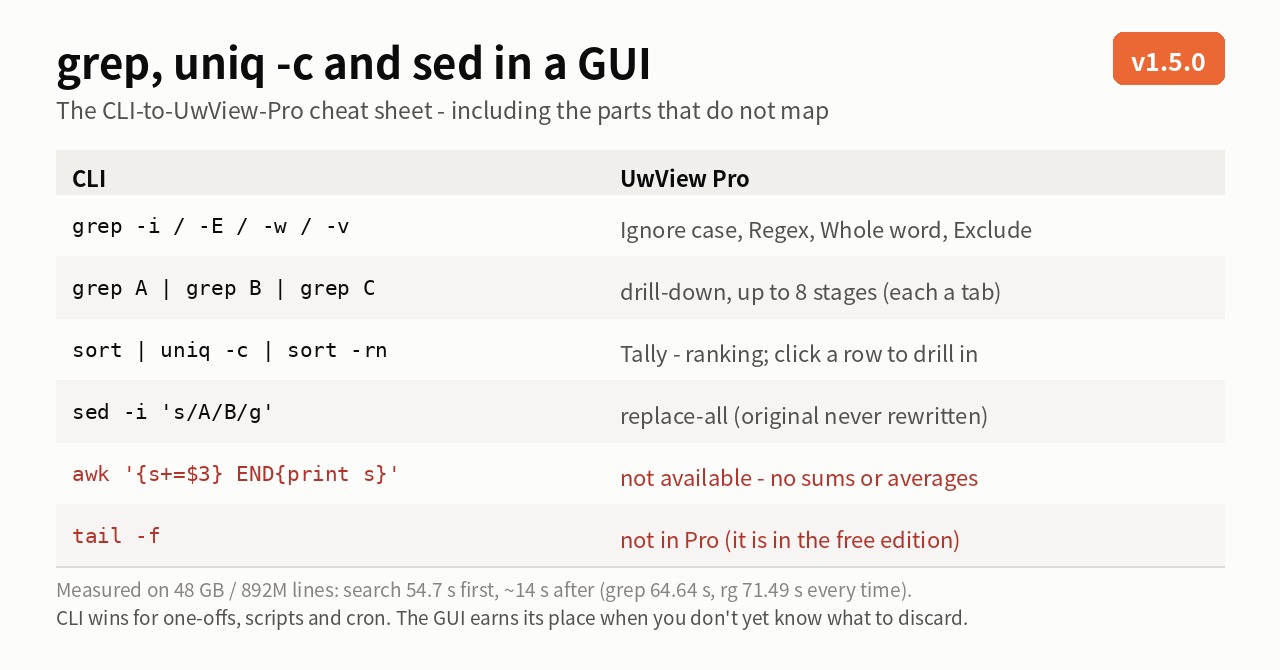
Short version: I can honestly claim grep, uniq -c and sed. I cannot claim awk (more on that below).
The mapping — closest CLI equivalents
This is “close behavior,” not strict equivalence. Drill-down refines ±N-line context blocks while a grep pipe streams lines, so edge cases differ.
Finding
| CLI | UwView Pro |
|---|---|
grep PATTERN big.log |
search (stage 1) |
grep -i |
“Ignore case” checkbox |
grep -E |
“Regex” checkbox |
grep -w |
“Whole word” checkbox |
grep -v |
“Exclude” checkbox (stage 2 onward) |
grep -C N |
±N lines of context |
grep A \| grep B \| grep C |
drill-down search (up to 8 stages; each stays as a tab with its hit count, so you can jump back) |
wc -l |
total line count, shown the moment the file opens |
Counting
| CLI | UwView Pro |
|---|---|
... \| sort \| uniq -c \| sort -rn |
Tally (frequency ranking on the regex’s first capture group) |
... \| head -20 |
Top-N (default 20, adjustable) |
| (getting from the counts back to the lines) | click a ranking row → drill into that value as the next stage |
Fixing and keeping
| CLI | UwView Pro |
|---|---|
sed -i 's/A/B/g' |
replace-all (Edit Upgrade — the original is never rewritten; edits accumulate in a .ewvz sidecar) |
grep ... > hits.txt |
export hit lines (line numbers, first line as header, ±N context) |
zgrep PATTERN log.gz |
search a .uwvz archive without unpacking it |
keeping logs gzipped |
.uwvz archive (~1/9 the size, checksum-protected, opens and searches directly) |
Measured numbers (all on the same 48 GB, 892,239,125-line file)
| Operation | Measured |
|---|---|
| Full-text search | 54.7 s first run (while indexing), ~14 s after. For reference: grep 64.64 s, ripgrep 71.49 s — every time |
Three -v stages |
Tokyo 10,967 → exclude 医療 10,949 → exclude 消防 10,928 → 横浜 16 |
Whole word -w |
Tokyo 10,967 → whole-word Ariake 7 |
| Tally | 10,967 hits ranked into 159 distinct values in 22 ms (scanning those 10,967 lines). 61.5 s over 1.39M hits on the 48 GB file |
| Replace-all | 47.0 s for two replaces |
| Saving | quitting mid-work costs 0 s (the diff already exists); writing the final text takes 1–2 min |
I ran this whole table against the CLI
Those are per-operation numbers. I also ran the exact workflow this table describes end to end — once on the CLI, once in UwView Pro — against a 258 GB, 4.5-billion-line file, and wrote it up separately.
→ Five Questions Against 258 GB and 4.5 Billion Lines — Where grep Loses to a GUI
Five searches, a four-stage drill-down, a tally, a replace-all and a save, measured as one job: 51 m 17 s on the CLI against 12 m 29 s in UwView Pro (finishing with .uwvz; 15 m 35 s if you export plain text). But with a single question ripgrep wins — the crossover is at question two. Hit counts, replacement counts and output byte sizes were cross-checked across six items, all matching.
What does not map (the more useful half)
| CLI | UwView Pro |
|---|---|
awk '{s+=$3} END{print s}' — sums, averages, arithmetic |
Not available. Tally stops at frequency ranking |
tail -f — following a growing file |
Not in Pro. It lives in the free UwView |
cut / paste / join and other column work |
Not available (block/rectangular copy exists) |
| Pipes, redirection, scripting | Not in the GUI. Since v1.6.0 there is a CLI — uvp (Pro) and uvf (free) — writing line<TAB>text to stdout with grep’s exit codes (0 / 1 / 2), so automation and scheduled runs can be written with those |
I can’t claim awk because awk is really field splitting ($1, $3), arithmetic, conditions, BEGIN/END and printf. Tally cuts a value out with a regex capture and counts it — that lineage is grep -oE | sort | uniq -c, not awk. Being vague here would only produce the “I thought it could sum a column” disappointment, so I’d rather write it plainly.
So when do you use which?
The line hasn’t moved.
CLI wins for a one-off search, anything inside a script, anything on a cron schedule, anything piped onward. A GUI has nothing to add there. What has changed is that “CLI” no longer means only grep, sed and awk: since v1.6.0 there is uvp (Pro) and uvf (free), with grep’s exit codes (0 found / 1 not found / 2 error) and line<TAB>text on stdout, so they drop straight into a pipe or a cron job. The genuine one-off on a file with no index yet is still faster with grep or ripgrep, because the index has to be built first.
The GUI earns its place when you don’t yet know what to throw away — when you ask the same file many different questions. On a 48 GB file, every new question costs another full scan: 64 seconds each, stacking up. Index it once and repeat searches take ~14 s, with every refinement stage still sitting there as a tab so you can think your way back and forth.
Exactly when that starts paying off now has a number, from the 258 GB run: a 317.8-second index plus 32.38 s per question, against ripgrep’s 277.91 s per question, crosses over at question 1.29 — so from question two onward.
More CLI-flavored features are on the way; the next one is being selected now.
The tool used
UwView Pro is on sale (Windows, macOS, Linux — one license covers all three; one-time or monthly, with a 14-day free trial — editing features included). Drill-down search and Tally are Pro features; replace-all is part of the Edit Upgrade.
Links
- Five Questions Against 258 GB and 4.5 Billion Lines — Where grep Loses to a GUI (this table, measured as one whole job)
- I Put grep -v into a GUI — part 1
- grep -w Joins the GUI — part 2
- uniq -c Joins the GUI — part 3
- Is ripgrep Really the Fastest on a 51 GB Single File?
From the developer: a list of my apps, Kindle books and public projects is on GitHub: amru195704.
A note
The information in this article is provided for reference purposes only, and we do not guarantee its accuracy or completeness. All measurements reflect the specific environment described above and may differ on other hardware. If you notice any errors or inaccuracies, please let us know in the comments and we will review and correct them.