Once you can open and search a huge log, the next question is what changed between last time and this time.
Last month’s CSV against this month’s. Yesterday’s log against today’s. The previous delivery folder against the current one. Version 1 of a specification against version 2. All of these are “compare two things” jobs — but the files may be in Shift-JIS, the rows may not be in the same order, and one file may be 10 GB. So I built UwDiff as a sister tool to UwView: search with UwView, compare with UwDiff.
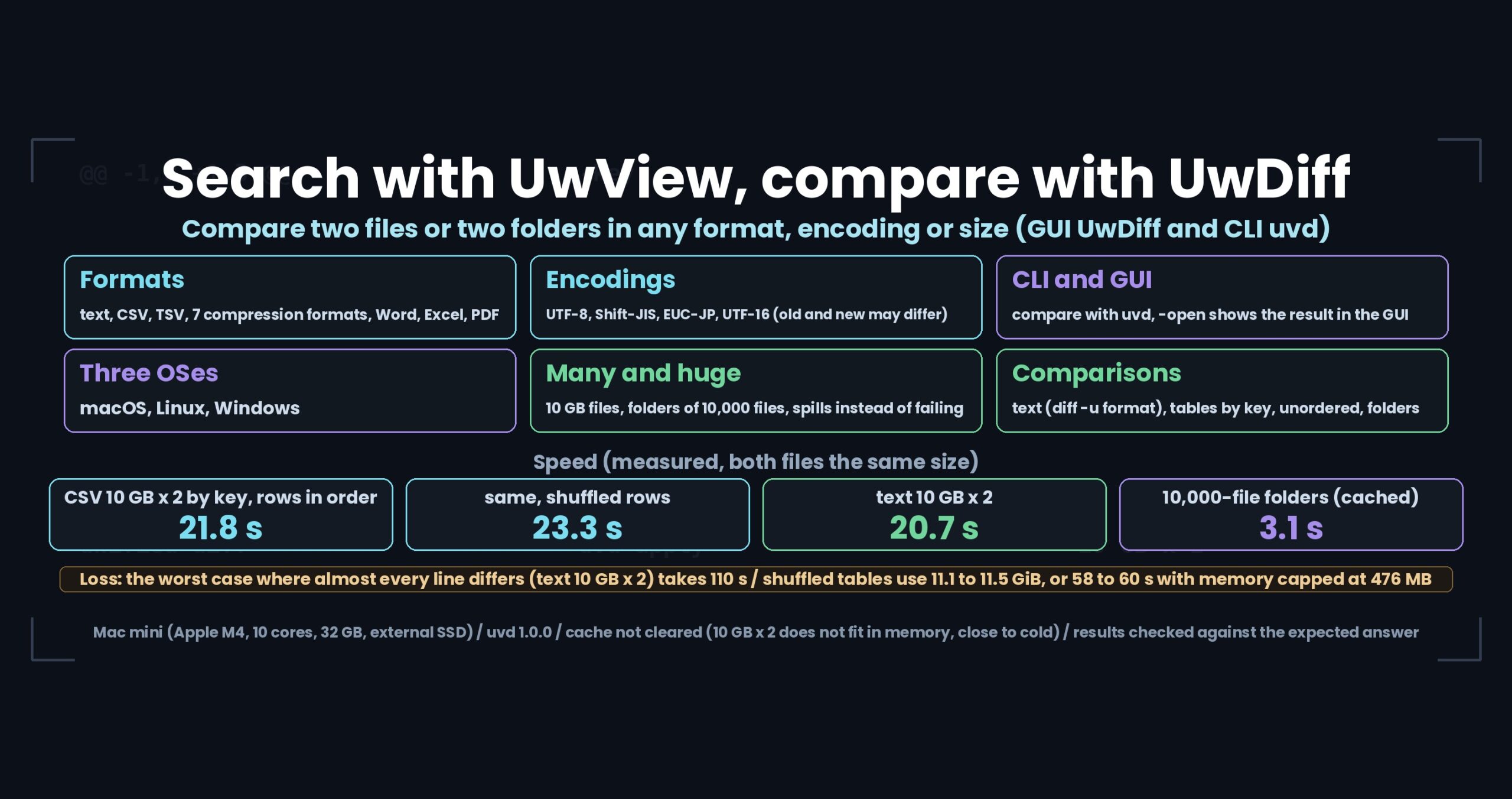
- The short version: key matching of two 10 GB CSV files takes 21.8 s (23.3 s with shuffled rows) and two 10 GB text files take 20.7 s — but the worst case, where almost every line differs, takes 110 s, and capping memory at 476 MB takes 58 to 60 s
- Six axes
- Four ways to compare
- Encodings — no conversion when both sides match
- Speed (measured, with conditions)
- What it does not do
- Getting it, and the license
- Links
The short version: key matching of two 10 GB CSV files takes 21.8 s (23.3 s with shuffled rows) and two 10 GB text files take 20.7 s — but the worst case, where almost every line differs, takes 110 s, and capping memory at 476 MB takes 58 to 60 s
- Two 10 GB CSV files matched by a key column: 21.8 s with rows in the same order (20.5 s in CP932), 23.3 s even with fully shuffled rows (22.3 s in CP932)
- Two 10 GB text files (order-preserving comparison, unified diff): 20.7 s using 0.4 GiB
- GUI: two 10 GB text files appear on screen 20.5 s after clicking Compare; jumping to the last change takes 27 ms
- Folders of 10,000 files (2.2 GB per side): 3.1 s (data in the page cache)
Losses first. The worst case, where almost every line differs (two 10 GB files, the new one shuffled every 4,096 lines), took 110 s as a text comparison — about five times the 20.7 s for files whose lines are in order. And huge tables in shuffled row order keep rows waiting for their counterpart in memory: 11.1 to 11.5 GiB for two 10 GB files. With the memory limit set to 476 MB the rows spill to temporary files and the run still completes, but takes 58 to 60 s.
uvdis the CLI of UwDiff, a tool I build (the GUI is also called UwDiff). UwDiff is a separate product, not a part of UwView. The numbers in this article are for uvd 1.0.0 on a Mac mini (Apple M4, 10 cores, 32 GB memory, external SSD), and the cache was not cleared (runs directly after generating the data; two 10 GB files do not fit in memory, so this is close to cold). Every time was taken after confirming the result matches the expected answer exactly.
Six axes
The goal for UwDiff was to compare any pair of files the same way. That breaks down into six axes.
| Axis | What it does |
|---|---|
| Formats | text (logs, CSV, TSV, source), the content of 7 compression formats (gz, bz2, xz, lzma, zst, lz4, br), the text of Word (.docx), Excel (.xlsx) and PDF |
| Encodings | UTF-8, Shift-JIS (CP932), EUC-JP and UTF-16 (with or without BOM), detected automatically; old and new may differ |
| CLI and GUI | compare with the uvd CLI; add -open and the result appears in the GUI (the GUI does not compare again) |
| Three OSes | macOS (Apple Silicon, Intel), Linux (x86_64, aarch64), Windows (x64, ARM64) |
| Many and huge | files of 10 GB and more, folders with thousands to tens of thousands of files; spills to temporary files instead of running out of memory |
| Speed | the short version above and the table under “Speed” below |
Four ways to compare
1. Text — the same format as diff -u
UwDiff compares lines in order and writes the result in the same format as diff -u (unified diff). Applying the diff to the old file with patch gives the new file; I confirmed that the result matches the new file byte for byte even at 10 GB.
diff -u old.log new.log > changes.diff
With uvd:
uvd old.log new.log -o changes.diff
Exit codes follow diff as well (0 = same, 1 = different, 2 = error). Compressed logs can be passed as they are (uvd old.log.gz new.log.zst -o -; one side may be uncompressed).
Line-ending differences (CRLF vs LF) are ignored by default; add -strict-eol to treat them as differences.
2. Tables — matched by key columns, even when the row order differs
CSV, TSV and Excel files are matched by key columns such as an ID. Rows are paired by key even if their order differs, and columns are paired by header name (column order may differ too).
uvd old.csv new.csv -key ID -o diff.csv
uvd ledger_09.xlsx ledger_10.xlsx -key ID -o diff.csv
The output lists kind, key, column, old value and new value, with one row per changed cell. Values are compared as strings, so leading zeros, long numbers and date-like values are never reinterpreted.
3. Apply only the changes you pick
Delete the rows you do not want from the table diff (editing it in Excel is fine) and apply the rest to the old file:
uvd apply old.csv new.csv picked.csv -o result.csv
UwDiff keeps the old file’s encoding, BOM, delimiter, line endings, quoting and row order, and writes untouched rows byte for byte. Cells whose current value differs from the diff’s old value, and values that cannot be written in the old file’s encoding, are not applied and are reported (exit code 1). In the GUI, uncheck rows and choose “Apply selected changes…” to do the same.
4. Folders — every subfolder in one run
diff -rq release_prev/ release_now/
With uvd:
uvd release_prev/ release_now/ -o list.csv
The CSV lists only-in-old, only-in-new, different and same. Add -detail diffs/ to write a diff for each file whose content differs. The include and exclude patterns (-include, -exclude) use the same syntax as UwView’s uvf.
Encodings — no conversion when both sides match
Encodings are detected automatically (BOM, then UTF-16 without BOM, then UTF-8, then CP932 and EUC-JP). When old and new use the same encoding, UwDiff compares them as they are, without conversion. When they differ, both are converted to UTF-8 (and the diff is written in UTF-8); UTF-16 is always converted to UTF-8. NEC special characters, IBM extended characters and half-width katakana come through intact.
Speed (measured, with conditions)
| Comparison (both files the same size) | Time (s) | Memory |
|---|---|---|
| CSV 10 GB × 2, key matching, same row order (UTF-8 / CP932) | 21.8 / 20.5 | 4.0 to 4.3 GiB |
| CSV 10 GB × 2, key matching, shuffled rows (UTF-8 / CP932) | 23.3 / 22.3 | 11.1 to 11.5 GiB |
| CSV 10 GB × 2, shuffled rows, memory limit 476 MB (UTF-8 / CP932) | 58 / 60 | 2.8 GiB |
| Text 10 GB × 2, order-preserving comparison | 20.7 | 0.4 GiB |
| Text 10 GB × 2, worst case where almost every line differs | 110 | 1.3 GiB |
| GUI: text 10 GB × 2, from Compare until on screen | 20.5 | — |
| Folders of 10,000 files (2.2 GB per side, about 1% different) | 3.1 (data in the page cache) | — |
The test data is the same as tools/run_tests.sh in the UwDiff repository (CSV generated with a fixed seed; the 10 GB file has 105.34 million rows and the expected diff 2.559 million rows). Seconds are /usr/bin/time real.
What it does not do
- Word, Excel and PDF are compared by their extracted text. Formatting, images and formulas are not compared. Legacy .doc and .xls, password-protected files and PDFs without text cannot be read.
- Excel sheet matching and order-independent comparison produce a list of differences, but cannot be applied.
- Where millions of lines are rearranged in one place, that range may be reported as a replacement (a correct diff, but not necessarily the minimal one).
- The GUI switches between Japanese and English, but CLI output stays in Japanese.
Getting it, and the license
The current version is v1.0.0 “First Light”. Packages (.dmg for macOS, .tar.gz for Linux, .zip for Windows) are on GitHub Releases and on this site’s download page (with SHA256 values). Building from source with the .NET 10 SDK is described in the UwDiff repository on GitHub.
The license is the UwDiff License (PolyForm Internal Use 1.0.0 plus a permission to redistribute the official binaries as packages). It is free for internal use by individuals and companies, and the official, unmodified binaries may be redistributed free of charge as packages (Homebrew, Scoop, Flathub, Snap, AUR and so on). It is not open-source software.
Links
- UwDiff source and documentation (GitHub): https://github.com/amru195704/UwDiff
- User manual (GitHub): https://github.com/amru195704/UwDiff/blob/main/docs/manual.en.md
- Full benchmark data (GitHub): https://github.com/amru195704/UwDiff/blob/main/docs/benchmarks.md
- UwDiff on this site: https://uvp.y42u.net/en/uwdiff-en/
- Sister tool UwView (open and search): https://uvp.y42u.net/en/about-en/
- UwView source code (GitHub): https://github.com/amru195704/UwView
- Bugs and requests: https://github.com/amru195704/UwDiff/issues
From the developer: a list of my apps, Kindle books and public projects is on GitHub: amru195704.