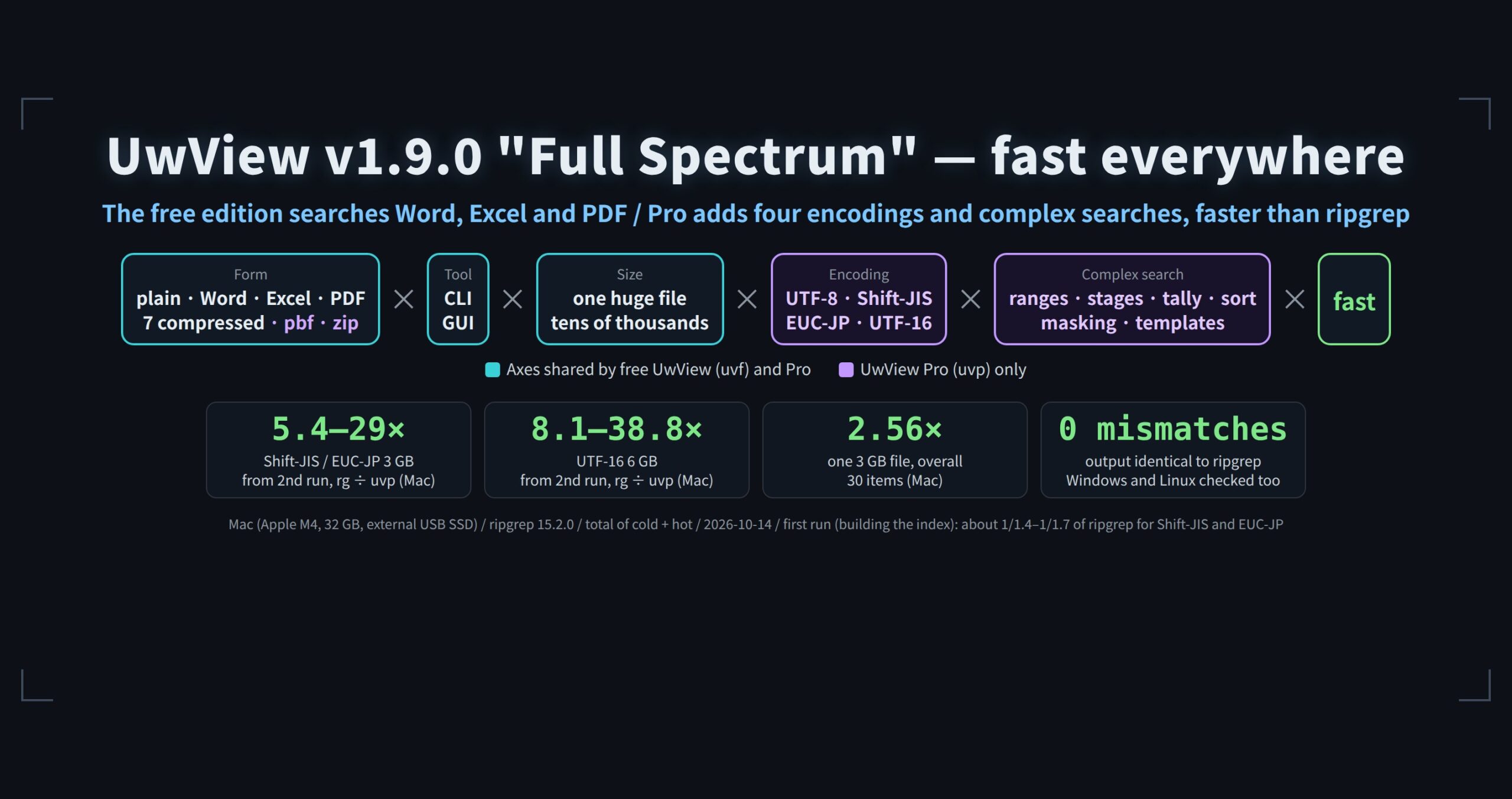
As a formula, it looks like this.
Free UwView (uvf)
(plain + Word, Excel, PDF + compressed [gz, bz2, xz, lzma, zst, lz4, br]) × (CLI + GUI) × (huge + many) files × fast

UwView Pro (uvp)
(plain + Word, Excel, PDF + compressed [gz, bz2, xz, lzma, zst, lz4, br, pbf, zip]) × (CLI + GUI) × (huge + many) files
  × (UTF-8 + Shift-JIS + EUC-JP + UTF-16) × (complex searches: ranges, stages, tallies, sorting, masking, templates) × fast
“Full Spectrum” means every combination in that formula. The goal: on par with ripgrep or faster everywhere, and several times faster in many places with Pro. How much of it has actually been measured is in the “Honestly” section at the end.
UwView is an app you can use like grep and vi combined. The CLI (
uvfin the free edition,uvpin UwView Pro) searches files for text, and the GUI opens files of several to tens of gigabytes and lets you read them from the moment they open. v1.9.0 was released in October 2026 (GitHub Releases, Homebrew, Scoop, Snap).
1. The free edition now searches inside Word, Excel and PDF
uvf report.docx Tokyo             # Word
uvf 'expenses/**/*.xlsx' taxi     # Excel (many files with a wildcard)
uvf 'docs/**/*.pdf' contract -i   # PDF
uvfextracts the text as it searches. It builds no index and writes nothing next to the original file.- The line shape is fixed: Excel becomes
Sheet!row<TAB>A<TAB>B…, PDF becomes## page Nfollowed by the lines in reading order. So, just like ripgrep, you get results with line numbers. Excel is searched by displayed values;--rawsearches the stored values. - In the window, opening one shows “Extracting text” with progress, then you can read and search the extracted text.
- It is read-only: these files cannot be written back in their own format (you can save or copy the extracted text). Old .doc and .xls files, password-protected files and PDFs without text (images only) are skipped with the reason.
ripgrep alone cannot search inside Word, Excel or PDF (the contents are zip archives or compressed streams). You would chain an extractor with --pre, or add a separate tool such as ripgrep-all. uvf does that extraction inside one command, with no external commands.
2. The window: dark theme, fonts, key bindings
Choose them in Settings (Tools → Settings…, Ctrl+, on Windows and Linux; Settings… in the app menu, Cmd+, on a Mac).
- Theme: Follow OS, Light, Dark. It follows the OS switch on the spot.
- Font: body font and size (6–48). Ctrl (Cmd)+wheel works too.
- Key bindings: up to two keys per action. The vi/less style preset adds
jkgGnNmand more, with count prefixes like5j(five lines down) and120g(line 120). Export to.uwvkeysto take them to another machine, Mac ↔ Windows/Linux included.
Also new: Hits + bookmarks / Bookmarks only / Hits only in the result list, AND/NOT/OR templates in the predefined ★ list, Copy / Folder / Terminal / App from the file name in the status bar, and brace patterns such as '**/*.{txt,log}' in file patterns. A log that is truncated or rotated while open no longer crashes the app, and tail-follow keeps up.
3. UwView Pro: Shift-JIS, EUC-JP and UTF-16 as a UTF-8 index
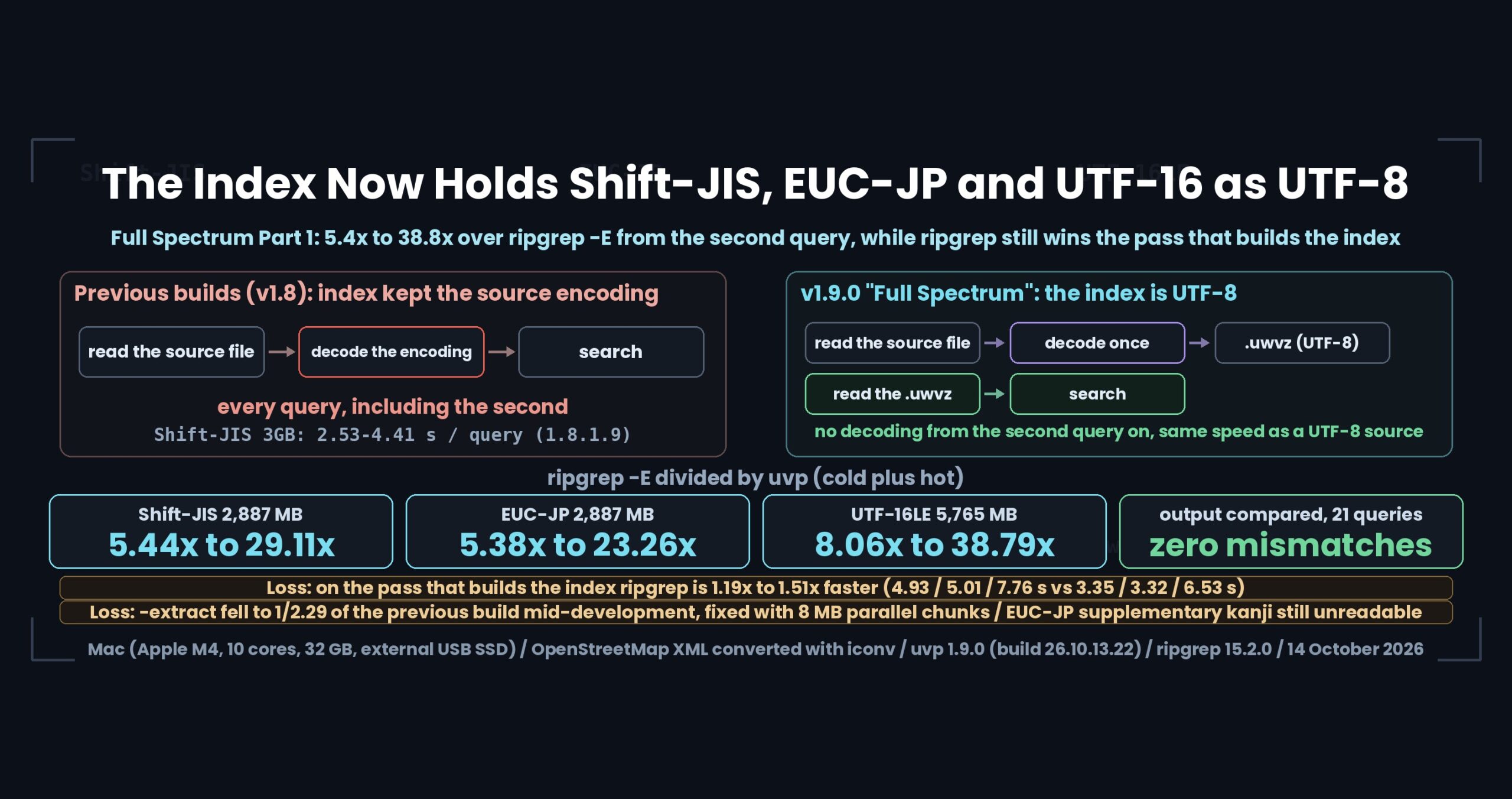
uvp builds an index (.uwvz) the first time and searches the index from then on. From v1.9.0, Shift-JIS, EUC-JP and UTF-16 files are kept as UTF-8 inside the index.
- From the second search there is no conversion per search, so they are as fast as UTF-8 files.
- ripgrep converts on every read, as in
rg -E shift_jis. - Output and display keep the original characters.
-extractwrites a file back in its original encoding. - The index format is new, so a
.uwvzmade by an earlier version is rebuilt on the first search.
| One 3 GB / 6 GB file | Mac: first run uvp / ripgrep | Mac: from the 2nd run, rg ÷ uvp | Linux (reference): first run | Linux (reference): from the 2nd run |
|---|---|---|---|---|
| Shift-JIS 3 GB | 4.93 s / 3.35 s (on par) | 5.4–29.1× | 15.12 s / 1.82 s (1/8.3) | 2.0–13.0× |
| EUC-JP 3 GB | 5.01 s / 3.32 s (1/1.51) | 5.4–23.3× | 15.41 s / 1.69 s (1/9.1) | 2.0–13.1× |
| UTF-16LE 6 GB | 7.76 s / 6.53 s (on par) | 8.1–38.8× | 17.64 s / 3.17 s (1/5.6) | 3.0–15.3× |
(Seven patterns, compared on the total of the first and second runs; the first run includes building the index. Output is byte-for-byte identical to ripgrep. Linux is a reference value from the correctness check. In the reference Windows run, the first run was 1/1.5–1/2.3 of ripgrep and 2.2–14.1× from the second.)
In the reference Linux run too, uvp’s hot time from the second run matched the UTF-8 original (A1: 0.47 s vs 0.54 s).
4. UwView Pro: complex searches, and Word, Excel and PDF in the index
uvp lets you line up stages for searches that ripgrep alone cannot do: ranges (-seq start,end -range), stages (-grep), nearby lines (word1 -C N word2), tallies (-uniq), sorting (-sort), masking (-mask) and templates (-format … --csv). v1.9.0 adds machinery that makes repeat searches faster (line skeleton, block marks, joining on the second word). Word, Excel and PDF are indexed too, so tallies, ranges and templates work on them.
# Count expense categories in Excel files, most frequent first
uvp 'expenses/**/*.xlsx' 'taxi|hotel|meeting' -E -uniq '(taxi|hotel|meeting)' -sort count
| Compared (cold + hot, ripgrep ÷ uvp) | Mac | Windows (reference) | Linux (reference) |
|---|---|---|---|
| one 3 GB file (total of 30–32 items) | 2.56× | 2.24× | 1.50× |
| one 10 GB file (total of 30 items) | 2.51× | 3.17× | 1.96× |
| tally and sort (3 GB and 10 GB) | 4.2–4.9× | 2.0–3.6× | 1.4–3.3× |
| three log examples (range + exclude + mask, nearby lines, collect into CSV; Linux kernel, 60,000 files) | 2.35–4.56× | 1.26–2.48× | 1/2.85–1/3.21 (ripgrep faster) |
The ripgrep side is the time to do the same thing with ripgrep combined with perl, awk, sort and uniq. Windows and Linux were run to confirm correct operation (all correctness tests passed, zero output mismatches against ripgrep); their speeds are for reference only, since the machines and conditions differ.
5. Honestly
- Some cells are not measured. Not every combination in the formula has been measured. What the current measurements support as “fast”: UTF-8 plain text (huge and many, CLI and GUI), UTF-8 compressed (huge, CLI), Shift-JIS/EUC-JP/UTF-16 plain text (huge, CLI), and complex searches (UTF-8). The speed of Word/Excel/PDF, encodings × many files or × compressed, and GUI × compressed are not measured yet.
- On plain text, the first run is about the same as ripgrep. Because it builds the index,
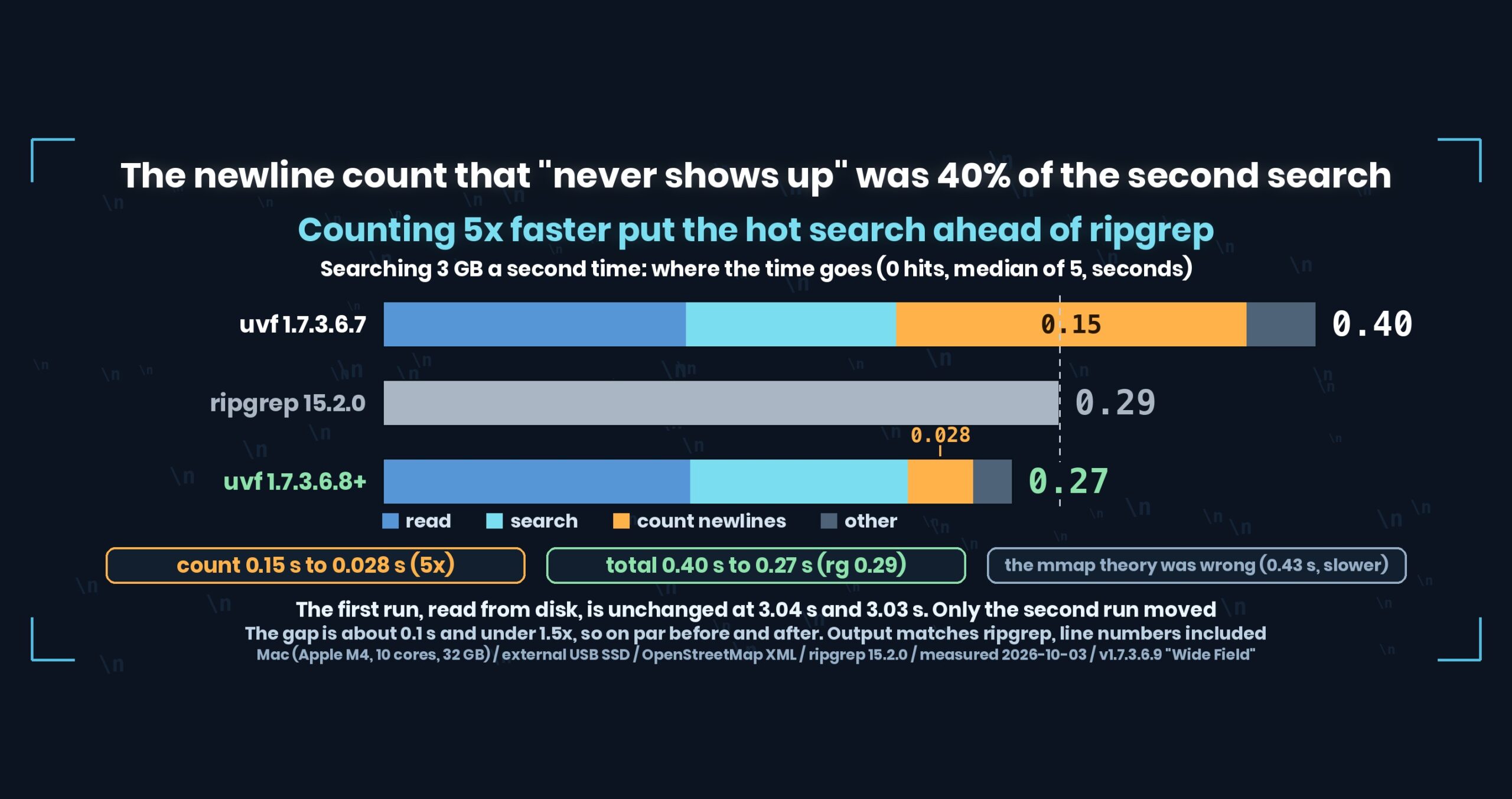
uvp‘s first run on 3 GB of plain text was 1/1.3 of ripgrep (Mac). The gap opens from the second run. - The first run (including building the index) is about 1/1.4–1/1.7 of ripgrep for Shift-JIS and EUC-JP (the range over three runs on a Mac). Fast-to-decompress lz4 including the first run is 1/1.4. In the reference Windows and Linux runs, ripgrep was faster on zst and lz4 including the first run, on first-time bundling of many files, and on 5 of the 6 Linux log examples.
- EUC-JP supplementary kanji (JIS X 0212) cannot be read (they become a middle dot).
- The free
uvfis on par with ripgrep on single and multiple files (the several-times-faster results come from Pro, which keeps an index). - Times were measured with v1.9.0 on a Mac (Apple M4, 32 GB, external USB SSD) on 14 October 2026. Windows (x64, 16 GB) and Linux (aarch64, 2 cores, 7 GB) were checked for correct operation; their speeds are for reference only. Do not compare times across environments.
- Download: free edition and Pro
- Release notes: UwView v1.9.0
- How to use: UwView User Guide · UwView Pro User Guide · uvf command manual · uvp command manual
- UwView Pro (one-time or monthly, 14-day free trial)