Last time we covered opening a 10GB–50GB log without splitting it and finding “ERROR”. But a real incident investigation starts the moment you find that line. The ERROR is the result — the cause is usually in the lines before it. The WARN just above, a timeout a few seconds earlier, a config load hundreds of lines back. If you can’t see those, your report says nothing more than “an error occurred”.
Why grep’s context flags aren’t enough
On the command line, grep -B 20 -A 5 extracts surrounding lines. It’s a fine first step, but it breaks down as the investigation deepens:
- The context width is decided in advance — you don’t know whether 20 lines is enough until you look. If it isn’t, you run it again
- The extracted fragment is a different text — when you want to go back another few thousand lines, there’s no way to jump to the original position in the file
- With thousands of hits, you now have a mountain of fragments, and a second investigation begins: which hit is the real one?
What you want is not fragments. It’s moving back and forth between a hit list and the actual scene in the original file.
The procedure: hit list ↔ source, with UwView (free)
UwView is a free viewer for huge logs and text files (Windows / macOS / Linux). Search results appear in an independent popup window that moves separately from the main view.
- Download the free edition and drag & drop the log (no splitting; readable the moment it opens)
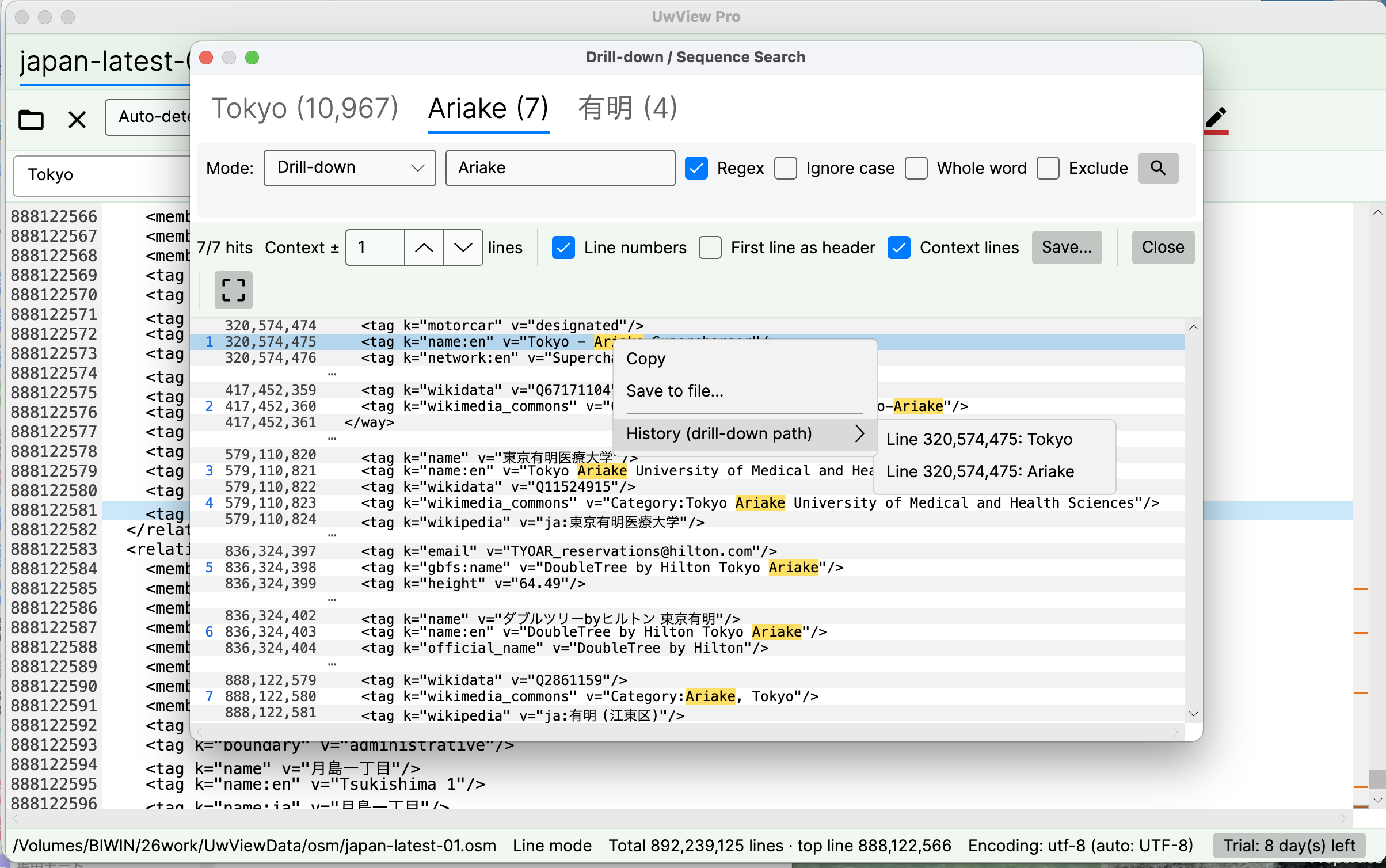
- Search for “ERROR” from the toolbar. Hits are listed in the popup
- Double-click a hit (or press Enter). The main view scrolls to that line and briefly highlights it. The popup stays open, so you can go list → scene → list as many times as you need
- At the scene, just scroll upward. Unlike grep fragments, you can go back 20 lines or 20,000 — the context never gets cut off, because you’re in the original file
- In the popup, turn on ±1 line context display to skim every hit together with the line before it. If the same WARN precedes every ERROR, you’ll spot it here
- Once you have a suspect, search again for the request ID or thread ID and follow that one thread through time
- Finally, use “Save…” to write the hits (optionally with surrounding lines) to a separate file — ready to attach to your report
Color rules make the upstream reading easier still. With ERROR in red and WARN in yellow, you’ll notice “the yellow gets denser before the accident” even while scrolling (details on color rules).
What the free edition covers
“Find the ERROR, trace upstream, identify the causal line, export the relevant part” — this whole investigation is covered by the free edition. Jump, save, and ±1-line context display are all included. For a one-off investigation, you can stop reading here.
Wider context, in parallel — UwView Pro
For repeated investigations, the free edition has three ceilings: popup context is limited to ±1 line, there is one popup (tied to the active tab), and the index is rebuilt on every reopen.
UwView Pro extends context display to up to ±64 lines and opens an independent popup per tab. Lining up an app log and a DB log, each with its own ERROR list, and cross-checking them — that’s Pro territory. The saved index gives instant reopen (measured 0.02–0.07 s) and the compressed cache makes search about 9× faster on every visit after the first.
| Task | UwView (free) | UwView Pro |
|---|---|---|
| Jump from the hit list to the source line | ○ | ○ |
| Save hits (optionally with surrounding lines) | ○ | ○ |
| Context display in the popup | ○ up to ±1 line | ○ up to ±64 lines |
| Independent popups per tab, in parallel | ― | ○ |
| Rectangular selection inside the popup | ― | ○ |
| Instant reopen from a saved index | ― | ○ |
| ~9× faster search via compressed cache | ― | ○ |
For a single investigation, the free edition is enough. Consider Pro only for cross-checking multiple logs or returning to the same logs repeatedly. (one-time purchase or monthly subscription — one license covers all OSes.)
Links
- Download UwView (free): https://uvp.y42u.net/download/?utm_source=blog&utm_medium=article&utm_campaign=error-context-2-en
- Previous: File too large to open? Investigate without splitting: https://uvp.y42u.net/en/blog/uwview-huge-log-cannot-open-en/
- Design notes on the filter popup (jump / save / context): https://uvp.y42u.net/en/blog/uwview-filter-popup-jump-save-context-en/
- Worked example: tracing 5xx errors in an access log: https://uvp.y42u.net/en/blog/uwview-access-log-5xx-workflow-en/
- Source code (GitHub): https://github.com/amru195704/UwView
From the developer: My apps, Kindle books, and public projects are listed at GitHub: amru195704.
Note
The information in this article is provided for reference and is not guaranteed to be accurate or complete. Figures are measurements in a specific environment and will vary. Feature availability reflects the versions tested and may change in future updates. If you find an error, please point it out in the comments and it will be corrected after verification.