UwView Pro just gained Drill-down Search: refine your search results with another term, then another — up to 8 stages, each in its own tab.
It’s the grep pipeline you already type every day
When you dig through a big log on the command line, you write something like:
grep -C 5 "ERROR" huge.log | grep "timeout" | grep "db-server3"
“Find ERROR, keep 5 lines of context, then keep only the chunks that also mention timeout, then db-server3.” Drill-down Search is exactly that pipeline — as GUI tabs.
Run a normal search and the results pop up as usual (same as the free edition). In Pro, the popup has a refine bar: type the next term, hit Refine, and a new tab appears containing only the matches found within the ±N context of the previous stage. Each tab shows term (count), so you can watch the numbers collapse.
Real example: finding one coffee shop in 258 GB / 4.5 billion lines
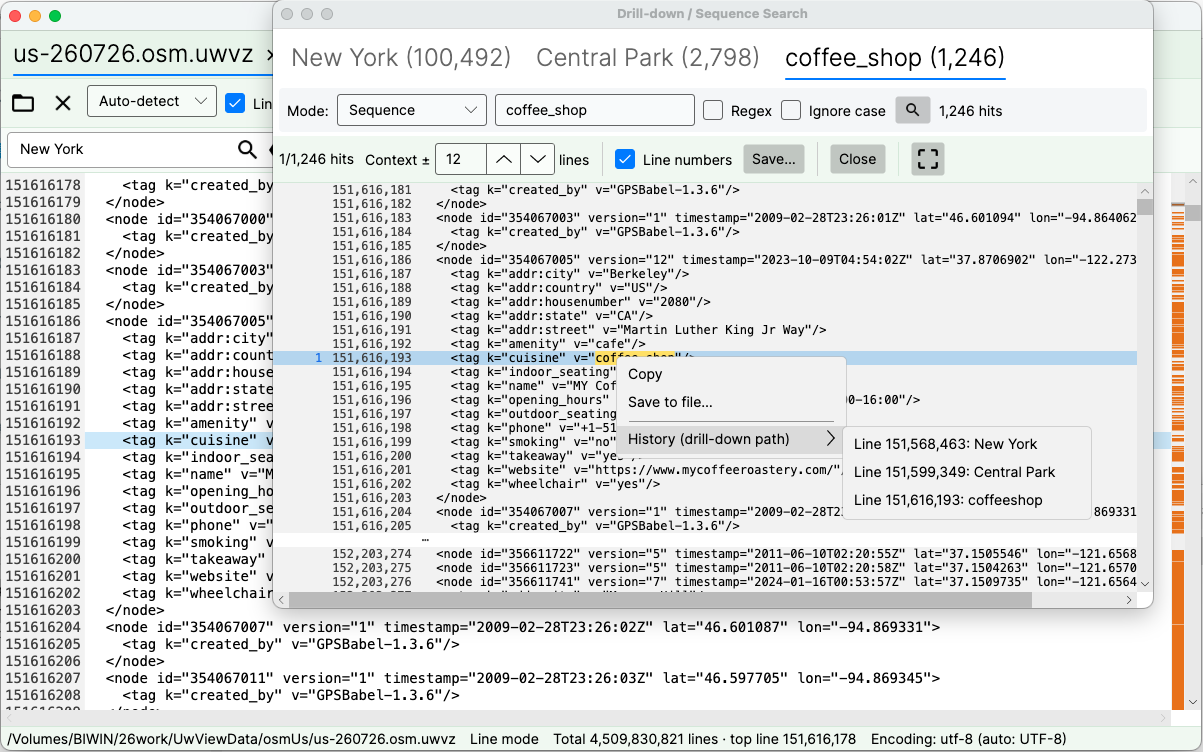
The screenshot above is the entire US OpenStreetMap extract — one XML file of 258.68 GB and 4,509,830,821 lines, opened directly from its compressed .uwvz archive without unpacking:
New York (100,492) → Central Park (226) → coffee_shop (3)
“New York” alone: 100,492 hits in 30.28 s. Refine with “Central Park”: 226. Refine with “coffee_shop”: 3. Two refinements took 100k hits down to three — and hit #1 lands on a Starbucks at Central Park South (59th & Broadway branch), with its address, opening hours and latitude/longitude sitting right there in the raw tags. One coffee shop, surfaced out of 4.5 billion lines.
Three things worth noting:
- Stages after the first are instant. They only scan the previous stage’s context blocks, so the only real wait is the initial full-text search.
- ±N context is set per stage. Keep intermediate stages tight, then open the final stage up (the screenshot uses ±12) to actually read the story.
- Every tab keeps the usual tools: jump to the source line, save results to a file — and a right-click History (drill-down path) menu shows exactly which hits led you here, line numbers included.
Which term, and which line, brought you here — the History menu
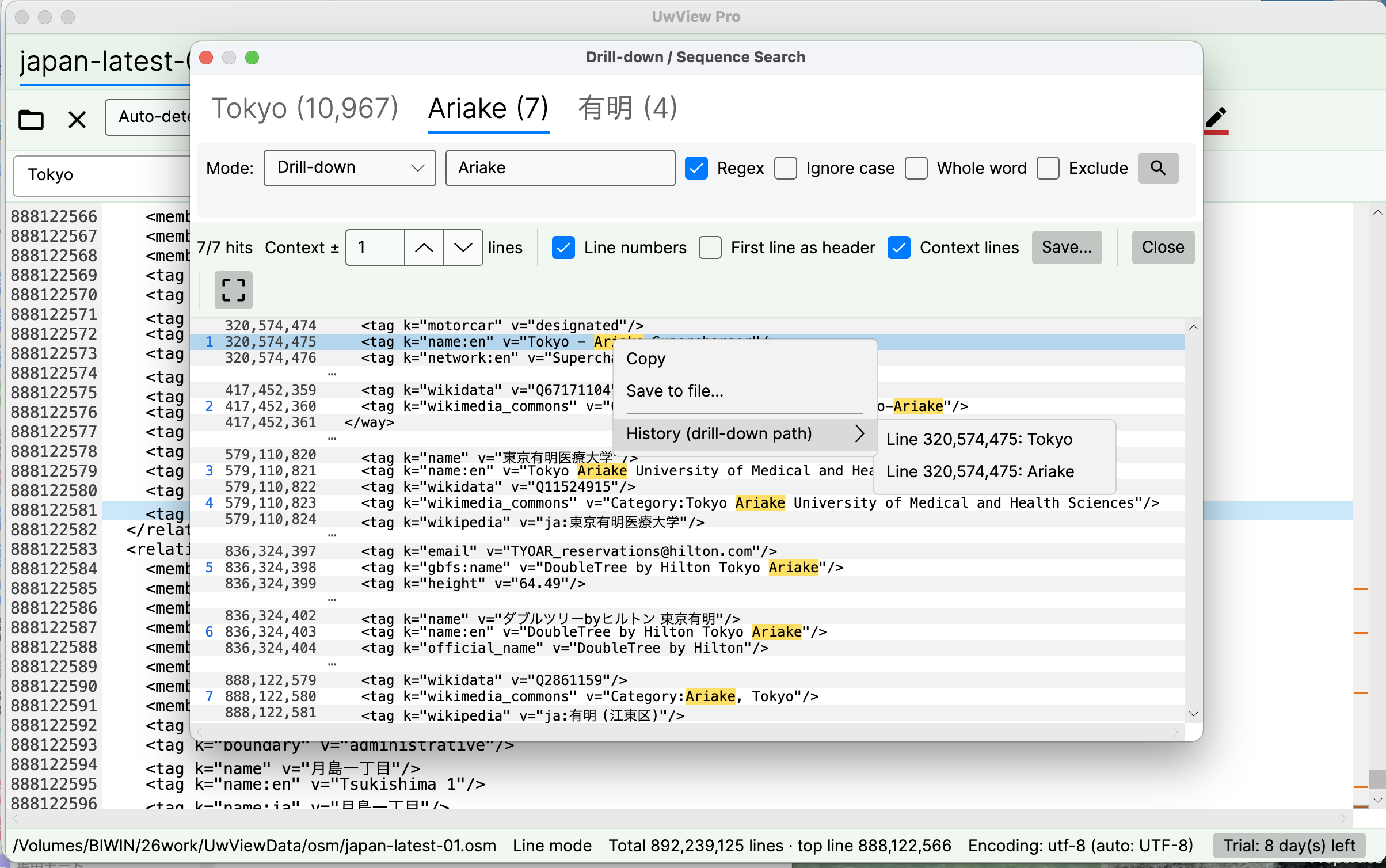
Stack a few stages and it gets easy to lose track of why a given line is on screen — which term actually caught it. Right-click any hit and open History (drill-down path), and every stage you passed through is listed in order, term and line number together.
The screenshot above is a three-stage refinement — Tokyo (10,967) → Ariake (7) → 有明 (4) — right-clicked on the second tab. The history reads “Line 320,574,475: Tokyo” → “Line 320,574,475: Ariake”: the exact route that produced this hit. Any entry in that list jumps straight to the source line, so retracing your steps never means clicking back through the tabs.
Do the same thing with a shell pipeline and the intermediate results are gone — nothing tells you afterwards which grep caught which line. Here the path is kept alongside the results, which matters whenever the search conditions themselves are part of what you have to hand over.
How this differs from klogg’s Boolean search
klogg’s and/or Boolean search works within a single line. Drill-down finds co-occurrence across nearby lines — and in real logs, the clues are almost never on one line.
The same tabbed UI is also gaining Sequence Search — detecting “w1 → w2 → w3 in that order,” the desktop equivalent of Elastic EQL’s sequence or Splunk’s transaction. Almost nothing offers that against a multi-gigabyte local file. More on that soon.
Get it
Drill-down Search ships in UwView Pro — released and available now (introduced in V1.3; current release v1.7.3.6 “Wide Field”). The free edition keeps the classic single-stage search with ±1 context and result export.
UwView Pro is available on Polar (V1.4.0 added the Edit Upgrade for non-destructive editing). Every license comes with a 14-day free trial — get a trial key on Polar, no payment details required.
- UwView Pro — View License (Polar — one-time or monthly; 14-day free trial; prices on the product page): https://buy.polar.sh/polar_cl_37MuoKb8WjSfLZ7hhjaTTzwAVBxu2XyqbnuWe3aGzbj
- UwView Pro — Edit Upgrade (one-time or monthly — requires an active View License): https://buy.polar.sh/polar_cl_JTfnSNp9cywCIKbvOMMzRuqdeUvw4T9bMrIZ53dMJQ1
- UwView Pro (Edit) — 14-day Free Trial (free; full View + Edit features, key expires after 14 days): https://buy.polar.sh/polar_cl_Iidw8Bhz2KibMCWLMKYPT04MqdqTixrdUkQ630Im06l
- UwView Pro product page: https://uvp.y42u.net/en/pro-en/
- Free UwView: https://github.com/amru195704/UwView