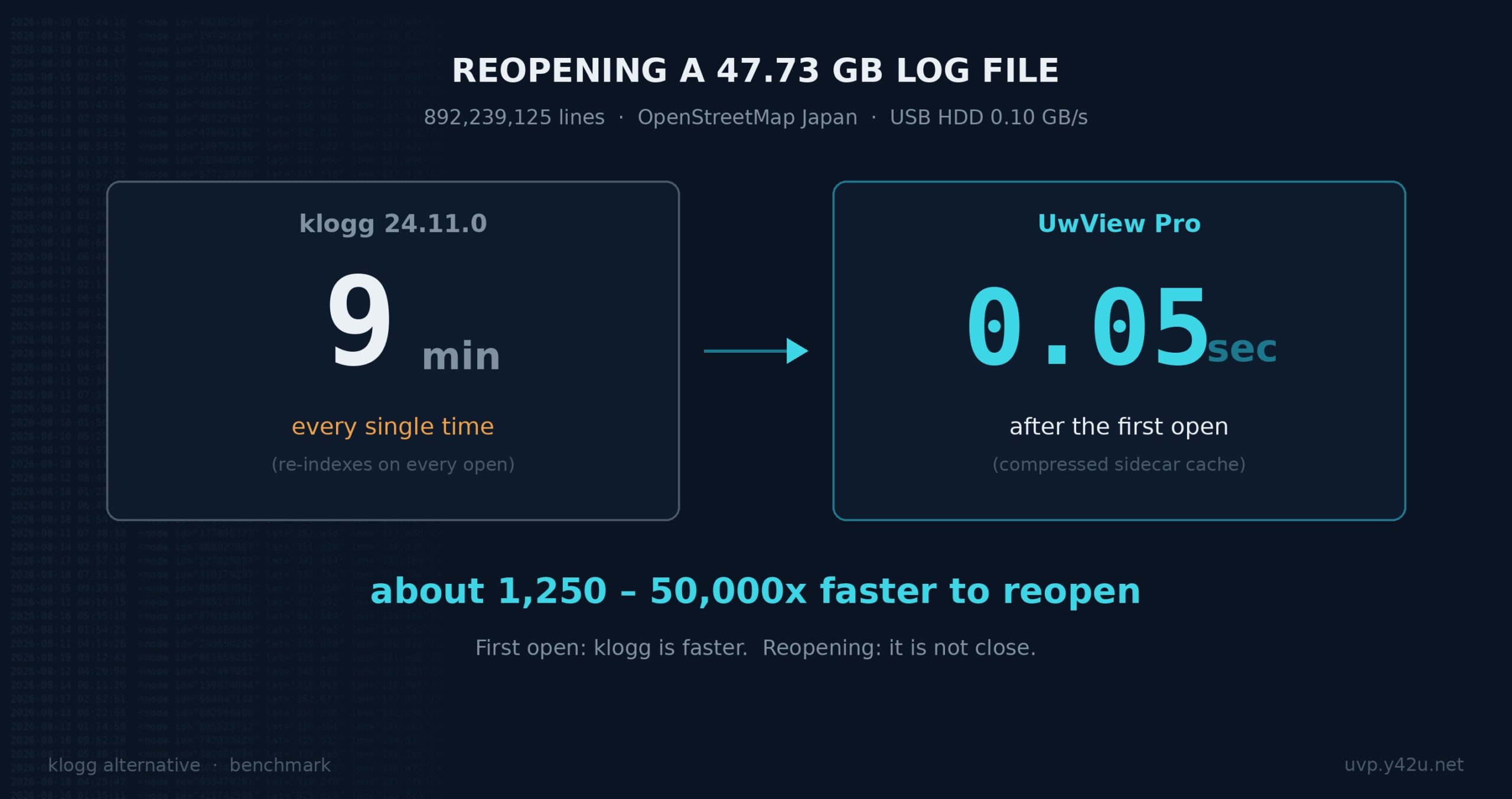
[Update, 16 October 2026] Speed today — Pro is about as fast as before; the free edition is now on par with klogg
The 47.73 GB figures in this article were measured in July 2026 (around v1.1) on a Mac with an external USB drive (0.41 GB/s read). The current version is v1.9.0 “Full Spectrum”.
Around 50 GB, against klogg In this article (then) Today Pro: reopen (2nd time on) 0.02–0.07 s 0.01–0.07 s (instant either way — unchanged) Pro: search (with index) about 9× klogg 8.6× klogg (6.47 s vs 55.59 s) Free: open / search (no figures in this article) on par with klogg (open 50.44 s vs 52.55 s, search 53.50 s vs 55.59 s) Free: search and read in the window ( uvf … -open)(not available yet) 2.15× klogg (50.76 s vs 109.32 s) Today’s figures were measured on a Mac (external USB SSD), not on Windows. The disk is different from then, so compare the ratios to klogg, not the seconds. Free edition: v1.6.6 (September 2026); Pro search: v1.7.3.1 (28 September 2026). UwView has also been confirmed to run correctly on Windows and Linux. Details: Benchmarks and the v1.9.0 “Full Spectrum” article.
Someone hands you a log file for an incident investigation — and it’s 10 GB, sometimes 50 GB. Double-clicking does nothing, or your editor freezes. If your work has ever stopped right there, this article walks through how to open and search the file as-is, with a free tool, without splitting it.
Why ordinary editors can’t open it
Notepad gives up at a few hundred MB with “file too large”. VS Code and Notepad++ freeze or fall back to a restricted, warning-laden mode at a few GB. The reason is simple: most editors try to load the entire file into memory so you can edit it. A 50 GB log will never fit into 32 GB of RAM.
Why “just split it” doesn’t solve anything
The commonly suggested fix — cutting the file into 1 GB chunks with split or a splitter tool — tends to backfire in an actual investigation:
- Line numbers are lost — you can no longer report “the error is on line N”
- Context is severed — what happened right before the error ends up at the tail of a different file
- With 50 GB you now have 50 files to open one by one, and search becomes manual labor again
What an investigation needs is not fragments. It needs one log, viewable as one log.
The procedure: open it as-is with UwView (free)
UwView is a free viewer built specifically for huge logs and text files (Windows / macOS / Linux). It cannot edit — in exchange, it is designed to start displaying before the file is fully read.
- Download the free edition (on Windows: unzip and run — no installer)
- Drag & drop the log file onto the window
- You can scroll the moment it opens. Drag the scrollbar to the bottom and you’re at the last line — the newest entries
- Search for “ERROR” from the toolbar. Regular expressions are supported
- Jump to a hit from the results list and read the surrounding lines in place
Index building runs in the background, and line numbers appear when it completes. The part that matters during an incident: you don’t wait for the index — the tail and the middle of the file are readable immediately after opening.
One measured example: with a 47.73 GB, ~892-million-line text file (OSM data, external USB SSD, a 32 GB-RAM machine), scrolling to the end and searching worked immediately after opening. The line-count ceiling is about 550 billion lines — in practice, your disk runs out first.
What the free edition covers
The task above — open a huge log once, find the error, read the context — is fully covered by the free edition. String search, regular expressions, color rules, and automatic encoding detection (including CJK encodings such as Shift-JIS) are all included. If this is a one-off investigation, you can stop reading here.
If you keep coming back to the same log — UwView Pro
For repeated work, two waits remain in the free edition: the index is rebuilt every time you reopen, and every search reads the file itself.
UwView Pro saves the index and a compressed cache to disk. On the same 47.73 GB file, reopening took about 0.02–0.07 s (with line numbers), and string search via the compressed cache ran about 9× faster. You can also archive the log at about 1/9 of its size and open it without unpacking (48 GB → 5.3 GB, checksum-protected).
| Task | UwView (free) | UwView Pro |
|---|---|---|
| Read a huge file the moment it opens | ○ | ○ |
| String/regex search, color rules | ○ | ○ |
| Investigate an incident log once | ○ Enough | ○ |
| Reopen instantly from a saved index | ― | ○ |
| ~9× faster search via compressed cache | ― | ○ |
| Store at ~1/9 size, open without unpacking | ― | ○ |
For a one-time job, the free edition is enough. Consider Pro only if you return to the same logs again and again. (one-time purchase or monthly subscription — one license covers all OSes.)
Links
- Download UwView (free): https://uvp.y42u.net/download/?utm_source=blog&utm_medium=article&utm_campaign=huge-log-1-en
- Measured comparison with klogg (47.73 GB, reopen, search): https://uvp.y42u.net/en/blog/uwview-klogg-feature-comparison-v111-en/
- Source code (GitHub): https://github.com/amru195704/UwView
From the developer: My apps, Kindle books, and public projects are listed at GitHub: amru195704.
Note
The information in this article is provided for reference and is not guaranteed to be accurate or complete. Figures are measurements in a specific environment and will vary. Feature availability reflects the versions tested and may change in future updates. If you find an error, please point it out in the comments and it will be corrected after verification.