[Update, 16 October 2026] Speed today — Shift-JIS, EUC-JP and UTF-16 can now be searched fast through an index
The
uvp/uvffigures in this article were measured with v1.6.6/v1.6.6.1 (September 2026, Mac). With the current version, v1.9.0 (14 October 2026, Apple M4, external USB SSD), they look like this.
Item In this article (then) Today (v1.9.0) Searching Shift-JIS / EUC-JP / UTF-16 with uvpEncodings were handled in the window; no command-line speed figure Stored as a UTF-8 index; from the 2nd search 5.4–38.8× faster than rg -E(0.10–0.54 s)First run (building the index) 6–7% slower on 50 GB of plain text Still slower: about 1/1.4–1/1.7 of ripgrep for Shift-JIS/EUC-JP, about 1/1.3 on 3 GB of plain text 3 GB plain file, uvp(seven search patterns)On par with ripgrep 3.44× (total including the first, index-building run) Free uvfOn par Still on par (1.08×) Output and
-extractcome back in the original encoding (EUC-JP’s JIS X 0212 is not supported). 50 GB was not re-measured. Details: Benchmarks and the v1.9.0 “Full Spectrum” article.
Triage is done. All that’s left is to read the log from the business system. You open the file. What’s on screen is something like ?~?A???[.
If your logs contain non-ASCII text — Japanese, Chinese, Korean, Cyrillic, or just an accented name in a user field — log investigation has one extra step that English-language write-ups rarely mention: deciding which encoding those bytes should be interpreted as. Get it wrong and your search, your grep, and your regexes all fail in the worst possible way — they run fine and match nothing. An error at least tells you something is wrong. An encoding mismatch usually comes back as zero results: a quiet lie.
This article lines up four traps you hit with non-ASCII logs — mojibake, wrong auto-detection, three invisible bytes at the front, and searches that never hit. For each one it gives the command-line triage, and then goes on to where that hand stops.
- 1. The screen breaks the moment you cat it — legacy encodings in a UTF-8 terminal
- 2. You can’t quite trust “auto-detect” — five conditions where it misses
- 3. Three bytes at the front change everything — the BOM
- 4. The search doesn’t hit — encoding, normalization, and width, stacked
- What the four had in common
- The tool I use
- Links
1. The screen breaks the moment you cat it — legacy encodings in a UTF-8 terminal
Situation
You received a log from a Windows-based business system. You cat it in your macOS or Linux terminal. Garbled text would have been fine; instead the terminal itself falls apart and you have to run reset.
Why it happens
In Shift_JIS — in practice CP932 / Windows-31J — the second byte of a two-byte character overlaps the printable ASCII range. The notorious case is characters whose second byte is 0x5C (backslash): ソ, 表, 能, 噂 are the usual suspects. Feed that to a UTF-8-assuming tool and the byte gets read as an escape character, breaking regexes and paths. The same class of problem exists in GBK, Big5, and other legacy CJK encodings.
Reading it as UTF-8 loses information outright. Invalid byte sequences are replaced with U+FFFD (�) in most implementations, so you cannot recover the original bytes from the garbled display. The screen breaks because, during that process, bytes from the control range reach the terminal untouched and are interpreted as escape sequences.
Command-line triage, and where it stops
Converting through a pipe makes it readable.
iconv -f CP932 -t UTF-8 app.log | less
nkf --guess app.log    # just show the detection result
Note -f CP932 rather than -f Shift_JIS. Vendor extensions (①, ㈱, 﨑, 髙) are outside the strict Shift_JIS standard, so a Shift_JIS conversion simply stops when it reaches one.
Three limits. First, what you converted is no longer the original. iconv halts on invalid bytes, and silencing it with //IGNORE throws away exactly the bytes that may have been the clue. Second, whole-file conversion costs: pipe a multi-GB log every time and the conversion runs from byte zero, even when the minute you care about is at the end. Third, if you solve it by writing out a converted file, you’ve doubled the storage and taken on the job of mapping line numbers back to the original by hand.
2. You can’t quite trust “auto-detect” — five conditions where it misses
Situation
You opened the file in a viewer with encoding auto-detection. It garbled anyway. Switching manually fixed it. So what about the next file — can auto-detection be trusted or not?
Why it happens
Encoding detection is heuristic by nature. The encoding name isn’t written in the file, so all a tool can do is guess from byte distribution and validity checks. The conditions where it misses are fairly predictable.
The head of the file is pure ASCII. Timestamps and English INFO lines run for tens of thousands of lines, and the only non-ASCII text is in an error message far downstream. A tool that samples the first few KB will confidently answer “UTF-8.”
Similar encodings look alike. EUC-JP and CP932 have close byte distributions; with little non-ASCII text to go on, they get confused for each other.
The file is mixed. Logs from several hosts concatenated with cat, or an output format that changed mid-migration. A detector that picks one encoding per file will always break one half of a mixed file.
Both candidates pass validation. A byte sequence can be valid UTF-8 and valid CP932. Validity checks narrow the candidates; they don’t decide.
Command-line triage, and where it stops
When in doubt, the checklist looks like this:
- Ask
file,nkf --guess, andchardetectand see whether all three agree (if they split, suspect a mixed file) - Ask what part of the file each verdict was based on — the head, or all of it
- Find where non-ASCII first appears and look at that spot:
grep -n -P '[^\x00-\x7F]' app.log | head -1 - If the file was concatenated or appended to, assume mixed encoding by default
- Eliminate candidates by validity: does
iconv -f utf-8 -t utf-8 app.log > /dev/nullpass?
The limit is that step 5 costs a full scan per candidate. And there’s a deeper one. What you actually want here isn’t a verdict — it’s to switch the interpretation and see with your own eyes whether the garbling clears. With a tool that reopens the file and rebuilds its index on every switch, one round trip takes minutes. Asked to do that four times for four candidates, most people give up.
3. Three bytes at the front change everything — the BOM
Situation
Your CSV parser dies on line 1 only. head -1 looks correct. grep '^timestamp' doesn’t match. Visually, the line clearly starts with timestamp.
Why it happens
A UTF-8 BOM (EF BB BF) is sitting at the front, and it’s invisible in display. It shows up constantly in anything that passed through Excel — which, in a business-systems context, is most CSVs. Excel misreads BOM-less UTF-8 CSVs as a legacy codepage, so saving with a BOM is the correct behavior in that world.
Which makes the BOM three bytes that tooling genuinely disagrees about. A shell script won’t execute with a BOM before #!. Most JSON parsers reject it. In awk, the BOM becomes part of field 1.
UTF-16 is worse. Its BOM is FF FE / FE FF, NUL bytes sit between ASCII characters so grep decides the file is binary and goes silent (you need grep -a), and any tool that splits lines on a single 0x0A byte can’t treat 0A 00 as a proper line ending. PowerShell’s event-log export defaults to UTF-16LE — that fact alone is worth keeping in your head.
Command-line triage, and where it stops
Making a habit of looking at the first bytes is the only real defense.
head -c 16 access.csv | xxd    # does it start with efbbbf?
file access.csv               # may report "with BOM"
sed '1s/^\xEF\xBB\xBF//' access.csv > clean.csv    # strip it
The limit is that stripping modifies the original. For a log you may need to treat as evidence, changing the hash is exactly what you don’t want. Keep a stripped copy instead and you’ve doubled storage again and taken on the debt of tracking which file is authoritative.
Above all, the BOM is information you could confirm in one second by looking at three bytes. Instead you go back to a terminal and type xxd every time. Something the viewer could simply show you has been pushed outside the tool.
4. The search doesn’t hit — encoding, normalization, and width, stacked
Situation
You searched for a word that is visibly on screen. Zero results. The string is right there in front of you and the search won’t match it.
Why it happens
Non-ASCII search can fail at three separate layers. And the result doesn’t tell you which one failed.
Layer 1 — encoding. The bytes of the word you typed into a UTF-8 terminal and the bytes of the same word inside a CP932 file are different. grep compares bytes, so not matching is the correct behavior.
Layer 2 — normalization and width. Half-width katakana (エラー) versus full-width, ABC versus ABC. On top of that, Unicode NFC versus NFD: when macOS-derived path names end up in a log, a character may be stored as base + combining mark, two code points instead of one. Identical on screen, different bytes — the hardest variant to notice. The same trap hits accented Latin text (é as U+00E9 versus e + U+0301).
Layer 3 — variant and compatibility characters. 髙/高, 﨑/崎. CP932’s ① can land as U+2460 or as (1) depending on the conversion path. Dash confusion (- ‐ – — −) is a perennial, and the classic is the wave dash: U+FF5E and U+301C flip depending on which vendor’s conversion table you went through.
Command-line triage, and where it stops
You peel the layers one at a time.
grep "$(echo 'エラー' | iconv -f UTF-8 -t CP932)" app.log   # layer 1: convert the query instead
uconv -x nfc -f UTF-8 -t UTF-8 app.log > nfc.log            # layer 2: normalize, then search
grep -E 'エラ|エラ' app.log                                    # layer 3: short, and both forms
Shortening the query to one or two characters works well in practice — it leaves less room for variants to creep in. (grep -i does nothing for width or CJK variants.)
Two limits. One: normalization rewrites the file again. Running uconv over tens of GB to produce a copy is not a casual decision in either time or disk.
The other is fundamental. A zero-result answer says nothing about which of the three layers failed. To find out, you have to open one place where the non-ASCII text lives and look at what’s actually written there — but the search didn’t match, so it can’t tell you where that place is. When a search fails, a search tool has no next move. That’s where the hours go.
What the four had in common
| Trap | How it shows up | Where it stops |
|---|---|---|
| Legacy encoding in a UTF-8 terminal | The screen breaks | The converted output isn’t the original; full-file conversion waits |
| Auto-detection misses | It garbles on open | The switch-and-look round trip is too expensive |
| BOM / UTF-16 | Only line 1 behaves differently | One-second information lives outside the tool |
| Zero search results | Nothing matches | You can’t tell why, so there’s no next move |
All four are settled by looking, not by converting. Switch the interpretation and see if the garbling clears. Look at the first bytes. Look around the word that didn’t match. None of that requires producing a converted file — it requires keeping the original open and switching only the interpretation.
The reason this is heavy in practice is the tooling. iconv and uconv are tools that convert input into a different output; used for confirmation, they always insert either a temp file or a full-file pipe. And on the viewer side, if switching encodings means re-reading and re-indexing, then on a multi-GB file a single check costs minutes. The tool limits from part 1 and the list-to-scene round trip from part 2 reappear here, one notch harsher.
This article focused on CP932, which is still very much in service. The older layer (EUC-JP, UTF-16) and the newer one (surrogate pairs and emoji throwing off line handling) get their own follow-up.
The tool I use
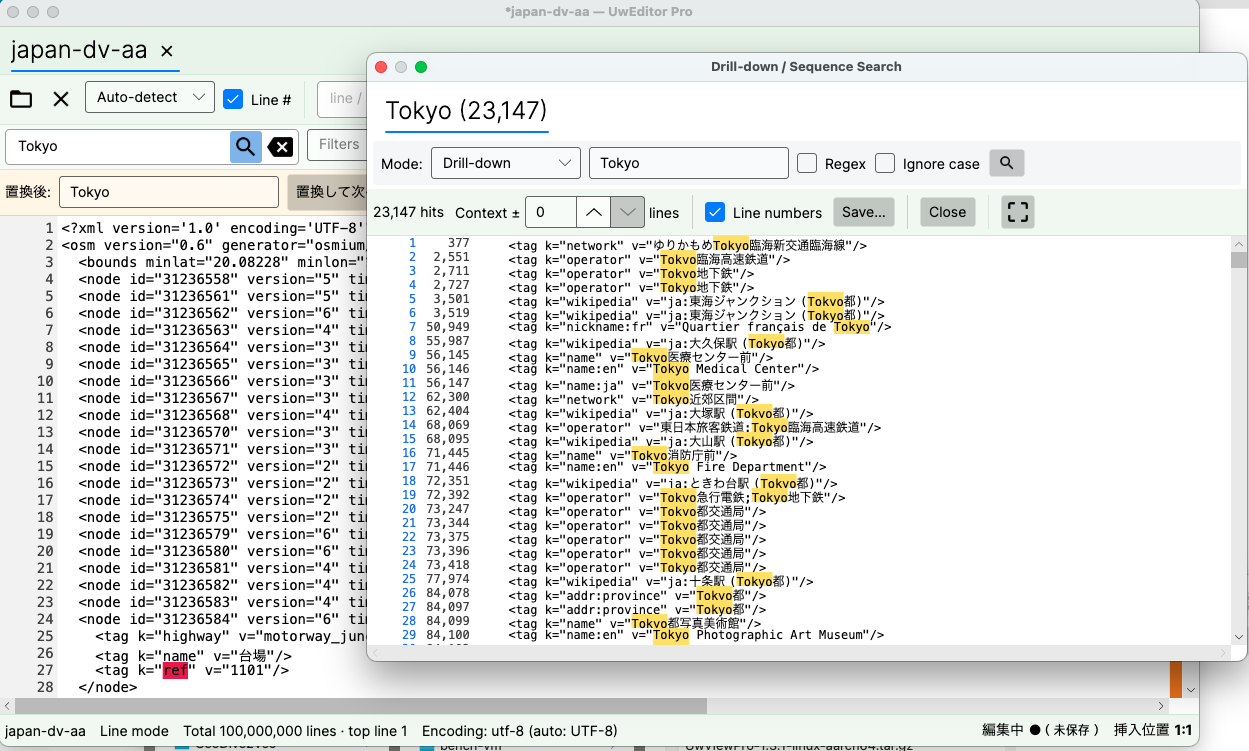
UwView (free), which I develop, is a viewer built for exactly this kind of checking. It auto-detects UTF-8 / Shift-JIS (CP932) / EUC-JP / UTF-16, and switching manually applies immediately, with no index rebuild — so when detection misses, you can try candidates on the spot instead of reopening the file. Even with huge logs it displays, scrolls, and searches the whole file from the moment it opens; the index is built in the background, and line numbers appear when it completes. Nothing is converted or stripped, so the original stays a single, unmodified file. To be straight about the boundary: UTF-16 is recognized by its BOM, but line splitting is \n-based, so the primary targets are UTF-8 / Shift-JIS / EUC-JP. And if a huge log is hogging your storage and you want it compressed for keeping — and searched even faster — there’s UwView Pro: persistent index, compressed-cache search, storage at roughly 1/9 size, and faster reopen and search across the board (from the second time on, files open instantly with line numbers; all OS supported; one-time or monthly).
The same things, from the command line
v1.6.0 added a uvp command (and uvf for the free build). It uses the same .uwvz as the GUI, so an index built from the shell is already there when you open the file in the app. Mapped onto this article’s four parts:
# Part 1: don't pipe it at the terminal — write the hits to a file first
uvp legacy.log 'エラー' -out found.txt

# Part 2: before blaming detection, ask the original directly, no converted copy
uvp legacy.log -i 'warn'

# Part 3: ranking the start of each line makes the odd one out (the BOM line) visible
uvp mixed.log -uniq '^(.{0,20})' -head 20

# Part 4: for spelling and width variants, narrow from a hit with a second word
uvp app.log 'タイムアウト' '接続' -C 10
Exit codes are grep’s — 0 found, 1 not found — plus 2 when a limit is hit and the output is cut off (no limit by default; only when you set one with -limit N), which drops straight into a small script for part 4’s “it doesn’t hit” check. One boundary: encoding detection and manual switching are GUI features; the CLI is the side that takes the first shot.
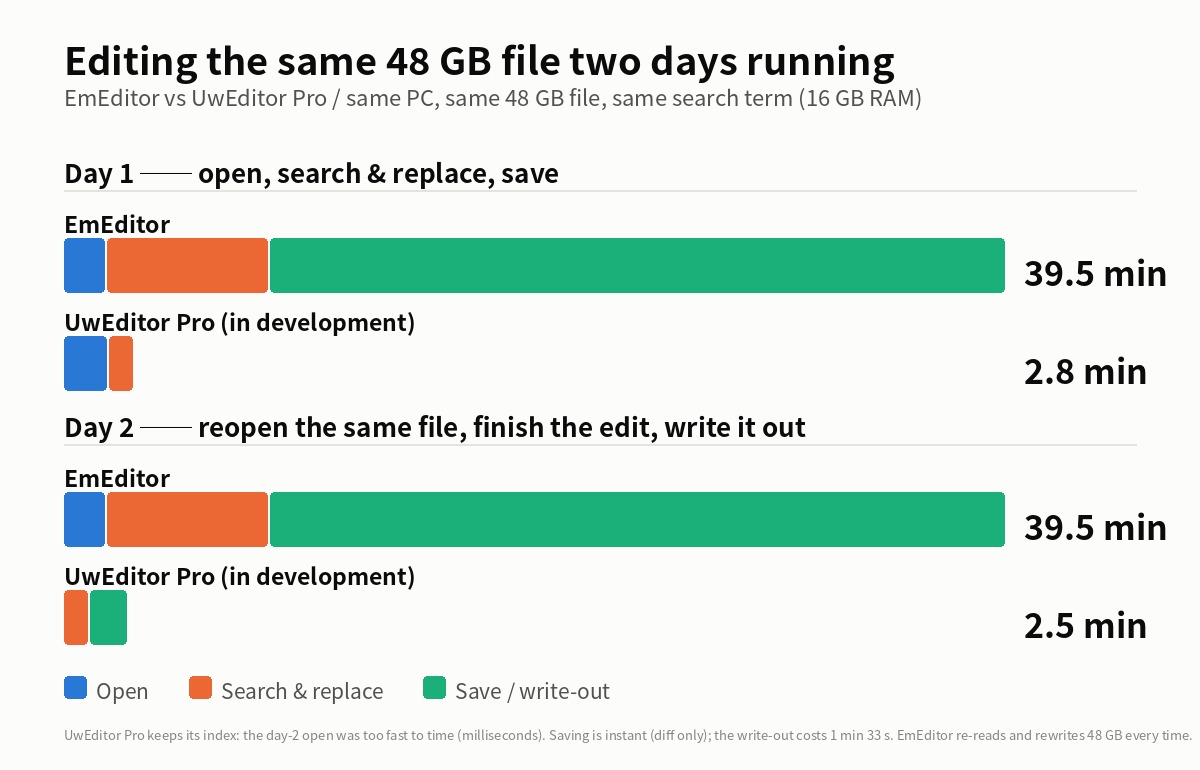
Stated honestly: on the first question uvp is a little slower than ripgrep — it builds its .uwvz (a compressed cache plus index) first, 59.0 s against 54.9–55.8 s at 50 GB, 6–7%. In v1.6.6.1 it searches while building the index instead of re-reading it afterwards, which cut 6.7 s. It starts paying from the second question: the same 50 GB search takes 6.6 s against ripgrep’s 55–57 s — 8.4×. On a small file such as 3 GB the two are level, because an index has little to earn there. The free uvf is level with ripgrep at every size (the measurements; Mac M4, external USB SSD, OpenStreetMap XML — one setup, results vary).
Links
- Part 1: four go-to tools that sink under huge files: https://uvp.y42u.net/en/blog/uwview-ps01-huge-file-tool-limits-en/
- Part 2: four ways to trace causality in logs: https://uvp.y42u.net/en/blog/uwview-ps02-log-causality-tracing-en/
- What to do when a huge log won’t open: https://uvp.y42u.net/en/blog/uwview-huge-log-cannot-open-en/
- How the hit list and the source view move together: https://uvp.y42u.net/en/blog/uwview-filter-popup-jump-save-context-en/
- We shipped a
uvpcommand (measured against ripgrep): https://uvp.y42u.net/en/blog/uvp-cli-release-vs-ripgrep-en/ - Source code (GitHub): https://github.com/amru195704/UwView
From the developer: My apps, Kindle books, and public projects are listed at GitHub: amru195704.
A note
The information in this article is provided for reference and is not guaranteed to be accurate or complete. Encoding-detection behavior and conversion-table differences vary by tool implementation, version, and locale settings. Command examples may need adjusting for your environment (GNU vs. BSD,iconvimplementation differences, availability ofuconv, etc.). If you find an error or inaccuracy, please point it out in the comments and it will be corrected after verification.