[Update 2026-10-04] v1.7.3.6.8 made the second (hot) run faster
“On five plain files,
uvfis the slower side on the second run (1/1.38)” below is from v1.7.3.6. v1.7.3.6.8 reworked how the second run reads (counting newlines for line numbers). Measured on v1.7.3.6.9 (4 October 2026), the same five plain files take ripgrep 5.23 s anduvf5.11 s on the first run, 0.33 s each on the second (1.00), and 1.02× in total (on par).uvp‘s second run is 0.47 s, 1/1.42 of ripgrep (within on par). The twelve mixed files total ripgrep 50.16 s,uvf38.80 s (1.29×) anduvp52.19 s (1/1.04). The tables below are kept as measured at the time. Details: Wide Field Part 12: the newline count that was 40% of the second search.
The first pass loses.
Rotated .gz files piling up next to today’s plain-text log. When you want to search the whole pile at once, do you hand it to rg -z? I searched the same 12 files in a single command and put the numbers next to ripgrep’s.
The first run is ours to lose. So from which run does it start paying? On one of the three sets, it never does.
- The short version: the free uvf is on par with ripgrep across all three sets (1.00–1.31). The paid uvp loses the bundling pass by 1.52–1.62x and wins every pass after it by 2.36–2.42x — except on plain text, where the second pass is slower too and the cost is never recovered
- The losses, first
- What Wide Field added
- Three shapes
- Why only uvp‘s first pass is slow
- Which sets actually pay back
- How you write it: quotes and commas
- Match counts come before seconds
- How it was measured
- What generalises
- Being straight about it
- The tools behind this
- Links
The short version: the free uvf is on par with ripgrep across all three sets (1.00–1.31). The paid uvp loses the bundling pass by 1.52–1.62x and wins every pass after it by 2.36–2.42x — except on plain text, where the second pass is slower too and the cost is never recovered
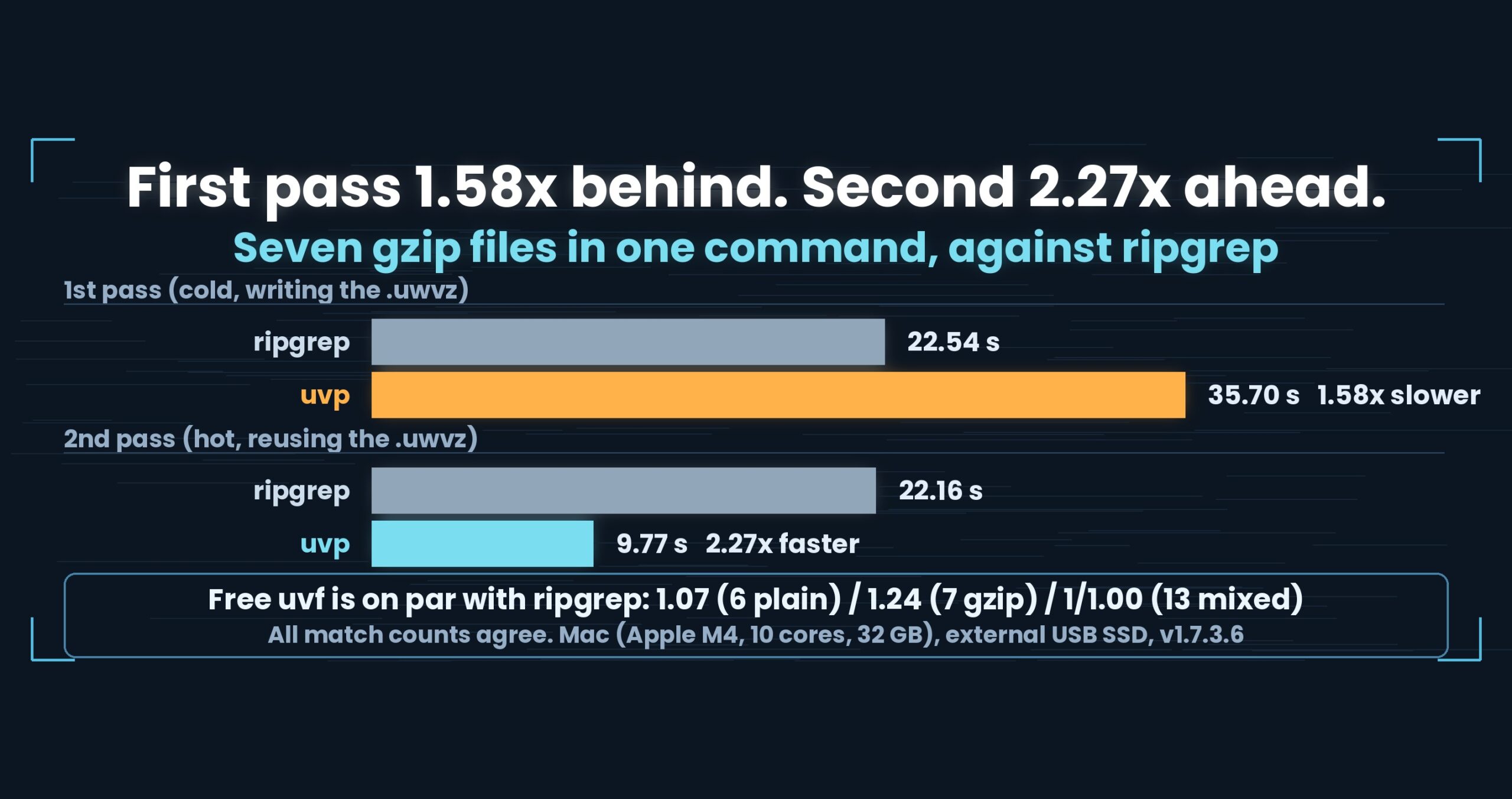
Searching 12 mixed files in one command (osm17, OpenStreetMap XML, 127,886 matching lines), the first pass was ripgrep 25.57 s against uvp 41.45 s — a 1.62x loss. The second pass was ripgrep 25.22 s against uvp 10.43 s, 2.42x faster. The seven gzip files follow the same shape: 1/1.52 on the first pass (23.12 s against 35.20 s), then 2.36x on the second (23.09 s against 9.80 s). The free uvf, which builds no index, stayed on par with ripgrep on all three shapes (1.03 / 1.30 / 1.09). Every match count agreed with ripgrep. Mac (Apple M4, 10 cores), 32 GB RAM, external USB SSD, OpenStreetMap XML.
uvfanduvpare the search commands of UwView v1.7.3.6 “Wide Field” (released 28 September 2026), which I make.uvfships in the free edition;uvpis part of the paid UwView Pro. These numbers come from the released v1.7.3.6, re-measured on 1 October 2026 — this article originally carried a different set, and the last section explains why.
The losses, first
uvp‘s first pass is a clear loss. 41.45 s against ripgrep’s 25.57 s on 12 mixed files (1/1.62), 35.20 s against 23.12 s on seven gzip (1/1.52). This article calls nothing under 1.5x a difference, so these are losses, not parity.- On plain text alone,
uvpis slower on the second pass too. Five plain files, second pass: ripgrep 0.37 s againstuvp0.55 s. It does not shrink — it grows. No number of repeats recovers that. - I am not writing
uvf‘s 1.30 up as a win. Neither the 1.30 on gzip nor the 1.09 on mixed reaches the 1.5x bar, so both are parity. - Over two passes, the mixed set has still not caught up (51.88 s against 50.79 s = 1/1.02). It overtakes on the third.
What Wide Field added
v1.7 is nicknamed Wide Field — the release where the field of view widened.
- Many files in one command (this article)
- Seven compression formats read without an external command (gz, bz2, xz, lzma, zst, lz4, br)
- Inside zip archives, entry by entry
- OpenStreetMap pbf, searched without converting it first
Through v1.6 the only question was how fast a single huge file could be read. Real logs do not grow that way. They grow in count — app.log, app.log.1, app.log.2.gz, and on. Retyping the command per file costs more than any speed difference.
Three shapes
OpenStreetMap XML from osm17, in three combinations. The term is 東京 (fixed string, with line numbers). sudo purge plus a 10-second wait before the first pass (cold); the second pass (hot) follows immediately.
| Set | Size | ripgrep | uvf (ratio) |
uvp pass 1 |
uvp pass 2 |
|---|---|---|---|---|---|
| 5 plain (5,445 matches) | 4.78 GiB | 5.23 / 0.37 s | 5.09 / 0.51 s (1.03 / 1/1.38) | 6.21 s = 1/1.19 | 0.55 s = 1/1.49 |
| 7 gzip (122,441 matches) | 7.13 GiB | 23.12 / 23.09 s | 17.82 / 17.67 s (1.30 / 1.31) | 35.20 s = 1/1.52 | 9.80 s = 2.36x |
| 5 plain + 7 gzip = 12 mixed (127,886) | 11.91 GiB | 25.57 / 25.22 s | 23.48 / 23.48 s (1.09 / 1.07) | 41.45 s = 1/1.62 | 10.43 s = 2.42x |
Paired seconds are cold / hot. uvf‘s ratio takes ripgrep as 1, so above 1 is the faster side. uvp‘s “1/1.62” means it took 1.62 times as long — a loss.
uvf lands on par everywhere
The free uvf builds no index; it reads and searches in place. It is doing what ripgrep does, so it lands where ripgrep lands. On 12 mixed files, 1.09 and 1.07. On the second pass over plain files it came out at 1/1.38 — the slower side.
I have decided not to call any of that a win. A 1.30 on gzip is inside the range a warmer cache or a fuller disk can flip. Promote parity to victory and the 2.42x further down stops being believable.
The mixed set is the one that matches real machines
Of the three, 12 mixed files is closest to real operations. Run logrotate as shipped and you get today’s uncompressed log sitting beside yesterday’s .gz. Plain-only and gzip-only are tidy states you would have to construct on purpose.
On that mixed set uvf came out at 1.09 — on par — and uvp reached 2.42x from the second pass. Mixing formats does not break the ratio, which is what you would expect from handling plain and compressed through one path: the format is detected at the read stage, and everything past that is shared. Dispatching each format to a different external command would not line up this way.
Why only uvp‘s first pass is slow
Before the number that flatters us (2.42x), the one that does not (1/1.62), under its own heading — because this is where I would be sceptical.
On the first pass uvp searches and writes out a .uwvz holding the whole input as one file (UwView Pro’s compression format plus index). Of the 41.45 s on 12 mixed files, the part ripgrep also does — read and search — is around 25 s. The remaining ~16 s is the price of writing. The resulting .uwvz was 7.67 GiB.
From the second pass on, the gzip files are never decompressed. Only the .uwvz is read. That is the 10.43 s.
Which sets actually pay back
This is arithmetic, so here it is per set.
| Set | Extra on pass 1 | Saved per later pass | Verdict |
|---|---|---|---|
| 5 plain | about 1.0 s | −0.18 s (it grows) | never pays back |
| 7 gzip | about 12.1 s | about 13.3 s | recovered on pass 2 |
| 12 mixed | about 15.9 s | about 14.8 s | ahead from pass 3 |
Over two passes the gzip set is already ahead at 1.03, while the mixed set is still at 1/1.02 — it has not caught up yet. A third pass in the 10-second range flips it.
The plain set is a different shape altogether. It is 4.78 GiB against 32 GB of RAM on the test machine. ripgrep’s second pass is 0.37 s — it is barely touching the disk. There is no room left for an index to save anything. I have not isolated why uvp is the 0.18 s slower one, but either way the conclusion holds: for plain text that fits in memory, there is no reason to reach for uvp.
Repeated passes over the same pile, with compression in it, at a size that does not fit in memory: that is where uvp earns its keep. Everything else, uvf covers. The dividing line is not speed — it is count, size and format.
Where the free/paid line sits
Paid-edition numbers appear here, so let me state the line as it was decided at design time: reading once is free; making the second read fast is paid.
- Searching many files at all is in the free
uvf— that is theuvfcolumn - Bundling many files into one
.uwvzisuvponly - zip interiors and pbf are
uvponly;uvfprints a note and exits
If you never need the second pass to be faster, the free edition gives you ripgrep-equivalent results. That is what this table claims.
How you write it: quotes and commas
A multi-file pattern goes in as one argument.
uvf 'osm17/*.gz,osm17/*.osm' 東京      # plain and compressed together, in one pass
uvf '**/*.log.gz' ERROR                # recursion, same syntax
uvp 'app.log,app.log.*.gz' ERROR       # bundle it; the second pass is fast (UwView Pro)
ripgrep takes a list of paths — rg -z ERROR *.gz *.log. This takes a single quoted argument instead: a pattern and a search term, nothing else.
The quotes are required. Drop them and the shell expands first, so what arrives here is a list of filenames. That case stops with an error. Halting beats silently searching only part of what you meant.
Match counts come before seconds
One thing always happens before any timing is compared: the output is checked line for line against ripgrep.
All three sets agreed with ripgrep exactly (5,445 / 122,441 / 127,886). In the correctness half of the same run, 35 checks passed with zero mismatches across file patterns, output formats and index rebuilds (the single pbf check was skipped, as pbf was not passed to this run).
Comparisons on compressed files are one wrong flag away from “zero matches, finished early.” When a number looks fast, suspect that you searched nothing before you believe it.
How it was measured
- Files: OpenStreetMap (Japan) XML from
osm17— 5 plain (4.78 GiB) / 7 gzip (7.13 GiB) / 12 mixed (11.91 GiB) - Term:
東京, fixed string, with line numbers - State:
sudo purge, a 10-second wait, then the first pass (cold); the second pass (hot) follows immediately - Counterpart: ripgrep 15.2.0 (
rg -n -Ffor plain,rg -z -n -Ffor gzip and mixed) - Ours:
uvf/uvpv1.7.3.6 “Wide Field”, measured 1 October 2026 uvp‘s first pass runs with the bundled.uwvzdeleted beforehand, so it includes building it. The resulting files: 0.54 GiB plain / 7.13 GiB gzip / 7.67 GiB mixed- Mac (Apple M4, 10 cores, 32 GB RAM), external USB SSD. Seconds move with the environment.
What generalises
(1) An average of “first pass” and “second pass” says nothing. A tool that builds an index has two entirely different personalities. Averaging them produces a “parity” figure that occurs in neither situation. Split them and the reader can map the result onto their own usage.
(2) State the break-even in passes, not percentages. “2.42x faster” decides nothing. “You pay 16 extra seconds once and get 15 back every pass after” lets someone choose by how often they revisit the same logs. A speed claim is only usable once it converts into a count.
(3) Put the set that never pays back in the same table. No number of passes makes uvp worthwhile on five plain files. Publish the condition where your tool fails next to the ones where it works. Split them into separate articles and readers will assume you are showing only the flattering half.
(4) Fix the win/loss bar before measuring. To not write 1.30x up as a win in a moment when you could, you need a threshold chosen before the results. Here it is nothing under 1.5x counts as a difference. The bar exists to constrain me, not the other tool.
Being straight about it
- These numbers replaced an earlier set. The first version of this article used a 29 September 2026 run on “6 plain / 13 mixed” files. That set included a 47.73 GiB plain file the GUI had left behind when it expanded a gzip, and the file was moved away the next day, making those rows impossible to reproduce. On 1 October 2026 the sets were re-measured as 5 plain / 12 mixed, and all three sets — gzip included — now come from that single run. The old version’s “8.08x on the second plain pass” was a figure from the set containing those 47.73 GiB. On the current set, the second plain pass is the slower side.
- All numbers are one measurement on Mac (Apple M4, 10 cores), 32 GB RAM, external USB SSD, OpenStreetMap XML. They move with the environment
- The 5 plain files (4.78 GiB) fit in memory. I believe that is why ripgrep’s second pass drops to 0.37 s, but I did not measure it in isolation. What happens with a larger plain set is outside what this article can say
- Over two passes the mixed set has not yet caught ripgrep (1/1.02). The “2.42x” is the ratio of one later pass
- The bundled
.uwvzfor 12 mixed files was 7.67 GiB. Disk space is what buys the speed - Nothing under 1.5x is called a difference. Anything written as parity could flip on another machine
- Only three shapes were measured — plain, gzip, mixed. Change the file count or the per-file size and the ratios move
- Other tools (ugrep, zgrep and so on) are not in this round
- I am one of the two developers being compared. Discount accordingly
The tools behind this
UwView is a CLI and GUI for investigating very large text files and logs. In v1.7.3.6 “Wide Field” it searches many files and seven compression formats in one pass, without calling an external command.
How you would write it with uvp
# plain and compressed together, in one pass (free)
uvf 'osm17/*.gz,osm17/*.osm' 東京

# collect recursively (free)
uvf '**/*.log.gz' ERROR

# open the hits straight in the GUI (free)
uvf 'app.log,app.log.*.gz' ERROR -open

# search while building the bundled .uwvz (first pass, UwView Pro)
uvp 'app.log,app.log.*.gz' ERROR

# later passes reuse it (same command, UwView Pro)
uvp 'app.log,app.log.*.gz' ERROR

# case-insensitive
uvf 'app.log,app.log.*.gz' error -i
Exit codes follow grep: 0 = found, 1 = not found, 2 = error or incomplete result.
The free edition is on GitHub Releases. On Mac, brew install --cask amru195704/uwview/uwview; on Windows, Scoop (scoop bucket add uwview https://github.com/amru195704/scoop-uwview, then scoop install uwview).
Links
- Searching compressed logs compared with ugrep, ripgrep and zgrep (seven formats, more tools): https://uvp.y42u.net/en/blog/uwview-ugrep-ripgrep-zgrep-compressed-logs-en/
- Compressed logs are faster to search (choosing a format): https://uvp.y42u.net/en/blog/log-compression-format-choice-en/
- Searching a gzip without extracting it (the single-file case): https://uvp.y42u.net/en/blog/uwview-fl08-gz-without-extract-en/
- Building a
.uwvz, searching inside it, extracting from it: https://uvp.y42u.net/en/blog/uwvz-compressed-archive-search-extract-en/ - Thirteen rounds of reading the file fewer times: https://uvp.y42u.net/en/blog/uwview-fl13-first-light-recap-en/
- Every measurement we publish: https://uvp.y42u.net/en/benchmarks-en/
- Source code (GitHub): https://github.com/amru195704/UwView
And if huge logs are eating your storage and you want them compressed and fast to search, take a look at UwView Pro: a persistent index, search inside the compressed cache, roughly 1/9 the storage, and a faster reopen every time (all operating systems; one-time purchase or monthly plan).
From the developer: my apps, Kindle books and public projects are listed at GitHub: amru195704.