The shape did not come back.
A log kept as bz2, searched, and the result wanted as bz2 again. Seven compression formats went in. Only plain text came out.
What is missing when a tool can read a format it cannot write?
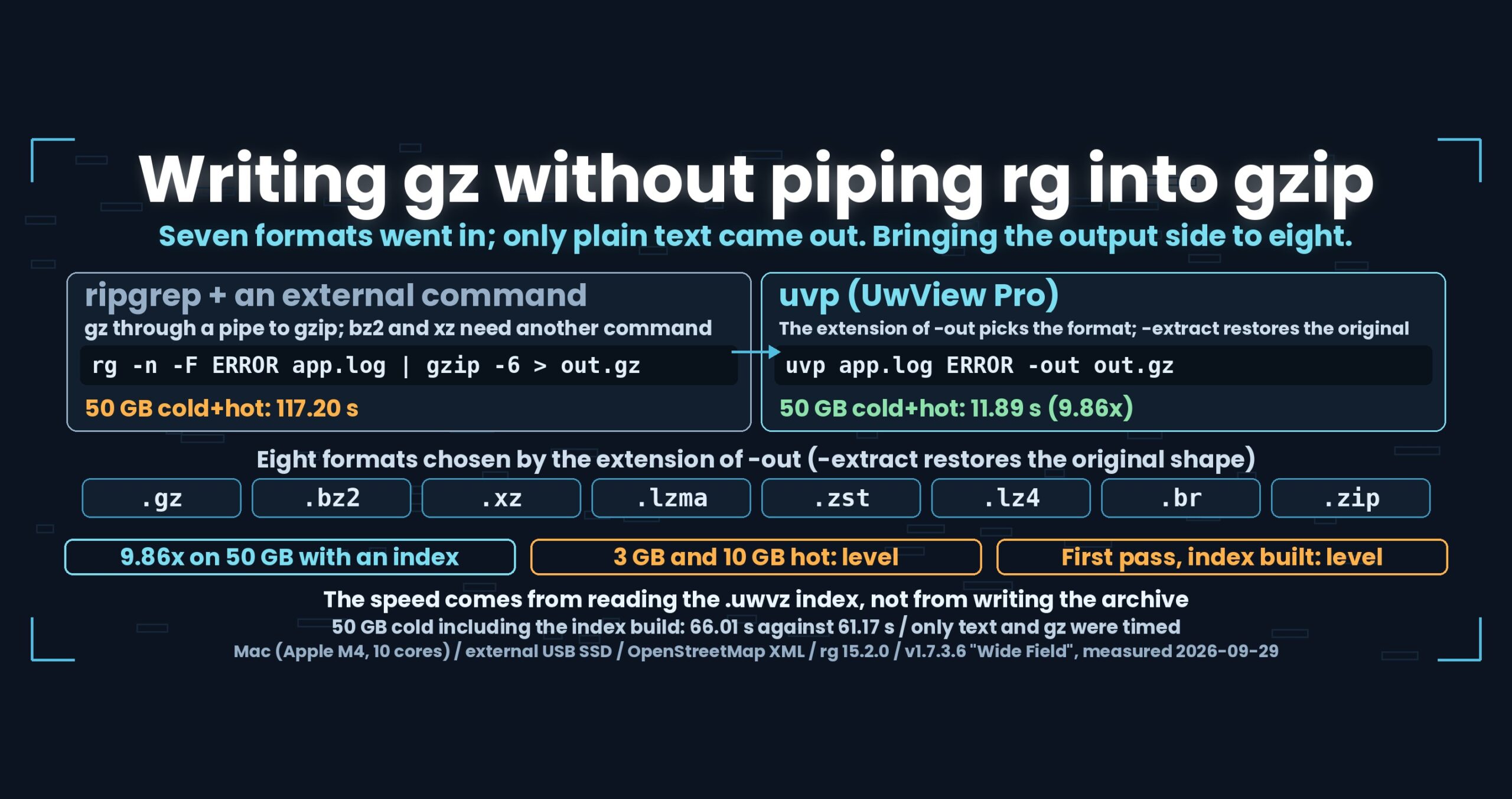
- Up front: the output side now covers the same eight formats as the input (gz, bz2, xz, lzma, zst, lz4, br, zip). With an index already built, a 50 GB file takes 11.89 s against 117.20 s for rg -n -F … | gzip -6 > (cold + hot, 9.86x). But on cached 3 GB and 10 GB files the two are level (0.33 s against 0.31 s; 1.02 s against 0.98 s), and the first pass that builds the index is level too (50 GB cold, 66.01 s against 61.17 s). The speed comes from reading the index — writing the archive is not the fast part
- The losses, before anything else
- The reading side already remembered
- One rule: the extension decides
- For xz, the output side includes “write multiple blocks”
- When we cannot write it, we do not fall back to text
- When names collide, we stop before writing
- The numbers — 9.86x at 50 GB, level at 3 GB
- Why only uvp is fast here — and it is not the writing
- How this was checked
- What generalises
- Being straight about it
- The tools in use
- Links
Up front: the output side now covers the same eight formats as the input (gz, bz2, xz, lzma, zst, lz4, br, zip). With an index already built, a 50 GB file takes 11.89 s against 117.20 s for rg -n -F … | gzip -6 > (cold + hot, 9.86x). But on cached 3 GB and 10 GB files the two are level (0.33 s against 0.31 s; 1.02 s against 0.98 s), and the first pass that builds the index is level too (50 GB cold, 66.01 s against 61.17 s). The speed comes from reading the index — writing the archive is not the fast part
Measured on a Mac (Apple M4, 10 cores), 32 GB RAM, external USB SSD, OpenStreetMap XML, against ripgrep 15.2.0.
uvfanduvpare the search commands of UwView v1.7.3.6 “Wide Field” (released 28 September 2026), which I make.uvfships in the free edition;uvpis part of the paid UwView Pro. The eight output formats landed in v1.7.2.2, and the timings come from the v1.7.3.6 integration run of 29 September 2026.
The losses, before anything else
- On cached 3 GB and 10 GB files we are level. Writing gz at 3 GB (hot) is 0.33 s for
rg | gzipagainst 0.31 s foruvp; at 10 GB, 1.02 s against 0.98 s. Under 1.5x, so we do not call it a difference. - Include the pass that builds the index and 50 GB is level as well. With the
.uwvz(UwView Pro’s compression format plus index) deleted first, the 50 GB cold run is 66.01 s for ripgrep against 61.17 s foruvp. If you only ever search once,rg | gzipis enough. - Only two output formats were timed: text and gz. bz2, xz, lzma, zst, lz4, br and zip were checked for correctness — they write, and an external command restores them — but we have no timings for them.
- We made the br default weaker than the
brotlicommand’s own default.brotlidefaults to level 11, which is very slow, so ours is 6. The same.brwill not match an externally produced one in ratio. - The bytes of the archive itself do not match the original. What matches is the decompressed content; levels and timestamps differ.
- pbf cannot be written back. It is restored as XML text, and
-extract pbfis an error. - Some restores of a bundle with an explicit format are refused. When names would collide, we stop before writing anything (below).
- Without the library, we cannot write that format. We raise an error instead of falling back to text.
The reading side already remembered
Before the change, the output side looked at the extension of -out for .gz and .zip only; everything else became text. -extract — restoring the original file from an index — could only rebuild plain, gz and zip, so an index built from a bz2 came back as plain text.
The input side reads seven formats. Hand it a .bz2 and it decompresses and searches. Yet the output side had three.
Going to look for the cause was an anticlimax. The format was recorded in the index all along. Each entry in sources[] carries a Kind, so something read as bz2 is remembered as bz2. The reading side had the information; the writing side simply never looked at it.
What was missing was not a record. It was the code that uses the record.
That asymmetry is probably common. Adding an input format is legible work, so it gets done. Restoring the original shape is quiet work, so it waits. And the bookkeeping is already sufficient, because whoever built the input side did it properly.
One rule: the extension decides
Format-selection rules break when they grow. If -out uses the extension, -extract uses an argument and cat is always text, nobody can predict what a command will produce.
So there is one rule now.
-outis decided by the extension..gz .bz2 .xz .lzma .zst .lz4 .br .zipcompress in that format; anything else is text. The same holds for search results, forcatand for-extract-extractdefaults to the original shape. An index built fromapp.log.bz2comes back asapp.log.bz2- Ask for a shape with an argument:
-extract [txt|gz|bz2|xz|lzma|zst|lz4|br|zip] - A bundled index defaults to per-entry original shapes. Name a format and every entry is written that way, with the extension swapped
Default levels follow each command’s own default (gz 6, bz2 9, xz 6, lzma 6, zst 3, lz4 fast), so that a file placed next to an externally produced one has no unexplained difference. br is the exception. brotli‘s default of 11 is too slow, so ours is 6. Where we did not match, we have to say so more plainly than where we did.
For xz, the output side includes “write multiple blocks”
One format pulled us into its details: xz.
An xz stream can be written as a single block, but then it cannot be decompressed in parallel. Part 2 of this series covered xz reads losing to ripgrep -z by more than six times; the fix was parallel decompression, and parallel decompression only works on xz written as multiple blocks.
In other words, we could have written xz files that our own reader then handled slowly. So the writer uses lzma_stream_encoder_mt, writing with several threads into several blocks — the same as xz 5.6 and later do by default.
The check went in with it. A test asserts that xz --list reports two or more blocks, and on a larger file we see four blocks (84 MB).
How you write decides how fast you can read. When a format is added, the writer is the part most likely to be treated as “good enough if it writes at all”.
When we cannot write it, we do not fall back to text
Another decision: if the library for a format is missing, we raise an error rather than writing text.
Falling back looks kinder. You asked for .xz, we cannot produce it, so at least keep the data — the instinct is reasonable. But a text file named result.xz means someone later runs xz -d on it and fails, at a point where nothing explains why.
“This environment cannot write .xz” is shorter. Not leaving a file whose name disagrees with its contents is cheaper over time.
Writing to a temporary name and renaming at the end stayed for the same reason. An interrupted run leaves no broken .xz behind.
When names collide, we stop before writing
One thing the spec did not cover, decided during implementation.
Take an index bundling a.log.bz2 and a.log.zst, and restore it with gz named explicitly. Swapping extensions gives a.log.gz for both. Write them in order and the second overwrites the first: content is lost.
We did not add an automatic escape such as renaming the second to a.log.1.gz. We raise an error before writing and say that restoring without a named format gives the original names back.
Renaming automatically produces files the user never asked for. Restoring exists to return things to their original state, so inventing a different name defeats its purpose. Better to stop and let someone choose.
The numbers — 9.86x at 50 GB, level at 3 GB
Two output items from the v1.7.3.6 integration run of 29 September 2026 (the big-file suite). Each measurement is sync, drop caches, wait ten seconds, cold, then hot. ripgrep 15.2.0, and uvp has its index already built.
50 GB (47.73 GiB, 51,254,526,392 bytes)
| Item | Their command | Theirs cold/hot/total | uvp cold/hot/total |
Total ratio |
|---|---|---|---|---|
| Write text | rg -n -F '東京' … > out.txt |
55.62 / 57.34 / 112.96 | 6.57 / 5.37 / 11.94 | 9.46x |
| Write gz | rg -n -F '東京' … \| gzip -6 > out.txt.gz |
61.15 / 56.05 / 117.20 | 6.62 / 5.27 / 11.89 | 9.86x |
Both outputs match ripgrep’s, line for line (94,979 matches).
3 GB and 10 GB — level
| Item (hot) | Theirs | uvp |
Ratio |
|---|---|---|---|
| 3 GB, write text | 0.35 | 0.31 | 1.13x (level) |
| 3 GB, write gz | 0.33 | 0.31 | 1.06x (level) |
| 10 GB, write text | 1.02 | 0.99 | 1.03x (level) |
| 10 GB, write gz | 1.02 | 0.98 | 1.04x (level) |
Anything under 1.5x we do not call a difference. At these sizes, with the file in cache, both finish in about a second. A gap appears only once the amount read starts to dominate.
Asking for gz instead of text costs uvp nothing measurable at 50 GB: 11.94 s becomes 11.89 s, and 0.05 s is inside the noise. On the other side it is 112.96 s against 117.20 s — also under 1.5x, so not a difference either.
※ A note on file sizes: the “50 GB” in this article is a 47.73 GiB file (bytes ÷ 1024³). macOS shows it as 51.25 GB (SI, ÷ 1000³). Earlier articles call the same file “48 GB”. It is one file throughout (51,254,526,392 bytes).
Why only uvp is fast here — and it is not the writing
This is a number that flatters us, so it gets its own heading.
9.86x is not a claim that compressed writing is fast. The two commands are reading different things.
rgreads all 51,254,526,392 bytes of the original file, every timeuvpreads the.uwvz. The index already knows where the matching lines are
The content written is the same 94,979 lines in both cases, and packing it into gz costs about the same. The only difference is how much is read beforehand. So “uvp is faster” is a restatement of “searching is faster”, and has nothing to do with the subject of this part — the eight output formats.
And an index does not exist until it has been built once. Include that pass and the 50 GB cold run is 66.01 s against 61.17 s: level with ripgrep. Reusing the index is covered in Part 4.
To compare the writing itself, you would have to write the same format from the same input on both sides. We have not measured that.
How this was checked
- Opponent: ripgrep 15.2.0 (for gz, with
| gzip -6on the end) - Version:
uvfanduvpare both v1.7.3.6 “Wide Field”; the eight output formats landed in v1.7.2.2 - Timings: the v1.7.3.6 integration run of 29 September 2026 (big-file suite; each measurement is
sync, drop caches, wait ten seconds, cold, then hot) - Correctness: the input-format suite from the same day, 66 of 66 items passing, zero mismatches — including
-extractfor all seven formats,-extract -out,-outon search results, restoring a bundle, and xz written as multiple blocks (four blocks, 84 MB) - Data: OpenStreetMap XML (3 GB = 3,032,812,644 bytes; 10 GB; 50 GB = 51,254,526,392 bytes)
- Machine: Mac (Apple M4, 10 cores, 32 GB RAM), external USB SSD
- No timings are compared across operating systems. Every number here is from the Mac
What generalises
(1) When you add an input format, inventory the outputs. Readable formats and writable formats can diverge without a single test failing, because each path is correct on its own. The gap only shows in a round trip. One read-write-restore test catches the missing output on the day you add the input.
(2) The bookkeeping is usually already there. Whatever is needed to read a format, the reader already holds. Widening the output side is rarely about recording something new; it is about using a record that exists. Doubt the record first and you design something you do not need.
(3) How you write decides how fast the next read is. A single-block xz cannot be read in parallel. Cut a corner in the writer and the reader’s numbers drop — in a different measurement, on a different day, with nothing connecting the two.
(4) Never let a name disagree with its contents. Falling back to text when a format is unavailable, and silently renaming a colliding file, are both kind in the moment. Both send the bill to whoever opens the file later. Stopping is the cheaper option more often than it feels.
Being straight about it
- On cached 3 GB and 10 GB files we are level. The win exists only for large files with an index already built
- Include the pass that builds the index and 50 GB is level too (66.01 s against 61.17 s). For a single search,
rg | gzipis enough - 9.86x is not writing speed. It is the difference in how much is read: the index versus the whole file
- We have no measurement of the writing itself. Nobody wrote the same format from the same input on both sides
- Only text and gz have timings. bz2, xz, lzma, zst, lz4, br and zip were checked for correctness only
- The br default is 6, weaker than
brotli‘s own default of 11. Ratios will not match - Archive bytes do not match the original. The decompressed content does
- pbf cannot be written back. It returns as XML text
- A missing library means we cannot write that format. We error instead of falling back to text
- Name collisions when restoring a bundle with an explicit format are stopped before writing. There is no automatic renaming
- I am the developer of one side of this comparison. Discount accordingly
The tools in use
UwView is a CLI and GUI for inspecting very large text files and logs. v1.7.3.6 “Wide Field” handles multiple files, seven compression formats, zip and pbf without calling an external command.
How you would write it with uvp
# Write search results as text
uvp app.log 'ERROR' -out result.txt

# The extension picks the format (gz, bz2, xz, lzma, zst, lz4, br, zip)
uvp app.log 'ERROR' -out result.gz
uvp app.log 'ERROR' -out result.xz

# Allow overwriting
uvp app.log 'ERROR' -out result.gz --force

# Restore from an index (original shape by default)
uvp app.log.bz2.uwvz -extract

# Restore in a named shape
uvp app.log.bz2.uwvz -extract zst
uvp app.log.bz2.uwvz -extract txt -out app.log

# Restore a bundled index (per-entry original shapes by default)
uvp 'logs/*.log,logs/*.gz' -extract

# Read the rules for formats and file patterns
uvp --help files

# Narrow first, then write
uvp app.log 'ERROR' -limit 1000 -out result.gz
uvp app.log 'k="amenity"' -uniq 'v="([^"]+)"' -sort count -head 20 -out tally.txt
Exit codes follow grep: 0 = found, 1 = not found, 2 = error or incomplete result. Ask for a format we cannot write and the command exits 2 before writing anything.
The free edition is on GitHub Releases. On Mac, brew install --cask amru195704/uwview/uwview; on Windows, Scoop (scoop bucket add uwview https://github.com/amru195704/scoop-uwview, then scoop install uwview).
Links
- Seven formats without calling an external command (and the parallel xz read): https://uvp.y42u.net/en/blog/uwview-wf02-seven-formats-no-external-en/
- Reusing a bundled
.uwvz, and not rebuilding it when a source disappears: https://uvp.y42u.net/en/blog/uwview-wf04-bundle-keep-en/ - Searching inside a zip, which ripgrep will not do: https://uvp.y42u.net/en/blog/uwview-wf05-zip-entries-en/
- Searching an OpenStreetMap pbf, which ripgrep cannot read: https://uvp.y42u.net/en/blog/uwview-wf06-pbf-osm-en/
- Searching gz without extracting it (the OS zlib and the CRC): https://uvp.y42u.net/en/blog/uwview-fl08-gz-without-extract-en/
- Packing into
.uwvz, searching it, and restoring with-extract: https://uvp.y42u.net/en/blog/uwvz-compressed-archive-search-extract-en/ - Every measurement we publish: https://uvp.y42u.net/en/benchmarks-en/
- Source code (GitHub): https://github.com/amru195704/UwView
And if huge logs are eating your storage and you want them compressed and fast to search, take a look at UwView Pro: a persistent index, search inside the compressed cache, roughly 1/9 the storage, and a faster reopen every time (all operating systems; one-time purchase or monthly plan).
From the developer: my apps, Kindle books and public projects are listed at GitHub: amru195704.