UwView Pro now has a uvp command you can call from the terminal. The free build has uvf.
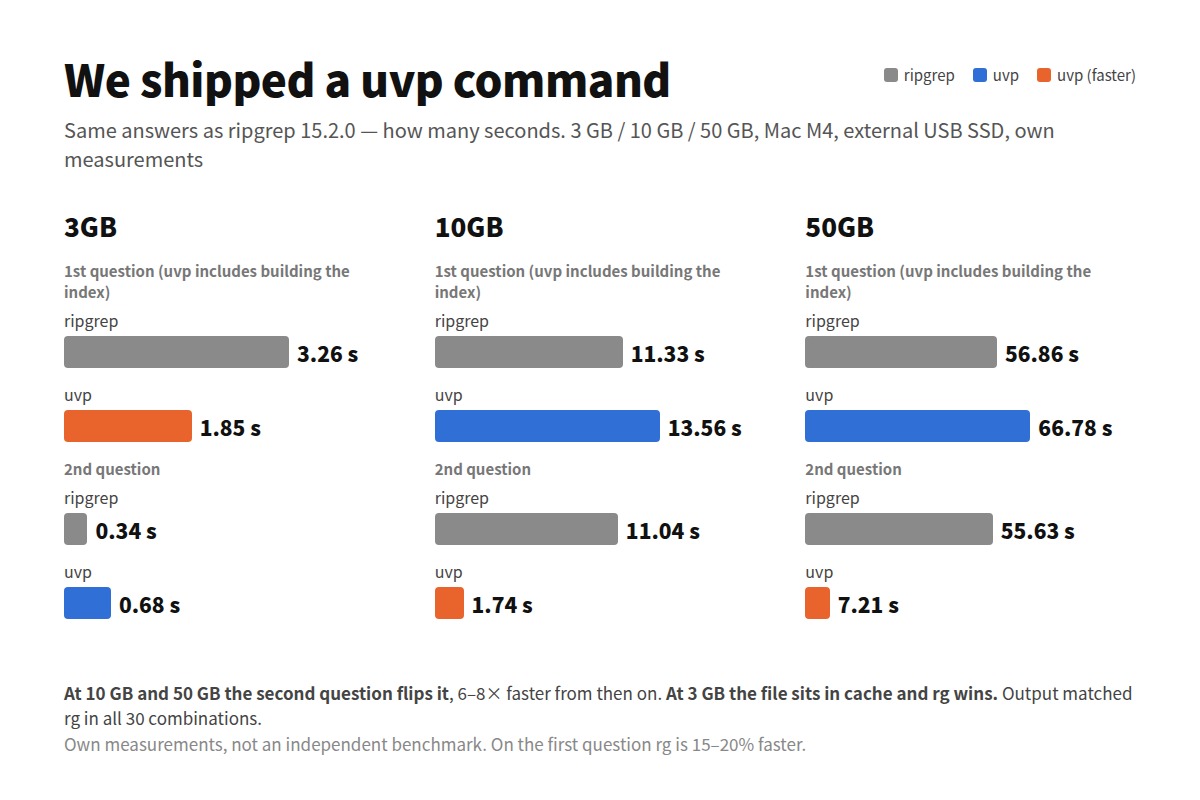
When you bolt a CLI onto a GUI tool, the thing to be afraid of is not speed. It is getting a different answer. So before timing anything, I checked whether uvp returns the same lines as ripgrep on three files at 3 GB, 10 GB and 50 GB. Nothing differed. Then I timed it: from 10 GB upwards uvp wins outright, and at 3 GB the two swap places depending on whether the file is in the page cache.
In order, then.
- What it does
- Are the answers the same?
- Speed — cold cache or warm?
- I thought we lost at 3 GB — turns out we’d won (as long as the cache is cold)
- How many questions until it pays off
- The free uvf — level with ripgrep since v1.6.3
- When you want the first N — -head N
- Other things that came out of it
- Choosing between them
- The tools behind this
- Links
What it does
uvp japan.osm 'Tokyo'                         # the same lines as rg -n -F 'Tokyo'
uvp japan.osm tokyo -i                        # ignore case
uvp japan.osm 'v="(bus_stop|traffic_signals)"' -E   # regular expression
uvp japan.osm '^ +<' -E -v                    # lines that do NOT match (like grep -v)
uvp japan.osm 'k="amenity"' 'v="parking"'     # narrow with a second term (rg | rg)
uvp japan.osm 'k="amenity"' -uniq 'v="([^"]+)"' -head 20   # tally, top 20
uvp japan.osm 'k="amenity"' -C 3 'k="name"'   # second term within 3 lines
uvp japan.osm -seq 'k="amenity",k="name"'     # in this order
uvp japan.osm 'Tokyo' -out hits.txt.gz        # save the results, compressed
uvp japan.osm 'Tokyo' -open                   # hand them to the GUI
Exit codes are grep’s: 0 = found, 1 = not found, plus 2 = cut off at a limit. if uvp log 'ERROR'; then works as written, and nothing runs away with your memory.
The limit is unlimited by default. -limit N stops at N and returns 2. It is a guard on memory, and which N you keep is not defined — when you want the first N, that is -head N (below).
To call uvp and uvf by name, register them from “Command line setup…” in the app’s Help menu.
Are the answers the same?
| File | Pattern | rg | uvp | Match |
|---|---|---|---|---|
| 3 GB | Tokyo | 11,274 | 11,274 | ✅ |
| 10 GB | Tokyo | 11,393 | 11,393 | ✅ |
| 50 GB | Tokyo | 94,979 | 94,979 | ✅ |
Not just the counts — the output was compared line by line. Case-insensitive, regex, exclude, two-term narrowing and tallies all matched. The wider record is in 81 checks against rg and sed.
Speed — cold cache or warm?
A number of seconds means nothing without the state it was measured in. Two states are kept apart here.
- Cold: straight after
sudo purge. The file is not in the OS page cache. This is coming back to a file after a while. - Warm: the run immediately after. The file is in memory. This is asking the same file several questions in a row.
Measured on a Mac (MacBook Air / Apple M4 / 32 GB / external USB SSD), ripgrep 15.2.0, uvp 1.6.3, on OpenStreetMap Japan (XML). Windows and Linux — a low-powered laptop, under VMware — may well behave differently; those are being measured separately and will get their own article.
Fixed-string search for “Tokyo” (the .uwvz already built)
| Size | rg cold / warm | uvp cold / warm | rg ÷ uvp cold / warm |
|---|---|---|---|
| 3 GB | 3.26 s / 0.33 s | 1.25 s / 1.01 s | 2.6× / 1/3.1 |
| 10 GB | 10.96 s / 10.89 s | 2.37 s / 1.55 s | 4.6× / 7.0× |
| 50 GB | 54.76 s / 55.15 s | 7.76 s / 6.34 s | 7.1× / 8.7× |
From 10 GB up, the state does not matter — uvp wins either way. ripgrep takes the same time cold and warm, because 10 GB and 50 GB do not fit in memory: every run reads them off the drive again. uvp reads only the .uwvz, about 1/9 the size, and that is the whole difference.
Only 3 GB swaps. It fits in 32 GB of RAM, so one read puts the whole file in the cache and ripgrep runs across it in 0.33 s. uvp has to start the app and load the index first — 1.01 s. That one goes to ripgrep.
I thought we lost at 3 GB — turns out we’d won (as long as the cache is cold)
This article used to say “and at 3 GB it loses”. Measured cold, it is the other way round.
| 3 GB, cold | rg | uvp | rg ÷ uvp | Hits |
|---|---|---|---|---|
| Fixed string | 3.26 s | 1.25 s | 2.6× | 11,274 |
Ignore case -i |
3.30 s | 1.58 s | 2.1× | 940,482 |
Regex -E |
3.32 s | 1.70 s | 2.0× | 928,301 |
| Regex, anchored | 3.24 s | 1.47 s | 2.2× | 222,072 |
| Regex + ignore case | 3.29 s | 1.69 s | 1.9× | 491,643 |
Exclude -E -v |
3.57 s | 1.85 s | 1.9× | 1 |
Exclude -v, plain term |
3.51 s | 3.96 s | 1/1.1 | 7,698,790 |
Six of seven go to uvp, by roughly 2×. The reason is the same as at 10 and 50 GB: it reads 1/9 of the bytes. What hid it at 3 GB was that every earlier measurement had been a warm one.
Warm, the table flips almost entirely (rg 0.33–0.65 s against uvp 1.01–1.40 s). The exception is -E -v: uvp is faster even warm (1.74 s against 3.13 s). Excluding means working over every line, which is where ripgrep’s cache advantage stops helping.
Which one you want depends on your situation.
- Asking the same file question after question (warm) → at 3 GB, ripgrep
- Opening it after a while, switching between files, doing other work in between (cold) → uvp, even at 3 GB
How many questions until it pays off
uvp builds an index (.uwvz) on the first run. Leaving that out would be unfair, so the totals below start from no .uwvz at all (question 1 cold, the rest warm).
| 10 GB | Q1 | Q2 | Q3 | Q4 | Q5 |
|---|---|---|---|---|---|
| rg | 10.96 s | 21.85 s | 32.74 s | 43.63 s | 54.52 s |
| uvp | 14.84 s | 16.39 s | 17.94 s | 19.49 s | 21.04 s |
| 50 GB | Q1 | Q2 | Q3 | Q4 | Q5 |
|---|---|---|---|---|---|
| rg | 54.76 s | 109.91 s | 165.06 s | 220.21 s | 275.36 s |
| uvp | 74.58 s | 80.92 s | 87.26 s | 93.60 s | 99.94 s |
Question 1 always loses — it is building the index. Question 2 turns it over, and by the fifth question uvp is at 1/2.6 to 1/2.8 of ripgrep’s total. At 258 GB the crossover was question 1.29. The shape does not change with size.
Building the index costs 4.64 s at 3 GB, 14.84 s at 10 GB and 74.58 s at 50 GB (each including the first search).
The free uvf — level with ripgrep since v1.6.3
uvf returns the same answers, and v1.6.3 rebuilt it for speed. It no longer builds an index: it reads the file once, straight through, taking line numbers, matches and line text from the same pass, so the drive’s bandwidth is the speed. Memory stays around 50 MB.
| rg cold / warm | uvf cold / warm | |
|---|---|---|
| 3 GB | 3.26 s / 0.33 s | 3.32 s / 0.55 s |
| 10 GB | 10.96 s / 10.89 s | 10.48 s / 10.25 s |
| 50 GB | 54.76 s / 55.15 s | 50.82 s / 50.63 s |
It used to take 205 s at 50 GB — 3.7× slower than ripgrep. Now it is level or slightly ahead. But it keeps no index, so every question costs the same again — if you want the second question to be fast, that is uvp.
What uvf is really for, besides the speed, is the exit code and -open: let a script decide, and put a person in front of the window only when there is something to see.
When you want the first N — -head N
“Just the first N” is -head N, not -limit N.
| Meaning | 50 GB, “Tokyo” | |
|---|---|---|
-head N |
Reads from the top on one thread and stops at N hits. Byte-identical to rg \| head -N |
-head 10: 0.32 s |
-limit N |
The cap on hits kept — a guard on memory, exit 2. Which N you get is not defined | -limit 1000: 0.43 s |
| Default | Unlimited | all 29,114,490 hits in 27.12 s (rg 60.35 s) |
uvp japan.osm 'Tokyo' -head 10        # first 10, same as rg | head -10
uvp japan.osm 'Tokyo' -limit 1000     # stop once 1000 are kept (a guard, exit 2)
Of that 0.32 s, the search itself is 0.03 s. The remaining 0.25 s is .NET starting up — uvp --version alone takes 0.24 s. It does not reach rg | head‘s 0.05 s: the first N, repeatedly, in well under a second is ripgrep’s ground.
Other things that came out of it
- Building the index takes the same time as “open” in the GUI: 59.6 s on the CLI, 59.78 s in the GUI at 50 GB. It is the same artifact.
- The
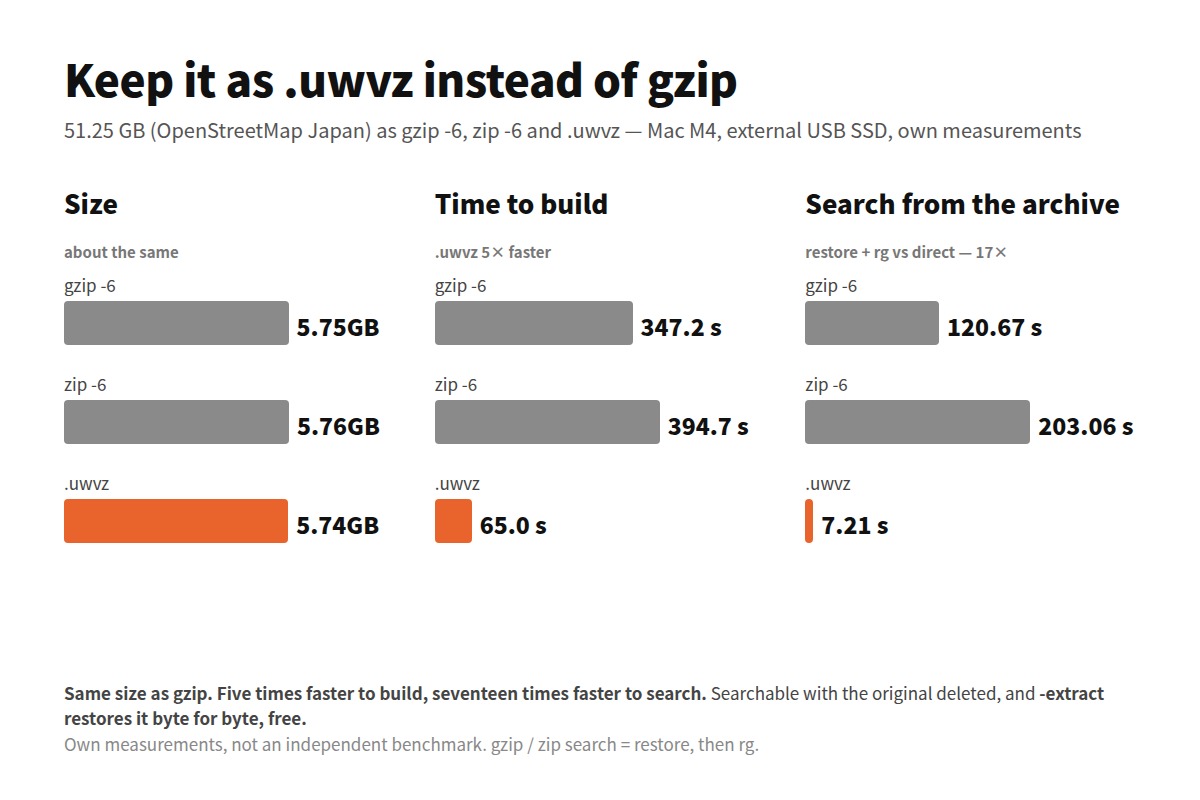
.uwvzis smaller than the original: 3 GB → 0.25 GB, 10 GB → 1.16 GB, 50 GB → 5.74 GB (1/9 to 1/12). Anduvp japan.osm.uwvz 'Tokyo'works — you can search it with the original deleted. -extractrestores the original from the.uwvz, byte for byte. That part is free.- On an external SSD ripgrep itself varies by ±20–40%. These are single runs and carry that spread.
Choosing between them
- Around 3 GB, asking the same file repeatedly (warm) → ripgrep
- Around 3 GB but opening it after a while (cold) → uvp, about 2× faster
- Over 10 GB → uvp, 4.6–8.7× whatever the state
- One question and done → ripgrep. There is no point building an index
- The first N hits, in well under a second →
rg | head - Called from a script, with a human looking at the hits →
-open, onuvforuvp
The tools behind this
uvp ships with UwView Pro. It launches UwView Pro itself internally, so the Pro license covers it (Windows, macOS, Linux — one license for all three; one-time or monthly, with a 14-day free trial, and uvp works during the trial). uvf ships with the free UwView.
Every number here is my own measurement on a Mac (Apple M4 / 32 GB / external USB SSD), not an independent benchmark. Windows and Linux use different hardware and different storage, so the seconds will not carry over. ripgrep is among the fastest things there is at searching many files at once, and this article does not contest that. It is only about one enormous file, asked many questions.
Links
- I thought we lost at 3 GB — turns out we’d won — the 3 GB cold/warm split in more detail
- 81 checks against rg and sed — the record that the output is identical
- 258 GB, 4.5 billion lines, five questions
- Is ripgrep really the fastest on a single huge file?
- Measured results — large-file tools compared