[Update, 16 October 2026] Speed today — re-measured with v1.9.0 “Full Spectrum”
The
uvfanduvpnumbers in this article come from the Wide Field development build (1.7.1.6, September 2026). The same files on the same Mac were measured again with the current version, v1.9.0 (14 October 2026).
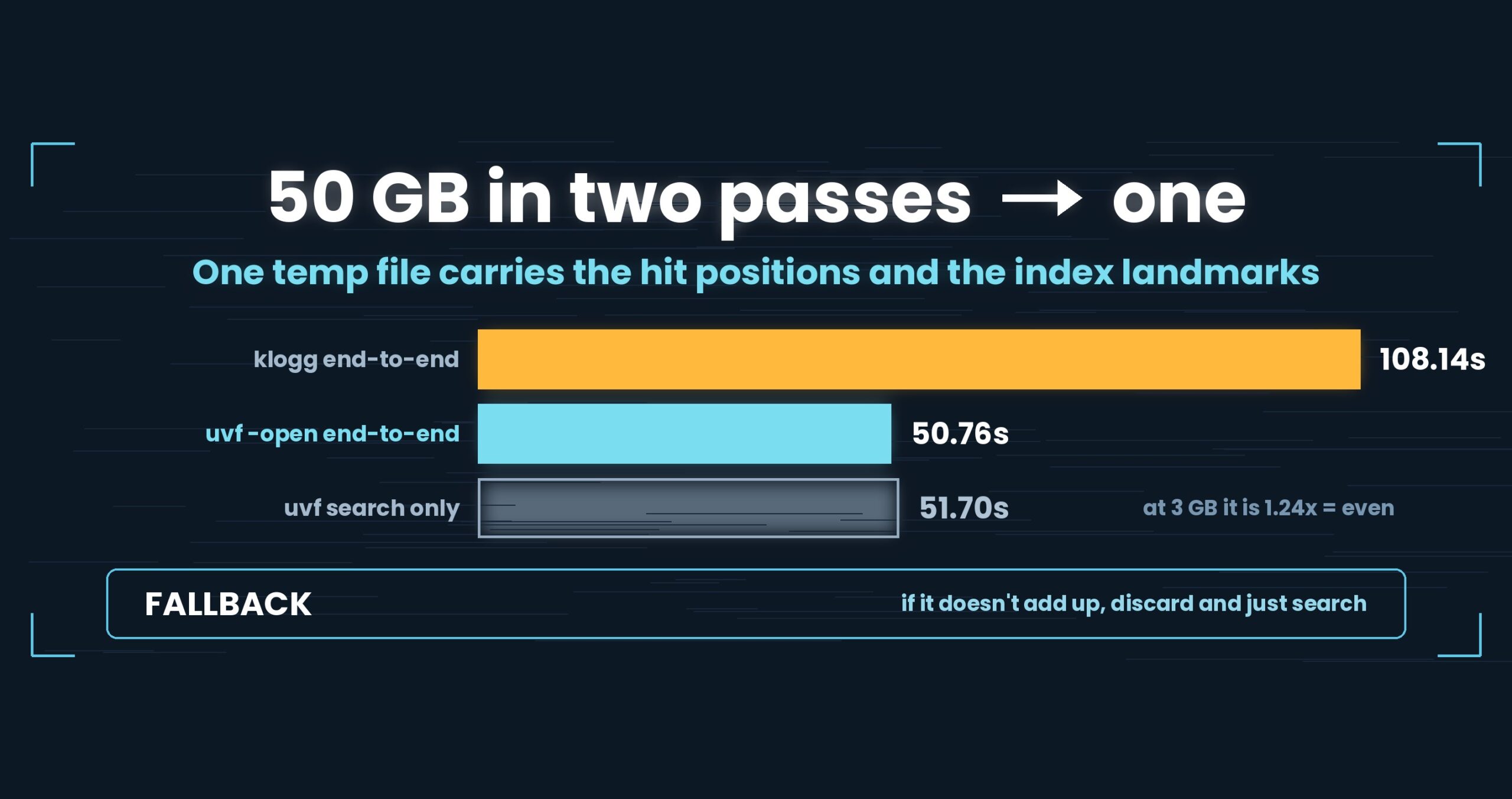
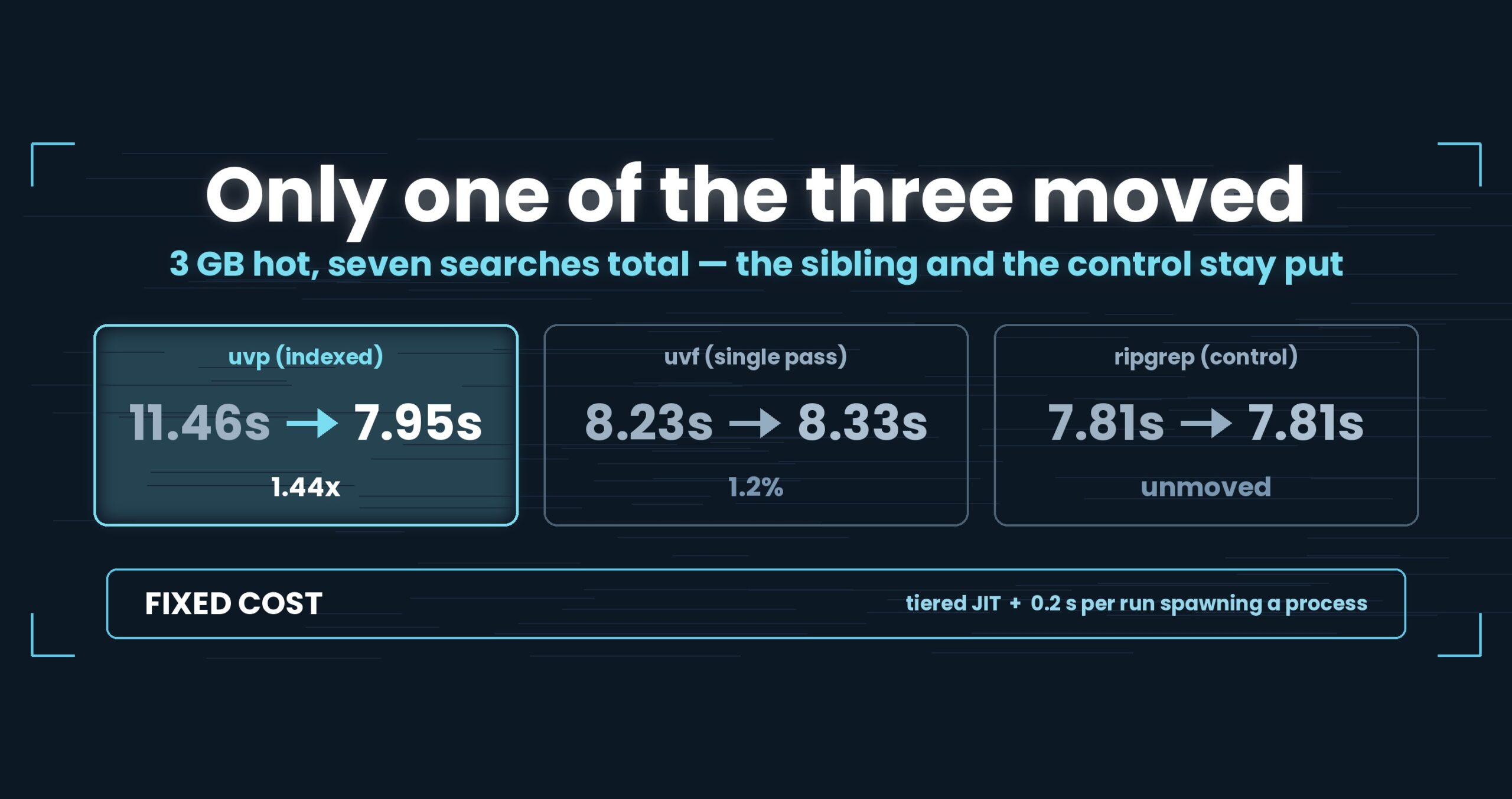
Searching 3 GB for “東京” This article (1.7.1.6) Now (v1.9.0) uvpafter converting to.uwvz(from the 2nd search)0.31–0.40 s 0.15–0.16 s (about 2× faster) the same at 1 GB 0.14–0.16 s 0.10 s uvpfirst run (building the.uwvzfrom plain text, search included)3.59 s 3.84 s (about the same) uvfsearching the compressed file directly (first run, seven formats)0.89–23.48 s 0.86–22.32 s (about the same; on par with rg -zin every format)The article’s conclusion — compressed logs are faster to search than plain text — still holds with v1.9.0 (
rg -z, 3 GB, first run: lz4 0.94 s, gz 1.32 s, zst 1.62 s, xz 1.67 s, br 2.49 s vs plain 3.31 s). Details: Benchmarks and the v1.9.0 “Full Spectrum” article.
Logs cannot stay as they are. Older ones get compressed and kept. When you pick the format, do you pick it by how small it gets and nothing else?
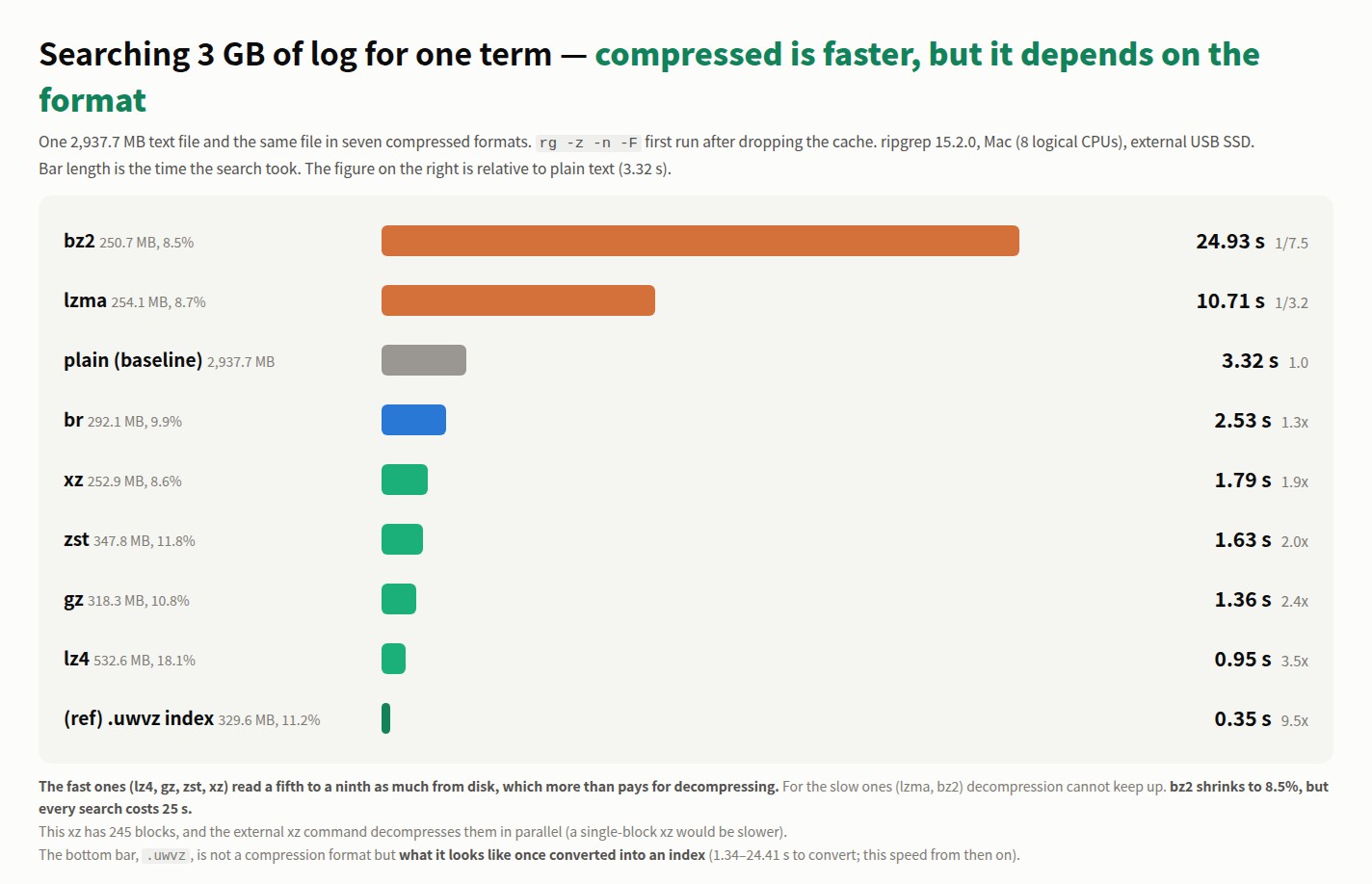
I compressed the same file seven ways and timed ripgrep searching each one for a single term. The size ordering and the speed ordering do not match. And for most formats, the compressed file was faster to search than the plain one.
Note: the
uvf,uvpand.uwvznumbers in this article come from Wide Field (1.7.1.6), a development build measured before release. Wide Field was released as v1.7.3.6 on 29 September 2026 (update). Figures measured on the released version are on the Measured Results page. The format comparison itself (therg -znumbers) uses the released ripgrep 15.2.0.
One term in 3 GB
One 2,937.7 MB text file and the same file in seven formats. The term is 東京; every number is the first run after dropping the cache.
| Format | Size | % of original | rg -z search |
vs plain | uvf search |
vs rg |
|---|---|---|---|---|---|---|
| bz2 | 250.7 MB | 8.5% | 24.93 s | 1/7.5 | 23.48 s | 1.06× |
| lzma | 254.1 MB | 8.7% | 10.71 s | 1/3.2 | 8.49 s | 1.26× |
| (plain) | 2,937.7 MB | 100% | 3.32 s | 1 | 3.10 s | 1.07× |
| br | 292.1 MB | 9.9% | 2.53 s | 1.3× | 2.25 s | 1.12× |
| xz | 252.9 MB | 8.6% | 1.79 s | 1.9× | 1.88 s | 1/1.05 |
| zst | 347.8 MB | 11.8% | 1.63 s | 2.0× | 1.54 s | 1.06× |
| gz | 318.3 MB | 10.8% | 1.36 s | 2.4× | 1.07 s | 1.27× |
| lz4 | 532.6 MB | 18.1% | 0.95 s | 3.5× | 0.89 s | 1.07× |
(ref) uvp after converting to .uwvz |
329.6 MB | 11.2% | — | — | 0.31–0.40 s | — |
uvf is the search command of the free UwView: it searches the compressed file with a built-in decoder, without calling any external command. Every format came out about the same as rg -z (under 1.5×). The last row is for reference: the paid uvp after it has turned the file into .uwvz (its own compression format plus index), searching the second time on (more in the last section).
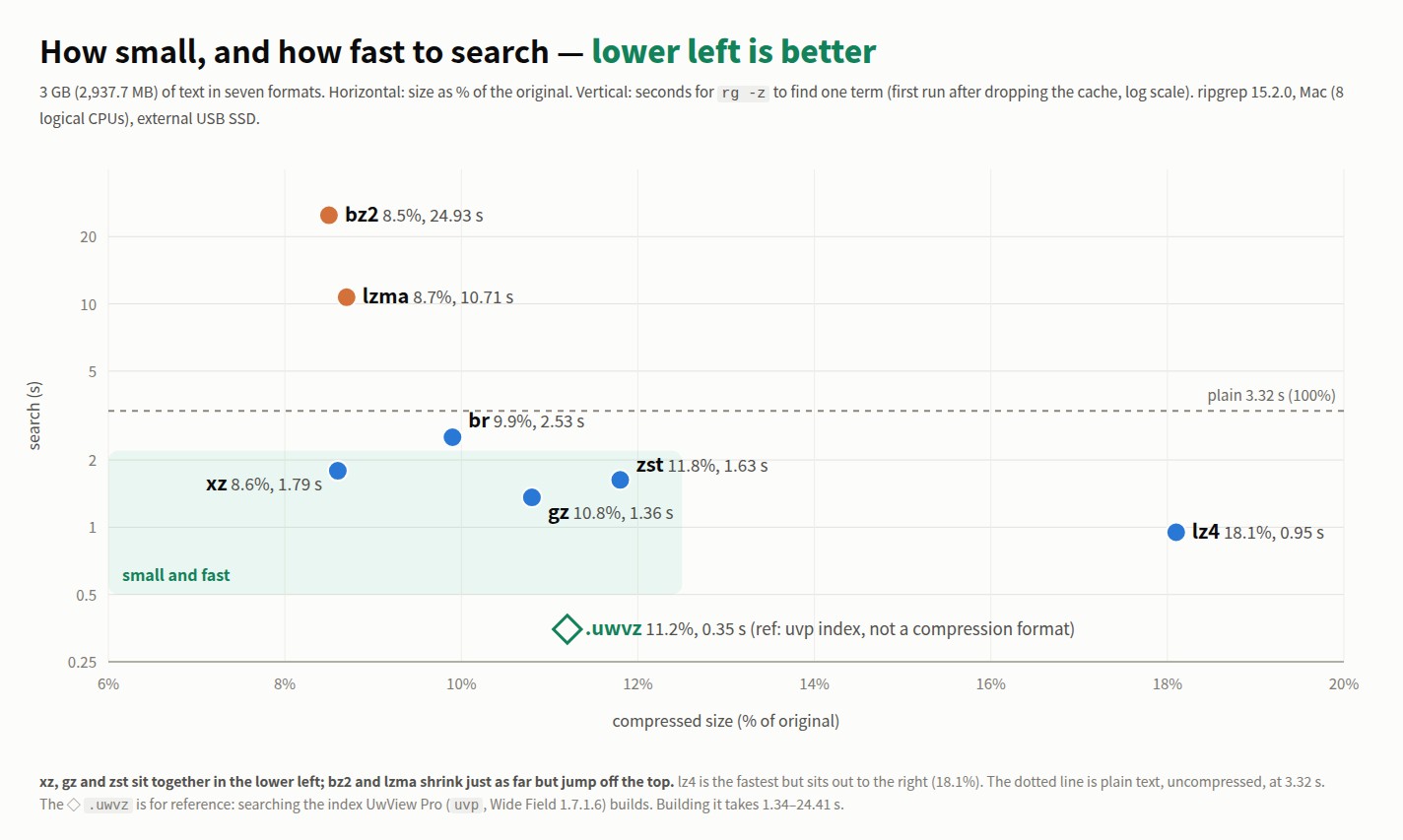
The five below plain (br, xz, zst, gz, lz4) beat plain text. So does .uwvz in the last row, from the second search on. For the five, the reason is simple: there is a fifth to a ninth as much to read from disk. The time saved on reading is larger than the time spent decompressing. This external SSD reads at about 950 MB/s, so 2.9 GB takes three seconds just to get off the disk. 318 MB takes 0.3 s.
The two above plain (bz2, lzma) lose to plain text. For lzma and bz2, decompression itself cannot keep up — bz2 decompresses at 118 MB/s here.
At 1 GB, the same ordering
The same data at 979.2 MB, read the same way as the 3 GB table.
| Format | Size | % of original | rg -z search |
vs plain | uvf search |
vs rg |
|---|---|---|---|---|---|---|
| bz2 | 83.6 MB | 8.5% | 7.50 s | 1/6.6 | 7.40 s | 1.01× |
| lzma | 84.7 MB | 8.7% | 3.40 s | 1/3.0 | 2.85 s | 1.19× |
| (plain) | 979.2 MB | 100% | 1.14 s | 1 | 1.08 s | 1.06× |
| br | 97.4 MB | 9.9% | 0.88 s | 1.3× | 0.71 s | 1.24× |
| xz | 84.3 MB | 8.6% | 0.64 s | 1.8× | 0.68 s | 1/1.06 |
| zst | 115.9 MB | 11.8% | 0.59 s | 1.9× | 0.69 s | 1/1.17 |
| gz | 106.1 MB | 10.8% | 0.45 s | 2.5× | 0.38 s | 1.18× |
| lz4 | 177.5 MB | 18.1% | 0.36 s | 3.2× | 0.33 s | 1.09× |
(ref) uvp after converting to .uwvz |
109.9 MB | 11.2% | — | — | 0.14–0.16 s | — |
The size ordering (bz2 < xz < lzma < br < gz < zst < lz4) and the speed ordering are the same at both sizes. Three times the data, roughly three times the seconds — it scales the way you would hope.
Time to compress
To store a log compressed you first have to compress it. If logs arrive every day, so does this cost.
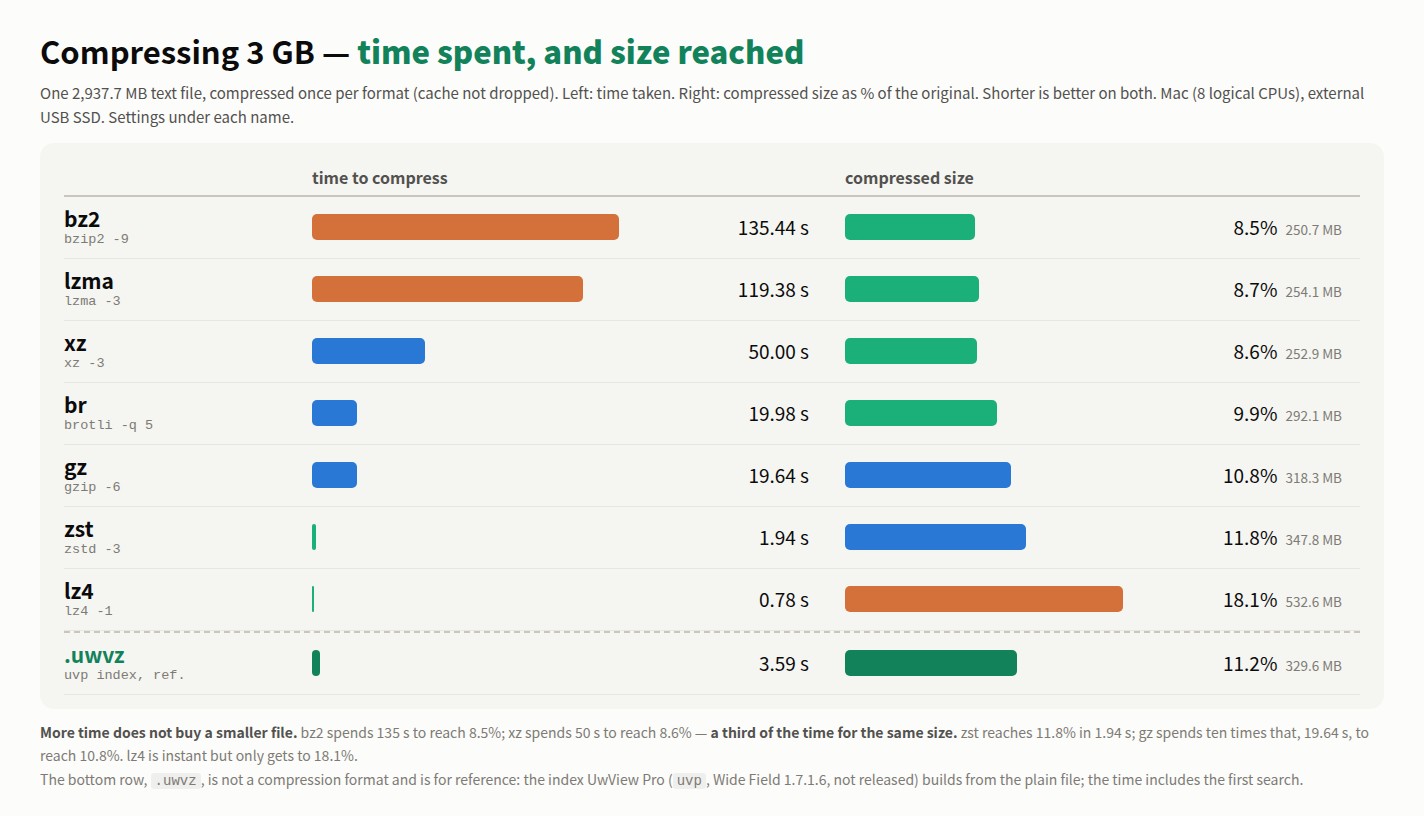
| Format | Setting | Compress 1 GB | Compress 3 GB | Per second (3 GB) | Size (3 GB) |
|---|---|---|---|---|---|
| bz2 | bzip2 -9 |
45.22 s | 135.44 s | 22 MB | 250.7 MB, 8.5% |
| lzma | lzma -3 |
38.24 s | 119.38 s | 25 MB | 254.1 MB, 8.7% |
| xz | xz -3 |
16.88 s | 50.00 s | 59 MB | 252.9 MB, 8.6% |
| br | brotli -q 5 |
6.72 s | 19.98 s | 147 MB | 292.1 MB, 9.9% |
| gz | gzip -6 |
6.32 s | 19.64 s | 150 MB | 318.3 MB, 10.8% |
| zst | zstd -3 |
0.67 s | 1.94 s | 1,514 MB | 347.8 MB, 11.8% |
| lz4 | lz4 -1 |
0.29 s | 0.78 s | 3,766 MB | 532.6 MB, 18.1% |
(ref) .uwvz |
uvp (from plain) |
1.26 s | 3.59 s | 818 MB | 329.6 MB, 11.2% |
More time does not buy a smaller file. bz2 spends 135 s to reach 8.5%; xz spends 50 s to reach 8.6% — a third of the time for the same size. And zst finishes in a tenth of the time gz takes (1.94 s vs 19.64 s), at almost the same size (11.8% vs 10.8%). zst and lz4 compress about as fast as the file can be read. xz takes 50 s even compressing in parallel; bz2 and lzma take over two minutes.
The bottom row, .uwvz, is uvp‘s own compression format plus index: the time to build it from the plain file (building plus the first search, Wide Field).
xz, lzma and brotli were run lighter than their defaults (the defaults are -6 for xz and lzma, 11 for brotli). At the defaults they would get somewhat smaller and compress more slowly still.
Choosing on all three
Compression is paid once, size for as long as you keep the file, search every time you look. Here are the three together.
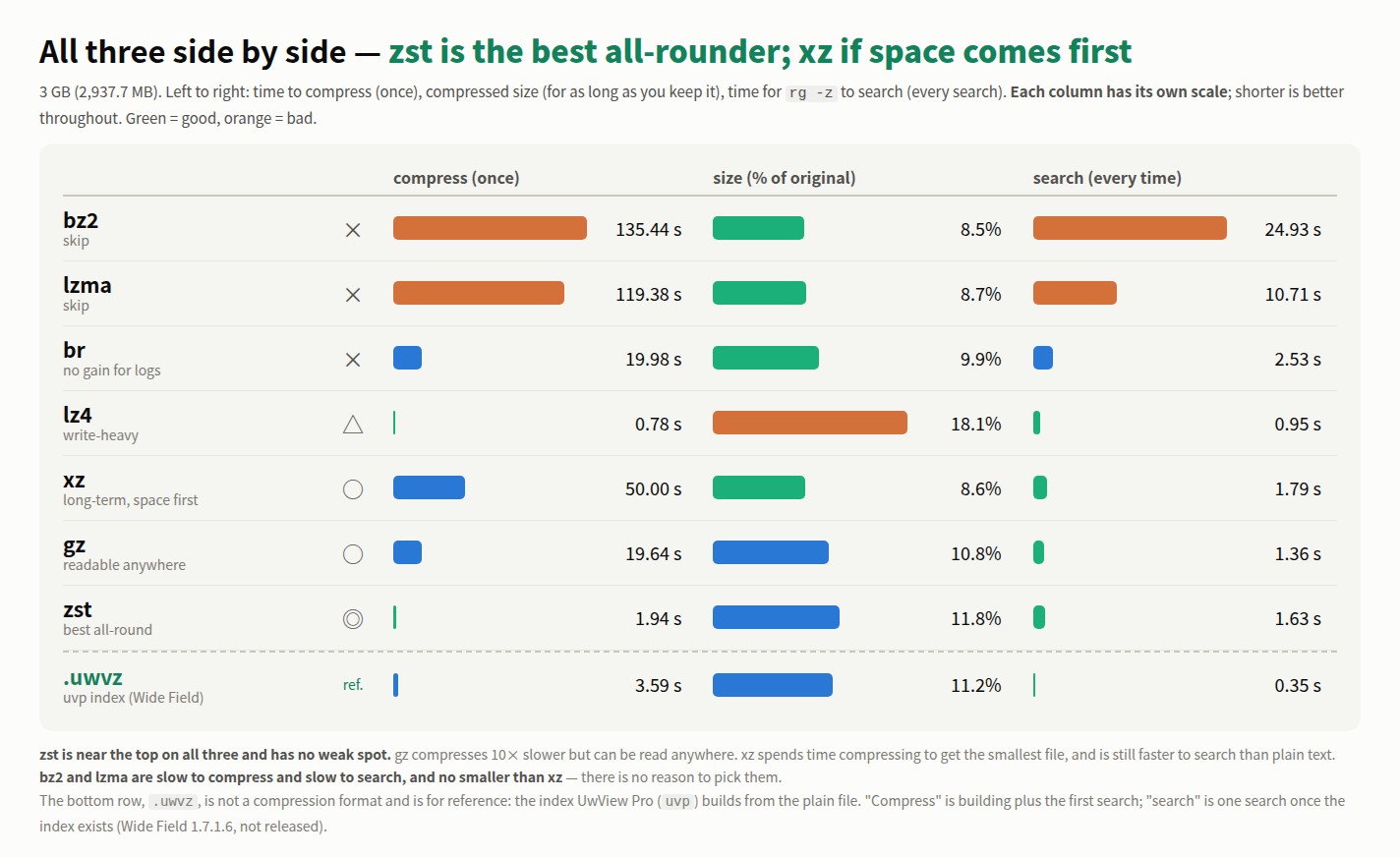
| Format | Compress (once) | Size | Search (every time) | Verdict |
|---|---|---|---|---|
| bz2 | 135.44 s | 8.5% | 24.93 s | × skip |
| lzma | 119.38 s | 8.7% | 10.71 s | × skip |
| br | 19.98 s | 9.9% | 2.53 s | × no gain for logs |
| lz4 | 0.78 s | 18.1% | 0.95 s | △ write-heavy |
| xz | 50.00 s | 8.6% | 1.79 s | ○ long-term, space first |
| gz | 19.64 s | 10.8% | 1.36 s | ○ readable anywhere |
| zst | 1.94 s | 11.8% | 1.63 s | ◎ best all-round |
(ref) .uwvz |
3.59 s | 11.2% | 0.35 s | uvp‘s own compression format + index (Wide Field) |
- If in doubt, zst. It compresses in a tenth of gz’s time, and is about the same size and speed to search. It is near the top on all three and has no weak spot.
- If you do not know what the reader has, gz. Everything can decompress it. The price is ten times zst’s compression time.
- For long-term storage, xz. Spend the time once, keep the smallest file, and it is still faster to search than plain text. Block splitting is required: this xz has 245 blocks and the external xz command decompresses them in parallel. A single-block xz (written with
-T1) is far slower to search. - For a firehose of logs, lz4. Compression is instant and search is the fastest — but at 18.1% it is not for long-term storage.
- br is not for logs. It compresses as slowly as gz, is only slightly smaller, and takes twice as long to search. It was made for serving web content.
- Skip bz2 and lzma. Slow to compress, slow to search, and no smaller than xz. If you already keep logs as bz2, repacking them as zst or xz is worth it.
How it was measured
- Files: OpenStreetMap Japan as XML, cut to 979.2 MB and 2,937.7 MB. The 3 GB one is the same content concatenated three times; the repeat interval is longer than each format’s window, so the ratios stay close to the 1 GB ones
- Term:
東京(1,145 hits at 1 GB, 3,435 at 3 GB) - Settings:
gzip -6,bzip2 -9,xz -3,lzma -3,zstd -3,lz4 -1,brotli -q 5(defaults for gz, bz2, zst and lz4; lighter than default for xz, lzma and brotli). xz 5.6 and later compress in parallel by default, producing several blocks (82 at 1 GB, 245 at 3 GB) - Compression times were measured once, without dropping the cache, and are for reference
- Each measurement: sync → drop the cache → wait 10 s → first run (cold) → the repeat right after (hot)
- ripgrep 15.2.0 with
-z.rg -zshells out to the external tools (gzip, bzip2, xz and so on) to decompress - Mac (Apple M4, 10 cores), external USB SSD. Seconds vary by machine
- Every measurement was checked against the plain-text search for the same hit count (20 items each, 0 mismatches)
What this looks like in our own tool
From here on, this is about the product I make. UwView’s search command decompresses with built-in decoders instead of shelling out. I measured whether that shows.
The free uvf is even with rg -z on every format. Over the 3 GB pair of runs it is 1.29× on gz, 1.26× on lzma, 1.15× on br, 1.09× on lz4, 1.07× on zst and 1/1.07 on xz — all under 1.5×. Not going through a pipe should help, but not by enough to call it a difference, and on xz, its weakest format, it falls just short of the external xz’s parallel decompression.
The paid uvp converts a compressed file once into .uwvz (its own compression format plus index) and searches that from then on — the last row of the table above. Searching takes 0.31–0.40 s regardless of the original format. Stored as bz2 or stored as xz, after the conversion it is the same. The first search, conversion included, also landed within 1.5× of rg -z for every format (gz 1.82 s vs 1.36 s, bz2 24.41 s vs 24.93 s, and so on). The format only matters once, during that conversion (24.41 s from bz2, 1.34 s from lz4).
So this is less “a faster search” than a different way to keep the file. Leave it compressed and decompress on every search, or convert it and stop decompressing. The first is smaller; the second is faster to search. At 11.2%, the .uwvz lands about where zst does — the same storage cost, with search times in the third of a second range. The original can be deleted; -extract brings it back.
Whether the conversion pays depends on how often you search. With bz2 you save 24.5 s per search, so it pays on the first one; with gz the gap is 0.96 s, so it pays on the second.
These numbers are from Wide Field (1.7.1.6), a development build measured before release. Wide Field was released as v1.7.3.6 on 29 September 2026 (release notes). The free
uvfsearches all seven formats as they are; converting to.uwvzand searching that isuvp, part of the paid UwView Pro.
The free UwView is on GitHub Releases. On a Mac,brew install --cask amru195704/uwview/uwview; on Windows, Scoop (scoop bucket add uwview https://github.com/amru195704/scoop-uwview, thenscoop install uwview).