cut -d: broke.
It was splitting search output into a filename and a line number, and the drive letter in C:/logs/app.log gave it a third field. Fine — emit JSON instead. Which raises the real question.
When output is meant for a program rather than a person, should it look like ripgrep’s?
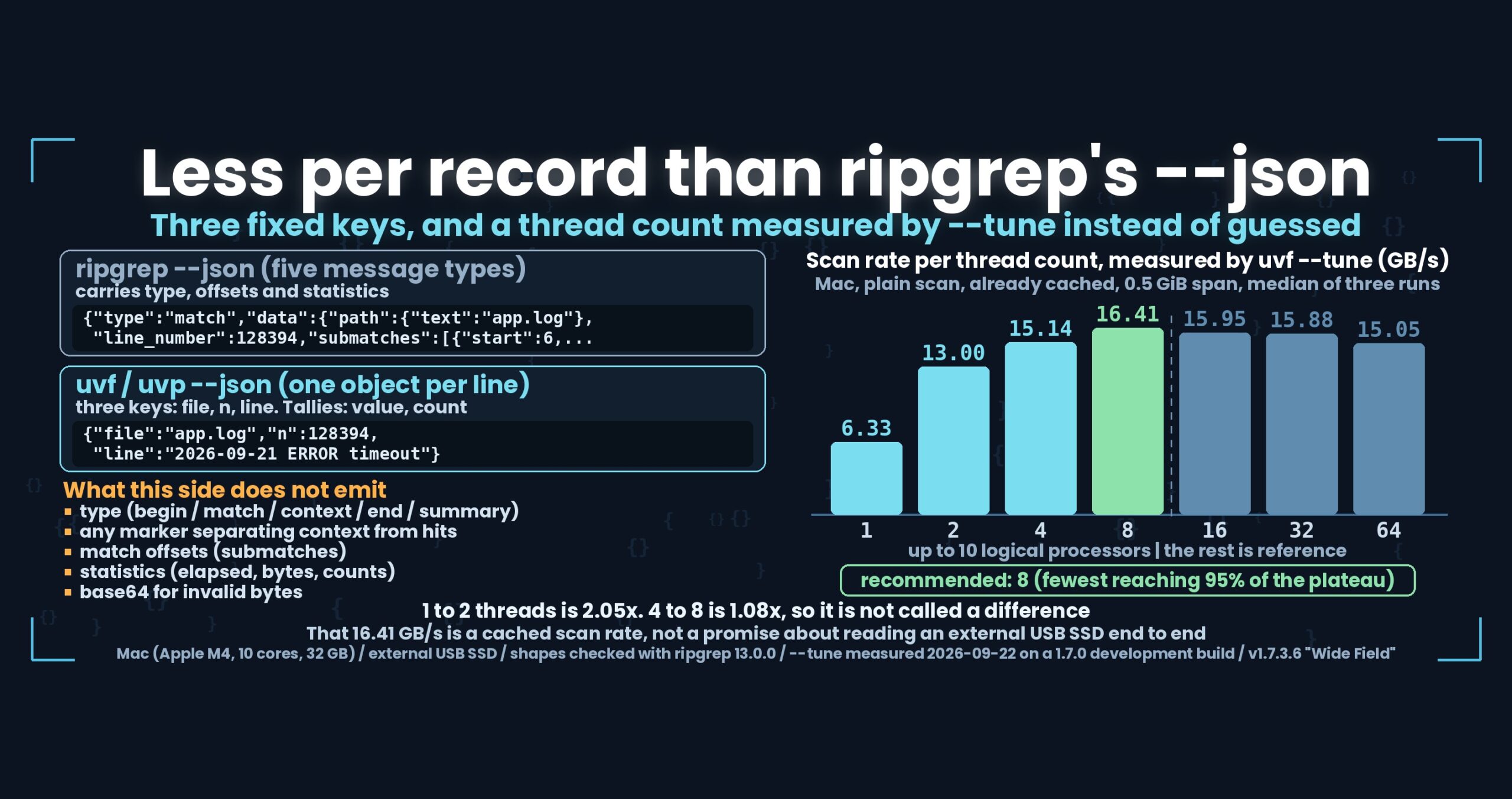
- The short answer: --json writes one object per line with three fixed keys — file, n, line — and it reports less than ripgrep’s --json (no message type, no match offsets, no statistics). Thread count is measured instead of guessed: --tune reported 6.33 GB/s on one thread and 16.41 GB/s on eight, and recommended eight
- What this loses, stated first
- Why only three keys
- “Same content as the text output” is a test, not a promise
- --json | jq -r .file, not cut -d:
- --tune — measure the machine instead of guessing
- The numbers — measured on a Mac, and the prediction was wrong
- uvp --tune measures the .uwvz path
- How this was checked
- What generalises
- Stated plainly
- The tools behind this
- Links
The short answer: --json writes one object per line with three fixed keys — file, n, line — and it reports less than ripgrep’s --json (no message type, no match offsets, no statistics). Thread count is measured instead of guessed: --tune reported 6.33 GB/s on one thread and 16.41 GB/s on eight, and recommended eight
The only thing deliberately matched is the envelope: one JSON object per line, never wrapped in an array. The payload is smaller on purpose. --tune is the other half — it measures this machine three times per thread count, prints a ladder, and saves the answer with --apply. Both work in the free uvf.
uvfanduvphere are from UwView v1.7.3.6 “Wide Field” (released 28 September 2026), which I make.uvfis the free edition anduvpbelongs to the paid UwView Pro.--jsonand--tunearrived in stages 1 and 2 of Wide Field. The--tunefigures below were measured on 22 September 2026 on a development build in the 1.7.0 range; I have not re-measured them on v1.7.3.6, so I am not claiming the numbers carry over. The latest build on offer is v1.7.3.6.9 (still the Wide Field line; 4 October 2026).
What this loses, stated first
On the amount of information per record, ripgrep’s --json wins. Here is everything this side does not emit.
- No message type. ripgrep streams
begin,match,context,endandsummary, each tagged withtype. This side emits hit lines and nothing else. - Context lines are indistinguishable from hits. ripgrep marks them
"type":"context". This side keeps the--separator out of JSON mode but adds no marker in its place, so with-Cyou cannot tell which line matched. That is a straight loss. - No statistics. ripgrep’s
--jsonimplies--stats, andsummarycarries elapsed time, bytes searched and match counts. This side gives you an exit code and whatever it wrote to stderr. - No match offsets. ripgrep fills
submatcheswith the start and end byte offsets of each match. This side hands over the whole line and leaves the locating to you. - No base64 escape hatch for invalid bytes. ripgrep switches to
{"bytes":"<base64>"}when the text is not valid UTF-8. This side decodes to text before writing, so unreadable bytes become replacement characters. It is the wrong tool for moving raw bytes around. --jsoncannot be combined with-open(it is a stdout format, not a window), and combining it with--csvis an error.- A
--tunenumber is not a promise about search speed. It measures a scan over data that is already in memory. More on that below. - The default thread count is still 8. The rule was not to move it until three machines had been measured, and that still holds.
Why only three keys
The streaming requirement came first.
Wrap the records in an array and nothing can be printed until the closing bracket. A search that returns 350,000 hits from a 50 GB file cannot wait for that. So each hit is one object on its own line, written as it is found. That is the whole reason for choosing JSON Lines.
The short key names are a separate decision.
{"file":"logs/app.log","n":128394,"line":"2026-09-21 ERROR timeout"}
{"n":128394,"line":"2026-09-21 ERROR timeout"}
The first form is what you get across several files; the second is a single file. file is omitted for a single file, matching the text output, which also leaves the name off when there is only one. Tallies (-uniq) are the one other shape: {"value":"503","count":1298}. Sequential search (-seq) emits {"lines":[…]}.
file rather than path, and n rather than line_number, because the cost is paid 350,000 times. A dozen bytes per record adds up in the size of the output. It trades readability for volume, and I accept that reasonable people would choose differently.
One more: non-ASCII text is not escaped. 東京 stays 東京 instead of becoming \u6771\u4eac. The output goes straight to a terminal or a file, so there is nothing to escape it for. The implementation uses JsonEncodedText for string escaping rather than JsonSerializer, because JsonSerializer inspects types by reflection and does not work in the NativeAOT build of uvf. Escaping a string works identically in every build.
“Same content as the text output” is a test, not a promise
Maintaining two output shapes invites the bug where one is fixed and the other drifts. So the equivalence is pinned down in tests.
- Reading each
--jsonline and rebuildingline_number + TAB + textreproduces the text output byte for byte, checked for a plain search and for-i,-Eand-v. - Every line starts with
{, ends with}, and contains no[— the array check. - With
-uniq,valueis non-empty andcountis at least 1. - With
-C, the--separator that appears in text mode never leaks into JSON. - A log containing Japanese produces no
\usequence anywhere in the output.
If equivalence can be written as a test, that beats writing it in a specification. Change one side and the other side fails.
--json | jq -r .file, not cut -d:
Back to the colon.
The manual used to suggest cut -d: -f1 for pulling filenames out of a multi-file result. An outside review caught it. Windows drive letters and zip entry names like logs.zip!app.log both contain colons, and cut splits them in the wrong place.
The fix was to reorder the advice.
# Now the primary form: survives colons in the path
uvp 'logs/**/*.log' ERROR --json | jq -r .file | sort -u

# cut is documented as the quick option for paths without colons
uvp 'logs/**/*.log' ERROR | cut -d: -f1 | sort -u
Half the point of --json is exactly this: giving people a way to stop re-parsing a line that was formatted for human eyes. Try to serve both readers with one shape and one of them breaks.
--tune — measure the machine instead of guessing
The second feature. Parallel search used to be fixed at 8 threads. A 32-core machine cannot use that, and simply raising the default risks making things slower on a machine with little memory.
So the setting (UVF_MAX_THREADS / UVP_MAX_THREADS, the MaxThreads key in the config file, resolved as environment variable > config > default) and --tune, which measures and recommends, were built together. Either one alone is useless: a setting with no evidence invites arbitrary numbers, and a measurement with nowhere to save it goes to waste.
The measurement rules:
| Rule | Decision | Why |
|---|---|---|
| State | Cached only | Thread count matters where the CPU is the limit; from the medium, any count reads at the same rate |
| Privileges | Never ask for admin rights | Ask someone to drop their page cache and most of them stop right there |
| Repeats | Three runs per setting, spread shown | A single run makes people tune to noise |
| Span | First 4 GiB, trimmed to half of free memory | Measure more than fits and you “discover” that threads do not help |
| Ladder | 1, 2, 4, … logical processors, plus four rungs past that (cap 64) | With only two data points you cannot tell flat from unmeasured |
| Medium | Measured once before anything is read | Without it, the recommendation has no visible basis |
| Recommendation | Fewest threads reaching 95% of the plateau | Do not spend threads on a range that does not pay |
| Small spread | If one thread reaches 80%, say “any value behaves the same“ | Same posture as not calling anything under 1.5x a difference |
| Saving | --apply writes it to the config |
A table you have to retype into a settings dialog does not get used |
When the ladder comes out flat, the output also says whether the limit is the CPU and memory side or the medium, by comparing against the medium figure. Printing “one thread is enough for this machine” without that comparison hides the cases where threads really would help.
The numbers — measured on a Mac, and the prediction was wrong
What --tune actually printed. Plain scan, data already in memory, median of three runs, 0.5 GiB span.
| Threads | Speed | Note |
|---|---|---|
| 1 | 6.33 GB/s | |
| 2 | 13.00 GB/s | 2.05x of one thread |
| 4 | 15.14 GB/s | |
| 8 | 16.41 GB/s | ← recommended |
| 16 | 15.95 GB/s | past the 10 logical processors; reference only |
| 32 | 15.88 GB/s | |
| 64 | 15.05 GB/s |
Two readings to attach. The 2.05x from one thread to two is a difference (a single item at 1.5x or more). The 1.08x from four threads to eight is not, and eight is recommended only because of the “fewest threads reaching 95% of the plateau” rule — not because it beats four. The slow decline from 16 threads on reads as flat, not as a regression.
The prediction said 5.4 GB/s
Before building it, the specification recorded predictions for three machines. For the Mac: roughly 5.4 GB/s at 8 threads, with 8 to 10 recommended.
The recommendation held. The speed was off by about a factor of three (5.4 predicted, 16.41 measured), and so was the 650–800 MB/s per-thread rule of thumb (one thread measured 6.33 GB/s). The prediction was most likely describing the .uwvz path, where zstd decompression is part of the work. A plain scan looking for a term that is never found is close to pure memory bandwidth, and the cost per byte is simply not comparable.
The wrong prediction table is still in the specification. Delete it and the same mistake gets made next time.
16.41 GB/s is not a search speed
This is where a reader should be suspicious. 16.41 GB/s across 50 GB would be three seconds. It is not.
--tune measures how fast 0.5 GiB already in memory can be scanned at a given thread count. A real search reads from an external USB SSD, and that read is the first thing to saturate. Spare CPU capacity cannot produce bytes the medium has not delivered yet. The measurements of the medium side on the same machine are in First Light Part 10 (mmap against pread) and Part 11 (counting newlines against the speed of the medium).
That is also why the --tune output prints the medium rate next to the ladder, and spells out which side the limit is on. A measuring tool that reports a number without its conditions does harm.
uvp --tune measures the .uwvz path
The flag is shared, but uvp measures the path it actually uses. If the target has a usable .uwvz (UwView Pro’s compression format plus index), --tune times a search through it — zstd decompression included — and falls back to a plain scan when there is no .uwvz.
A different path means a different cost per byte, and therefore a different recommendation. The output labels it: “Measured: searching the .uwvz (the real path)”. The ratio used to judge whether the medium is the limit is scaled as well, since a .uwvz reads only about a ninth of the original bytes.
No uvp --tune timings appear in this article, because I have no cross-checked Mac measurement of that path to quote.
How this was checked
--tunefigures: Mac (Apple M4, 10 cores, 32 GB RAM) / external USB SSD. Plain scan, cached, median of three runs, 0.5 GiB span. Measured 22 September 2026 on a development build in the 1.7.0 range- JSON shapes: ripgrep was run with
--jsonand its output read directly (ripgrep 13.0.0 on this machine). Thebegin/match/end/summarystructure andsubmatchesabove are from that output - This side: unit tests fix the equivalence with the text output, the absence of an array wrapper, and the handling of
-uniq,-Cand non-ASCII text - There is no speed comparison in this article. Neither
--jsonnor--tunehas a timing against ripgrep - Version is v1.7.3.6 “Wide Field” for both
uvfanduvp, with the--tuneladder measured on the earlier development build as noted
What generalises
(1) Output for a program is a different design from output for a person. cut -d: broke because a line formatted for human eyes was handed to a parser. The durable fix was to stop carrying data in delimiters, not to pick a better delimiter.
(2) “Match the other tool” is sometimes wrong; “enumerate what you cannot do” rarely is. For ignore rules (Part 7), agreeing with rg --files was the definition of done. For JSON it was not: ripgrep’s shape exists to carry information this side does not have. Listing the five missing items earns more trust than claiming parity.
(3) A measuring tool must publish its conditions or it does harm. Shown alone, 16.41 GB/s reads as a search rate. The medium figure beside the ladder, and the sentence naming which side is saturated, exist for that reason.
(4) Keep the prediction you got wrong. Being off by three times on 5.4 GB/s is worth remembering, because it teaches you to ask which code path a predicted number was describing.
(5) A setting and the evidence for it ship together. Exposing the thread count without a way to measure invites arbitrary values; measuring with nowhere to save the answer wastes the measurement. Some features do not exist as halves.
Stated plainly
- The
--tunefigures are from 22 September 2026 on a development build (1.7.0 range). They have not been re-measured on v1.7.3.6, so I will not call them current-version numbers --jsonreports less than ripgrep’s. No message type, no context marker, no match offsets, no statistics, no base64 for invalid bytes- No timings exist for
uvp --tuneon the.uwvzpath. That section is design only - There is no speed comparison with ripgrep in this article, and the cost of adding
--jsonto a search has not been measured either - The default thread count is unchanged at 8, per the rule not to move it until three machines are measured
- No Windows or Linux results are used here. This series quotes Mac measurements only
--tuneonly ever recommends up to the logical processor count. The rungs past it are there to show whether the curve is genuinely flat- I am one side’s developer; discount accordingly
The tools behind this
UwView is a CLI and GUI for investigating very large text files and logs. v1.7.3.6 “Wide Field” searches several files and seven compression formats in one pass, with no external commands.
How it looks in uvp
# one JSON object per line (works in the free edition)
uvf 'logs/**/*.log' ERROR --json

# pull out filenames, safe with colons in the path
uvp 'logs/**/*.log' ERROR --json | jq -r .file | sort -u

# a tally as JSON ({"value":…,"count":…})
uvp app.log ERROR -uniq 'code=(\d+)' --json

# drop the line numbers (uvp)
uvp app.log ERROR --json --no-line-number

# measure the right thread count for this machine (prints the ladder)
uvf --tune app.log

# measure and save the answer
uvp --tune app.log --apply

# override for a single run
UVP_MAX_THREADS=4 uvp 'logs/**/*.log' ERROR
--json combines with neither -open nor --csv. Exit codes follow grep: 0 = found, 1 = not found, 2 = error or incomplete result.
The free edition is on GitHub Releases. On a Mac, brew install --cask amru195704/uwview/uwview; on Windows, Scoop (scoop bucket add uwview https://github.com/amru195704/scoop-uwview, then scoop install uwview).
Links
- Matching ripgrep’s ignore rules, where agreement was the definition of done: https://uvp.y42u.net/en/blog/uwview-wf07-ignore-rules-en/
*,**, commas, and why the quotes are mandatory: https://uvp.y42u.net/en/blog/uwview-wf08-file-globs-en/- How far .NET and Rust regular expressions agree: https://uvp.y42u.net/en/blog/uwview-wf09-regex-vs-ripgrep-en/
- mmap only gave 60% of the disk on a sequential read: https://uvp.y42u.net/en/blog/uwview-fl10-mmap-vs-pread-en/
- Counting newlines got 1.88x faster and the search did not: https://uvp.y42u.net/en/blog/uwview-fl11-newline-vs-media-en/
- Where we stopped calling things a difference: https://uvp.y42u.net/en/blog/uwview-fl09-difference-threshold-en/
- Counting values with
-uniq: https://uvp.y42u.net/en/blog/uvp-tally-uniq-c-drilldown-en/ - Every measurement in one place: https://uvp.y42u.net/en/benchmarks-en/
- Source code (GitHub): https://github.com/amru195704/UwView
And if you are storing huge logs that eat your disk and want to search them compressed, take a look at UwView Pro — a persistent index, search inside the compressed cache, about 1/9 of the storage, and a faster reopen as well (all operating systems; one-time purchase or monthly plan).
From the developer: my apps, Kindle books and public projects are listed at GitHub: amru195704.