Almost every number in this series came from one Mac.
UwView ships for Windows, macOS and Linux. Is “on par with ripgrep or better”, measured on a Mac, true on the other two?
We ran the same test suite on three machines.
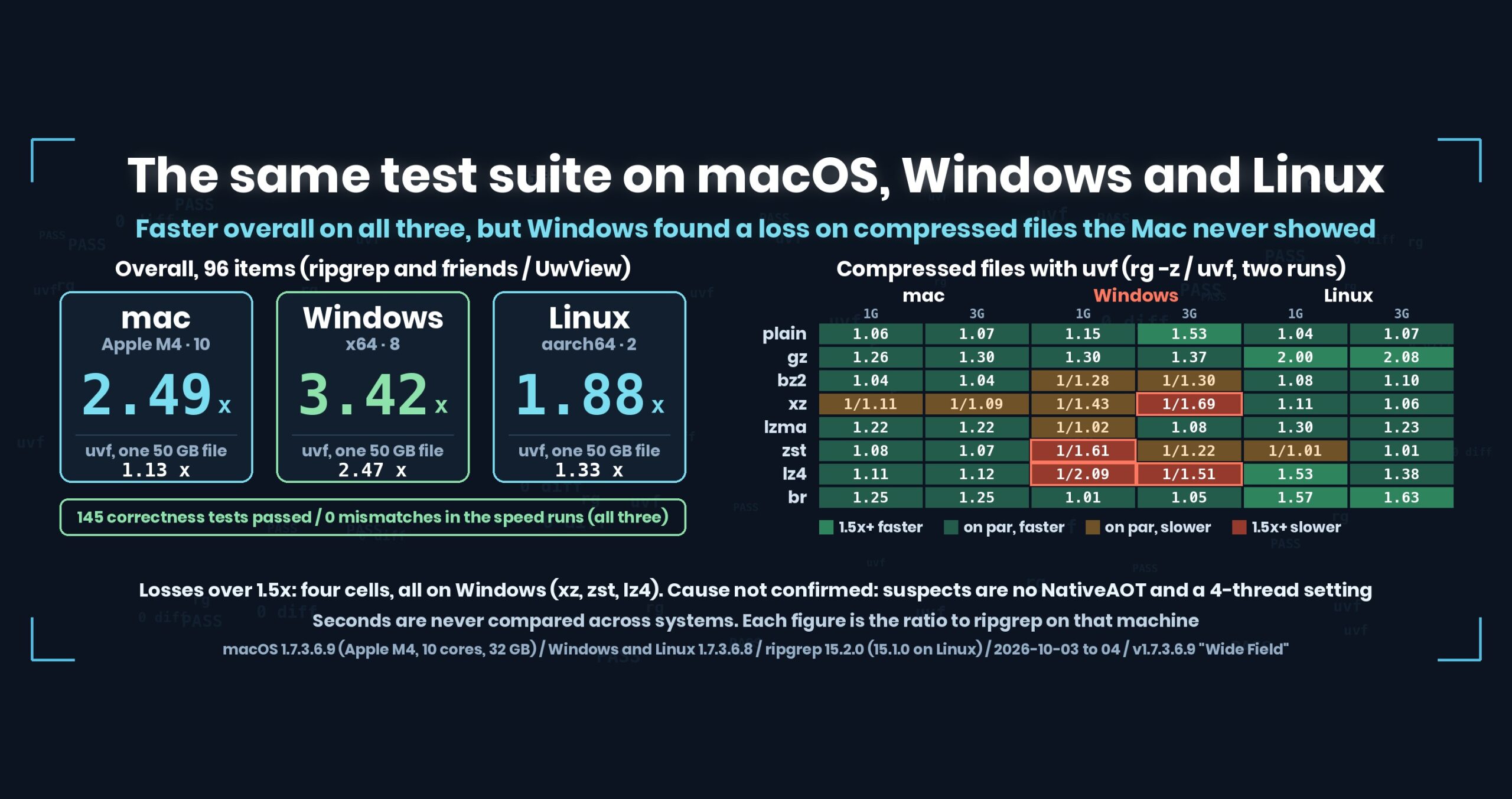
- The short answer: all 145 correctness tests passed on all three machines, and the 96 speed comparisons had zero mismatched results. Overall, UwView (uvf/uvp) was faster on all three: 2.49× on macOS, 3.42× on Windows and 1.88× on Linux. On one large file the gap was widest on Windows (uvf 2.47× over seven searches on 50 GB). But Windows turned up a loss the Mac never showed: on compressed xz, zst and lz4, uvf was 1.5–2.1× slower than ripgrep. We have not yet confirmed why
- The three machines, and what we measured
- Correctness: all three pass
- One large file: the gap is widest on Windows
- Many files: uvf ahead on Windows and Linux
- The loss: compressed files on Windows
- Suspects (not yet confirmed)
- uvp on Linux (2 logical cores)
- Caveats
- Takeaways: don’t call it fast on one machine
- The tool
- Links
The short answer: all 145 correctness tests passed on all three machines, and the 96 speed comparisons had zero mismatched results. Overall, UwView (uvf/uvp) was faster on all three: 2.49× on macOS, 3.42× on Windows and 1.88× on Linux. On one large file the gap was widest on Windows (uvf 2.47× over seven searches on 50 GB). But Windows turned up a loss the Mac never showed: on compressed xz, zst and lz4, uvf was 1.5–2.1× slower than ripgrep. We have not yet confirmed why
uvfanduvpare the search commands of UwView (v1.7.3.6.9 “Wide Field”, 4 October 2026), which I build.uvfis in the free edition,uvpin the paid UwView Pro. Windows and Linux were measured with 1.7.3.6.8 (1.7.3.6.9 only changes searching many small files).
The three machines, and what we measured
| macOS | Windows | Linux | |
|---|---|---|---|
| Machine | Apple M4, 10 logical, 32 GB, external USB SSD | x64, 8 logical, 15.6 GB | aarch64, 2 logical, 7.0 GB |
| Version | 1.7.3.6.9 | 1.7.3.6.8 | 1.7.3.6.8 |
| Threads | uvf 8, uvp 8 (default) |
uvf 4 (set in config), uvp 8 |
uvf 2, uvp 2 (default) |
| ripgrep | 15.2.0 | 15.2.0 | 15.1.0 |
| Full run | 2 h 20 min | 4 h 9 min | 3 h 29 min |
The machines are completely different, so seconds are never compared across systems. All we line up is, on each machine, “ripgrep’s time ÷ UwView’s time” (above 1 means UwView is faster; under 1.5× is “on par”).
uvf ran with 4 threads on Windows because the test machine’s config file said so — not the default (up to the logical processor count). That matters later.
Correctness: all three pass
| macOS | Windows | Linux | |
|---|---|---|---|
| Input types (encodings, 7 compression formats, empty files, …) | 66 pass | 66 pass | 66 pass |
| Multiple files | 36 pass | 34 pass, 2 skipped | 36 pass |
Exclusion rules (.gitignore and friends) |
43 pass | 43 pass | 43 pass |
| Output checks during the speed runs | 0 mismatches | 0 mismatches | 0 mismatches |
The two skipped on Windows were “no way to create a zip” (no Python on the test machine), not a product problem.
Every speed comparison checks the output against ripgrep’s (or sed, sort and uniq’s). Fast with a different answer means nothing, so that comes first.
One large file: the gap is widest on Windows
Seven searches (plain, -i, -E, anchored, -E -i, -v, -E -v) on OpenStreetMap XML of 3 GB, 10 GB and 50 GB, first run (right after dropping the cache) plus second run.
| vs ripgrep | macOS uvf |
Windows uvf |
Linux uvf |
macOS uvp |
Windows uvp |
Linux uvp |
|---|---|---|---|---|---|---|
| 3 GB | 1.00 | 1.48 | 1.31 | 2.39 | 2.22 | 1.62 |
| 10 GB | 1.16 | 1.90 | 1.13 | 3.28 | 2.81 | 2.45 |
| 50 GB | 1.13 | 2.47 | 1.33 | 3.74 | 3.44 | 1.99 |
Overall, 96 items (uvf + uvp) |
2.49 | 3.42 | 1.88 |
- On Windows, ripgrep’s first run was slow, taking 1.65–2.53× as long as
uvf. Even on the second 50 GB runuvfwas 2.42× faster.uvfwon all 21 combinations of 7 patterns × 3 sizes. - On the Mac,
uvfis on par with ripgrep (1.00–1.16) — exactly what this series has been saying. uvpwas 1.6–3.7× faster on all three, even including the first run that builds the index (.uwvz). From the second search on it only reads the index.
Look only at the Mac and the story ends at “uvf is on par with ripgrep”. On Windows the same uvf is 1.5–2.5× faster. Both are true; write only one and it will be wrong for some readers.
Many files: uvf ahead on Windows and Linux
| vs ripgrep (first + second run) | macOS | Windows | Linux |
|---|---|---|---|
| 5 plain files | 1.02 | 1.86 | 2.22 |
| 7 gz files | 1.31 | 1.54 | 1.67 |
| 12 plain + gz files | 1.29 | 1.58 | 1.67 |
On Linux with 2 logical cores, rg -z calling an external gzip for every gz file costs a lot. uvf decompresses in-process.
The loss: compressed files on Windows
Compressed 1 GB and 3 GB files searched with rg -z and uvf (first + second run).
| vs ripgrep | mac 1G | mac 3G | Win 1G | Win 3G | Linux 1G | Linux 3G |
|---|---|---|---|---|---|---|
| plain | 1.06 | 1.07 | 1.15 | 1.53 | 1.04 | 1.07 |
| gz | 1.26 | 1.30 | 1.30 | 1.37 | 2.00 | 2.08 |
| bz2 | 1.04 | 1.04 | 1/1.28 | 1/1.30 | 1.08 | 1.10 |
| xz | 1/1.11 | 1/1.09 | 1/1.43 | 1/1.69 | 1.11 | 1.06 |
| lzma | 1.22 | 1.22 | 1/1.02 | 1.08 | 1.30 | 1.23 |
| zst | 1.08 | 1.07 | 1/1.61 | 1/1.22 | 1/1.01 | 1.01 |
| lz4 | 1.11 | 1.12 | 1/2.09 | 1/1.51 | 1.53 | 1.38 |
| br | 1.25 | 1.25 | 1.01 | 1.05 | 1.57 | 1.63 |
| mixed (plain + compressed) | 1.04 | 1.03 | 1/1.43 | 1/1.41 | 1.24 | 1.24 |
| mixed (compressed only) | 1.04 | 1.06 | 1/1.36 | 1/1.23 | 1/1.25 | 1/1.04 |
We lost by more than 1.5× in four places, all on Windows: xz (3G), zst (1G) and lz4 (1G and 3G). bz2 and the mixed sets are 1/1.2–1/1.4 — on par, but only Windows leans toward losing. On macOS and Linux the same formats were on par or better.
The Windows breakdown (3 GB, seconds — same machine, so seconds are fine here):
| 3 GB | rg -z first / second |
uvf first / second |
|---|---|---|
| plain | 4.03 / 1.35 | 2.53 / 0.99 |
| bz2 | 39.38 / 36.73 | 48.22 / 50.80 |
| xz | 2.74 / 2.63 | 4.79 / 4.27 |
| zst | 2.49 / 2.18 | 2.98 / 2.71 |
| lz4 | 1.43 / 1.14 | 2.08 / 1.81 |
One more number bothers me. The second run on 1 GB of plain text takes 0.57 s with uvf on Windows (0.12 s on the Mac). We don’t compare seconds across machines, but it makes me suspect a fixed cost of about 0.4–0.7 s on every run, even when there’s almost nothing to decompress. The faster a format decompresses (zst, lz4), the worse the ratio — which is what a fixed cost would do.
Suspects (not yet confirmed)
| # | Suspect | Evidence |
|---|---|---|
| W1 | The Windows uvf and uvp are not built with NativeAOT. Every start pays for starting .NET and compiling code on the spot |
A fixed 0.4–0.7 s on plain-text second runs and on uvp second runs; the faster the format decompresses, the worse the ratio |
| W2 | uvf set to 4 threads (8 logical). It loses to external tools on parallel xz decompression and bz2 |
xz 3G: uvf 4.27 s, rg -z 2.63 s |
| W3 | Antivirus (Defender) scanning | Not checked |
The macOS and Linux builds are NativeAOT (compiled to machine code ahead of time). The Windows build is a single-file executable that has to warm up on every start. NativeAOT can only be built on the target OS, and the Windows build was being made from a Mac.
We know how to check. W2: delete the 4-thread setting on the test machine and rerun only the compression comparison. W1: build NativeAOT on a Windows machine and compare. As of this article, neither has been done.
uvp on Linux (2 logical cores)
uvp builds an index (.uwvz) on the first run, and writing it compressed costs CPU.
On a 2-core Linux machine, for fast-to-decompress zst and lz4 and for plain text, that first run is heavy: two runs combined come to 1/1.2–1/1.4 of ripgrep (gz, bz2 and lzma are 1.7–2.1× faster). From the third search on uvp only reads the index and pulls ahead. On a machine with few cores, if you search only once, uvf or ripgrep is enough.
Caveats
- We have not confirmed the cause of the Windows compression losses. W1–W3 above are suspects. When they are fixed, we’ll write it up with re-measured numbers.
uvfon Windows ran with 4 threads from a config setting. Measured at the default, results may change (we expect better, but won’t say so until measured).- Windows and Linux used 1.7.3.6.8, the Mac 1.7.3.6.9. The only difference is searching many small files, which barely touches the items in these tables.
- The three machines differ in CPU, memory and disk. We do not compare seconds across systems. Each ratio is a ratio on that machine. Read it not as “Windows favors UwView” but as “on this Windows machine, ripgrep’s first run was slow”.
- 50 GB doesn’t fit in memory on any of the machines, so the second run reads from disk too.
- I’m writing about my own product. Please read with that in mind.
Takeaways: don’t call it fast on one machine
(1) Losses show up on other machines. Formats that were on par or better on the Mac were 1/2.1 on Windows. Measuring on one machine, we could never have written about this loss.
(2) Across machines, line up ratios only. Seconds from machines with different CPUs and disks don’t tell you what you’re comparing. We took “theirs ÷ ours” on each machine and lined those up.
(3) Check the answers match on every machine before the speed. Every speed comparison checks the output. Zero mismatches on all three.
(4) Write suspects and confirmations separately. “It’s slow because it isn’t NativeAOT” sounds right — and last time (Part 12) the mmap story that sounded right was wrong. Until it’s checked, it’s written as a suspect.
The tool
UwView is a viewer for huge text files and huge logs (free UwView / paid UwView Pro).
uvf app.log.zst ERROR                # search compressed files as they are (7 formats, no external commands)
uvf 'logs/*' ERROR                   # plain and compressed together, in one run
uvf --tune                           # measure the thread count that suits this machine (--apply saves it)
Exit codes follow grep: 0 = found, 1 = not found, 2 = error or incomplete result.
The free edition is on GitHub Releases. On a Mac, brew install --cask amru195704/uwview/uwview; on Windows, Scoop (scoop bucket add uwview https://github.com/amru195704/scoop-uwview, then scoop install uwview).
Links
- Part 12: the newline count I said would never show up in seconds was 40% of the second search: https://uvp.y42u.net/en/blog/uwview-wf12-newline-hot-en/
- Part 11:
--jsonand--tune(measuring the thread count): https://uvp.y42u.net/en/blog/uwview-wf11-json-and-tune-en/ - Part 1: 12 plain and gz files in one command: https://uvp.y42u.net/en/blog/uwview-wf01-multi-file-one-command-en/
- Choosing a compression format for logs (7 formats measured): https://uvp.y42u.net/en/blog/log-compression-format-choice-en/
- If you use
rgon Windows (--no-mmap): https://uvp.y42u.net/en/blog/uvp-rg-no-mmap-50gb-en/ - Where we stopped calling things a difference: https://uvp.y42u.net/en/blog/uwview-fl09-difference-threshold-en/
- v1.7.3.6.9 release notes: https://github.com/amru195704/UwView/blob/main/2-doc/release-body-v1.7.3.6.9.md#uwview-v17369–wide-field-english
- Every measurement in one place: https://uvp.y42u.net/en/benchmarks-en/
- Source code (GitHub): https://github.com/amru195704/UwView
And if you are storing huge logs that eat your disk and want to search them compressed, take a look at UwView Pro — a persistent index, search inside the compressed cache, about 1/9 of the storage, and a faster reopen as well (all operating systems; one-time purchase or monthly plan).
From the developer: my apps, Kindle books and public projects are listed at GitHub: amru195704.