Seconds on their own are not a result.
You read that a 10 GB log opened in 0.3 seconds, you open a 10 GB log of your own, and it takes twelve. Nobody lied to you. The conditions were simply missing.
So which conditions have to be written down for a number to survive contact with someone else’s machine? This series puts uvf (the search command in the free UwView) and uvp (the search command in the paid UwView Pro) through the same data and the same procedure on macOS, Linux and Windows, across sixteen parts. Today’s opening part quotes no seconds at all. Instead it fixes how every number in the remaining fifteen should be read. And having fixed them, the series starts with two holes already in it.
- The short version: cold, hot and first, five runs, median, with the answer checked down to exit code, hit count and line numbers — but Linux runs in VMware and Windows has no standard way to make cold
- The problem: six months later, even the person who wrote the number cannot reproduce it
- Test conditions
- Results: the seven rules that decide how to read the next fifteen parts
- The losses: three holes, left open on purpose
- Correctness: weak points ship unfixed
- What travels: four things worth writing down in your own measurements
- How you write it with uvf (and the same with uvp)
- How to reproduce this
- Links
The short version: cold, hot and first, five runs, median, with the answer checked down to exit code, hit count and line numbers — but Linux runs in VMware and Windows has no standard way to make cold
The losses first.
One. The Linux numbers come from a VMware Fusion guest, not from Linux on real hardware. Everything virtualization costs is included in them. Worse, dropping the cache inside the guest leaves the host Mac’s own cache untouched. Every time a Linux second appears in this series it will be labelled “on VMware”.
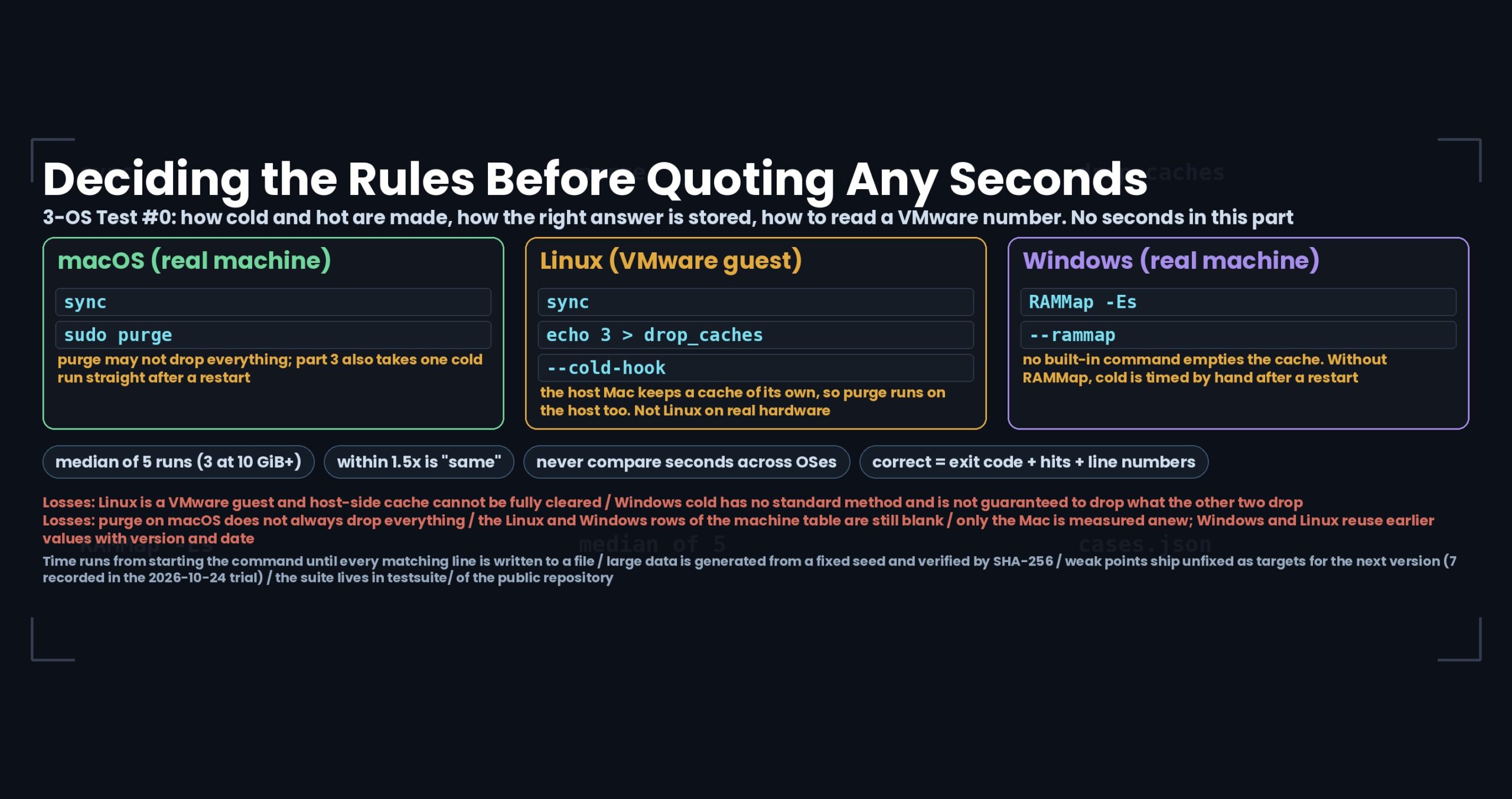
Two. Windows has no built-in command for emptying the file cache. macOS has purge and Linux has drop_caches; on Windows you either bring in an external tool (RAMMap) or restart the machine and time it by hand. The same word, cold, denotes three different procedures depending on the OS.
Three. Even purge on macOS does not always drop everything. For part 3 (cold versus hot) an extra cold run is taken immediately after a restart.
With that said, here is what was decided.
- Time runs from starting the command to its exit, including writing every matching line out to a file. Peak memory (RSS) is recorded alongside it
- Three cache states: cold, hot and first.
firstmeans the first search of that file in a session, and it is kept apart from the medians - Five runs per case; three for files of 10 GiB and more. The median is reported, with the minimum and maximum kept
- Files larger than 60 % of physical memory are measured cold only — there is no meaningful hot for them
- The right answer lives in
cases.json: exit code, number of result lines and, where it matters, the exact line numbers. A run counts as correct only when all of them match - Two values within 1.5× of each other are written as “same”, with only the direction noted
- Seconds are compared within one machine only. Never across operating systems
- Weak points are published as found, not fixed first
uvfanduvpare the search commands of UwView, which I build (uvfships with the free edition,uvpwith the paid UwView Pro). What follows is the procedure and result schema that live intestsuite/in the public repository. This part quotes no seconds. Across the series only the Mac is measured anew; Windows and Linux reuse earlier measurements, always labelled with the version and date they were taken, and never lined up as if they were the same build as the fresh Mac figures.
The problem: six months later, even the person who wrote the number cannot reproduce it
Benchmark arguments are rarely about the number. They are about the conditions that were left out.
Was the cache warm, or was this the first run? How many runs, and which one is being quoted? Was this a query matching nothing, or one matching almost every line? And — this one goes missing surprisingly often — was the answer correct? Finishing quickly with the wrong output is not a result.
The same applies when you are only measuring for yourself. A note from six months ago saying “10 GB in 0.3 s” with no conditions attached is a note that cannot tell you why today’s measurement disagrees.
So before writing any of the series, the procedure was built as a suite and published. Every second that appears in these posts comes out of its CSV files. The numbers exist first; the post is written from them, not the other way around.
Test conditions
Three machines
| Label | Machine | Memory | Storage | File system | Type |
|---|---|---|---|---|---|
mac-m4-32g-usbssd |
MacBook Air (Apple M4, 10 cores) | 32 GB | external USB SSD | APFS | real machine |
linux-vmware-fusion |
VMware Fusion guest on the Mac above | to be filled | virtual disk (location to be filled) | ext4 | virtual machine |
win11-16g |
Windows 11 notebook | 16 GB | internal SSD | NTFS | real machine |
The blanks are genuinely blank. Running the real measurements makes env.json fill them in automatically, and each part will carry them once they exist. What is published today is the shape of the table, not a complete one.
Product versions are read from uvf --version and uvp --version and stored with every run, together with OS version, CPU, core count, memory, file system and whether the machine is virtualized — so the procedure page and the CSV cannot drift apart.
Data
Large data is not distributed. tools/gen.py builds it from a fixed seed, so the same bytes come out on any OS, and tools/check.py data verifies them against the SHA-256 manifests (thirteen sets of them). The hashes have been confirmed to agree between x86_64 and aarch64.
Small data — encodings, newlines, Japanese characters, deliberately broken files — is committed to the repository so it can be inspected directly.
The 100 GB part needs roughly 250 GB free. The working folder lives outside the repository.
How cold is made, per OS
This is where the three machines diverge most. One word, three procedures.
| OS | How cold is made | Caveat |
|---|---|---|
| macOS | sync, then sudo purge |
purge may not drop everything; part 3 also takes one cold run after a restart |
| Linux (VMware) | sync, then write 3 to drop_caches |
the host Mac keeps its own cache. --cold-hook runs purge on the host as well |
| Windows | RAMMap -Es (empty the standby list), passed via --rammap |
no built-in command exists. Without RAMMap, cold is timed by hand after a restart |
Hot means the file was just read: one unrecorded warm-up run happens first. first is the first search of that file in a session; for uvp the first search and the ones after it differ substantially, so both are reported separately.
Timing the on-screen apps
Times for the windowed apps — UwView, UwView Pro and the Web edition — cannot be taken automatically, so they are timed by hand with a stopwatch, three runs, median. The start and stop points are fixed: opening runs from pressing Open until the line count in the status bar stops changing; jumping to the end runs from Ctrl/Cmd+End until the last line is on screen; searching runs from Enter in the search box until the hit count is final.
Results: the seven rules that decide how to read the next fifteen parts
There are no seconds in this part. These are the rules the seconds will be read under.
| Rule | What it means |
|---|---|
| What is timed | Start of the command to its exit, including writing all matching lines to a file |
| Runs | Five per case (three at 10 GiB and above); median reported, minimum and maximum kept |
| Very large files | Anything over 60 % of physical memory is measured cold only |
| The “same” threshold | Two values within 1.5× are written as same, with the direction noted |
| No crossing OSes | Seconds are compared within one machine; never lined up across operating systems |
| Version and date | Every table states the product version and the date of measurement |
| Definition of correct | ok only when exit code, hit count and (where it matters) line numbers all match |
That last row took the most work to build. Measuring speed needs no answer key at all. But there is nothing to celebrate in a tool that returns the wrong answer quickly.
Results land in four files: one row per execution (runs.csv), the medians per product × case × cache (summary.csv), just the rows that were wrong, crashed or timed out (failures.csv), and the environment (env.json). Seconds quoted in these posts come from summary.csv; weak points quoted in them come from failures.csv.
Exit codes are 0 for hits found, 1 for none, and 2 for an error or an incomplete result.
The losses: three holes, left open on purpose
1. Linux is a virtual machine. It is a VMware Fusion guest, so virtualization is inside every second. No sentence in this series can say “Linux on real hardware would do this.” And there is a variable invisible from inside the guest: the host’s own cache. --cold-hook runs purge on the host, but it cannot be claimed that host-side variation disappears entirely.
2. Windows cold is not the same procedure as the other two. Either RAMMap empties the standby list, or the machine restarts and a human holds the stopwatch. Neither one is guaranteed to drop the same things purge or drop_caches drop. Read Windows cold as the loosest of the three.
3. The machine table is not finished. The Linux vCPU count, memory and virtual disk location, and the finer Windows details, are blank. env.json will fill them during the real runs, but as of today the three machines are not fully specified.
There is one more disclosure, about how the series itself is produced. Only the Mac is measured anew. Windows and Linux figures are reused from earlier measurements. The builds differ, so they are never placed side by side with fresh Mac numbers as if they were one comparison. Where no earlier measurement exists — several of the Japanese-text parts, for instance — only the Mac appears, and the post says plainly that Windows and Linux were not measured.
Correctness: weak points ship unfixed
If one thing about this series is worth being explicit about, it is this.
Wrong answers, crashes and hangs are not fixed before publication. Each one is recorded in the weak-point list along with the version it was found in, and becomes a target for the next version. When it is fixed, that gets its own follow-up post.
While the suite was being assembled — 24 October 2026, on Linux x86_64 and on the Mac — seven were already recorded. They belong to parts 5, 6 and 10, so today only the count appears. Combinations the manual already declares unsupported are listed separately as “documented” rather than counted as weak points.
One of the seven (UTF-32) is already marked as fixed for the next version: the free command and the free windowed app will refuse UTF-32 the way the paid edition already does. Publishing that whole round trip — found, then fixed — is the point of doing it this way.
Cases with no single defensible right answer are recorded as obs, separate from pass and fail. Unicode normalization is the clearest example: whether an NFC search term ought to match NFD text is a product decision, not a bug, so it is logged as an observation.
What travels: four things worth writing down in your own measurements
None of this needs my tool. When you measure something and leave yourself a note, these are the conditions worth recording.
One. Describe the cache state as a procedure, not a word. “Measured cold” is not a condition. “sync, then sudo purge, then two seconds of settling” is. When the same word means different procedures on different systems, the word is not carrying the information.
Two. Record how many runs you took and which one you quoted. A single run may have landed on a fast moment or a slow one. If you quote a median, keep the minimum and maximum too, so that later you can see whether that day was noisy. Discard the spread and the next disagreement becomes unexplainable.
Three. Record whether the answer was right, in the same row as the time. One extra column turns “faster but subtly wrong” into something you catch at the moment of measuring rather than months later, when you can no longer tell which change caused it.
Four. Fix the threshold for calling something a difference before you measure. This series uses 1.5×. Decide it afterwards and you will find yourself calling a gap meaningful exactly when it flatters you. The threshold is a restraint on the author, not on the reader.
How you write it with uvf (and the same with uvp)
Running the suite on your own machine:
# build the small data set (about a minute); trial and full also exist
python3 tools/gen.py --work ~/uwtest --preset smoke

# verify the generated data against the SHA-256 manifests
python3 tools/check.py data --work ~/uwtest

# measure (hot and uvf by default)
python3 tools/run.py --work ~/uwtest --label my-machine

# both cache states, both products
python3 tools/run.py --work ~/uwtest --label my-machine \
  --product uvf --product uvp --cache cold,hot

# on Linux under VMware, drop the host cache too
python3 tools/run.py --work ~/uwtest --label linux-vmware-fusion \
  --cache cold,hot --cold-hook 'ssh mac-host purge'

# on Windows, point it at RAMMap
python3 tools\run.py --work C:\uwtest --label win11-16g ^
  --cache cold,hot --rammap C:\tools\RAMMap64.exe

# summarize, or look only at the rows that were wrong
python3 tools/summarize.py ~/uwtest/results/<folder> --failures
The search itself is written the same way in both editions:
uvf japan.osm '\d+\.\d{6,}' -E -H    # free edition (no index)
uvp japan.osm '\d+\.\d{6,}' -E -H    # paid edition (uses the index)
The free edition comes from GitHub Releases (brew install --cask amru195704/uwview/uwview on Mac, Scoop on Windows, Snap on Linux).
How to reproduce this
Everything in this part lives in testsuite/ in the public repository. Where this post and that folder disagree, the folder is right.
- The rules themselves (the source of this post): https://github.com/amru195704/UwView/blob/main/testsuite/docs/00-rules.md
- Japanese entry point: https://github.com/amru195704/UwView/blob/main/testsuite/README.ja.md
- The machines: https://github.com/amru195704/UwView/blob/main/testsuite/docs/environment.md
- Result CSV schema: https://github.com/amru195704/UwView/blob/main/testsuite/schema/results.md
- Weak-point list: https://github.com/amru195704/UwView/blob/main/testsuite/weak-points.md
- The suite folder: https://github.com/amru195704/UwView/tree/main/testsuite
Links
- The last part of the previous series (three fixes in the free edition): https://uvp.y42u.net/en/blog/uwview-fs05-uvf-three-fixes-en/
- Normalizing the index to UTF-8: https://uvp.y42u.net/en/blog/uwview-fs01-sjis-utf8-index-en/
- Where the second search of a 10 GB file saves its time: https://uvp.y42u.net/en/blog/uwview-fs04-10g-second-search-en/
- Source code (GitHub): https://github.com/amru195704/UwView
From the next part onward there are real numbers. Part 1 is “opening 1 GiB to 100 GiB on three operating systems”.
And if you keep searching the same huge logs for the same handful of terms, UwView Pro makes the second query a step faster — a persistent index, search inside the compressed cache, and roughly a ninth of the storage (every OS, one-time purchase or monthly subscription, 14-day free trial; see the pricing page).
From the developer: my apps, Kindle books and public projects are listed at GitHub: amru195704.