Decompression turned out to be the fast part.
That was the surprise in this one. We assumed inflate would be the bottleneck. When we measured, inflate was keeping up comfortably, and the slow step was checking that the data wasn’t corrupt.
Searching a 3 GB gz took 7.8 s. Six of those seconds went somewhere that was neither searching nor decompressing.
- Up front: searchable while still compressed
- The problem: compressed logs had to be unpacked before we could look
- The cause: the bottleneck was CRC32, not inflate
- Fix 1: fold CRC32 eight bytes at a time — and use the instruction on ARM
- Fix 2: hand the inflating to the OS
- Fix 3: skip the pipe
- The numbers: 2.0–2.1×, and level with the pipe
- The general lesson: get a breakdown before you trust your instinct
- The tools behind this
- Links
Up front: searchable while still compressed
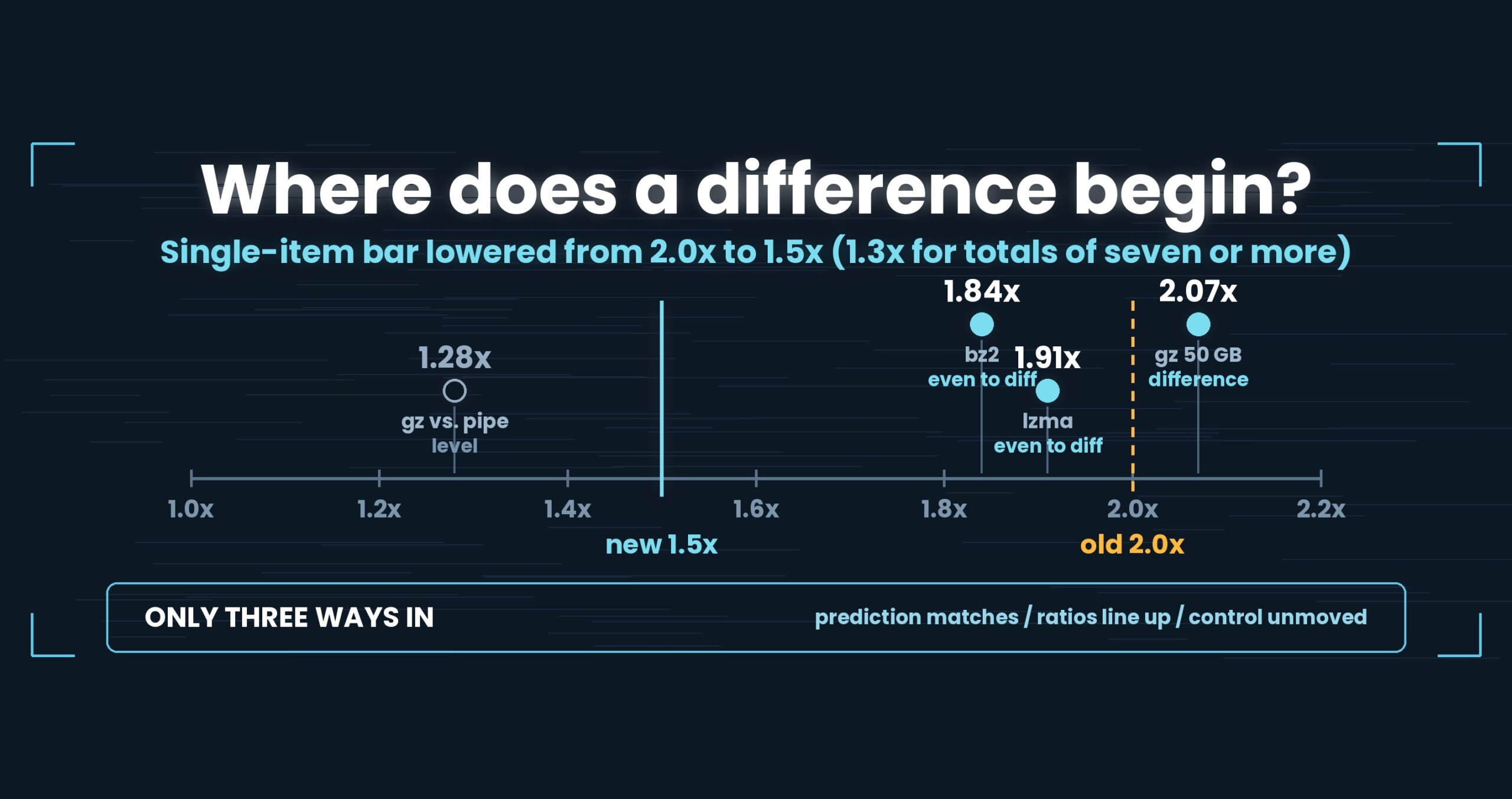
You can now search a .gz without writing an extracted copy to disk. On macOS we call the zlib that ships with the OS directly, and we fold CRC32 eight bytes at a time (using the dedicated instruction on ARM64). Result: a 50 GB-equivalent gz search went from 35.65 s to 17.20 s — 2.0–2.1×. Piping gzip -dc into ripgrep on the same machine takes 22.06 s, which makes us 1.28× — and that we call level, not a win (we do not call anything under 1.5× a difference on a single item). Windows and Linux point the same way, each measured within its own OS (1.71× and 2.00×). Mac M4, 32 GB RAM, external USB SSD, OpenStreetMap XML; one setup, results vary. Details at the end.
About this series. “First Light” is the pet name of UwView v1.6.6 — the release where both the GUI and the command line
started opening and searching a huge file in a single pass. This series follows what that took, one fix at a time.
Direct gz search landed in the same release.
The problem: compressed logs had to be unpacked before we could look
Logs on disk are usually compressed. Rotate daily, stack up app.log.20260901.gz, move on. If 50 GB becomes 5 GB, of course you do that.
And in that state we could not search them. UwView 1.6.0, handed a .gz, would extract it to a plaintext file and open that. Which means, before searching:
- you need 50 GB of free space
- nothing starts until extraction finishes
- you delete the plaintext afterwards (or forget to)
The first one is the real problem. Files are compressed because space is tight. A tool that demands space in order to search is unavailable exactly when you most want it.
Meanwhile the command line has had an answer for decades:
gzip -dc app.log.gz | rg 'ERROR'
Inflate into a pipe, search the stream, write no file. It is a strong baseline. If we could not match it, there was no point building direct gz search at all.
So: when you search while inflating, where does the time actually go?
The cause: the bottleneck was CRC32, not inflate
We built the obvious thing first. Inflate the gz from the start, hand the emitted bytes straight to the matcher. Search only moves forward, so only a recent window has to be retained. Inflate and match run on separate threads so they overlap.
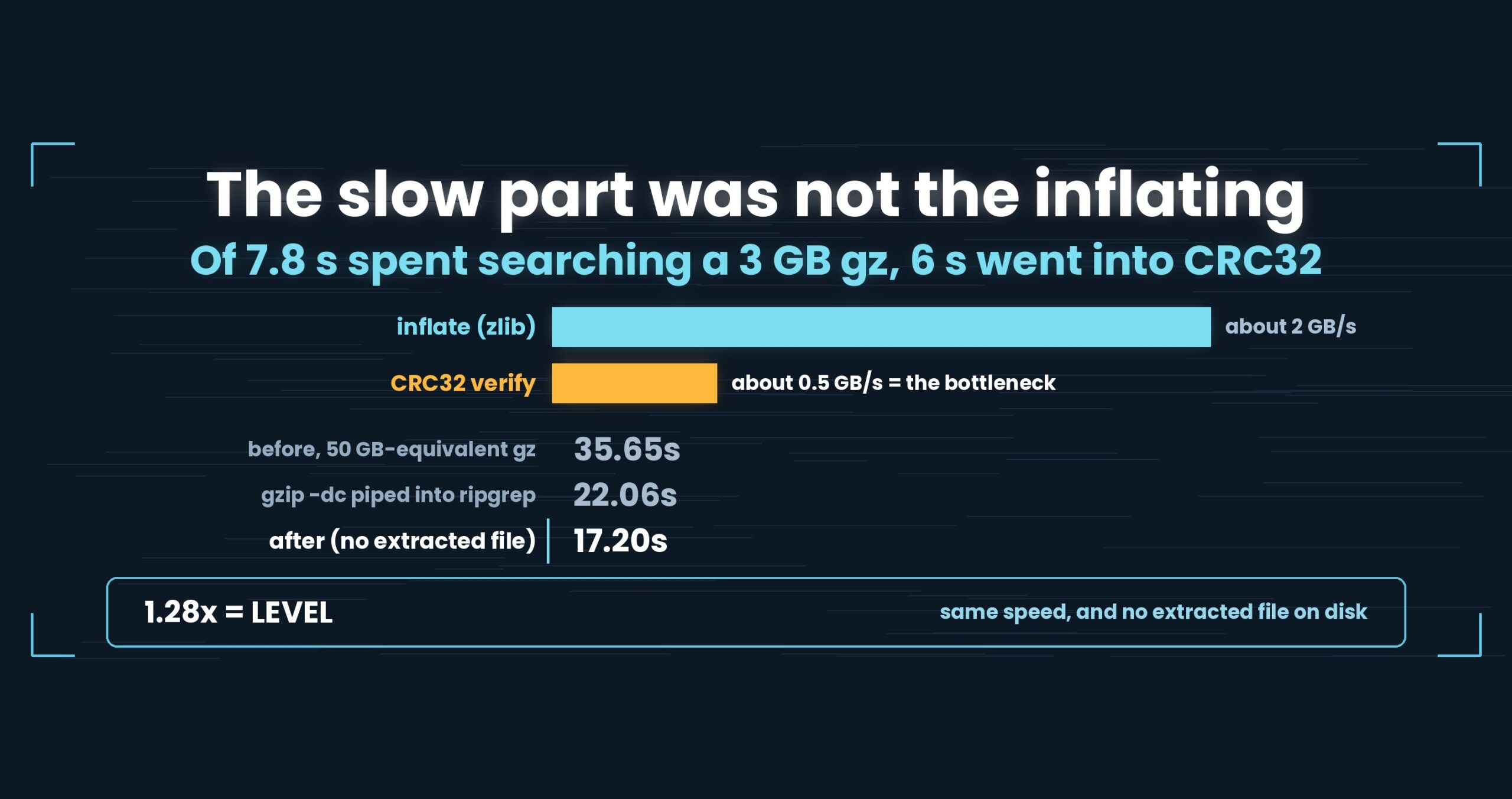
It worked. It was also slow: 7.8 s to search a 3 GB gz. Then we measured the parts, and the parts were the surprise.
| stage | throughput |
|---|---|
inflate (GZipStream) |
about 2 GB/s |
| CRC32 verification | about 0.5 GB/s |
A gz file ends with the CRC32 of the uncompressed data (4 bytes) and its length. You are expected to compute the checksum as you go and compare. That comparison was 4× slower than the decompression feeding it.
A straightforward CRC32 is a loop that takes one byte, indexes a table, folds it in. A handful of instructions per byte. Simple enough that we assumed it was cheap — but a byte at a time leaves nothing to batch, so it never reaches memory bandwidth, and inflate finishes waiting on it. Six of the 7.8 s went into verification.
Note also that the CRC runs over every byte whether or not anything matches. It is a fixed tax, unrelated to the outcome of your search.
Fix 1: fold CRC32 eight bytes at a time — and use the instruction on ARM
There are two well-trodden roads here.
One is a slice-by-eight (or sixteen) table: keep eight tables, fold eight bytes’ worth of contribution at once, run one-eighth the iterations.
The other is the CPU’s CRC32 instruction — and here is the trap. The CRC32 instruction in x86 SSE4.2 uses a different polynomial than gzip does (that is CRC-32C). Use it and the values simply do not match. ARM64’s CRC32 instruction, on the other hand, uses gzip’s polynomial and drops straight in.
So: the instruction on ARM64, slice-by-eight everywhere else. The practical lesson was not “CPUs have instructions, use them”. It was that two things called CRC32 are not necessarily the same function.
Fix 2: hand the inflating to the OS
Once CRC stopped being the bottleneck, inflate became visible.
.NET’s GZipStream is a reasonable implementation, but the operating system already ships a heavily tuned zlib. On macOS that is /usr/lib/libz.dylib. We call it directly.
- 1.6–1.8× faster (inflating a 50 GB-equivalent alone: 30.2 s → 18.5 s)
- for reference,
gzip -dcby itself is 26.3 s under the same conditions - it is always present, so we ship nothing extra
- if the call fails, or on other platforms, we fall back to
GZipStream(the feature never disappears)
Shipping nothing extra matters more than it sounds. Every library you bundle to go faster buys you a second set of problems: updates, signing, licensing. Calling what the OS already has is one of the few ways to get faster without getting bigger.
Fix 3: skip the pipe
Finally, there is exactly one structural advantage we have over gzip -dc | rg: we do not cross a process boundary.
A pipe means the inflating side writes, the kernel buffers, the searching side reads. That is cheap, but not free. Inflating and matching inside one process removes the handoff entirely.
Worth stressing: this is the small one. We did not win by deleting a pipe. In order of impact it was CRC32 (six seconds), the zlib call (a few), and the pipe (barely).
The numbers: 2.0–2.1×, and level with the pipe
gz search with no extracted file; Mac M4, 32 GB RAM, external USB SSD, gz of OpenStreetMap XML
| original size | before | after | ratio |
|---|---|---|---|
| 3 GB | 2.18 s | 1.16 s | 1.88× |
| 10 GB | 7.27 s | 3.66 s | 1.99× |
| 50 GB | 35.65 s | 17.20 s | 2.07× |
The ratios line up across three sizes: 1.88 / 1.99 / 2.07. That is why we trust this one. Measurement noise scatters ratios; a constant ratio across sizes is the signature of removing a stage that cost a fixed fraction of every byte — which CRC and inflate both do.
Against the baseline:
| searching a 50 GB-equivalent gz | seconds |
|---|---|
gzip -dc piped into ripgrep |
22.06 s |
| UwView (direct, no extracted file) | 17.20 s |
| ratio | 1.28× |
1.28× is level. We have committed to not calling anything under 1.5× a difference on a single item, so we will not write “faster” or “overtook” here. What we can write is “matched”.
Which still means something. At the same speed, you do not produce an extracted file: no space required, no cleanup, no debris if you cancel halfway. When the seconds are equal, the version with fewer side effects is the more useful one — that is the honest claim available from this result.
Windows and Linux point the same way. We will not compare seconds across operating systems, only ratios within each.
- Windows (internal SSD, admin rights plus cache flushing):
gzip -dc | rg120.86 s against our 70.52 s = 1.71× - Linux VM (2 cores, 8 GB,
drop_cachesenabled): 80.69 s against 40.32 s = 2.00×
The interesting wrinkle: on Windows and Linux we are still on GZipStream — the direct OS zlib call is macOS only. Getting 1.7–2.0× anyway is partly explained by the gzip binary on Windows being slow (two minutes to inflate 5.74 GB; Mac does it in 22 s, Linux in 81 s). “It got faster” means something different on each platform, and flattening that into one sentence would be dishonest.
How this relates to .uwvz
UwView Pro has a .uwvz sidecar — a compressed format plus an index — which takes “search it while compressed” considerably further (full article). This work is a different thing: searching the .gz files that already exist in the world. Being able to work with logs as they sit, without recompressing them, covers more real situations.
Being straight about it
- One known limitation stays. If a gz contains a single line longer than 64 MiB and that line matches, we report the file as corrupt. We are not fixing it — lifting the cap slows down ordinary files. It is documented in the README instead
- Because inflate is the bottleneck, cold and warm cache barely differ here. Plaintext search changes a lot between cold and hot; gz spends more effort decompressing than reading, so the cache matters less
- The three gz files were produced with
gzip -6. A different compression level changes the cost of inflating - ripgrep also has
-zfor compressed input. We compared againstgzip -dc | rgbecause that is the form people actually type - On Linux, calling the OS zlib directly would likely buy another step like it did on macOS. We have not done it — the goal was matching
gzip -dc | rg, that is met, and another switchable code path needs a better reason than “probably faster”
The general lesson: get a breakdown before you trust your instinct
One line: the stage you assume is expensive probably isn’t.
Ask anyone to speed up compressed-file processing and they look at decompression. It has the impressive name, it obviously burns CPU, and it genuinely is expensive. We started there too. Then the breakdown came back with inflate running at 2 GB/s and verification at 0.5 GB/s.
The same shape recurs:
- key derivation or hashing costs more than the encryption it serves
- the checksum costs more than the compression
- decoding bytes into strings costs more than the parser you were optimizing
What these have in common is that the cheap-looking stage is a simple per-byte loop. Per-byte loops can be few instructions and still never reach bandwidth, because there is nothing to batch. Meanwhile the “expensive” stage is expensive enough that somebody already vectorized it.
So the order is: produce MB/s per stage before you optimize anything. Watching only the total keeps you polishing the most-polished code in the program. A breakdown finds the byte-at-a-time table lookup nobody has touched yet. Ours was worth six seconds.
And the other one: matching names do not guarantee matching specifications. There was a CRC32 instruction right there in the CPU and we could not use it, because the polynomial differed. Hashes, character encodings, timestamp formats, regex dialects — every place where a name is shared but the semantics are not is a place where a performance change becomes a correctness bug. Verify the values agree before you take the fast road.
The tools behind this
UwView is a viewer for huge text and huge logs (free: UwView; paid: UwView Pro).
The same things, from the command line
# Ch.2: search a gz in place, no extraction (free edition)
uvf app.log.gz 'ERROR'

# Ch.4: regex and ignore-case work on the gz as well
uvf app.log.gz -E 'timeout|refused'
uvf app.log.gz 'error' -i

# Ch.6: write results out compressed
uvf app.log.gz 'FATAL' -out fatal.txt.gz

# Ch.6: with surrounding context
uvf app.log.gz 'FATAL' -C 5

# Ch.6: open what you found in the GUI
uvf app.log.gz 'FATAL' -open
Exit codes match grep: 0 = found, 1 = not found, 2 = error or incomplete result, so if uvf app.log.gz 'FATAL'; then works as written.
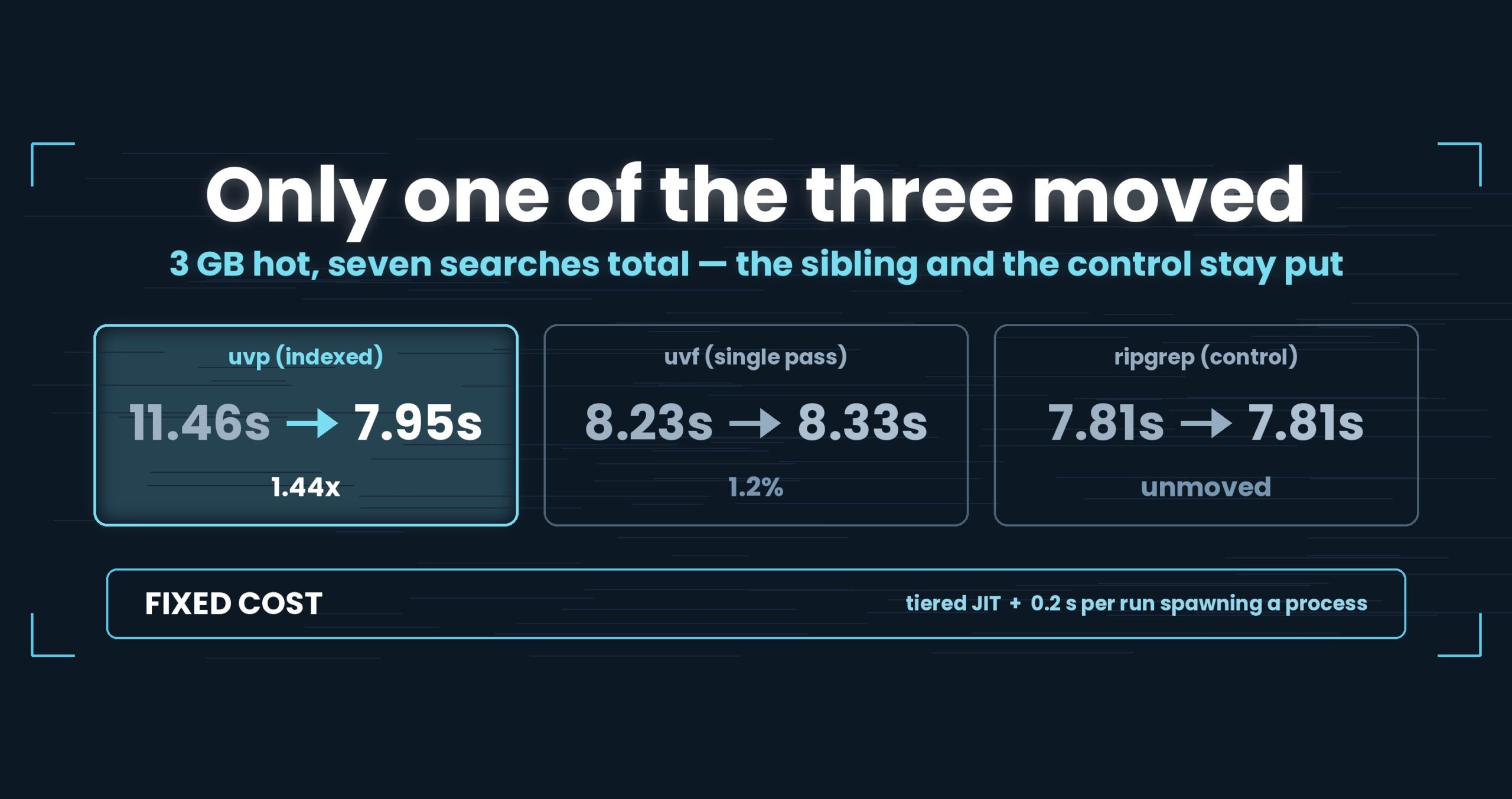
Honestly: the first query with uvp is a little slower than ripgrep, because it builds the .uwvz (compression + index) first — at 50 GB, 59.0 s vs. 54.9–55.8 s = 6–7% (v1.6.6.1). It pays off from the second query on: the same 50 GB search returns in 6.56 s, about 8.4× ripgrep. On small files like 3 GB it is about even — the index buys you less. The free uvf is on par with ripgrep at any size (measured article; Mac M4, 32 GB RAM, external USB SSD, OpenStreetMap XML — one setup, results vary).
Links
- Part 1 — the day we wrote “this is not a speed tool”: https://uvp.y42u.net/en/blog/uwview-fl01-v160-confession-en/
- Part 2 — folding two and a half passes into one: https://uvp.y42u.net/en/blog/uwview-fl02-one-pass-rawgrep-en/
- Part 4 — making regex as fast as a plain literal: https://uvp.y42u.net/en/blog/uwview-fl04-regex-required-literal-en/
- Searching inside
.uwvzwhile it stays compressed: https://uvp.y42u.net/en/blog/uwvz-compressed-archive-search-extract-en/ - Seven compression formats, measured, then chosen: https://uvp.y42u.net/en/blog/log-compression-format-choice-en/
- Source (GitHub): https://github.com/amru195704/UwView
And if huge logs are eating your storage and you want them kept compressed and still searchable, try UwView Pro: a persistent index, search inside the compressed cache, and about 1/9 the storage, with reopening and searching both a step faster (all OSes; one-time purchase or subscription).
From the developer: a list of my apps, Kindle books, and open source is at GitHub: amru195704.