You double-click a log and nothing opens. Notepad says the file is too large; VS Code opens it but search freezes the window. This site has published 14 articles about that moment, covering files from 3GB to 258GB and comparing Notepad, Excel, VS Code, klogg, grep, ripgrep and EmEditor.
This page collects the answers from those 14 articles in one place. Every number was measured by the developer, so please read them with that in mind. Where we lose, we say so.
Note on file-size notation: this page gives file sizes in bytes, with GB in SI units (÷1000³). The file that older articles call “48GB” is the same file as the “51.25GB” here (51,254,526,392 bytes, 47.73 GiB).
- The short answer: files fail to open because the tool tries to hold the whole file in memory. A tool that does not can open 258GB and 4.5 billion lines. For a single search it ties grep and ripgrep; for repeated searches on the same file, the gap opens up
- 1. Why the file will not open — the dead ends of Notepad, Excel, VS Code and splitting
- 2. Opening a file larger than memory — 50GB on a 16GB PC
- 3. How far it can go — measured at 890 million and 4.5 billion lines, plus the theoretical limit
- 4. Searching after you open it — today’s numbers against klogg and ripgrep
- 5. Where we lose or tie
- 6. Choosing a tool by size
- Read each article
- Links
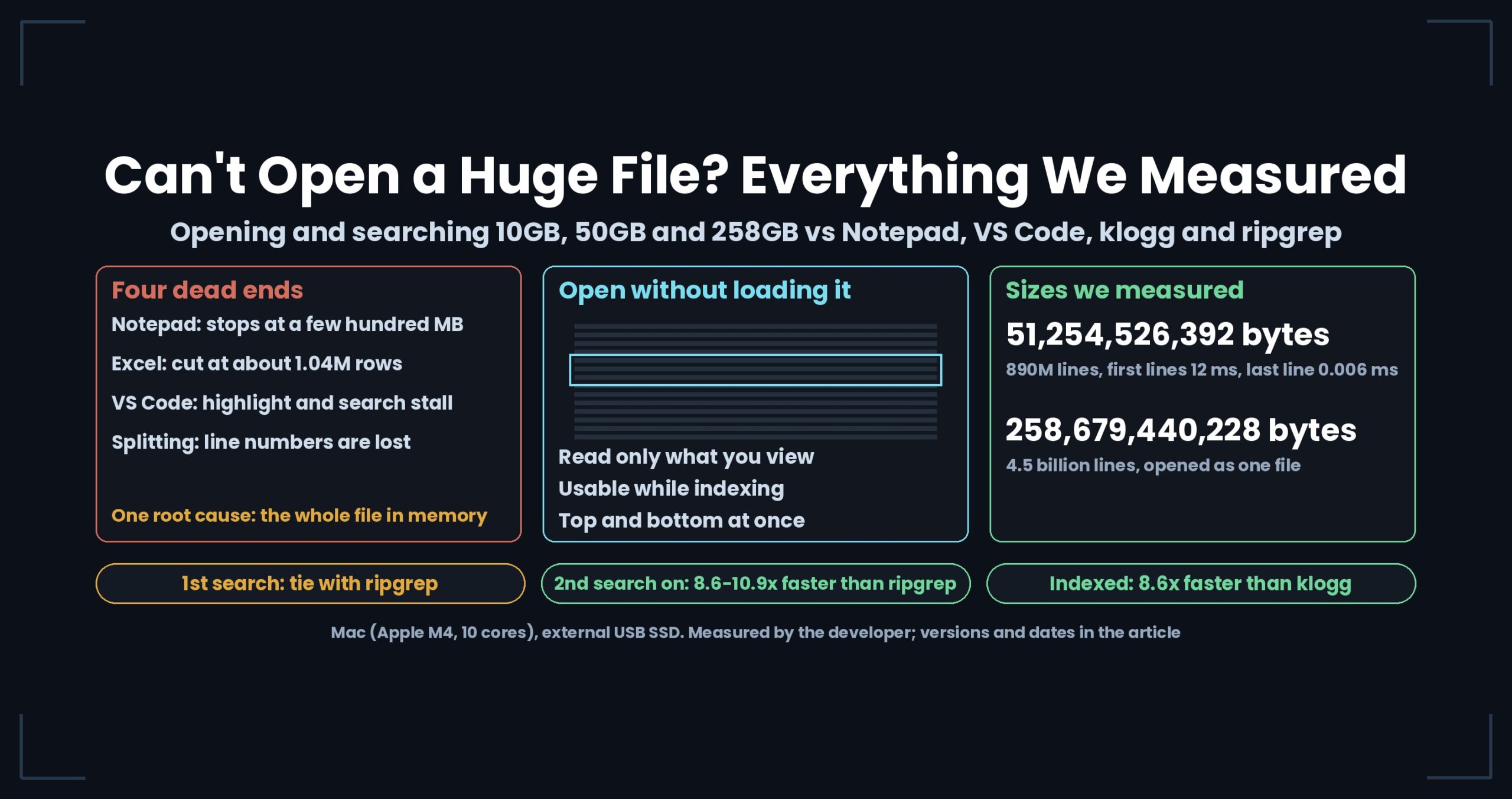
The short answer: files fail to open because the tool tries to hold the whole file in memory. A tool that does not can open 258GB and 4.5 billion lines. For a single search it ties grep and ripgrep; for repeated searches on the same file, the gap opens up
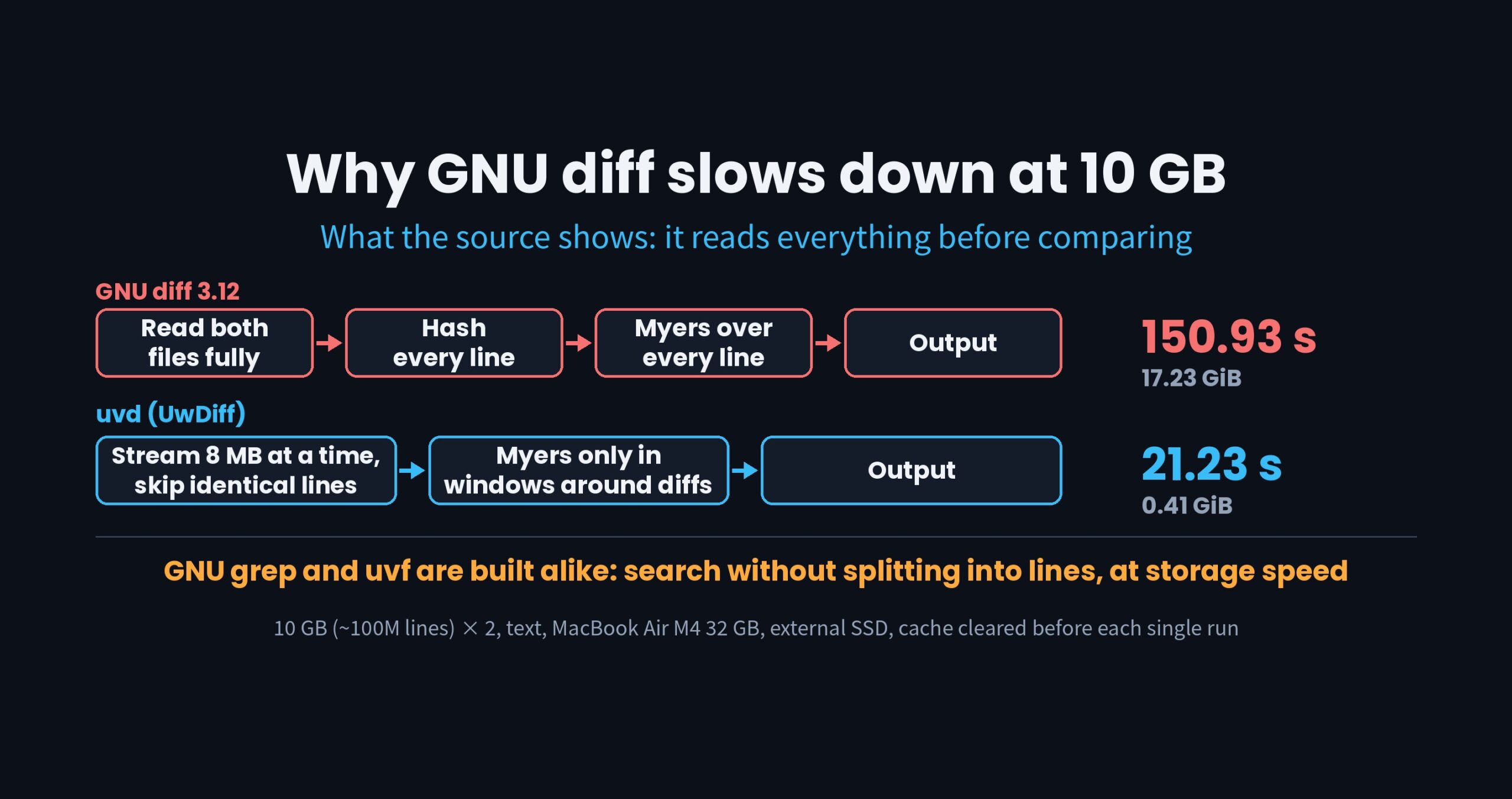
- There is one reason a file will not open. Notepad, Excel and VS Code try to keep the whole file (or its list of lines) in memory for editing. A file larger than memory stops them there.
- A tool that never loads the whole file barely cares about size. UwView — Huge Files, No Waiting showed the first lines of an 890-million-line file in 12 ms and jumped to the last line in 0.006 ms. It has also opened a single 258GB file with 4.5 billion lines.
- Search speed depends on whether you ask once or many times. The first search ties ripgrep. From the second question on the same file, UwView Pro — Huge Files, No Waiting was 8.6–10.9x faster than ripgrep.
1. Why the file will not open — the dead ends of Notepad, Excel, VS Code and splitting
Each of the four usual tools stops at a different place (details in this article).
| Tool | Where it stops |
|---|---|
| Notepad | “File too large” at a few hundred MB |
| Excel | Rows beyond about 1.04 million are not loaded, and the sheet still looks normal |
| VS Code | Even with the limit raised, highlighting stops and search freezes the window |
Splitting (split etc.) |
The pieces open, but line numbers and context are cut. Fifty pieces means fifty searches |
All four share one root cause: they try to hold the whole file in memory. A 50GB log cannot fit into 16GB or 32GB of RAM. Why splitting backfires during incident work is covered in the Windows “file too large to open” article.
2. Opening a file larger than memory — 50GB on a 16GB PC
What you need is a tool that reads only the part you are looking at. UwView works that way, and you can read both the top and the bottom of the file while the index is still being built.
The steps for the case “a 50GB log arrives on a laptop with 16GB of RAM” are in this article. There are three stages: first check that UwView can open the file; if you will search the same file repeatedly, use UwView Pro; if you need to change the contents, use the editing feature that fixes the file without rewriting the original.
Jumping to line 8,342,119 of a 12GB CSV when the parser only told you the line number is covered in the huge-data inspection article.
3. How far it can go — measured at 890 million and 4.5 billion lines, plus the theoretical limit
| File | Bytes | Lines | First lines shown (ms) | Jump to last line (ms) | Index finished (s) |
|---|---|---|---|---|---|
| OpenStreetMap Japan (XML) | 51,254,526,392 | 892,239,125 | 12 | 0.006 | 172.8 |
| OpenStreetMap whole US (XML, one unsplit file) | 258,679,440,228 | 4,509,830,821 | — | — | 328 |
- The Japan figures were measured in July 2026 with the benchmark program bundled with UwView (Mac, external SSD). The line count matched
wc -lexactly, and memory grew by only 33.3MB while indexing (the measurement). - The US figures were measured in July 2026 by operating UwView Pro on screen (a real Mac). From the second open on, the saved index makes opening instant. A full-text search for “New York” took 34.8 s and found 100,492 hits. The file holding the index and the compressed contents (
.uwvz, compression format plus index) is 28.61GB, about 1/9 of the original (the measurement).
We also worked out the theoretical limit. Line numbers and byte offsets are 64-bit integers, so the type limit is about 9.2 quintillion lines (the calculation, with real data). In practice, disk capacity and file-system limits arrive long before that.
4. Searching after you open it — today’s numbers against klogg and ripgrep
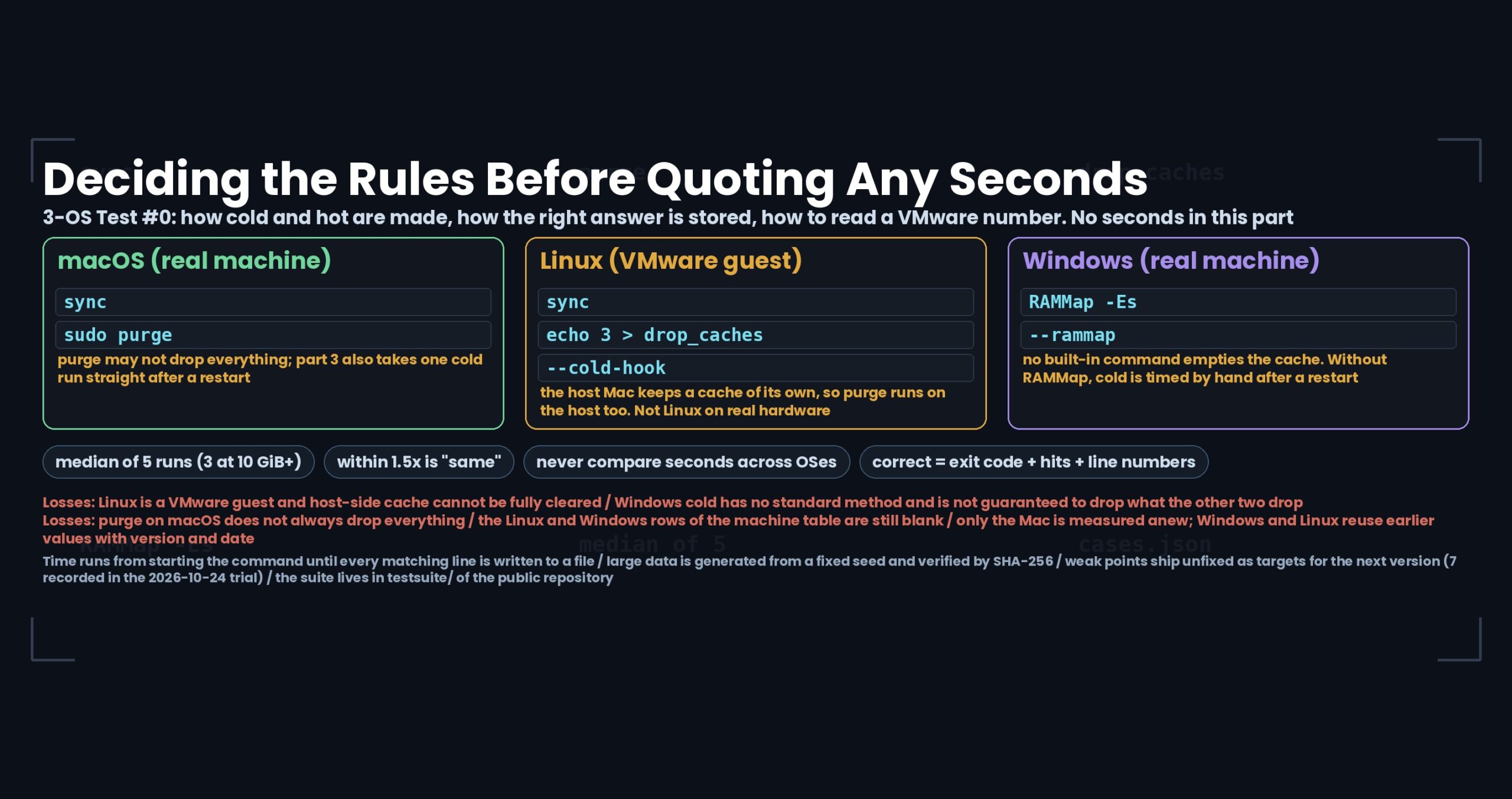
All values below use the same 51,254,526,392-byte file on the same Mac (Apple M4, 10 cores) with an external USB SSD. Seconds are compared only within one machine, and differences under 1.5x are called a tie.
| Comparison | Other tool (s) | UwView (s) | Result | Version and date |
|---|---|---|---|---|
| Open (UwView vs klogg) | 52.55 | 50.44 | Tie | v1.6.6, Sep 2026 |
| Open and search (UwView vs klogg) | 55.59 | 53.50 | Tie | v1.6.6, Sep 2026 |
Search, then read the hit lines on screen (uvf … -open vs klogg) |
109.32 | 50.76 | 2.15x faster than klogg | v1.6.6, Sep 2026 |
| Indexed search (UwView Pro vs klogg) | 55.59 | 6.47 | 8.6x faster than klogg | v1.7.3.1, Sep 28, 2026 |
| First search (UwView Pro vs ripgrep) | — | — | Tie | v1.7.3.6.9, Oct 4, 2026 |
| Second and later searches (UwView Pro vs ripgrep) | 55–70 | 6.45 | 8.6–10.9x faster than ripgrep | v1.7.3.6.9, Oct 4, 2026 |
ripgrep’s second run varies between 55 and 70 seconds each time we measure, so it is given as a range. The current release is v1.9.0 “Full Spectrum”, and UwView Pro’s seconds on the 50GB file are almost unchanged from the values above.
On the 258GB, 4.5-billion-line file, we asked five terms in turn (September 2026). The totals were (the article):
| Tool | Total for 5 questions (s) | Per question (s) |
|---|---|---|
| BSD grep | 1,789.22 | 357.84 |
| ripgrep | 1,389.55 | 277.91 |
| UwView Pro | 161.90 | 32.38 |
We have also compared against klogg in nine cells: three sizes (3GB, 10GB, 48GB) times three kinds of disk (the complete benchmark, July 2026). Search threads level off at 8, giving 3.0x the single-thread speed (the thread-count article).
5. Where we lose or tie
- For a single search, grep or ripgrep is enough. UwView Pro’s first search also ties ripgrep, because it spends that time building the index. The gap appears from the second question.
- UwView (free edition) ties klogg for opening and searching. It only pulls ahead when you chain “search, then read on screen”.
- On a slow disk, every tool lines up. On an external drive reading 0.41GB/s, grep (64.64 s) beat ripgrep (71.49 s) on the 48GB file. On a 963MB/s disk the order reversed. “grep is faster” held only on the slow disk.
- We have measured wrongly, too. Running back-to-back on a fanless Mac skewed results by 54% because of heat. How we fixed the method is kept in the thermal-throttling article.
- All seconds here are from a Mac. We have checked that Windows and Linux work correctly, but we have not compared seconds across operating systems. A series that runs the same procedure on all three OSes starts with part 0.
6. Choosing a tool by size
| What you want to do | Suitable tool |
|---|---|
| Search one term, once | grep, ripgrep |
| Open the file and read surrounding lines while you investigate | UwView |
| Ask the same file many times, or keep it and reopen it often | UwView Pro |
| Edit a file that fits in memory | An editor such as EmEditor |
This table is based on the size-based quick guide that two AIs produced after reading ten of our comparison articles. The underlying numbers are all the developer’s own measurements, not an independent benchmark.
Read each article
- “This File Is Too Large to Open” — Four Go-To Tools That Sink Under Huge Files, and What Comes Next
- File Too Large to Open? How to Investigate a 10GB–50GB Log on Windows Without Splitting It
- How to Open and Search a 50GB Log File on a 16GB PC
- Only the Line Number Survived — Four Techniques for Inspecting Huge Data
- UwView Opens 51GB / 890 Million Lines of Real Data (OSM Japan)
- The Text Viewer That Opened 890 Million Lines: How Far Can It Really Go, Theoretically?
- I Opened 51GB / 890M Lines of Real Data — Then Calculated How Far It Could Theoretically Go
- Opening 258.68 GB and 4.5 Billion Lines — Expanding the Whole US OpenStreetMap to XML and Measuring It in UwView Pro
- Five Questions Against 258 GB and 4.5 Billion Lines — Where grep Loses to a GUI
- UwView Pro Complete Benchmark — 3GB/10GB/48GB x HDD/SSD/Internal SSD: A 9-Cell Comparison with klogg
- How Many Search Threads Is the Right Number? I Measured 0.89 Billion Lines at 1-16 Threads
- My Fanless Mac Skewed My Benchmark by 54% — Thermal Throttling and Round-Robin Measurement
- [AI Grades S–C] I Fed 10 of My Own Benchmark Posts to Gemini and ChatGPT — They Both Drew the Same Map, by File Size
Links
- Download UwView (Windows, macOS, Linux)
- UwView Pro (one license covers every OS)
- Benchmarks
All numbers were measured by the developer and depend on the environment, version and date stated. Your results will vary.