So far I have been the one asking AIs about 50 GB logs. This time I reversed it: I handed Gemini and ChatGPT all ten of my comparison posts — the measured matchups against EmEditor, klogg, ripgrep/grep, UltraEdit, 010 Editor, and Log Voyager — and asked them to organize the results by test size.
Full disclosure first: every data point comes from my own benchmark articles. This is not a neutral third-party review; it is my own measurements, re-organized by AI. What made it interesting is that two AIs, independently, drew nearly the same map.
The combined grade sheet (S–D)
One AI returned a grade table, the other a step-by-step (open / search & replace / save) evaluation. I merged them around the grade table and corrected some grades against the source articles (the UwView family runs at every size up to 50 GB, so the free desktop and Wasm builds are graded too):
| Tool | ~3 GB | ~10 GB | ~48–51 GB | Core use |
|---|---|---|---|---|
| UwView Pro + Edit Upgrade | A | S | S | Search, replace, non-destructive editing of huge files; multi-day work |
| EmEditor | S | B | C | Fast replace on files that fit in RAM; rich editing features |
| UwView Pro | A | S | S | Viewing, search, reopen, compressed archiving of huge single files |
| klogg | A | A | B | Log monitoring and analysis; solid while the file fits in RAM. Also opens and searches 258 GB (re-measured 2026-09-14) |
| UltraEdit | A | B | B | Normal editing at ~3 GB. Viewing and searching are practical up to 50 GB (re-measured 2026-09-14). Replace/save not re-measured |
| UwView free desktop | B | B | B | Free viewer, full file visible from the start (re-indexes every open) |
| UwView Wasm build | C | C | C | Browser viewing and search (completed the 47.73 GB search) |
| grep | — | — | B | One-off plain search over a huge single file |
| ripgrep (rg) | — | — | B | One-off search; its real strength is multi-file traversal |
Legend: S = clearly ahead for this size and use / A = practical / B = completes with waits or scope limits / C = heavy waits, conditional daily use / — = not tested.
Re-measured 2026-09-14 — UltraEdit opens 50 GB (10 GB 13.15 s, 50 GB 1 m 11 s; search 20.1 s / 1 m 23 s). klogg also reaches 258 GB (opened in 4 m 18.3 s).
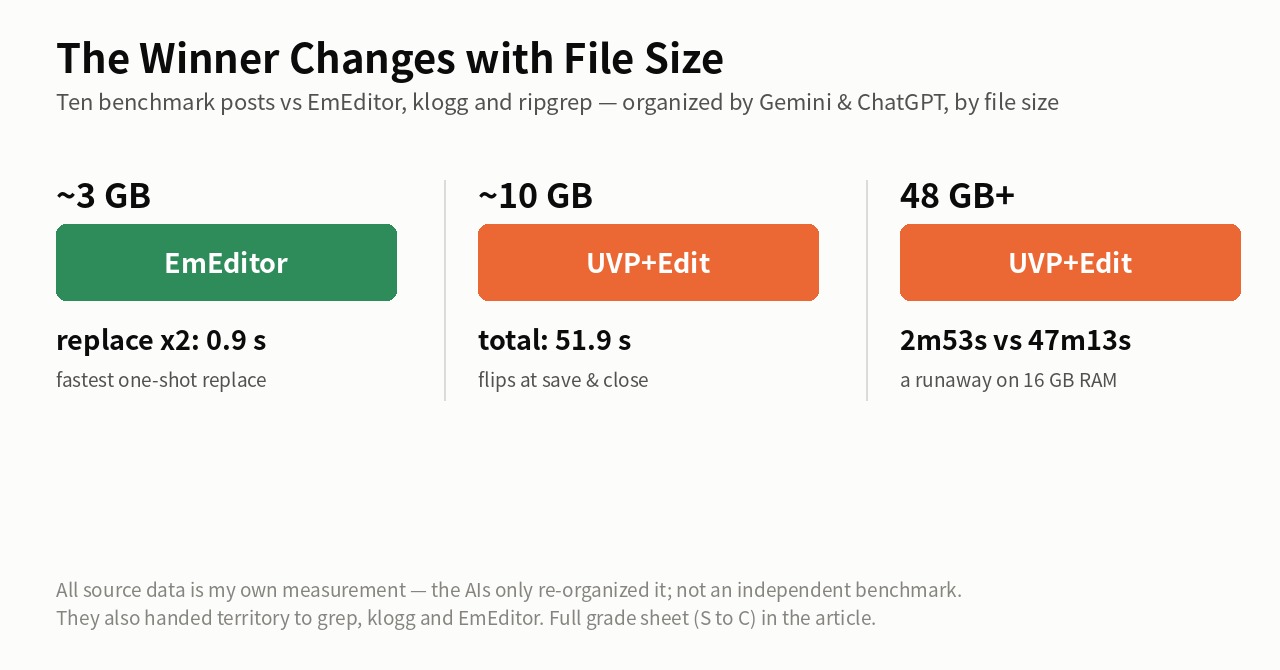
The winner changes with size
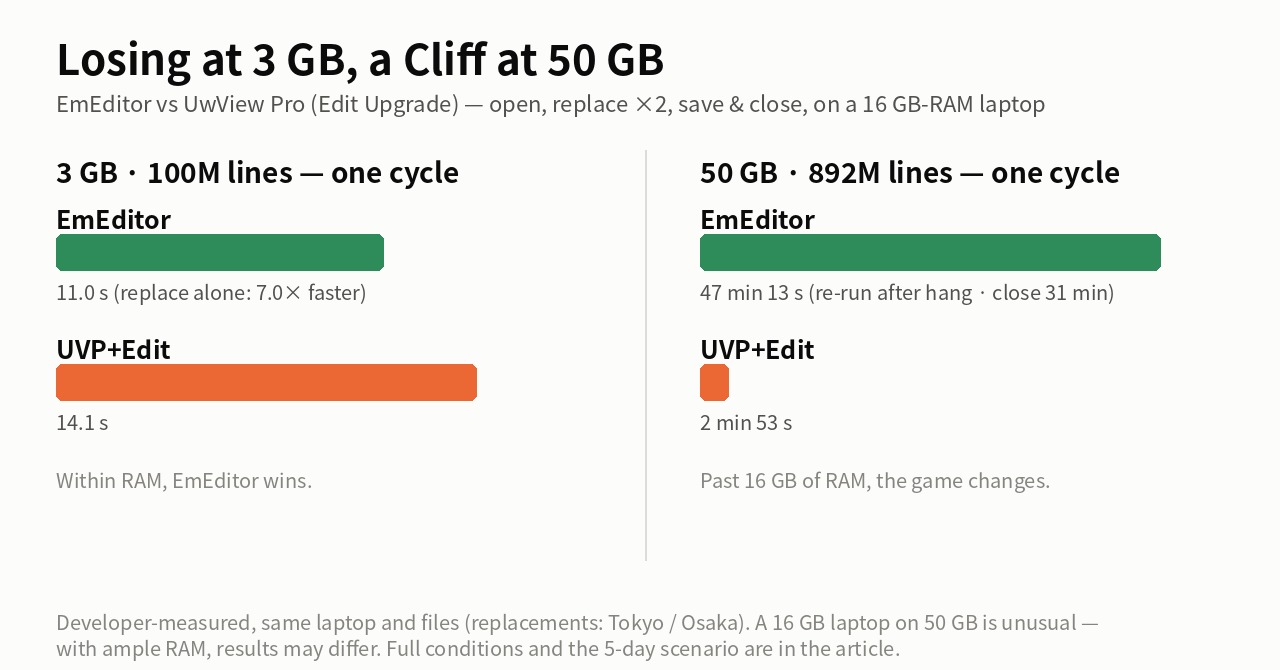
~3 GB (fits in RAM): EmEditor wins outright — two replacements in 0.9 s, 7.0× faster than UVP+Edit, and the total too (11.0 s vs 14.1 s). The AI’s verdict: “best in class for one-shot editing; the replace engine’s raw speed is overwhelming.”
~10 GB (the RAM boundary): everything completes; the gap opens at “save & close.” EmEditor’s 187.3 s close is 81% of its total time — the AI did that arithmetic itself. The ranking flips toward the diff-keeping UVP+Edit (51.91 s).
~48–51 GB (past RAM): on a 16 GB machine this becomes a runaway for UVP+Edit (2 min 53 s vs EmEditor’s 47 min 13 s). With the same caveat the AI and I both attach: this is a 16 GB story — with ample RAM (64 GB+) the picture may change.
The AIs also caught where I lose
Even with my own posts as the source, the summary wasn’t one-sided.
- For a one-off CLI search, grep at 64.64 s is the fastest (beating ripgrep’s 71.49 s — parallelism doesn’t pay on a single huge file)
- Live monitoring, search-while-following, QuickFind, line wrapping: klogg beats my products there
- One-shot replace at 3 GB, macros, CSV editing: EmEditor
- UltraEdit is a feature-rich general editor; its low grades apply only to this narrow huge-single-file workload
Where both AIs agreed: the bottleneck shows up at “save & close,” not at open or search; the moment a file outgrows RAM, the ranking flips; so pick the tool by size and use. Not “my product wins” — a map on which EmEditor, grep, and klogg each own real territory.
Full disclosure
- All ten source posts are my own measurements; the AIs only re-organized them. This is not an independent benchmark
- The data mixes a 16 GB Windows laptop, a 32 GB Mac, and three storage types — seconds across environments are not directly comparable
- The grade definitions come from the AI; some grades (UwView free desktop, the Wasm build, grep/rg, and others) were corrected by the developer against the source articles
- Rerun any of it under the same conditions and I will update this article to match
The tool used
UwView Pro is on sale (Windows, macOS, Linux — one license covers all three; one-time or monthly, with a 14-day free trial — editing features included). For a one-off look, the free UwView is enough.
The ten source posts
- Losing at 3 GB, a Cliff at 50 GB — EmEditor vs UwView Pro + Edit Upgrade
- Editing a 48 GB File — the EmEditor comparison
- A 48 GB File “Opens” — That Doesn’t Mean You Can Investigate It
- An Honest Comparison with klogg [Ver1.1.1, Complete Edition]
- UwView Pro Benchmark, Complete Edition — 9 Cells vs klogg
- I Rebuilt My 30-Year-Old Viewer — It Matched klogg
- Is ripgrep Really the Fastest on a 51 GB Single File?
- 010 Editor, UltraEdit, and UwView Pro + Edit on Mac ARM
From the developer: a list of my apps, Kindle books and public projects is on GitHub: amru195704.
A note
The information in this article is provided for reference purposes only, and we do not guarantee its accuracy or completeness. All measurements reflect the specific environments described above and may differ on other hardware. If you notice any errors or inaccuracies, please let us know in the comments and we will review and correct them.