
A few days ago I measured the speed gap between the native and browser builds using a 3.16 GB, 100-million-line XML file carved out of Japan. To be honest, while doing it I kept thinking: at 100 million lines, this thing still isn’t trying.
UwView is built around the claim “open any huge file — instantly readable and searchable.” If you’re going to make that claim, you owe it to yourself to find out where it breaks. So I went and got the OpenStreetMap data for the entire United States.
- The test file: a single 258.68 GB XML
- Measured results (macOS, real hardware, UwView Pro)
- You can read to the end while the index is still being built
- What 4.5 billion lines looks like
- Search took about 34 seconds regardless of the word
- The sidecar is 28.61 GB — about 11% of the original
- Honest notes
- Summary
The test file: a single 258.68 GB XML
I took the OpenStreetMap extract for the whole US (PBF format, about 11 GB) and expanded it to XML with osmium cat. About 15 minutes later, this came out:
us-260726.osm
258,679,440,228 bytes  =  258.68 GB (240.9 GiB)
ls -lh reports “241G” — that’s the GiB spelling of the same file. It is one single XML file, not split.
Why build such a thing? Because genuinely huge files are surprisingly hard to come by. Logs get rotated. Dumps get chunked. An unsplit, near-terabyte single file is something you basically have to make yourself if you want to hit a viewer as hard as you can.
Measured results (macOS, real hardware, UwView Pro)
| Item | Measured | Conditions |
|---|---|---|
| First open (until indexing completes) | 5 min 28 s (328 s) | full scan of 258.68 GB = about 789 MB/s |
| Second open onward | instant | with the .uwvz sidecar (UwView Pro) |
| Total lines | 4,509,830,821 (4.5 billion) | determined once indexing finished |
| Full-text search for “New York” | 34.8 s / 100,492 hits | after indexing |
| Full-text search for “Boston” | about 34 s | after indexing |
.uwvz sidecar size |
28.61 GB (28,608,409,551 bytes) | about 11% of the original |
All figures were measured by the developer on a real Mac, timed from the UI with a stopwatch, at second-level precision.
You can read to the end while the index is still being built
Here’s the screen I most want to show.
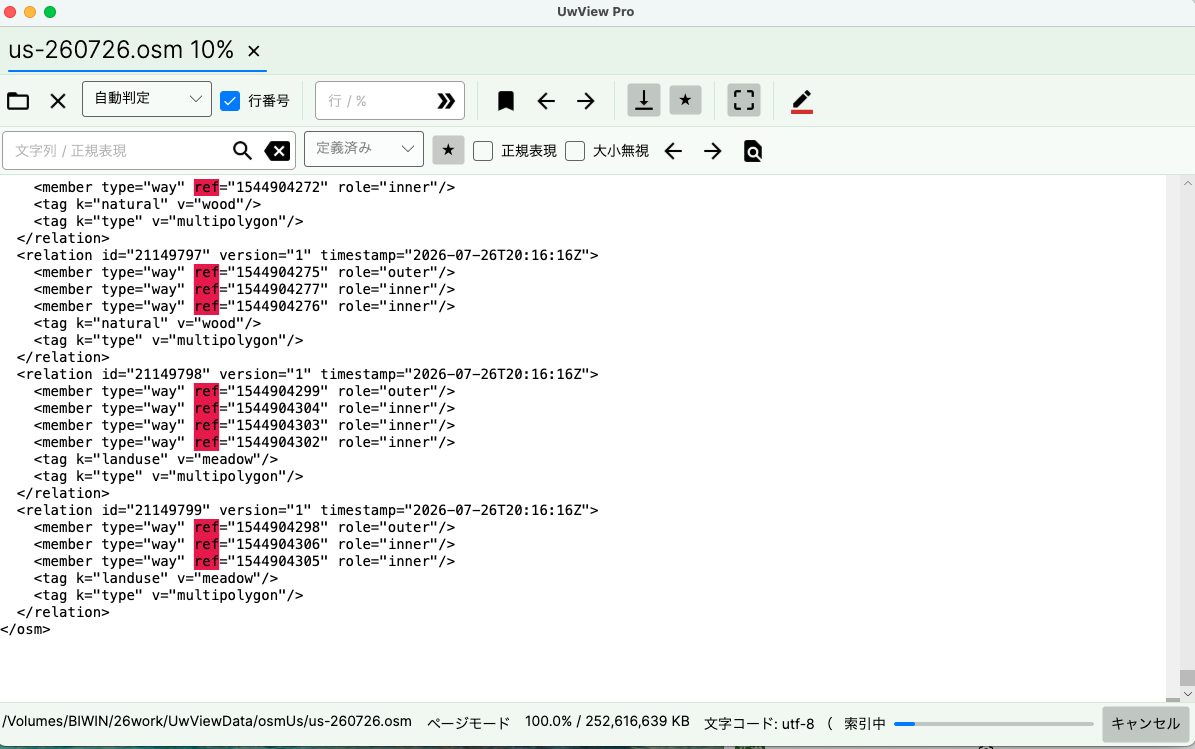
The tab reads us-260726.osm 10%, and the status bar shows an “indexing” progress bar with a cancel button. In other words, only 10% of the index exists. Even so, the body is showing real <relation> and <member type="way" ref="..."> elements, and it scrolls.
This is UwView’s page-mode instant open: it never loads the whole file, it reads and paints only what’s on screen. So even at 258.68 GB, content appears the moment you pick the file. Indexing proceeds behind that, and line numbers appear when it finishes.
Most viewers show you only the head of the file until indexing completes. For 5 minutes and 28 seconds, do you stare at the first page — or do you start reading? That difference matters most exactly when you’re in trouble.
Note that the line-number gutter is still empty at this stage. Line numbers arrive after indexing — that’s by design, and I’d rather state it plainly than hide it.
What 4.5 billion lines looks like
Here’s the screen once indexing finished.
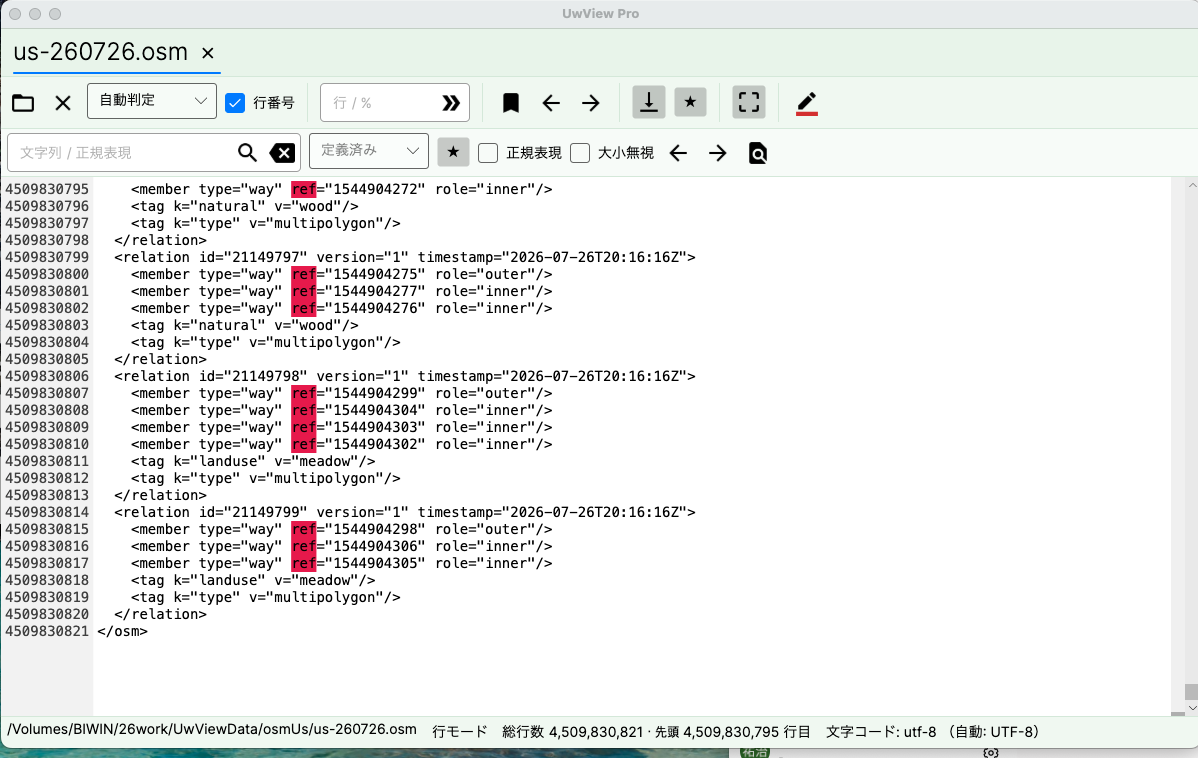
The status bar reads “line mode | total 4,509,830,821 lines | top line 4,509,830,795.” I jumped straight to the end, and the final </osm> is right there.
4.5 billion lines. Once the line numbers reach ten digits it does get a little funny to look at. Even here, jumping is instantaneous — once you’re in line mode the index does the work, and file size stops being something you feel.
(The screenshots show the Japanese UI; the English build has the same layout.)
Search took about 34 seconds regardless of the word
The most interesting result was search.
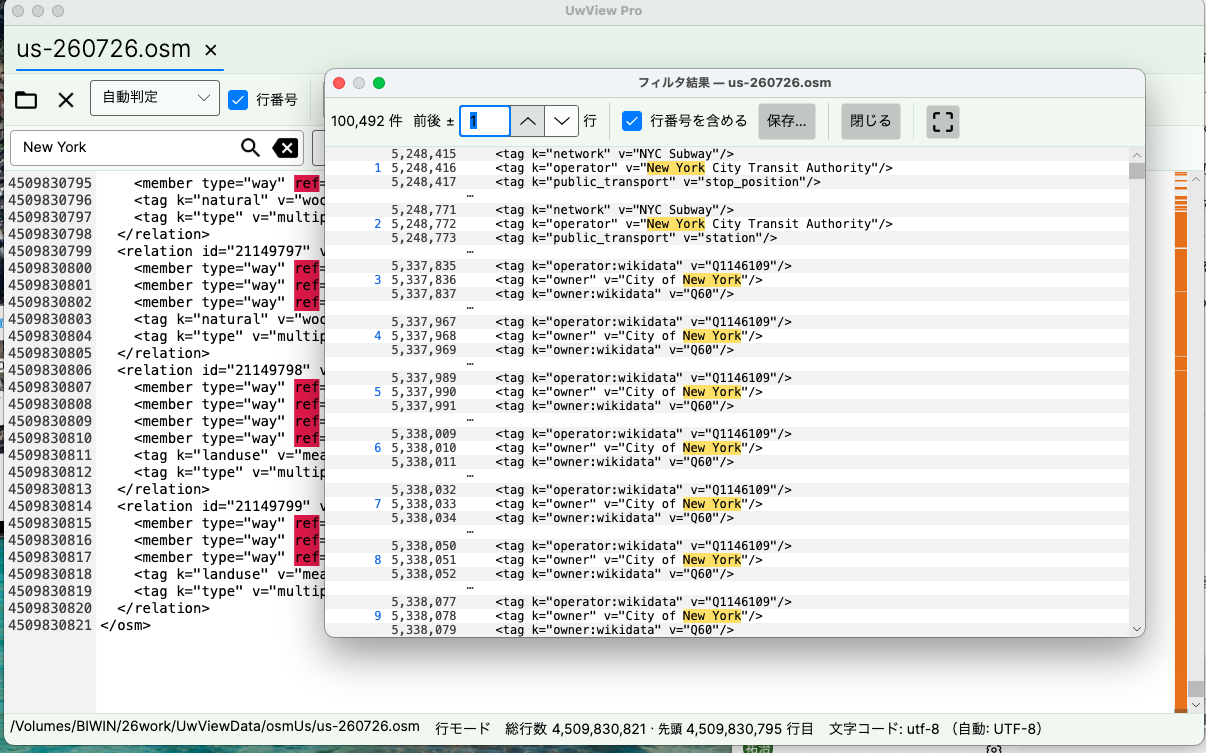
“New York” returned 100,492 hits, listed in the filter results window with line numbers and ±1 line of context. Lines like <tag k="operator" v="New York City Transit Authority"/> and <tag k="owner" v="City of New York"/> came up — very much OSM.
That search took 34.8 seconds. Searching for “Boston” took about 34 seconds. The hit counts are wildly different; the time is essentially the same.
So UwView’s full-text search is bound by how much data it scans, not how many hits it finds. In practice that’s a quietly useful property: you don’t have to guess that a rare word will be fast or a common word slow. If you know any word takes about 34 seconds, you can decide whether to go make coffee without thinking about it.
Dividing 258.68 GB by 34 seconds gives about 7.6 GB/s, but that is a nominal figure. UwView Pro’s search goes through the saved compressed cache (28.61 GB), so the data actually being read is far smaller. This is not a claim that an SSD hit 7.6 GB/s, and I’d rather say so.
The sidecar is 28.61 GB — about 11% of the original
On the first open, UwView Pro saves the index and compressed data into a .uwvz sidecar file. Here it came to 28.61 GB (28,608,409,551 bytes) — about 11% of the original 258.68 GB.
That 28.61 GB is what makes the second open instant. Five minutes and 28 seconds becomes zero. Even at near-terabyte scale, that value proposition held.
And 11% is also a storage story. Instead of keeping the 258.68 GB XML around, you can keep the 28.61 GB sidecar and open and search it directly when you need it. That’s the shape of what UwView Pro proposes for huge logs that are eating your disk.
Honest notes
- Everything here was measured on real macOS hardware with a single file. Different machines and storage will produce different numbers.
- The 5 min 28 s first open cannot be shortened, because the 258.68 GB has to be read through once. UwView’s claim is not “the first open is fastest” — it’s that you can read during the first open, and that the second open onward is instant with line numbers.
- Search results come back quickly only after indexing. You can browse while indexing runs, but a full-text search needs the index to complete.
- The instant second open is a UwView Pro feature. The free UwView (UVF) doesn’t save a sidecar, so it rebuilds the index in the background on every open — though browsing and searching are available from the first open just the same.
- The 34.8 s and ~34 s search times are each a single measurement, not an average of several runs.
- “About 789 MB/s” and “about 7.6 GB/s” are derived figures (file size divided by elapsed time), not storage benchmark results.
Summary
The point of testing at 258.68 GB and 4.5 billion lines — a size you’ll rarely meet in real work — wasn’t to brag about performance. It was to find out whether the design claims survive.
- Indexing at 10%, and the whole file was already browsable and scrollable (screen 1)
- 4.5 billion lines, and jumping to the end was instantaneous (screen 2)
- Search took about 34 seconds regardless of the word, and 100,000+ hits came back with context (screen 3)
- A 28.61 GB sidecar (about 11%) made every subsequent open instant
“Open any huge file — instantly readable and searchable.” Near a terabyte, I didn’t have to change how I say it.
UwView is free. If you work with big logs or dumps, try it on the largest file you have. And if it breaks, please tell me.
Related Articles
- How Much Slower Is the Same UwView in a Browser? — Free Native UVF vs the WASM Build on the Same File
- Why We Split Search Results Into a Separate Window — Jump, Save, and Context Lines You Can Use “While Looking” With the Filter Popup
- UwView Ver1.1.1 — Right-Click to Color-Code Instantly, Reopen and Pick Up Right Where You Left Off
- UwView on GitHub — a Windows 95-Era Huge-Text Viewer Rebuilt for 200 Million Lines and Every OS
Sources
- amru195704/UwView (GitHub) https://github.com/amru195704/UwView
- OpenStreetMap contributors (data, ODbL) https://www.openstreetmap.org/copyright
- Geofabrik Download Server (OSM extracts) https://download.geofabrik.de/
- osmium-tool (used for PBF to XML expansion) https://osmcode.org/osmium-tool/
Premium edition: UwView Pro (on sale, Windows/macOS/Linux)
The commercial edition: “View and search huge files instantly, any time; save the index so the second time onward it opens instantly with line numbers; searching up to about 9x faster; store logs at about 1/9 the size and open them as-is.” one-time or monthly.
→ https://uvp.y42u.net/en/pro-en/
From the developer: a list of my apps, Kindle books and public projects is on GitHub: amru195704.
Note
The information in this article is provided for reference only, and its accuracy or completeness is not guaranteed. Features and figures reflect the state at the time of writing and may change in future updates. If you notice any errors or inaccuracies, please let us know in the comments and we will review and correct them.
コメント