This is what happened when UwView Pro’s Edit Upgrade — Huge Files, No Rewriting was pointed at a 100-million-line file. The build measured here was named UwEditor Pro, and the screenshots show that name.
What I did was simple: open a 10.09GB XML file and replace every occurrence of 東京 (Tokyo, in Japanese) with Tokyo.
Here is the result first.
| Operation | Measured |
|---|---|
Search for 東京 (21,948 matching lines) |
3.7 s |
Replace all 東京 → Tokyo (21,994 occurrences) |
16.8 s |
| Extra disk space the edit consumed | 3.7 MB |
And — the original 10.09GB file was not modified by a single byte.
The file
| File | A split of the OpenStreetMap Japan extract, japan-dv-aa (XML) |
| Size | 10.09 GB |
| Lines | 100,000,000 (exactly 100 million) |
| Encoding | UTF-8 (auto-detected) |
| Machine | macOS / UwView Pro (Edit) |
| Storage | External USB SSD (measured with dd at 0.41 GB/s), not the internal drive |
1. Open it
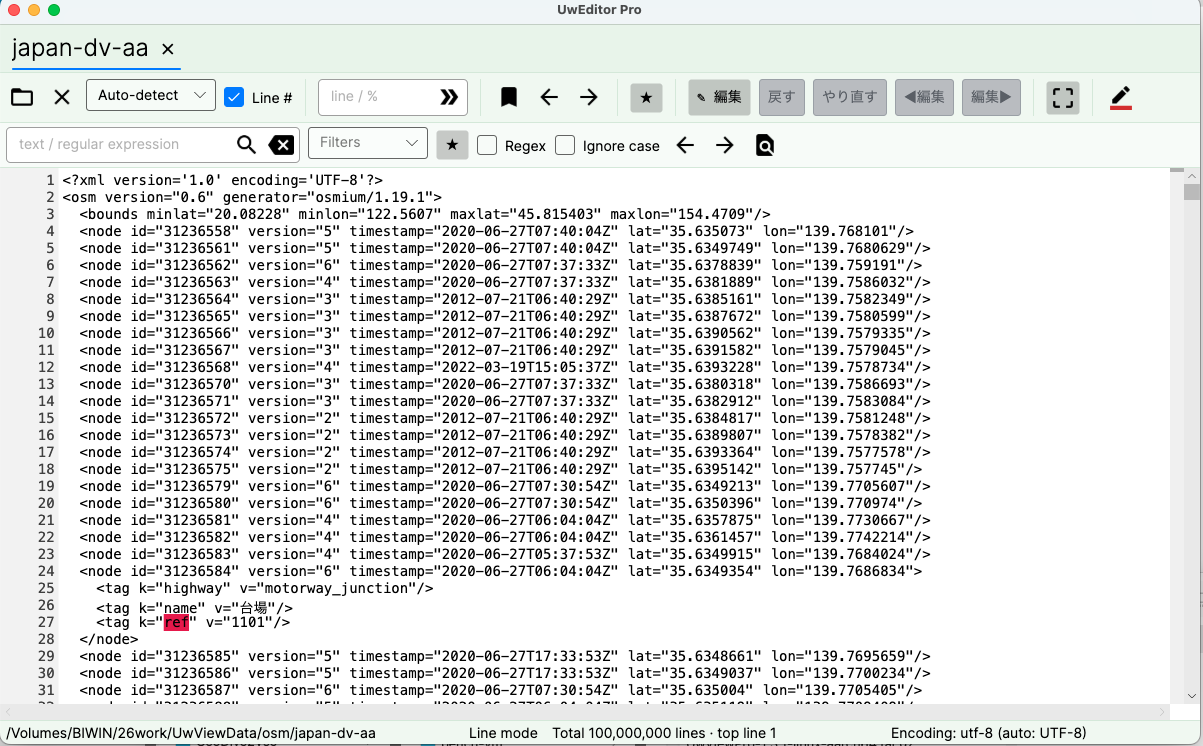
The status bar reads Total 100,000,000 lines. This part is the same as UwView Pro: the whole file is readable, scrollable and searchable the moment it opens. The index already lives in the .uwvz compressed cache, so line numbers are there from the start.
2. Enter edit mode
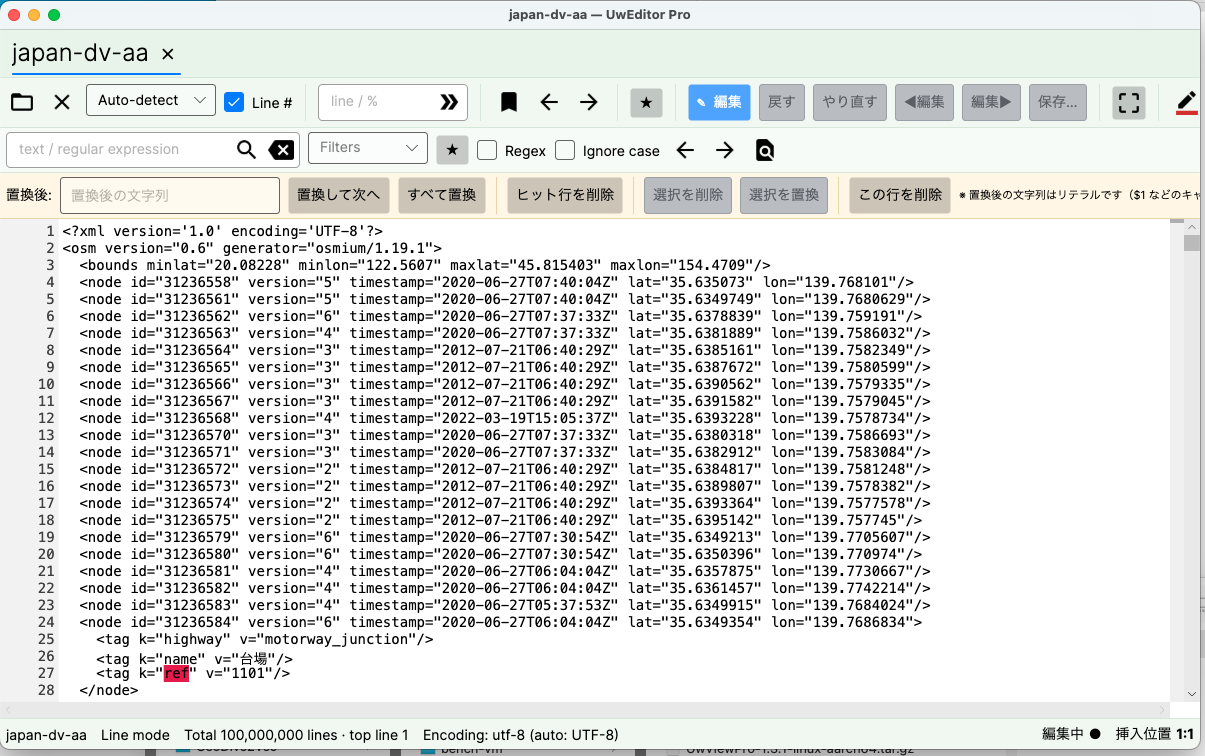
Pressing Edit in the toolbar reveals a replace bar under the search bar. Alongside Replace next and Replace all there are Delete matching lines, Delete selection, Replace selection and Delete this line — the operations you actually reach for when cleaning up logs.
3. Count what you are about to change
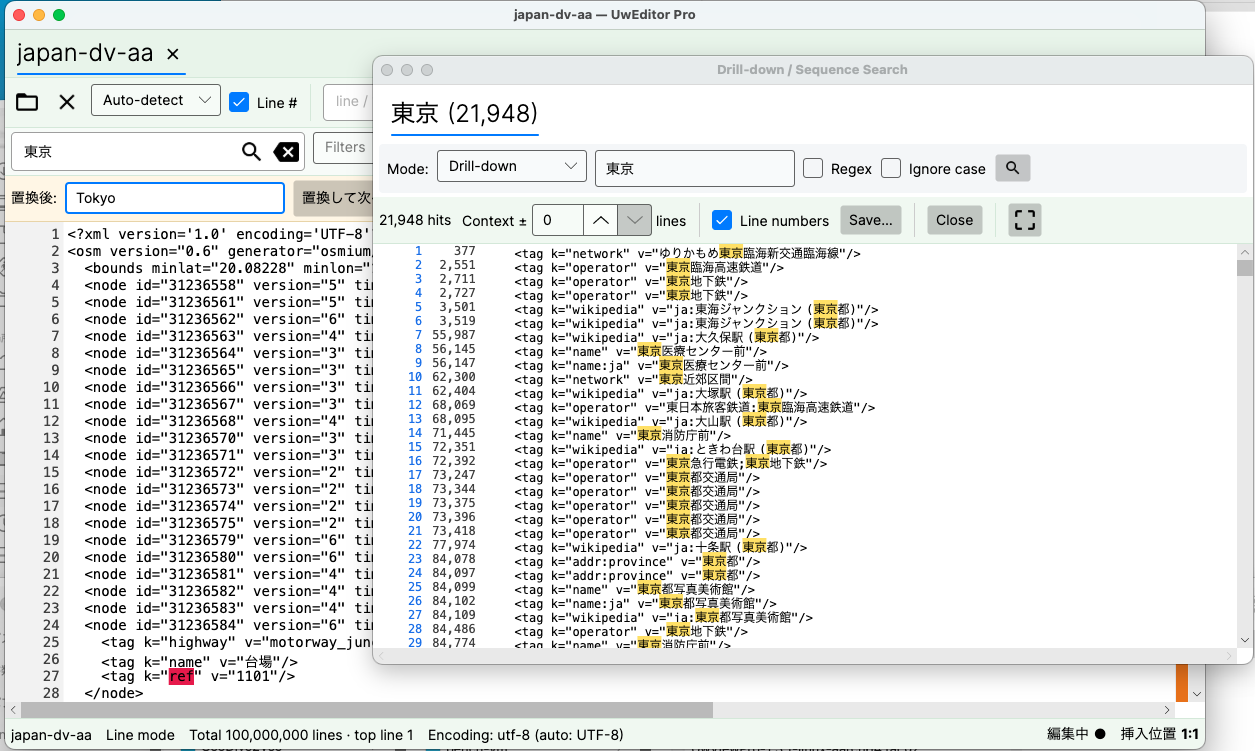
Before replacing anything, I counted with drill-down search: 21,948 hits in 3.7 seconds. A hundred million lines in under four seconds is possible because the search reads the compressed index (.uwvz, 1.38GB) rather than the raw 10.09GB — and this is on an external USB SSD measured at 0.41 GB/s, not the internal drive (3.29 GB/s on the same machine).
The list shows 東京 scattered across operator names, place names and Wikipedia references — <tag k="operator" v="東京臨海高速鉄道"/>, <tag k="wikipedia" v="ja:大久保駅 (東京都)"/>, and so on.
4. Replace all
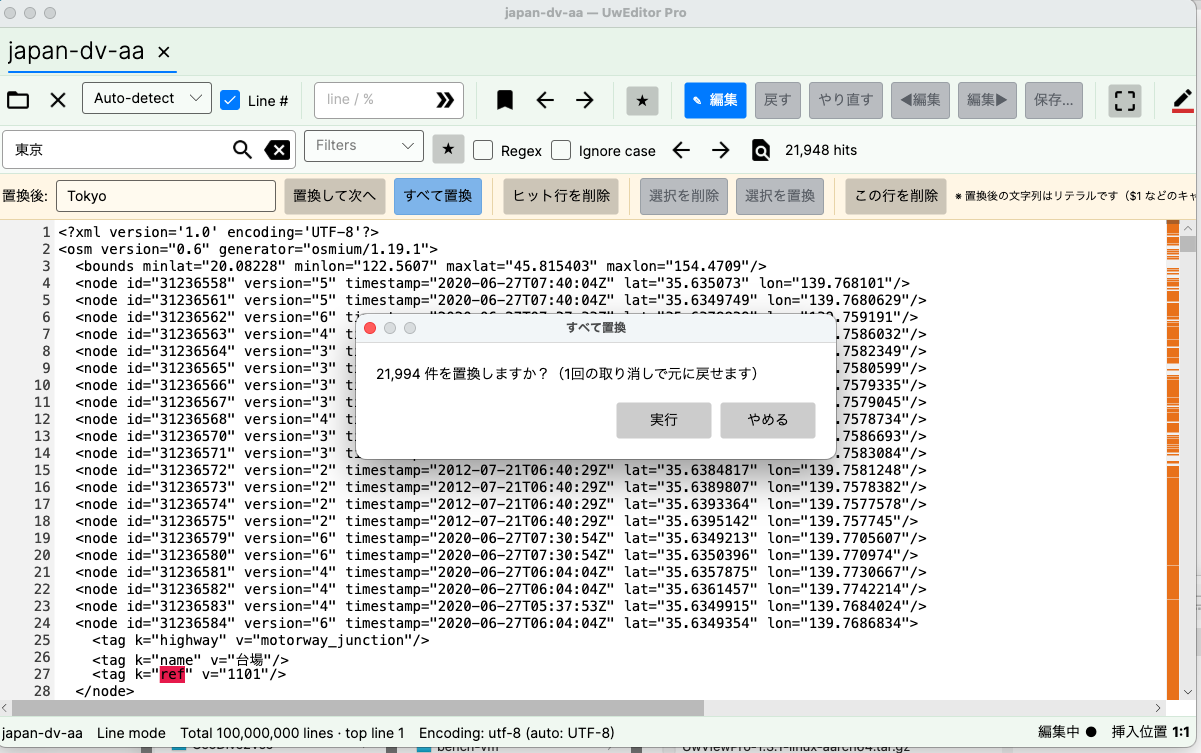
Type Tokyo into the replacement field, press Replace all, and a confirmation appears:
Replace 21,994 occurrences? (A single undo will revert this.)
Why 21,948 and 21,994 disagree
The search says 21,948, the replace says 21,994 — a gap of 46. That is not a bug. The two numbers count different things.
- The search list counts lines that contain a match.
- The replace counts occurrences that will actually be rewritten.
One line in the list above reads v="東京急行電鉄;東京地下鉄" — two occurrences on a single line. Forty-six lines were like that.
5. Run it
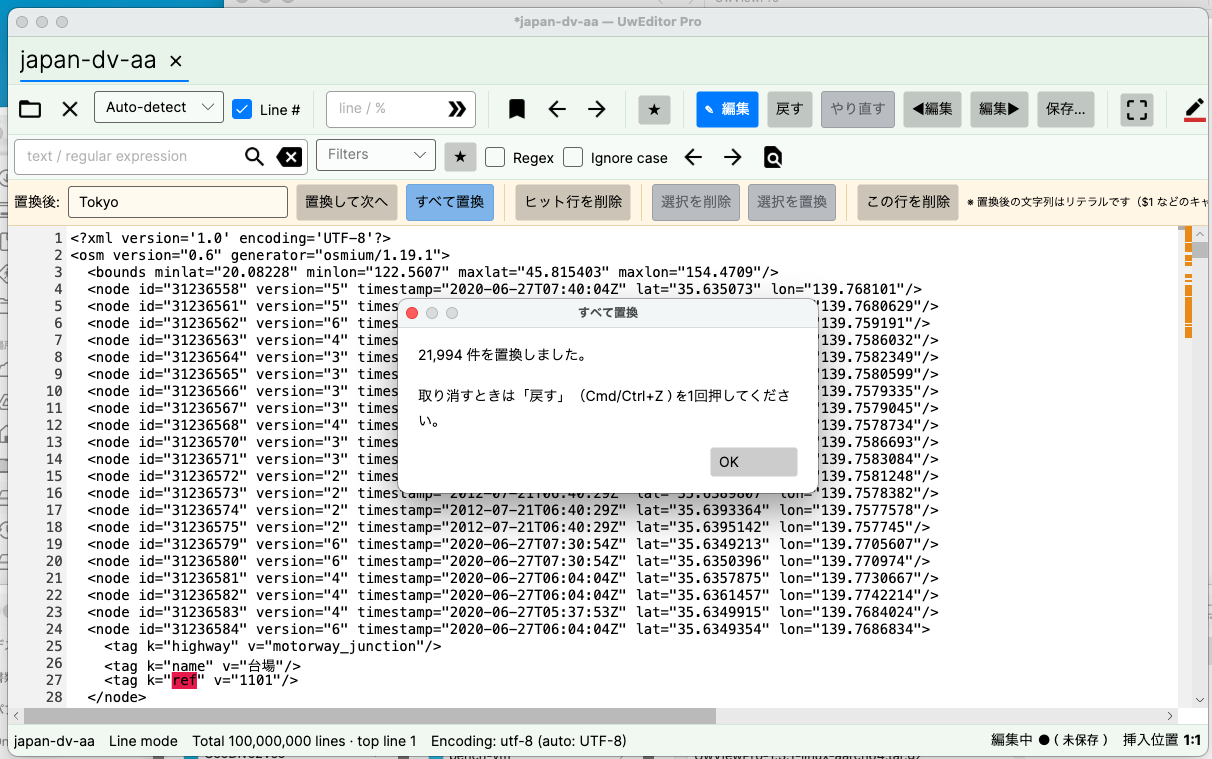
21,994 occurrences replaced. Press Undo (Cmd/Ctrl+Z) once to revert.
16.8 seconds, for 21,994 changes inside 100 million lines.
And the whole thing reverts with one undo. The replacements are not 21,994 separate history entries; they are one operation.
6. Verify
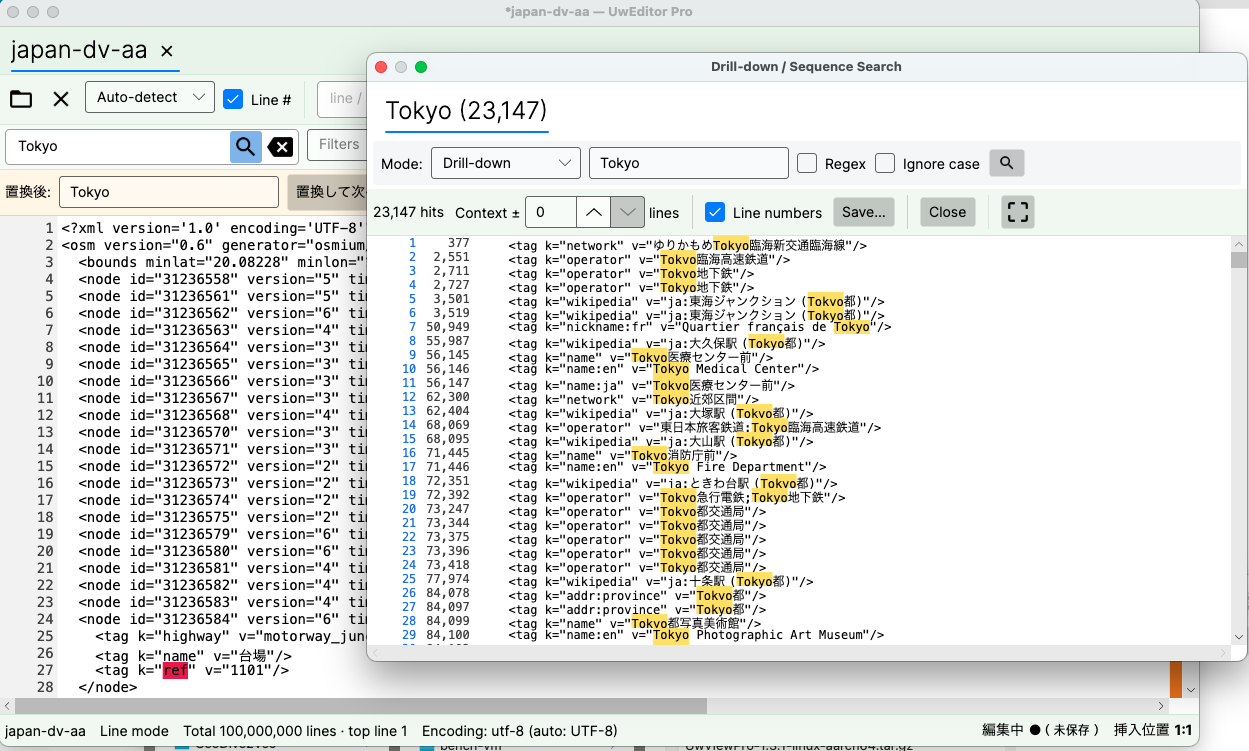
Searching again for Tokyo now returns 23,147 hits.
The file already contained Tokyo on 1,153 lines (in name:en tags, mostly), and the replacement stacked on top of that. Look closely and you can see entries like v="ja:大塚駅 (Tokyo都)" — nonsense as Japanese, but exactly what a correct replacement should produce.
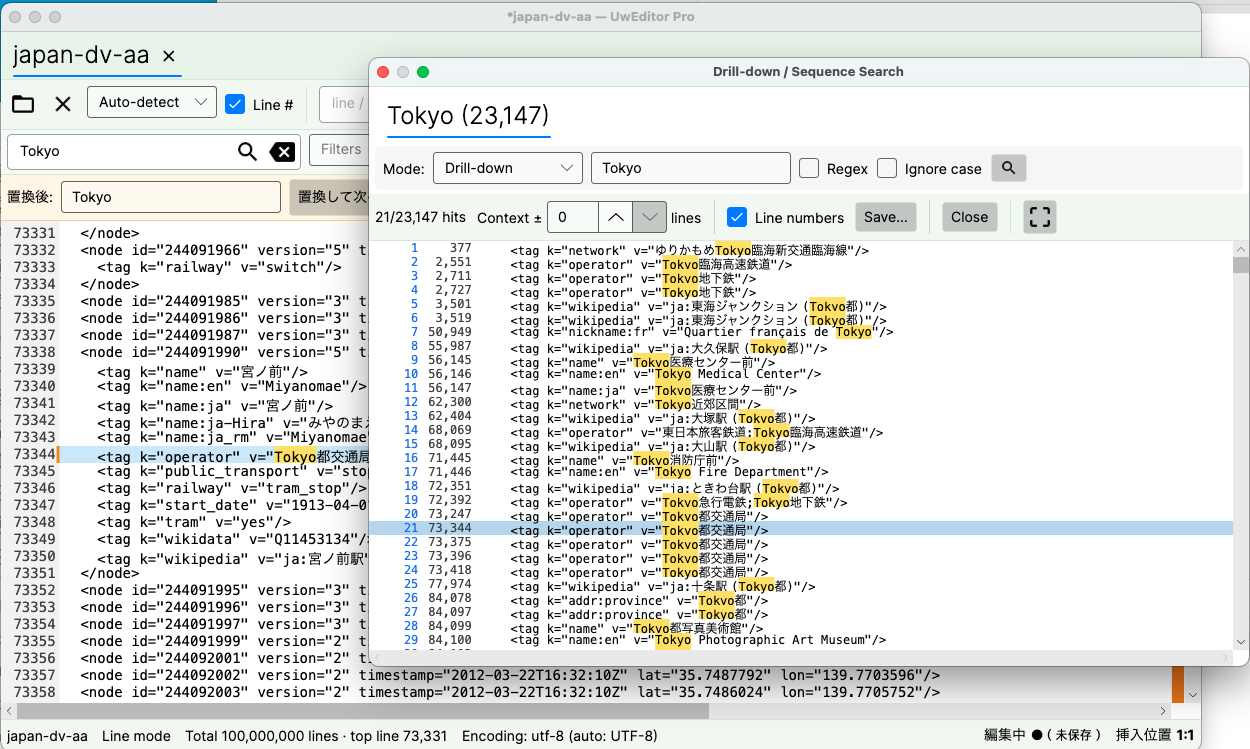
Jumping from a result lands you on the line itself — here, around line 73,000. Viewing and searching stay fully alive while the file is being edited.
7. Now look at the file sizes
This is the actual point of the article.
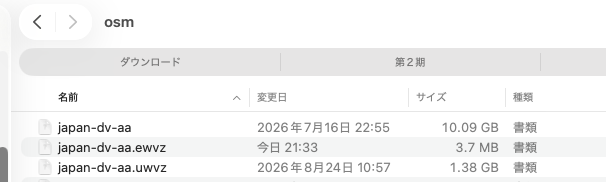
| File | Size | Modified | What it is |
|---|---|---|---|
japan-dv-aa |
10.09 GB | July 16, 2026 | the original XML |
japan-dv-aa.uwvz |
1.38 GB | August 24, 2026 | compressed cache + index (~1/7) |
japan-dv-aa.ewvz |
3.7 MB | today, 21:33 | the edit |
Look at the modification dates. Twenty-two thousand changes were made, and neither the original (July 16) nor the index (August 24) moved. They were never touched.
The only thing created today is a 3.7 MB .ewvz — 0.037% of the 10.09GB file.
Why it works this way
A normal text editor rewrites the entire file every time you save. Change one line in a 10GB file and you write 10GB back out. That is why editing huge files is slow, and why a failure halfway through can destroy the original.
The Edit Upgrade uses non-destructive overlay editing.
- The
.uwvz(compressed cache + index) is immutable. It is only ever read. - Edits accumulate as a diff in
.ewvz— a record of what was changed to what. - What you see on screen is the composite of the two.
So the cost of an edit does not depend on the size of the file. Whether it is 10GB or 100GB, changing one line costs the same.
There is a second, quieter property that matters in practice. In the screenshots above the app still reports “editing (unsaved)” — and the .ewvz is already on disk. If it crashes before you save, your edits are still there.
Being straight about the limits
- Editing is the Edit Upgrade license of UwView Pro V1.4.0 and later.
- These are single measurements on macOS, against a file on an external USB SSD — not the internal drive — that had already been converted to
.uwvz. The internal SSD on the same machine runs at 3.29 GB/s, so these numbers should shrink there (same machine and same method as our 3-size, 3-storage benchmark). Slower storage will stretch them instead. - 16.8 seconds is the cost of editing, not of writing out. Pressing Save reconstructs a new
.uwvzfrom the.uwvz+.ewvzin a single pass, and that does take time proportional to size. - [Update, Aug 29, 2026] We measured it. On Windows, with a 48 GB file, the write-out took 1 min 33 s.
Saving the same file in EmEditor — which rewrites the whole file — took 31 minutes, about 20x longer.
Details → Editing a 48 GB file, and saving mid-way - The edit target is a
.uwvzfile. The Edit Upgrade standardises on.uwvzas the thing it edits.
How it relates to UwView Pro
The drill-down search used above and the instant reopen belong to the View License; the editing described here is the Edit Upgrade, added on top of it. Prices are on the product page.
If 10GB costs 0.037%, 100GB should cost about the same proportion. If you have a file that breaks it, we would like to hear about it — that is how we found out 890 million lines was not the limit.