Adding -i made it four times slower.
Same file, same word. The only difference is whether case is ignored — and the clock quadruples. We went looking in the matching code. The culprit was not there.
Getting onto the fast path meant first settling a question about one particular character.
- Up front: we moved case-insensitive matching off the decode path
- The problem: ignoring case cost four times as much
- The cause: we rebuilt every line before looking at it
- Why “just fold A/a in the bytes” isn’t obviously safe
- We counted: one exception in 65,536
- The fix: two tiers, with the slow one reserved for k
- The other trap: not every encoding may be searched as bytes
- The numbers: 2.72 → 0.66 s, even at 50 GB, still losing on -E -i
- The general lesson: “how many exceptions?” is usually a countable question
- Tools used
- Links
Up front: we moved case-insensitive matching off the decode path
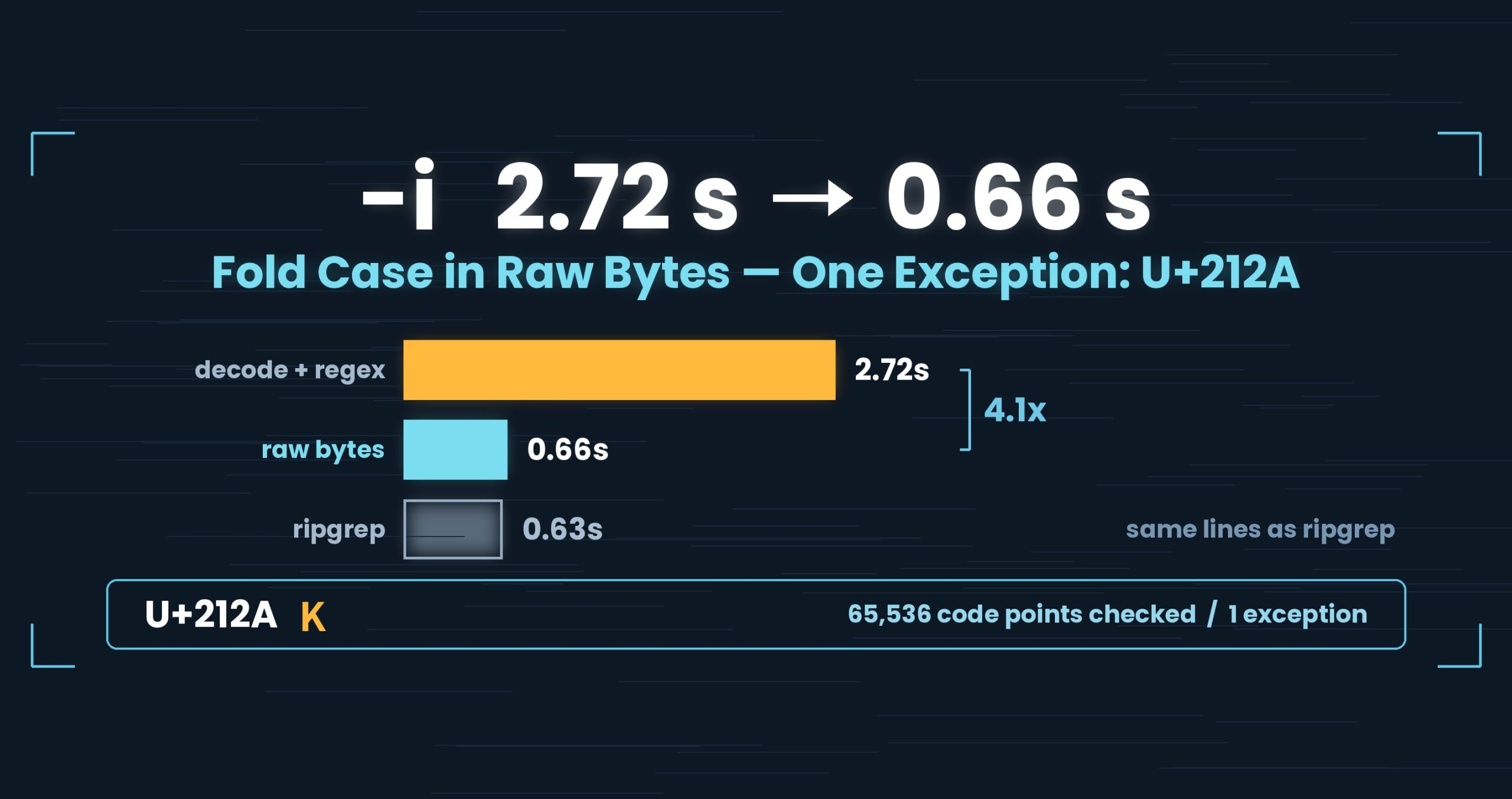
-i used to decode each line to UTF-16 and run an IgnoreCase regex over it. Folding case in the raw bytes instead took a 3 GB warm search from 2.72 s to 0.66 s (ripgrep: 0.63 s — level). What made byte-level folding safe was a measurement, not a hunch: across the entire BMP, the only non-ASCII character that .NET’s IgnoreCase | CultureInvariant matches against an ASCII letter is U+212A, the Kelvin sign. At 50 GB it comes out even (ripgrep 113.85 s vs. uvf 108.58 s, cold + warm combined, 1.05×). And we still lose on -E -i: 1.67 s against ripgrep’s 0.60 s at 3 GB warm, 2.8× behind. All figures come from one setup; details at the end.
About this series. “First Light” is the pet name of UwView v1.6.6 — the release where both the GUI and the command line
started opening and searching a huge file in a single pass. This series follows what that took, one fix at a time.
This is part 3: what-ilooks like once it rides that single pass (v1.6.3).
The problem: ignoring case cost four times as much
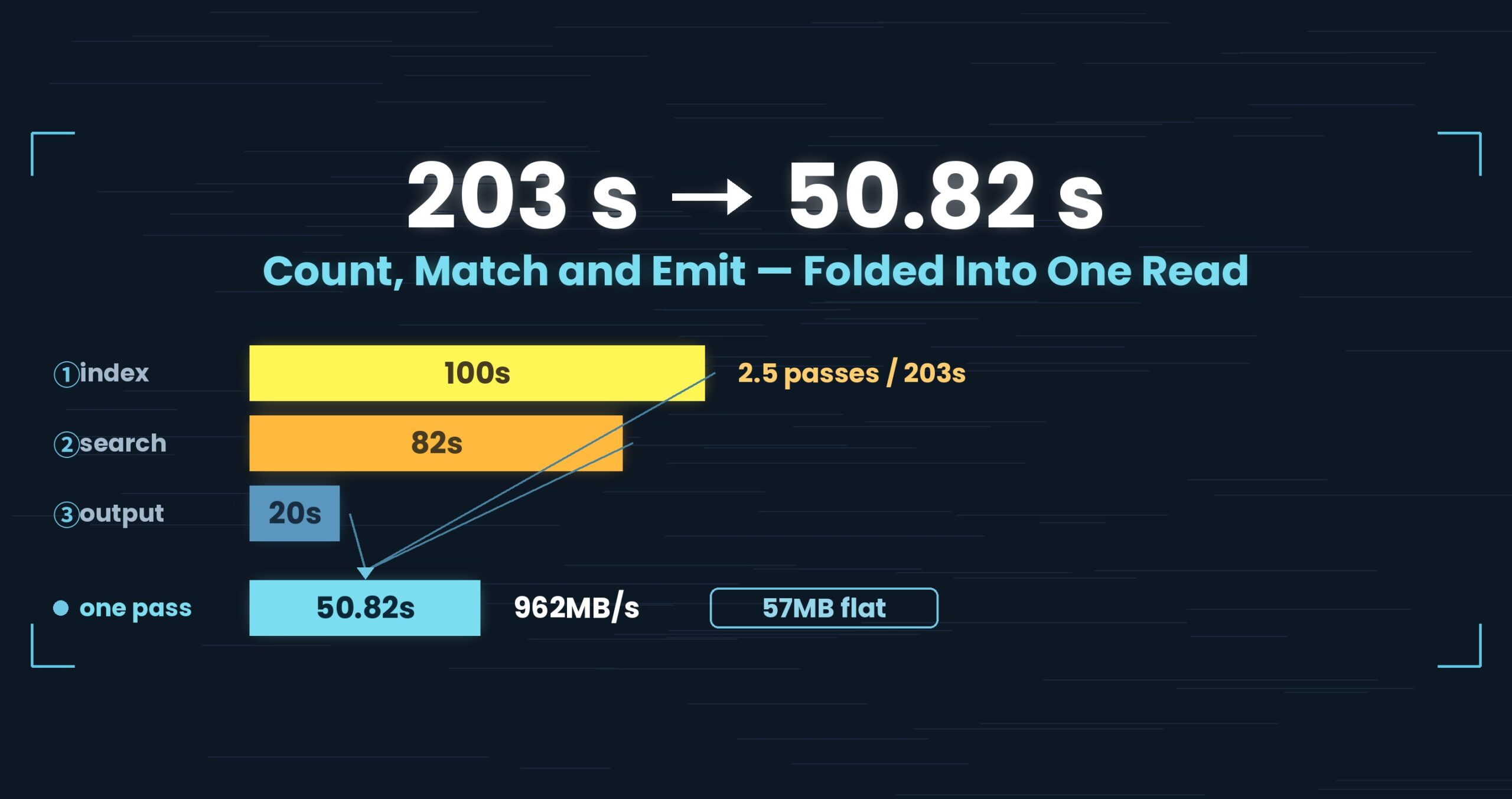
Part 2 folded two and a half passes over the file into one. Cutting reads has a side effect: whatever was hiding behind the I/O steps into the light.
Here is a 3 GB file searched twice in a row — the second run, warm, with the file already in memory.
| 3 GB, warm | uvf (then) |
ripgrep |
|---|---|---|
| Plain search | 1.20 s | 0.33 s |
-i (ignore case) |
2.72 s | 0.63 s |
The plain search loses too, but 2.72 s is a different order of loss: 4.3× ripgrep. Well past our 1.5× single-item bar, so we are comfortable calling that a loss outright.
Cold (straight after sudo purge), the gap all but disappears: 3.36 s for -i against ripgrep’s 3.25 s. While the file is being pulled off the drive, the drive sets the pace and the CPU’s habits never reach the stopwatch. Wasted CPU only becomes visible once the I/O is gone — which is to say part 2’s single pass is what dug up part 3’s problem.
The cause: we rebuilt every line before looking at it
The -i path read like this:
- Decode the line’s bytes into a UTF-16 string
- Run a regex with
IgnoreCase | CultureInvariantover that string
It is correct. It uses the same rules as the GUI’s search, so the answers agree. The problem was which lines paid for it.
Matching lines are normally a small minority. The decode, however, ran on every line — 92 million of them in a 3 GB file. The plain search has no such step, and that is exactly where the gap between 1.20 s and 2.72 s lived.
The slow part was not the matching. It was everything we did to get ready to match — and we did it per line, so it scaled with line count.
Why “just fold A/a in the bytes” isn’t obviously safe
The fast path is easy to imagine. A (0x41) and a (0x61) differ by a single bit, so you can fold case in the bytes and never decode or run a regex at all.
There is a catch. Unicode case-insensitivity does not stay inside ASCII. Characters like ı (dotless i) or ſ (long s) can be treated as the same letter as an ASCII one. Miss a line containing one and -i starts disagreeing with the GUI’s search. Faster is worthless if the answer changes.
So one question had to be settled first: how many non-ASCII characters does .NET’s IgnoreCase | CultureInvariant actually match against an ASCII letter?
We counted: one exception in 65,536
Instead of estimating, we swept it. Every code point in the BMP (U+0000–U+FFFF), compared against a–z and A–Z. When the domain is finite, guessing is a choice, not a necessity.
One character came back.
'k' ← U+212A (KELVIN SIGN) — and nothing else
That settles the design. If the pattern contains no k or K, case folding stays inside ASCII — so matching in raw bytes produces exactly the lines the regex path would.
While we were there we measured the neighbours. ripgrep’s -i does fold U+212A (rg -i kilo matches a line containing the Kelvin sign). grep -i does not. The same flag, a different reach, depending on the tool.
Worth saying plainly: our Pro source had carried a comment to the effect that U+212A is deliberately not matched on the byte path, “the same trade-off ripgrep and other byte-oriented searchers make.”
Measured, it was the other way round. ripgrep folds it, so uvp‘s -i could return answers that agreed with neither ripgrep nor our own GUI. “Same as the other tools” was not evidence — it was an assumption wearing evidence’s clothes.
The fix: two tiers, with the slow one reserved for k
Detection, folding and landmark selection now live in one place (AsciiCaseFold, in UwView.Core), and the pattern decides the route.
| Pattern | Route |
|---|---|
ASCII only, no k/K |
Fold case in the raw bytes — no decode, no regex. Folding is closed under ASCII, so results are identical to the regex path |
Contains k/K |
Pre-filter (SIMD-scan for one non-k character), then decode and regex only the surviving lines. U+212A is never dropped |
| Non-ASCII, or not UTF-8 | The original decode path |
The pre-filter leans on something obvious: a line that contains none of the pattern’s other characters was never a candidate. The landmark character is chosen preferring punctuation and digits — they occur less often than letters, so fewer lines survive. For kilo, we scan for one of i, l, o and decode only what it finds.
We fixed the newline counting in the same pass. Counting every newline for line numbers had been a loop of IndexOf; it became MemoryExtensions.Count (SIMD). On 1 GB with 33.5 million newlines: 0.302 s → 0.055 s (3,386 MB/s → 18,593 MB/s). Speeding up -i while counting newlines one at a time next to it would have capped the result, so the two had to land together.
The other trap: not every encoding may be searched as bytes
Searching raw bytes is only valid when bytes map one-to-one to characters and ASCII appears as its own bytes. Violate that and you do not get a slow answer — you get a wrong one.
- Shift_JIS:
ソis83 5C. That second byte is the same byte as ASCII\. Search the bytes for a backslash and you land in the middle of a character. - UTF-16: a newline is
0A 00. Count single0Abytes as line breaks and your line boundaries drift.
So AsciiCaseFold.IsAsciiCompatible(encoding) gates the byte path, and anything else goes straight to decoding. The same gate went into Pro’s parallel search, which brings the GUI, the free CLI and Pro into agreement about what “matches” means.
There was a bonus. A review had flagged that a case-insensitive search of a very long line returned 1 hit or 0 hits depending on whether an index existed. Putting the same byte path into the GUI made it go away: long lines no longer fall back to a route that decodes and inspects only the first 64 KB. A change made for speed turned out to be the change that made the answers agree.
The numbers: 2.72 → 0.66 s, even at 50 GB, still losing on -E -i
3 GB, warm (the second run against the same file)
| Before | After | ripgrep | |
|---|---|---|---|
| Plain search | 1.20 s | 0.50 s | 0.33 s |
-i |
2.72 s | 0.66 s | 0.63 s |
-E -i |
9.36 s | 1.67 s | 0.60 s |
50 GB, one cold run plus one warm run, summed (v1.6.6, Mac)
| 50 GB, combined | ripgrep | uvf |
Ratio |
|---|---|---|---|
| Plain search | 110.30 s | 103.31 s | 1.07 |
-i |
113.85 s | 108.58 s | 1.05 |
-E -i |
113.29 s | 103.25 s | 1.10 |
At 50 GB everything lands between 1.05× and 1.10×, and we are not calling that a win — our own rule is that under 1.5× on a single item is not a difference, so the honest word is “even”. That is expected: 50 GB is bound by the drive, so CPU savings never reach the clock. This work pays off on files that fit in memory, asked question after question.
More important than speed: the answers did not move. Output was compared line by line against ripgrep across 3 sizes × 7 patterns and matched (84 checks on Mac, 0 mismatches). There are dedicated tests for picking up Kelvin-sign lines with a k pattern, and for the pre-filter never discarding a candidate.
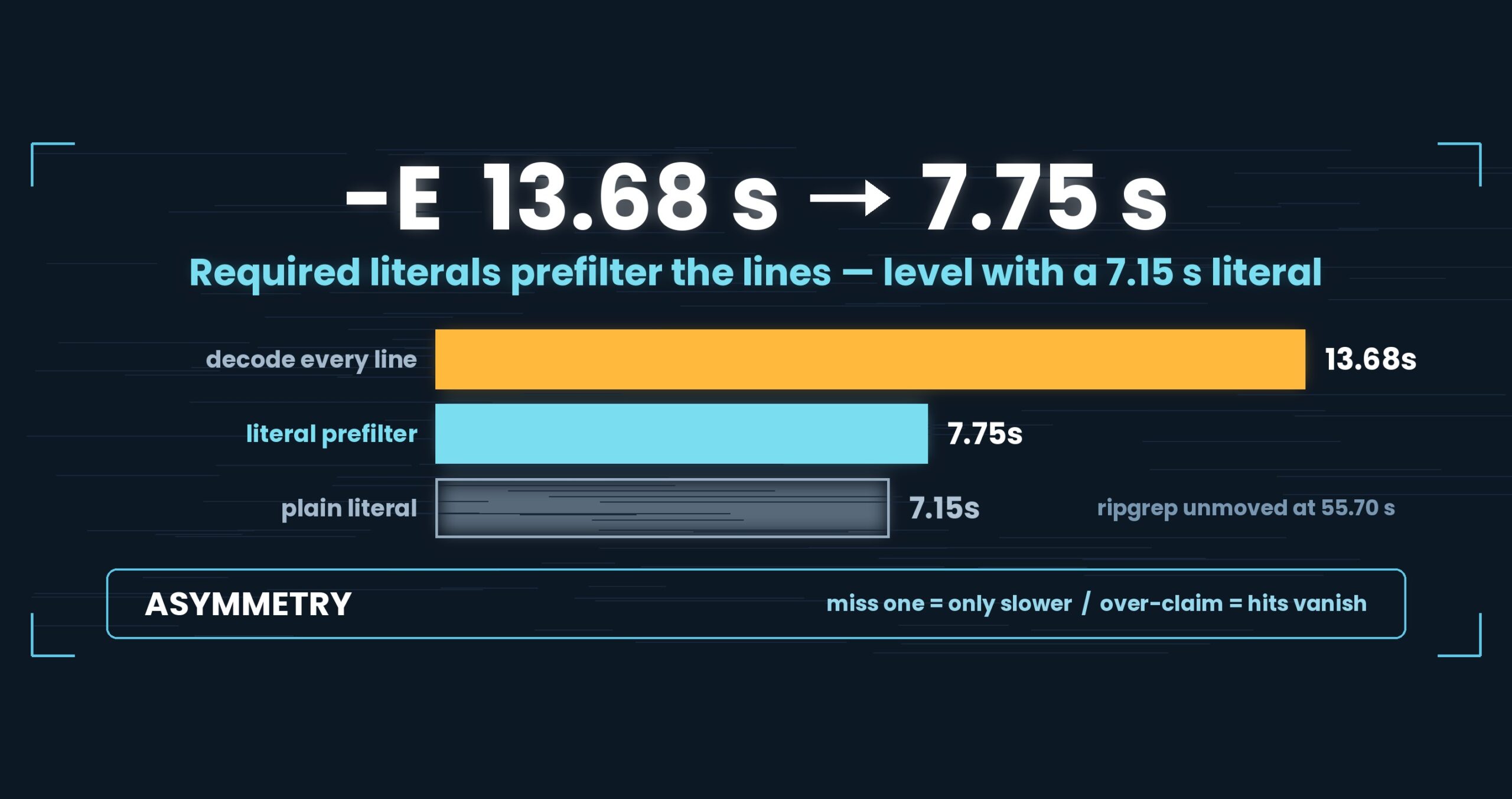
The loss we still carry. -E -i (regex plus ignore case) runs 1.67 s against ripgrep’s 0.60 s at 3 GB warm — 2.8× behind. The reason is a weak landmark: with -E -i we cannot extract a required literal (a string every matching line must contain), so we fall back to “the longest run of the pattern that contains no k“. Any contiguous slice of a required literal is itself required, so nothing is dropped — but it filters less well than the real thing. Required literals themselves are part 4’s subject.
One more. At 10 GB, -E -i is the single item where we sit on the slow side: ripgrep 12.83 s against uvf 16.05 s, combined. Under 1.5×, so we are not calling it a difference — but it is the one of the seven that leans the wrong way.
The general lesson: “how many exceptions?” is usually a countable question
What makes a fast special case frightening is not the speed. It is the rare input that changes the answer. So the special case gets abandoned on the strength of a feeling that exceptions probably exist.
But “rare” rarely needs to be estimated. When the domain is finite, you can count it. Ours was 65,536 cases — a moment’s work on any laptop. The count came back as one, and one exception can simply be routed elsewhere while everything else takes the fast path. That reframing was the whole trick.
And a second one. “Same trade-off the other tools make” is not evidence. We measured, and it was backwards. The least-tested claim in most codebases is a comment that says the same as X — wherever you have outsourced your specification to someone else’s tool, that is the place worth running.
Tools used
Since this article is about the command itself, here is the actual usage.
UwView is a viewer for huge text and huge logs (free: UwView; paid: UwView Pro).
The same things, from the command line
# Ignore case (free build; added to uvf in v1.6.3)
uvf app.log 'error' -i

# A pattern with k in it still picks up Kelvin-sign lines (routed via the pre-filter)
uvf app.log 'kilo' -i

# Combined with a regular expression
uvf app.log -E 'timeout|refused' -i

# Narrow with a second word (searched within the first word's hits)
uvf app.log 'ERROR' 'payment'

# With surrounding context / write results to a file
uvf huge.log 'FATAL' -C 5
uvf huge.log 'FATAL' -out fatal.txt

# Hand the CLI's result straight to the GUI to open
uvf access.log ' 503 ' -open
Exit codes match grep: 0 = found, 1 = not found, 2 = error or incomplete result, so if uvf access.log ' 503 '; then works as written.
Honestly: the first query with uvp is a little slower than ripgrep, because it builds the .uwvz (compression + index) first — at 50 GB, 59.0 s vs. 54.9–55.8 s = 6–7% (v1.6.6.1). It pays off from the second query on: the same 50 GB search returns in 6.56 s, about 8.4× ripgrep. On small files like 3 GB it is about even — the index buys you less. The free uvf is on par with ripgrep at any size (measured article; Mac M4, 32 GB RAM, external USB SSD, OpenStreetMap XML — one setup, results vary).
Links
- Part 1 — the day we wrote “this is not a speed tool”: https://uvp.y42u.net/en/blog/uwview-fl01-v160-confession-en/
- Part 2 — folding two and a half passes into one: https://uvp.y42u.net/en/blog/uwview-fl02-one-pass-rawgrep-en/
- We shipped a uvp command (measured against ripgrep): https://uvp.y42u.net/en/blog/uvp-cli-release-vs-ripgrep-en/
- Source (GitHub): https://github.com/amru195704/UwView
And if huge logs are eating your storage and you want them kept compressed and still searchable, try UwView Pro: a persistent index, search inside the compressed cache, and about 1/9 the storage, with reopening and searching both a step faster (all OSes; one-time purchase or subscription).
From the developer: a list of my apps, Kindle books, and open source is at GitHub: amru195704.