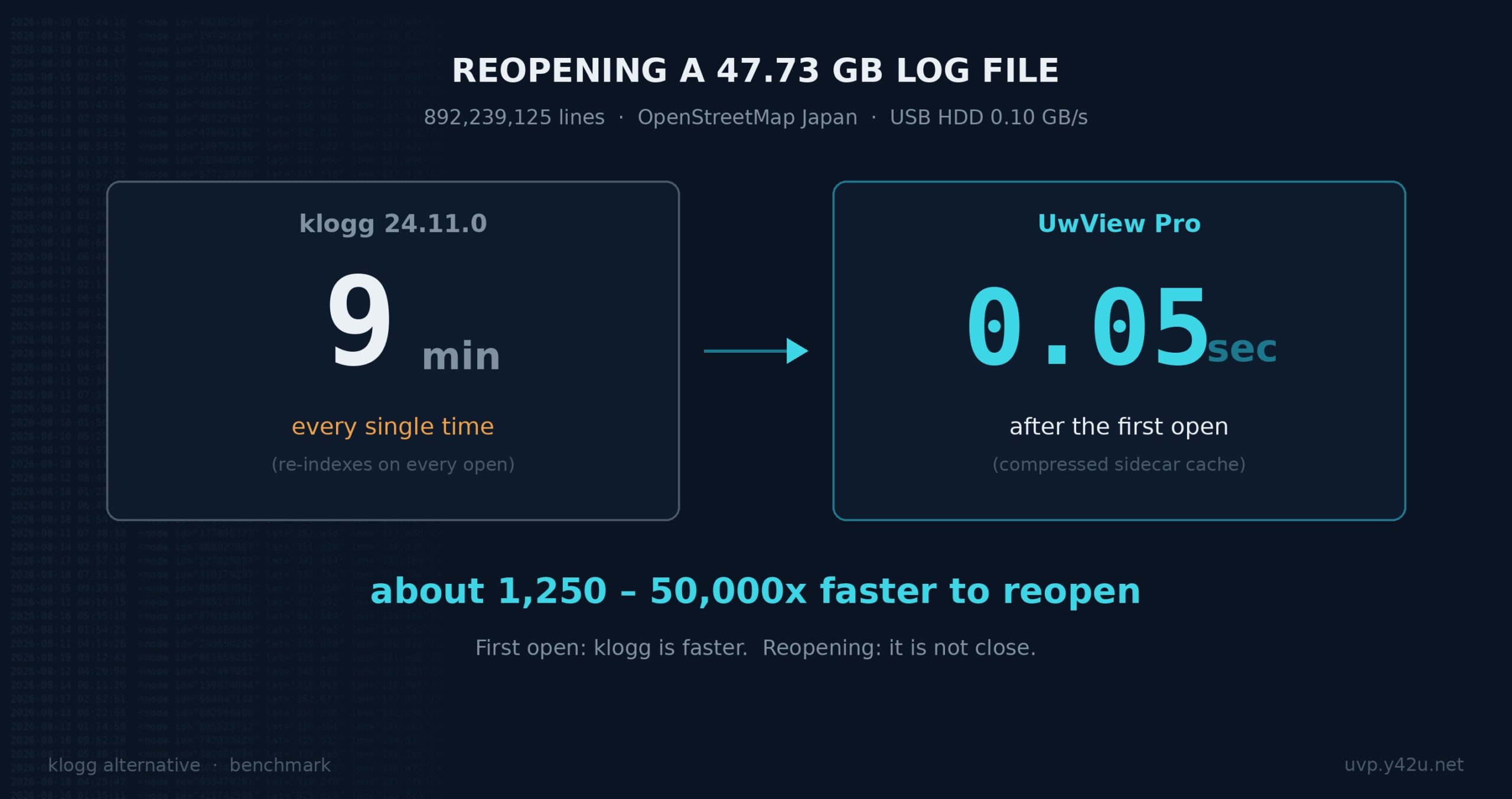
If you searched for a klogg alternative, you probably already know klogg is good. It is fast, it is free, it is open source, and it runs on Windows, macOS and Linux. Most people who go looking for something else are not unhappy with klogg as a viewer. They are unhappy with one specific moment in their day:
Opening the file again.
You investigated a 48GB log yesterday. You closed it. This morning your colleague asks about a different error, and you have to wait through the whole index build a second time. On a USB HDD that is nine minutes of staring at a progress bar — and while it builds, klogg only shows you the beginning of the file.
That is the problem this article is about. Below is a measured comparison on a real 47.73GB file, including the rows where klogg wins.
- The test
- The numbers
- Why the difference exists
- One more thing: you can move around while it indexes
- When you should stay with klogg
- When UwView Pro makes sense
- What about the other klogg alternatives?
- Free version vs Pro
- Update (Aug 26, 2026): the search gap has since reversed
- Update (Aug 29, 2026): where UwView actually comes from
- Further reading
The test
| File | OpenStreetMap Japan japan-latest.osm — 47.73 GB, 892,239,125 lines |
| Machine | MacBook Air / Apple M4 (10 cores) / 32GB RAM |
Storage (measured with dd) |
USB HDD 0.10 GB/s / USB SSD 0.41 GB/s / Internal SSD 3.29 GB/s |
| Versions | klogg 24.11.0 / UwView Pro |
Search hit counts were verified to match exactly across klogg, UwView Pro, and a direct search of the raw file — so we know both tools are answering the same question.
The numbers
| klogg 24.11.0 | UwView Pro | Ratio | |
|---|---|---|---|
| First open | HDD ~9 min / USB SSD ~110 s / Internal SSD ~15 s — every time | HDD 10.6 min / USB SSD 138.5 s / Internal SSD 23.3 s — first time only | klogg wins |
| Reopening | Same as the first open (re-indexes every time) | 0.01–0.07 s | ~1,250–50,000x |
Search, literal "Tokyo" |
~585 s / 120–135 s / 15–20 s | 74.8 s / 14.3 s / 5.1 s | ~7.8x / ~9x / 3–4x |
Search, regex "Tok[yi]o" |
≈ literal (I/O bound, pattern-independent) | 29.8 s (USB SSD) / 11.0 s (Internal SSD) | ~4.4x / ~1.5x |
| Disk used to keep the file | 48 GB (original required) | 5.3 GB (original can be deleted) | 1/9 |
Two things are worth saying plainly.
klogg opens the file faster the first time. UwView Pro is slower on the first open because it is building a compressed cache while it reads. That is a real cost and we are not going to hide it.
You pay klogg’s cost every single time. UwView Pro pays it once.
Why the difference exists
klogg builds its line index in memory. Close the window and the index is gone. This is a perfectly reasonable design — it keeps the tool simple and leaves nothing behind on your disk.
UwView Pro writes a compressed sidecar cache next to your file: a single .uwvz file with the line index built in and a checksum to detect corruption. The next time you open the file, there is nothing to rebuild. The index is already there.
The cache is also why the search is faster. Searching the .uwvz means reading roughly one ninth as many bytes off the disk. The slower your storage, the bigger the gap — on a USB HDD, a literal search drops from about ten minutes to 75 seconds.
There is a second consequence that surprised us more than the speed did. Because the .uwvz contains everything needed to read the file, you can delete the original 48GB and still browse and search the log at 5.3GB. For teams that keep finished incident logs “just in case,” that changes the storage math.
One more thing: you can move around while it indexes
klogg shows you the head of the file until indexing finishes. You cannot jump to the middle or the end.
UwView displays by byte position, so the whole file is navigable the moment you open it. Jump to the end of a 258GB file at 10% indexed and it will show you the end. We have done exactly that on a 4.5-billion-line file — the entire United States OpenStreetMap extract expanded to XML, 258.68 GB.
If your workflow is “open it, immediately jump to the timestamp where things broke,” this matters more than raw index speed.
When you should stay with klogg
This is the section most comparison articles leave out.
Your files are under a few gigabytes. At 3GB and 100 million lines the two tools are within seconds of each other on search. klogg’s re-index at that size is 47 s / 8 s / 2 s depending on storage — annoying, not painful. The case for switching is weak.
You open each file exactly once. All of UwView Pro’s advantage is amortised across reopens. If you genuinely never come back to a file, you are paying the slower first open for nothing.
You want open source. klogg is open source. UwView is not.
You need to edit. UwView is a viewer, not an editor. If you need to change the file, neither klogg nor UwView will help you.
You are on Windows and cannot accept an unsigned binary. The Windows build of UwView Pro is currently unsigned, which means SmartScreen will warn you (More info → Run anyway). If your organisation blocks that, this is a hard stop for now.
When UwView Pro makes sense
You reopen the same large files. This is the whole argument. If a 20GB log gets opened three times over a week, klogg costs you three full index builds and UwView Pro costs you one.
Your storage is slow. Network shares, external drives, spinning disks. The gap widens as bandwidth drops, because the compressed cache reads a ninth of the bytes.
You are archiving. Keeping investigated logs at 1/9 the size, still directly openable, with checksum protection. We wrote about that workflow separately.
Your files are genuinely enormous. We have measured 4.5 billion lines. We do not know where the ceiling is.
What about the other klogg alternatives?
If you browse the alternatives listed for klogg, you will find a long tail of log viewers — GamutLogViewer, LogExpert, Chainsaw, Logbert, WinTail and others. Many of them are good at things klogg is not: structured log parsing, live tailing, colour rules per log format, database-backed search.
Most of them are also Windows-only, and — more to the point — most were not designed with a 48GB single file in mind. “Log viewer” covers two quite different problems: understanding structured logs and surviving enormous files. If your problem is the first one, a purpose-built log analyser will serve you better than either klogg or UwView.
UwView is built for the second problem, and only for that.
Free version vs Pro
UwView (free) opens huge files with the same byte-position navigation. On first open it is comparable to klogg and other tools. No sidecar cache, so reopening re-reads.
UwView Pro adds the compressed .uwvz cache: instant reopen, faster search, 1/9 storage. one-time or monthly, and one licence covers Windows 10/11, macOS 11+ (Apple Silicon and Intel), and Linux x86_64.
There is also a browser build (WASM) if you want to try the interface without installing anything, though it is naturally slower than native.
Update (Aug 26, 2026): the search gap has since reversed
When this article was written, klogg’s Boolean search was one of the rows where klogg won. UwView Pro v1.3.0+ changed that with two new modes: Drill-down search (refine results with the next term, up to 8 stages in tabs — narrowing co-occurrence across nearby lines, which single-line Boolean can’t do) and Sequence search (only the flows where w1 → w2 → w3 appear in that order — the local-file equivalent of EQL’s sequence, with no klogg counterpart). Details: Drill-down / Sequence. Everything else in this article, including the rows klogg wins, is unchanged.
Update (Aug 29, 2026): where UwView actually comes from
One thing this article did not say, because I did not have the evidence at the time: UwView is not new.
A routine notice from Vector — a Japanese software library that has been running since the 1990s — confirmed in August 2026 that UwView 0.6, published by the same author in May 2006, is still listed there (item no. PS398984), with 12,657 cumulative downloads. Its description then: “a fast text viewer that can display up to 50 million lines.”
(Update, 7 October 2026: the 2006 UwView 0.6 listing was removed from Vector at the author’s request, with 12,666 downloads at the time. The current UwView is listed on Vector at https://www.vector.co.jp/soft/winnt/util/se529278.html.)
- 2006 ── 50 million lines
- 2026 ── 4,509,830,821 lines / 258.68 GB, measured
90x in twenty years, same author, same problem.
Two honest qualifications. Those 12,657 downloads belong to the 2006 predecessor, not to the current build — the current version went up on GitHub in 2026 and its own numbers are still small. And klogg’s decade is continuous development and distribution, which is a stronger kind of track record than one release twenty years ago. On that row, klogg is still ahead.
Further reading
- An honest feature comparison with klogg — every row, including the ones we lose
- The full 3GB / 10GB / 48GB benchmark across three storage types
- Opening 258.68 GB and 4.5 billion lines
- Product page and download
- UwView on AlternativeTo — listed as an alternative to klogg, glogg, BareTail and Log Voyager
If you try it against a file that breaks it, we would like to hear about it. That is how we found out 890 million lines was not the limit.

コメント