[Update, 16 October 2026] Speed today — the second run of
-E -iwent from a 1/2.7–1/3.1 loss to faster than ripgrepThe timings in this article are from v1.7.3.6 (29 September 2026). The current version, v1.9.0 (13 October 2026), was measured on the same Mac (Apple M4, external USB SSD) with the same pattern.
ripgrep ÷ free uvf(second run, cache warm)This article (v1.7.3.6) Now (v1.9.0) 3 GB -E -i 'K="NAME[^"]*"'0.58 s vs 1.55 s (1/2.67, a loss) 0.56 s vs 0.48 s (1.17×) 10 GB, same pattern 1.78 s vs 5.44 s (1/3.06, a loss) 1.75 s vs 1.38 s (1.27×) First and second run combined, 3 GB is 1.08× (on par). With an index,
uvpruns the same pattern at 4.97× ripgrep on 3 GB. The “loss” below is kept as a record of that time. Details: Benchmarks and the v1.9.0 “Full Spectrum” article.
The count changed.
We told people [[:alpha:]] was not supported and to write \p{L} instead. They did as they were told — and the number of matching lines moved.
Is the suggested rewrite really looking for the same thing?
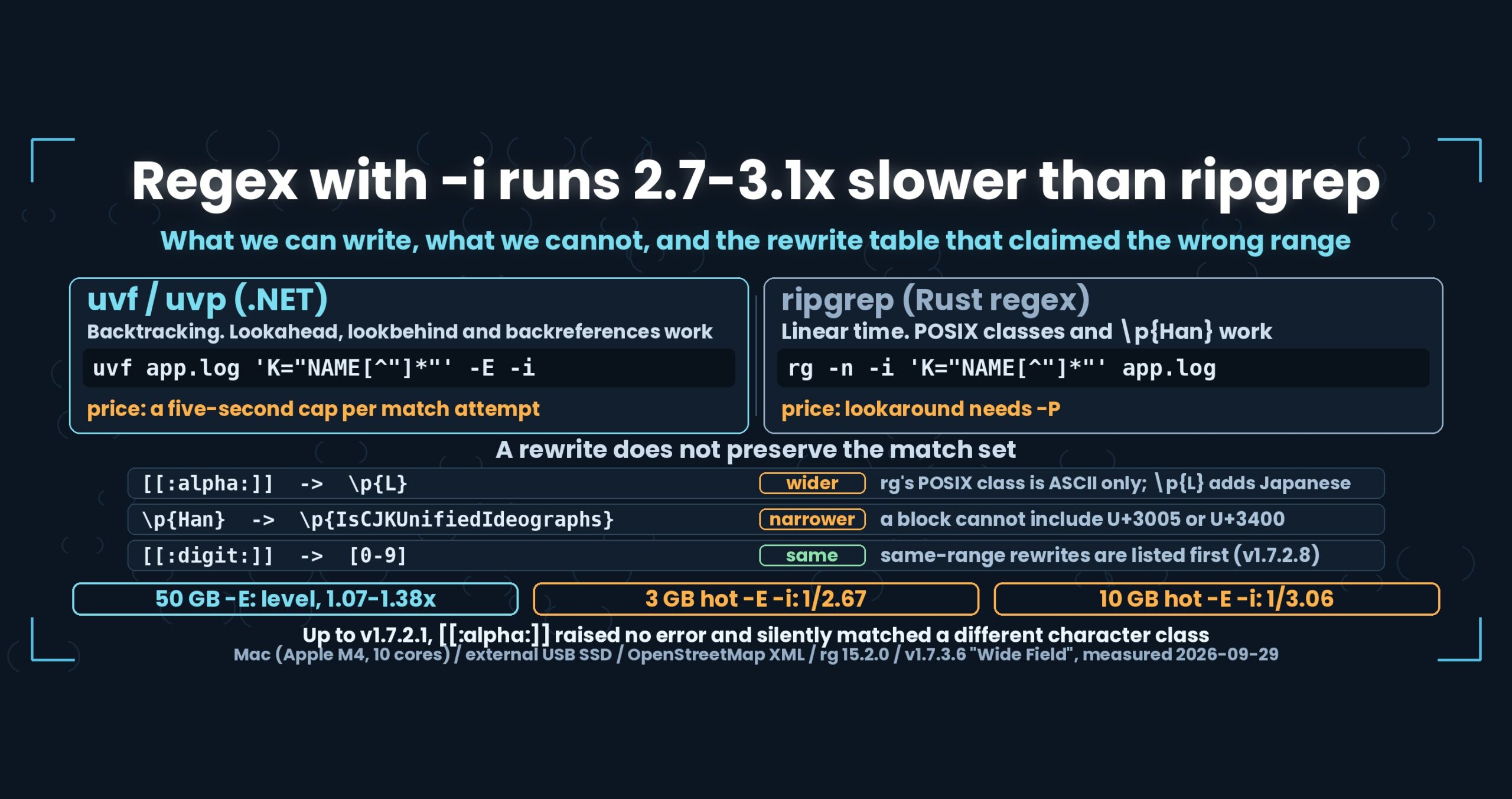
- Up front: -E uses .NET regular expressions, so what you can write differs from ripgrep. Lookaround and backreferences work here and not there; POSIX classes and \p{Han} work there and not here. A rewrite does not preserve the match set, so the guidance is now two tables instead of one. Timings match ripgrep on a 50 GB file, but on cached 3 GB and 10 GB files -E -i takes 1.55 s against 0.58 s (2.67x) and 5.44 s against 1.78 s (3.06x) — we lose both
- The losses, before anything else
- The default is inverted, and that is the first difference
- What we have and ripgrep does not
- What we lack — and we used to search for something else without saying so
- The rewrite does not preserve the match set
- The numbers — level at 50 GB, behind once it is cached
- There was a build that could not compile a regular expression
- How this was checked
- What generalises
- Being straight about it
- The tools behind this
- Links
Up front: -E uses .NET regular expressions, so what you can write differs from ripgrep. Lookaround and backreferences work here and not there; POSIX classes and \p{Han} work there and not here. A rewrite does not preserve the match set, so the guidance is now two tables instead of one. Timings match ripgrep on a 50 GB file, but on cached 3 GB and 10 GB files -E -i takes 1.55 s against 0.58 s (2.67x) and 5.44 s against 1.78 s (3.06x) — we lose both
uvf and uvp treat the search term as a literal string by default and only as a regular expression when you add -E. ripgrep is the other way round: regex by default, -F for a literal. Mac (Apple M4, 10 cores), 32 GB RAM, external USB SSD, OpenStreetMap XML.
uvfanduvpare the search commands of UwView v1.7.3.6 “Wide Field” (released 28 September 2026), which I make.uvfships in the free edition;uvpis part of the paid UwView Pro. The rewrite guidance and the(?P<name>)alias landed in v1.7.2.2, the split into two tables in v1.7.2.8, and the timings come from the v1.7.3.6 integration run of 29 September 2026.
The losses, before anything else
-E -iis slow once the file is in cache. A regex without-imatches ripgrep. Add-iand onlyuvfstretches: 1.55 s against 0.58 s on 3 GB (2.67x), 5.44 s against 1.78 s on 10 GB (3.06x). On 50 GB the two are level, but only because the medium becomes the bottleneck and hides the CPU cost. Nothing got faster.- There is a five-second cap per match attempt. Cross it and the search stops with “the regular expression took too long.” ripgrep’s engine runs in linear time, so it needs no such cap. We need one because our engine backtracks.
- POSIX character classes (
[[:alpha:]]and friends) cannot be written. Up to v1.7.2.1 they did not even raise an error — we silently searched for something else. - Script names (
\p{Han},\p{Hiragana}) cannot be written. There are rewrites, but they do not cover the same characters (more below). - No multi-line matching. Matching is line by line.
- On paths that need decompression, only the first 64 KB of a line is examined. The rest of a very long line is not seen.
- We have not isolated why
-E -iis slow. There is a design-level explanation below, but no breakdown of where the seconds go.
The default is inverted, and that is the first difference
ripgrep treats the pattern as a regular expression by default and takes -F when you want a literal. uvf and uvp do the opposite: literal by default, -E when you want a regular expression.
rg -n 'k="highway[^"]*"' app.log      # regex by default
rg -n -F 'ERROR' app.log              # literal

uvf app.log 'ERROR'                   # literal by default
uvf app.log 'k="highway[^"]*"' -E     # regex
The reason is speed. Most of what people type when searching logs is a plain string like ERROR, and a plain string does not need a regex engine. Make the literal the default and every command without -E stays on the byte-comparison path.
The inversion is itself a difference, though. Type uvf app.log 'ERROR|WARN' out of ripgrep habit and you will be searching for a string that contains a pipe character.
What we have and ripgrep does not
.NET’s engine backtracks, so it accepts constructs ripgrep’s default engine rejects.
| Construct | uvf / uvp (.NET) |
ripgrep (Rust regex) |
|---|---|---|
Lookahead (?=…) (?!…) |
works | needs -P |
Lookbehind (?<=…) (?<!…) |
works | needs -P |
Backreference \1 \k<name> |
works | needs -P |
Class subtraction [a-z-[aeiou]] |
works (.NET syntax) | written [a-z&&[^aeiou]] |
Possessive quantifier a*+ |
no (use (?>…)) |
no |
“Lines containing ERROR but not ERROR_IGNORED” is one expression on this side. And that is exactly why we carry the five-second cap. A backtracking engine can blow up on the wrong pattern, so something has to stop it; a linear-time engine cannot blow up, so nothing has to. Neither is better — the trade runs in opposite directions.
Named groups work on both sides with different spellings: (?<name>…) in .NET, and ripgrep accepts both (?P<name>…) and (?<name>…). An expression copied from ripgrep should just run, so v1.7.2.2 reads (?P<name> as (?<name>. It costs almost nothing and saves the newcomer a puzzle.
What we lack — and we used to search for something else without saying so
The other direction.
| Construct | uvf / uvp (.NET) |
ripgrep |
|---|---|---|
POSIX class [[:alpha:]] |
cannot be written | works |
Script \p{Han} \p{Hiragana} |
cannot be written | works |
Unicode category \p{L} \p{Lu} |
works | works |
Range of \d |
also matches full-width digits (0–9) | same |
The first row was the bad one. [[:alpha:]] parses successfully in .NET — as a character class meaning “any one of [, :, a, l, p, h, ]“. No error, and the search starts.
So you did not get zero results. You got a wrong number of results. Stopping would have been far kinder.
Since v1.7.2.2, a [[: is caught before the search begins: we raise an error, name the rewrite, and exit 2. Script names like \p{Han} go the same way, with the rewrite attached to .NET’s own error.
The rewrite does not preserve the match set
This is the part of this round I most wanted to write, and it does not flatter us, so it gets its own heading.
An external review flagged it: the table of “the same range as ripgrep” contained entries that are not the same range. We checked against the real binaries. The review was right.
- ripgrep’s
[[:alpha:]]matches ASCII letters only.\p{L}matches Japanese too. So rewriting[[:alpha:]]as\p{L}adds matching lines - .NET’s
\dalso matches full-width digits. Write it meaning[0-9]and you will pick up full-width runs as well - Rewriting
\p{Han}as\p{IsCJKUnifiedIdeographs}misses 々 and 㐀. The original is a script, the replacement is a block, and a block cannot include everything a script does
So v1.7.2.6 and v1.7.2.8 split the guidance into two tables.
- Rewrites that match the same range come first (
[[:alpha:]]→[A-Za-z],[[:digit:]]→[0-9]) - Forms that also include Japanese follow in a second table (
\p{L},\p{IsCJKUnifiedIdeographs})
Error text, manual and --help regex were all reordered to match. “Extension B cannot be written” became “this block specifier cannot include it”, because the limit belongs to block specifiers, not to the characters.
If you are going to tell someone to rewrite an expression, you owe them a statement about whether the rewrite changes the answer. Leave that vague and you are quietly moving their counts while sounding helpful.
The numbers — level at 50 GB, behind once it is cached
Four -E rows from the v1.7.3.6 integration run of 29 September 2026. Each measurement purges the cache, waits ten seconds, takes cold, then immediately takes hot. The other side is ripgrep 15.2.0.
50 GB (47.73 GiB, 51,254,526,392 bytes)
| Row | ripgrep cold/hot | uvf cold/hot |
uvp cold/hot |
|---|---|---|---|
-E 'k="highway[^"]*"' |
57.05 / 56.01 | 51.26 / 52.21 (level) | 15.53 / 14.73 (3.67x / 3.80x) |
-E '^ *<tag k="name"' |
56.43 / 56.59 | 51.69 / 50.76 (level) | 7.07 / 6.12 (7.98x / 9.25x) |
-E -i 'K="NAME[^"]*"' |
55.88 / 64.37 | 50.94 / 50.95 (level) | 11.53 / 10.62 (4.85x / 6.06x) |
-E -v '^ +<' |
74.22 / 57.65 | 53.85 / 54.50 (level) | 12.97 / 12.23 (5.72x / 4.71x) |
Note on file-size notation: the “50 GB” file here is 47.73 GiB (bytes ÷ 1024³). macOS shows it as 51.25 GB (SI units, ÷ 1000³), and earlier articles call the same file “48GB”. All three refer to one file of 51,254,526,392 bytes.
Every uvf row sits between 1.07x and 1.38x, which is under 1.5x, so we do not call it a difference. At this size the raw read speed of the medium (about 950 MB/s on this machine) is the ceiling and both tools are pressed against it. uvp reaches 3.67x–9.25x because from the second pass it reads a .uwvz (UwView Pro’s compression format plus index) instead of the file, so the volume of bytes read is not the same.
3 GB and 10 GB — we lose only when -i is added
| Row (hot) | ripgrep | uvf |
Ratio |
|---|---|---|---|
3 GB -E 'k="highway[^"]*"' |
0.52 | 0.56 | level |
3 GB -E -i 'K="NAME[^"]*"' |
0.58 | 1.55 | 1/2.67 (we lose) |
10 GB -E 'k="highway[^"]*"' |
1.07 | 1.42 | 1/1.33 (level) |
10 GB -E -i 'K="NAME[^"]*"' |
1.78 | 5.44 | 1/3.06 (we lose) |
Two sizes agree in direction and roughly in magnitude, so this is not noise.
The design-level explanation: -i on a plain string is folded at the byte level, as described in Part 3 of the First Light series. With -E -i we hand IgnoreCase to the .NET engine instead, which never reaches that byte-folding path. Folding case character by character while matching costs the extra time.
That is reasoning from the design, not a measurement. We have not broken the time down. And the fact that 50 GB looks level is not a win either — it is the medium hiding the cost. A faster SSD would make this loss visible at 50 GB too.
There was a build that could not compile a regular expression
History, not the current version.
Partway through Wide Field, from 1.7.1.4, the Mac CLI was built with NativeAOT (ahead-of-time compilation). Startup went from 0.30 s to 0.01 s — a real win on small files.
But NativeAOT cannot emit code at run time. Which means regular expressions cannot be compiled and fall back to interpretation.
Measured on -E -v '^ +<' (3 GB, hot):
- v1.6.6.1: 2.85 s
- 1.7.1.6 (NativeAOT, the regressed build): 5.56 s
- 1.7.1.7 (the fix): 2.75 s
A 2.02x regression. The same row in today’s v1.7.3.6 reads 2.78 s (the 3 GB -E -v hot figure above), in line with 1.7.1.7.
Only regular expressions with no required literal to filter on got slower. ^ +< has exactly one mandatory character, <, which is on nearly every line. Patterns like k="highway… or ^ *<tag k="name" filter first, so few lines ever reach the engine — and for those, NativeAOT was slightly faster.
The fix was one branch: when the pattern is a regular expression, has no usable required literal, and the input is 256 MB or larger, hand the work to the JIT host (about 0.1 s of extra startup). Everything else stays on NativeAOT and keeps its 0.01 s. We also tried the NonBacktracking engine; it was not faster — slower on some patterns.
How the required literal is extracted is Part 4 of the First Light series. The same machinery pays off twice in different shapes: once to make a regex as fast as a literal, and once to decide which engine should run it.
How this was checked
- Other side: ripgrep 15.2.0, default engine (no
-P) - Version:
uvfanduvpboth v1.7.3.6 “Wide Field”; rewrite guidance in v1.7.2.2, v1.7.2.6 and v1.7.2.8; the NativeAOT branch in 1.7.1.7 - Timings: v1.7.3.6 integration run of 29 September 2026 (
sync→ purge → 10 s wait → cold → hot) - Data: OpenStreetMap XML (3 GB = 3,032,812,644 bytes / 10 GB / 50 GB = 51,254,526,392 bytes)
- Machine: Mac (Apple M4, 10 cores, 32 GB RAM), external USB SSD
- Source of truth for the tables:
uvf --help regexand the manual carry the same content - No cross-OS timing comparisons. Every number here is from the Mac
What generalises
(1) Before claiming “the same”, check the match set. A spelling table is easy to produce, which is what makes it dangerous. [[:alpha:]] → \p{L} is a correct substitution of syntax and an incorrect substitution of meaning. Whoever publishes the table has to separate “can / cannot be written” from “produces the same result” in the table itself.
(2) Silently meaning something else is the worst failure mode. While [[:alpha:]] parsed, nothing appeared to be wrong. Zero results get questioned; a wrong count does not. An error that parses costs more than an error that does not.
(3) The engine’s type fixes both the features and the limits. Backtracking buys lookaround and backreferences and requires a timeout; linear time removes the timeout and removes lookaround. You cannot copy one half.
(4) Ahead-of-time compilation takes run-time code generation with it. Startup from 0.30 s to 0.01 s is a large win on small inputs, and the price was interpreted regular expressions. When the win and the loss land on different rows, the aggregate hides both. You have to measure per row and branch on input size, or one of them quietly crushes the other.
Being straight about it
- We lose on
-E -i: 2.67x on a cached 3 GB file, 3.06x on 10 GB. Looking level at 50 GB is the medium hiding it - No isolated measurement of the cause. The explanation stops at “it does not reach the byte-folding path”
- Five seconds per match attempt, then we stop. Heavy expressions get cut off. ripgrep has no such limit
- POSIX classes and script names cannot be written. Rewrites exist; identical match sets do not
- Up to v1.7.2.1 we searched for something else when given
[[:alpha:]]. Counts produced in that window are wrong - The table claiming “the same range as ripgrep” was wrong. An external review caught it; we verified against the binaries and split it in two
- No multi-line matching, and on decompression paths only the first 64 KB of a line is examined
- 10 GB hot has shown cache-dependent swings in past runs. This run used the ten-second wait under identical conditions, but we treat the 2.67x at 3 GB as the primary evidence
- When the NativeAOT regression was fixed, we did not measure how much each part of the branch contributed
- I am the developer of one side of this comparison. Discount accordingly
The tools behind this
UwView is a CLI and GUI tool for examining very large text files and logs. In v1.7.3.6 “Wide Field” it searches many files and seven compression formats in one pass, with no external commands.
The same things, from the command line
# Literal by default (same as ripgrep's -F)
uvf app.log 'ERROR'

# As a regular expression
uvf app.log 'k="highway[^"]*"' -E

# Case-insensitive, literal or regex
uvf app.log 'HIGHWAY' -i
uvf app.log 'K="NAME[^"]*"' -E -i

# Non-matching lines (works with a regex)
uvf app.log '^ +<' -E -v

# A postcode shape
uvp app.log '[0-9]{3}-[0-9]{4}' -E

# What can and cannot be written, and the rewrites
uvf --help regex

# Count what the capture group caught
uvp app.log 'k="amenity"' -uniq 'v="([^"]+)"' -sort count -head 20

# Narrow by a second term / with three lines of context
uvp app.log k="amenity" v="parking"
uvp app.log k="amenity" -C 3 k="name"

# Read the hits in the GUI
uvp app.log 'k="highway[^"]*"' -E -open
Exit codes follow grep: 0 = found, 1 = not found, 2 = error or incomplete result. An expression we cannot run, such as [[:alpha:]], prints its rewrite and exits 2 before the search starts.
The free edition is on GitHub Releases. On Mac, brew install --cask amru195704/uwview/uwview; on Windows, Scoop (scoop bucket add uwview https://github.com/amru195704/scoop-uwview, then scoop install uwview).
Links
- Making a regex as fast as a literal (extracting the required literal): https://uvp.y42u.net/en/blog/uwview-fl04-regex-required-literal-en/
- What
-ishould match, and why U+212A was the one exception: https://uvp.y42u.net/en/blog/uwview-fl03-ignorecase-u212a-en/ - A faster CPU does not show up on an external SSD: https://uvp.y42u.net/en/blog/uwview-fl11-newline-vs-media-en/
- Why a file pattern is one quoted argument: https://uvp.y42u.net/en/blog/uwview-wf08-file-globs-en/
- Matching ripgrep’s ignore rules (
.ignore,.gitignore): https://uvp.y42u.net/en/blog/uwview-wf07-ignore-rules-en/ - Seven formats without calling an external command: https://uvp.y42u.net/en/blog/uwview-wf02-seven-formats-no-external-en/
- Thirteen rounds of reading the file fewer times: https://uvp.y42u.net/en/blog/uwview-fl13-first-light-recap-en/
- Every measurement we publish: https://uvp.y42u.net/en/benchmarks-en/
- Source code (GitHub): https://github.com/amru195704/UwView
And if huge logs are eating your storage and you want them compressed and fast to search, take a look at UwView Pro: a persistent index, search inside the compressed cache, roughly 1/9 the storage, and a faster reopen every time (all operating systems; one-time purchase or monthly plan).
From the developer: my apps, Kindle books and public projects are listed at GitHub: amru195704.