Size is not the wall.
When someone hands you a 100 GB incident log, the first worry is whether it opens at all. If it does not, you split it; and once you split it, the line numbers no longer line up with the timestamps you are chasing. So the first thing worth knowing is how far you can go while keeping the file in one piece.
Which raises two questions. When the file gets ten times bigger, what happens to time and to memory? And is “a lot of lines” a different wall from “a lot of bytes”?
This part covers two sets of tests at once: reading 1 GiB, 10 GiB and 100 GiB end to end, and reaching the last line of a 100-million-line and a one-billion-line file. Both scaled cleanly. And because they scaled cleanly, exactly one thing stands out that did not.
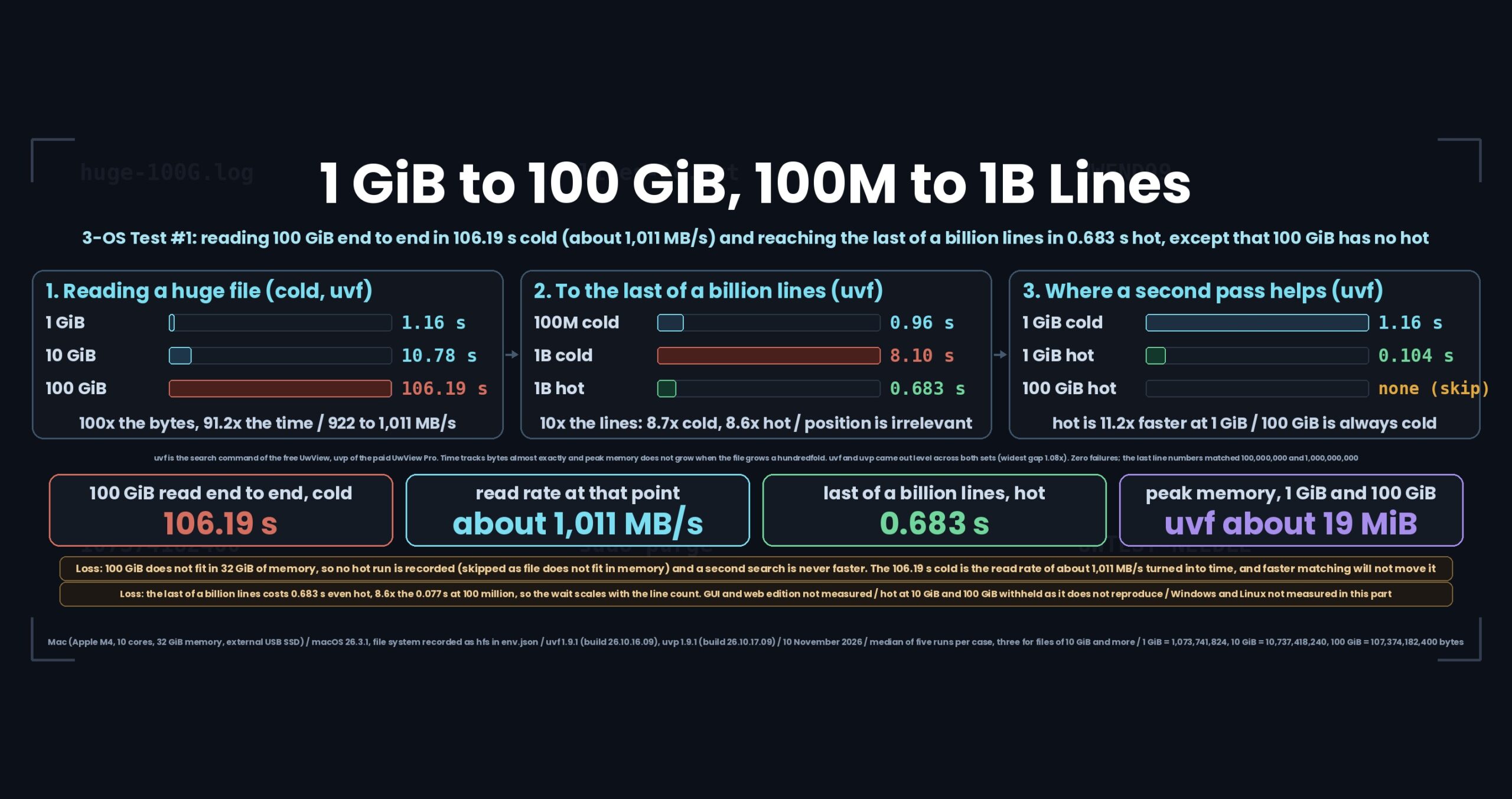
- The short version: time tracks bytes, memory does not grow at all — but 100 GiB has no hot, and the last of a billion lines still costs about 0.68 seconds hot
- The problem: “it opened” and “you can work with it” are different claims
- Test conditions
- Results
- The losses: a size where the second pass never helps, and a wait that scales with line count
- Correctness: zero failures across both sets, line numbers included
- What generalizes: three checks you can run on any large-file tool
- How you would write it with uvp
- How to reproduce
- Links
The short version: time tracks bytes, memory does not grow at all — but 100 GiB has no hot, and the last of a billion lines still costs about 0.68 seconds hot
The losses first.
One. There is no hot for 100 GiB. The file does not fit in 32 GiB of memory, so instead of a time the results CSV records a skip: file does not fit in memory: hot is the same as cold. There are sizes at which “the second search is faster” simply does not apply. And the cold time is pinned to what the external USB SSD can read — about 1,011 MB/s on this machine — so there is almost nothing left for software to shave off.
Two. Reaching the last of a billion lines costs about 0.68 seconds even hot, up from about 0.077 seconds at 100 million lines — 8.6 times. To report the number of the last line, you have to finish counting every newline before it. The honest phrasing is not “jump to the end instantly” but “wait for a time proportional to the line count“.
With that said, here is what held up.
- Time tracks bytes almost exactly. From 1 GiB to 100 GiB (a hundredfold in bytes), cold went from 1.16 s to 106.19 s — 91.2 times. Slightly better than linear, because 1 GiB never gets the drive up to its full read rate
- Peak memory does not grow when the file grows a hundredfold. uvf stayed around 19 MiB and uvp around 23 MiB, at 1 GiB and at 100 GiB alike
- The line count is not a wall. 100 million lines (763 MiB) ran cold in about 0.93–0.99 s, the same ballpark as a 1 GiB log (1,024 MiB) at about 1.16–1.25 s. What matters is bytes, not lines
- The last line, the middle line and a no-hit pattern all cost the same. Every cold run on the billion-line file landed near 8.1 s, so where the hit sits does not change the time
- At 1 GiB, hot is about a eleventh of cold (uvf 1.16 s to 0.104 s). Where the file fits in memory, the second pass pays off
- The free uvf and the paid uvp came out level across both sets. The widest gap was 1.08 times (1 GiB, no hits, cold, in uvf’s favour), well inside this series’ “within 1.5 times is level” line
uvfis the search command of the free UwView;uvpis the one in the paid UwView Pro. Every number here comes from the results CSV of a run made on 10 November 2026 on a Mac (Apple M4, 10 cores, 32 GiB memory, external USB SSD), with uvf 1.9.1 (build 26.10.16.09) and uvp 1.9.1 (build 26.10.17.09) on macOS 26.3.1. This part covers the Mac only; Windows and Linux were not measured. How cold and hot are made, and how to read these numbers, was settled in part zero.Note on file-size notation: “1 GiB”, “10 GiB” and “100 GiB” in this article are bytes ÷ 1024³ — 1,073,741,824 / 10,737,418,240 / 107,374,182,400 bytes respectively. macOS’s capacity display (SI units, ÷1000³) shows them as 1.07 GB / 10.74 GB / 107.37 GB. The “100 GB” in the title follows that SI figure.
The problem: “it opened” and “you can work with it” are different claims
A tool facing a huge log has to answer two things: can it open the file, and once open, can you reach the line you want.
The first is easy. Stream the file instead of loading it, and size stops mattering for opening. The second is where it gets interesting. To look at what happened around an incident you want a line near the end — but a line number cannot be known without counting newlines from the start. Jump into the middle of a file and ask “which line is this?” and no tool can answer. So “go to the end” is really “read the whole file once“.
The other thing that is easy to miss is memory. A tool that says “opened” while quietly eating all of physical memory starts swapping, and everything else on the machine stalls. How many MiB it opened in matters as much as whether it opened.
So this part runs one series that grows by size and one that grows by line count, through the same harness, to separate which of the two actually costs time.
Test conditions
Machines (Mac only in this part)
| Machine label | What it is | Memory | Storage | File system | Kind |
|---|---|---|---|---|---|
mac-m4-32g-usbssd |
MacBook Air (Apple M4, 10 cores) | 32 GiB | External USB SSD | hfs (as recorded) |
Real hardware |
linux-vmware-fusion |
— | — | — | — | Not measured |
win11-16g |
— | — | — | — | Not measured |
macOS 26.3.1 (arm64), no virtualization. The file system came out as hfs in the run’s env.json (part zero listed APFS in its table; the recorded value is what gets printed here).
There are no Linux or Windows numbers in this part. The series only measures the Mac anew and reuses earlier measurements for the other two — but no earlier measurements exist for these two sets of tests. The VMware allocation is therefore not applicable this time either.
Data
The huge-file set (huge) is UTF-8 log lines — timestamp, level, city name, id, status, path — laid out in 1 MiB blocks, with one UWTEST-NEEDLE line in the first, the middle and the last 1 MiB block at known line numbers. The line-count set (lines) is 8 bytes per line (7 random letters plus a newline); UWMID01 is the middle line and UWEND99 is the very last one.
| File | Bytes | GiB (÷1024³) | Lines | SHA-256 |
|---|---|---|---|---|
huge-1G.log |
1,073,741,824 | 1.00 | — | 984d3c2f49e9eaab… |
huge-10G.log |
10,737,418,240 | 10.00 | — | 4e223935919feedd… |
huge-100G.log |
107,374,182,400 | 100.00 | — | d9348a746b6a70eb… |
lines-100M.txt |
800,000,000 | 0.75 | 100,000,000 | 09dea7a0ea3abb51… |
lines-1G.txt |
8,000,000,000 | 7.45 | 1,000,000,000 | 4f17fc251f46d3cc… |
The data is not distributed. A fixed-seed generator produces it, so the same bytes come out on any OS, and SHA-256 is checked before anything is timed.
How it was measured
Five runs per case, three for files of 10 GiB and more, reporting the median. cold is sync then sudo purge; hot gets one unrecorded warm-up pass first. The first search of a file in a session is recorded separately as first. A run counts as correct only when the exit code, the hit count and — for the last and middle lines — the exact line numbers all match.
Results
Table 1: 1 GiB to 100 GiB (cold, Mac only, seconds)
| Case | uvf 1.9.1 (s) | uvp 1.9.1 (s) | uvf (MB/s) | uvp (MB/s) |
|---|---|---|---|---|
| 1 GiB, no hits | 1.16 | 1.25 | 922 | 856 |
| 1 GiB, 3 hits | 1.24 | 1.24 | 865 | 864 |
| 10 GiB, no hits | 10.78 | 10.75 | 996 | 999 |
| 10 GiB, 3 hits | 10.68 | 10.67 | 1,006 | 1,006 |
| 100 GiB, no hits | 106.19 | 106.19 | 1,011 | 1,011 |
| 100 GiB, 3 hits | 107.17 | 106.21 | 1,002 | 1,011 |
1 GiB is the only size with a usable hot number.
| Case | uvf 1.9.1 (s) | uvp 1.9.1 (s) | How much faster than the same product’s cold |
|---|---|---|---|
| 1 GiB, no hits (hot) | 0.104 | 0.102 | uvf 11.2 times faster than its cold; uvp 12.3 times |
| 1 GiB, 3 hits (hot) | 0.101 | 0.103 | uvf 12.3 times faster than its cold; uvp 12.1 times |
Peak memory came out at about 19 MiB for uvf and about 23 MiB for uvp at every size (uvp about 4 MiB more, 1.2 times, which is level). Reading 100 GiB does not raise it.
The hot numbers for 10 GiB and 100 GiB are withheld here. 100 GiB never produced one (recorded as a skip, file does not fit in memory), and 10 GiB gave a different answer when it was measured again. This series publishes only numbers that reproduce.
Table 2: 100 million and one billion lines (Mac only, seconds)
| Case | uvf cold (s) | uvp cold (s) | uvf hot (s) | uvp hot (s) |
|---|---|---|---|---|
| 100M lines, to the last line | 0.96 | 0.99 | 0.077 | 0.077 |
| 100M lines, to the middle line | 0.95 | 0.97 | 0.077 | 0.077 |
| 100M lines, no hits | 0.93 | 0.98 | 0.080 | 0.078 |
| 1B lines, to the last line | 8.10 | 8.00 | 0.683 | 0.676 |
| 1B lines, to the middle line | 8.09 | 8.09 | 0.688 | 0.672 |
| 1B lines, no hits | 8.10 | 8.12 | 0.686 | 0.674 |
The point of this table is that reading down a column, every row is the same. Fetching the last line, fetching the middle line and finding nothing at all all finish in the same time. Where the hit sits does not matter.
From 100 million to one billion lines (ten times the bytes and ten times the lines), cold went 0.93 s to 8.10 s (8.7 times) and hot went 0.080 s to 0.686 s (8.6 times) — the same multiplier either way.
The 100-million-line file is 800,000,000 bytes (763 MiB), smaller than the 1 GiB log in table 1 (1,024 MiB). Its cold runs took about 0.93–0.99 s against about 1.16–1.25 s for the log — close to the byte ratio of 1.34. So what costs time is bytes, not lines: a file of 8-byte lines and a log of roughly 100-byte lines cost about the same per byte.
The first run of a file in a session came out close to cold throughout. One exception: uvp’s first on the billion-line no-hit case took 9.01 s against a cold median of 8.12 s, 1.1 times slower.
The losses: a size where the second pass never helps, and a wait that scales with line count
One. 100 GiB is cold every single time.
Once a file is larger than physical memory (32 GiB here), the OS cannot hold it in the page cache, so there is no hot state to create. The results CSV carries the reason instead of a time. Search the same 100 GiB log in the morning and again in the afternoon, and the afternoon still costs 106 seconds.
And that 106 seconds is not the software’s doing. Reading 107,374,182,400 bytes at 1,011 MB/s takes about 106 seconds by itself. However much faster the matching gets, this number barely moves. The reason uvf and uvp agree to one decimal place on the 100 GiB rows of table 1 is that both are sitting on the same ceiling.
Two. Reaching the last of a billion lines costs about 0.68 seconds even hot, 8.6 times the 0.077 seconds at 100 million lines. Ten times the lines, nearly ten times the wait. 0.68 seconds is a wait a person will accept, but it still scales with the line count.
And this part has no GUI numbers. Only command-line times. Window timings are taken by hand with a stopwatch and were not taken this time, and the web edition was not measured either. “How long does opening 100 GiB in the window and scrolling to the end take?” is a question this article cannot answer.
Finally, this is a 3-OS test series running on one OS. Neither of these two sets has an earlier Windows or Linux measurement to reuse, and the series only measures the Mac anew. As of part one, the “3-OS” in the title is still one OS.
Correctness: zero failures across both sets, line numbers included
Before the speed, the answers.
Both sets of tests finished with zero failures. failures.csv holds its header row and nothing else.
- The no-hit cases exited with code 1 and printed no lines. All
ok - The 3-hit cases on the huge files returned all three lines — first, middle and last 1 MiB block — with the right line numbers
- The last line of the 100-million-line file came back as line 100,000,000, and of the billion-line file as line 1,000,000,000. The middle lines matched their expected numbers too
A last line number that matches the line count exactly is a dull result, but it matters: miscount newlines by one rule and this is off by one. Opinions differ on how to count a trailing newline, so counting a billion newlines and landing exactly on the mark is worth checking every time.
The series’ weak-point list currently holds seven entries, and neither of these two sets added to it. All seven concern character encodings, line endings and Japanese characters, and they come up from part four onwards.
What generalizes: three checks you can run on any large-file tool
Evaluating a tool for huge files, two measurements at two sizes tell you most of it.
One. Take a tenfold-bigger file and check the time does not grow far past tenfold. Thirty or a hundred times means something is touching the file repeatedly or trying to load it. Conversely, almost exactly tenfold means the read rate is what decides, and everything beyond that is a storage question. Measure your own drive’s read rate first and you can judge any such number on the spot.
Two. Take peak memory at two sizes. One point tells you nothing. If two points show no growth, the implementation is size-independent. /usr/bin/time -l on macOS, /usr/bin/time -v on Linux.
Three. Include one size larger than physical memory. This is the check that earned its place this time. Measure only within what fits and you may end up promising a faster second pass that does not exist. Above physical memory, the cache effect essentially disappears — if your workload lives there, treat the cold number as the real one.
Four. Add one column for correctness. Putting “matched the expected answer” next to the seconds catches “faster but different” the moment it happens. For a tool that reports line numbers, checking that the last line number equals the line count is the cheapest check there is.
How you would write it with uvp
Exactly the form used in both sets of tests. No flags.
# Search inside a huge log (free edition)
uvf huge-100G.log UWTEST-NEEDLE

# The same with the paid edition
uvp huge-100G.log UWTEST-NEEDLE

# Print the last line of a billion-line file, with its line number
uvf lines-1G.txt UWEND99
uvp lines-1G.txt UWEND99
Add -E for a regular expression (-H prefixes each matching line with its file name).
uvf huge-100G.log 'UWTEST-[A-Z]+' -E -H
uvp huge-100G.log 'UWTEST-[A-Z]+' -E -H
The free edition is on GitHub Releases (brew install --cask amru195704/uwview/uwview on Mac, Scoop on Windows, Snap on Linux).
How to reproduce
The procedure for both sets lives in the public repository. Where this article and the repository disagree, the repository is right.
- The huge-file set: https://github.com/amru195704/UwView/blob/main/testsuite/docs/01-huge.md
- The line-count set: https://github.com/amru195704/UwView/blob/main/testsuite/docs/02-lines.md
- The measurement rules (the source of part zero): https://github.com/amru195704/UwView/blob/main/testsuite/docs/00-rules.md
- The weak-point list: https://github.com/amru195704/UwView/blob/main/testsuite/weak-points.md
- The suite itself: https://github.com/amru195704/UwView/tree/main/testsuite
To run it yourself, generate the data with tools/gen.py, verify it with tools/check.py data, then run tools/run.py. Budget about 250 GB of free working space if you include the 100 GiB case. The results folder itself is not public as of this article; a link will follow once it is.
Links
- Part zero (how cold and hot are made, and how to read these numbers): https://uvp.y42u.net/en/blog/uwview-xt00-rules-en/
- Where the second search of a 10 GB file saves its time: https://uvp.y42u.net/en/blog/uwview-fs04-10g-second-search-en/
- Handling 258 GB in one piece: https://uvp.y42u.net/en/blog/uvp-258gb-cli-vs-gui-en/
- Everything measured about opening huge files, in one place: https://uvp.y42u.net/en/blog/uvp-huge-file-open-summary-en/
- All measured results: https://uvp.y42u.net/en/benchmarks-en/
- Source code (GitHub): https://github.com/amru195704/UwView
Part two takes on “how much difference does cold versus hot actually make” — a closer look at the elevenfold that showed up here at 1 GiB only.
And if you keep searching the same huge logs for the same handful of terms, UwView Pro makes the second query a step faster — a persistent index, search inside the compressed cache, and roughly a ninth of the storage (every OS, one-time purchase or monthly subscription, 14-day free trial; see the pricing page).
From the developer: my apps, Kindle books and public projects are listed at GitHub: amru195704.