UwView is a viewer for huge logs and text files on Windows, macOS and Linux. It reads without loading the file into memory, so 10 GB, 50 GB and 258 GB files open right away, and it searches inside seven compressed formats (gz, zst and others) and Word, Excel and PDF files. There is a free edition (CLI uvf), the paid UwView Pro (uvp), which indexes a file so the second search onward is faster, and the sister tool UwDiff (uvd) for comparing two files or folders.
“If you need to grep a huge file, use ripgrep.” That is still the right answer. Between September and October 2026 this site published 25 articles measuring huge-file search against ripgrep and grep. We started out 3.7x behind ripgrep on a 50 GB search.
This page collects the numbers from those 25 articles, and the reasons we got faster, in one place. Today’s numbers and how we got there are kept apart. Every number was measured by the developer, mostly on a single Mac, so please read them with that in mind. Where we lose, we say so.
Note on file-size notation: this page gives file sizes in GB (SI, ÷1000³). “3GB” is 3,032,812,644 bytes, “10GB” is 10,255,315,281 bytes, “50GB” is 51,254,526,392 bytes (the same file older articles call “48GB” or “51GB”, 47.73 GiB), and “258GB” is 258,679,440,228 bytes. All of them are OpenStreetMap data expanded to XML.
On version names: v1.6.6 is called “First Light” — the version where both the GUI and the command line open and search a file in a single read. The v1.7 line is “Wide Field” (many files, seven compressed formats, zip and pbf). v1.9 is called “Full Spectrum” — Shift_JIS, EUC-JP and UTF-16 files are normalized to UTF-8 inside the index, so any encoding or file type searches at the same speed. The current release is v1.9.0 “Full Spectrum”.
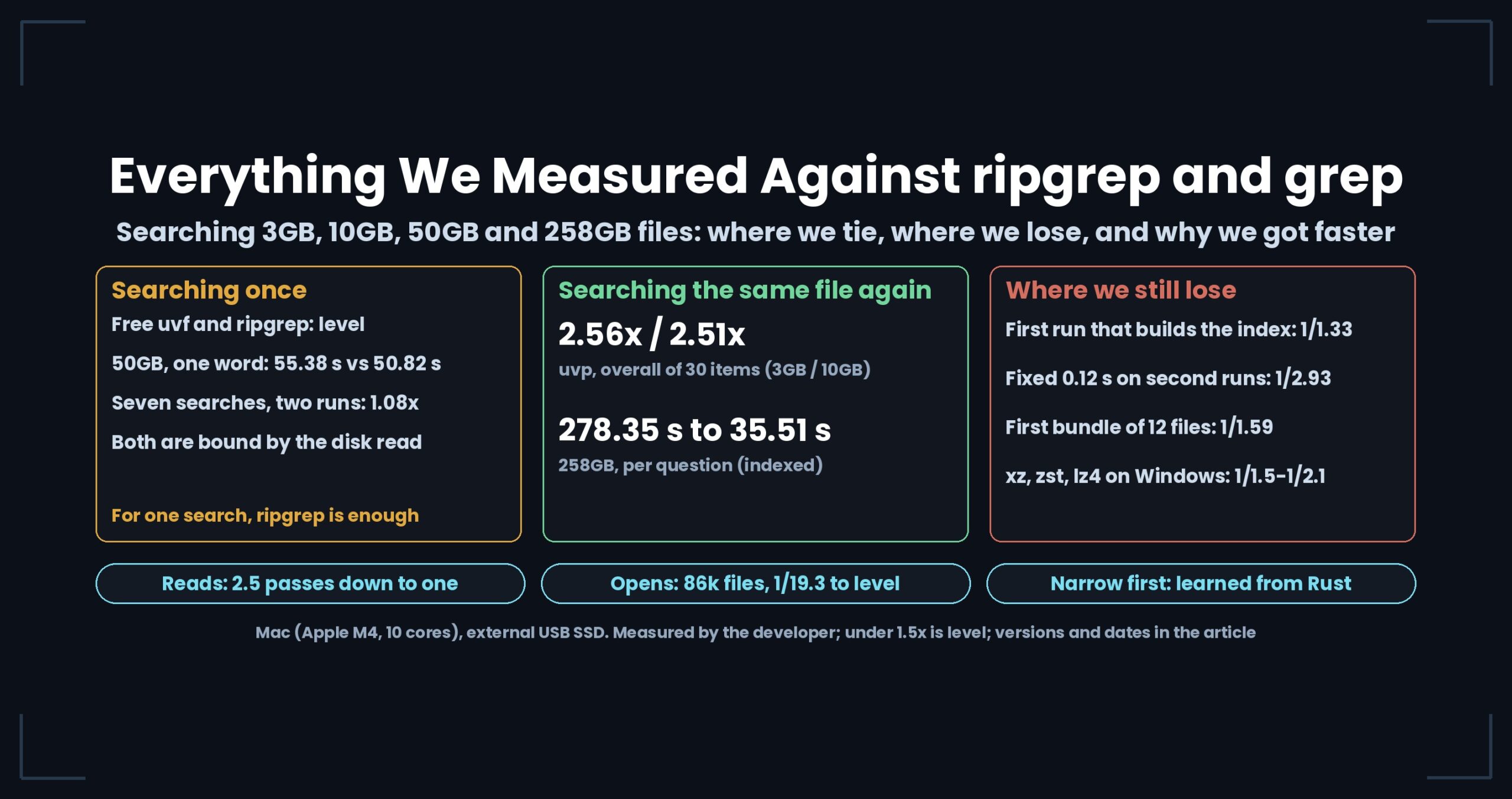
- The short answer: for a single search, the free uvf and ripgrep are level. For repeated searches on the same file, uvp with its index runs about 2.5x ripgrep. The gap came from how many times we read, how many times we open files, and how we narrow lines first — not from the language
- 1. Today’s numbers — v1.9.0 (October 13–14, 2026, Mac)
- 2. Searching once — the free uvf against ripgrep
- 3. Searching again and again — uvp with its index against ripgrep
- 4. Why we got faster — from 205 s to level
- 5. On three OSes — is this a Mac-only conclusion?
- 6. What we settle before speed — same answers, and what counts as a “difference”
- Where we lose, and where we are level
- Read each article
- Links
The short answer: for a single search, the free uvf and ripgrep are level. For repeated searches on the same file, uvp with its index runs about 2.5x ripgrep. The gap came from how many times we read, how many times we open files, and how we narrow lines first — not from the language
- For a single search, ripgrep is all you need. The free
uvfgot as far as 1.08x ripgrep over two runs of seven searches (level at both 3GB and 10GB). The UwView — Huge Files, No Waiting command line is not a tool that overtakes ripgrep. - Ask the same file again and again, and the gap opens.
uvpin UwView Pro — Huge Files, No Waiting builds an index (.uwvz, a compressed format plus index) on the first question and reads only that from the second question on. Across 30 items in v1.9.0, including the first question that builds the index, it came to 2.56x at 3GB and 2.51x at 10GB. At 258GB, one question takes 278.35 s against 35.51 s. - The reason was not Rust versus C#. Rewriting the same design in Rust gave the same speed as the C# version. What mattered was how many times we read the file (2.5 passes down to one), how many times we opened small files, and the clues a regex gives for narrowing lines before matching.
1. Today’s numbers — v1.9.0 (October 13–14, 2026, Mac)
Same Mac (Apple M4, 10 cores, 32 GB memory, external USB SSD), same expression and same file as ripgrep. cold is the first run after sudo purge and a 10-second wait; hot is the run right after it. The ratio is “ripgrep’s time ÷ our time”: above 1 means we are faster, 1/x means we are slower. Under 1.5x we call it “level”.
| What we compared | ripgrep (s) | Ours (s) | Result | Source |
|---|---|---|---|---|
3GB, 東京 (Tokyo), second run (uvf) |
0.31 | 0.29 | 1.07x, level | Wide Field Part 12 |
3GB, 東京, second run (uvp) |
0.31 | 0.17 | 1.8x | Full Spectrum Part 3 |
3GB, 東京, first run (uvp, including index build) |
3.27 | 4.35 | 1/1.33, level (ripgrep ahead) | Full Spectrum Part 3 |
3GB, -E -i, second run (uvf) |
0.56 | 0.48 | 1.17x, level | Wide Field Part 9 |
10GB, -E -i, second run (uvf) |
1.75 | 1.38 | 1.27x, level | Wide Field Part 9 |
3GB, -E -v (^ +<), second run (uvp) |
3.10 | 0.11 | 28.2x | Full Spectrum Part 2 |
10GB, regex with no required literal, second run (uvp) |
13.54 | 0.73 | 18.55x | Full Spectrum Part 4 |
10GB, 東京, second run (uvp) |
0.98 | 0.43 | 2.28x | Full Spectrum Part 4 |
10GB, 東京, first run (uvp) |
10.96 | 12.72 | 1/1.16, level (ripgrep ahead) | Full Spectrum Part 4 |
Adding the first and second runs together (“two-run total”) gives the following (sources: the addenda to the Rust and C# article and the 81-check article, and Full Spectrum Part 4).
| Two-run total | Result |
|---|---|
Seven searches, 3GB / 10GB (uvf) |
1.08x / 1.08x (level) |
Seven searches, 3GB / 10GB (uvp, including index build) |
3.44x / 3.55x |
Overall across 30 items, 3GB / 10GB (uvp) |
2.56x / 2.51x (zero output mismatches against ripgrep) |
Counting and sorting (uvp vs rg + sort + uniq) |
4.2–4.9x |
Three complex searches, about 60k Linux kernel files (uvp) |
2.35–4.56x |
Three complex searches, one 1GB file (uvp) |
1.22–2.13x |
The “seven searches” are a plain search, -i, -E, -E anchored at line start, -E -i, -v and -E -v. The “complex searches” are three examples — cut out multi-line blocks and mask them, find pairs of nearby lines, and gather fields into CSV — with perl and awk piped after ripgrep on the other side.
2. Searching once — the free uvf against ripgrep
uvf builds no index; like ripgrep, it reads the file once and searches. Both are bound by how fast the disk reads, so on large files they line up (the three-arenas article, September 2026).
50GB, 東京, cold |
s |
|---|---|
| ripgrep 15.2.0 | 55.38 |
uvf |
50.82 |
That is 1.09x — level. The two-run total of seven searches on the Mac was also within level everywhere: 1/1.06 at 3GB (ripgrep ahead), 1.08x at 10GB and 1.07x at 50GB.
ripgrep’s speed does depend on the OS and on how it reads. By default it reads large files with mmap; with --no-mmap, a regex-plus-exclusion search on 50GB under Windows 11 went from 282.84 s to 97.83 s (2.89x). On macOS both were the same, and on Linux (a virtual machine) the default was faster for light searches while --no-mmap was faster for heavy ones (the mmap vs no-mmap article). When uvf showed 2.57x on a Windows laptop, it was not that uvf was fast — Windows ripgrep was slow with its default read.
On a slow disk, everyone lines up. On an external drive that reads 0.41 GB/s, searching 51.25GB took grep 64.64 s and ripgrep 71.49 s, with grep coming out ahead (the 51GB article, September 2026).
3. Searching again and again — uvp with its index against ripgrep
uvp gets faster because, from the second question on, it reads .uwvz (about 1/9 the size of the original) instead of the original file. Here are cold and hot measured separately (the uvp command article, uvp 1.6.3, ripgrep 15.2.0, .uwvz already built).
東京 |
ripgrep cold / hot (s) | uvp cold / hot (s) |
Result cold / hot |
|---|---|---|---|
| 3GB | 3.26 / 0.33 | 1.25 / 1.01 | 2.6x / 1/3.1 |
| 10GB | 10.96 / 10.89 | 2.37 / 1.55 | 4.6x / 7.0x |
| 50GB | 54.76 / 55.15 | 7.76 / 6.34 | 7.1x / 8.7x |
10GB and up do not fit in memory, so ripgrep reads from disk every time. Only 3GB fits in 32 GB of memory, and on the second run ripgrep ran over the cache in 0.33 s. That 3GB hot loss flipped in v1.9.0 to 0.31 s against 0.17 s (1.8x) (the table in section 1).
On a single 258GB file with 4.5 billion lines, ripgrep’s median over five questions was 278.35 s — 1.04x the time it takes just to read the file once (268.73 s with wc -l). It used only 11 s of CPU in 275 s. The only place left to win was the number of bytes read: uvp, which shrinks 258.68GB to 28.6GB (1/9.04) with its index and compression, takes 35.51 s. In exchange, the first question spends 333.67 s building the index, and it pays for itself from question 1.37 on (the one-place-to-win article).
Even at 3GB, the picture changes once you do more than search. Replacing was 3.5x sed, extracting 12.6x, and for a file kept as gz, “decompress + ripgrep” took 6.47 s against 0.68 s reading .uwvz directly (the 3GB article, uvp 1.6.3).
4. Why we got faster — from 205 s to level
From here on, this is history. Each number belongs to the version of its time, not to today.
| When / version | What we fixed | Before → after | Source |
|---|---|---|---|
| 2026-09-15, v1.6.0 | (Starting point) uvf 205 s on 50GB, ripgrep 56 s |
ripgrep 3.7x faster | Rust and C# |
| v1.6.0 | Conservatively extract the string a regex must contain, and narrow candidate lines first | 50GB -E 13.68 s → 7.75 s |
Part 4 |
| v1.6.2 | Counts changed from run to run (parallel search stopped at the first million hits). Default made unlimited; truncation reported with exit code 2 | Chose reproducibility over speed (50GB 1.24 s → 27.12 s; ripgrep 60.35 s) | Part 5 |
| v1.6.3 | Counting line numbers, matching and handing over lines folded into one read (it had been 2.5 passes) | 50GB 203 s → 50.82 s, 57 MB working memory | Part 2 |
| v1.6.6 | Cut the per-run fixed cost (JIT settings, launching an external command) | 3GB hot, 7 items 11.46 s → 7.95 s; uvp vs ripgrep 1/1.48 → 1.16 |
Part 7 |
| v1.6.6 | Display keeps mmap; full reads switch to pread (4 MB) | Read rate 551 → 966 MB/s; opening 50GB 100.6 s → 50.44 s | Part 10 |
| During First Light | Faster newline counting (1.74 → 3.27 GB/s in memory) | Not one second moved when reading from disk | Part 11 |
| 1.7.3.6.7 | The -E -i anchor had picked = and "; switched to letters |
1/1.68 → 1/1.07 of ripgrep | Rust and C# |
| 1.7.3.6.8 | Count newlines 16 bytes at a time (3GB 0.15 s → 0.028 s) | 3GB hot 0.40 s → 0.27 s (ripgrep 0.29 s) | Wide Field Part 12 |
| 1.7.3.6.5 → 1.7.3.7 | Stopped opening each of 86k Linux kernel files three times | uvf second run 1/19.3 of ripgrep → 1/1.08 over 8 questions × 2 runs |
Rust and C# |
| v1.8.1.9 | Writing out matching lines ballooned allocated memory | 3GB 4.70 s → 2.68 s (ripgrep 2.83 s); 28 GB → 0.4 GB allocated | Full Spectrum Part 5 |
| v1.9.0 | A dictionary of line “shapes” (the line skeleton) so blocks with no hit stay closed | 3GB -E -v 1.510 s without → 0.062 s with |
Full Spectrum Part 2 |
| v1.9.0 | A summary of 3-byte sequences per block (block marks), blocks cut from 4 MB to 1 MB | 東京 1.67x, 札幌 (Sapporo) 2.61x with vs without marks (this ratio alone measured on dev build 1.8.3.4) |
Full Spectrum Part 3 |
The newline counting that “did not move one second” in Part 11 paid off later. On the second run, with the file in memory, 0.15 s of the 0.40 s at 3GB was spent counting newlines (Wide Field Part 12). Slowness that stays hidden while the disk is the bottleneck comes to the front once the file is cached — that pattern came up again and again.
Did rewriting it in Rust catch ripgrep?
To check whether “it’s fast because it’s Rust”, we ported the search part of uvf to Rust and measured five searches over the 86k Linux kernel files (cold + hot, median of three, October 4, 2026).
| ripgrep | uvf (C#) |
Rust version (matching left to the regex crate) |
|---|---|---|
| 30.62 s | 37.55 s | 36.85 s |
The Rust version ran at the same speed as the C# version (1.02x). The gap to ripgrep did not shrink. The difference was in the design. What we brought back from Rust was not the language but a way of narrowing: filter lines first even on a single character or a byte sequence. Adding that to uvf made regexes with no required literal 2.3–6.1x faster (the Rust and C# article).
What we took from ripgrep, grep, klogg and others — and what we deliberately left out — is listed in the article on what we borrowed from other tools.
5. On three OSes — is this a Mac-only conclusion?
We ran the same test suite on a Mac, a Windows machine and a Linux machine. The machines are completely different, so we never compare seconds across OSes; we only list the ratio to ripgrep on each machine.
| Mac | Windows | Linux | |
|---|---|---|---|
| Overall (v1.7.3.6.8–6.9, 96 items) | 2.49x | 3.42x | 1.88x |
| Overall (v1.6.6, two-run total) | 2.30x | 3.06x | 1.76x (VM) |
| Output mismatches against ripgrep and sed | 0 | 0 | 0 |
Sources: Wide Field Part 13 (October 4, 2026) and Part 12. In Part 12 we noticed that our Windows “cold” runs had not actually dropped the cache (a record of reading 10GB in 2.65 s) and measured everything again.
Windows found a loss the Mac never showed. On compressed xz (3GB), zst (1GB) and lz4 (1GB and 3GB), uvf ran at 1/1.5–1/2.1 of ripgrep (Wide Field Part 13). On a two-core Linux machine, uvp‘s first run (the index build) was heavy, and the two-run totals for zst, lz4 and plain text were 1/1.2–1/1.4 of ripgrep.
6. What we settle before speed — same answers, and what counts as a “difference”
Before comparing seconds, we compare the output line by line. For 東京 at 3GB, 10GB and 50GB, ripgrep and uvp both returned 11,274 / 11,393 / 94,979 hits, and with case-insensitive, regex, exclusion, two-word narrowing and frequency counts included there were zero mismatches (the uvp command article). The script log of 81 checks against ripgrep and sed is in the 81-check article.
We wrote down what counts as a “difference” before measuring: for a single item, under 1.5x is not a difference; for a total of seven items or more, under 1.3x is not a difference. The bar used to be 2x; lowering it to 1.5x flipped six of our own verdicts against ripgrep (Part 9). “Level” on this page follows the same rule.
Where we lose, and where we are level
- For a single search, ripgrep is all you need.
uvp‘s first question is slower by the time it spends building the index; even in v1.9.0 it is 1/1.33 at 3GB and 1/1.16 at 10GB (both level, with ripgrep ahead). - Every
uvpsecond run carries a fixed cost of about 0.12 s. Where ripgrep reads everything in 0.04 s, as with an XML split into 1,000 files of about 1GB in total, we lose 0.043 s against 0.126 s (1/2.93) (Wide Field Part 14, v1.7.3.7). - The first pass that bundles many files is slow. Twelve mixed plain and gz files: 24.95 s against 39.78 s (1/1.59), earned back from the third run. With five plain files only, the second run is also slower, 0.32 s against 0.53 s (1/1.66), and more runs never earn it back. If you search only plain text repeatedly,
uvfor ripgrep is enough (Wide Field Part 14). - On Windows,
uvfruns at 1/1.5–1/2.1 on xz, zst and lz4 (section 5). We have not found the cause yet. - Expressions that hit in every block cannot skip anything, skeleton or marks.
[0-9]{3}-[0-9]{4}"was 0.92–0.99x with and without the skeleton, andhighway0.96x with marks (both level, with the new mechanism slightly slower). The skeleton makes the index 6.3% larger (Full Spectrum Parts 2 and 3). - Matching a second word within ±N lines is only level at 1.24x, and the second run of counting is 1/1.13 (level, ripgrep ahead) (Full Spectrum Part 4).
- The free
uvfonly caught up on writing out matches. 2.68 s against ripgrep’s 2.83 s (1.06x, level) (Full Spectrum Part 5). - Our regex is .NET’s, so what you can write differs. POSIX classes (
[[:alpha:]]) and\p{Han}cannot be written, and the suggested rewrites do not always match exactly the same ranges. Each match has a 5-second limit (Wide Field Part 9).--jsonalso has fewer fields than ripgrep: onlyfile,lineandtext(Wide Field Part 14). - Past losses that have since flipped: the 3GB hot plain search (1/3.1 → 1.8x) and the second run of
-E -i(1/2.67–1/3.06 → 1.17–1.27x). The original articles keep their text as a record, with an addendum at the top. - Almost every second on this page comes from one Mac. We have started a series that runs the same procedure on three OSes, beginning with part 0.
Read each article
The overall picture today
- Catching Up With Rust’s ripgrep in C# — Huge Files From 205 s to On Par, 86k Small Files From 19x Behind to On Par, and Complex Searches Where uvp Is 1.07–3.5x ripgrep
- Every Place ripgrep Still Beats Us, in One List — Wide Field Part 14
- The Free uvf Holds Its Own Against Both ripgrep and klogg. uvp Earns Its Keep at the Second Question — One 51 GB File, Three Arenas
- What We Took From klogg, ripgrep, grep and PowerGREP — The Features UwView Borrowed From Other Tools, and the Ones We Deliberately Left Out
Measured side by side with ripgrep (September 2026)
- How Fast Is ripgrep on a Single 51 GB File? — rg vs grep vs UwView Pro, Measured
- We shipped a uvp command — the same answers as ripgrep, 7× faster at 10 GB. And at 3 GB too, if the cache is cold
- uvp vs rg and sed, 81 checks — the script’s run log (3 GB / 10 GB / 50 GB)
- Picking the one place to beat ripgrep — read 1/9 of the bytes, then hand the result from the CLI to the GUI
- I Thought We Lost at 3 GB — Turns Out We’d Won (As Long as the Cache Is Cold)
- ripgrep Is 2.9x Faster With no-mmap — Measured Against the Default mmap Read on One 51 GB File, on Three OSes
The improvement log (First Light, v1.6)
- We Made Our CLI as Fast as ripgrep on 50 GB — Part 2: Folding 2.5 Passes Into One (203 s to 50.82 s)
- Our -E Nearly Doubled the Time; ripgrep’s Didn’t — Part 4: Extracting Required Literals Took 50 GB -E From 13.68 s to 7.75 s
- Our CLI Gave Three Different Counts Where ripgrep Gave One — Part 5
- Only the 3 GB File Lost to ripgrep — Part 7: The Bottleneck Was Startup Overhead, Not I/O
- We Set the Bar Before Measuring — Part 9
- mmap Cost Us Half the Disk — Part 10
- We Counted Newlines 1.88x Faster and the Clock Did Not Move — Part 11
- Our Windows “Cold” Runs Were a Lie — Part 12
Wide Field (v1.7)
- Regex With -i Runs 2.7–3.1x Slower Than ripgrep on a Cached File — Wide Field Part 9
- The Newline Count I Said Would Never Show Up in Seconds Was 40% of the Second Search — Wide Field Part 12
- We Ran the Same Test Suite on macOS, Windows and Linux, and Windows Found Us Losing — Wide Field Part 13
Full Spectrum (v1.9)
- An Index That Knows Where the Answer Cannot Be — Full Spectrum Part 2
- Knowing Which Blocks Not to Open — Full Spectrum Part 3
- Where the Second Query on 10 GB Got Shorter — Full Spectrum Part 4
- Three Fixes in the Free Edition — Full Spectrum Part 5
Links
- Can’t Open a Huge File? Everything We Measured in One Place (the summary on opening files)
- Download UwView (Windows, macOS, Linux)
- UwView Pro (one license for every OS)
- Benchmark summary
- Source code (GitHub)
Every number was measured by the developer and depends on the machine, version and date it was measured with. Results vary by environment. The ripgrep compared was 15.2.0 wherever recorded (15.1.0 on part of the Linux runs).