205 seconds, to search 50 GB.
“This is not a speed tool. If you have ripgrep, use ripgrep.” We wrote that ourselves, in the v1.6.0 release notes. About four times slower than ripgrep. But we had never actually measured what those 205 seconds were made of.
When we did measure, the culprit wasn’t the algorithm. It was that we were reading the same file over and over.
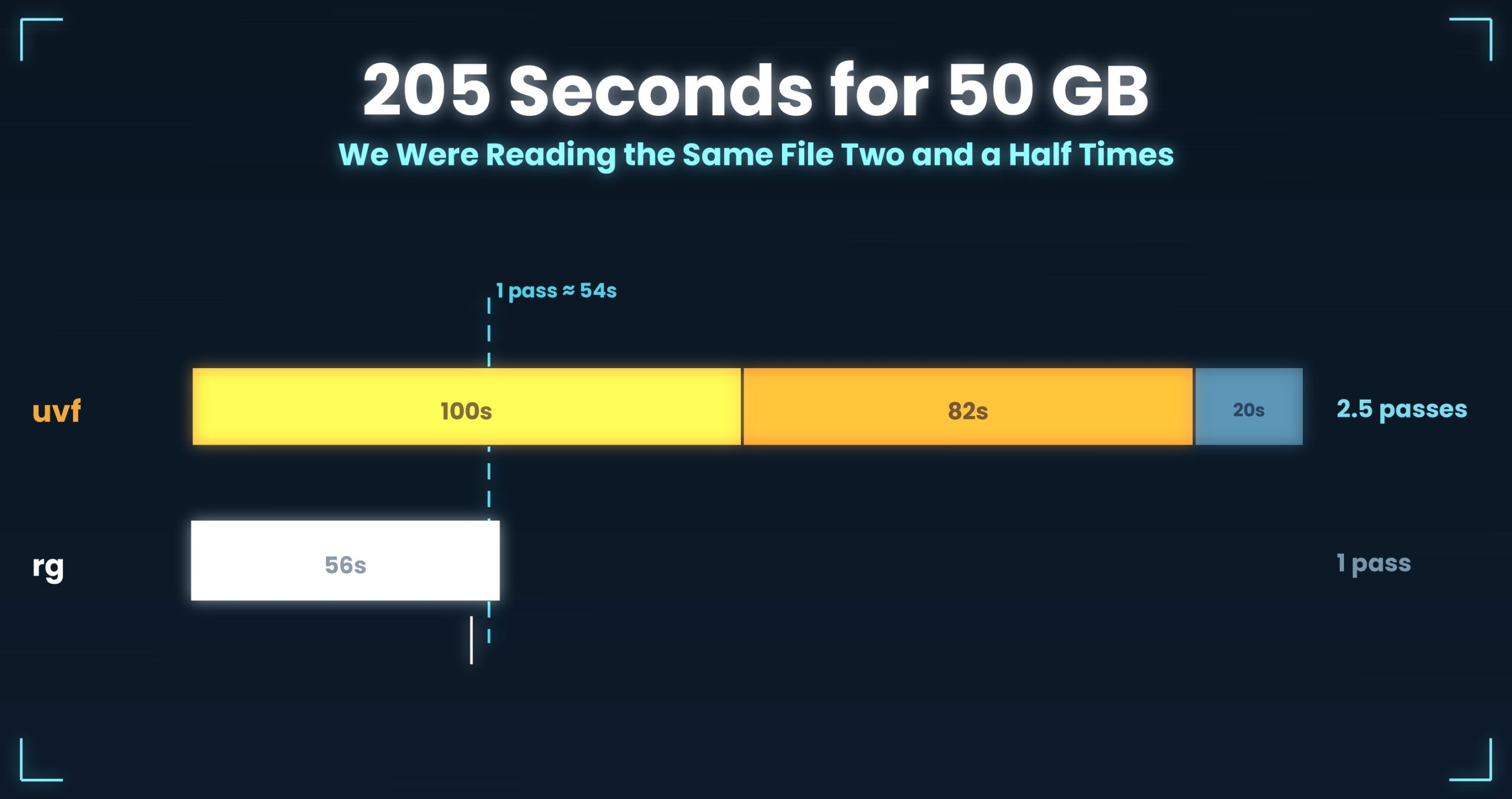
- Up front: The CLI (uvf) that took 205 seconds to search 50 GB was about 4× slower than ripgrep (56 s). Measuring it showed the cause was not a slow algorithm — we were reading the same file two and a half times: “build the index (100 s) → search (82 s) → re-read the matched lines (20 s).” Folding those into a single pass brought it to 50.82 s (962 MB/s). Even so, the first query is still 6–7% slower than ripgrep — the price of keeping an index. All figures are from one setup; details at the end.
- The problem: we had written “about 4× slower” ourselves
- The cause: 205 seconds was “two and a half passes”
- The fix: fold it into a single pass (next time’s topic)
- The numbers: 203 → 50.82 s (one pass, 962 MB/s)
- The general takeaway: “slow” comes in two kinds
- Tools used
- Links
Up front: The CLI (uvf) that took 205 seconds to search 50 GB was about 4× slower than ripgrep (56 s). Measuring it showed the cause was not a slow algorithm — we were reading the same file two and a half times: “build the index (100 s) → search (82 s) → re-read the matched lines (20 s).” Folding those into a single pass brought it to 50.82 s (962 MB/s). Even so, the first query is still 6–7% slower than ripgrep — the price of keeping an index. All figures are from one setup; details at the end.
This is part 1 of the “First Light” series: a log of how we made UwView — a huge-file viewer — faster from v1.6.0 to v1.6.6 using one lever only, the number of times we read the file. Every number is measured on the same machine, and we print the ones we lose on as plainly as the ones we win on.
The problem: we had written “about 4× slower” ourselves
UwView is a viewer for huge text and huge logs. When we added a command line in v1.6.0 (uvp for the paid build, uvf for the free one), the release notes said: “This is not a speed tool. If you have ripgrep, use ripgrep.”
We had reason to. Searching a single 51.25 GB file (the OpenStreetMap Japan XML) for a word, uvf took 205 seconds (203 s at v1.6.2 and earlier). ripgrep did the same search, same machine, same file, in 56 seconds. Four times slower. All we could do was write, honestly, “we lose.”
But “we lose” doesn’t tell you what to fix next. So first, we broke the 205 seconds down.
The cause: 205 seconds was “two and a half passes”
Timing each stage separately, here is where the time went.
| Stage | What it does | Time | Bytes read |
|---|---|---|---|
| ① Build the index | Read the whole file front to back, count newline positions | 100 s | whole file, once |
| ② Search | Read the whole file again, find lines matching the word | 82 s | whole file, once |
| ③ Output | Re-read the matched lines to lay them out | 20 s | matched lines only (~half a pass) |
| Total | ~205 s | 2.5 passes |
The culprit was not a clever algorithm, nor the language (C#). We were reading the same 51.25 GB two and a half times — once for the index, once for the search, and half again for output. That was all.
ripgrep is fast not by magic: it reads while it searches and emits as it goes — one pass over the file. We had split the three jobs (count, find, write) into separate passes, so we read more times. Before “write fast code” comes the obvious thing we had skipped: “don’t read the same thing twice.”
Raw disk read speed has a ceiling. This external USB SSD reads at about 950 MB/s, so reading 51.25 GB even once takes about 54 seconds. Two and a half passes is already about 135 seconds — which lines up with the 205 being mostly re-reading.
The fix: fold it into a single pass (next time’s topic)
The fix is to merge the three passes into one: while reading, count newlines, test each line against the word, and send matches straight to output. Read once, and the answer is already in hand. That single-pass design is the subject of part 2.
The version that bundled ten improvements into one write-up is on Qiita (a 50 GB search from 205 s to 51 s, in Japanese). This series unpacks that bundle one theme at a time.
The numbers: 203 → 50.82 s (one pass, 962 MB/s)
After folding the three passes into one, uvf‘s 50 GB search went from 203 s to 50.82 s — 962 MB/s, essentially at the disk’s raw ceiling. Working memory: 57 MB, constant regardless of file size.
We did not “swap in a faster algorithm.” We cut the number of passes from two and a half to one. Since the real cost was the number of reads, removing reads was what paid off.
That single-pass reading was later extended from the command line to the GUI, and by v1.6.6 both “open” and “search” reach the disk’s raw read speed.
We gave v1.6.6 a pet name: “First Light.” Both the screen and the command line now open and search by reading the file just once — the release where UwView first felt complete.
And, honestly: the first query is still 6–7% slower than ripgrep. That is the price of keeping the index (.uwvz), and it cannot be removed (see the command-line section below, and the final part).
The general takeaway: “slow” comes in two kinds
When your own tool is slow, the cause usually splits two ways. One is a slow algorithm (the computation is wrong). The other is reading the same data many times (too many I/O passes). The first needs a code rewrite; the second you find just by counting passes — and it’s usually the bigger win.
On huge files, raw disk speed is the ceiling. If the ceiling is 950 MB/s, one pass over 50 GB is about 54 seconds. Decompose “how many seconds” into “how many passes × time per pass” first. That alone tells you whether to fix the code or the way you read. For us, the answer was the way we read.
Tools used
Since this article is about the command itself, here is the actual usage.
The same things, from the command line
v1.6.0 added the uvp command (uvf in the free build). It uses the same .uwvz as the GUI, so an index built on the CLI works in the GUI too.
# One pass, just to check whether a word is there (free build)
uvf japan-latest.osm 'Tokyo'

# Case-insensitive
uvf app.log 'error' -i

# With surrounding context
uvf huge.log 'FATAL' -C 5

# Hand the CLI's result straight to the GUI to open
uvf access.log ' 503 ' -open
Exit codes match grep: 0 = found, 1 = not found, so if uvf access.log ' 503 '; then just works.
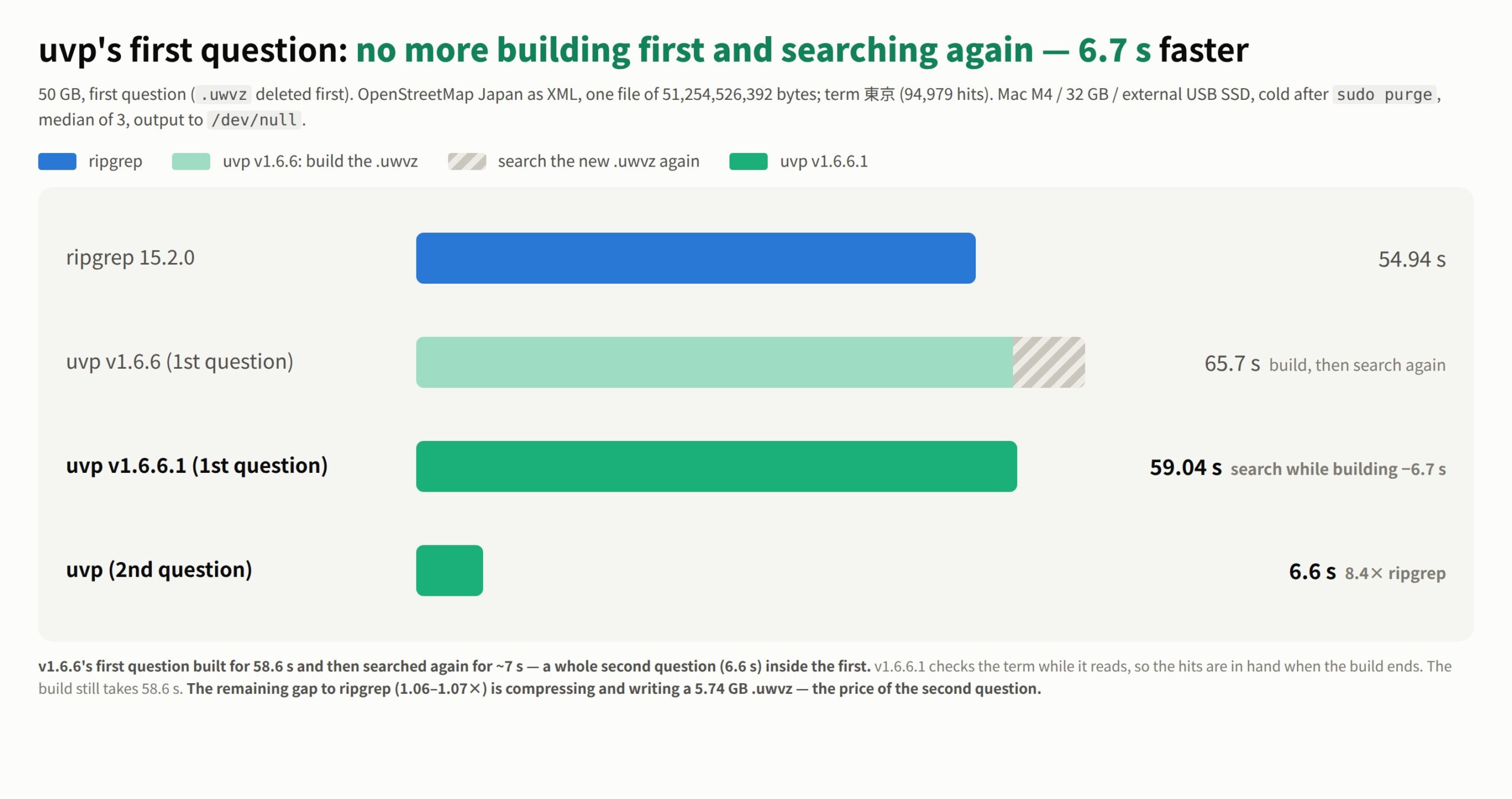
Honestly: the first query is a little slower with uvp than ripgrep — it builds the .uwvz (compression + index) first, so at 50 GB it’s 59.0 s vs. 54.9–55.8 s = 6–7% (v1.6.6.1). It pays off from the second query on: the same 50 GB search returns in 6.6 s, about 8.4× ripgrep. On small files like 3 GB it’s about even — the index buys you less. The free uvf is on par with ripgrep at any size (measured article; Mac M4, 32 GB RAM, external USB SSD, OpenStreetMap XML — one setup, results vary).
Links
- Qiita: a 50 GB search from 205 s to 51 s (the ten-improvement bundle, JP): https://qiita.com/amru195704/items/3cb6451815624aeced73
- We added the uvp command (measured vs. ripgrep): https://uvp.y42u.net/en/blog/uvp-cli-release-vs-ripgrep-en/
- Benchmarks at three sizes: https://uvp.y42u.net/en/blog/uwview-pro-benchmark-3sizes-en/
- Source (GitHub): https://github.com/amru195704/UwView
If you open and search the same files again and again, UwView Pro keeps the index and compression around: from the second query on you reopen instantly with line numbers, and search while it stays compressed to about 1/9 (all OSes; one-time purchase or subscription).
From the developer: a list of my apps, Kindle books, and open source is at GitHub: amru195704.