Zero matches.
Hand rg a zip and it will not look inside. Exit code 1. If your logs are archived, you have to expand them before you can search them.
What does that expansion actually cost?
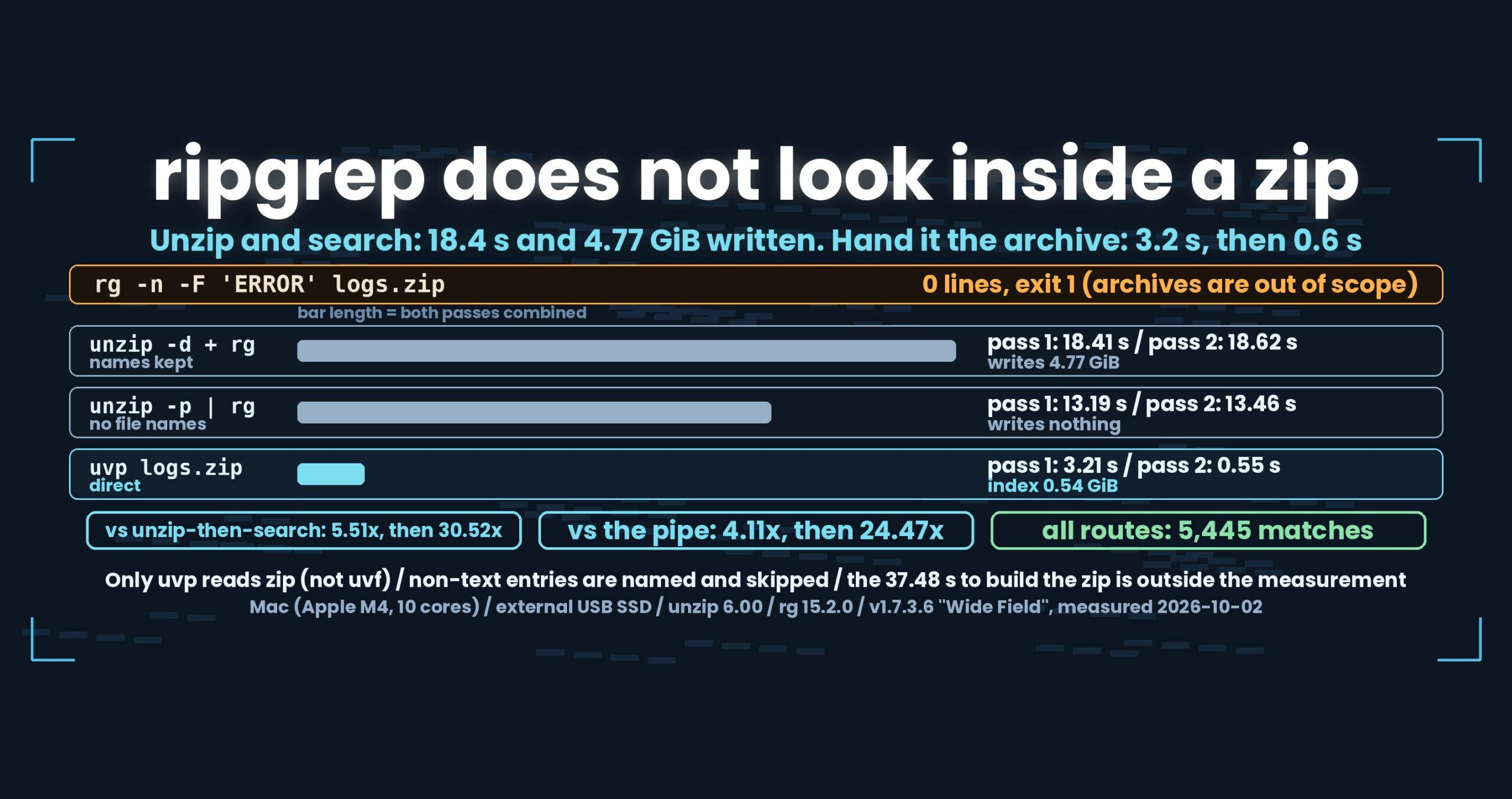
- Up front: uvp searches a zip directly. Unzipping into a folder and then running rg takes 18.41 s cold and 18.62 s hot (and writes 4.77 GiB to disk); the unzip -p pipe takes 13.19 s and 13.46 s. uvp takes 3.21 s on the first pass (index build included) and 0.55 s on the second — 5.51x and 30.52x against unzip-then-search, 4.11x and 24.47x against the pipe. All routes return 5,445 matches. The catch: only the paid uvp reads zip
- The limits, before anything else
- First, what rg actually does
- There are two ways to expand, and they cost differently
- The numbers
- Narrowing to one entry — zip!path
- Bundling per entry: the decisions
- How this was checked
- What generalises
- Being straight about it
- The tools behind this
- Links
Up front: uvp searches a zip directly. Unzipping into a folder and then running rg takes 18.41 s cold and 18.62 s hot (and writes 4.77 GiB to disk); the unzip -p pipe takes 13.19 s and 13.46 s. uvp takes 3.21 s on the first pass (index build included) and 0.55 s on the second — 5.51x and 30.52x against unzip-then-search, 4.11x and 24.47x against the pipe. All routes return 5,445 matches. The catch: only the paid uvp reads zip
The archive is uvzip-plain5.zip, 0.52 GiB — five OpenStreetMap XML files (4.77 GiB) compressed with deflate -6. Mac (Apple M4, 10 cores), 32 GB RAM, external USB SSD; the other side is unzip 6.00 and ripgrep 15.2.0.
uvfanduvpare the search commands of UwView v1.7.3.6 “Wide Field” (released 28 September 2026), which I make.uvfships in the free edition;uvpis part of the paid UwView Pro. zip input landed in the v1.7.5 work, and the timings here were measured on the v1.7.3.6 binaries on 2 October 2026.
The limits, before anything else
Nothing in this round is slower on our side either, so here is what it costs instead.
- The free edition cannot read it. Only
uvphandles zip. - The index needs room: 0.54 GiB for the whole archive, 0.11 GiB when you narrow to one entry. Though that is less than the 4.77 GiB that unzip-then-search writes, so the comparison depends on what you measure.
- The other side is not ripgrep alone.
rgdoes not open archives, so this isunzipplusrg. Not “faster at the same job” — one less job to do. - Non-text entries are not bundled. An image or a binary gets named and skipped. We do not drop it silently, but it is not searchable either.
- Building the zip is outside the measurement. The 0.52 GiB archive here took 37.48 s to create. Every route pays that equally, so it is not in the table.
.Z(compress) is not supported.
First, what rg actually does
Hand it the archive:
$ rg -n -F 'ERROR' logs.zip
$ echo $?
1
Zero lines, exit code 1. It says there is nothing.
That is not a bug. ripgrep is not an archive reader (-z handles single-stream compression like gzip, not containers like zip).
From the user’s side, though, it is awkward. Zero results wears the face of a correct answer. rg does not say “this archive is out of scope”, so if you do not already know, you conclude your logs contain no errors.
There are two ways to expand, and they cost differently
Through a pipe
unzip -p logs.zip | rg -n -F 'ERROR'
Nothing touches the disk, which makes it the faster of the two. But the file names are gone. unzip -p emits every entry’s contents back to back, so what rg receives is one long text — and the line numbers run continuously across entry boundaries.
If you need to know which file and which line, this is not usable.
Into a folder
unzip -q -o -d tmp/ logs.zip && rg -n -F 'ERROR' tmp/
Names and line numbers come out right. In practice this is usually the shape people end up with.
It also writes 4.77 GiB to disk — and then rg reads it all back.
The numbers
Cache dropped, ten seconds of waiting, then the first pass (cold) and immediately the second (hot). The other side is unzip 6.00 plus ripgrep 15.2.0.
| Route | Pass 1 | Pass 2 | Both | Written to disk | Matches |
|---|---|---|---|---|---|
rg on the archive |
— | — | — | 0 | 0, exit 1 |
unzip -p \| rg (no file names) |
13.19 s | 13.46 s | 26.65 s | 0 | 5,445 |
unzip -d + rg (names kept) |
18.41 s | 18.62 s | 37.03 s | 4.77 GiB | 5,445 |
uvp logs.zip ERROR |
3.21 s (index included) | 0.55 s | 3.76 s | 0.54 GiB | 5,445 |
As ratios:
| Against | Pass 1 | Pass 2 | Both |
|---|---|---|---|
unzip -p \| rg |
4.11x | 24.47x | 7.09x |
unzip -d + rg |
5.51x | 30.52x | 9.37x |
We win from the first pass, which is unusual. Part 1 and Part 4 of this series both said the opposite: bundling costs you the first pass, because building an index is more work than just reading.
What flips it here, as far as we can tell, is that the other side expands one entry at a time. unzip -p walks the entries in order. We expand entries in parallel, so we get ahead. We have not isolated that, though — it is reasoning from the design.
Decompression is the bottleneck, so the second pass is not faster
Look at the second column: the other side goes 13.19 → 13.46 s and 18.41 → 18.62 s. Warming the cache changed almost nothing.
If disk reads were the bottleneck, the second pass would benefit. They are not: nearly all the time goes into decompressing. Reading 0.52 GiB is small next to expanding it into 4.77 GiB. There is very little for a cache to save.
The same shape appeared in Part 8 of the First Light series, with gzip.
uvp‘s second pass drops to 0.55 s because it reads a .uwvz (UwView Pro’s compression format plus index) instead — a different number of bytes entirely.
Narrowing to one entry — zip!path
To search a single entry rather than the whole archive:
uvp 'logs.zip!server/*.log' 'ERROR'
The part after ! is a wildcard over entry names (* and ?). Results print as logs.zip!server/error.log:12345:…, so you can paste a result line straight back in as the next query.
| One entry (1,145 matches) | Pass 1 | Pass 2 | Both |
|---|---|---|---|
unzip -p ZIP ENTRY \| rg |
2.74 s | 2.80 s | 5.54 s |
uvp 'ZIP!ENTRY' … |
0.72 s | 0.15 s | 0.87 s |
| Ratio | 3.81x | 18.67x | 6.37x |
The index this produced has a name worth pausing on:
uw-osm17-gc6ybj5yrhoz.uwvz
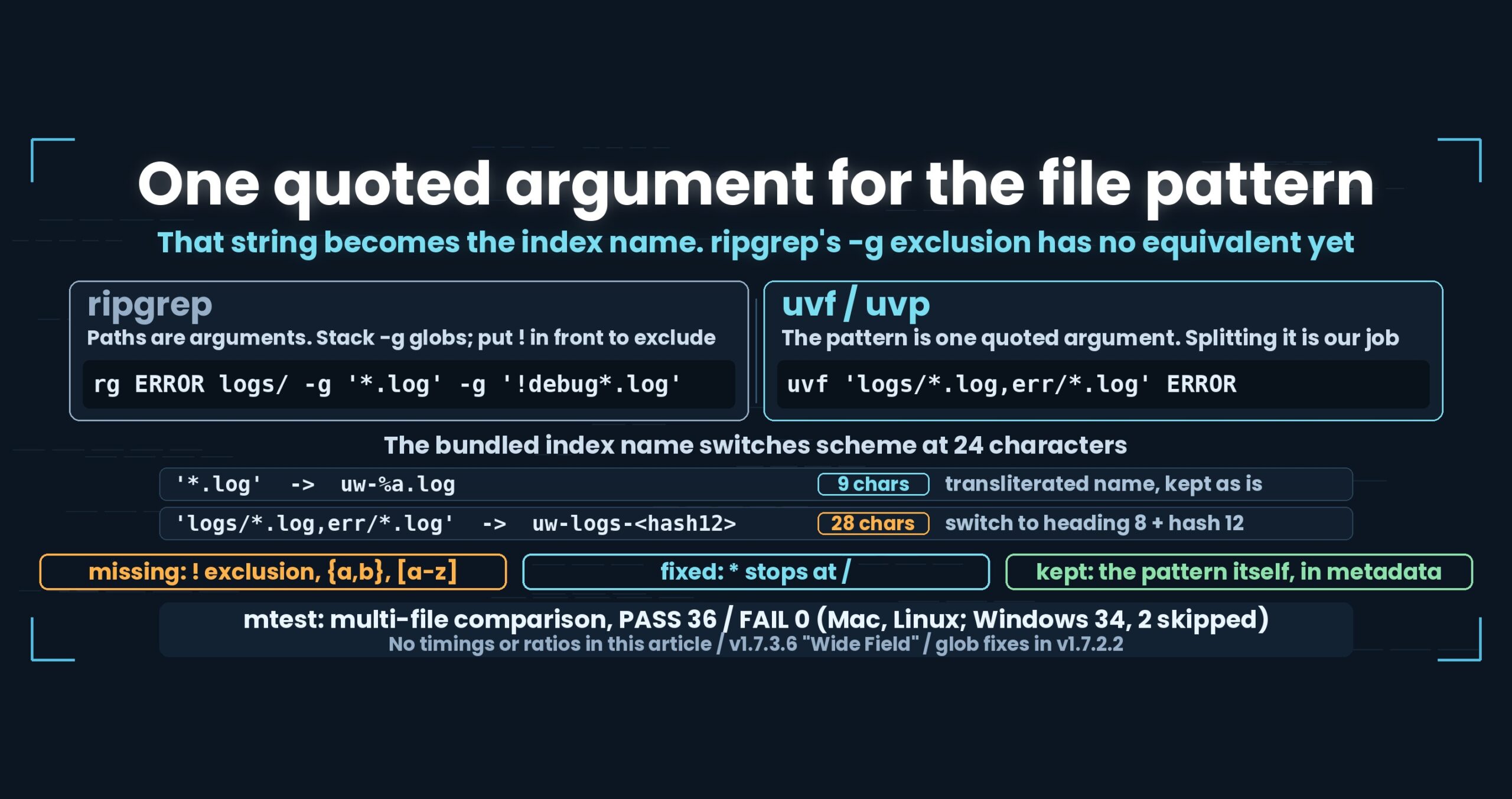
That is the rule from Part 8 — over 24 characters, switch to an 8-character heading plus a 12-character hash — firing in a situation we did not write it for. The transliterated form of osm17/uvzip-plain5.zip!japan-dv-10m.osm runs well past 24 characters, so the hashed name took over. Point uvp at the whole archive instead and the index sits next to it as logs.zip.uwvz; only a narrowed query puts a differently-named index in the current directory, because each narrowing is its own thing.
Bundling per entry: the decisions
A few things we settled while implementing it.
The index lives next to the archive when you open the archive itself. You opened logs.zip, so logs.zip.uwvz is the natural place. Narrowed queries get the name-from-the-pattern treatment described above.
Non-text entries are not bundled, and they are named. The test is whether the first 4 KB contains a zero byte — not the extension. Indexing an image as body text makes it unsearchable and throws the line count off; dropping it silently means you never learn a file you put in is missing. So it prints not text, skipped: logs.zip!blob.bin and moves on.
Entries are ordered by name (ordinal). The storage order inside a zip reflects whoever built it; sorting by name means the same archive always produces the same order.
And one side effect we had to fix: the newline convention for bundled content used to be decided by looking at the head of the first file. In a zip, that first file is compressed bytes — so when no plain file happened to be in the mix, we were deciding line endings by peering at deflate output. It now opens one entry and reads its actual head.
How this was checked
- Other side: unzip 6.00 (
unzip -pandunzip -q -o -d) plus ripgrep 15.2.0 (rg -n -F) - Version:
uvfanduvpboth v1.7.3.6 “Wide Field” - Data:
uvzip-plain5.zip, 0.52 GiB — five OpenStreetMap XML files (japan-dv-1m/3m/6m/10m/3g.osm, 5,126,445,571 bytes = 4.77 GiB) at deflate -6 - Method:
sync→ purge → 10 s wait → pass 1 → immediately pass 2. The.uwvzis deleted beforeuvp‘s first pass - Machine: Mac (Apple M4, 10 cores, 32 GB RAM), external USB SSD
- Agreement: not just counts — the set of matching lines (names and line numbers stripped, sorted) matched on all three routes. No ratios are printed when they disagree
- Correctness: the multi-file suite covers “a zip is bundled per entry and searchable” and “non-text entries are named and skipped”; both pass
- The same measurement was run twice the same day (
unzip -p13.31/13.49 s → 13.19/13.46 s;uvp3.22/0.59 s → 3.21/0.55 s). The values held - No cross-OS timing comparisons. Every number here is from the Mac
What generalises
(1) A tool returning zero is not always being honest with you. rg returning 0 and exit 1 on a zip is correct behaviour. It is still indistinguishable, from the outside, between “nothing there” and “did not look”. Do not return a silent zero for input you cannot read — the same call we made when uvf refuses a pbf.
(2) Price “expand then search” in bytes written, not just seconds. Zero through a pipe, 4.77 GiB into a folder. The 13.19 s versus 18.41 s gap matters less in practice than writing and deleting 4.77 GiB. The 0.54 GiB index should be compared against that, not only against the clock.
(3) Sequentially, or in parallel. We win the first pass, we think, because the other side expands one entry at a time. Whatever unit can be expanded independently is the unit of parallelism — zip entries, gzip blocks, pbf blobs. Different formats, same idea.
(4) Build the cache key out of the input string. A narrowed query became the index name (heading plus hash). The rule from Part 8 about mandatory quoting paid off in a case we had not pictured. Design decisions earn their keep when they are tested outside the situation that prompted them.
Being straight about it
- Nothing here is slower on our side. The costs instead: the free edition cannot read zip, the index needs 0.54 GiB, and non-text entries are not searchable
- The other side is not ripgrep alone.
rgdoes not open archives, so this isunzipplusrg. Not the same playing field - We did not isolate why we win the first pass. “They expand one at a time, we expand in parallel” is reasoning from the design
- The 37.48 s to build the zip is outside the measurement. If it belongs in an article, it belongs as preparation time, counted separately
- We may not have tuned
unzip.-pand-q -o -dwere run with their defaults - The 18.41 s route does not include deleting the extracted files afterwards. Real use pays that too
- We did not test an archive with many entries. Five files. Thousands of small entries might behave differently
- Encrypted zip is not supported, and neither is
.Z(compress) - The 0.54 GiB index is slightly larger than the 0.52 GiB zip. It does not save storage; it makes repeated queries fast
- I am the developer of one side of this comparison. Discount accordingly
The tools behind this
UwView is a CLI and GUI tool for examining very large text files and logs. In v1.7.3.6 “Wide Field” it searches many files, seven compression formats, zip archives and OpenStreetMap pbf — with no external commands.
The same things, from the command line
# Search everything in the archive. Pass one builds the .uwvz (UwView Pro)
uvp logs.zip 'ERROR'

# Narrow to some entries (wildcards after the !)
uvp 'logs.zip!server/*.log' 'ERROR'

# Case-insensitive / as a regular expression
uvp logs.zip 'ERROR' -i
uvp logs.zip '[0-9]{3}-[0-9]{4}' -E

# Narrow by a second term / with three lines of context
uvp logs.zip ERROR timeout
uvp logs.zip ERROR -C 3 retry

# Count what the capture group caught
uvp logs.zip 'ERROR' -uniq 'code=([0-9]+)' -sort count -head 20

# Read the hits in the GUI
uvp logs.zip 'ERROR' -open

# What is in this index? (free)
uvp logs.zip.uwvz --info

# Write the contents back out
uvp logs.zip.uwvz -extract -out out/
Exit codes follow grep: 0 = found, 1 = not found, 2 = error or incomplete result.
The free edition is on GitHub Releases. On Mac, brew install --cask amru195704/uwview/uwview; on Windows, Scoop (scoop bucket add uwview https://github.com/amru195704/scoop-uwview, then scoop install uwview).
Links
- Why a file pattern is one quoted argument, and the index name that switches at 24 characters: https://uvp.y42u.net/en/blog/uwview-wf08-file-globs-en/
- Searching gzip without expanding it (why cold and hot match): https://uvp.y42u.net/en/blog/uwview-fl08-gz-without-extract-en/
- Seven formats without calling an external command: https://uvp.y42u.net/en/blog/uwview-wf02-seven-formats-no-external-en/
- Reusing a bundled index, and not rebuilding when a file vanishes: https://uvp.y42u.net/en/blog/uwview-wf04-bundle-keep-en/
- Many files in one command: https://uvp.y42u.net/en/blog/uwview-wf01-multi-file-one-command-en/
- Building a
.uwvz, searching inside it, extracting from it: https://uvp.y42u.net/en/blog/uwvz-compressed-archive-search-extract-en/ - Searching compressed logs compared with ugrep, ripgrep and zgrep: https://uvp.y42u.net/en/blog/uwview-ugrep-ripgrep-zgrep-compressed-logs-en/
- Every measurement we publish: https://uvp.y42u.net/en/benchmarks-en/
- Source code (GitHub): https://github.com/amru195704/UwView
And if huge logs are eating your storage and you want them compressed and fast to search, take a look at UwView Pro: a persistent index, search inside the compressed cache, roughly 1/9 the storage, and a faster reopen every time (all operating systems; one-time purchase or monthly plan).
From the developer: my apps, Kindle books and public projects are listed at GitHub: amru195704.