We’ve released v1.1 of UwView, the large-file text viewer (free, open source on GitHub). The headline feature is the color highlighter. When we honestly compared features with the industry-standard klogg previously, “multi-keyword color highlighting” was a clear item on the loss list — something klogg had that UwView didn’t. This release fills in that line on the scoreboard.
And we didn’t stop at catching up. UwView ships with use-case presets built in from the start, and now also supports exporting/importing rule sets. This article walks through what you can now do, screen by screen.
For testing, we used an XML file with 100 million lines (100,000,000 lines) converted from OpenStreetMap Japan data. Even at this scale, the coloring doesn’t feel like it’s holding anything back.
Search’s “Yellow” and Highlighting’s “Red/Blue” Work Together at the Same Time
Let’s start with the basic screenshot. On the left is the body text; on the right is the search results (filter results) popup. The search term “Wakayama” hit 1,129 matches, listed with ±1 line of surrounding context.
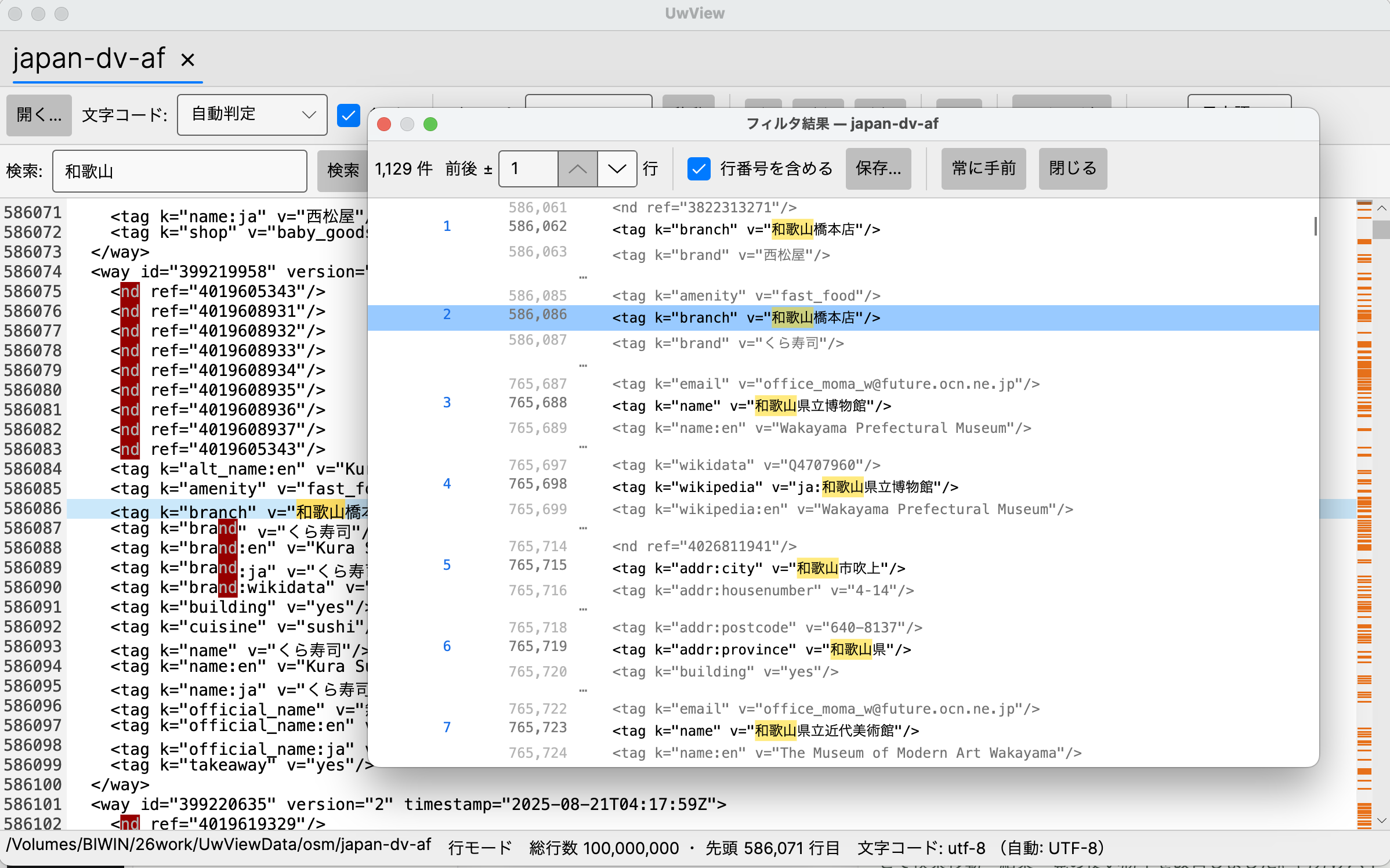
What I want you to notice is that the yellow of the search match (Wakayama) and the red applied by the color highlighter (the string nd) both appear on the same screen at the same time. UwView’s highlighter is designed so that search matches are always drawn with top priority — no matter how many colors you stack on top, the yellow of the term you’re currently searching for always stays on top. This avoids the common failure mode of this kind of feature, where too much coloring buries the search results.
One more understated bit of engineering: coloring is evaluated only for the lines currently visible on screen, each time. That’s why, even with a 100-million-line file, the coloring never falls behind while scrolling.
Color Rules Are Built from Patterns and Background Colors
The coloring itself is managed in a dedicated “Color Highlighter” dialog. Each line is one rule, assigning a text color and a background color to a pattern (a literal string or a regular expression).
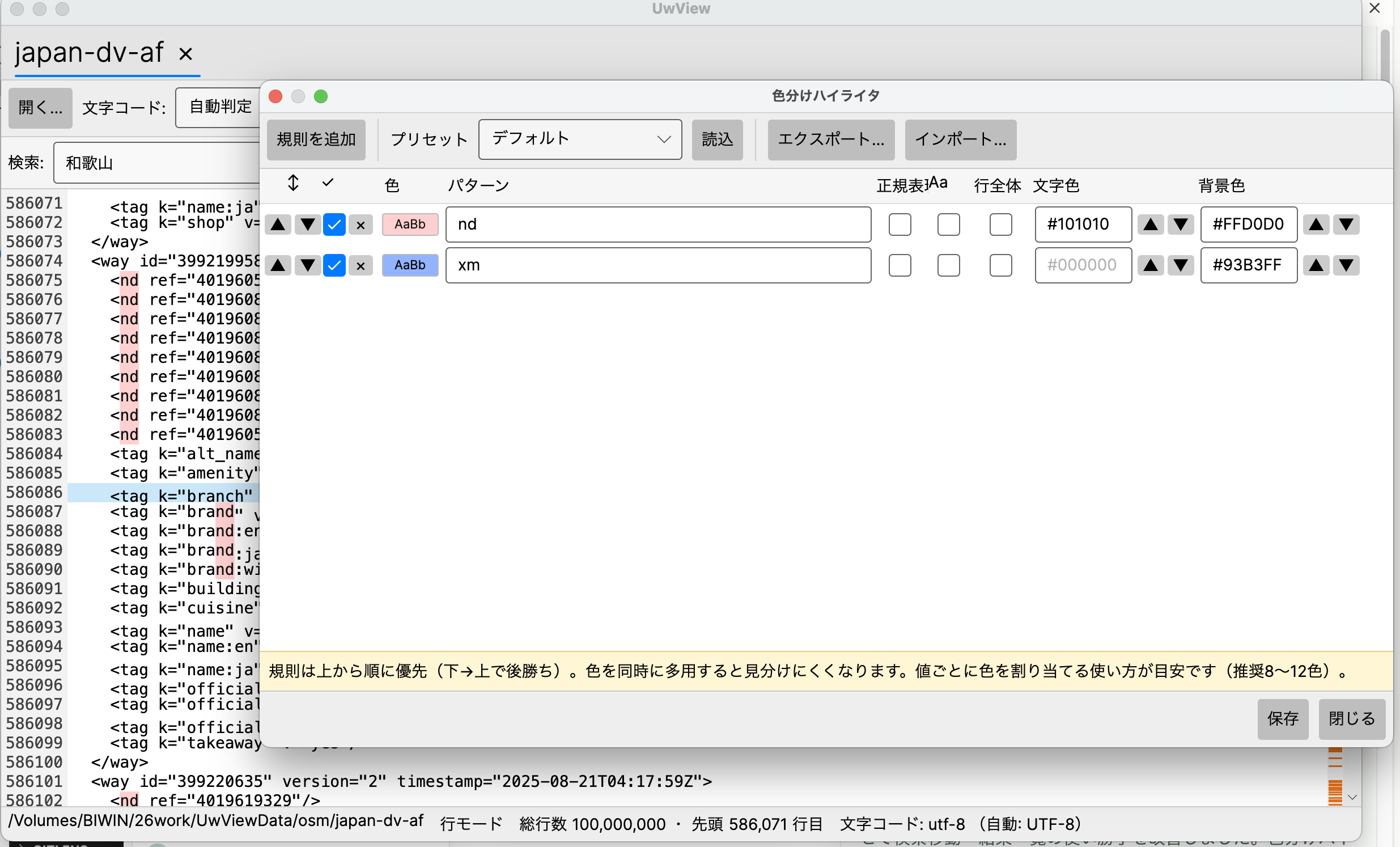
The key points:
- Regular expression support (the
Regexcheckbox). You can also color just the captured portion of a match. - Case sensitivity (
Aa) and whether to highlight the whole line can both be set per rule. - Rules are prioritized top to bottom. When rules overlap, the lower row wins. Reorder rows with the ▲▼ buttons on each line.
- Using too many colors actually makes things harder to distinguish, so as the note at the bottom of the screen suggests, aim for around 8 to 12 colors per screen. Colors are chosen from a color-vision-friendly 32-color palette, and colors cycle automatically as you add more rules.
You can save a rule set under a name, so you can switch between them depending on the project or the system you’re monitoring.
Bundled Presets for “syslog” and “Web Access Logs”
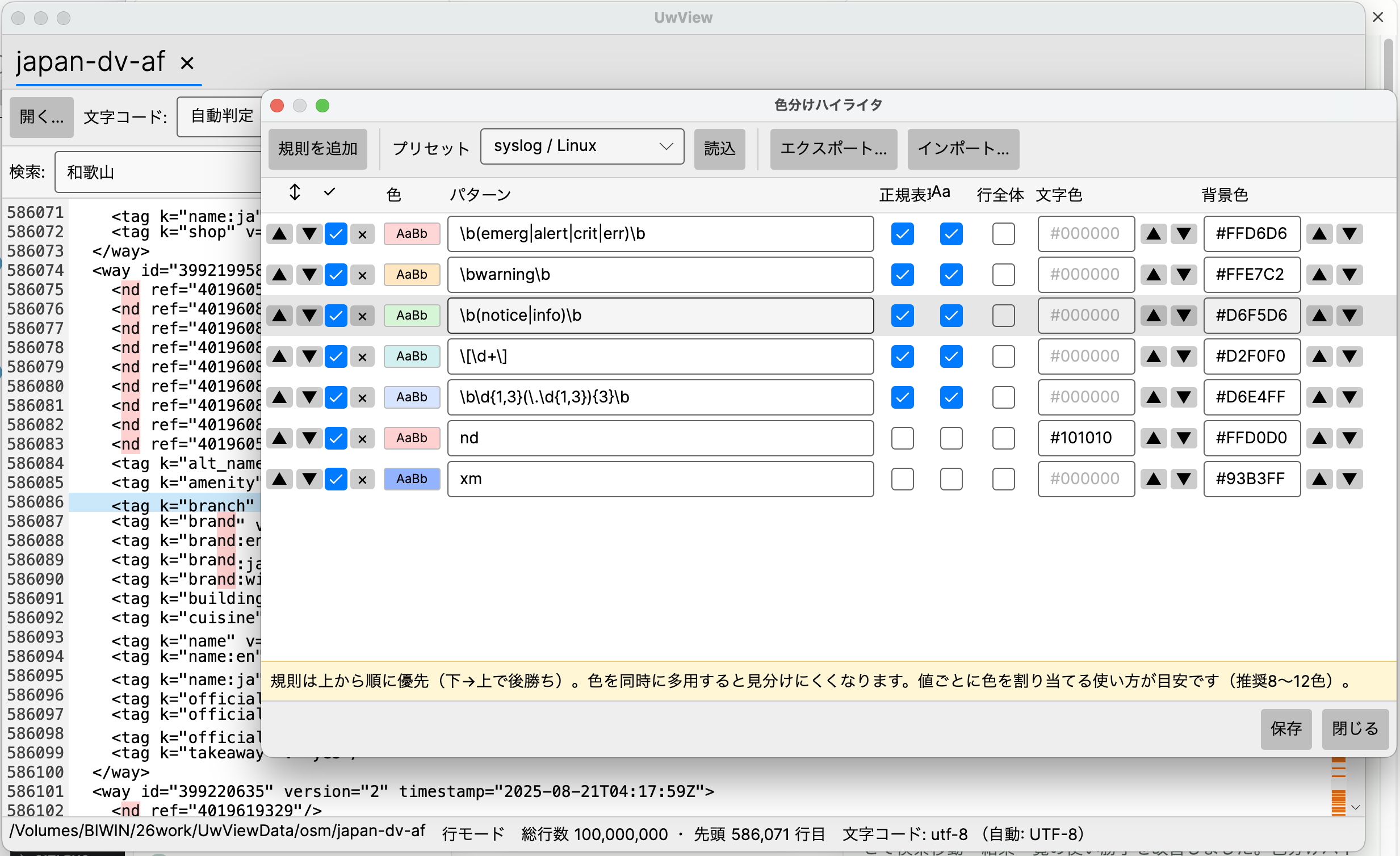
This is the part that goes beyond simply catching up with klogg. UwView v1.1 ships with commonly used coloring rules built in from the start. Just pick a preset and click “Load,” and the colors apply on the spot.
For example, the syslog / Linux preset colors emerg / alert / crit / err red, warning orange, and notice / info green, and also assigns colors to the PID at the start of a line ([number]) and to IP addresses.
The Web access (HTTP) preset lets you read HTTP status codes by color. 5xx is red, 4xx is orange, 3xx is blue, and 2xx is green, so clusters of errors jump out at you just from skimming an access log.
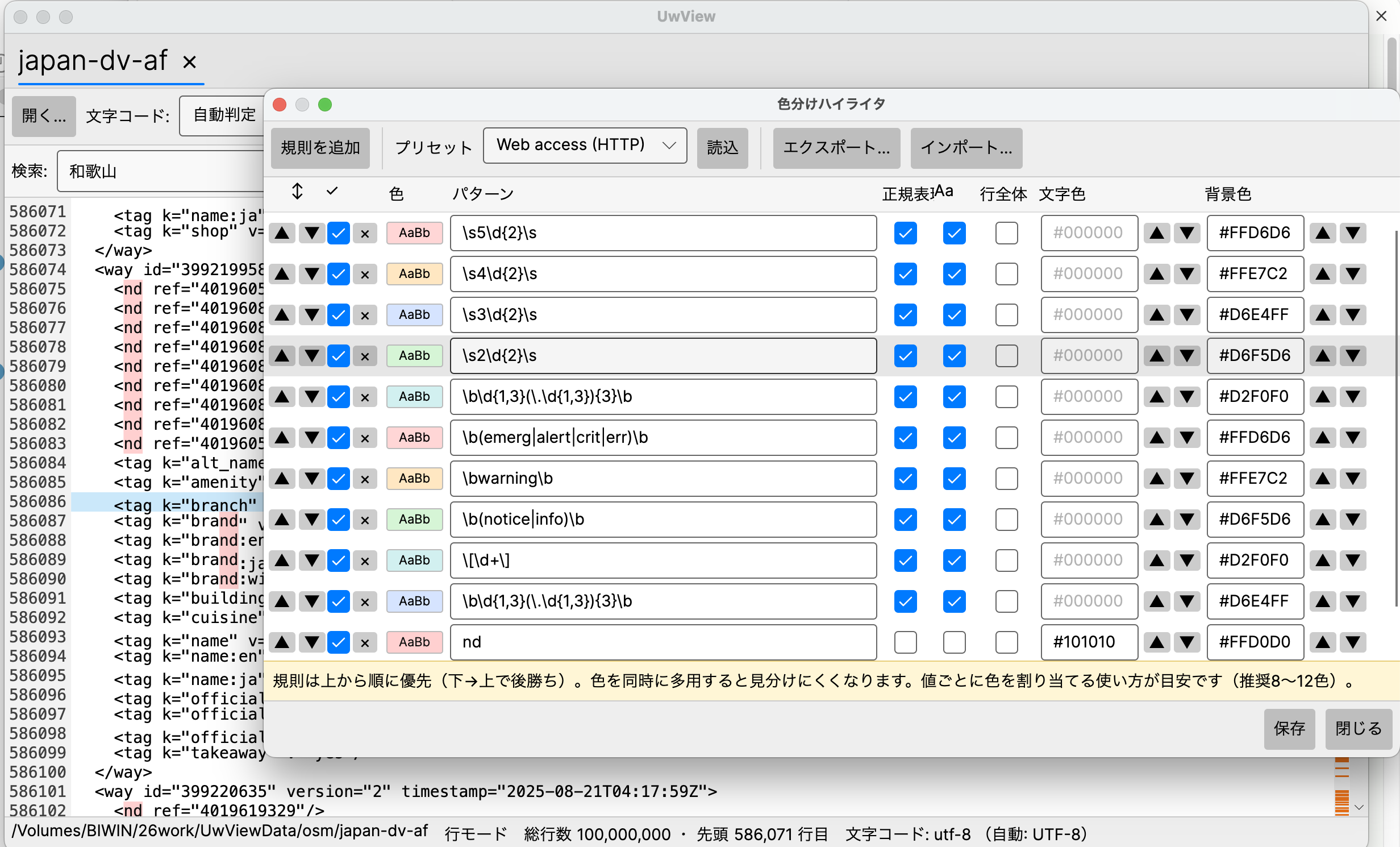
These presets can be used as-is, or rewritten to your own taste. Once you’ve finalized a rule set, you can export it as a .uwvhl file and share it with another machine or a team member via import. In other words, you can hand out “site-specific coloring configurations” to everyone who needs them.
Search History and Predefined Filters Also Get Improvements
Alongside the coloring feature, v1.1 also raises the bar around search. It now remembers up to 50 search history entries for autocomplete, and you can star (★) frequently used searches to save them and run them instantly from a dropdown. This, too, fills in an area — saved predefined filters / search history — where klogg previously had the edge.
Items still remaining on the loss list — QuickFind (in-view incremental search), automatic refresh of search results while following (tail), and state/session restoration — continue to be listed as top-priority candidates for future releases, published openly in the repository. Our policy of laying everything out honestly and filling gaps in one by one remains unchanged.
That said, there’s one thing I’m particular about in how these gaps get filled: even when adding a feature we were behind on, we don’t just copy klogg’s implementation — we redesign it into a form that feels good to use every day, before shipping it. The color highlighter in this release is exactly that. Rather than just adding the ability to apply color, we prioritized the things you actually want once you’re working with genuinely huge logs: “the yellow of the search stays on top at all times,” “presets bundled for common use cases,” and “evaluating only visible lines, even at 100 million lines, so speed never drops.” We’ll keep filling in the remaining items the same way — not to check a box, but in a form that genuinely makes things better to use.
About the Higher-Tier UwView Pro (On Sale Now)
We’ve also released the commercial UwView Pro — you can instantly view and search huge files the moment you open them, and because it also saves an index, from the second time you open a file onward it opens instantly, complete with line numbers; search is up to approximately 9× faster, and logs are stored at about 1/9 the size while still being openable as-is (macOS version first; one-time purchase or monthly subscription. For actual measured performance, see this article). The color highlighter and bundled presets covered here work the same way in Pro. → https://uvp.y42u.net/en/pro-en/
Summary
- UwView v1.1 implements a color highlighter, filling in one line on the list of items where klogg had the edge.
- Supports regular expressions, text/background colors, rule priority, and named saves. The yellow of search matches always stays on top, and coloring stays fast even at 100 million lines.
- Ships with presets for syslog, web access logs, and more, and rule sets can be shared via export/import as
.uwvhlfiles. - Search history and predefined filters are also improved. The remaining gaps (QuickFind, Follow-linked search, state restoration) stay listed openly, and we’ll keep filling them in — not by copying klogg, but by designing each one into a form that’s genuinely comfortable to use.
Related Articles
- Releasing UwView on GitHub — Renewing a Windows 95-Era Large-File Text Viewer to Support Up to 200 Million Lines and Every OS
- We Opened a Real 51GB, 890 Million-Line Dataset (OSM Japan) with UwView
- UwView Pro — We Compared It with Industry-Standard klogg, and the Design Turned Out to Be the Same as 30 Years Ago?
Sources
- klogg official documentation https://github.com/variar/klogg/blob/master/DOCUMENTATION.md
- amru195704/UwView (GitHub) https://github.com/amru195704/UwView
From the developer: a list of my apps, Kindle books and public projects is on GitHub: amru195704.
A Note
The information in this article is provided for reference purposes only, and we do not guarantee its accuracy or completeness. Feature availability reflects the state at the time of each version and may change in future updates. If you notice any errors or inaccuracies, please let us know in the comments, and we will review and correct them.

コメント