The sheet ends at row 1,048,576.
Last month’s ledger and this month’s. You want to see what changed, so you open both in Excel — and get “This data set is too large for the Excel grid.” As the warning says, Excel does not load anything past row 1,048,576. And even the part it does load is not always what was in the file.
So how do you match a CSV that does not fit in Excel against last month’s version by a key column? I timed three tools from 1 GB up to 10 GB (about 100 million rows). (I develop UwDiff, one of the three, so read the numbers with that in mind — the losses are included.)
- The short answer: Excel cuts the table before you can compare it. Key matching on 10 GB took 22 s with UwDiff, 33 s with qsv diff and 125–220 s with DuckDB
- Three reasons Excel cannot do this comparison
- The usual tools: qsv diff and DuckDB
- With UwDiff: name one key column
- Where it loses, and what it does not do
- Try it
- Read next
The short answer: Excel cuts the table before you can compare it. Key matching on 10 GB took 22 s with UwDiff, 33 s with qsv diff and 125–220 s with DuckDB
- Excel stops at row 1,048,576. Even with a 1.05-million-row (100 MB) CSV, the last few thousand rows were not loaded, and values such as
1-10were turned into dates just by opening the file. - To match by key without Excel, I measured qsv (
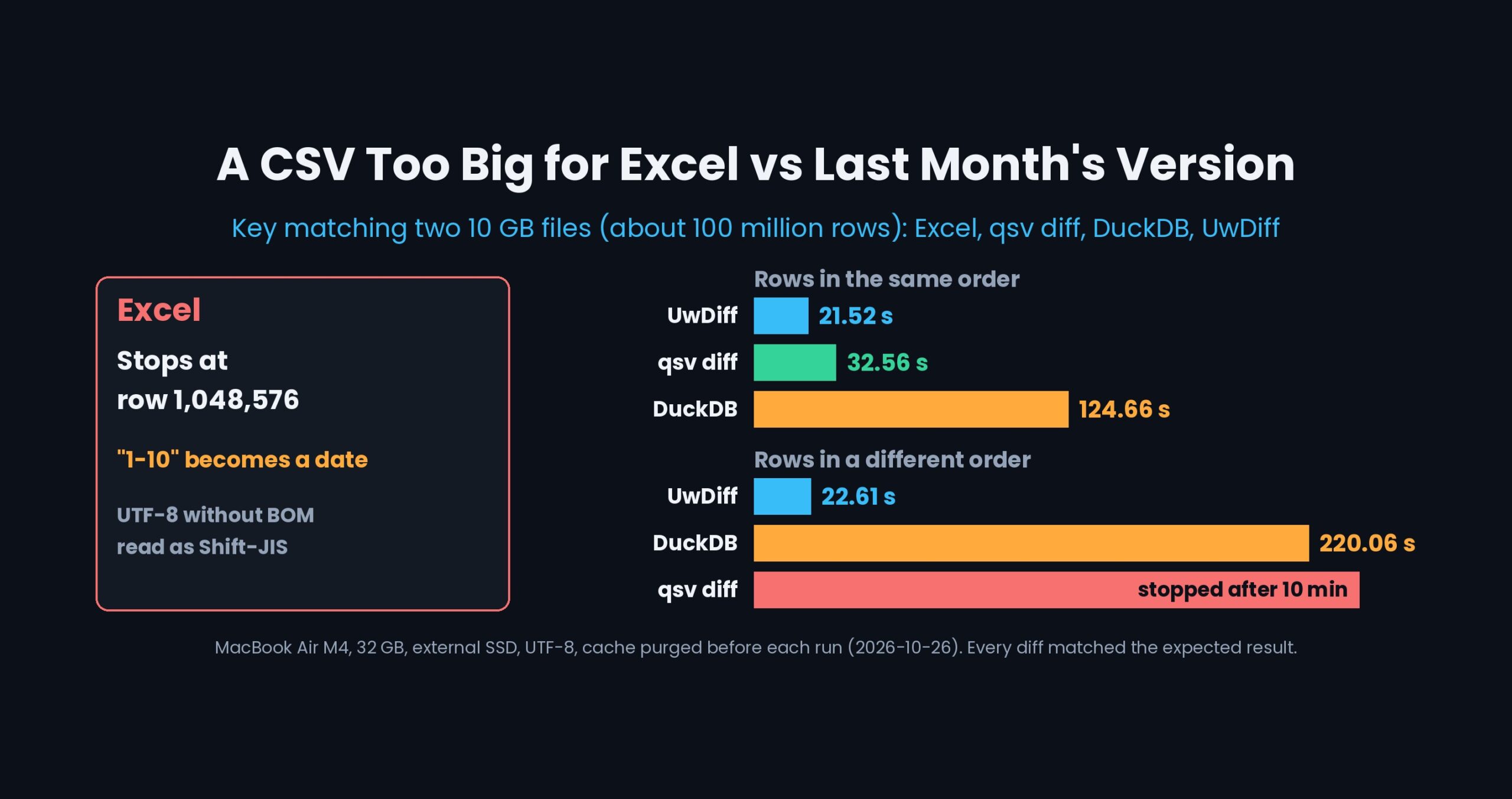
qsv diff) and DuckDB (a join in SQL) on the same Mac. With two 10 GB files whose rows were in the same order, qsv diff took 32.56 s and DuckDB 124.66 s. With the rows in a different order, DuckDB took 220.06 s and qsv diff did not finish within 10 minutes. - UwDiff matches by key regardless of row order with a single line:
uvd old.csv new.csv -key ID. On 10 GB it took 21.52 s (same order) and 22.61 s (different order). Every tool’s output matched the expected diff exactly. - Where it loses: with rows in the same order, qsv diff is as fast at 1 GB, and it used less memory at every size.
Three reasons Excel cannot do this comparison
I opened a 1.05-million-row (100 MB) CSV in Excel (Microsoft 365) on the same MacBook Air (2026-10-23).
- It stops at 1,048,576 rows. Excel warns that the data set is too large for the grid and that unloaded data will be lost if you save, and leaves the rest out. A VLOOKUP or XLOOKUP built on half a table cannot give the right answer.
- Opening a file changes values.
1-10became a date, and2025/02/21became2025/2/21. Excel also asks each time whether to strip leading zeros or convert to scientific notation; forget to say no, and the values change before you compare anything. - It does not detect the encoding. A UTF-8 CSV without a BOM was read as Shift-JIS, and all the Japanese text was garbled.
You can work around 1 and 3 (load into the data model with Power Query, or import with an explicit encoding). But producing “which cell in which row changed” between two files is not what Excel is built for.
The usual tools: qsv diff and DuckDB
Several tools can match two tables by a key column without Excel. I picked two that run on the same Mac.
- qsv (
qsv diff --key 0 old.csv new.csv): a collection of CSV commands.diffmatches two files by key and reports added, deleted and changed rows. - DuckDB: a database that reads CSV files directly with SQL. You write the SQL that joins old and new on the key and picks out rows whose values differ.
Both handle rows in a different order.
With UwDiff: name one key column
In the window
- Open UwDiff and put last month’s CSV in “旧” (old) and this month’s in “新” (new) — drag and drop works too. (The window is in Japanese; the manual has the English names.)
- Enter a column name such as
IDas the key column. Rows are matched by key even if their order differs. - Click “比べる” (Compare).
Only the changed cells are listed, as pairs of old and new values. Values are compared as strings, so leading zeros, long numbers and date-like values stay as they are.
On the command line
uvd ledger_sep.csv ledger_oct.csv -key ID -o changes.csv
The output is a CSV of kind, key, column, old value, new value, with one row per added, deleted or changed cell. (The header and kind labels are in Japanese: 区分,ID,列,旧値,新値 and 追加 / 削除 / 変更.)
- The key can be several columns (
-key ID,Type). - Columns are matched by header name, so the comparison still works if the column order changed between months.
- Old and new can be in different encodings (for example Shift-JIS and UTF-8) — UwDiff detects and aligns them while reading.
- Excel files that do fit in Excel can be matched the same way (
uvd ledger_sep.xlsx ledger_oct.xlsx -key ID).
Keep only the rows you want in the diff and pass it to uvd apply to apply just those changes to last month’s CSV. Its encoding, delimiter and row order are preserved (manual, 3-3).
Measured at 1 GB, 5 GB and 10 GB
All three tools ran on the same machine with the same test data. Every result below was checked against the expected diff and matched exactly.
- Machine: MacBook Air (Apple M4, 10 cores, 32 GB memory), macOS 26.3.1, data on an external SSD (USB)
- Method: cache purged before every run (
sudo purge), one run each. Seconds are/usr/bin/timereal time. Anything over 10 minutes was stopped (2026-10-26) - Versions: UwDiff 1.0.0 (uvd), qsv 26.0.0, DuckDB 2.0.0
- Test data: columns “point name, X, Y, Z, type, station number, observation date, note”. NEW was made from OLD with deletions, additions, cell edits, renamed keys and so on (the expected diff for 10 GB is about 2.56 million rows). Encoding: UTF-8
| Size × 2 files | Row order | UwDiff (s) | qsv diff (s) | DuckDB (s) |
|---|---|---|---|---|
| 1 GB (about 10.5 million rows) | same | 2.28 | 2.73 | 4.05 |
| 1 GB | different | 2.27 | 5.87 | 4.41 |
| 5 GB (about 52.7 million rows) | same | 10.88 | 17.15 | 23.33 |
| 5 GB | different | 11.11 | 36.01 | 24.39 |
| 10 GB (about 100 million rows) | same | 21.52 | 32.56 | 124.66 |
| 10 GB | different | 22.61 | stopped after 10 min | 220.06 |
- UwDiff’s time grows in proportion to size: 10 times the size took about 10 times as long (1 GB 2.28 s → 10 GB 21.52 s).
- At 10 GB with rows in the same order, qsv diff took 1.5 times as long as UwDiff and DuckDB 5.8 times. With rows in a different order, DuckDB took 9.7 times as long.
- With Shift-JIS (CP932) on both sides, UwDiff’s 10 GB times were 20.35 s (same order) and 21.90 s (different order). All tables are on the benchmark page.
Where it loses, and what it does not do
- With rows in the same order, qsv diff is close. At 1 GB, 2.73 s versus 2.28 s is a tie (under 1.5 times); at 10 GB it is 1.5 times, right on the line.
- qsv diff uses less memory. At 10 GB with rows in the same order: qsv diff 1.7–2.1 GiB, UwDiff 4.2–4.5 GiB, DuckDB about 18 GiB.
- Huge tables with rows in a different order use memory in UwDiff too. 12.7–13.4 GiB at 10 GB. Set a limit with
-memand it spills to temporary files and finishes; at 476 MB it took 58 s (not measured with a purged cache). - Aggregation and reshaping belong to DuckDB and qsv. Counting the changes or adding computed columns afterwards is better done in SQL or qsv. UwDiff stops at “what changed”.
- Formatting and formulas in Excel files are not compared.
.xlsxfiles are compared by displayed values (-rawfor the stored values).
Try it
# Mac (Homebrew)
brew install --cask amru195704/uwview/uwdiff
# Windows (Scoop)
scoop bucket add uwview https://github.com/amru195704/scoop-uwview
scoop install uwdiff
# Linux (Snap)
sudo snap install uwdiff
How to install Scoop itself and manual installation are on the download page.
Read next
- UwDiff manual (tables and applying changes) — key columns, and
uvd applyto apply only the changes you keep - UwDiff benchmarks (with conditions, losses included) — every table for UTF-8 and CP932 at 1 GB, 5 GB and 10 GB
- Why does GNU diff take 150 seconds on 10 GB? — what the source shows about reading everything before comparing
- UwView, the sister tool — open a huge log and search it like grep
- (Japanese) UwDiff magazine on note: 巨大ファイルを比べる——UwDiff 開発と使い方
From the developer: apps, Kindle books and public projects are listed on GitHub: amru195704.