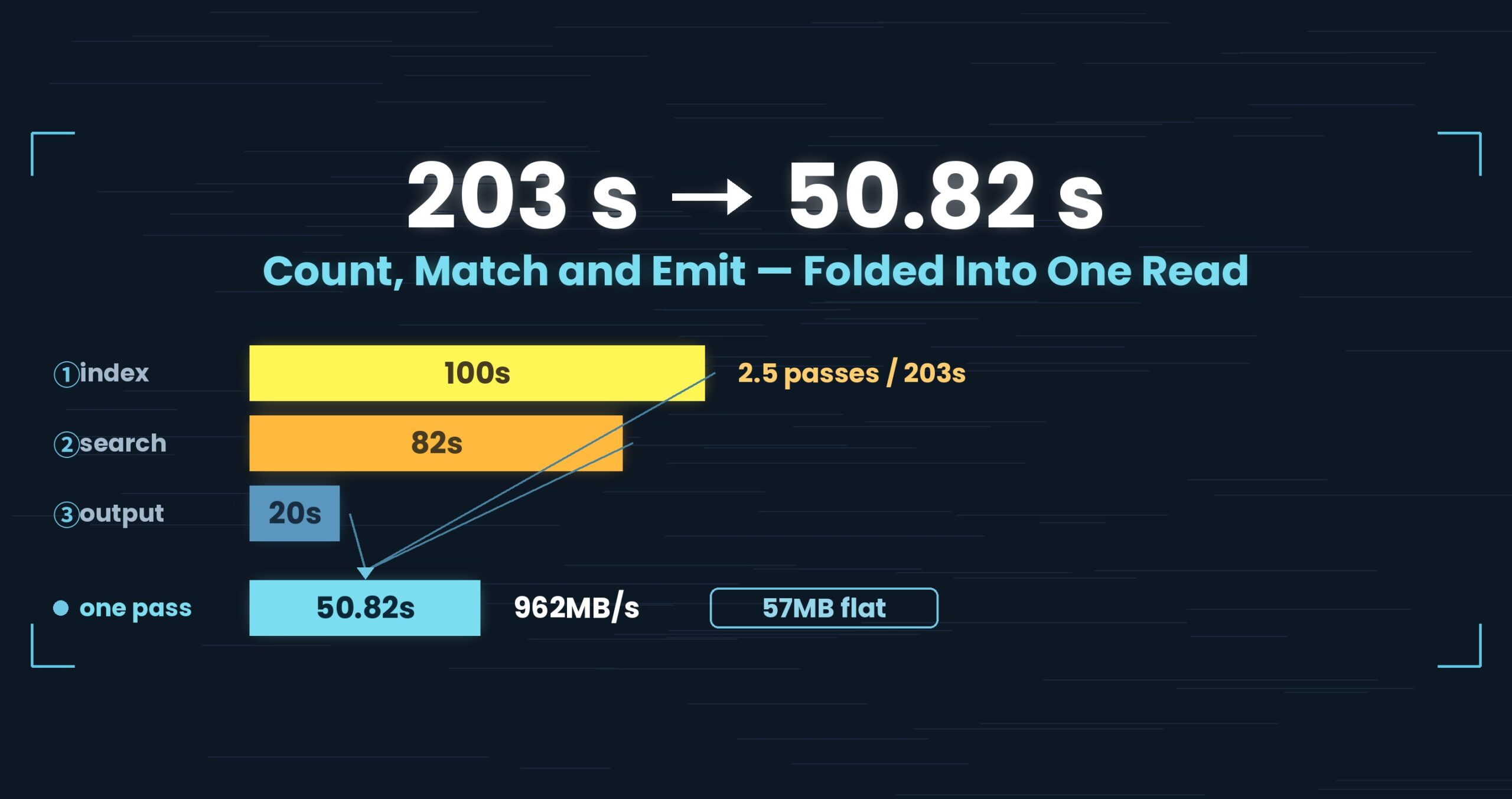
203 seconds became 50.82.
We did not rewrite the hot loop, and we did not parallelise anything. The only thing we reduced was how many times we read the same file. So what breaks when you fold “count, find, write” into one pass?
Three conditions had to hold for nothing to break.
- Up front: a single-pass reader (RawGrep) that counts newlines, tests for the word and emits the matched line all within one read took the 50 GB search from 203 s to 50.82 s (962 MB/s), with working memory flat at 57 MB regardless of file size. Reading in 4 MB blocks beat 1 MB (889 → 966 MB/s), and the match rules are shared with the GUI so both produce the same lines. On small files it did not help: at 3 GB hot we still lose to ripgrep (0.32 s vs. 0.54 s) — that one is fixed cost, not read count. All figures come from one setup; details at the end.
- The problem: “count”, “find” and “write” each read the file themselves
- The cause: the information wasn’t missing — we were throwing it away
- The fix: RawGrep — read a 4 MB block, finish all three on the spot
- The numbers: 203 → 50.82 s, 57 MB, and the same lines as ripgrep
- The general takeaway: count what you’ll need before you walk past it
- Tools used
- Links
Up front: a single-pass reader (RawGrep) that counts newlines, tests for the word and emits the matched line all within one read took the 50 GB search from 203 s to 50.82 s (962 MB/s), with working memory flat at 57 MB regardless of file size. Reading in 4 MB blocks beat 1 MB (889 → 966 MB/s), and the match rules are shared with the GUI so both produce the same lines. On small files it did not help: at 3 GB hot we still lose to ripgrep (0.32 s vs. 0.54 s) — that one is fixed cost, not read count. All figures come from one setup; details at the end.
This is part 2 of the “First Light” series. “First Light” is the pet name of UwView v1.6.6 — the release where both the screen and the command line open and search a huge file by reading it just once, and UwView first felt complete. This part is about where that single pass started: the v1.6.3 command line.
The problem: “count”, “find” and “write” each read the file themselves
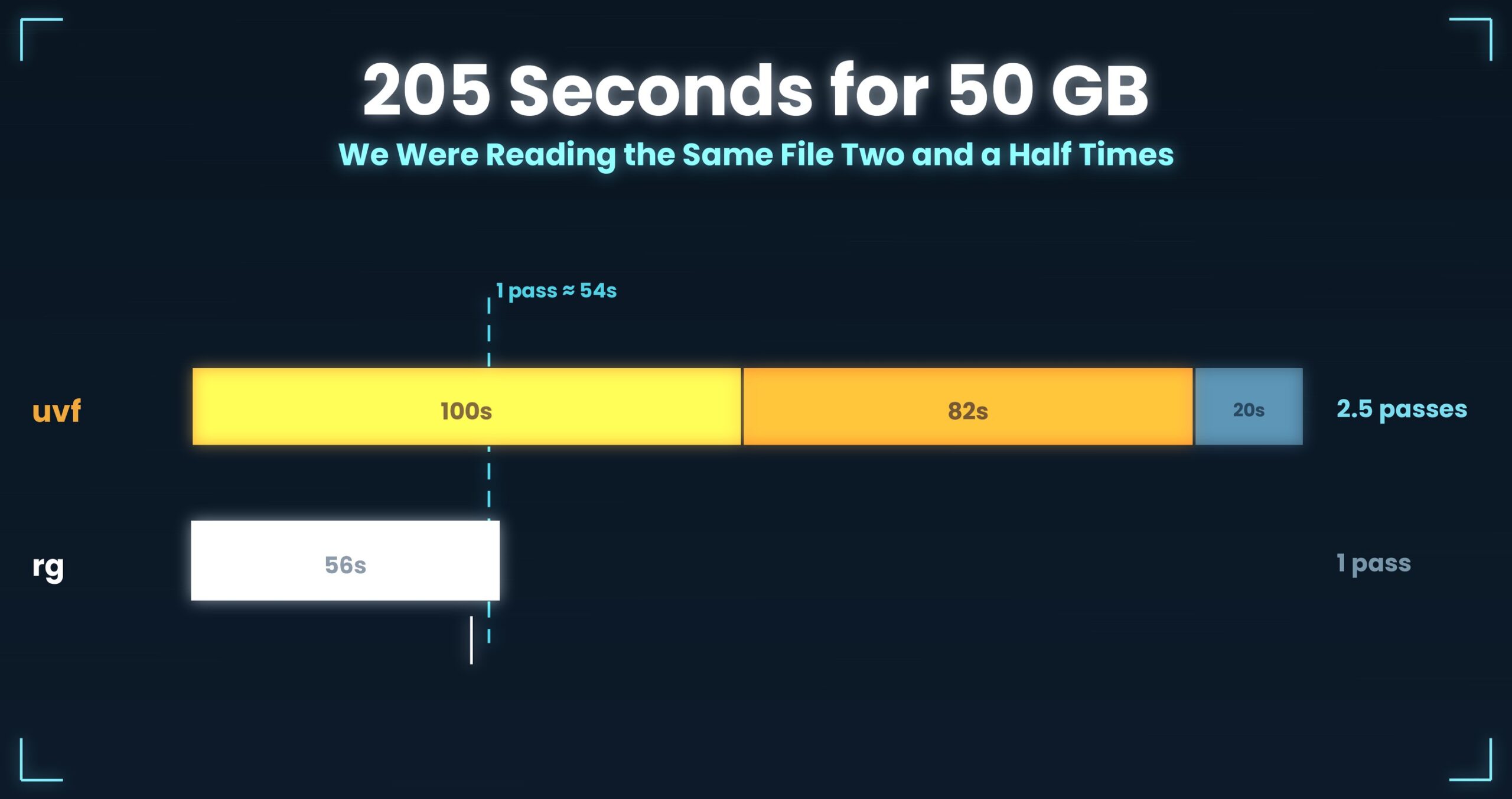
As part 1 broke it down, the 205 seconds uvf spent on a 50 GB search at v1.6.0 (203 s at v1.6.2 and earlier) split like this:
| Stage | What it does | Time |
|---|---|---|
| ① Build the index | Read everything, record newline positions | 100 s |
| ② Search | Read everything again, find matching lines | 82 s |
| ③ Output | Re-read the matched lines and lay them out | 20 s |
Why three stages? Taken one at a time, each was the obvious design.
- Line numbers need newline positions, so read the file first and build an index.
- Searching doesn’t care about the index, so start from the top again.
- Output needs the text of matched lines, and the search stage only kept match positions — so go back and fetch the text.
Clean responsibilities, easy to test. The problem was that all three stages owned the single most expensive operation there is: reading the file. One pass over 51.25 GB takes about 54 seconds on this external USB SSD. The moment you split into stages, you stack that 54 seconds once per stage.
The cause: the information wasn’t missing — we were throwing it away
Whether you can fold passes together comes down to one question: can each stage’s input be produced by reading front to back, in order? Line all three up, and the answer was yes every time.
A line number is the count of newlines seen so far. You can only get it by counting from the beginning — which is to say it runs in the same direction as the search. Things that run in the same direction can run at the same time.
The text of a matched line was even simpler. At the instant you find a match, that line is sitting in the read buffer in front of you. We were re-reading it only because we recorded the position and dropped the buffer. Nothing was missing; we let go of what we were holding as we walked past it. Those 20 seconds were the bill.
The 100-second index is the same story. Counting newlines runs perfectly well over the blocks you are already reading for the search. If you’re going to read every byte anyway, counting one more thing while you do costs almost nothing. Reading is the expensive part.
The fix: RawGrep — read a 4 MB block, finish all three on the spot
What went in was a sequential-read path called RawGrep (v1.6.3, UwView.Core/Cli/RawGrep.cs). For each block it reads, it:
- counts the newlines in that block and advances the current line number,
- looks for positions matching the word,
- and, on a hit, resolves that line’s start and end inside the block and sends the text straight to output.
That’s it. When the read finishes, the line numbers, the matches and the output are already done.
Three conditions had to hold for the fold to be safe.
① Don’t lose lines that straddle a block boundary. Reading in 4 MB chunks means blocks end mid-line, and a match can span the seam. So the tail of each block carries over into the next, and the boundary becomes a detail of reading rather than a break in the data. The newline count has to skip the carried-over bytes so they aren’t counted twice.
② Share the match rules with the GUI. Write the matching logic twice and the same word eventually returns different lines in the two places. RawGrep uses the same rules as the GUI’s SearchService, and that paid off later: -open, which hands the CLI’s results to the window to display (part 6), only works if both sides agree on what a match is. With two copies of the logic, that handoff could never have been trusted.
③ Don’t buffer the output. Matches stream out in the order they’re found, so working memory scales with neither the hit count nor the file size. 57 MB, flat, at 50 GB.
The read block went from 1 MB to 4 MB. Measured read throughput over the whole 50 GB file (median of three runs) was 889 MB/s at 1 MB, 966 MB/s at 4 MB and 968 MB/s at 16 MB — effectively flat past 4 MB. A 1.09× gap is small for a single measurement and normally wouldn’t earn the word “difference,” but the plateau landed in the same place all three runs, so we took it (the rule behind that judgement is part 9).
The way we read — dropping mmap for pread — changed around the same time, but that deserves its own article: part 10.
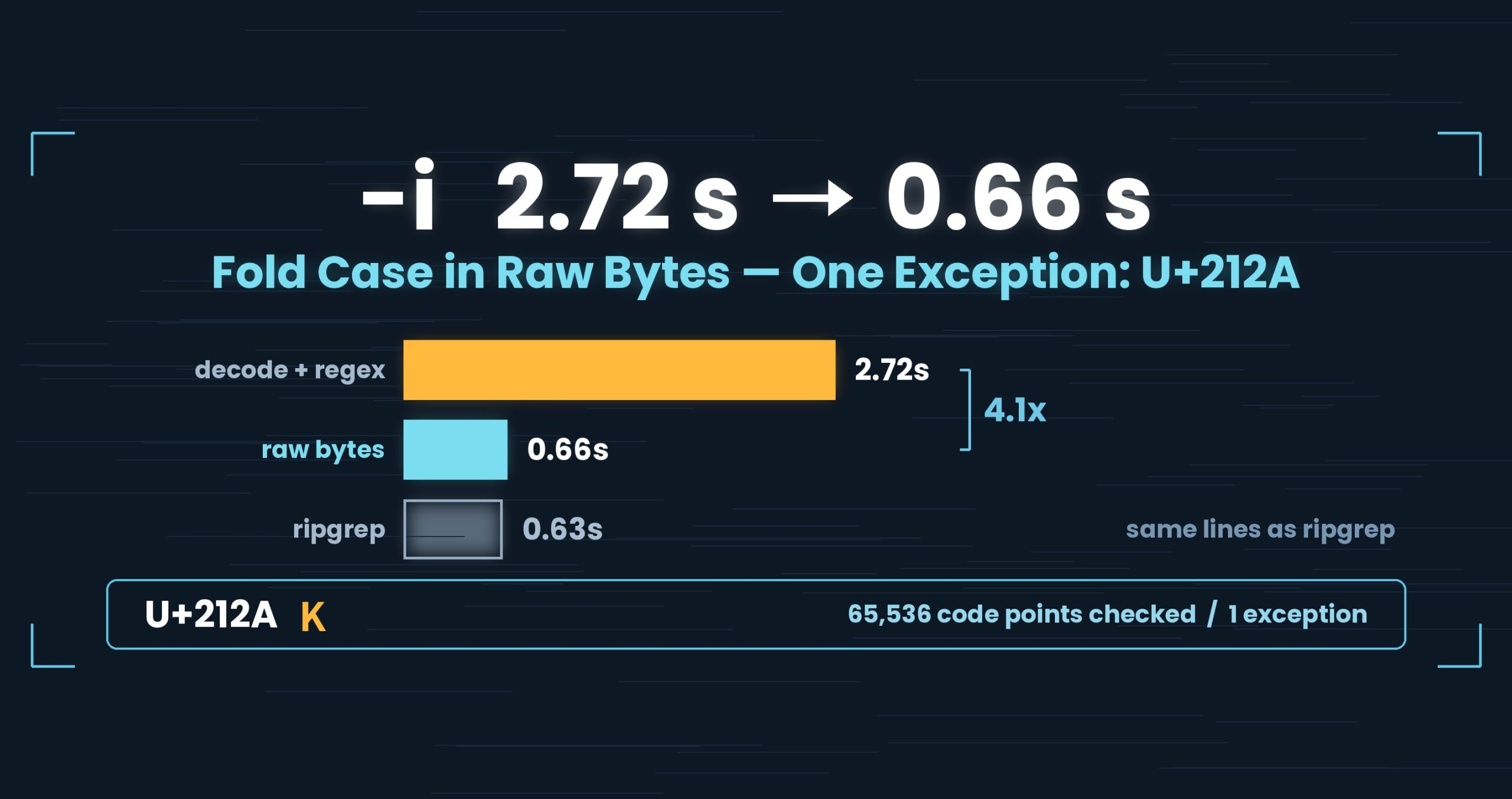
We also added -i, -E and -v to uvf, spelled exactly as in the paid uvp. Output format and exit codes did not change, so existing scripts keep working.
The numbers: 203 → 50.82 s, 57 MB, and the same lines as ripgrep
| ≤ v1.6.2 | v1.6.3 (RawGrep) |
|
|---|---|---|
| 50 GB search | 203 s | 50.82 s |
| As read throughput | — | 962 MB/s |
| Working memory | scales with hits | 57 MB, flat |
962 MB/s is essentially this external SSD’s raw read speed (950–970 MB/s). The search now costs what reading the file costs — past this point, nothing shrinks unless the way we read changes.
Just as important as “faster” is “the same answers.” We diffed output lines against ripgrep across three file sizes and seven patterns; they match line for line (84 harness items on Mac, zero mismatches).
And the honest landing: a cold 50 GB search is 51.70 s for uvf against 54.94 s for ripgrep. That is 1.06×, and we are not going to call it a win — we hold ourselves to “a single measurement under 1.5× is not a difference,” so the right words here are “it drew level.”
The loss that remains, also on the record: at 3 GB hot, a plain search is 0.32 s for ripgrep against 0.54 s for uvf. Single-passing didn’t touch it. On a small file the reading itself is short, so removing reads buys you nothing. The cause is elsewhere — per-invocation fixed cost — and that’s part 7.
The general takeaway: count what you’ll need before you walk past it
Splitting a big job into stages is usually good design: clear responsibilities, easy tests. But if data gets read again at a stage boundary, that design is paying a bill proportional to your input size.
Whether you can fold usually comes down to one question: can each stage’s input be produced by reading front to back, in order? If yes, fold. For us, line numbers, match tests and line text all qualified.
And one more: if you’re reading every byte anyway, counting one extra thing on the way is nearly free. The expensive move is dropping the buffer you’re holding and going back for it later. Before making code faster, look at what you’re throwing away as you walk past it.
Tools used
Since this article is about the command itself, here is the actual usage.
UwView is a viewer for huge text and huge logs (free: UwView; paid: UwView Pro).
The same things, from the command line
# Section 2: one pass, just to check whether a word is there (free build)
uvf japan-latest.osm 'Tokyo'

# Section 3a: ignore case (added to uvf in v1.6.3)
uvf app.log 'error' -i

# Section 3b: regular expression
uvf app.log -E 'timeout|refused'

# Section 3c: narrow with a second word (searched within the first word's hits)
uvf app.log 'ERROR' 'payment'

# Section 4: with surrounding context / write results to a file
uvf huge.log 'FATAL' -C 5
uvf huge.log 'FATAL' -out fatal.txt

# Section 4: hand the CLI's result straight to the GUI to open
uvf access.log ' 503 ' -open
Exit codes match grep: 0 = found, 1 = not found, 2 = error or incomplete result, so if uvf access.log ' 503 '; then just works.
Honestly: the first query is a little slower with uvp than ripgrep — it builds the .uwvz (compression + index) first, so at 50 GB it’s 59.0 s vs. 54.9–55.8 s = 6–7% (v1.6.6.1). It pays off from the second query on: the same 50 GB search returns in 6.56 s, about 8.4× ripgrep. On small files like 3 GB it’s about even — the index buys you less. The free uvf is on par with ripgrep at any size (measured article; Mac M4, 32 GB RAM, external USB SSD, OpenStreetMap XML — one setup, results vary).
Links
- Part 1: the day we wrote “this is not a speed tool”: https://uvp.y42u.net/en/blog/uwview-fl01-v160-confession-en/
- The GUI on the same single pass (v1.6.6): https://uvp.y42u.net/en/blog/uvp-gui-catches-up-v166-en/
- We added the uvp command (measured vs. ripgrep): https://uvp.y42u.net/en/blog/uvp-cli-release-vs-ripgrep-en/
- Qiita: a 50 GB search from 205 s to 51 s (the ten-improvement bundle, JP): https://qiita.com/amru195704/items/3cb6451815624aeced73
- Source (GitHub): https://github.com/amru195704/UwView
And if a huge log is eating your disk and you want it compressed for storage while staying searchable at speed, give UwView Pro a look — persistent index, compressed-cache search, and ~1/9 storage make both reopening and searching a step faster (all OS, one-time or monthly).
From the developer: a list of my apps, Kindle books, and open source is at GitHub: amru195704.