Two kinds of loss are left.
Over fourteen posts I counted every place where ripgrep is still faster. Only two kinds of item lose by more than 1.5x, and both are the price the paid uvp build pays for keeping an index.
Seven new ways into a file, and only two kinds of speed loss at the end of it. The reason is not a clever implementation. It is one decision made up front.
- Up front: every new feature went to the side that keeps an index, so the free build is still on par with ripgrep (1.02–1.41x)
- Where this started: First Light only ever looked at one plain file
- What fourteen posts actually did, counted as ways in
- Numbers: where it landed (ripgrep = 1, two runs combined)
- The two losses that remain
- Correctness took the longer half of the work
- What generalises
- Conditions, and what I am not claiming
- The tools involved
- Links
Up front: every new feature went to the side that keeps an index, so the free build is still on par with ripgrep (1.02–1.41x)
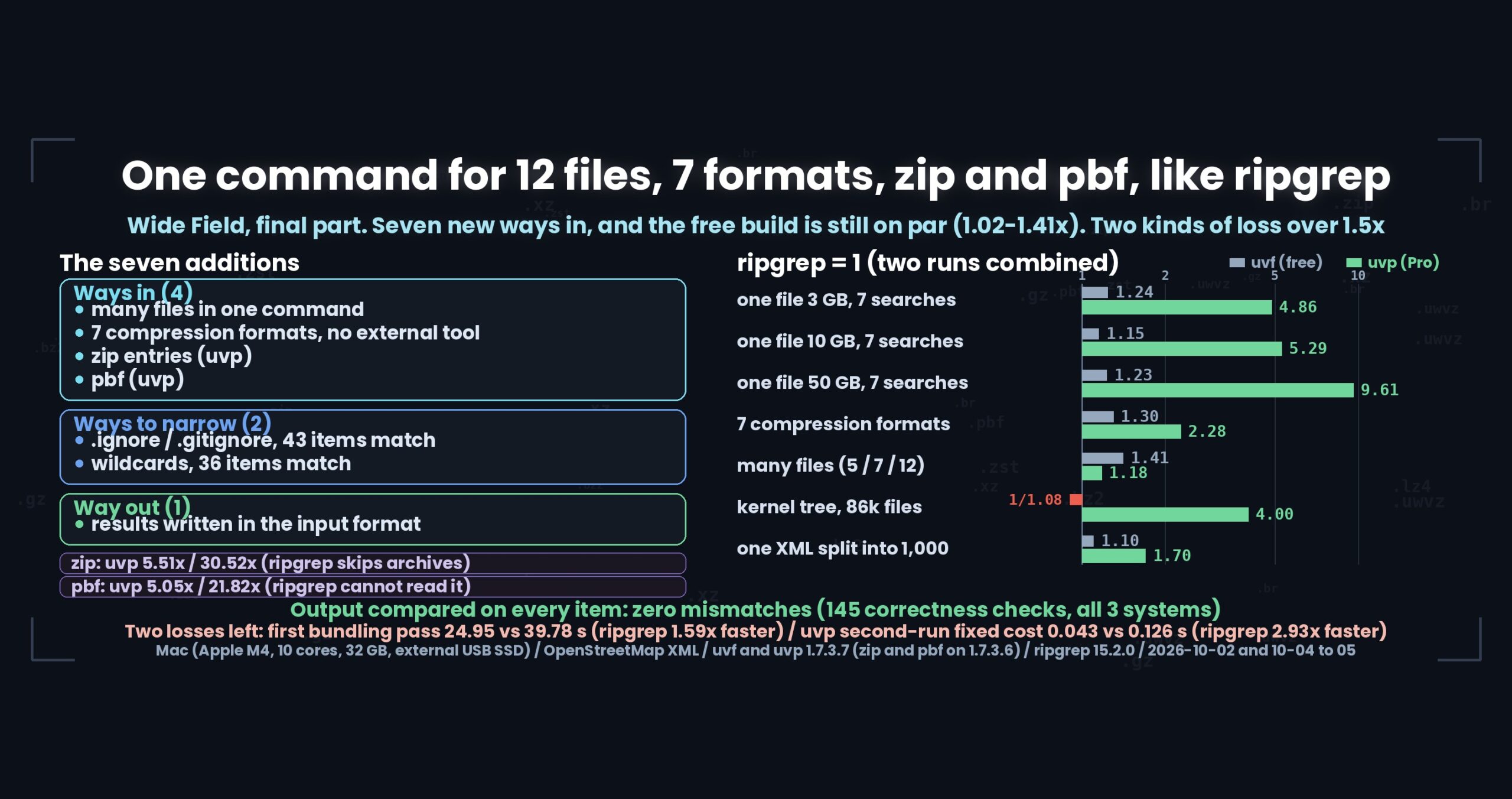
This series added seven things: many files in one command, seven compression formats, zip, pbf, ignore rules, wildcard file patterns, and output in eight formats. Measured again afterwards, the free uvf build has no loss over 1.5x anywhere — 1.02–1.41x on many files, 1.02–1.30x on the seven compression formats, with the slower side being xz at 1/1.08 and the 86k-file kernel tree at 1/1.08, both inside the on-par band. The paid uvp build reaches 4.0x on eight queries over the Linux kernel sources (86,000 files) and 1.68–9.61x on a 50 GB search. And only two kinds of loss remain: the first pass that bundles many files (12 mixed files, 24.95 s against 39.78 s — ripgrep is 1.59x faster) and a fixed cost of roughly 0.12 s on every uvp second run (1,000 split files, 0.043 s against 0.126 s — ripgrep is 2.93x faster). Output was compared with ripgrep on every item, with zero mismatches. Mac (Apple M4, 10 cores), 32 GB RAM, external USB SSD, OpenStreetMap XML. Conditions at the end of the article.
uvfanduvpare the search commands of UwView, which I make (uvfis the free build,uvpbelongs to the paid UwView Pro). This series follows the line that began with v1.7.3.6 “Wide Field” (released 28 September 2026). The current stable release is v1.7.3.6.9 (4 October 2026; brew, scoop, Snap, GitHub Releases), and v1.7.3.7 is a Mac-only preview on GitHub Releases. Unless a line says otherwise, the numbers here were measured on 1.7.3.7 on 4–5 October 2026.
Where this started: First Light only ever looked at one plain file
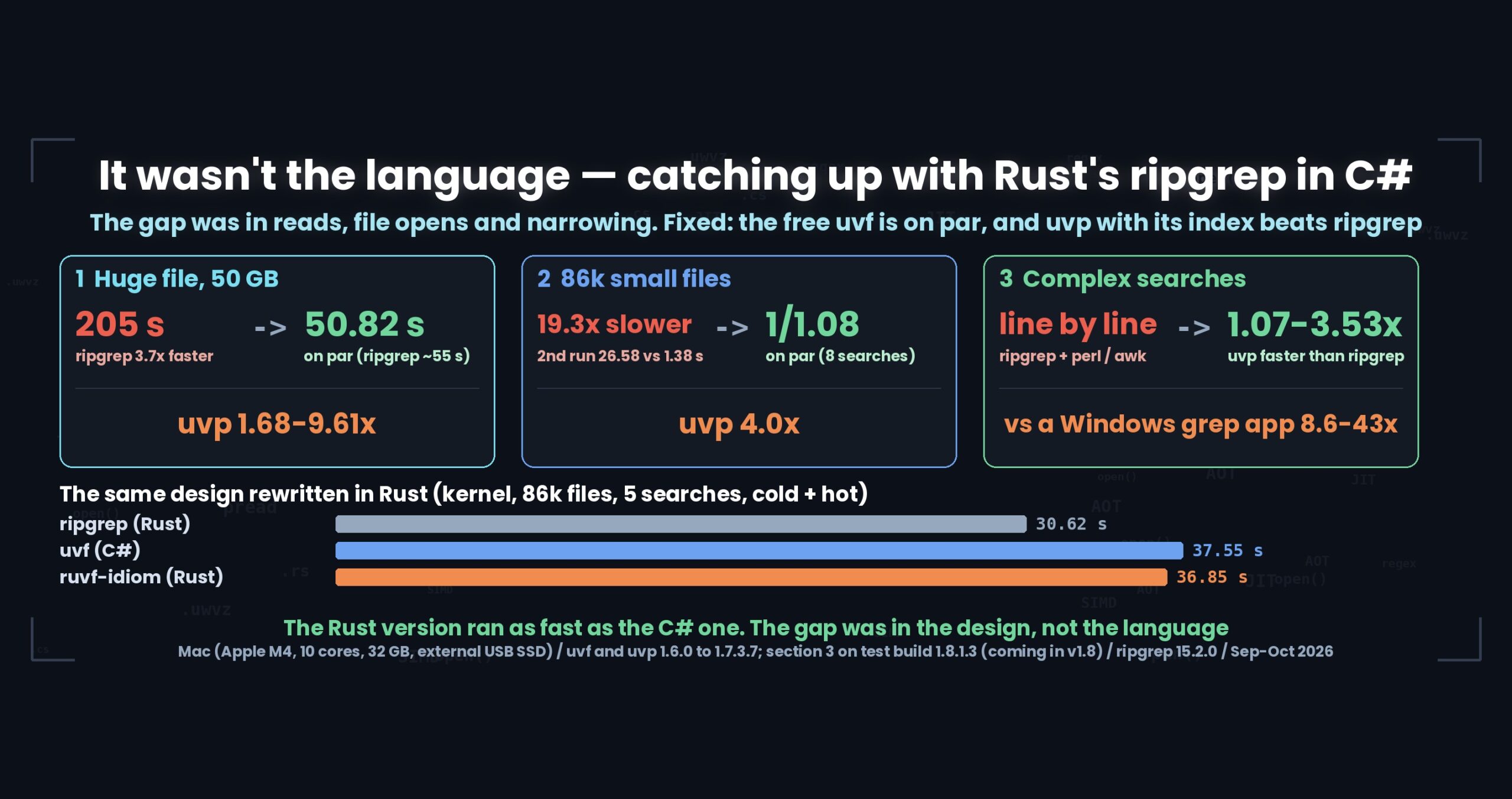
The previous series (First Light, v1.6.6) was about how many times we read a single large plain file. A 50 GB search went from 205 s to 51.70 s, and reading levelled off at the raw sequential speed of the drive (950–970 MB/s). That is where it stopped.
Looking back, the set of situations it covered was too narrow.
- Logs do not arrive as one file.
logrotatecuts them nightly, so you getapp.logplusapp.log.1.gzand everything after it. - Logs often arrive zipped.
- Sometimes what you want to search is not text at all — OpenStreetMap pbf, for instance.
ripgrep already had the first two. rg -z reads gz, bz2, xz, zst and lz4, and -g narrows the file set. We had neither. Wide Field is the release that filled that gap.
What fourteen posts actually did, counted as ways in
Four new ways into the data.
- Many files in one command (Part 1).
uvf 'logs/*.log,err/*.gz' ERRORtakes plain and compressed files mixed together. Over 12 mixed files (11.9 GiB),uvfruns at 1.20x of ripgrep, and the 127,886 hits match ripgrep exactly. - Seven compression formats without calling an external command (Part 2). gz, bz2, xz, lzma, zst, lz4 and br are decompressed in-process.
rg -zsilently skips a format when the external decompressor is missing, so this is a behavioural difference as well as a speed one. Along the way.xzalone was 6.19x slower thanrg -z; block-level parallel decompression took the built-in decoder from 309 MB/s to 1020 MB/s. - zip entries directly (Part 5,
uvponly). Unpacking 4.77 GiB withunzipand then runningrgtakes 18.41 s cold;uvptakes 3.21 s on the first pass and 0.55 s on the second (5.51x / 30.52x; measured 2 October 2026 on v1.7.3.6). ripgrep does not look inside archives. - pbf directly (Part 6,
uvponly).osmium cat … -f osm | rgtakes 148.17 s cold;uvptakes 29.32 s then 6.79 s (5.05x / 21.82x; same date, same build). The 94,979 hits match the XML version of the same data.
Two new ways to narrow the file set.
- Ignore rules matched to ripgrep (Part 7). Which files are read, the precedence order,
!negation and how far up the tree we look now follow ripgrep 15, and a cross-check againstrg --filesmatched on 43 items on all three of macOS, Windows and Linux. The one thing deliberately not matched is.rgignore. - Wildcards passed as a single argument (Part 8).
*no longer crosses a path separator,**and[ ]behave properly, and a cross-check over many files matched on 36 items. Quoting is mandatory because that exact string becomes the name of the bundled index.
One new way out.
- Results written in the same eight formats as the input (Part 10). Instead of
rg -n -F … | gzip -6 >, one-outdoes it. With an index already built, 50 GB takes 11.89 s against 117.20 s — but on a warm 3 GB or 10 GB file it is on par with ripgrep (0.33 s against 0.31 s; 1.02 s against 0.98 s). It is fast because it reads the index, not because writing is fast.
The remaining posts were about measuring or honestly listing what had been added: --json and --tune (Part 11), cutting the warm-cache newline count from 0.15 s to 0.028 s (Part 12), running the same test suite on three operating systems (Part 13), and listing every loss against ripgrep (Part 14). The design of reusing a bundled .uwvz (UwView Pro’s compression format plus index) in Part 4, and the ways our .NET regular expressions differ from ripgrep’s in Part 9, are the other side of the same additions.
Numbers: where it landed (ripgrep = 1, two runs combined)
Totals over two runs (cold + hot), against ripgrep or against a command combination producing the same output. 1/x means ripgrep is x times faster.
| Arena | uvf (free, ×) |
uvp (Pro, ×) |
|---|---|---|
| One large file, 3 GB, 7 searches | 1.05–1.24 (only -E -v at 1/1.10) |
1/1.05–4.86 |
| One large file, 10 GB, 7 searches | 1/1.01–1.15 | 1/1.10–5.29 |
| One large file, 50 GB, 7 searches | 1.06–1.23 | 1.68–9.61 |
| Seven compression formats (1 GB, 3 GB) | 1.02–1.30 (only xz at 1/1.08) | 1.21–2.28 (only plain at 1/1.09) |
| Many files (5 plain, 7 gz, 12 mixed) | 1.02–1.41 | 1/1.19–1.18 |
| Linux kernel tree, 86k files, 8 queries | 1/1.08 | 4.0 |
| One XML split into 1,000 files, 8 queries | 1.1 | 1.7 |
zip (against unzip -d plus rg) |
cannot read | 5.51 (first pass) / 30.52 (second) |
pbf (against osmium cat plus rg) |
cannot read (declines with a message) | 5.05 (first pass) / 21.82 (second) |
Sources are listed at the end. Only the zip and pbf rows come from 2 October 2026 on v1.7.3.6; everything else is 1.7.3.7, measured 4–5 October 2026.
The two most important rows are the dullest ones: the compression formats and the many-file arena. Adding ways in usually slows the paths that were already there. We took over decompression of seven formats, started bundling many files, and the free build still came out at 1.02–1.41x. Had that collapsed, none of the new ways in would have been worth shipping.
What the 4.0x on an 86k-file tree actually is
It is the largest ratio in the table, so it deserves breaking down. Eight searches over the Linux kernel sources (86,000 files, 1.9 GB) total 56.25 s for ripgrep and 14.02 s for uvp across two runs. Of that, 8.4 s is building the index (including the first query); from the second query on, each one takes 0.29–0.38 s. ripgrep takes 1.5–1.6 s every time.
So we lose the first query and win it back over the remaining seven. Ask only once and ripgrep is faster. This 4.0x assumes you ask the same tree repeatedly, and saying it without that assumption would be misleading.
The two losses that remain
Part 14 lists all of them; here is the short version. Both are the price uvp pays for an index, and the free uvf build has no loss over 1.5x at all.
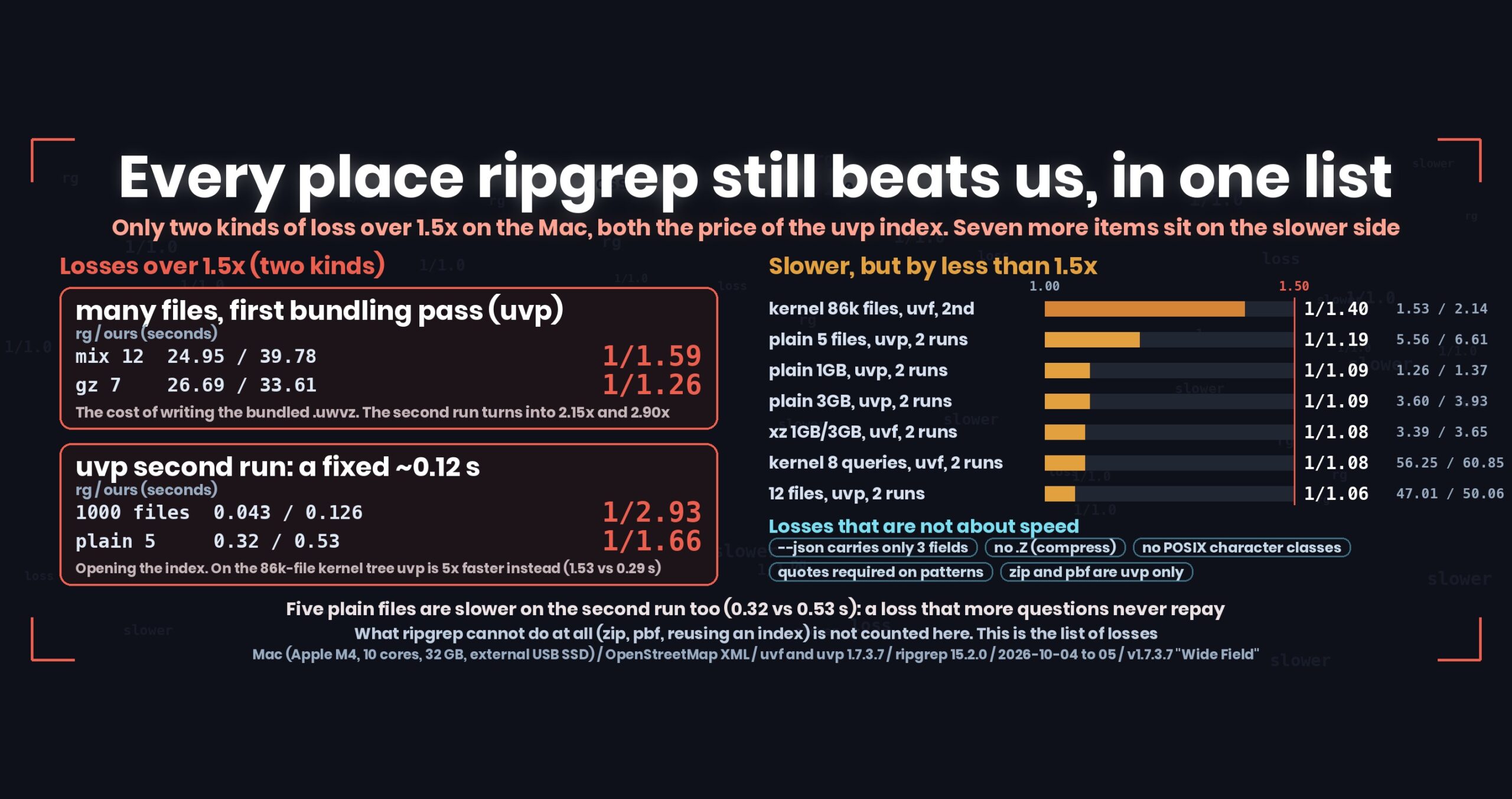
(1) The first pass that bundles many files. Over 12 mixed files, ripgrep takes 24.95 s and uvp 39.78 s (ripgrep is 1.59x faster). The second run flips to 2.15x, and over three runs the totals cross (ripgrep 69.07 s against 60.34 s for uvp). Seven gz files cross on the second query.
But five plain files never pay it back. The second run is still slower, 0.32 s against 0.53 s. More questions never reverse it, so this is not a design cost — it is simply a loss. If you search plain files repeatedly, uvf or ripgrep is the faster choice.
(2) A fixed cost of about 0.12 s on every second run. That is opening the index. Over 1,000 split files it is 0.043 s against 0.126 s (ripgrep is 2.93x faster). When ripgrep finishes the whole input in 0.04 s, the fixed cost is the entire measurement. The same fixed cost turns into a win on the kernel tree — 1.53 s against 0.29 s — because the other side’s own per-file cost is larger there.
Seven items are slower by less than 1.5x: the uvf second run on the kernel tree (1/1.40), [ぁ-ん]{3,} on a warm 3 GB file with uvf (1/1.43), five plain files with uvp (1/1.19), a single plain file with uvp (1/1.09), xz with uvf (1/1.08), eight kernel queries with uvf (1/1.08), and 12 mixed files with uvp (1/1.06). This series calls that band “on par”, but they are on the slower side, so the numbers go in.
Losses that are not about speed are still there too: no .Z (compress) support, no POSIX character classes, fewer fields in --json than ripgrep offers (file, n, line), no exclusion form of -g (!) yet, and zip and pbf only in uvp.
Correctness took the longer half of the work
Most of these posts are about speed, but the work that took time was correctness.
Every new way in multiplies what has to be checked: seven formats × single/many files × cold/hot, 43 ignore-rule items, 36 wildcard items, eight output formats over two code paths. And if the result of searching a decompressed stream differs from the plain file even once, every speed number becomes meaningless.
- The correctness suite, 145 checks, passed on all three machines — macOS, Windows and Linux (Part 13).
- Across the 96 speed items, comparing output gave zero mismatches.
- Hit counts over many files (5,445 / 122,441 / 127,886), the zip counts (5,445 / 1,145) and the pbf count (94,979) all match ripgrep or the XML version of the same data.
Without that “zero mismatches”, the table above could not be published. One post in this series had its numbers replaced wholesale (Part 1: a file that should not have been in the set had been included). That change also reversed a claim — “the second pass over plain files is faster” became “the second pass over plain files is slower too” — which was, honestly, the least comfortable moment of the series.
What generalises
(1) When you add features, decide first what must not change. Of the seven additions, the free uvf build got many files, seven formats, ignore rules, wildcards and output formats; every feature that keeps state went to uvp. Because that line was drawn first, the uvf path never stopped being “read the files in order”. It did not get slower because we did not touch it, not because of anything clever.
(2) Do not count “things the other tool cannot do” as wins. ripgrep does not search zip or pbf, so the comparison is against unzip or osmium in a pipe. When you get to choose the opponent, the choice moves the number. So the opposing command is always printed next to the ratio, and features with no equivalent at all (-seq, for example) get no ratio — just “no equivalent”.
(3) A fixed cost flips sign with the size of the input. The 0.12 s in uvp is a 1/2.93 loss over 1,000 small files and a 5x win over an 86,000-file tree. The same code shows both faces on the same day. A tool you can describe as simply “fast” or “slow” has probably not been measured in enough places.
(4) If a loss is never paid back, say that it is never paid back. The second pass over five plain files is slower. Calling that “the price of the first pass” would read well and would be a lie. It is a price only when the arithmetic actually comes back.
Conditions, and what I am not claiming
- Every number is from a Mac (Apple M4, 10 cores), 32 GB RAM, an external USB SSD and OpenStreetMap XML — except the kernel rows, which use the Linux kernel sources. Windows and Linux timings are not brought into this article, because different machines cannot be compared in seconds. Part 13 is the post that deals only in ratios across the three.
- Calling anything under 1.5x “on par” is a line this series drew for itself (the reasoning is in Part 9 of the previous series). If that looks like a line drawn in my own favour, read the seconds in the tables instead.
- Each figure is a single measurement. Only the items that visibly varied were re-measured and annotated. The first pass over many files varies on ripgrep’s side as well (22.39–26.69 s over seven gz files).
- Different tables come from different builds (1.7.3.7, builds 26.10.04.23 through 26.10.05.14), because no single 1.7.3.7 run covers 3 GB, 10 GB and 50 GB together. The zip and pbf rows are v1.7.3.6 (2 October 2026).
- 50 GB does not fit in RAM, so the second run still reads from disk. The 3 GB and 10 GB second runs read from memory.
- The
--tunefigures (Part 11) alone were measured on 22 September 2026 on a development build in the 1.7.0 range and have not been re-measured. - The write-out speed of 50 GB gz, and of bz2, xz, lzma, zst, lz4, br and zip, has not been measured — only its correctness.
- I am one side of this comparison. Please discount accordingly.
The tools involved
UwView is a viewer for very large text and log files (free: UwView; paid: UwView Pro).
The same thing from the command line
One line for each way in that this series added.
uvf 'logs/*.log,err/*.gz' ERROR      # many files in one command (quotes required)
uvf app.log.1.xz ERROR               # seven compression formats, no external command
uvp logs.zip ERROR                   # zip entries directly (uvp only)
uvp japan-latest.osm.pbf Tokyo       # pbf directly (uvp only)
uvf 'src/**/*.log' ERROR --no-ignore # search past .ignore and .gitignore
uvp big.log ERROR -out hits.log.gz   # write results in the input's format
uvf big.log ERROR --json             # JSON Lines (file, n, line)
uvf --tune                           # measure the thread count for this machine (--apply saves it)
uvf big.log 'ZZZ-not-found'; echo $? # check the exit code
Exit codes follow grep: 0 = hits, 1 = no hits, 2 = error or incomplete result.
The free build is on GitHub Releases. On a Mac, brew install --cask amru195704/uwview/uwview; on Windows, Scoop (scoop bucket add uwview https://github.com/amru195704/scoop-uwview, then scoop install uwview); on Linux, Snap also works.
To be straight about it: the first pass that bundles many files is slower in uvp than in ripgrep — 39.78 s against 24.95 s over 12 mixed files. It starts paying from the second query (the same 12 files take 10.28 s), and the totals cross by the third. For a single pass over plain files, the free uvf or ripgrep is faster.
Links
All fourteen posts of the Wide Field series (Part 3 was merged into Part 2).
- Part 1 — 12 plain and gzip files in one command: https://uvp.y42u.net/en/blog/uwview-wf01-multi-file-one-command-en/
- Part 2 — seven formats without an external command (including parallel xz): https://uvp.y42u.net/en/blog/uwview-wf02-seven-formats-no-external-en/
- Part 4 — reusing a bundled
.uwvz, even when files disappear: https://uvp.y42u.net/en/blog/uwview-wf04-bundle-keep-en/ - Part 5 — searching inside zip: https://uvp.y42u.net/en/blog/uwview-wf05-zip-entries-en/
- Part 6 — searching pbf: https://uvp.y42u.net/en/blog/uwview-wf06-pbf-osm-en/
- Part 7 — ignore rules (
.ignore,.gitignore): https://uvp.y42u.net/en/blog/uwview-wf07-ignore-rules-en/ - Part 8 — how file patterns are written, and why quotes are required: https://uvp.y42u.net/en/blog/uwview-wf08-file-globs-en/
- Part 9 — regular expressions compared (.NET against Rust): https://uvp.y42u.net/en/blog/uwview-wf09-regex-vs-ripgrep-en/
- Part 10 — writing results in the input’s format: https://uvp.y42u.net/en/blog/uwview-wf10-output-same-format-en/
- Part 11 —
--jsonand--tune: https://uvp.y42u.net/en/blog/uwview-wf11-json-and-tune-en/ - Part 12 — the newline count that was 40% of the second search: https://uvp.y42u.net/en/blog/uwview-wf12-newline-hot-en/
- Part 13 — the same test suite on macOS, Windows and Linux: https://uvp.y42u.net/en/blog/uwview-wf13-three-os-en/
- Part 14 — every place ripgrep still beats us: https://uvp.y42u.net/en/blog/uwview-wf14-where-ripgrep-wins-en/
- The previous series, recapped (First Light: only the number of reads changed): https://uvp.y42u.net/en/blog/uwview-fl13-first-light-recap-en/
- ugrep, ripgrep and zgrep over seven formats and 12 files: https://uvp.y42u.net/en/blog/uwview-ugrep-ripgrep-zgrep-compressed-logs-en/
- Choosing a format to archive logs in: https://uvp.y42u.net/en/blog/log-compression-format-choice-en/
- All measured data (benchmark list): https://uvp.y42u.net/en/benchmarks-en/
- Source code (GitHub): https://github.com/amru195704/UwView
And if huge logs are eating your storage and you want them archived compressed and still searchable quickly, try UwView Pro: a persistent index, search over the compressed cache, and roughly 1/9 of the original size, with reopening and searching both a step faster (all platforms; one-time purchase or monthly plan).
From the developer: a full list of my apps, Kindle books and public projects is on GitHub: amru195704.