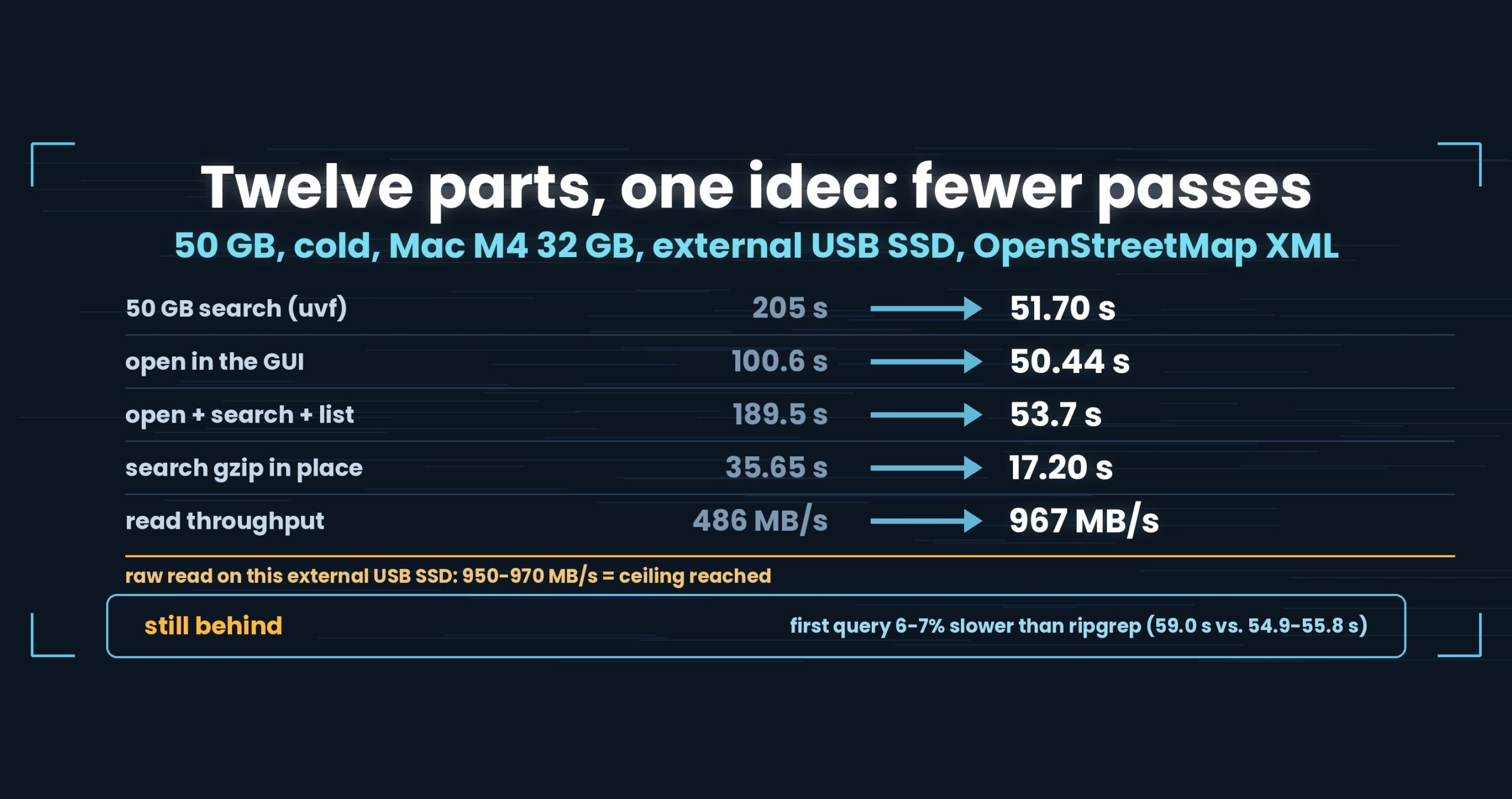
[Update 2026-10-04] In v1.7.3.6.9, five plain files are on par too (
uvfslightly ahead)“Searching several plain files at once, ripgrep is slightly faster (1/1.17)” below is from the version this post was written with. Re-measured on v1.7.3.6.9 (4 October 2026) as first + second run totals: five plain files, ripgrep 5.56 s and
uvf5.44 s (1.02×, on par); twelve files (7 gz + 5 plain), ripgrep 50.16 s anduvf38.80 s (1.29×, on par). Measured this way (cold),uvp‘s bundling first run took 42.45 s — 1/1.51 of ripgrep (28.19 s) and 1.96×uvf(21.65 s); the 2.34× in the text is a hot figure, the faster of two runs. The tables and numbers below are kept as measured at the time. Details: Wide Field Part 12: the newline count that was 40% of the second search.
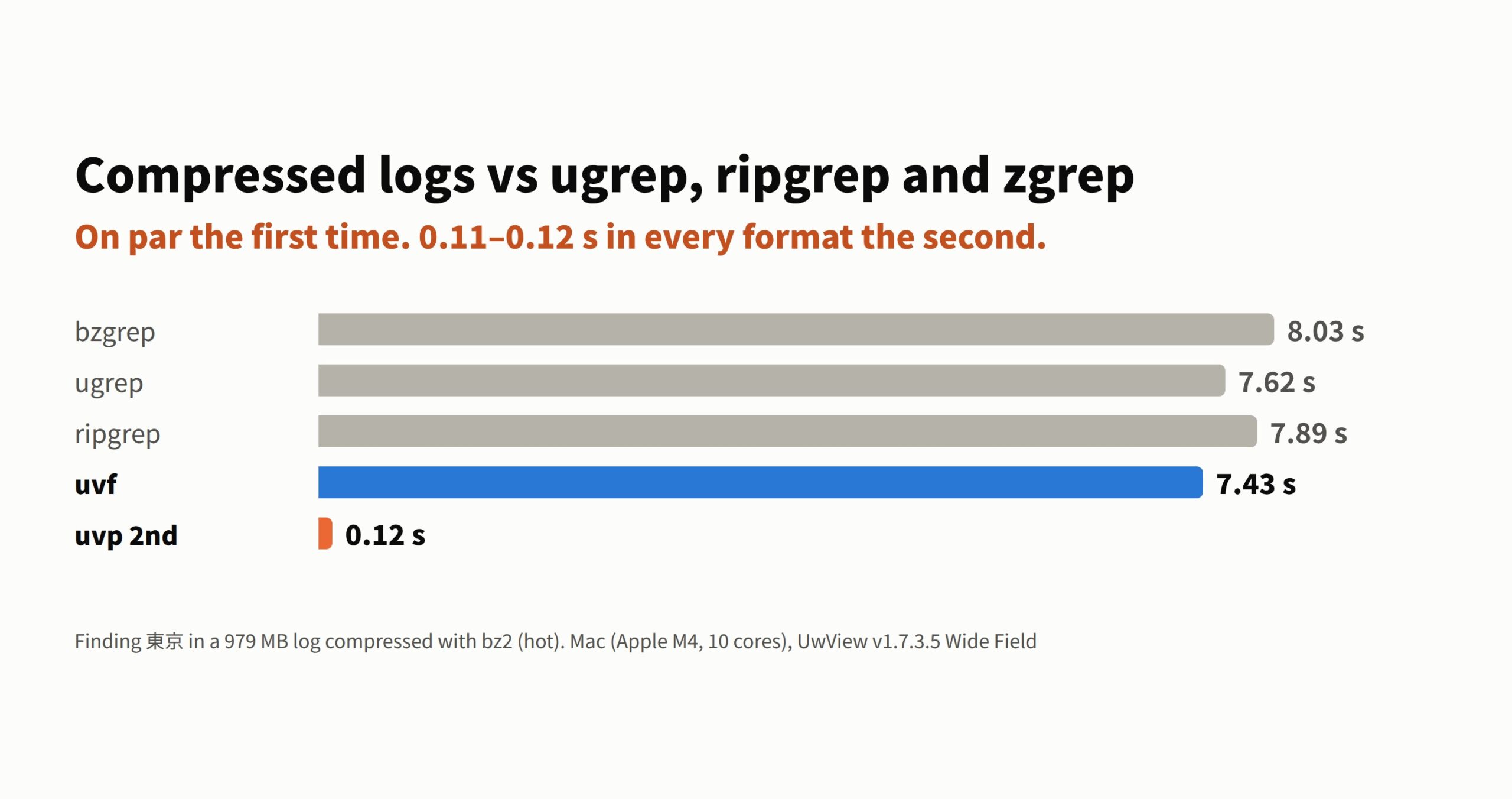
On bz2, every first search took 7 to 8 seconds.
When you search compressed logs, do you reach for zgrep? Or ugrep -z, or rg -z? The idea is that a faster tool makes it faster — so I searched the same compressed log in seven formats with six tools.
Switching tools only helped under one condition. The number that changed out of all recognition was not about the tool at all. It was about the second search.
- The short version: for a one-off search, ugrep, ripgrep and uvf are on par in all seven formats (1.03–1.36× apart). Only the standard grep for each format (zgrep and friends) falls behind: 2.73× on gz, 2.32× on lz4, 1.80× on br. Search the same file a second time and uvp takes 0.11–0.12 s whatever the original format (62× faster than uvf on bz2). Searching many files in one go, zgrep took 5.08× as long as uvf.
- Where we lose, first
- Seven formats, one file each
- Many files at once
- Why ag was left out
- What to watch for when you measure
- How it was measured
- The tool I use
- Links
The short version: for a one-off search, ugrep, ripgrep and uvf are on par in all seven formats (1.03–1.36× apart). Only the standard grep for each format (zgrep and friends) falls behind: 2.73× on gz, 2.32× on lz4, 1.80× on br. Search the same file a second time and uvp takes 0.11–0.12 s whatever the original format (62× faster than uvf on bz2). Searching many files in one go, zgrep took 5.08× as long as uvf.
uvfanduvpare the search commands of UwView (v1.7.3.6 “Wide Field”), which I make.uvfis in the free edition;uvpis part of the paid UwView Pro.
Where we lose, first
- A first-run lead is not a win. Comparing first runs,
uvfhad the shortest time in all seven formats, but it is within 1.03–1.36× of ugrep and ripgrep. In this article anything under 1.5× is written as “on par”, not as a difference. - Searching several plain-text files together, ripgrep was slightly faster (5 plain files:
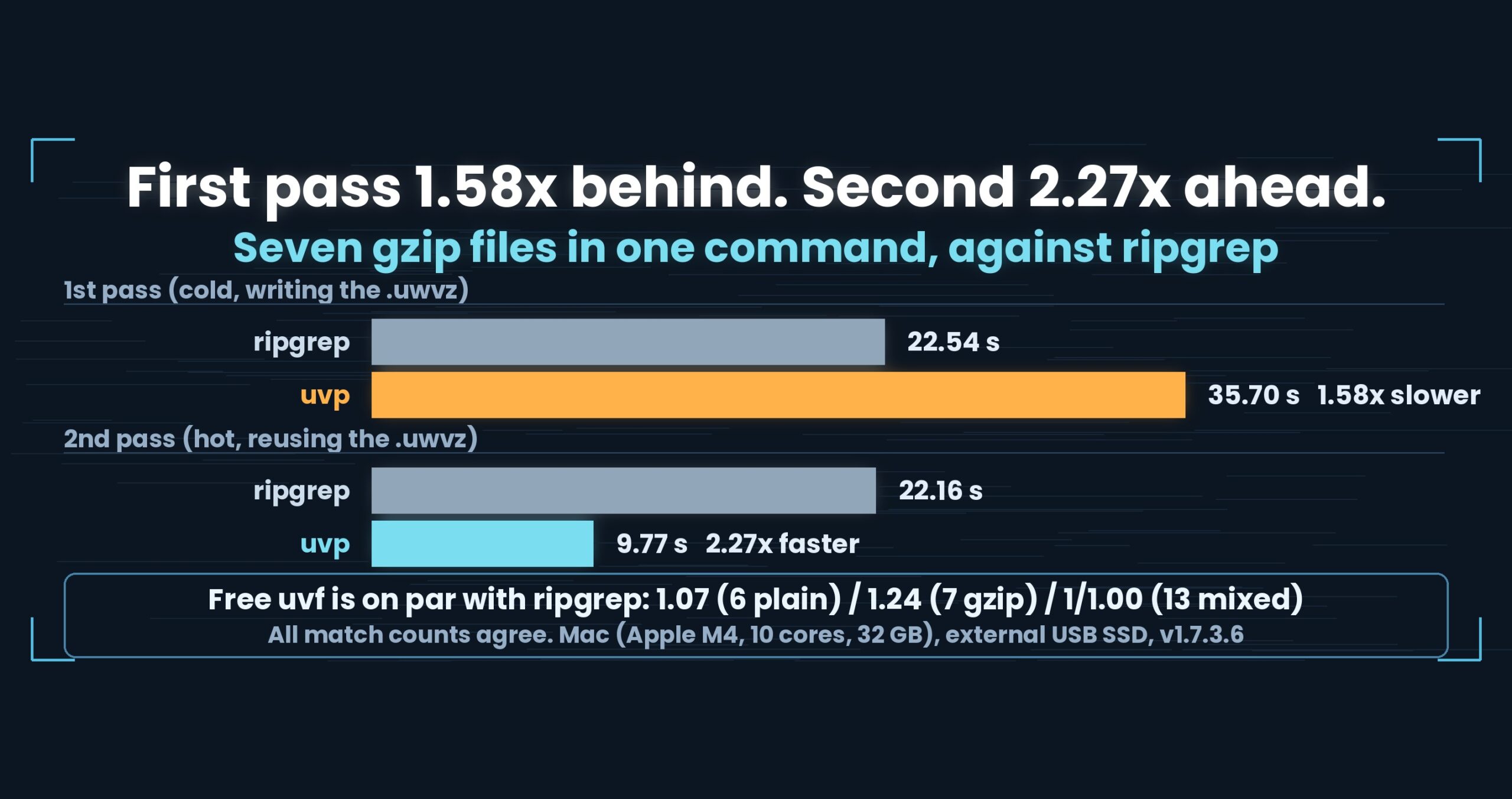
uvfat 1/1.17 of ripgrep — on par; a separate run withuvf1.7.2.7, cold and hot). uvpis slow the first time it bundles several files. With 12 files it took 41.23 s, 2.34×uvf‘s 17.60 s, because it writes the bundled index.
Seven formats, one file each
The same 979 MB OpenStreetMap XML, compressed in seven formats, searched for 東京 (1,145 lines). Hot (warm cache), two runs each, the faster one shown. Seconds; shorter is faster.
| Format (size) | Standard grep | ugrep | ripgrep | uvf |
uvp 1st |
uvp 2nd |
|---|---|---|---|---|---|---|
| gz (111 MB) | 0.90 (zgrep) | 0.45 | 0.43 | 0.33 | 0.42 | 0.12 |
| bz2 (88 MB) | 8.03 (bzgrep) | 7.62 | 7.89 | 7.43 | 7.64 | 0.12 |
| xz (56 MB) | 4.01 (xzgrep) | 3.64 | 4.21 | 3.37 | 3.44 | 0.11 |
| lzma (56 MB) | 3.21 (xzgrep) | 2.83 | 3.40 | 2.57 | 2.64 | 0.12 |
| zst (122 MB) | 0.63 (zstdgrep) | 0.65 | 0.54 | 0.50 | 0.57 | 0.12 |
| lz4 (186 MB) | 0.65 (lz4 -dc | grep) | 0.33 | 0.31 | 0.28 | 0.35 | 0.12 |
| br (106 MB) | 1.33 (brotli -dc | grep) | 0.91 | 0.87 | 0.74 | 0.85 | 0.12 |
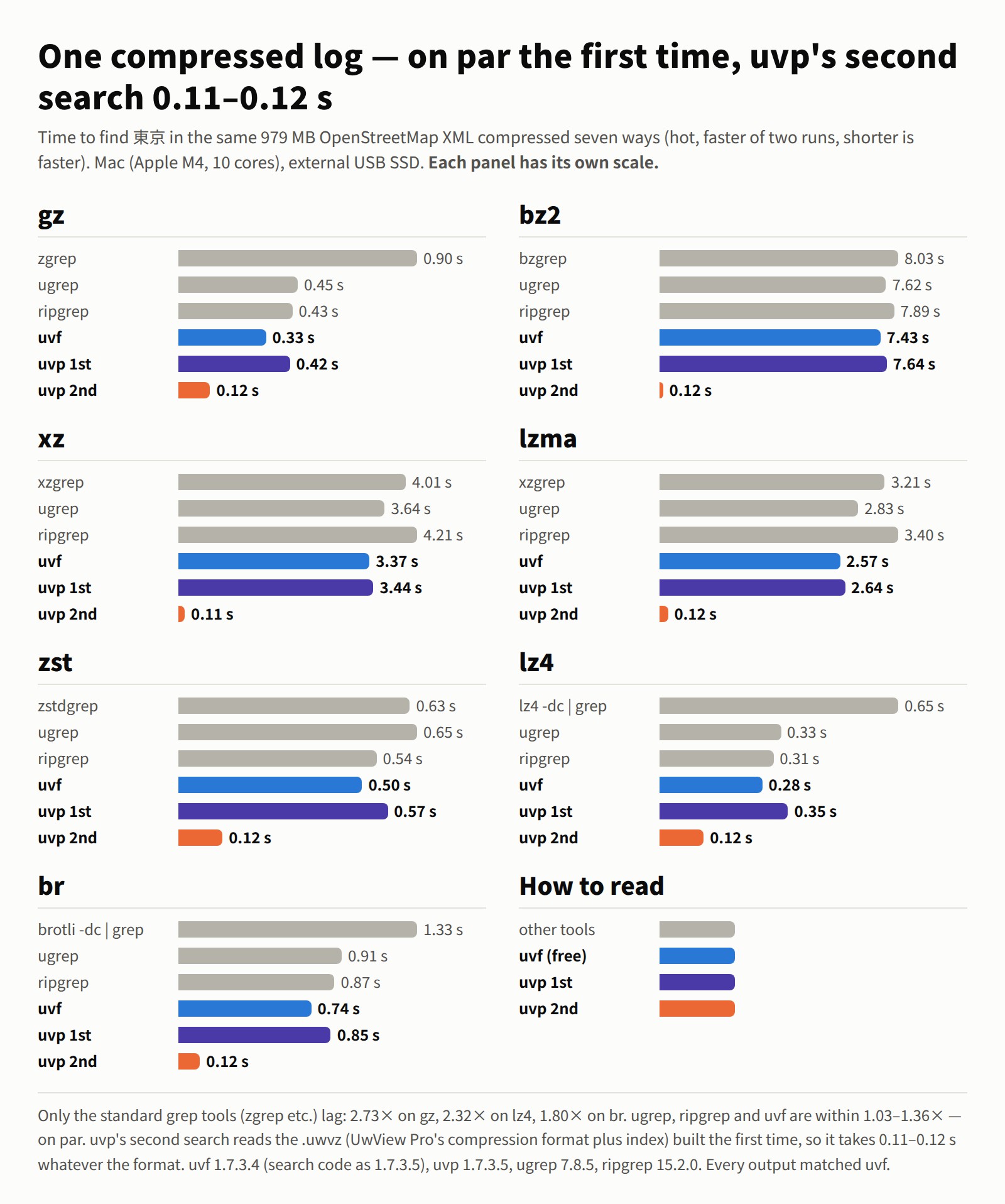
For every run, the output was checked against uvf for line count and content (file name, line number, text) and matched.
Only the standard grep tools fall behind
ugrep, ripgrep and uvf stayed within 1.36× of each other in every format. The gap appeared with each format’s standard grep: zgrep on gz at 2.73× uvf, lz4 at 2.32×, br at 1.80×. The standard tools pipe the output of a decompressor into grep (lz4 and br have no dedicated grep, so I piped lz4 -dc and brotli -dc myself). ripgrep’s -z also calls external decompressors (gzip, xz and so on), yet it showed no gap against ugrep and uvf. uvf calls no external commands; it decompresses with its own built-in decoders.
On bz2, xz, lzma and zst the standard grep was on par too (1.08–1.26×). On bz2 in particular, every tool without an index took 7–8 seconds. Decompression itself is the heavy part, every such tool is bound by it, and changing tools does not shrink it. That is the 7 to 8 seconds from the first line.
Why only uvp‘s second search takes 0.11–0.12 s
This is where you should be suspicious, so it gets its own heading.
On the first search, uvp builds a .uwvz (UwView Pro’s compression format plus index) while it searches. From the second search on it does not decompress the original at all; it searches the .uwvz. Whether the source was bz2 or lz4, the second search reads the same kind of .uwvz, so the weight of the original format disappears and every format lands at 0.11–0.12 s. Against uvf that is 2.3–62× (bz2 62×, xz 31×, lzma 21×).
The first search, which builds the .uwvz, is not slow either: 1.02–1.27× uvf, on par. Memory was 0.12–0.19 GB on the first run and 0.07 GB on the second.
So the numbers change not because of a faster grep, but because the second search skips decompression. For a log you only search once, this gap never shows up.
Many files at once
Logs rarely come one at a time. Searching a pile of rotated gz files is the more common job.
| hot, seconds | zgrep | ugrep | ripgrep | uvf |
uvp 1st (bundling) |
uvp 2nd |
|---|---|---|---|---|---|---|
| 5 gz files (~7.4 GB uncompressed, 16,069 lines) | 9.43 | 2.56 | 1.34 | 1.04 | 3.04 | 0.73 |
| 7 gz + 5 plain = 12 files (~60 GB uncompressed, 127,886 lines) | 89.35 | 25.38 | 24.62 | 17.60 | 41.23 | 9.52 |
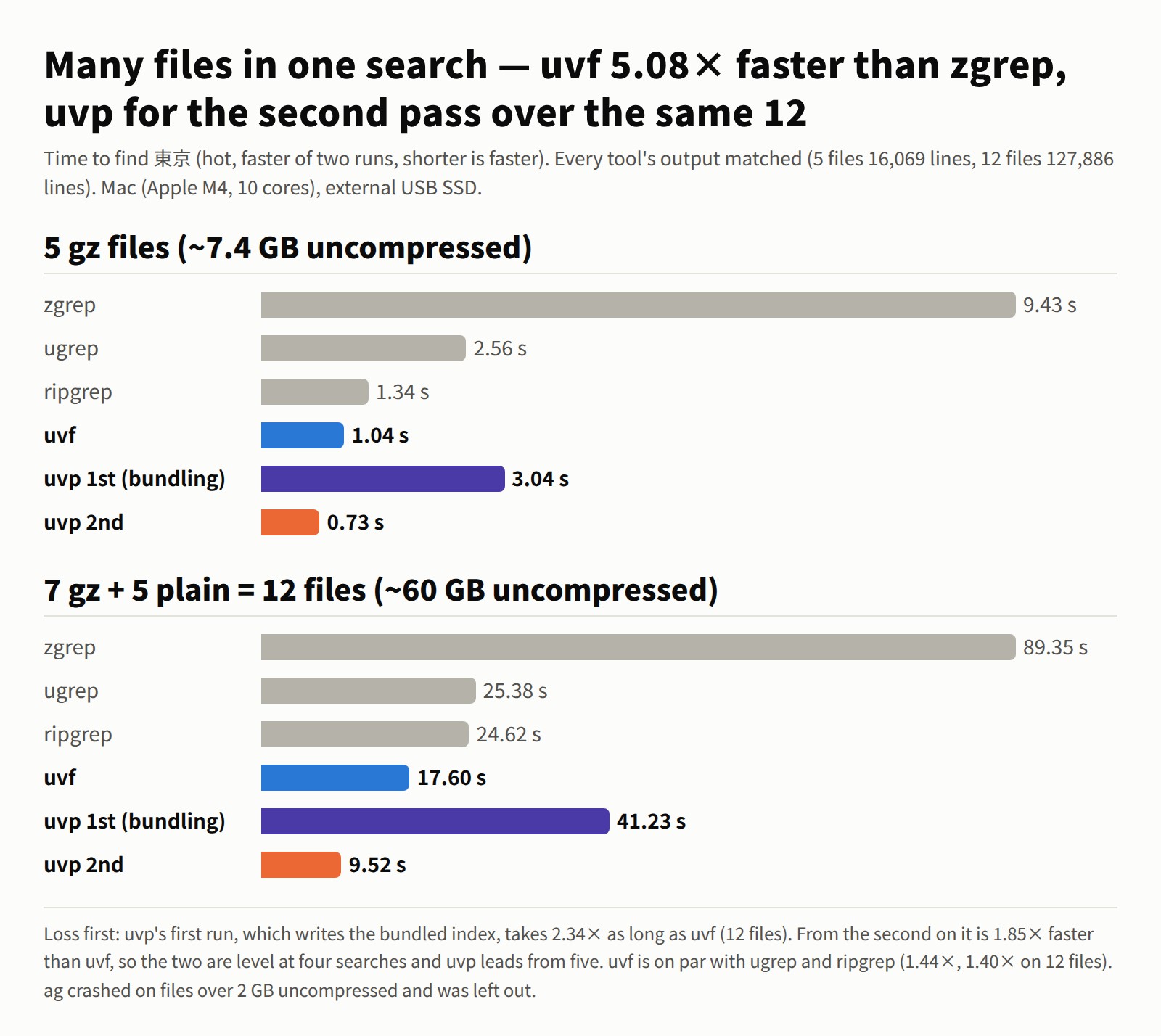
- The gap to
zgrepis the widest: 9.07× with 5 files, 5.08× with 12.zgrepdecompresses one file at a time on one thread, so the gap grows with the file count. - ugrep and ripgrep are on par with
uvf(1.44× and 1.40× with 12 files). Cold, with the cache dropped, 12 files tookuvf21.35 s and ugrep 26.85 s — on par too. - With
uvf, wildcards and commas go into one argument, as inuvf 'osm17/*.gz,osm17/*.osm' 東京. Plain and compressed files mixed together take a single run.
uvp draws level at four searches and pulls ahead from five
On its first run uvp bundles the 12 files into a single .uwvz (about 8.2 GB), which costs about 24 s more than uvf. From the second run it takes 9.52 s, 1.85× faster than uvf. Each search claws back about 8 s, so at four searches in total the two are level (69.79 s vs 70.40 s), and from five on uvp is clearly ahead (79.31 s vs 88.00 s).
If you keep returning to the same set of logs, use uvp; if you search once and move on, uvf. The dividing line is the number of searches.
Why ag was left out
I measured The Silver Searcher (ag) as well, but left it out of the tables. Before speed even comes into it, it did not search correctly.
- With
-zalone it skips compressed files. Even with--search-binary, it decompressed only three formats: gz, xz and lzma (bz2, zst and br gave 0 lines; lz4 gave one line that matched by accident and was wrong). - It crashes (segmentation fault) on files over 2 GB uncompressed. With the 5 gz files, only the 1,197 lines written before the crash were left (the correct answer is 16,069).
What to watch for when you measure
A grep comparison can finish fast with zero results.
- Without
-z, ugrep does not decompress and finishes quickly with 0 hits (the first measurement, 9.0 s, turned out to be 0 hits). - ripgrep returned 0 hits on zst when the file was a symbolic link (the
zstdit calls skips links). Measure with the real path. - Measure
uvp‘s first run after deleting the.uwvz. Forget, and you are measuring the second run.
Match the line count and content of the output before comparing seconds. Every value in this article passed that check.
How it was measured
- Files: OpenStreetMap (Japan) XML. The single-file comparison uses the same 979 MB compressed in seven formats (1,145 lines). Many files: 5 gz (16,069 lines) and 7 gz + 5 plain (127,886 lines)
- Term:
東京(fixed string, with line numbers) - State: hot, faster of two runs. Only the 12-file cold figures were taken separately, after
sudo purge - Tools: standard = macOS
zgrepandbzgrep(BSD grep 2.6.0),xzgrep(XZ Utils 5.8.4),zstdgrep(zstd 1.5.7), andlz4 -dc(1.10.0) andbrotli -dc(1.2.0) piped into BSD grep / ugrep 7.8.5ugrep -z -n -F/ ripgrep 15.2.0rg -z -n -F/ ag 2.2.0ag -z --search-binary -Q/uvf1.7.3.4 (search code identical to 1.7.3.6) /uvp1.7.3.5 (same search code as 1.7.3.6) - Mac (Apple M4, 10 cores, 32 GB memory), external USB SSD. Timings vary by machine
How much each format shrinks, how long compression takes, and a cold comparison are in Compressed logs are faster to search (those are cold numbers against ripgrep’s -z).
The tool I use
UwView is a CLI/GUI tool for investigating huge text files. In v1.7.3.6 “Wide Field” it searches many files and seven compressed formats in one run, with no external commands.
uvf app.log.bz2 ERROR                  # search a compressed file as it decompresses (free)
uvf 'app.log,app.log.*.gz' ERROR       # plain and compressed together, in one run (free)
uvf '**/*.log.gz' ERROR -open          # search, then read the hits in the GUI (free)
uvp 'app.log,app.log.*.gz' ERROR       # bundle them, faster from the second search (UwView Pro)
The free edition is on GitHub Releases. On a Mac, brew install --cask amru195704/uwview/uwview; on Windows, Scoop (scoop bucket add uwview https://github.com/amru195704/scoop-uwview → scoop install uwview).
Links
- Compressed logs are faster to search (how the seven formats shrink, and which to pick): https://uvp.y42u.net/en/blog/log-compression-format-choice-en/
- All measurements (benchmarks): https://uvp.y42u.net/en/benchmarks-en/
- Source (GitHub): https://github.com/amru195704/UwView
And if huge logs are eating your storage and you want them kept compressed and still searchable, try UwView Pro: a persistent index, search inside the compressed cache, and about 1/9 the storage, with reopening and searching both a step faster (all OSes; one-time purchase or subscription).
From the developer: a list of my apps, Kindle books, and open source is at GitHub: amru195704.