[Update, 16 October 2026] Speed today — with v1.9.0 the second run is still on par with ripgrep
The figures in this article are from 1.7.3.6.8 and 1.7.3.6.9 (3–4 October 2026). The current version, v1.9.0 (13 October 2026), was measured on the same Mac.
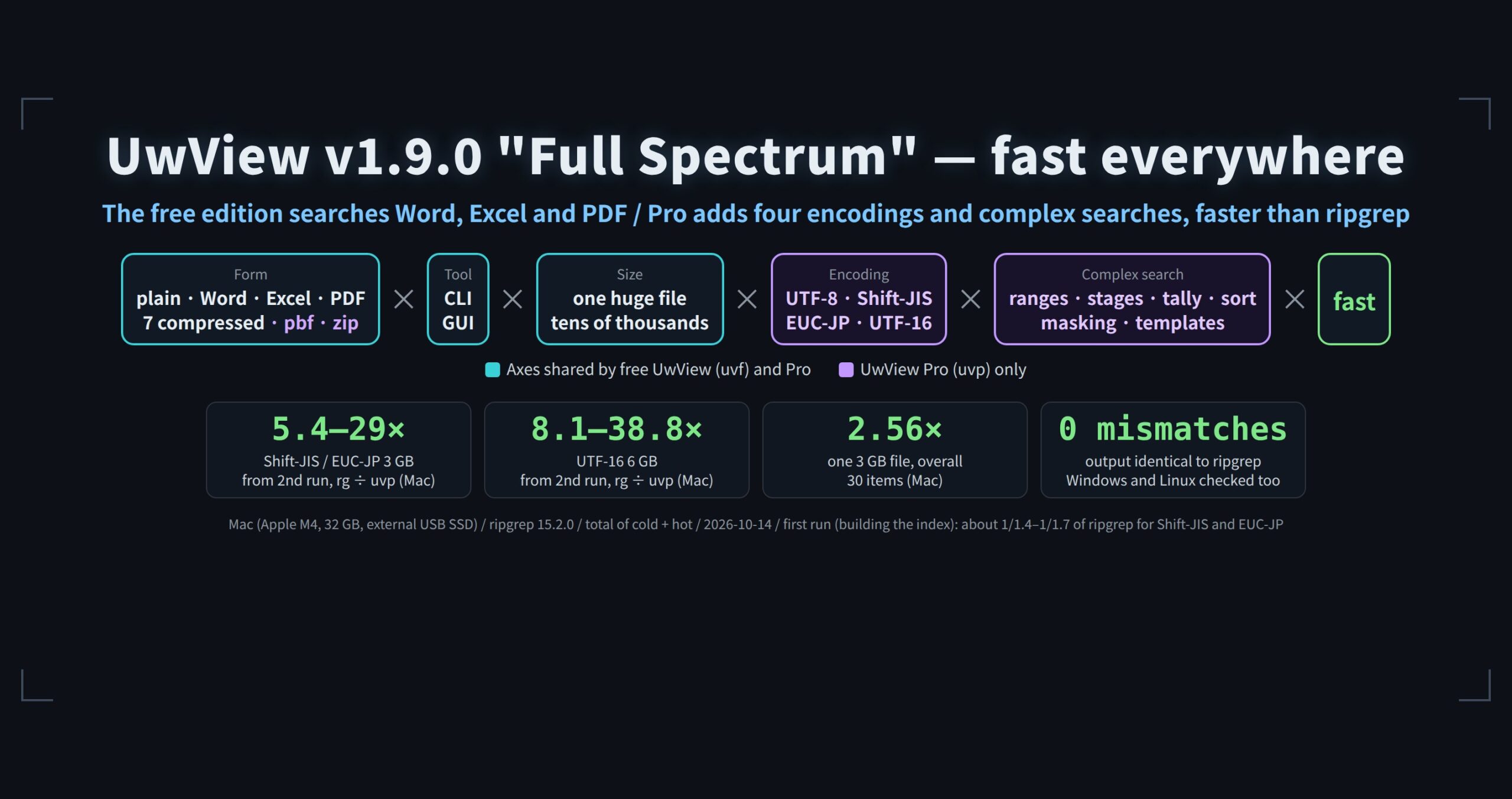
ripgrep ÷ free uvf(second run)This article (1.7.3.6.8–1.7.3.6.9) Now (v1.9.0) 3 GB plain string 1.07–1.11× (0.27 s) 1.07× (0.29 s vs 0.31 s) Seven searches, second-run total (3 GB / 10 GB) 1.20× / 1.19× 1.22× / 1.19× For reference: uvp, 3 GB plain string— 1.8× (0.17 s) The article’s conclusion still holds. For a big speed-up from the second search on, use
uvp, which keeps an index (3.44× ripgrep over seven searches at 3 GB). Details: Benchmarks and the v1.9.0 “Full Spectrum” article.
In Improvement Log Part 11 I wrote:
“How fast we count newlines doesn’t show up in the seconds, as long as we read from an external SSD. It’s groundwork that pays off when the medium gets faster.”
The faster medium turned out not to be new hardware. It was memory — the page cache — the second time you search the same file.
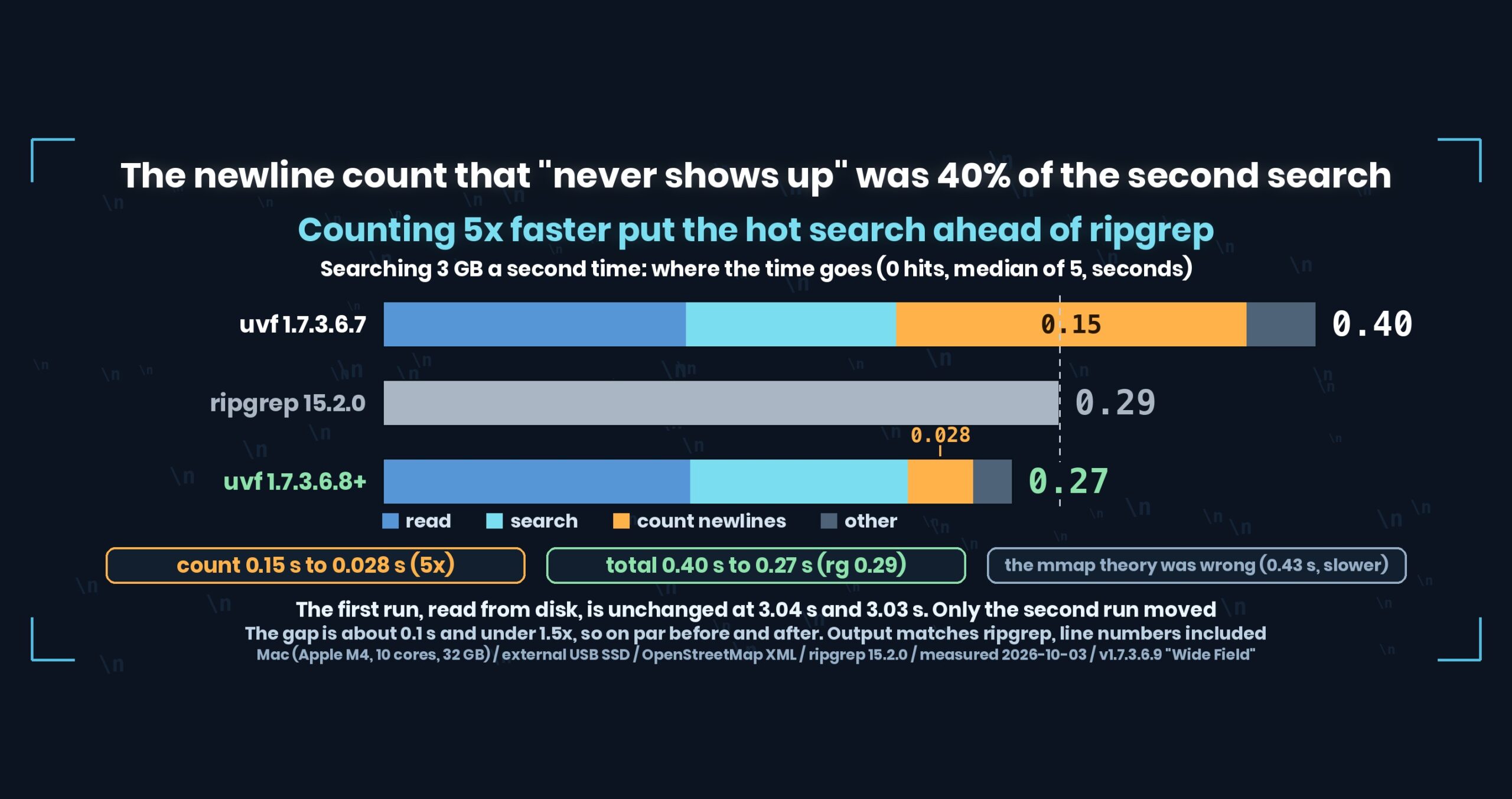
- The short answer: on the second search of the same file (hot), uvf was still 1.3–1.4× slower than ripgrep. Breaking the time down showed that 0.15 s of the 0.40 s on 3 GB went to counting newlines for line numbers. Counting by comparing 16 bytes at a time against the newline and adding the results up in place took that from 0.15 s to 0.028 s (5×). The second search went from 0.40 to 0.27 s on 3 GB (ripgrep 0.29) and from 1.28 to 0.85 s on 10 GB (ripgrep 0.95) — ahead of ripgrep. The first run, which reads from disk, did not change
- Where we were losing, first
- Four suspects
- Measured, only H1 held up
- Not counting, but how we counted
- The numbers: the second run passes ripgrep, the first run is unchanged
- Caveats
- Takeaways: “it won’t show up in seconds” always comes with conditions
- The tool
- Links
The short answer: on the second search of the same file (hot), uvf was still 1.3–1.4× slower than ripgrep. Breaking the time down showed that 0.15 s of the 0.40 s on 3 GB went to counting newlines for line numbers. Counting by comparing 16 bytes at a time against the newline and adding the results up in place took that from 0.15 s to 0.028 s (5×). The second search went from 0.40 to 0.27 s on 3 GB (ripgrep 0.29) and from 1.28 to 0.85 s on 10 GB (ripgrep 0.95) — ahead of ripgrep. The first run, which reads from disk, did not change
uvfis the free search command of UwView (v1.7.3.6.9 “Wide Field”, 4 October 2026), which I build. This change landed in 1.7.3.6.8. Measured on a Mac (Apple M4, 10 cores), 32 GB of memory, an external USB SSD and OpenStreetMap XML.
Where we were losing, first
On the first run, right after dropping the cache, uvf has been slightly faster than ripgrep for a while. Disk speed is the ceiling there, so how we read (pread, 4 MB at a time) is what shows.
On the second run, with the file in memory, we kept losing.
| Second run (hot), median of 3, seconds | ripgrep | uvf 1.7.3.6.7 |
vs ripgrep |
|---|---|---|---|
3 GB 東京 |
0.28 | 0.38 | 1/1.36 |
| 3 GB, a word that isn’t there (0 hits) | 0.28 | 0.40 | 1/1.43 |
10 GB 東京 |
0.94 | 1.29 | 1/1.37 |
| 10 GB, 0 hits | 0.92 | 1.25 | 1/1.36 |
The gap is 0.1–0.35 s. Nobody can feel that. It’s under 1.5×, so by this series’ rule it’s “on par”.
It still bothered me. The ratio is the same on 3 GB and 10 GB, so it isn’t start-up time — it’s raw read speed. On 10 GB ripgrep ran at about 10 GB/s and uvf at about 7.4 GB/s. And the gap was the same with zero hits, so it lives in reading and searching, not in output.
Four suspects
| # | Suspect | How to check |
|---|---|---|
| H1 | Counting every newline it reads, for line numbers, even with no hits | Run without counting |
| H2 | The copy from the page cache that pread makes (ripgrep reads directly via mmap) |
Read via mmap |
| H3 | The 4 MB block is bigger than the CPU cache, so it falls out between read, search and count | Use smaller blocks |
| H4 | A fixed start-up and teardown cost | Search an empty file |
Start thinking about fixes first and every one of these looks plausible. So before fixing anything I added a way to break the time down (UV_TRACE=1 prints the totals for reading, searching, counting and writing).
Measured, only H1 held up
3 GB, a word that isn’t there, second run, median of 5.
| What was measured | 3 GB | 10 GB | What it told us |
|---|---|---|---|
| Empty file | 0.02 | — | Not H4 |
| Previous version | 0.40 | 1.28 | Breakdown: read 0.13, search 0.09, count 0.15 |
No counting (UV_NOCOUNT=1, for measuring only) |
0.24 | 0.76 | Without the count we beat ripgrep |
Read via mmap (UV_SOURCE=mmap) |
0.43 | 2.03 | Slower. Not H2 |
| Blocks of 256K, 1M, 4M, 16M | 0.27–0.30 | — | Size makes no difference. Not H3 |
ripgrep / rg --no-mmap |
0.29 / 0.29 | 0.95 / 0.95 | ripgrep is the same with or without mmap |
H2 was the suspect I believed in most. “ripgrep is fast because mmap lets it read without copying.” It sounds right. But rg --no-mmap ran in the same 0.29 s, and switching us to mmap made things slower (pages get mapped in again every time). Had I fixed the plausible story before measuring, I would have shipped a slowdown.
And counting took 0.15 s — 40% of the whole second search.
ripgrep pays for line numbers too
3 GB 東京, second run |
With line numbers | Without |
|---|---|---|
| ripgrep | 0.30 | 0.24 |
ripgrep is about 20% slower with line numbers. Both tools pay that cost; they just pay it differently.
Not counting, but how we counted
uvf counted newlines with .NET’s Span.Count, which already compares in batches internally (SIMD). In Part 11 we moved the index builder from byte-by-byte to jumping with IndexOf; this path — the uvf search — had been on Span.Count all along.
Even so: 0.15 s on 3 GB, about 20 GB/s. Reading from an external SSD on the first run (about 0.97 GB/s) leaves 20× headroom, so it never shows. Reading from the page cache on the second run leaves none.
The new count works like this:
- Compare 16 bytes at a time against
\n. A match becomes −1 (all bits set), a miss becomes 0. - Subtract that result, as bytes, from an accumulator (subtracting −1 adds 1). The accumulator is sixteen one-byte counters.
- A one-byte counter overflows at 255, so every 255 rounds add the counters up.
// 64 bytes at a time into four accumulators; sum them every 255 rounds
a0 -= Vector128.Equals(Vector128.LoadUnsafe(ref start, (nuint)i), newline);
a1 -= Vector128.Equals(Vector128.LoadUnsafe(ref start, (nuint)(i + 16)), newline);
...
total += Sum(a0) + Sum(a1) + Sum(a2) + Sum(a3);
All it does is turn “how many matched” into a once-every-255-rounds job instead of an every-time job. 0.15 s became 0.028 s on 3 GB (5×). Compared with not counting at all (0.24 s), counting now costs about 0.03 s.
A bigger fix was on the table too: search and count in a single pass over the data. With counting 5× faster we hit the target while still reading twice, so I stopped at the smaller, safer change.
The numbers: the second run passes ripgrep, the first run is unchanged
Second run, median of 5, seconds (development machine, 3 October 2026)
| Search | Before (1.7.3.6.7) | After (1.7.3.6.8) | ripgrep | vs ripgrep (after) |
|---|---|---|---|---|
| 3 GB, 0 hits | 0.40 | 0.27 | 0.29 | 1.07 |
3 GB 東京 |
0.40 | 0.27 | 0.30 | 1.11 |
3 GB -E 'k="highway[^"]*"' |
0.53 | 0.42 | 0.50 | 1.19 |
3 GB -E '^ *<tag k="name"' |
0.45 | 0.33 | 0.45 | 1.36 |
| 10 GB, 0 hits | 1.28 | 0.85 | 0.95 | 1.12 |
10 GB 東京 |
1.40 | 0.88 | 0.96 | 1.09 |
- The first run did not change (3 GB
東京: 3.04 s before, 3.03 s after). Disk speed decides it. -v(print non-matching lines) takes another path and did not change (3 GB, 1.32 s).- The output did not change by a single byte, and matches ripgrep exactly, line numbers included. The tests for the new count check it against a naive count on random data, at the 64-byte and 255-round boundaries, on data that is all newlines, and that CR is not counted.
The owner’s full suite (drop the cache, wait 10 s, first run, then the second run straight after; 4 October 2026, 1.7.3.6.9) shows the same trend.
| Second-run total of seven searches, seconds | ripgrep | uvf |
|---|---|---|
| 3 GB | 7.60 | 6.31 |
| 10 GB | 12.58 | 10.61 |
Caveats
- The gap is around 0.1 s and under 1.5×. Before and after are both “on par” by this series’ rule. Nobody waiting at a terminal will notice.
- Part 11’s “a faster count won’t show up in seconds” is still true for the first run, which reads from disk. What was wrong was my assumption that the medium only gets faster when the hardware changes. On the same machine, the second run uses memory as the medium.
- The
IndexOfchange in Part 11 was in the GUI’s index builder; thisSpan.Count-to-accumulator change is in theuvfsearch. Different code. - 50 GB doesn’t fit in 32 GB of memory, so the second run reads from disk again. This change doesn’t help there.
- In UwView Pro’s
uvp, it helps the first run on a single file (which builds the index while reading) and counting lines while bundling many files. Searching the index (.uwvz) and searching in the GUI don’t use this count, so they’re unchanged. - Before/after figures are medians of 5 on the development machine; the full suite is the owner’s single runs. All numbers are examples from a Mac (Apple M4, 10 cores), 32 GB of memory, an external USB SSD and OpenStreetMap XML. Do not compare seconds across machines.
- I’m writing about my own product. Please read with that in mind.
Takeaways: “it won’t show up in seconds” always comes with conditions
(1) Re-measure the bottleneck for every condition. First run: the disk. Second run: memory. Second run on 50 GB: the disk again. Where it’s stuck changes with the conditions, even for the same command. Part 11’s conclusion was measured under first-run conditions.
(2) Break the time down before fixing. Of four suspects, the one I trusted most (H2, mmap) was wrong, and fixing it would have made things slower. The breakdown hook stays in the shipping build (UV_TRACE=1).
(3) Don’t guess why the other tool is fast. “ripgrep is fast because of mmap” could be checked with a single rg --no-mmap run.
(4) Stop at the smallest fix that reaches the target. Merging the two passes risks shifting line numbers. Swapping the counter has an obvious reference to check against: the naive count.
The tool
UwView is a viewer for huge text files and huge logs (free UwView / paid UwView Pro).
# See the breakdown of a search (read, search, count and write totals go to stderr)
UV_TRACE=1 uvf huge.log NO_SUCH_WORD

# Check you get the same answer as ripgrep first
uvf huge.log 'ERROR' > mine.txt
rg -n 'ERROR' huge.log > theirs.txt
Exit codes follow grep: 0 = found, 1 = not found, 2 = error or incomplete result.
The free edition is on GitHub Releases. On a Mac, brew install --cask amru195704/uwview/uwview; on Windows, Scoop (scoop bucket add uwview https://github.com/amru195704/scoop-uwview, then scoop install uwview).
Links
- Improvement Log Part 11: counting newlines got 1.88x faster and the search did not: https://uvp.y42u.net/en/blog/uwview-fl11-newline-vs-media-en/
- Improvement Log Part 10: mmap only gave 60% of the disk on a sequential read: https://uvp.y42u.net/en/blog/uwview-fl10-mmap-vs-pread-en/
- Where we stopped calling things a difference: https://uvp.y42u.net/en/blog/uwview-fl09-difference-threshold-en/
- How far .NET and Rust regular expressions agree: https://uvp.y42u.net/en/blog/uwview-wf09-regex-vs-ripgrep-en/
--jsonand--tune: https://uvp.y42u.net/en/blog/uwview-wf11-json-and-tune-en/- v1.7.3.6.9 release notes: https://github.com/amru195704/UwView/blob/main/2-doc/release-body-v1.7.3.6.9.md#uwview-v17369–wide-field-english
- Every measurement in one place: https://uvp.y42u.net/en/benchmarks-en/
- Source code (GitHub): https://github.com/amru195704/UwView
And if you are storing huge logs that eat your disk and want to search them compressed, take a look at UwView Pro — a persistent index, search inside the compressed cache, about 1/9 of the storage, and a faster reopen as well (all operating systems; one-time purchase or monthly plan).
From the developer: my apps, Kindle books and public projects are listed at GitHub: amru195704.