Last time we compared “opening a 48GB file and searching it.” This time we go one step further — editing it, and saving part-way through.
Same PC, same 48GB file, same search term. The conditions are held constant.
The comparison is again against EmEditor Professional. On Windows it is the practical benchmark for large-file work. And as we wrote last time, EmEditor is far ahead on editing features. That has not changed.
What changed is that the UwView side now has editing.
- Results first
- Where this comparison applies — below ~10GB, EmEditor is faster
- Test environment
- 1. Opening — a tie
- 2. Search — 245.3 s becomes 23.9 s
- 3. Replace — 257 s becomes 35.9 s
- 4. Mid-work saving — the question of whether you can stop
- 5. Final write-out — 31 minutes becomes 1 min 33 s
- What happens when you come back the next day
- Being straight about the limits
- How it relates to UwView Pro
Results first
| Operation | EmEditor (mean of 2 runs) | UwView Pro (Edit) | Ratio |
|---|---|---|---|
| Open the file | 103.6 s (116.8 / 90.4) | 107.1 s | Tie — EmEditor is marginally faster |
Search for 東京 (94,979 matching lines) |
194.7 s (245.3 / 144) | 23.9 s | ~8x |
Replace all 東京 → Tokyo |
210.5 s (257 / 164) | 35.9 s | ~6x |
| Mid-work save (to stop and come back) | 31 min (1,860 s) | 0 s (instant) | — |
| Final write-out (produce one file) | the same operation again — 31 min | 1 min 33 s | ~20x |
The EmEditor figures are the mean of two runs; both individual values are in brackets, because the spread is not small.
Opening is a tie — if anything EmEditor is slightly ahead. Everything after that is where the gap opens.
Where this comparison applies — below ~10GB, EmEditor is faster
Let me draw the boundary before anything else.
The test machine has 16GB of RAM. A 48GB file does not fit in it. Every number above comes from that condition.
At around 10GB — a file that fits in RAM — EmEditor is markedly faster at both search and replace. On a machine with plenty of RAM, EmEditor stays fast on genuinely large files too.
EmEditor is a capable, feature-rich editor, and more than sufficient for ordinary “large” files. Macros, CSV editing, fine-grained regex control, plugins — on editing features there is no contest.
UwView Pro (Edit) only pulls ahead once the file exceeds available memory — that region and nothing else. It was built for that one case; this is not a claim about which is the better editor.
If you open 10GB logs every day, use EmEditor. This article only starts to matter when your files outgrow your RAM.
Test environment
| Item | Value |
|---|---|
| PC | HP Spectre x360 (same machine as last time) |
| OS | Windows 11 Home (x64) |
| CPU | Intel Core i7-1165G7 2.80GHz (4 cores / 8 threads) |
| RAM | 16GB |
| Storage | Internal SSD |
| Test data | OpenStreetMap Japan |
| File size | ~48 GB (the same file as last time) |
| Lines | ~892 million |
| Encoding | UTF-8 |
| Search term | 東京 (Tokyo, in Japanese) |
| EmEditor | Professional 64-bit v26.2.5 (same as last time) |
| UwView Pro (Edit) | v1.3.3 (the build was named UwEditor Pro) |
Both products, same PC, same SSD, same file.
1. Opening — a tie
EmEditor 103.6 s (mean of 116.8 s and 90.4 s) / UwView Pro (Edit) 107.1 s.
On this one item, EmEditor came out slightly ahead.
As we wrote last time, the first open produces no dramatic gap — both have to physically read 48GB. We are not going to claim a win here.
The difference appears from the second open onward, because UwView Pro (Edit) stores a compressed index (.uwvz). But that is not the subject of this article.
2. Search — 245.3 s becomes 23.9 s
Searching for 東京 matches 94,979 lines. Both products returned the same count — which is to say, they are answering the same question.
| Time | |
|---|---|
| EmEditor (run 1 / run 2) | 245.3 s / 144 s → mean 194.7 s |
| UwView Pro (Edit) | 23.9 s |
About 8x. Three minutes, or twenty-four seconds. Once is noise; investigation means running dozens of searches.
Part of this gap is thread count
To be precise about what the number means: this 8x is not algorithm alone.
EmEditor was configured to use 8 threads. In practice it appeared to run on a single thread — presumably an automatic decision based on available memory and file size. UwView Pro (Edit) ran on 8 threads.
So the gap includes a difference in the parallelism actually used under these conditions. On a machine with memory to spare, EmEditor would run in parallel and the gap would narrow.
This is not a defect in EmEditor. It is the constraint imposed by handling 48 GB with 16 GB of RAM — which is precisely what this article is about.
EmEditor’s second run dropped sharply, 245.3 s → 144 s (the OS file cache, presumably). Even against the faster 144 s, UwView Pro (Edit) is 6x.
The reason is the same as last time: UwView Pro (Edit) is reading a compressed index, not the raw 48GB. Fewer bytes off the disk, less time.
3. Replace — 257 s becomes 35.9 s
Replacing every 東京 with Tokyo.
| Time | |
|---|---|
| EmEditor (run 1 / run 2) | 257 s / 164 s → mean 210.5 s |
| UwView Pro (Edit) | 35.9 s |
About 6x. Against the faster 164 s it is still 4.6x.
4. Mid-work saving — the question of whether you can stop
This is the difference that matters most in practice.
Editing a huge file is not a single pass. You replace, you check, you fix something else — and you want to save along the way. Before lunch. Before switching tasks. And simply because you do not want to lose what you have done.
A normal editor rewrites the whole file on every one of those saves. Change one spot in 48GB and you write 48GB back out. In this test, EmEditor’s save took 31 minutes (started 0:17, finished 0:48).
This is not a story about saving being slow. It means you cannot save part-way — you cannot stop. A 31-minute save cannot be inserted at every natural break in the work. Three saves and an hour and a half has gone to saving. You either finish the 48GB edit in one unbroken run, or you lose it.
UwView Pro (Edit)’s mid-work save measured 0 seconds — done the instant you press it.
The reason is non-destructive overlay editing. The .uwvz (compressed index) stays immutable; only the edit diff accumulates in .ewvz. Only the diff is written, so it finishes instantly regardless of how large the original is. In a separate test, 21,994 changes to a 10.09GB file produced a diff of 3.7MB — 0.037% of the original.
And the .ewvz is on disk throughout the edit. If it crashes before you save, your edits are still there.
“0 seconds” here means the mid-work save
Producing one final file — reconstructing a new .uwvz from the .uwvz + .ewvz — is a separate operation, and that one does take time proportional to size. That is the next section.
5. Final write-out — 31 minutes becomes 1 min 33 s
When the work is done, you write the result out as a single file. UwView Pro (Edit) reconstructs a new .uwvz from the immutable index plus the edit diff, in a single pass.
| Time | |
|---|---|
| EmEditor (rewrites the whole file) | 1,860 s (31 min) |
UwView Pro (Edit) (.uwvz reconstruction) |
93 s (1 min 33 s) |
About 20x.
For EmEditor this is the same operation as the mid-work save. Every save, mid-work or final, rewrites 48GB. UwView Pro (Edit) spends 0 seconds on the mid-work ones and pays 1 min 33 s once, at the end.
The reason is simple: what it writes out is a compressed index, not a raw 48GB file.
In the two previous articles we said we would measure the final write-out separately. This is that number.
What happens when you come back the next day
Editing a huge file is rarely a one-day job. So let’s include opening the same file again tomorrow.
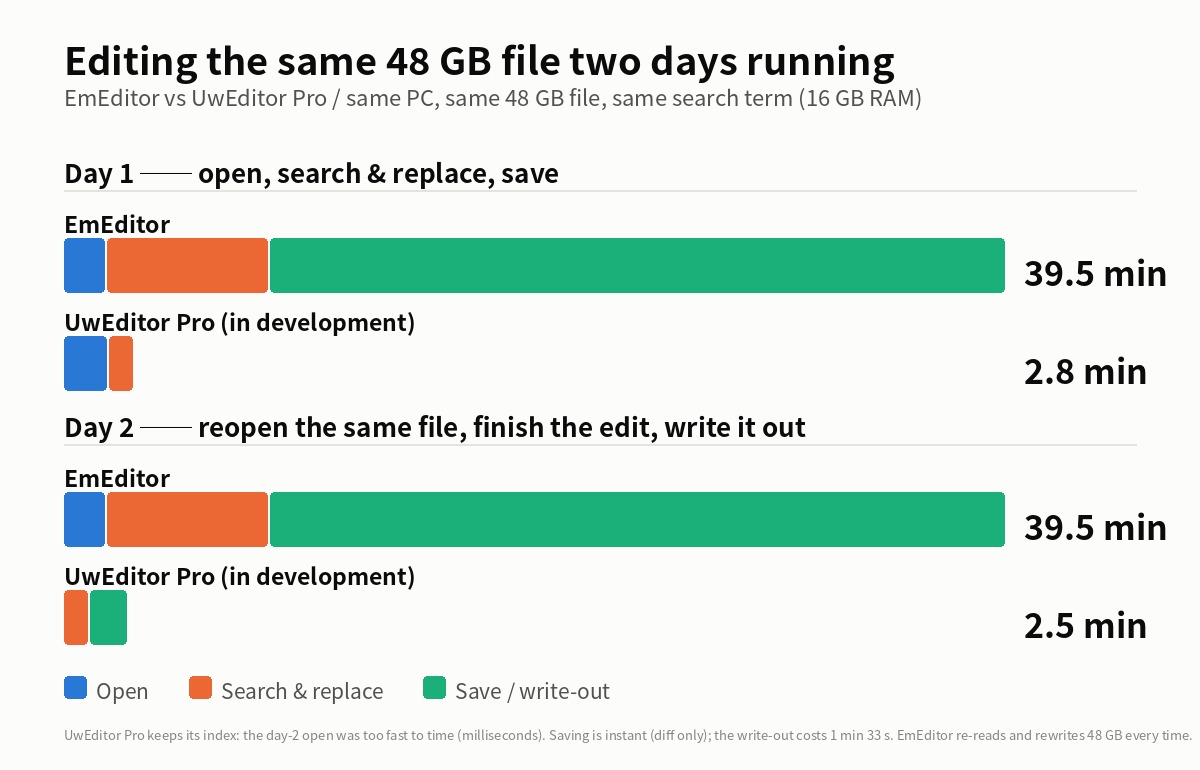
Day 1 — open, search & replace, save
| EmEditor | UwView Pro (Edit) | |
|---|---|---|
| Open | 103.6 s | 107.1 s |
| Search & replace | 405.2 s | 59.8 s |
| Save (to stop and come back) | 1,860 s (31 min) | 0 s |
| Total | ~39.5 min | ~2.8 min |
About 14x. There is no “save” time on the UwView Pro (Edit) side, because only the diff is written.
Day 2 — reopen the same file, finish the edit, write it out
| EmEditor | UwView Pro (Edit) | |
|---|---|---|
| Reopen | 103.6 s | too fast to time (milliseconds) |
| Search & replace | 405.2 s | 59.8 s |
| Write out as one file | 1,860 s (31 min) | 93 s (1 min 33 s) |
| Total | ~39.5 min | ~2.5 min |
EmEditor pays exactly the same 39.5 minutes on day 2. It reads 48 GB again, and writes 48 GB again.
On the UwView Pro (Edit) side, “open” disappears. The index (.uwvz) is already on disk, so reopening could not be timed with a stopwatch — it happens in milliseconds. In its place, the final write-out costs 1 min 33 s, once.
What these two tables show
- On day 1 the saving design does the work — only the diff is written, so it costs 0 s.
- On day 2 the index design does the work — nothing has to be read again.
They are two separate designs, and they pay off on different days. EmEditor spends the same 39.5 minutes on both. Day 3, day 4 — the gap keeps widening by that amount.
Again: these are the numbers for a 16 GB-RAM machine handling a 48 GB file. For a file that fits in RAM, EmEditor finishes first.
Being straight about the limits
- Editing is the Edit Upgrade license of UwView Pro V1.4.0 and later. The screenshots show the build name at the time, UwEditor Pro.
- EmEditor is ahead on editing features. Macros, CSV editing, fine-grained regex control, plugins — UwView Pro (Edit) is a narrow tool for “changing a huge file without breaking it,” not a replacement for EmEditor.
- At around 10GB — a size that fits in RAM — EmEditor is markedly faster at both search and replace. These results are for a 16GB-RAM machine handling 48GB. Change that condition and the order changes.
- The search gap includes a difference in thread count. EmEditor was set to 8 threads but appeared to run on one (presumably an automatic decision from memory and file size); UwView Pro (Edit) ran on 8. With memory to spare, that gap should narrow.
- EmEditor was measured twice; we published both the mean and the individual values. The two runs differ by up to 1.7x (the OS file cache, presumably). Even against the faster value, the gap holds.
- UwView Pro (Edit) was measured once per operation.
- EmEditor’s save time (31 min) is the difference between start and finish times.
- In the day-2 table, every figure except “reopen” repeats the day-1 measurement (it is the same operation). UwView Pro (Edit)’s reopen was too fast to measure — milliseconds.
- This comparison is about one thing: changing a huge file and saving it. It is not a statement about everyday editing.
How it relates to UwView Pro
Reading and searching come with the View License; the editing described here is the Edit Upgrade, added on top of it. Prices are on the product page.