[Update, 16 October 2026] Speed today — the UwView, klogg and ripgrep rows of the summary table, re-measured
The UwView, klogg and grep/ripgrep figures in the summary table were measured between July and September 2026 (the Mac ones on an external USB drive, 0.41 GB/s read; UwView Pro’s “first search 12.5–23.9 s” on a 16 GB Windows laptop). The current version is v1.9.0 “Full Spectrum”.
48–50 GB, same OSM file In this article (then) Today UwView Pro, search with index (klogg ÷ Pro) about 9× 8.6× (6.47 s vs 55.59 s) UwView Pro, 2nd search on (ripgrep ÷ Pro) about 5× (71.49 s vs 14 s) 8.6–10.9× (6.45 s) UwView Pro, 1st search incl. index build (ripgrep ÷ Pro) 1.31× (on par) 1.10× (on par) Free: search and read in the window ( uvf … -open, klogg ÷ uvf)(not available yet) 2.15× (50.76 s vs 109.32 s) Today’s figures were measured on a Mac (external USB SSD): against ripgrep v1.7.3.6.9 (4 October 2026), Pro against klogg v1.7.3.1 (28 September),
uvf … -openv1.6.6 (September). The disk is different from then, so compare the ratios, not the seconds. PilotEdit, lnav, EmEditor, 010 Editor and the Windows figures have not been re-measured, so those parts of the article stand as written. Details: Benchmarks and the v1.9.0 “Full Spectrum” article.
I’ve been benchmarking tools that claim to handle huge files — EmEditor, klogg, UltraEdit, 010 Editor, Log Voyager — on real data. After that first round, I asked several AIs (Grok, Gemini, ChatGPT) which tools I should still test. Two names came up consistently: PilotEdit (Windows) and lnav (Mac/Linux, free and open source).
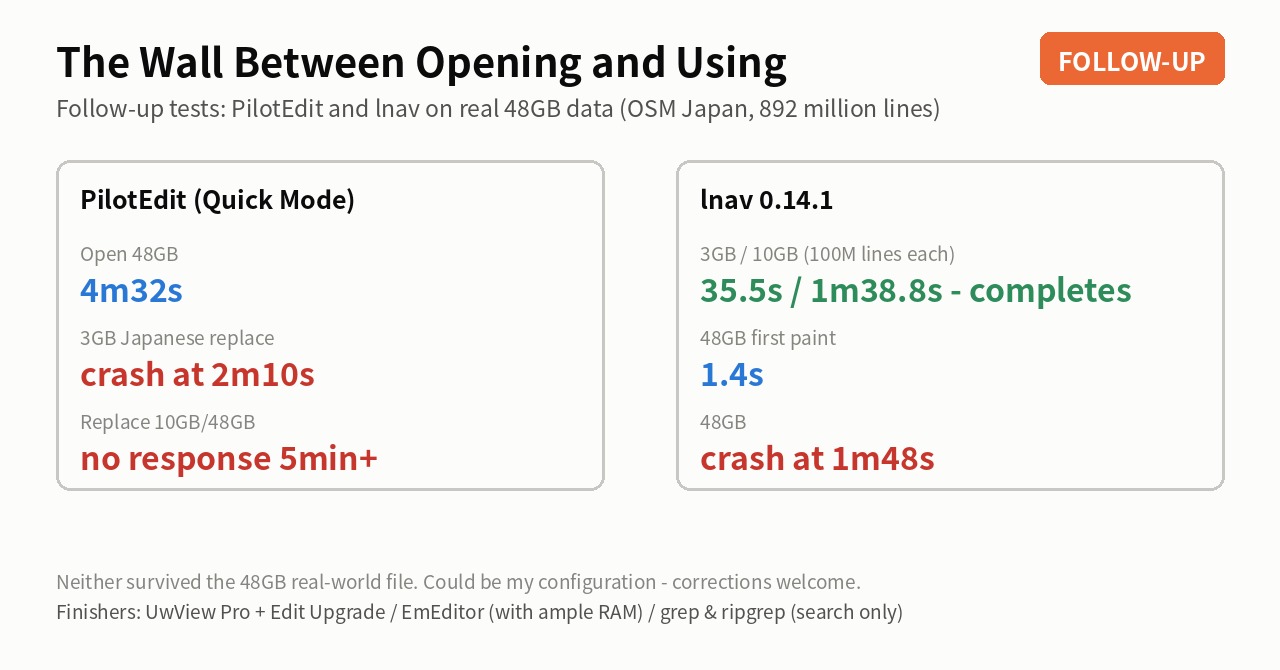
Here are the follow-up results. The short version: PilotEdit opened the 48GB file. A 3GB Japanese replace did not complete in my environment, but the vendor cannot reproduce that and sent video to show it, so it is most likely specific to my machine (see the note below). lnav finished 10GB and 100 million lines without trouble** — anything above that is out of scope, for reasons given below.
- Test conditions
- PilotEdit — quick to open; the replace did not complete here
- lnav — finishes 10GB and 100 million lines without trouble
- Three generations of “what you see right after opening”
- How to read a “handles huge files” review
- The usual summary table (48GB, real data)
- Honest notes
- Conclusion — very few tools remain usable at 50GB
- Related articles
Test conditions
Same real data as the whole series:
- File: OpenStreetMap Japan XML (~48GB, 892,239,125 lines). This is the same file called “50GB”/”51GB” in earlier posts — I’ve standardized on 48GB
- PilotEdit: Windows notebook, 16GB RAM (same machine as the EmEditor comparison)
- lnav 0.14.1: Mac (M4, 32GB RAM — same machine as the klogg comparison)
- Plus the 3GB and 10GB (100-million-line) siblings of the same data
PilotEdit — quick to open; the replace did not complete here
PilotEdit advertises large-file support, and I used its dedicated Quick Mode throughout.
Opening is respectable:
| Size | Open (Quick Mode) | For reference: EmEditor |
|---|---|---|
| 3GB | 15.4s | ~5.0s |
| 10GB | 44s | 14.0s |
| 48GB | 4m32s | 4m06s (103–301s + full-range navigation) |
4m32s for 48GB is roughly on par with EmEditor, and the timing scales cleanly with size — the indexing machinery works.
Then I ran a replace (Tokyo → 東京), and everything changed:
| Size | Replace-all result |
|---|---|
| 3GB | The application exited at 2m10s; completion never confirmed |
| 10GB | No response for 5+ minutes; never completed |
| 48GB | No response for 5+ minutes; never completed |
3GB / 100 million lines fits entirely in 16GB of RAM — the safe zone. On the same file and the same replace, EmEditor finishes in 0.9s (two replaces) and UwView Pro + Edit Upgrade in 6.3s (two; 1.31s for one). Tokyo (5 bytes) → 東京 (6 bytes) is a perfectly ordinary multi-byte replace that changes line lengths.
One more thing worth reporting: what the app looks like while opening. PilotEdit blocks its UI completely until loading finishes — the window goes dark. For 48GB, that’s four and a half minutes without seeing even the first line.
Update — I asked the vendor (12 September 2026)
The vendor cannot reproduce this. They sent two videos, which I have watched.
How it went: I first reported that “Find (Ctrl+F) terminates PilotEdit”. They replied that they could not reproduce it and pointed me at a specific build. After reinstalling, plain Find works here. So I corrected myself: my testing uses Find All and Replace All, and what exits is Find All — with a 4 KB text file as a reproduction anyone can try in seconds.
They still cannot reproduce it, and sent a video of Find All working on their side. So this is most likely specific to my environment. I am now working out which module is involved from the crash log, and I will rewrite this section once I know.
Please read the replace figures above with that in mind. On the vendor’s machine the result may well be different.
lnav — finishes 10GB and 100 million lines without trouble
lnav is a well-regarded TUI log navigator from CLI culture (free, open source). As I wrote recently, above 50GB the real competition isn’t GUI apps but CLI tools, so lnav went in as the representative of interactive investigation on that side.
| Size | Open (full read-through) | Search |
|---|---|---|
| 3GB, 100M lines | 35.5s | 東京 2.74s / 大阪 2.3s |
| 10GB, ~100M lines | 1m38.8s | Osaka 9.95s / Tokyo 10.1s |
3GB and 10GB complete. lnav interpreted the XML as logfmt-style logs, warned about out-of-time-order messages, and at 10GB still displayed everything down to line 99,999,998 — 100%.
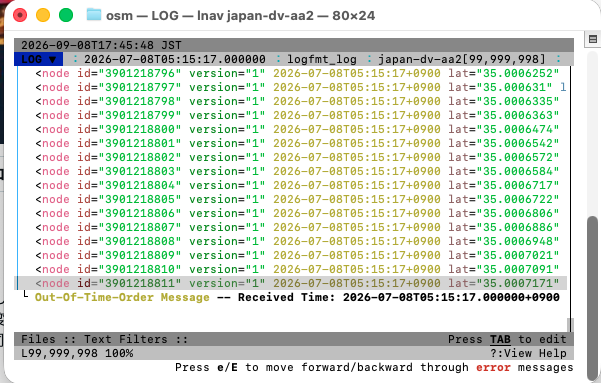
First paint took 1.4 seconds — among the fastest of everything I measured. Search is snappy at 3GB (2–3s) and takes ~10s at 10GB. Not fast at 10GB — klogg does ~2–3s and the UwView Pro family 1–2s on the same file — but it is a working interactive investigation over 100 million real lines.
Why 48GB and above is out of scope here
lnav is built for log files, and its author does not claim large-file support. There is a deliberate per-file limit of 134,217,728 lines, documented in the source as a way of bounding memory use. Log files are normally rotated long before they reach that many lines.
The 48GB OSM XML has 892 million lines — 6.6× over that limit. That is outside the design, not a performance result worth ranking. This article originally included the 48GB outcome; I have withdrawn it, because it was not a fair comparison (12 September 2026).
Up to 10GB and 100 million lines, lnav works fine. At the job it was built for, it is a well-regarded tool.
Three generations of “what you see right after opening”
These tests made a pattern visible — there are distinct tiers in how tools behave the moment you open a huge file:
- Full block (PilotEdit): the UI locks and the screen goes dark until loading completes. ~4.5 minutes for 48GB
- Head only (klogg, EmEditor): the first lines appear instantly, but you can’t jump to the end or the middle until the full scan finishes. Roughly 2–9 minutes for 48GB
- Whole file, immediately (the UwView family, excluding the Wasm version): the index builds in the background while you jump to the end, the 50% mark, anywhere, right away (index completes in 54–140s)
lnav starts out feeling like tier 3 — 1.4 seconds to first lines — but on 48GB of real data it couldn’t finish building its index (it does finish at 3GB and 10GB).
How to read a “handles huge files” review
Plenty of comparison articles say a given tool handles huge files comfortably. Having run these tests, I’d say the premises often differ. In such comparisons, “huge” often means tens of MB to ~1GB, and the pass criterion is “it opened, showed the top, and found an English word.” Reports of opening hundreds of GB sometimes use artificial data that is mostly newlines — a few bytes per line. Real data packed with tags and multi-byte text, plus a replace that changes line lengths, is a different load entirely. This is not a point about any one product — it is a point about how the measuring is done.
The usual summary table (48GB, real data)
| Tool | Open | Search | Replace |
|---|---|---|---|
| UwView Pro + Edit Upgrade | view immediately (index 54–140s) | 12.5–23.9s first run | 47.0s for two replaces |
| EmEditor | 103–301s (~4 min to navigate all) | 144–245s | 11+ min; save takes 31 min each (16GB RAM) |
| klogg (Mac, viewer) | head only, 110–545s | 120–585s | — |
| grep / ripgrep (CLI) | — | 64.64s / 71.49s | — (sed is another story) |
| PilotEdit | 4m32s (screen dark) | — | did not complete here (vendor cannot reproduce) |
| 010 Editor (Mac) | 56.7s | — | one replace 12m45.3s; save still had not finished after 15+ min |
lnav is not in the table above: it has a documented per-file limit of 134,217,728 lines, and 48GB (892M lines) is outside it. Up to 10GB and 100 million lines it completes — see the table in its section.
Honest notes
- All numbers are my own runs in my environments. This could be a configuration issue on my side — if you know better settings, please tell me and I’ll correct the article
- PilotEdit was tested in its dedicated Quick Mode. ASCII-to-ASCII replaces might behave differently (untested)
- The 48GB result for lnav has been withdrawn (12 September 2026). Its author does not claim large-file support, and the per-file line limit is documented as a design choice. Putting it in the same table as tools that do advertise large-file handling was my mistake. The results up to 10GB stand.
- I develop one of the tools being compared (UwView Pro), so apply the appropriate discount
Conclusion — very few tools remain usable at 50GB
There is a tall wall between opening a huge file and using it. Across all these real-data runs at 48GB, the tools that completed search, replace, and save were a short list: UwView Pro + Edit Upgrade, EmEditor (given plenty of RAM), and — for search only — grep/ripgrep.
This round also confirmed that among GUI apps, there is hardly anything left to compare against. Going forward, my comparisons will focus mainly on CLI tools — grep, ripgrep, lnav and friends. UwView Pro’s drill-down search has already gained grep’s -v (exclude) and -w (whole word) as checkboxes, and now a uniq -c-style frequency tally as well (all shipped in v1.5.0). The next feature to bring in is being selected now.
UwView Pro is on sale (Windows, macOS, Linux — one license covers all three; 14-day free trial — editing features included).
Related articles
- How to Open and Search a 50GB Log File on a 16GB PC
- EmEditor vs. My Editor on a 16GB Notebook
- Is ripgrep Really the Fastest on a 51 GB Single File?
- I Asked AIs for a Size-by-Size Tool Guide
From the developer: a list of my apps, Kindle books and public projects is on GitHub: amru195704.
A note
The information in this article is provided for reference purposes only, and we do not guarantee its accuracy or completeness. All measurements reflect the specific environments described above and may differ on other hardware. If you notice any errors or inaccuracies, please let us know in the comments and we will review and correct them.