When you work with a very large text file, “the editor can open it” is not the finish line.
Real work looks like this: you search for a string, replace it everywhere, fix a few things by hand, close the file for the day, and open it again tomorrow.
Open
→ search
→ replace all
→ hand edits
→ Close
× as many times as it takes
→ finally, produce the finished file
This time we compared three products running on Mac ARM.
- 010 Editor
- UltraEdit for Mac
- UwView Pro’s Edit Upgrade — Huge Files, No Rewriting (below, UEP; the build measured here was named UwEditor Pro, and the screenshots show that name)
The operations are the same for all three.
- Open the file
- Search the whole file for 東京 (Tokyo)
- Replace 東京 with Tokyo everywhere
- Quit part-way through the work
- Next time, reopen the edit state
- Finally, produce a normal text file
The short version
First open, and producing the finished text, were fast enough on the existing products.
The gaps appear in search, replace-all, and in stopping and resuming the work.
| Operation | 010 Editor vs UEP | UltraEdit vs UEP |
|---|---|---|
| First open | About the same | About the same |
| Full-file search | UEP ~5.2x faster | UEP ~5.6x faster |
| Replace all | UEP ~4.6x faster | UEP ~10.8x faster |
| Produce final text | UEP ~13.1x faster | About the same |
| Quit part-way | 010: 2 min 41.5 s / UEP: 0 s | UltraEdit: 4 s / UEP: 0 s |
| Resume next time | 010: 12.3 s / UEP: ~0 s | UltraEdit: 6 s / UEP: ~0 s |
Note that the file sizes differ between the 010 Editor test and the UltraEdit test. The seconds in the two columns are not comparable with each other. Each product was paired against UEP on the same file.
Why the file sizes differ
The original plan was to compare all three products on the same ~50GB file.
010 Editor was too slow at 50GB to finish the full sequence in a practical amount of time, so the 010 Editor comparison uses a 10.19GB file.
UltraEdit displayed a message warning that files above 5GB would be slow, so the UltraEdit comparison uses a 3.07GB file.
This is not a benchmark that ranks the three products against each other.
It is a check of what happens when each product handles the largest file it can realistically work with, using a real editing sequence.
010 Editor
Test file
File: japan-dv-010-ab
Size: 10.19GB
Results
010 Editor’s replace was measured on 2026-09-08 as two runs — Tokyo → 東京 (a byte-length-changing UTF-8 replace) and 大阪 → Osaka. The search figure and the UEP side are 2026-08 measurements.
| Operation | 010 Editor | UwView Pro (Edit) | Gap |
|---|---|---|---|
| First open | 11.1 s | 10.9 s | about the same |
| Search all for 東京 | 11.5 s | 2.2 s | UEP ~5.2x |
| Replace Tokyo → 東京 | 18.5 s | ― | (not measured on UEP) |
| Replace 大阪 → Osaka | 16.5 s | 3.6 s (東京 → Tokyo run) | UEP ~4.6x |
| Quit part-way | 2 min 41.5 s to save | 0 s | no wait for UEP |
Write final .uwvz |
— | 5.8 s | UEP’s own format |
| Produce final text | 2 min 41.5 s | 12.3 s | UEP ~13.1x |
| Reopen next time | 12.3 s | ~0 s | instant for UEP |
First open was essentially a tie. 010 Editor opened a 10GB file in about 11 seconds — that is fast.
Search and replace-all were 4.6–5.2x faster on UEP. Note that 010 Editor also completed the byte-length-changing Tokyo → 東京 replace in 18.5 s — worth recording, since that byte-length-increasing direction is one that some tools struggle with.
The larger gap is in saving. Writing normal text out of 010 Editor took 2 minutes 40 seconds. UEP produced the finished text in 12.3 seconds, or its compressed .uwvz in 5.8 seconds.
A possible misconfiguration on our side. That save time may reflect settings we did not tune. 010 Editor almost certainly has options that speed up processing and write-out, and we have not explored them. If you know which ones matter, please tell us. (Re-measured on 2026-09-08: 2 min 41.5 s — essentially the same.)
If you finish the edit in one sitting
Including the final text output:
010 Editor
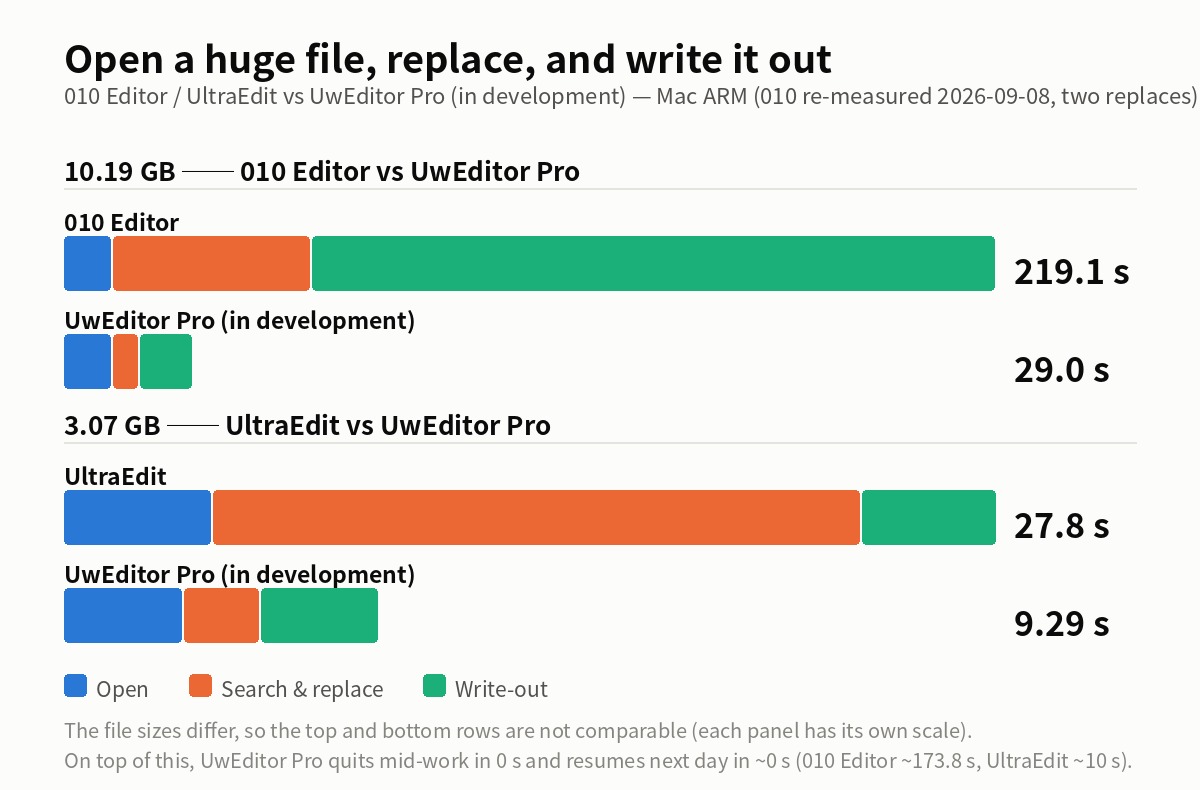
11.1 + 11.5 + 18.5 + 16.5 + 161.5
= 219.1 s (about 3 min 39 s, two replaces)

UwView Pro (Edit)
10.9 + 2.2 + 3.6 + 12.3
= 29.0 s
Across the whole sequence, UEP was about 7.6x faster (010 Editor ran two replaces, UEP one).
Counting the reopen after saving, 010 Editor is 231.4 s and UEP about 29 s — a gap of about 8.0x.
[2026-09-08 update] The 48 GB class, tested too
Along with the 10.19 GB re-measurement, I tried the 48 GB class (892 million lines).
- Open: 56.7 s — respectable (on the same file family, EmEditor takes 103–301 s)
- Replace-all 東京 → Tokyo: completed in 12 m 45.3 s (one run only; too slow to justify a second)
- Saving as normal text: did not finish after 15+ minutes — no final file could be produced (result in my environment)
It opens and replaces, but the save did not finish in my environment, so at the 48 GB class I could not take the open → replace → save cycle all the way through. As always, this could be a configuration issue on our side — if you know better settings, please tell us.
UltraEdit
Test file
File: japan-dv-UE3-af
Size: 3.07GB
Results
| Operation | UltraEdit | UwView Pro (Edit) | Gap |
|---|---|---|---|
| First open | 4.4 s | 3.54 s | about the same |
| Search all for 東京 | 5.3 s | 0.94 s | UEP ~5.6x |
| Replace 東京 → Tokyo | 14.1 s | 1.31 s | UEP ~10.8x |
| Quit part-way | 4 s to save | 0 s | no wait for UEP |
| Produce final text | 4 s | 3.5 s | about the same |
| Reopen next time | 6 s | ~0 s | instant for UEP |
UltraEdit is fast at both opening and saving. Its final text write took 4 seconds against UEP’s 3.5 — no meaningful difference.
Search was about 5.6x apart, and replace-all about 10.8x.
The same caveat applies here. UltraEdit displayed a warning that files above 5GB would be slow — which suggests there are settings or modes intended for large files. Tuned properly, these numbers could change. If you know how, please tell us and we will re-test.
If you finish the edit in one sitting
UltraEdit
4.4 + 5.3 + 14.1 + 4.0
= 27.8 s

UwView Pro (Edit)
3.54 + 0.94 + 1.31 + 3.5
= 9.29 s
Across the whole sequence, UEP was about 3x faster.
Counting the reopen after saving, UltraEdit is 33.8 s and UEP about 9.29 s — a gap of about 3.6x.
What “0 seconds to quit” actually means
UEP’s 0 seconds is not the time to produce a finished text file.
UEP does not rewrite the original data. Edits are recorded as a diff as you make them, so quitting part-way through does not require rewriting the whole huge file.
That makes the intended workflow look like this:
Day 1
Open → search, replace, fix → Close (0 s)

Day 2
Open (~0 s) → fix → Close (0 s)

Day 3
Open (~0 s) → fix → Close (0 s)

Final day
Produce the finished text, or the .uwvz
Closing part-way does not mean throwing the work away. It means the edit diff is already on disk, so there is nothing left to wait for.
The full file is written out only when you actually need the finished artifact.
The gap widens every time you stop
With 010 Editor, every interruption costs a 2-minute-41.5-second save, plus 12.3 seconds to reopen — about 173.8 seconds per stop-and-resume.
With UltraEdit it is 4 seconds to save and 6 to reopen — about 10 seconds.
With UEP, stopping and resuming is about 0 seconds.
| One stop-and-resume | Wait | Test file |
|---|---|---|
| 010 Editor | ~173.8 s | 10.19GB |
| UltraEdit | ~10 s | 3.07GB |
| UwView Pro (Edit) | ~0 s | either of the above |
The file sizes differ, so the 010 Editor and UltraEdit figures are not comparable with each other.
If a huge-file edit finishes in one sitting, the final save time is all that matters.
But when the work runs over several days — open, search, fix, stop — the save-and-reopen time accumulates. That repetition is what UEP is aimed at.
Being straight about the limits
These results are not an overall verdict on these products as text editors.
010 Editor is a powerful tool for far more than large text: binary data, disks, and structured file formats through templates.
UltraEdit brings years of accumulated features — programming support, regex, macros, project management.
On the range and maturity of editing features, both existing products are ahead of the in-development UEP.
UEP is narrow on purpose: editing a file too large for RAM, over many interrupted sessions.
Also note:
- The test files differ in size between the 010 Editor and UltraEdit runs
- Each product was compared against UEP on the same file
- Results vary with the Mac, RAM, SSD and OS cache state
- Regex, encoding and hit count all change the numbers
- The search term here is 東京; the replace is a plain string replace to Tokyo
- Neither 010 Editor nor UltraEdit was fully tuned — there may be settings we missed, and we will re-test if we learn of them
- UEP is the Edit Upgrade license of UwView Pro V1.4.0 and later (added to the View License; one-time or monthly; 14-day free trial; prices on the product page). The build measured here was named UwEditor Pro, and the screenshots show that name
Summary
010 Editor, UltraEdit and UEP all opened and edited multi-gigabyte files.
For first open, all three were practical. UltraEdit’s final text save is on par with UEP’s.
Where UEP was consistently faster: search and replace-all.
And the biggest difference is stopping and resuming.
010 Editor
Save the whole huge file → open it again next time

UltraEdit
Save quickly → open it again next time

UwView Pro (Edit)
Close with the edit diff intact → resume instantly
For huge-file editing, what decides whether a tool is usable is not only “how many seconds faster is one operation,” but “how many times can I safely stop?”
UEP is not an editor for finishing a huge file in one pass.
It is an editor for work that is too big to finish in one pass, continued across days.
Related
Reading and searching huge files is the View License of UwView Pro; the editing described here is the Edit Upgrade on top of it. Both come with a 14-day free trial. Prices are on the product page.