After the NOT filter (grep -v) and whole-word match (grep -w), part 3 of the CLI series. This time it’s not a checkbox — it’s the log investigator’s favorite one-liner, whole:
grep Tokyo big.log | grep -oE '...' | sort | uniq -c | sort -rn | head -20
Cut a value out of the hit lines, count it, rank it. Everyone types this pipe eventually. It now lives in UwView Pro‘s drill-down search as Tally.
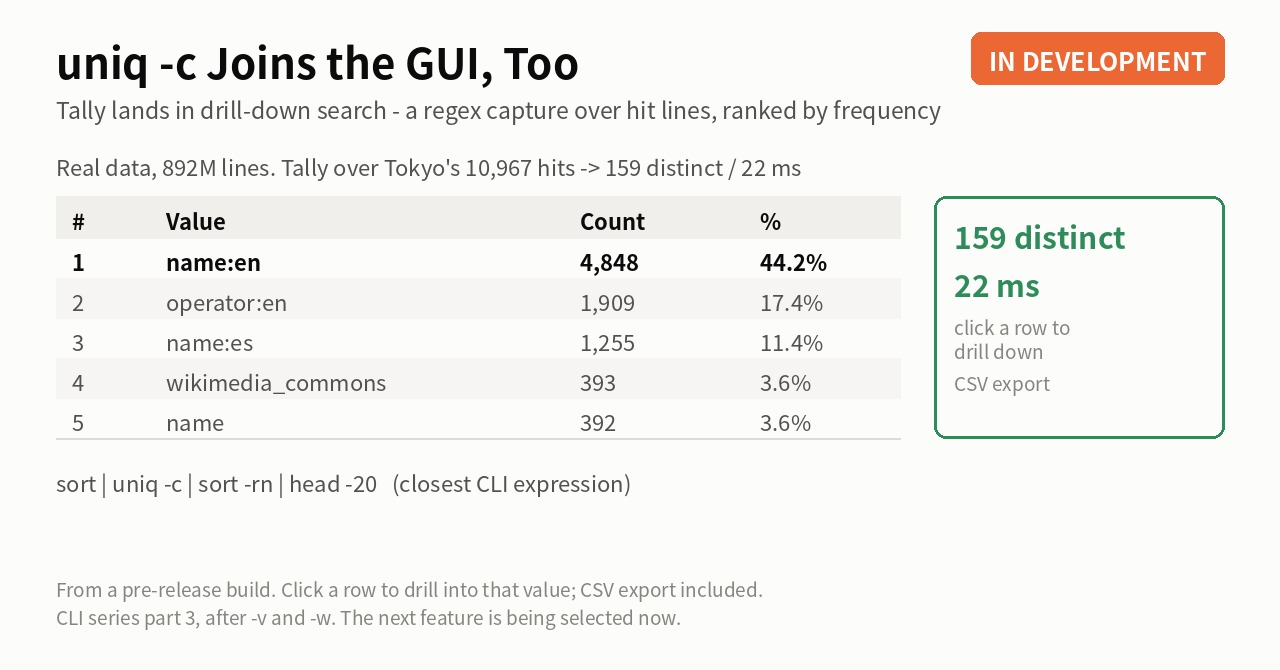
On real data — 10,967 hits turn out to be 159 distinct values
Same file as always: the OpenStreetMap Japan XML (892,239,125 lines). Stage 1 searches Tokyo — 10,967 hits. So what’s actually in those ten thousand lines?
Type the regex k="([^"]+)" into the Tally field and press the button. The first capture group — the content of each k="..." — becomes the key, counted in one pass over the hit lines.
![UwView Pro's drill-down search (English UI) running Tally over 10,967 Tokyo hits. Regex k="([^"]+)" first capture group as the key: 10,967 matches / 159 distinct / 10,967 lines scanned / 22 ms. name:en leads with 4,848 (44.2%)](https://uvp.y42u.net/wp-content/uploads/2026/09/uvp-word-count-e0.png)
Result: 10,967 matches / 159 distinct / 22 ms. The top of the ranking:
| # | Value | Count | % |
|---|---|---|---|
| 1 | name:en | 4,848 | 44.2% |
| 2 | operator:en | 1,909 | 17.4% |
| 3 | name:es | 1,255 | 11.4% |
| 4 | wikimedia_commons | 393 | 3.6% |
| 5 | name | 392 | 3.6% |
“44% of the lines containing Tokyo are English name tags” — a trend you’d never spot by scrolling ten thousand rows, obvious the moment it’s a table. Top-N is adjustable (default 20), and the table exports to CSV.
Where the GUI wins — one click from ranking back to raw lines
The most tedious part of uniq -c comes after the counting. “name:es has 1,255? What do those lines look like?” — and you’re rebuilding the pipe to search again.
With Tally, click a ranking row and it becomes the next drill-down stage, filtered to that value. Tally → interesting value → raw lines, a round trip in clicks. Every stage still persists as a tab, so you can tally, narrow, and re-tally on a different key — a whole interactive investigation inside one dialog.
The CLI mapping (close, not identical)
| CLI | UwView Pro |
|---|---|
grep Tokyo big.xml |
Stage 1: Tokyo |
grep -oE 'k="[^"]+"' \| sort \| uniq -c \| sort -rn |
k="([^"]+)" in the Tally field |
head -20 |
Top-N (default 20, adjustable) |
> tally.csv |
the Save CSV button |
| (rebuild the pipe by hand) | click a row to drill into that value |
As always: similar behavior, not strict equivalence. The key is the regex’s first capture group (a pattern without one uses the whole match), and counting details differ between tools.
Honest limits
- Tally is available from UwView Pro v1.5.0. The screenshots are from a build earlier than v1.5.0
- The 22 ms is the scan over the 10,967 hit lines — not over all 892 million. It runs on an already-narrowed stage; that’s why it’s this fast
- The counting differs from
grep -o | uniq -c: each value counts once per line, not per occurrence. That’s exactly what guarantees the ranking count always equals the drilled-down hit count (so: not “uniq -c compatible” — similar behavior) - Distinct values cap at 200,000; if hit, the cutoff and the uncounted total are shown
- It stays fast on big stages too: 7.0s over a 3GB / 100M-line stage, 61.5s over 1.39M hits on the 48GB file (development-build measurements)
- It stops at frequency ranking. No sums, averages, or charts — that’s real analytics tools’ territory
- Counts and timings are measured runs
- More CLI-flavored features are on the way; the next one is being selected now
The tool used
UwView Pro is on sale (Windows, macOS, Linux — one license covers all three; one-time or monthly, with a 14-day free trial — editing features included). Drill-down search is a Pro feature.
Links
- I Put grep -v into a GUI — part 1
- grep -w Joins the GUI — part 2
- How to Open and Search a 50GB Log File on a 16GB PC
From the developer: a list of my apps, Kindle books and public projects is on GitHub: amru195704.
A note
The information in this article is provided for reference purposes only, and we do not guarantee its accuracy or completeness. All measurements reflect the specific environment described above and may differ on other hardware. If you notice any errors or inaccuracies, please let us know in the comments and we will review and correct them.