[Update, 16 October 2026] Speed today — the gap from the second search on is wider than before; the first search is still on par with ripgrep
The ripgrep and klogg figures in this article were measured between July and September 2026 on a Mac with an external USB drive (0.41 GB/s read). The current version is v1.9.0 “Full Spectrum”.
48–50 GB, same OSM file In this article (then) Today UwView Pro, 2nd search on (ripgrep ÷ Pro) about 5× (71.49 s vs 14 s) 8.6–10.9× (Pro 6.45 s) UwView Pro, 1st search incl. index build (ripgrep ÷ Pro) 1.31× (on par) 1.10× (on par) UwView Pro, search with index (klogg ÷ Pro) about 9× 8.6× Today’s figures were measured on a Mac (32 GB RAM, external USB SSD), not on a 16 GB PC (against ripgrep: v1.7.3.6.9, 4 October 2026; against klogg: v1.7.3.1, 28 September). The disk is different from then, so compare the ratios, not the seconds. ripgrep’s second run varies between 55 and 70 s from one run to the next, hence the range. “For a one-off search, grep is plenty” still holds. The EmEditor and Windows figures have not been re-measured (UwView has been confirmed to run correctly on Windows and Linux). Details: Benchmarks and the v1.9.0 “Full Spectrum” article.
“The file is too large to open.” It’s incident morning, a customer just sent you a 50 GB log, and all you have is your everyday laptop with 16 GB of RAM. This page is a practical guide for exactly that moment.
Cards on the table first: I develop the UwView series described below. Every number here is my own measurement — discount accordingly. In exchange, I also list every place where other tools win.
- The short answer — no splitting, no database import
- Why a huge log file won’t open in the first place
- Step 1: open it now (free, 5 minutes)
- Step 2: search — how long will you actually wait?
- The tool grade sheet (S–C)
- If you need to edit a huge file without splitting — or EmEditor’s save is too slow
- Searching large XML (OSM, geodata, SQL dumps)
- Summary — the three-step ladder
- Full disclosure
- Source measurements
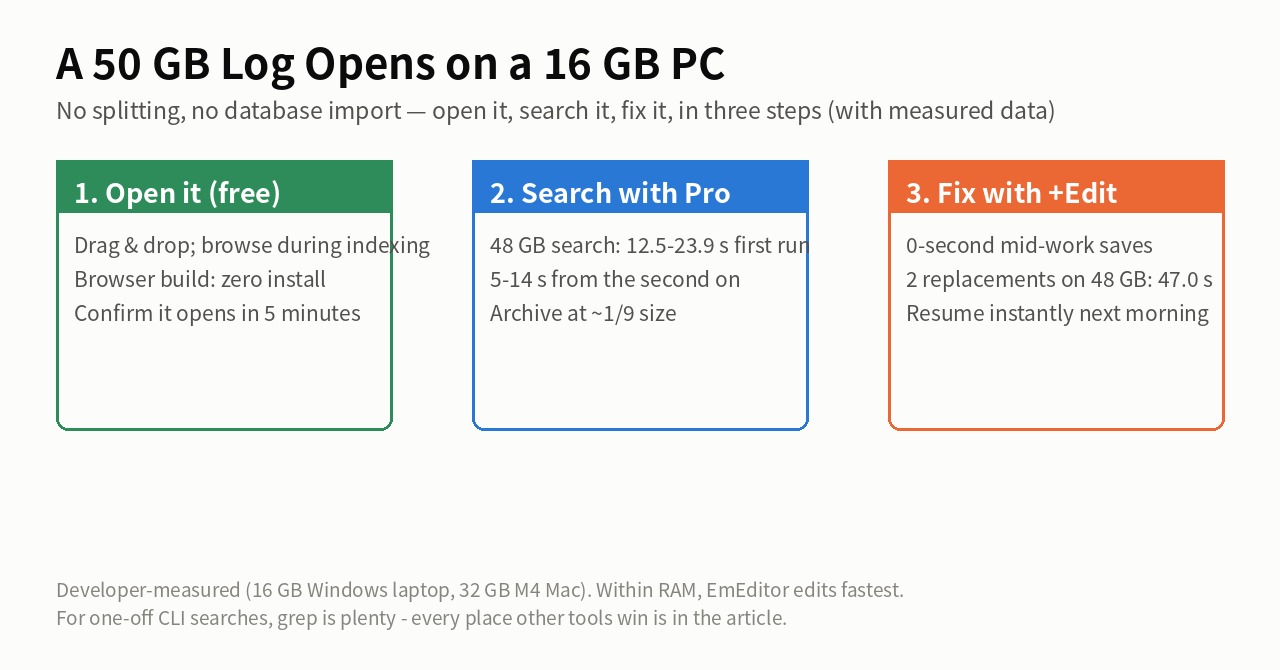
The short answer — no splitting, no database import
- Try the free viewer first to confirm the file opens at all (takes 5 minutes)
- If you’ll search the same file repeatedly, use Pro (repeat opens and searches get dramatically faster)
- If you need to edit the contents, add the Edit Upgrade (mid-work saves take 0 seconds even at 50 GB)
Details below.
Why a huge log file won’t open in the first place
A typical text editor tries to load the whole file into memory. A 50 GB file physically cannot fit into 16 GB of RAM, so the OS starts swapping and the machine freezes — that’s the “out of memory” crash or the endless spinner. What you need is a viewer that never loads the file into memory. With that design, opening 50 GB — or a billion lines — simply isn’t the hard part.
Step 1: open it now (free, 5 minutes)
- On a locked-down machine where installs are forbidden, use the browser-based UwView Wasm build (free, no install; it completed a measured search over a 47.73 GB / 892M-line file). Note: the UI opens in Japanese — switch languages from the dropdown at the top right
- Otherwise, download the free UwView desktop app (Windows, macOS, Linux) and drag the file in. The whole file is browsable even while indexing runs, so you can jump to the tail and read the last error immediately
Do this first, and confirm your file actually opens.
Step 2: search — how long will you actually wait?
Measured full-text searches for 東京 (“Tokyo”) over the same ~48 GB / 892M-line file (OpenStreetMap Japan):
- EmEditor (16 GB Windows laptop): 160 s
- klogg (Mac; depends on storage): 17.5–585 s (on an external HDD, each search takes ~10 minutes)
- grep: 64.64 s / ripgrep: 71.49 s (Mac, external USB — for a one-off search, grep is plenty)
- UwView Pro: 12.5–23.9 s the first time, 5–14 s from the second search on (it reads only a ~1/9-size compressed cache)
If your investigation is one search, use grep. But real incident work means dozens of searches with changing terms — and the gap between “minutes each” and “seconds each” compounds with every one.
The tool grade sheet (S–C)
Ten of my comparison posts, organized by Gemini and ChatGPT and corrected by the developer against the source articles (full story here):
| Tool | ~3 GB | ~10 GB | ~48–51 GB | Core use |
|---|---|---|---|---|
| UwView Pro + Edit Upgrade | A | S | S | Search, replace, non-destructive editing; multi-day work |
| EmEditor | S | B | C | Fast replace within RAM; rich editing features |
| UwView Pro | A | S | S | Viewing, search, reopen, compressed archiving |
| klogg | A | A | B | Log monitoring and analysis. Also opens and searches 258 GB (re-measured 2026-09-14) |
| UltraEdit | A | B | B | Normal editing at ~3 GB. Viewing and searching are practical up to 50 GB (re-measured 2026-09-14) |
| UwView free desktop | B | B | B | Free viewer, full file visible from the start |
| UwView Wasm build | C | C | C | Browser viewing and search |
| grep | — | — | A | One-off plain search |
| ripgrep (rg) | — | — | A | One-off search (its real strength is multi-file traversal) |
S = clearly ahead / A = practical / B = completes with waits or limits / C = conditional daily use / — = not tested.
Re-measured 2026-09-14 — UltraEdit opens 50 GB (10 GB 13.15 s, 50 GB 1 m 11 s; search 20.1 s / 1 m 23 s). klogg and 010 Editor also reach 258 GB (4 m 18.3 s / 4 m 44.9 s).
If you need to edit a huge file without splitting — or EmEditor’s save is too slow
For editing, the boundary is again RAM. Measured on the same 16 GB Windows laptop:
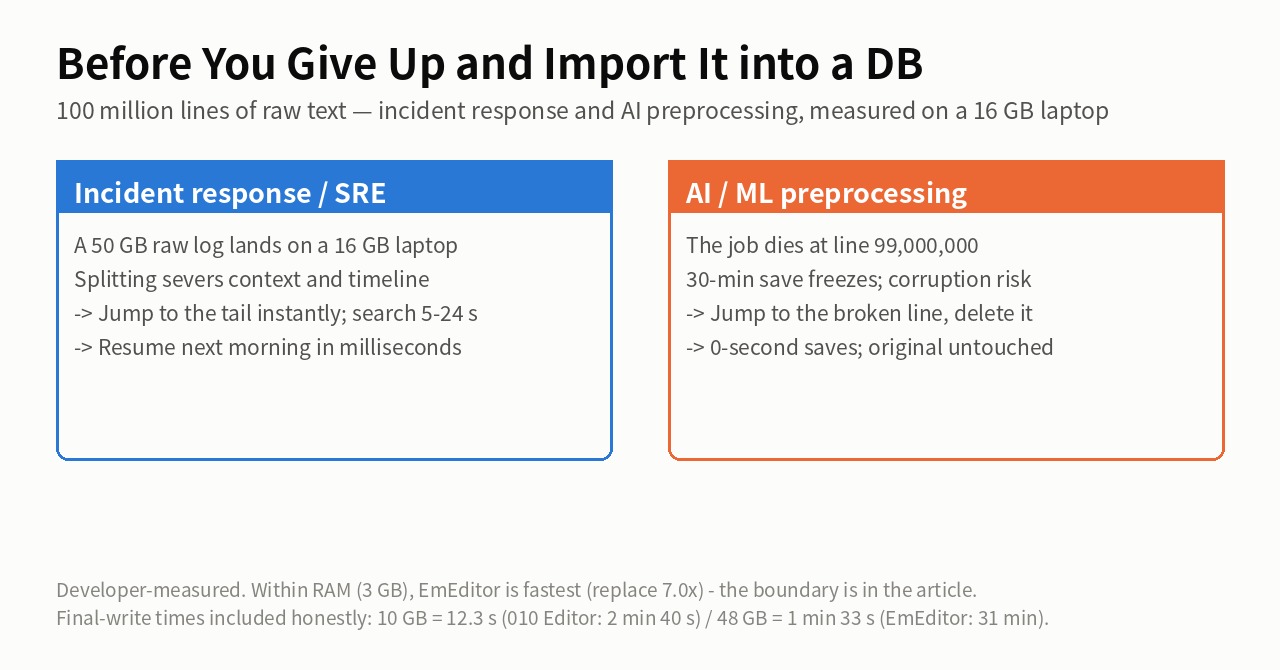
- 3 GB / 100M lines: EmEditor wins outright — two replacements in 0.9 s, 7.0× faster than my tool. Within RAM, EmEditor is the fastest editor here, and I’m not hiding that
- 10 GB: the ranking flips. EmEditor’s “save & close” takes 187.3 s — 81% of its total time
- 48 GB: EmEditor needs 47 min 13 s in total (31 minutes of it saving), vs 2 min 53 s for UwView Pro + Edit Upgrade — which edits huge files without splitting and saves mid-work in 0 seconds (only a small diff file is written)
Searching large XML (OSM, geodata, SQL dumps)
Splitting XML breaks its structural continuity. UwView Pro handles the file whole, with drill-down refinement (“New York → Central Park → coffee_shop”). As an upper-bound reference, it has measurably opened and searched 258.68 GB / 4.5 billion lines (OpenStreetMap USA, XML).
Summary — the three-step ladder
- Free UwView — confirm the file opens (the browser build is for no-install machines)
- UwView Pro — open and search the same file repeatedly; archive it at ~1/9 size
- + Edit Upgrade — fix huge files over multiple days (0-second mid-work saves, original never modified)
UwView Pro is on sale (Windows, macOS, Linux — one license covers all three; one-time or monthly, with a 14-day free trial — editing features included).
Full disclosure
- Every number is the developer’s own measurement (a 16 GB Windows laptop and a 32 GB M4 Mac; seconds are not comparable across environments). Not an independent benchmark
- EmEditor is fastest for editing within RAM; grep is right for one-off CLI searches — each tool owns real territory
- Rerun any of this under the same conditions and I will update the article to match
Source measurements
- Search and Replace Only — measured at 3/10/48 GB
- Losing at 3 GB, a Cliff at 50 GB — EmEditor vs UwView Pro + Edit Upgrade
- Is ripgrep Really the Fastest on a 51 GB Single File?
- UwView Pro Benchmark, Complete Edition — 9 Cells vs klogg
- The AI Grade Sheet
From the developer: a list of my apps, Kindle books and public projects is on GitHub: amru195704.
A note
The information in this article is provided for reference purposes only, and we do not guarantee its accuracy or completeness. All measurements reflect the specific environments described above and may differ on other hardware. If you notice any errors or inaccuracies, please let us know in the comments and we will review and correct them.