The hit is the expensive part.
You have met this file: an API response saved straight to disk, with not a single newline in it. Nothing is delimited, so every editor and every command treats the whole thing as one line.
So when that file is slow, where is it slow — in the reading, or somewhere else entirely?
This part builds no-newline files at four sizes, 1 MiB to 1 GiB, and measures each one twice: once where the search finds nothing, once where it finds one thing. The slow half was not the scanning.
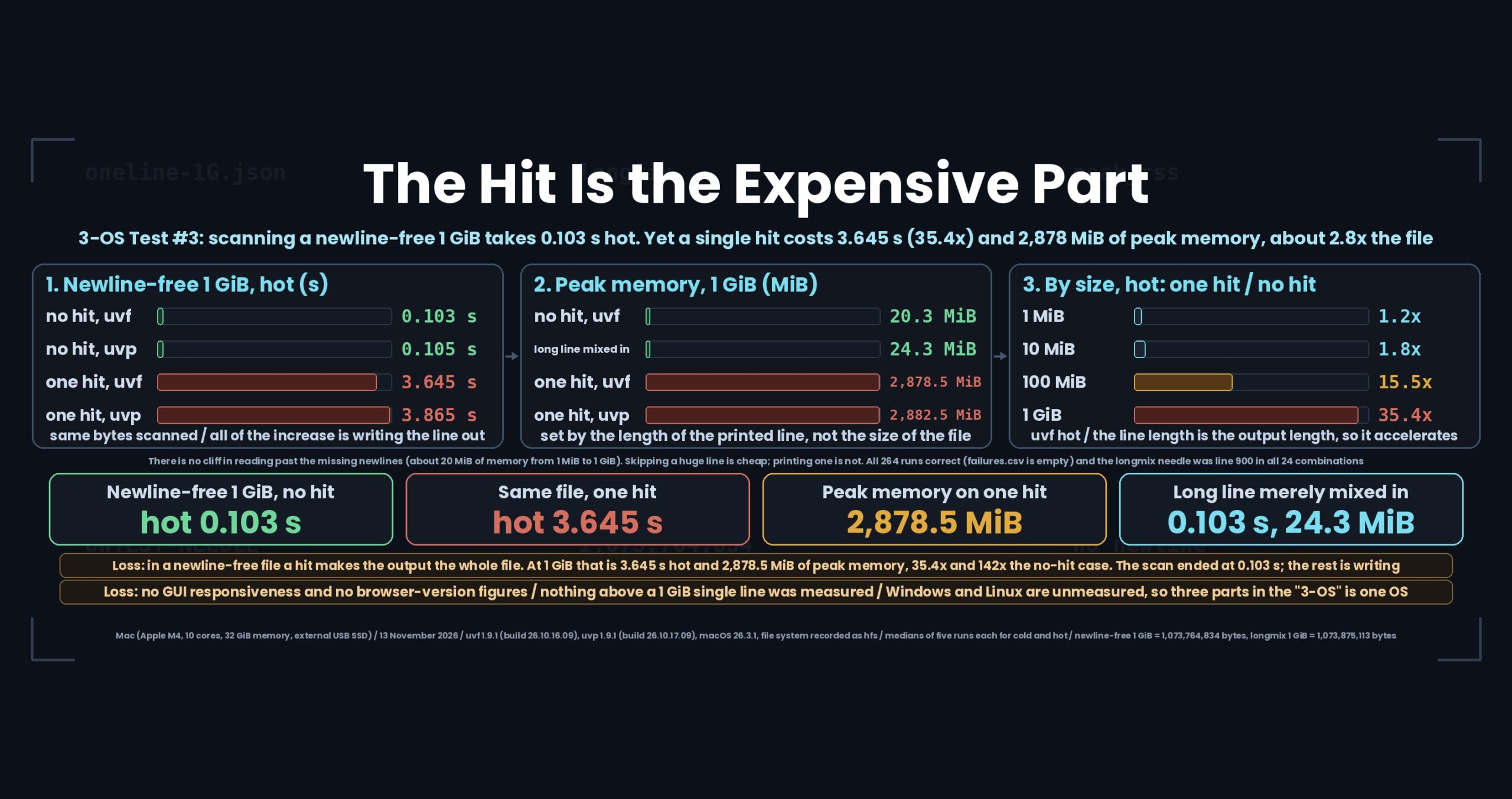
- The short version: with no hits, 1 GiB scans in 0.10 s hot — one hit turns that into 3.6 s and 2,878 MiB
- The problem: “no newlines is slow” — which part is slow?
- Test conditions
- Results
- The losses: one single match costs 35 times
- Correctness: 264 runs, all ok, zero failures
- What generalises: four things about newline-free files
- How you would write this with uvp
- Reproducing this
- Links
The short version: with no hits, 1 GiB scans in 0.10 s hot — one hit turns that into 3.6 s and 2,878 MiB
The losses first.
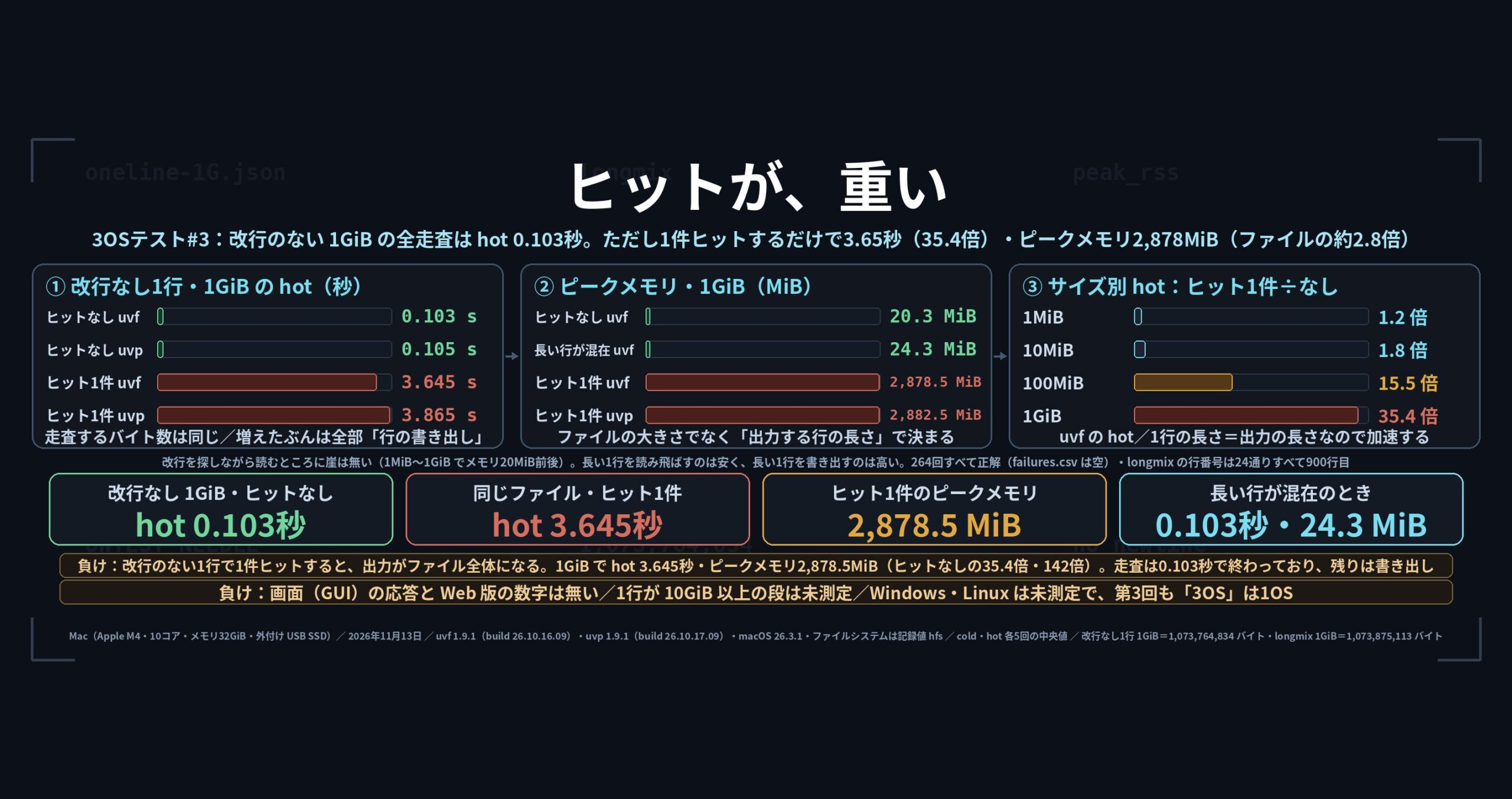
One hit in a no-newline file costs about 35 times a no-hit pass over the same file. On the 1 GiB single-line file (1,073,764,834 bytes), a no-hit hot run takes 0.103 s with uvf and 0.105 s with uvp. Put UWTEST-NEEDLE at the very end so there is exactly one hit, and hot becomes 3.65 s and 3.87 s — 35.4 and 36.8 times. The same bytes are scanned either way, so every bit of the increase is the cost of writing the matched line out. That line being, of course, almost the entire file.
Peak memory inflates for the same reason. The no-hit 1 GiB case stays at 20.3 MiB (uvf) and 24.4 MiB (uvp). With one hit it goes to 2,878.5 MiB and 2,882.5 MiB — about 2.8 times the file (1,024 MiB) and about 142 times the no-hit figure. Even the 100 MiB single line reached about 300 MiB, roughly 3.0 times its size. That is what holding one whole line in memory looks like.
With that said, here is what held up.
- The scanning itself stayed fast. Reading all of a no-newline 1 GiB file and reporting no match took 0.103 s (uvf) and 0.105 s (uvp) hot — the same order as an ordinary newline-delimited log. “No newlines means slow” does not apply to the scan
- A long line merely present in the file is free. In the
longmixshape — 1,000 log lines where line 500 is a single 1 GiB JSON line andUWTEST-NEEDLEsits on line 900 — hot was 0.103 s (uvf) and 0.106 s (uvp), with peak memory at 24.3 and 28.4 MiB. Skipping past a huge line is cheap; printing one is not - Line numbers did not drift. The
longmixneedle is on line 900. Across all 24 combinations it was reported as line 900, even after crossing a 1 GiB line - cold points the same way. On the 1 GiB single line, no-hit cold was 2.78 s (uvf) and 2.88 s (uvp); with one hit, 6.64 s and 6.66 s — 2.4 and 2.3 times. Disk reading dilutes the ratio, but it does not remove the gap
- The free uvf and the paid uvp were level here. Comparing cold and hot medians across all 24 combinations, the widest gap was 1.29 times (100 MiB with one hit, hot, uvf faster) — inside this series’ “under 1.5 times counts as level” line
- All 264 runs were correct.
failures.csvholds its header row and nothing else
uvfis the search command of the free UwView;uvpis the one in the paid UwView Pro. Every figure comes from result CSVs measured on 13 November 2026 on a Mac (Apple M4, 10 cores, 32 GiB memory, external USB SSD). Versions were uvf 1.9.1 (build 26.10.16.09) and uvp 1.9.1 (build 26.10.17.09) on macOS 26.3.1. This part is Mac only; Windows and Linux are not measured. How cold and hot are made, and how to read these numbers, was settled in part zero.Note on file-size notation: “1 MiB”, “10 MiB”, “100 MiB” and “1 GiB” here are bytes ÷ 1024ⁿ. The generator leaves a remainder, so the 1 GiB single-line file is 1,073,764,834 bytes (about 1.0007 GiB). Exact byte counts appear in every table. macOS shows that file as 1.07 GB in SI units (÷ 1000ⁿ).
The problem: “no newlines is slow” — which part is slow?
The giant single line is a common shape in log work: an API response stored unmodified, JSON minified to save space, a service that emits one event as one enormous object. None of them contain a newline.
People will tell you such files are slow. What stays vague is which part. There are three candidates.
- Reading. The reader looks for newlines as it goes; with none present, maybe something breaks down
- Splitting into lines. The length of the line is unknown while reading, so maybe buffers get rebuilt
- Printing. When a match is displayed, maybe that “line” is the whole file
Candidate 3 is obvious once stated, but how many times it costs is not obvious without measuring — and whether 1 and 2 contribute at all needs them measured apart.
So this part pairs each file with itself: same file, same bytes scanned, only the presence of a hit changed. The no-hit time is the bill for reading and splitting; the difference is the bill for printing. On top of that, the long line appears in two shapes: as the whole file, where output is enormous, and as one line among a thousand, where output stays short.
Test conditions
Machines (Mac only in this part)
| Machine label | What it is | Memory | Storage | File system | Kind |
|---|---|---|---|---|---|
mac-m4-32g-usbssd |
MacBook Air (Apple M4, 10 cores) | 32 GiB | External USB SSD | hfs (as recorded) |
Real hardware |
linux-vmware-fusion |
— | — | — | — | Not measured |
win11-16g |
— | — | — | — | Not measured |
macOS 26.3.1 (arm64), no virtualisation. The file system is recorded as hfs in the result env.json.
There are no Linux or Windows figures in this part. The series only takes new measurements on the Mac and reuses earlier figures for the other two, but no earlier figures exist for the huge-single-line test. The VMware allocation therefore does not apply either. Three parts in, the “3-OS” in the title is still one OS.
Data
Two shapes. Both come from a seeded generator, so the same bytes are produced on any OS.
oneline-<size>.json — one line, no newline anywhere, not even at the end. UWTEST-NEEDLE sits at the very end of the JSON (the one-hit case). For the no-hit case, a term that is not in the file was searched for instead.
longmix-<size>.log — 1,000 ordinary log lines in which line 500 alone is a long JSON line of the stated size. UWTEST-NEEDLE is on line 900, an ordinary-length line.
| File | Bytes | SHA-256 |
|---|---|---|
oneline-1M.json |
1,048,676 | 70041ee8569592e4… |
oneline-10M.json |
10,486,036 | 39d2b4bf7e029c32… |
oneline-100M.json |
104,859,953 | a4ef6156e2b5d59f… |
oneline-1G.json |
1,073,764,834 | e6f7c2f8b0bdf625… |
longmix-1M.log |
1,158,358 | 5c8c58434bdb574c… |
longmix-10M.log |
10,595,795 | 78ed288a8fa084bc… |
longmix-100M.log |
104,969,777 | c6b342caeb0ac36c… |
longmix-1G.log |
1,073,875,113 | 51860c8eb92e24ef… |
The data is not distributed. It is verified against SHA-256 after generation and before measuring.
How it was measured
Twelve cases — four sizes across oneline with a hit, oneline with no hit, and longmix — run against both uvf and uvp. Five runs each for cold and hot, medians taken; the first run of the session is recorded separately as first. cold means sync then sudo purge before every run; hot means one unrecorded warm-up followed by five runs. A run counts as correct only when the exit code and the hit count both match expectations.
first is a single run, so this article does not use it for product comparisons (it opens up to 2.9 times apart at the smallest size, which is single-run noise).
Results
Table 1: no-newline single line, no hit (Mac only, seconds)
Zero lines of output, exit code 1. This is the bill for reading and splitting.
| Size | Bytes | uvf cold (s) | uvf hot (s) | uvp cold (s) | uvp hot (s) | uvf peak memory (MiB) | uvp peak memory (MiB) |
|---|---|---|---|---|---|---|---|
| 1 MiB | 1,048,676 | 0.167 | 0.0068 | 0.175 | 0.0085 | 16.3 | 20.4 |
| 10 MiB | 10,486,036 | 0.184 | 0.0084 | 0.210 | 0.0103 | 20.3 | 24.5 |
| 100 MiB | 104,859,953 | 0.425 | 0.0173 | 0.433 | 0.0191 | 20.3 | 24.4 |
| 1 GiB | 1,073,764,834 | 2.78 | 0.103 | 2.88 | 0.105 | 20.3 | 24.4 |
A 1 GiB file with no newlines at all, scanned in 0.10 s hot. Peak memory sits around 20 MiB from 1 MiB all the way to 1 GiB. There is no cliff in reading past the missing newlines.
Table 2: the same files, one hit (Mac only, seconds)
Same sizes, same bytes scanned as Table 1. The only difference is that UWTEST-NEEDLE at the end is found, and the “line” containing it — the whole file — is printed.
| Size | Bytes | uvf cold (s) | uvf hot (s) | uvp cold (s) | uvp hot (s) | uvf peak memory (MiB) | uvp peak memory (MiB) |
|---|---|---|---|---|---|---|---|
| 1 MiB | 1,048,676 | 0.157 | 0.0080 | 0.179 | 0.0101 | 18.2 | 22.3 |
| 10 MiB | 10,486,036 | 0.206 | 0.0150 | 0.191 | 0.0161 | 48.5 | 52.5 |
| 100 MiB | 104,859,953 | 0.661 | 0.269 | 0.695 | 0.348 | 299.5 | 303.6 |
| 1 GiB | 1,073,764,834 | 6.64 | 3.65 | 6.66 | 3.87 | 2,878.5 | 2,882.5 |
Dividing Table 2 by Table 1, within each product, is the answer this article came for.
| Size | hot: one hit ÷ no hit | cold: one hit ÷ no hit | Peak memory: one hit ÷ no hit |
|---|---|---|---|
| 1 MiB | uvf 1.2x, uvp 1.2x | uvf 0.9x, uvp 1.0x | uvf 1.1x, uvp 1.1x |
| 10 MiB | uvf 1.8x, uvp 1.6x | uvf 1.1x, uvp 0.9x | uvf 2.4x, uvp 2.1x |
| 100 MiB | uvf 15.5x, uvp 18.2x | uvf 1.6x, uvp 1.6x | uvf 14.8x, uvp 12.4x |
| 1 GiB | uvf 35.4x, uvp 36.8x | uvf 2.4x, uvp 2.3x | uvf 142x, uvp 118x |
Invisible while the files are small. 1.8 times at 10 MiB, 15 times at 100 MiB, 35 times at 1 GiB. The length of the line is the length of the output, so the effect accelerates with size.
Table 3: the long line is one among a thousand (Mac only, seconds)
UWTEST-NEEDLE is on line 900 — not on the long line. The bytes scanned are nearly identical to Tables 1 and 2.
| Size | Bytes | uvf cold (s) | uvf hot (s) | uvp cold (s) | uvp hot (s) | uvf peak memory (MiB) | uvp peak memory (MiB) |
|---|---|---|---|---|---|---|---|
| 1 MiB | 1,158,358 | 0.166 | 0.0072 | 0.157 | 0.0084 | 16.5 | 20.5 |
| 10 MiB | 10,595,795 | 0.190 | 0.0087 | 0.200 | 0.0103 | 24.3 | 28.4 |
| 100 MiB | 104,969,777 | 0.429 | 0.0177 | 0.442 | 0.0194 | 24.3 | 28.4 |
| 1 GiB | 1,073,875,113 | 2.85 | 0.103 | 2.84 | 0.106 | 24.3 | 28.4 |
These are essentially Table 1’s numbers. At 1 GiB, hot is 0.103 s (uvf) and 0.106 s (uvp), with peak memory at 24.3 and 28.4 MiB. A 1 GiB line that merely sits inside the file costs almost nothing to skip. Against Table 2’s 3.65 s and 2,878 MiB, the same 1 GiB line changes the bill by 35 times and 142 times depending on whether it lands in the output.
And the line numbers. The needle on line 900, after a 1 GiB line, was reported as line 900 in all 24 longmix combinations. Rebuilding buffers mid-line left no trace in the counting.
Memory is set by the longest line you print
The 1 GiB cases, side by side:
| Case | uvf (MiB) | uvp (MiB) | Against the file |
|---|---|---|---|
oneline-1G, no hit |
20.3 | 24.4 | about 0.02x |
longmix-1G (long line not printed) |
24.3 | 28.4 | about 0.02x |
oneline-1G, one hit |
2,878.5 | 2,882.5 | about 2.8x |
Memory follows the length of the printed line, not the size of the file. A factor of 2.8 looks like one or two working copies of the 1 GiB string existing while it is written out. A 1 GiB line fits in 32 GiB of memory; what happens beyond that was not measured here.
The losses: one single match costs 35 times
One. In a file with no newlines, a hit makes the output the whole file. That is this part’s loss: 3.65 s hot and 2,878 MiB of peak memory at 1 GiB. The scan finished in 0.10 s; the remaining 3.5 seconds are writing. For one hit.
Put differently, searching a newline-free file is cheap to miss and expensive to find. In an ordinary log, one hit costs one line. In a file that is one line, one hit costs one file.
Two. GUI responsiveness is not in these numbers. Only command-line search time was measured. The procedure document includes a manual step — open the file, move to the end of line 1, search, and watch whether the window stays responsive — but an unattended measurement run cannot do it. Whether a 100 MiB single-line JSON is pleasant to open in a window is not answered here.
Three. Nothing above 1 GiB in a single line was measured. The largest single line here is 1 GiB. If the memory factor stays near 2.8, a 10 GiB line would not fit in 32 GiB of memory — but an expectation is not a number, so it is not published as one. Where the boundary sits gets written after it is measured.
Four. There are no browser-version figures. Only uvf and uvp command times exist here.
Correctness: 264 runs, all ok, zero failures
Before speed, the answers.
Twelve cases across two products — 24 combinations — at one first, five cold and five hot runs each: 264 runs, all ok. failures.csv contains its header row and nothing else.
oneline-*-needle: one hit, exit code 0. With no newlines in the file, the reported line number is 1oneline-*-nohit: zero hits, exit code 1. 88 of the 264 runs, all returning zerolongmix-*-needle: one hit, exit code 0, line number 900. No miscount across the long line- No run changed its answer between cold and hot. It only got faster
The series’ weak-point list currently holds ten entries, and this test added none. All ten concern character encodings, line-ending kinds, Japanese characters and abnormal inputs, which parts four onwards take up. For the no-newline single line, there is a slowness to report, but no wrong answer.
What generalises: four things about newline-free files
One. Estimate the output before you search. In a newline-free file, one hit can be the whole file. Ask what comes back if the search succeeds, and keep it off the terminal — write it to a file, take the head of it with head -c, or just count.
Two. Use the count-only mode. Most search commands can return counts or filenames without printing matched lines. On a single-line file that is a 35-fold difference. If the question is only “is it in there”, switching off the output is the single biggest win.
Three. Size memory from the longest line, not the file. The factor here was about 2.8 times the printed line. Find the longest line first — awk '{ if (length($0) > m) m = length($0) } END { print m }' — before picking a tool.
Four. A long line merely mixed in is not frightening. One giant line among a thousand is a common real-world shape, and here it was nearly free: 0.10 s hot and 24 MiB on a file containing a 1 GiB line. The scary case is only when that long line is the one that matches.
How you would write this with uvp
Exactly what this test ran. There is no special option for newline-free files — you just pass them in.
# Search a newline-free JSON file (one hit = the whole file is printed)
uvf oneline-1G.json UWTEST-NEEDLE
The paid version changes only the command name.
uvp oneline-1G.json UWTEST-NEEDLE
Both of those send a 1 GiB line straight to the terminal. In practice you switch the output off: -c for counts, -l for filenames.
# Count only (on a newline-free file, this is the 35-fold difference)
uvf oneline-1G.json UWTEST-NEEDLE -c
uvp oneline-1G.json UWTEST-NEEDLE -c

# Names of matching files only
uvf *.json UWTEST-NEEDLE -l
uvp *.json UWTEST-NEEDLE -l
When you do need to see inside the line, take the head of it.
uvf oneline-1G.json UWTEST-NEEDLE | head -c 2000
uvp oneline-1G.json UWTEST-NEEDLE | head -c 2000
In a file where a long line is mixed in, you can also search around it by bounding the line length with a regular expression (-E).
# Consider only lines up to 300 characters
uvf longmix-1G.log '^.{0,300}UWTEST-NEEDLE' -E
uvp longmix-1G.log '^.{0,300}UWTEST-NEEDLE' -E
The free version comes from GitHub Releases (brew install --cask amru195704/uwview/uwview on Mac, Scoop on Windows, Snap on Linux).
Reproducing this
The procedure lives in the public repository. If this article and the repository disagree, the repository is right.
- How the numbers are read and how cold and hot are built: https://github.com/amru195704/UwView/blob/main/testsuite/docs/00-rules.md
- The huge-single-line procedure this test comes from: https://github.com/amru195704/UwView/blob/main/testsuite/docs/04-longline.md
- The weak-point list: https://github.com/amru195704/UwView/blob/main/testsuite/weak-points.md
- The suite itself: https://github.com/amru195704/UwView/tree/main/testsuite
To run it yourself, generate the data with tools/gen.py --set longline, verify it with tools/check.py data, then run tools/run.py. Going all the way to the 1 GiB step needs about 5 GB of working space. The results folder itself is not public as of this article.
Links
- Part zero (how cold and hot are made, and how to read these numbers): https://uvp.y42u.net/en/blog/uwview-xt00-rules-en/
- Part one (1 GiB to 100 GiB, and 100 million to a billion lines): https://uvp.y42u.net/en/blog/uwview-xt01-1gb-to-100gb-en/
- Part two (how far apart cold and hot are, and the spread over five runs): https://uvp.y42u.net/en/blog/uwview-xt02-cold-vs-hot-en/
- All measured results: https://uvp.y42u.net/en/benchmarks-en/
- Source code (GitHub): https://github.com/amru195704/UwView
Part four takes on character encodings: a full sweep of them to see what auto-detection misses, and where line endings and BOMs make the line count drift.
And if you open and search the same enormous JSON repeatedly, UwView Pro spares you starting from zero every time — a persistent index, search inside the compressed cache, and roughly a ninth of the storage (every OS, one-time purchase or monthly subscription, 14-day free trial; see the pricing page).
From the developer: my apps, Kindle books and public projects are listed at GitHub: amru195704.